At 08:55 on a Monday, Jana sends the link. She runs training at a machine builder with plants in Mannheim, Brno and Porto, and the link opens the welcome video that 40 new starters are meant to watch before their first shift. She tested it twice. It plays. At 09:20 the first reply arrives from Brno, a screenshot with one line on it: “Playback limits: You’ve hit the limit for viewers who aren’t signed in.” Porto writes that the player never starts. Jana sees neither screen. She is signed in to Google. Her new starters are not. Jana is invented. The two screens are not: both come from Google’s own help pages.
Google Drive plays a video at up to 1920 x 1080 for anyone you share it with, and for most of what Drive was built for, that is plenty. But a visitor who is not signed in can meet that playback limit, and a browser that blocks third-party cookies gets a player that never starts, because Drive needs them to play, as Google’s help states. So hosting video on Google Drive works for handing files over and for a few signed-in colleagues. As the video host for a website, a course or your customers, it breaks where you cannot look. By the end you can share a Drive video the right way, tell the limits Google states from the ones it leaves open, embed a file when you must, choose where your files live, and move the videos people watch. Jana’s week shows the way.
Key takeaways
- Google Drive plays video at up to 1920 x 1080 and stores files of up to 5 TB if your storage allows. It was built to share files, not to deliver video.
- Signed-out visitors can meet a “Playback limits” message, and busy files a “too many users” block whose message speaks of up to 24 hours. Google publishes no threshold for either.
- Since 2025 Drive shows an open count and searchable transcripts, and its help lists automatic captions in 29 languages. Google does not say whether plays in your website’s iframe count.
- Google’s supported way to put a Drive video on a website is the Embed item iframe. Sites embedding Drive download URLs were told to switch by 2 January 2024.
- The Drive preview loads from google.com and needs third-party cookies to play, so on a German website the embed belongs behind consent under section 25 TDDDG, in force since December 2021.
- EU data regions for Drive need a paid Workspace edition above the entry tier. Nextcloud, open source from Stuttgart since 2016, runs on servers you choose. We keep our own files there.
- We encode at 540p, 720p or 1080p, so leaving Drive gains you no pixels. What changes is adaptive streaming, a player built for embedding, and hosting in Germany and the EU.
- Key takeaways
- How to host a video on Google Drive
- What Drive's video player does well
- Limits of hosting video on Google Drive
- Embedding a Google Drive video
- When hosting videos on Google Drive works
- Drive, company video and the GDPR
- A European alternative to Google Drive
- Moving video from Google Drive to a host
- Frequently asked questions about hosting video on Google Drive
- Getting started
How to host a video on Google Drive
Jana did nothing wrong. She did what Google’s help tells everyone to do, and the upload is the easy part: three steps, and one setting that decides who can watch.
Upload and share in three steps
First, drag the file into Drive, or choose New and then File upload; Google’s upload help covers every device. Second, wait. You can play the video at once, but Google’s help warns that it “might still be processing” for the people you shared it with. Third, open Share and set General access.
MP4 or MOV with H.264 video and AAC audio is the safe choice, and Drive also plays WebM, AVI, WMV, FLV, MTS, OGG and a few more. A single file may be as large as 5 TB, provided your storage holds it. A 4K master is stored, then played at 1080p at most. Captions go in as a file under 2 MB, such as .srt or .vtt, and the video’s sharing settings apply to them too.
Restricted or anyone with the link
General access decides who can watch. Restricted means, in Google’s words, “Only people with access can open the file.” Anyone with the link means whoever holds it can watch “without signing in to their Google Account.” Direct sharing reaches up to 600 email addresses per file, according to Google’s sharing help. For a team library, a shared drive keeps the videos with the team instead of one person’s account, with up to 600 members and 500,000 items per shared drive, per Google’s admin help.
You can also stop viewers and commenters from downloading, printing or copying the file, although that does not stop a screen recording. And a forwarded “anyone” link keeps working for whoever receives it. It is a link, not a lock. For a video on a public web page, “Anyone with the link” is the only setting that lets strangers watch, and that is where the limits begin.
In short: upload the original, give it time to process, and choose Restricted for colleagues or Anyone with the link for a public page.
What Drive’s video player does well
Drive’s player is better than its reputation. Since July 2024 it has generated captions automatically, English first, according to Google’s Workspace Updates blog. Workspace admins can switch them off or set them to on request, and personal accounts request them per video. On 25 November 2025 Google added 27 more languages, and Drive’s help now lists 29 for automatic captions, German, French, Spanish, Japanese and Arabic among them.
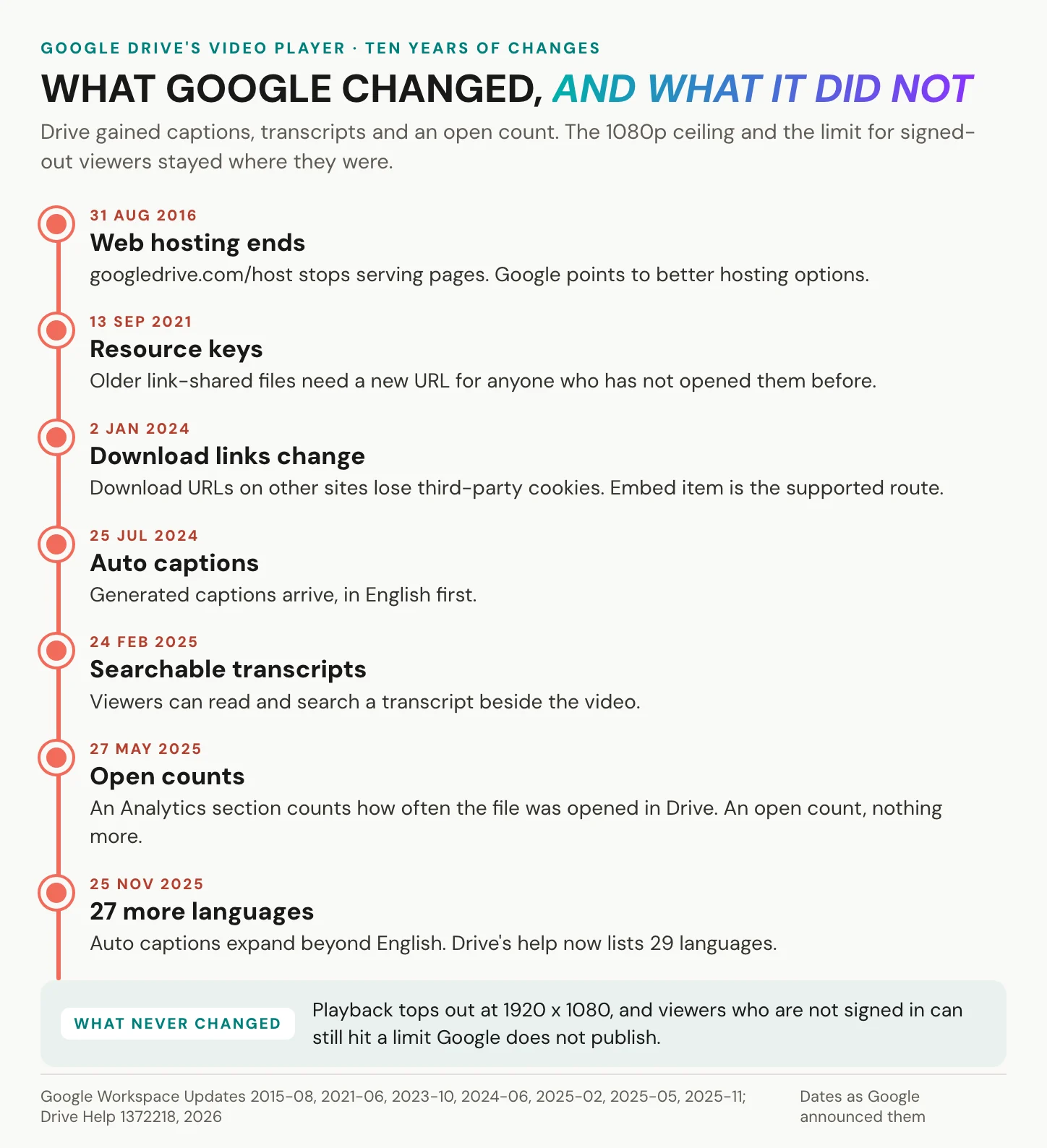
Once captions exist, viewers can turn on auto-translated captions: machine-translated subtitle text over the original audio. Since February 2025 you can also view and search a transcript for any captioned video. Since Google announced it on 27 May 2025, an Analytics section in the Details panel shows an open count, in bands such as “<5 opens” and “>5000 opens”. Google calls the feature video engagement insights. It is an open count, nothing more. On the web, colleagues can comment on the whole file or on a specific moment in the video.
Captions matter beyond convenience. Captions for prerecorded video are success criterion 1.2.2, Level A, in WCAG 2.2, a W3C Recommendation since 5 October 2023. The European Accessibility Act has applied since 28 June 2025. Drive’s automatic captions are a start for both, once someone checks them for accuracy. You can also upload your own caption file.
Drive once served whole websites from googledrive.com/host, until Google ended that on 31 August 2016 with an unusually frank reason: “better options are available to people today.”
In short: for colleagues who are signed in, Drive’s player does more than most people assume. Every feature above, though, assumes a viewer Google already knows.
Limits of hosting video on Google Drive
Drive stores the file. A host delivers the video.
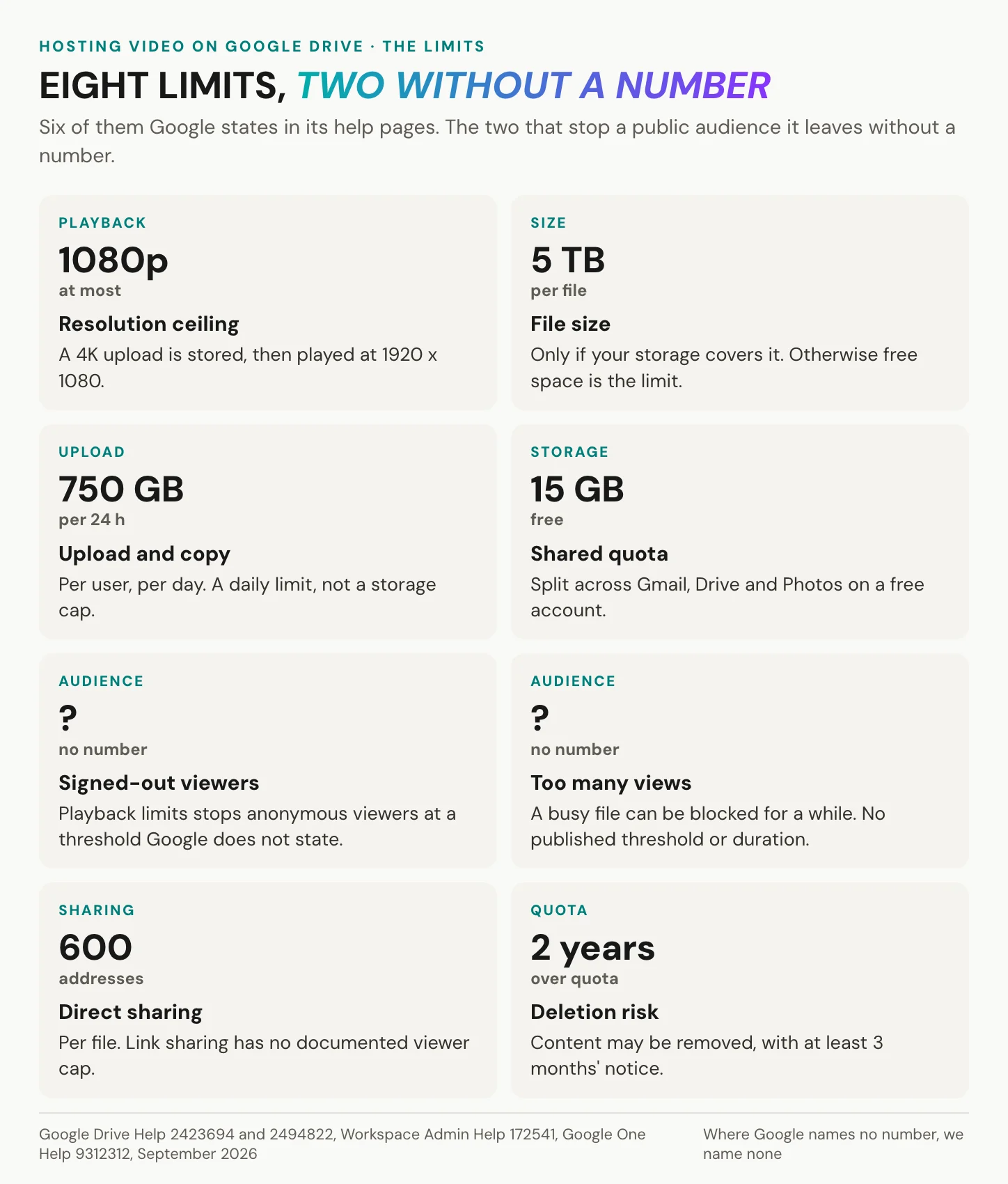
The limits of hosting video on Google Drive come in two kinds: the ones Google states, and the two that stop a public audience, which Google leaves without a number.
| Limit | What Google states | Source, year |
|---|---|---|
| Playback resolution | 1920 x 1080 at most | Drive Help 2423694, 2026 |
| File size | up to 5 TB, within your storage | Drive Help 2423694, 2026 |
| Upload and copy | 750 GB per user per 24 hours | Workspace Admin Help 172541, 2026 |
| Free storage | 15 GB, shared with Gmail and Photos | Google One Help 9312312, 2026 |
| Over quota | content may be removed after 2 years | Google One Help 9312312, 2026 |
| Direct sharing | 600 addresses per file | Drive Help 2494822, 2026 |
| Cookies | third-party cookies needed to play | Drive Help 2423694, 2026 |
| Signed-out viewers | “Playback limits”, no published threshold | Drive Help 2423694, 2026 |
| Heavy traffic | “Too many users have viewed or downloaded this file recently”, no published threshold | Google Drive Community, since 2019 |
| Video metrics | open count in bands, Drive only | Drive Help 2423694, 2025 |
Limits as Google states them, September 2026. Where Google names no number, none is given.
Signed-out viewers, busy files and blocked cookies
This is the screen from Brno, and Google’s help documents it word for word: “Playback limits: You’ve hit the limit for viewers who aren’t signed in. To continue to play the video, sign in to your Google Account.” Google publishes no threshold, so any figure you meet elsewhere is a guess.
The second message appears on busy files: “Too many users have viewed or downloaded this file recently.” Users have reported it in Google’s Drive Community since at least 2019, and the message says it may take up to 24 hours. No Google help article states a threshold or a duration. Link sharing itself has no documented viewer cap. In practice, these two messages are the cap.
The third barrier sits in the browser. Google’s help is blunt: “To play videos in Drive, you need to turn on third-party cookies.” A browser that blocks them, through a private window or strict privacy settings, can break playback on your page. Your own browser, signed in and permissive, shows nothing wrong. That was Porto: shared PCs on the shop floor, locked down by IT, third-party cookies off.
Resolution, storage and deletion
Resolution has a fixed ceiling. “The maximum playback resolution is 1920 x 1080,” says Drive’s help, so a 4K master plays at 1080p at most. Below that ceiling the viewer’s connection decides, and Google notes that internet quality and speed may affect playback quality.
A free Google account includes 15 GB, shared across Gmail, Drive and Photos, per Google One’s help. Each user can upload and copy 750 GB within 24 hours. A daily transfer limit, not a storage cap. Business tiers pool storage per user. Run over quota and uploads stop, and nobody can edit or copy your affected files. Stay over quota for 2 years or longer, and Google says “all of your content in your Google Account may be removed”, after at least 3 months’ notice.
Open counts are not video analytics
Drive does count: anyone who can watch the file sees how often it was opened directly in Drive. What the count leaves out is what a publisher asks next: watch time, completion, who watched. Plays inside Google Docs or Slides are excluded, and Google’s help does not say whether plays in an iframe on your website count at all. Workspace admins can see View events in the audit log, with signed-out viewers logged as anonymous, but that is an admin log, not owner analytics. The Activity dashboard covers Docs, Sheets and Slides, not video.
In short: Google states the limits that concern your storage and leaves the two that stop a public audience without a number. Those two are exactly where a public video breaks.
Embedding a Google Drive video
By Tuesday, Jana’s IT colleague has a fix: put the video on the onboarding page of the intranet instead of mailing a link. Google does support an embed. It just works best for people Google already knows.
Get the code with Embed item, not a download link
Google described the path in October 2023. Open the video in Drive and choose “Open in new window” from the overflow menu, then open the overflow menu again and select “Embed item…”. Drive hands you an iframe. Sharing must allow the viewer, so a video on a public page needs “Anyone with the link”.
<!-- Google Drive "Embed item" code. FILE_ID comes from the file's share link. -->
<iframe src="https://drive.google.com/file/d/FILE_ID/preview" width="640" height="480"></iframe>
Paste it into your page and the video appears. Underneath, your page now loads Google’s player from google.com in every visitor’s browser.
Skip the older shortcut. A popular hack pointed an HTML5 <video> tag at a Drive download URL (uc?export=download), which was never Drive’s supported pattern. In October 2023 Google announced that from 2 January 2024 Drive would serve downloads embedded on third-party websites without third-party cookies. It told site owners who relied on Drive’s download URLs to move to its publishing flows.
A share link is not a player, and a file preview is not a stream.
When a Drive video will not play
Most failures show up only for other people.
| Symptom on your page | Likely cause | Fix |
|---|---|---|
| “Playback limits: You’ve hit the limit for viewers who aren’t signed in” | signed-out viewer limit | viewer signs in, or host the video |
| Blank player in a private window or a strict browser | third-party cookies blocked | allow cookies, or host the video |
| “Video is still processing. Try again later.” | processing after upload | wait before sharing the link |
| “Too many users have viewed or downloaded this file recently” | traffic on the file | wait, or host the video |
| Visitor is asked to request access | General access set to Restricted | change General access, or share directly |
| Old link no longer opens for new viewers | 2021 resource key update | share the current link |
<video> tag with a download URL stays empty | download URLs are not a supported embed | use Embed item |
| “Video is unplayable.” | a corrupted file or a format Drive cannot play, per Google’s help | upload again, or re-export as MP4 with H.264 and AAC |
Two older quirks still surface. Since 13 September 2021, many older link-shared files need a URL with a resource key for anyone who has not opened them before, which is why an old link can fail for a new viewer. Large downloads also show a warning that Google cannot scan the file for viruses, and Google publishes no file size at which that warning starts.
One gap comes with no error message at all. Google Search Central (2025) says a video must be embedded on an indexed watch page before it can be indexed. Features such as video previews and key moments also need Google to fetch the video bytes. Whether Google can fetch those bytes behind a Drive preview is not documented, so do not count on either outcome.
In short: Embed item is the one supported way to show a Drive video on a site. It works for you and for signed-in viewers, and the table shows what everyone else may see instead.
Want visitors to watch without a Google account? Create an alugha account, verify it once, and embed your first video.
When hosting videos on Google Drive works
Drive is not the villain of this story. Two weeks earlier, the same welcome video went through three review rounds with the agency on Drive, comments pinned to the second where the logo flickered, and it worked without a hitch. Often, Drive is exactly the right tool. Hosting video on Google Drive works when the audience is small and known. A few people inside your team: Drive. Many people outside it: a host.
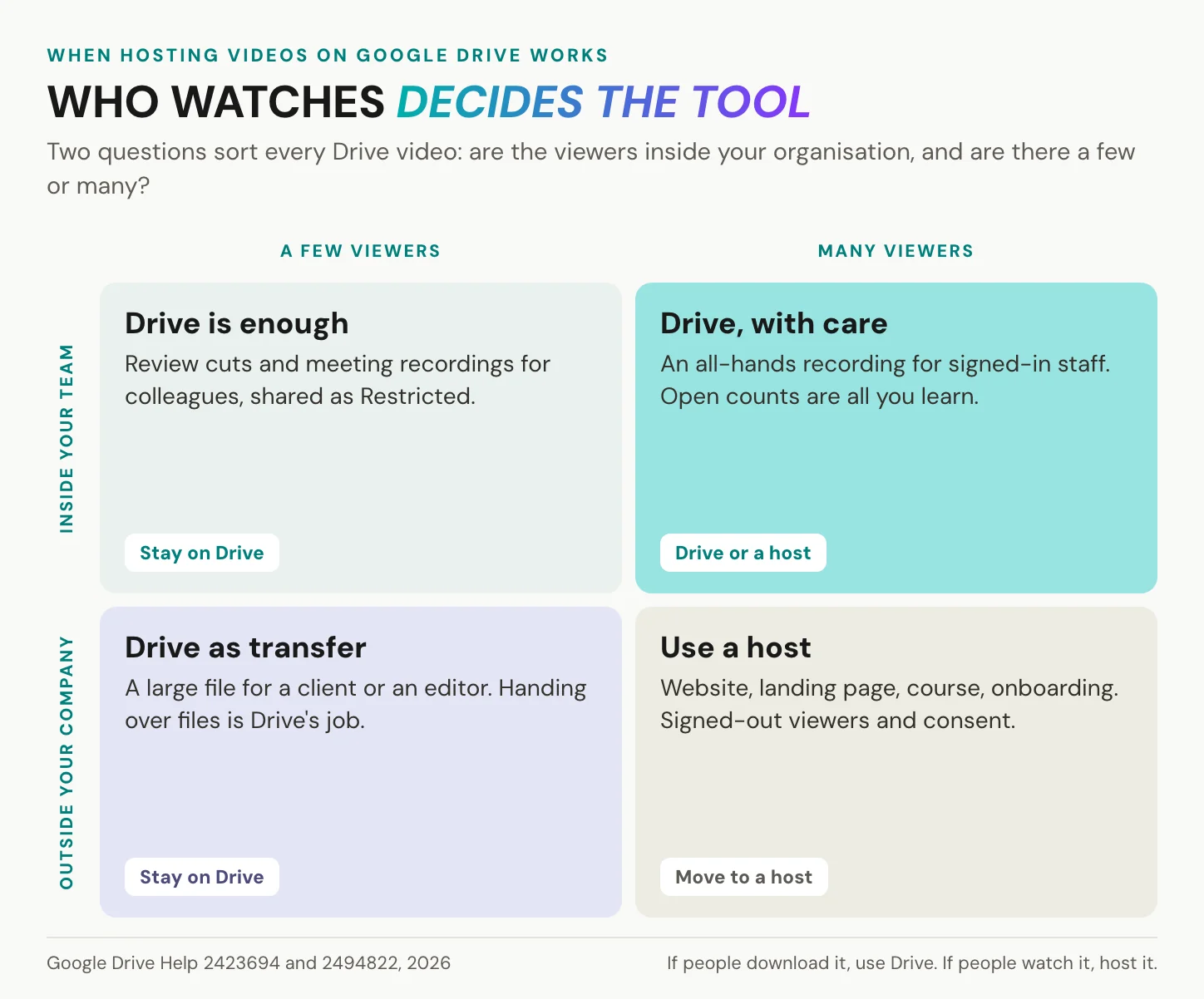
Sending a large video or a review cut
Here Drive wins outright. Files of up to 5 TB within your storage, 750 GB of uploads a day and sharing with named addresses make it a strong transfer tool for raw footage, a finished cut or a master. One catch for very large masters: files over 750 GB can be stored but not copied, per Google’s admin help. A review round suits Drive just as well. On the web, reviewers comment on a specific moment of the cut, and the file stays in one place instead of five inboxes. That is file transfer and collaboration, and no host is needed. If the link travels by email, how to embed a video in an email covers the thumbnail that gets it clicked.
Hosting video on Google Drive for a course
Hosting video on Google Drive for a course is quick to set up and costs the author nothing extra. When every learner signs in with a school or company Google account, it also avoids the signed-out limit, though the cookie rule still applies. Open courses are the trouble. Anyone watching in a browser without a Google sign-in is a signed-out viewer to Drive and can meet the unpublished limit. An open count says nothing about completion, and a learning platform that blocks third-party cookies breaks the player. Course video works better in a player embedded in the course page, as in our Moodle embed; how to create training videos covers production. Our own limit belongs in the same paragraph: we emit no xAPI statements, and some learning platforms strip iframes or block third-party cookies.
Developers and video at scale
Google’s own answer for delivery is not Drive: when it ended Drive web hosting, it pointed developers to Google Cloud Platform. The Drive API meters apps. Its 2026 documentation allows 1 TB of egress per project per day before charges apply, a limit on apps and scripts that pull files, not on people watching in Drive’s player. Each download request also draws on a per-minute quota, and an app that runs past it gets “User rate limit exceeded” errors instead of video. Google also says exceeding request quotas is planned to incur charges later in 2026, with at least 90 days’ notice. Code that serves video out of Drive is a sign the job has outgrown it.
In short: Drive is a transfer and review tool for a known audience, and at scale even Google points developers elsewhere.
If people download it, use Drive. If people watch it, host it.
Drive, company video and the GDPR
On Wednesday the data protection officer joins the thread. Her question is short: where does the video sit, and what does the intranet page load when a new starter opens it? Data protection is where the setups split. For a public channel whose job is discovery, YouTube’s reach is the point, and nothing here argues against it. For a company on Google Workspace, internal sharing in Drive may sit inside an agreement its data protection officer has reviewed. Google’s Cloud Data Processing Addendum names Google as processor, and in a 2021 Google Cloud blog post Google stated that it never uses Workspace customer data for ads targeting. A free personal account has no such addendum; Google’s consumer privacy policy applies.
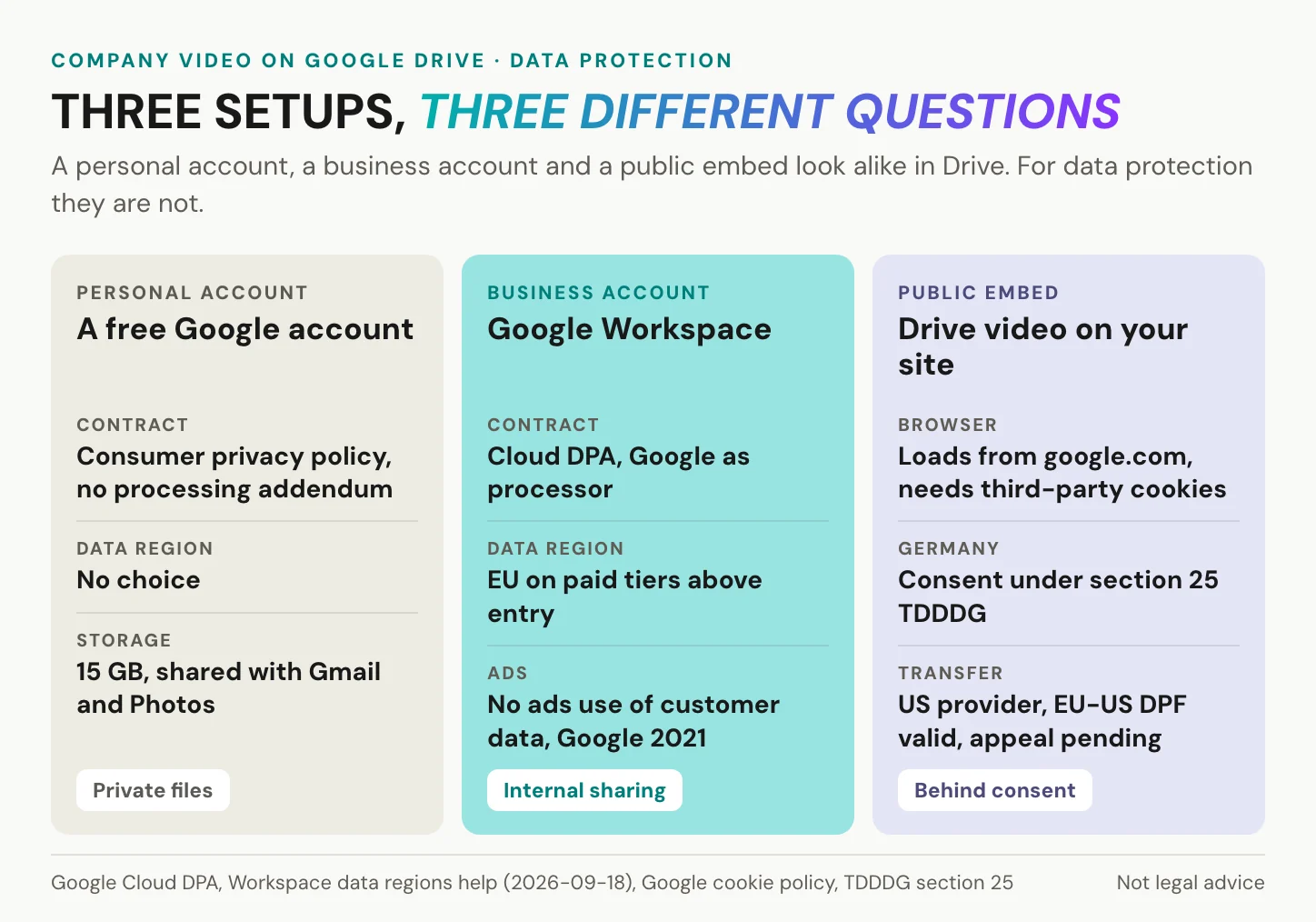
Where your Drive videos are stored
Workspace admins can pick a data region: the United States, Europe or no preference. Google’s admin help adds the catch: “Users who don’t have a supported edition aren’t covered by data region policies.” Storing data at rest in a region needs a paid edition above the entry tier, and keeping data processing in that region, too, needs one of the top tiers. Google runs an active data centre in Hanau, Germany, and does not say which site stores a given file. Transfers to certified US companies rest on the EU-US Data Privacy Framework of 10 July 2023, which the EU General Court upheld on 3 September 2025. Google LLC is certified. An appeal, C-703/25 P, is pending at the Court of Justice, so the framework is valid today but not final.
What an embed loads and when it needs consent
An embed is a different matter, because the visitor’s browser talks to Google directly. The Drive preview is served from google.com and needs third-party cookies to play. Google’s no-ads commitment covers customer data in Workspace; it says nothing about cookies in a visitor’s browser. By analogy, the Court of Justice held in Fashion ID (29 July 2019) that a site embedding a third party’s element can be joint controller for collecting and transmitting its visitors’ data. The case concerned a Like button.
Section 25(1) TDDDG requires consent before information is stored on, or read from, a user’s device, unless it is strictly necessary for a service the user explicitly asked for. It has applied since 1 December 2021, named TTDSG until 14 May 2024. In Planet49 (1 October 2019) the Court of Justice ruled that a pre-ticked box is no consent, whether or not the data is personal. On 20 January 2022 the Regional Court of Munich I (3 O 17493/20) ordered a site operator that loaded Google Fonts from Google’s servers without consent to pay a visitor EUR 100 in damages. Applying that ruling to video embeds is an argument by analogy, not a court decision. The practical pattern: a still image, a line naming Google as the source, and the Drive iframe loaded only after the visitor agrees. Not legal advice; GDPR-compliant video hosting has the wider picture.
In short: inside Workspace, hosting video on Google Drive is a contract question your company may already have answered. On a public page, it becomes a consent and transfer question for every visitor.
A European alternative to Google Drive
On Thursday the question moves one floor up. The managing director, who has never liked handing company files to Google, asks why the company uses Google for this at all. It is a fair question, and it has a European answer.
Drive earns its place on convenience. It comes with every Google account, it syncs on every device, and most of your colleagues already know where the share button is. Its weak spot is not a feature. It is the question of who runs the servers and which law reaches them. The data region settings above narrow where files sit. They do not change that the provider is a US company. If that question matters to your company, Google is not the only answer.
The best-known European answer is Nextcloud. It is open-source software from Nextcloud GmbH in Stuttgart, founded in 2016, and it does what most teams use Drive for: files that sync to laptops and phones, folders shared with colleagues, and links for people outside the company. The difference is where it runs. You run Nextcloud on your own server or rent it from a hosting provider in your country, so the files sit in a data centre you chose, under a contract with a company you can name. Public administration has made the same call. openDesk, the open-source workplace that Germany’s Centre for Digital Sovereignty (ZenDiS) provides for public bodies, uses Nextcloud for its files, and the state of Schleswig-Holstein is moving its administration’s shared documents from SharePoint to Nextcloud.
What Nextcloud does with video
For video, Nextcloud behaves much like Drive. Its viewer plays common formats such as MP4 in the browser, and a public link can carry a password and an expiry date, after which it stops working. That makes it a good home for the jobs where Drive shines: handing a large master file to an agency, sharing a review cut, keeping raw footage in one place. It does not make Nextcloud a video host. It plays the file you uploaded, as uploaded, with no lighter versions for slow connections, and every view streams from your own server and your own bandwidth. A few hundred visitors on a landing page are a load test you did not plan, and a public link has no consent banner of its own.
How we split it at alugha
We take our own advice. Our company files, shared folders and calendars run on Nextcloud, in a managed instance in a German data centre. Masters, scripts, subtitle files and review cuts live there, next to the contracts and the meeting notes. The version our customers and visitors watch lives in our player instead. It streams in several qualities, carries every language track of a video under one link, and runs on hosting in Germany and the EU, with no third-party advertising cookies and trackers. Each tool does the one job it was built for. The rule from earlier still holds, now with a European name on the storage side: if people download it, keep it in your drive. If people watch it, host it.
Sovereignty is not a setting you switch on. It is a choice of who runs the server.
In short: Nextcloud takes over Drive’s storage and sharing job with software you can run in Europe. For video that people watch, pair it with a host built for playback.
Moving video from Google Drive to a host
By Friday, Jana has a plan. Masters and review cuts stay where they are. The welcome video moves to a host. This is where we come in, limits first.
What we do not do, and when you do not need us
We are not a drive: no file sync, no desktop client, no document collaboration. We have no Drive import, so you download, then upload. Hosting with us is metered: storage, streaming and encoding draw from a monthly credit allowance, and the upload wizard shows the cost before you confirm (plans and credits). Drive storage you already have costs nothing per view, a real advantage. We encode at 540p, 720p or 1080p, with 1080p on a paid tier and nothing above. Our player needs JavaScript (supported browsers), and a one-time account verification comes before your first public share or embed. We count plays per language track, but the analytics interface beyond that sits on a higher paid tier, so we claim no analytics win over Drive.
Some jobs never need us. Handing a file to an editor, a recording for a few colleagues inside Workspace, an archive of masters, a review of cuts: stay on Drive for all of them. Keep your originals there after you move, too: a host is the delivery layer, not the backup.
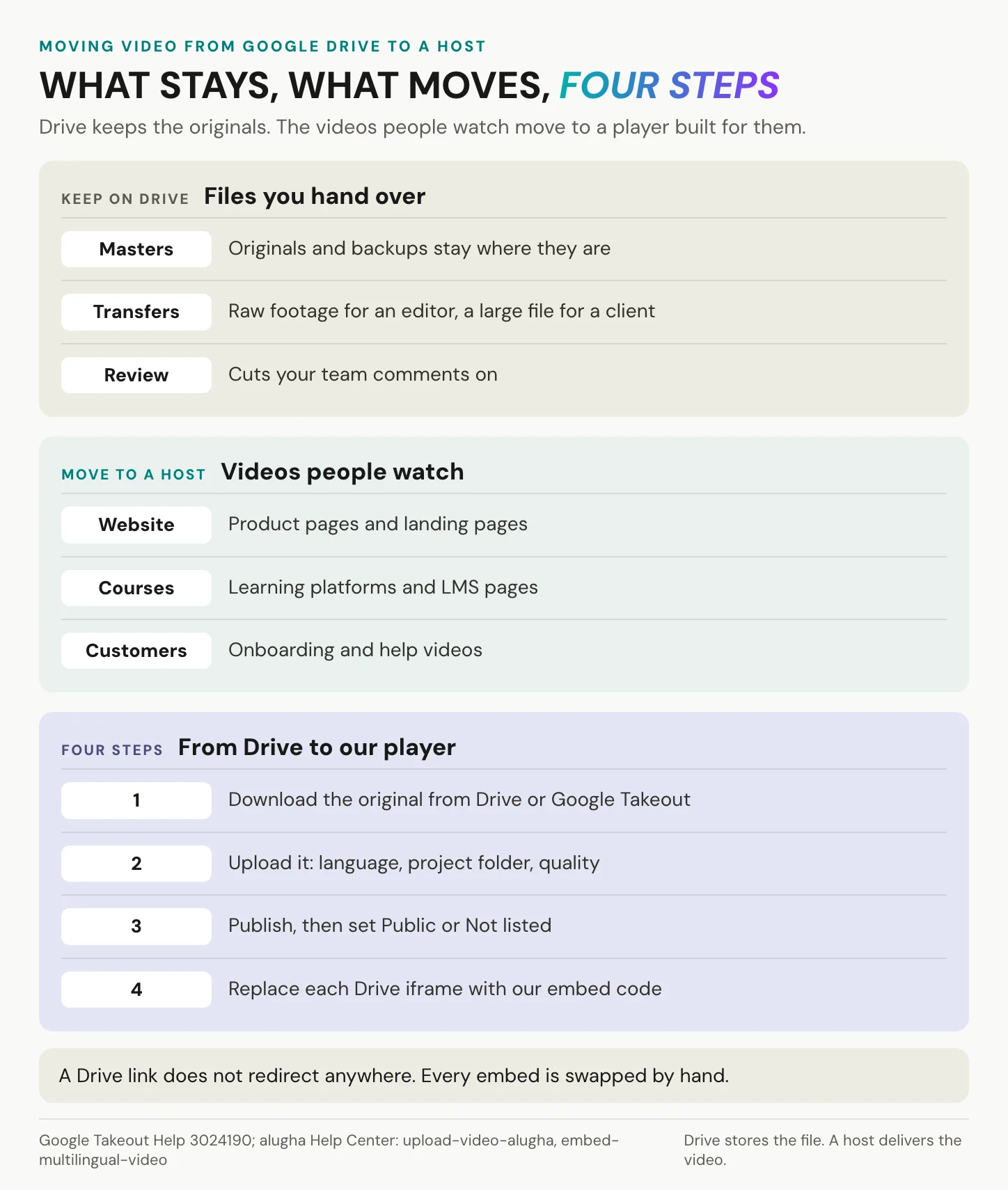
What changes when you host
We do not play your file, we stream it. Every upload is encoded on our servers into a ladder of resolutions in MP4, HLS and MPEG-DASH and delivered over a global CDN with over 100 data centres. Our player adapts to each viewer’s connection and screen. A Public or Not listed video plays for whoever has the page or the link.
Control comes in three states: Private, Public and Not listed. Not listed is a link, not a lock, exactly like Drive’s “anyone with the link”. One switch stops embedding on every website at once. Folder permissions steer your team’s access, and a paid tier can restrict where the player embeds. Our privacy line is short: hosting in Germany and the EU, no third-party advertising cookies and trackers. Ask any host for its Art. 28 processing agreement before the first upload, us included.
Languages change too. One upload, one link, every language as its own audio and subtitle track, and the automatic language switcher starts the player in the viewer’s browser language. That is a second language version, not machine-translated captions over one audio; how to translate a video covers producing it. Teejit’s MyHotelHub learning platform embeds our player, so employees choose their language inside the video: 50 training videos in 20 languages, 1,000 language versions (50 x 20), in the Teejit story.
From Drive to our player in four steps
- Download the original from Drive. For a whole library, Google Takeout packs Drive into archives of 1 GB to 50 GB, which Google’s help says expire in about 7 days and can be downloaded 5 times.
- Upload it in the Publisher. Our upload wizard asks for the video’s language, a project folder and the encoding quality. Recreate your Drive folders as project folders (upload steps).
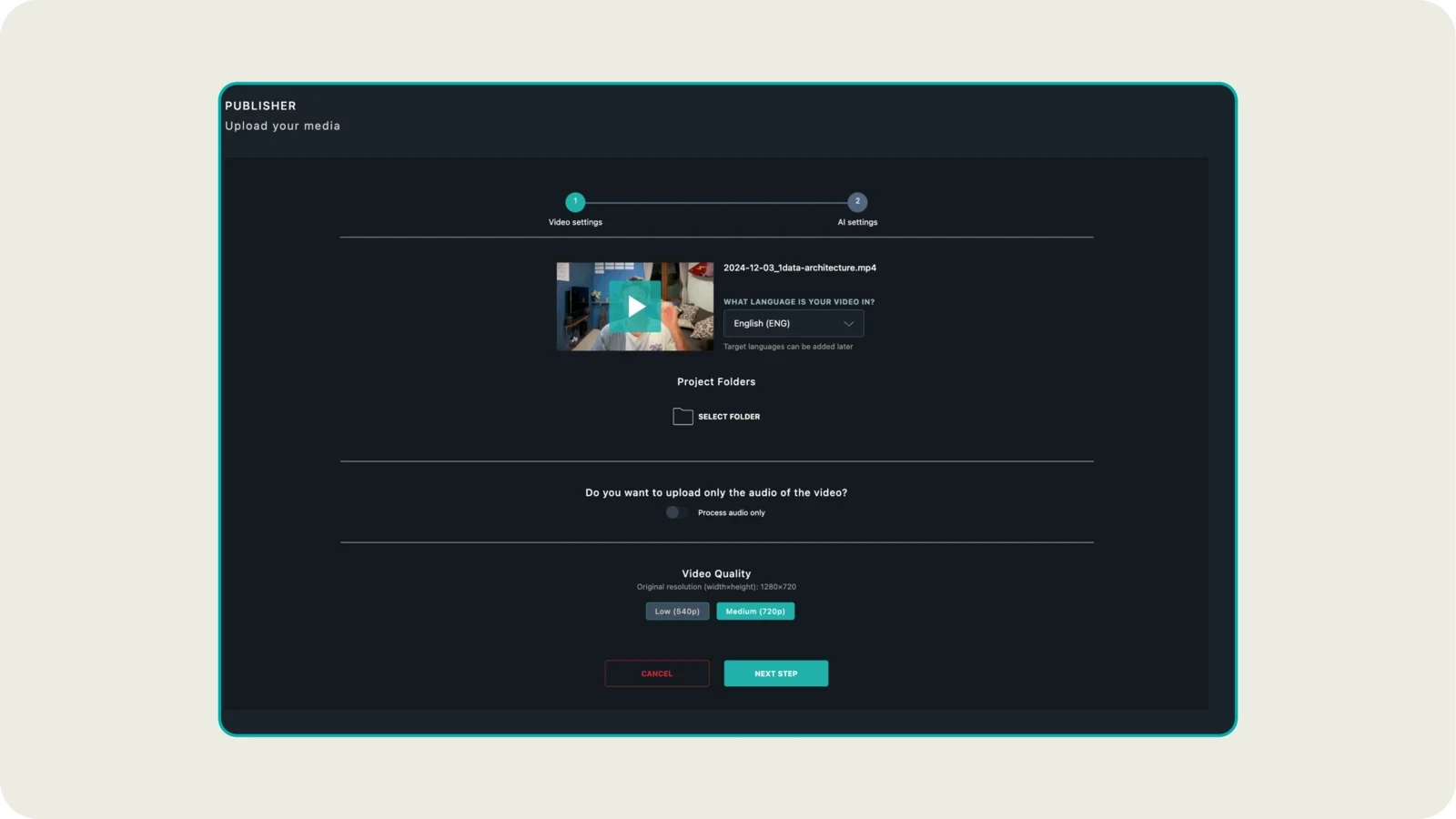
- Publish and set the state. Publish the project, set it to Public or Not listed, and leave embedding on. All three must be true (published vs available, visibility).
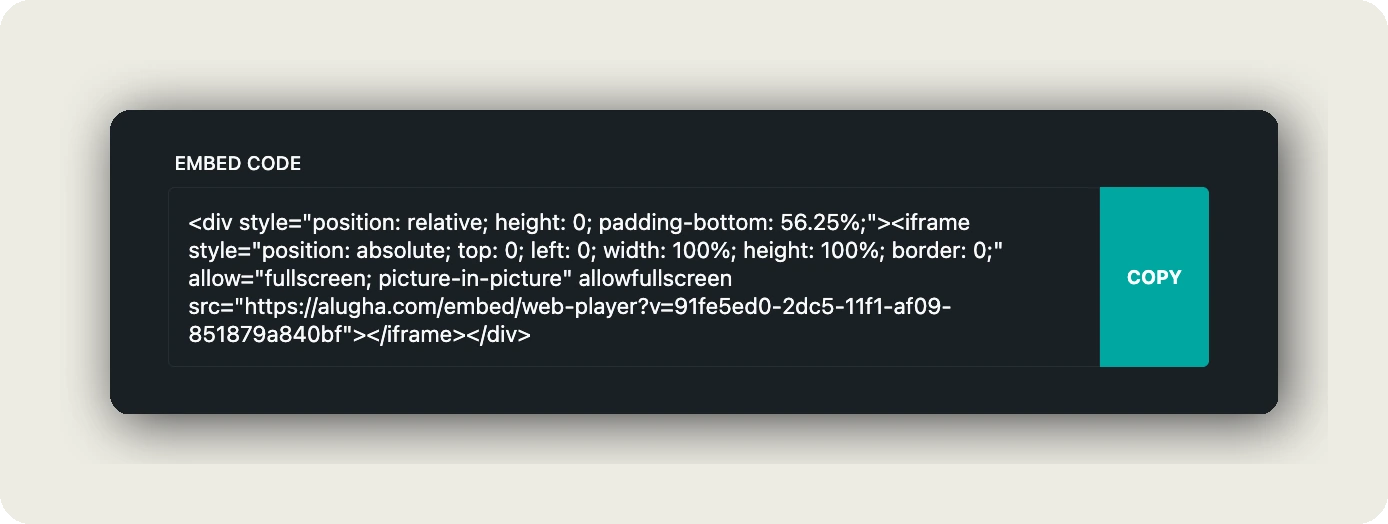
- Swap the embed. Under Im-/Export, open Share Project, then EMBED OPTIONS, copy the responsive iframe and replace each Drive iframe by hand, as in embedding in WordPress. A Drive URL redirects nowhere. Only the embed code goes into an iframe, never the share link
alugha.com/videos/<id>.
In short: moving from Drive gains no resolution. It gains a stream, a player built for embedding and viewers who never need a Google account, and it costs a download, an upload and a new embed code per video.
Frequently asked questions about hosting video on Google Drive
Is Google Drive safe for private videos?
Yes, if you keep General access on Restricted and share with named people. You can stop viewers from downloading, printing or copying, although that does not prevent a screen recording. “Anyone with the link” is a link, not a lock: a forwarded link keeps working. Google’s abuse policies also allow it to review, restrict or remove content that breaks its rules.
Can you embed a Google Drive video on a website?
Yes, with Embed item: open the video in a new window, choose Embed item from the overflow menu and paste the iframe. Three conditions apply. Sharing must allow the viewer, the visitor’s browser must allow third-party cookies, and signed-out visitors can still meet Google’s “Playback limits” message, for which Google publishes no threshold.
Why does a Google Drive video stop playing for visitors?
Usually for one of four reasons. The visitor is signed out and has hit Google’s playback limit. The file shows “too many users” after heavy traffic. The browser blocks third-party cookies, which Drive’s player needs. Or the upload is still processing. The troubleshooting table above matches each message to its fix, and none of them appears in your own signed-in browser.
How many people can watch a video on Google Drive?
Direct sharing reaches up to 600 email addresses per file, according to Google’s sharing help. Link sharing has no documented cap. In practice two limits without a published number decide: the playback limit for signed-out viewers and the “too many users” message on busy files. Neither has a threshold you can plan around.
Does Google Drive reduce video quality?
Playback is capped at 1920 x 1080, and below that the viewer’s connection affects quality, as Google’s help states. Drive keeps your upload, so you can download the file again later. A lossy re-encode before uploading does cost quality, so upload the original file. For a 4K master, Drive stores it but never plays it above 1080p.
How do you send a large video with Google Drive?
Upload the file, up to 5 TB within your storage and 750 GB of uploads a day, then share it with the recipient’s email address or a link. Restricted sharing with a named address is safer. If the video goes out in a newsletter, how to embed a video in an email covers the thumbnail approach.
Is there a European alternative to Google Drive?
Yes. Nextcloud, open-source software from Stuttgart, covers Drive’s core jobs: syncing files, sharing folders, and public links with a password and an expiry date. You run it on your own server or rent it from a European provider, so you decide where the files sit. We use it for our own company files. For video that many people watch, pair it with a video host.
Is hosting video on Google Drive GDPR compliant?
It depends on the setup. Hosting video on Google Drive for internal use in Workspace runs under Google’s data processing addendum, which your company may already have reviewed. A public embed on a German website needs consent under section 25 TDDDG, because the player needs third-party cookies. EU storage needs a paid Workspace edition above the entry tier. This is an orientation, not legal advice.
Getting started
Open your own page in a private window, stay signed out of Google and press play: what you see there is what every stranger sees. Then sort your Drive videos into two groups, files you hand over and videos people watch; the grid above draws the line. For the first group, hosting video on Google Drive is fine, so leave it where it is. Move the second group one video at a time, starting with your busiest page: download, upload, publish, swap the embed. When the next signed-out visitor presses play, they should see your video, not a message about Google accounts.
The next Monday, at 08:55, Jana sends a new link. In Brno they switch the player to Czech, in Porto to Portuguese. Nobody writes back. For a welcome video, silence is the best review there is.
Moving the videos people watch out of Drive? Book a call and we move the first one with you, or create an account and start with a single upload.