Key takeaways
- Three output forms: translated subtitles, AI voiceover, and dubbing solve one problem at three different levels of effort and cost.
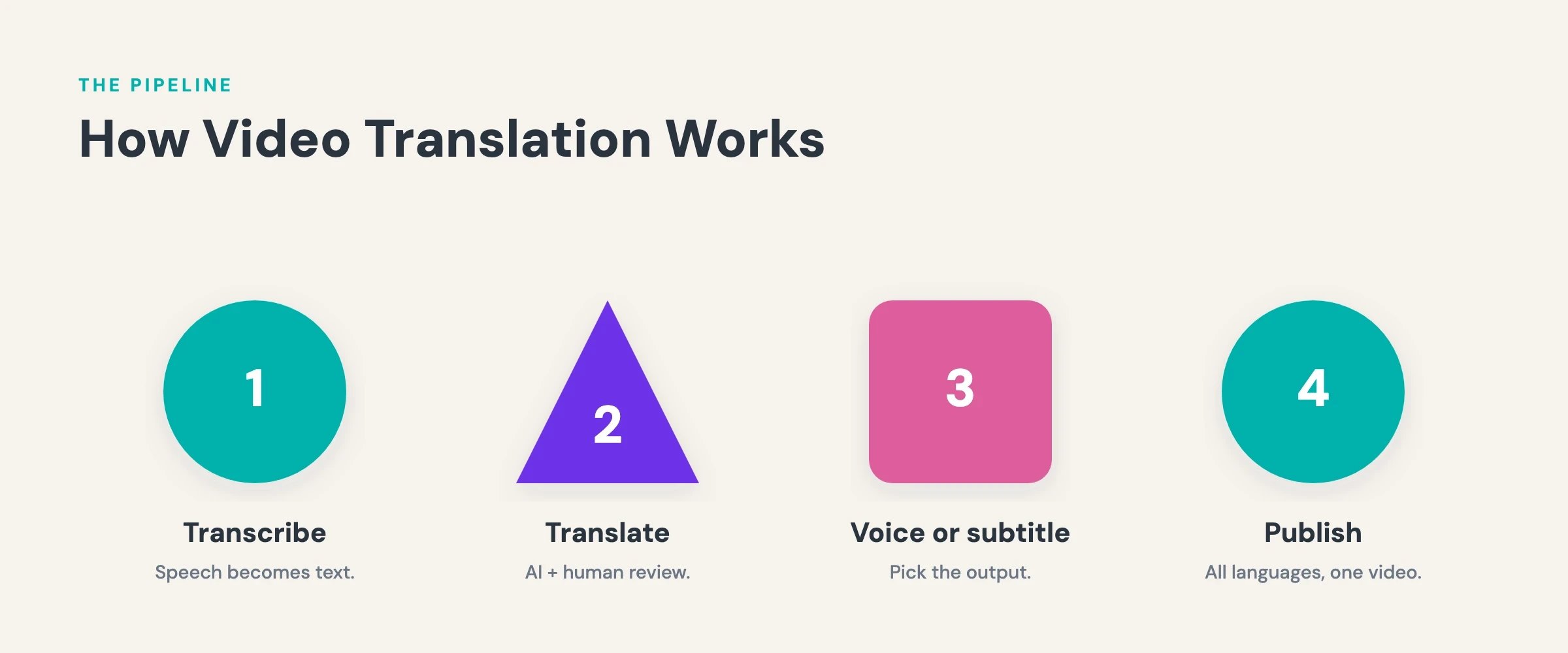
- One pipeline behind all of them: transcribe the source audio, translate the text, then render subtitles or a new voice track.
- Subtitles are the fastest route: the original audio stays intact, the viewer reads the translation, and the cost level stays the lowest of the three.
- AI voiceover closes the gap: text-to-speech with voice cloning gives viewers a listening experience without a studio dubbing budget.
- Publish once, not per language: alugha’s multilingual player carries every language on a single video URL instead of scattering uploads.
Ready to publish your video in more than one language? Start with alugha’s free plan ?
Why translating your videos pays off: reach, accessibility, and search
Translate a video and the production budget you already spent goes back to work in markets it has never seen. The footage does not change. The audience does. Three effects drive the return. Reach, because a single-language video excludes every viewer who does not speak it. Accessibility, because translated subtitles serve viewers who watch muted, viewers with hearing impairments, and viewers who read a second language better than they hear it. Search, because a video published with translated titles, descriptions, and transcripts can surface in local-language results the original never entered. The demand side is documented: in CSA Research’s 2020 survey of 8,709 consumers across 29 countries, 76% of online shoppers preferred buying products with information in their own language, and 40% said they would never buy from websites in other languages. The supply side is lopsided: as of July 2026, 49.6% of websites are written in English (W3Techs), a language only around 5% of the world speaks natively.
The guide below walks through the three output forms of video translation, weighs them on effort, cost level, and viewer experience, then shows the full workflow on alugha. It has two readers in mind: creators who want their content to travel past one language, and teams localizing training, product, or communication videos for international markets.

Subtitles, voiceover, or dubbing: the three output forms
Translated subtitles
Subtitles are the entry point, and they earn the position. The original audio stays untouched; a translated text track simply renders at the bottom of the frame. Of the three forms, this one asks the least of your production: once the transcript is translated, the subtitle file comes down to timing and formatting. Standard formats such as SRT and WebVTT travel across most players, and burned-in subtitles bake the text into the video file itself for platforms that refuse separate tracks.
The trade-off lands on the viewer. Reading subtitles demands continuous attention, which suits focused viewing and collapses the moment someone watches with half an eye. For tutorial and training content, where viewers concentrate anyway, subtitles carry most of the value at a fraction of the cost.
AI voiceover (text-to-speech)
AI voiceover swaps reading for listening. A text-to-speech engine reads the translated script, and the result is mixed over or in place of the original audio. The viewer hears the content in their own language and keeps their eyes on the picture. Modern text-to-speech has closed much of the distance to human narration, and voice cloning goes a step further: the original speaker’s vocal identity survives the language change instead of giving way to a generic narrator. Effort and cost sit in the middle, above subtitles because a new audio track must be generated and reviewed, well below booking studio talent for every language.
Dubbing
Dubbing is the most complete form of video translation. Voice actors, or increasingly AI voices, replace the original dialogue with performances timed to the picture. Studio dubbing sets the quality benchmark, and entertainment catalogs pay for it for a reason: the viewer forgets a translation ever happened. The bill for that illusion is effort and turnaround. Casting, recording, and synchronizing a human dub for every target language makes this the most expensive route in the comparison, which is why it has historically stayed inside entertainment budgets. AI dubbing changes that calculation. If the term is new territory, start with what dubbing is and how the AI variant works before committing to this route.
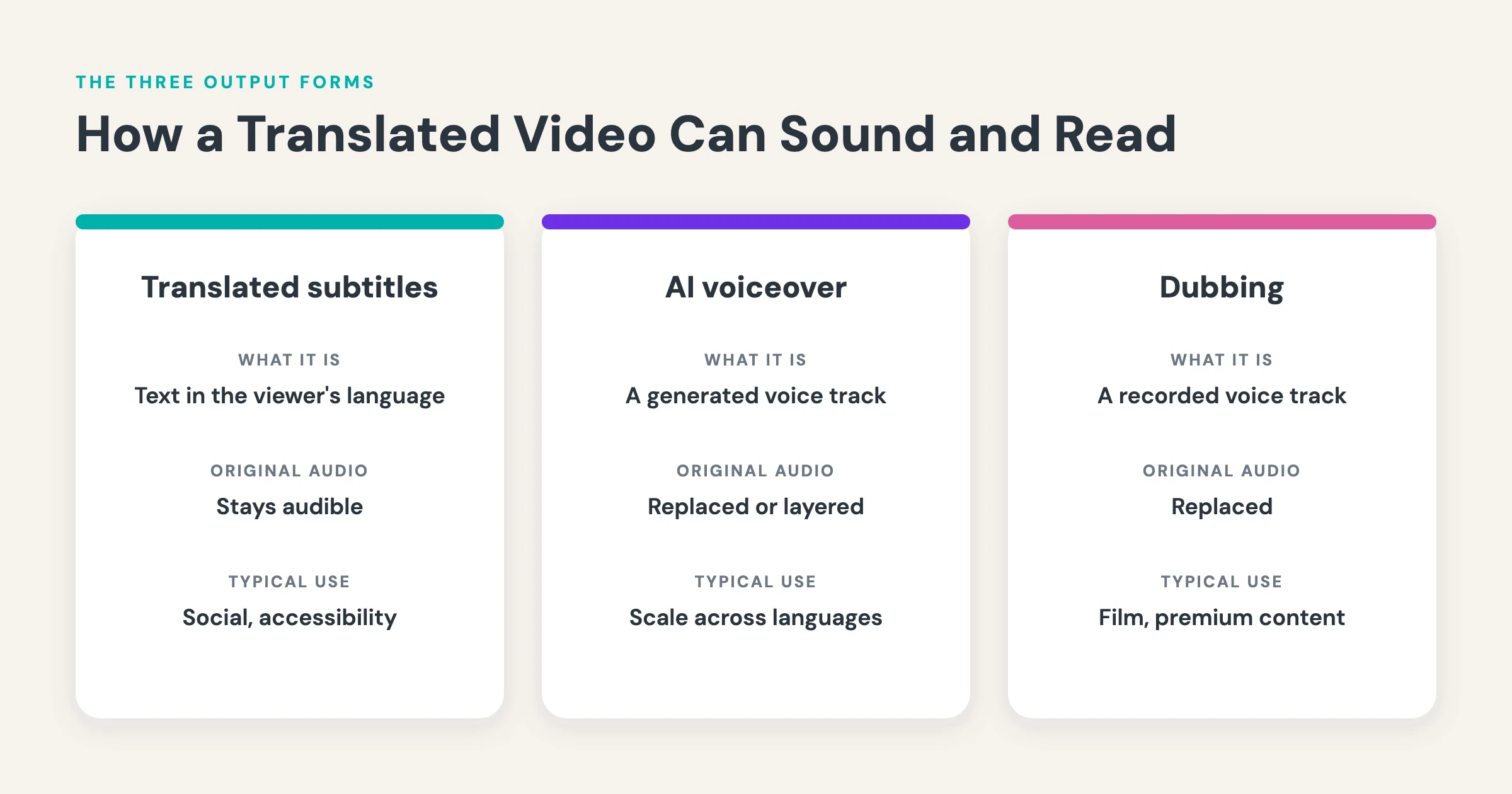
Comparing the three approaches: effort, cost level, and viewer experience
The three forms solve one problem from three points on the effort curve. The comparison below scores each approach on production effort, relative cost level, and what the viewer actually experiences. The ratings describe the approaches in general, not any specific tool.
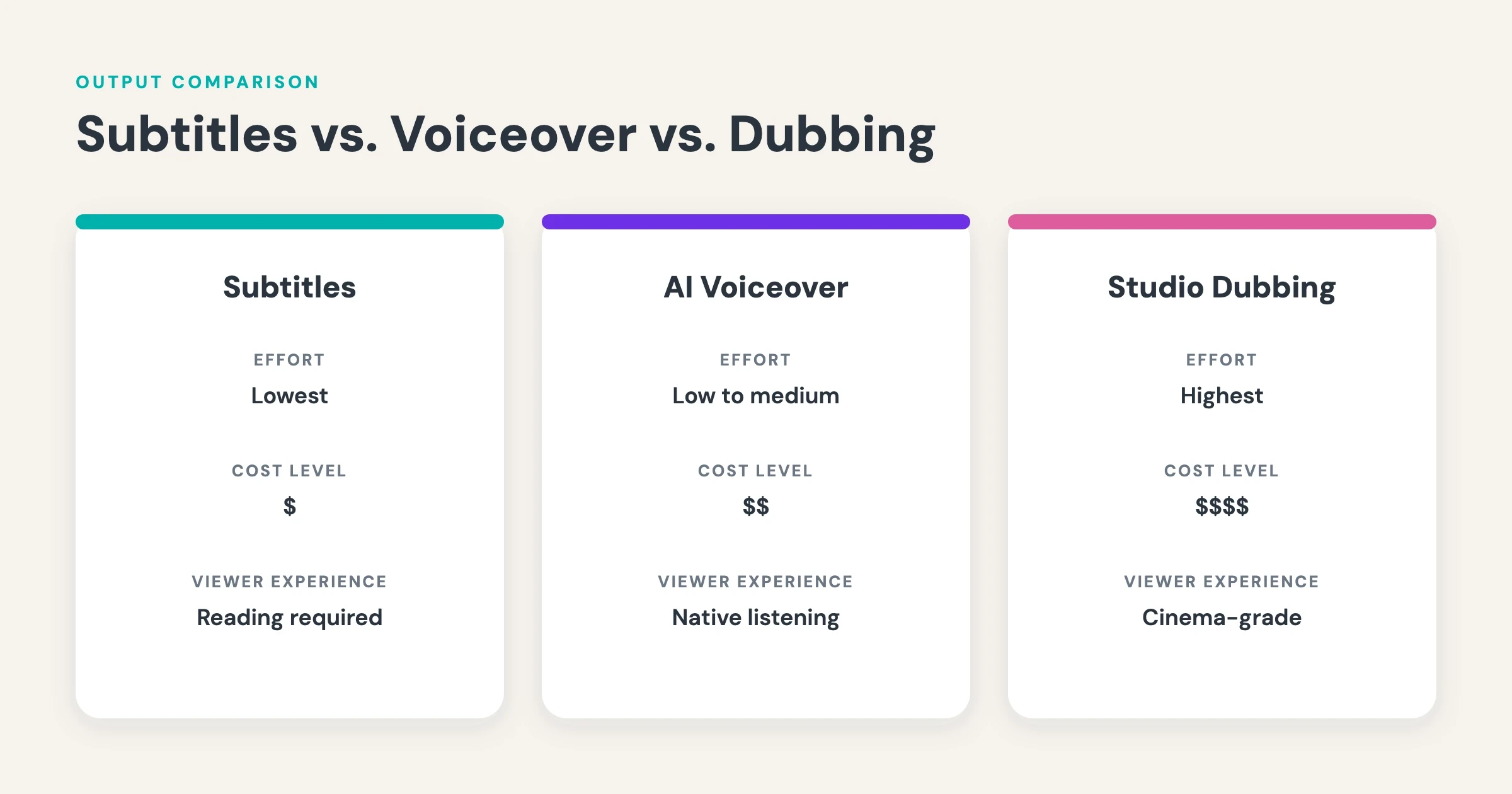
Read the table as a spectrum, not a ranking. Translated subtitles: low effort, the lowest cost level, a reading experience built for focused content. AI voiceover: moderate effort, a moderate cost level, a listening experience close to native viewing. Studio dubbing: high effort, the highest cost level, the most natural result of the three. Many teams refuse to choose and combine forms, publishing an AI voiceover for the audio experience plus translated subtitles for accessibility. In short: match the form to how your audience watches, not to what the original production seems to deserve.
One pipeline behind every method: transcribe, translate, render
Whichever output form you pick, the work runs through the same three stages. Stage one, transcription: before anything can be translated, the spoken words must exist as text, so the first move is always to transcribe your video to text. That transcript is the raw material for everything downstream — an error here becomes an error in every language. Stage two, translation: the transcript moves into the target languages, by machine translation, human translation, or machine translation with a human review. Stage three, rendering: the translated text becomes a subtitle track, a synthetic voice track, or a full dub.
The stages matter because quality problems almost always trace back exactly one stage. A subtitle that reads oddly in French is usually a translation problem. A translation that garbles a product name is usually a transcript problem. Fix the fault where it originates and the correction carries forward on its own. In short: transcription quality is the ceiling for translation quality, and translation quality is the ceiling for the finished video.
How to translate a video with alugha, step by step
Step 1: upload and transcribe
Upload your video and run speech-to-text in the dubbr workspace. alugha’s transcription reaches 98% speech accuracy and detects individual speakers, color-coding each one in the transcript. Before the job runs, the dialog shows what the action will cost in credits and what balance remains afterwards, so billing never ambushes you. Then read the finished transcript before moving on. Two minutes spent fixing a name or a technical term here spare you a correction in every target language later.
Step 2: translate into your target languages
Automated translation covers 200+ languages. Pick your targets and alugha translates the transcript into each one. For terminology that must not drift, the Glossary feature locks specific translations in place: product names, legal phrases, and brand terms render identically in every language and every video. Each translated transcript stays editable, so a reviewer can sharpen the wording before any audio or subtitles are generated.
Step 3: generate subtitles, an AI voiceover, or both
For subtitles, export the translated tracks as WebVTT, SRT, or plain text, or render a version with burned-in subtitles for platforms without native track support. For audio, text-to-speech offers 400+ AI voices. Voice cloning carries the original speaker’s vocal identity across languages, and emotion cloning keeps the tone of the delivery intact. Background audio extraction lifts the spoken words out of the original mix while preserving music and ambience, so the new language track sits inside the original atmosphere rather than a silent room.
Step 4: publish every language on one URL
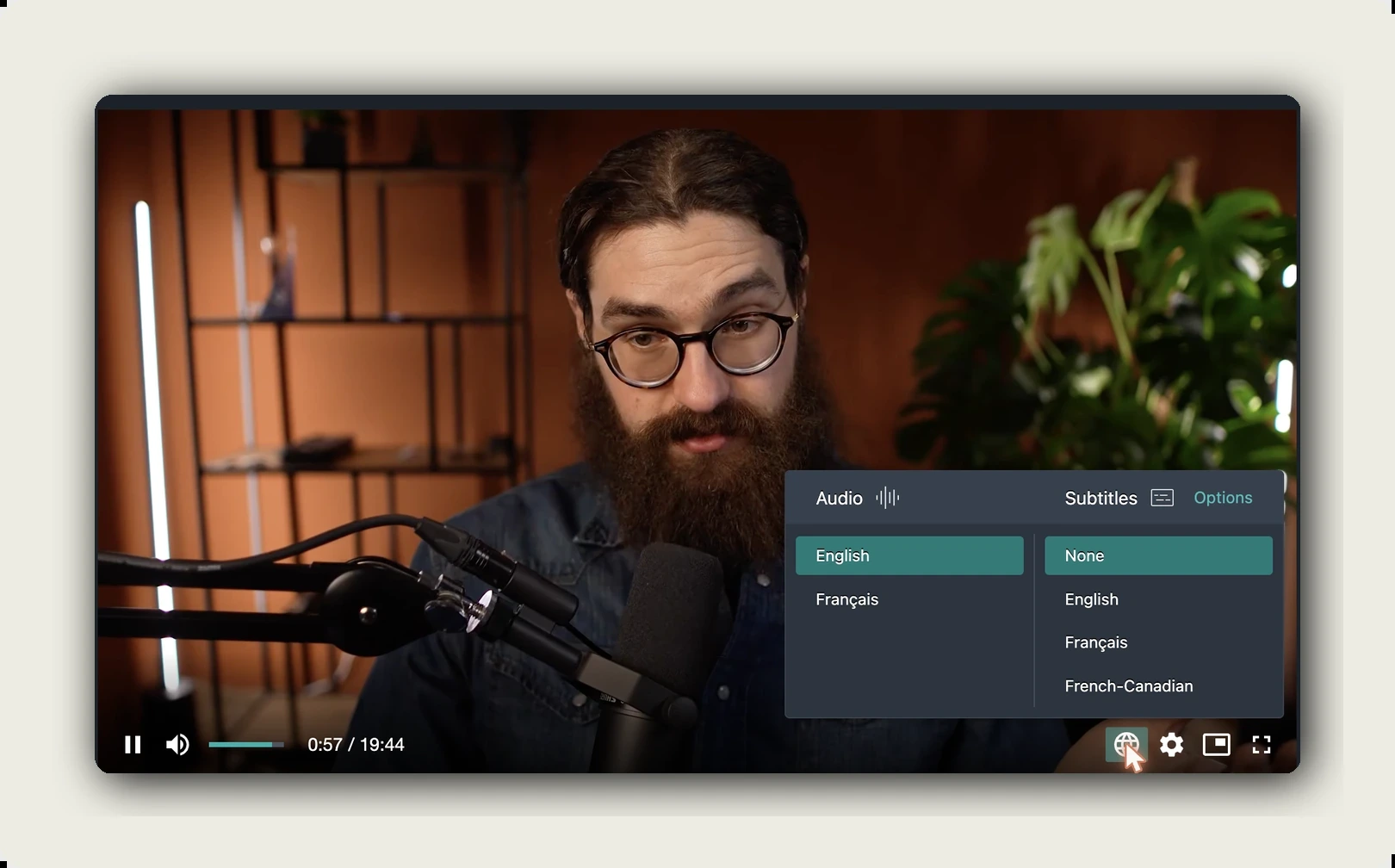
This is the step where alugha’s architecture parts ways with the re-upload model. Every language track, audio and subtitles alike, attaches to a single video in alugha’s multilingual HTML5 player. Viewers switch audio or subtitle language instantly, with no buffering and no reload, and automatic language detection starts playback in the viewer’s browser language. One embed code, copied from the Share tab, serves every market. The embedded player also carries your branding: a custom player color, your logo, and the option to hide the alugha logo.
See the workflow on your own footage. alugha’s free plan lets you test the multilingual player before committing to a paid tier. Compare plans ?
One video, all languages: why the architecture matters
The common alternative is the per-language re-upload: one video becomes five uploads, each with its own URL, its own view counter, its own separate life. On platforms built around channels this can be a deliberate strategy, and it works when every language has its own dedicated channel and team. For most teams it produces structural drag instead. Views, watch time, and inbound links scatter across five URLs, so no single version ever gathers enough signal to rank. Every correction means five edits. Every viewer who lands on the wrong language version has to go hunting for the right one.
The single-player model turns that upside down. The video exists once. Languages attach to it as audio and subtitle tracks, the one URL collects traffic from every language it speaks, and an update to the video lands everywhere at once. That is an infrastructure decision, not a feature preference — it determines how your analytics, your links, and your maintenance effort behave for the life of the content. And the audience for those extra tracks is real: YouTube reported in September 2025 that creators using multi-language audio earn over 25% of their watch time from views in a video’s non-primary language, and Jamie Oliver’s channel tripled its views after adding the tracks.
“A translated video is not a new video. It is the same video, speaking another language.”
Translating into English: the most common direction
Most localization guides assume an English source translated outward. In practice the reverse direction is at least as common: teams need to translate video to English because English is the working language of international business, the largest search market, and the default for global product documentation. Nothing in the pipeline changes; only the direction flips. Speech-to-text runs in the source language, the transcript translates into English, and English subtitles or an English voiceover render on top of the original video. For a worked example in this direction, see the walkthrough on how to translate a Spanish video to English.
One practical note for this direction: give the English output an extra-careful read when the source leans on regional idioms. Machine translation handles standard registers well and stumbles on colloquialisms, which is exactly where a human reviewer earns their pass.
Quality tips: where the machine needs a human
Fix the transcript before you translate
Every downstream artifact inherits the transcript. Automated transcription is accurate but not flawless; even at 98% speech accuracy, a long video carries a handful of errors, and they cluster exactly where accuracy matters most: names, technical vocabulary, numbers. Read the transcript once before translating. Corrections made at this stage propagate into every language for free. Corrections made after translation must be repeated per language.
Review machine translation like an editor, not a proofreader
Machine translation reads fluently, and that fluency is precisely what makes its errors dangerous: a wrong idiom or a mistranslated claim looks as polished as a correct sentence. Spend your review effort where fluency masks risk. Idioms, humor, legal or medical statements, and anything carrying a number deserve a native-speaker pass before publication. A glossary heads off the most expensive category of error, inconsistent terminology, before it has a chance to happen.
Respect subtitle timing and length
Subtitles compete with the picture for attention. Broadcast subtitle style guides commonly cap lines at roughly 42 characters and two lines per frame, with each subtitle held on screen long enough to read comfortably. Translated text often runs longer than the source, German notoriously so, which means a direct translation can overflow a perfectly timed source subtitle. Condense rather than compress: shorter phrasing beats smaller reading windows.
Frequently asked questions
What is the cheapest way to translate a video?
Translated subtitles are the lowest-cost route. The original audio stays unchanged, so the production work reduces to transcribing the speech, translating the text, and timing the subtitle file. Machine transcription and machine translation automate most of that pipeline, which leaves human review as the main cost. AI voiceover sits one step up in cost, and studio dubbing is the most expensive form.
Can I translate a video into English automatically?
Yes. Speech-to-text transcribes the source language, machine translation converts the transcript into English, and the result renders as English subtitles or an English AI voiceover. On alugha this runs inside one workspace, with automated translation covering 200+ languages. A human review pass on the English output is still worth scheduling for idioms, names, and numbers.
What is the difference between a voiceover and dubbing?
A voiceover reads the translated script as narration, without matching the timing of the original speakers’ performances; the original audio is usually lowered or replaced. Dubbing goes further: each speaker’s lines are re-performed and synchronized to the picture, so the translated voice behaves like the original performance. Dubbing buys the more natural viewing experience and carries the more expensive production.
How accurate is AI video translation?
Accuracy compounds across two stages. alugha’s speech-to-text reaches 98% speech accuracy, and modern machine translation handles standard registers reliably. Errors concentrate in names, technical terms, idioms, and numbers, which is why the recommended workflow keeps a human review at the transcript stage and again on the translated text before any audio or subtitles are generated.
Do I need to upload a separate video for every language?
Not on alugha. Every audio and subtitle track attaches to a single video, and viewers switch languages directly in the multilingual player without leaving the page. The alternative, re-uploading the video once per language, splits views, links, and search authority across separate URLs and multiplies the maintenance work with every edit.
Which subtitle format should I use for a translated video?
SRT is the most widely accepted subtitle format, and WebVTT is the standard for HTML5 web players. Reserve burned-in subtitles for platforms that cannot display a separate subtitle track, since burned-in text can never be switched off or edited later. alugha exports all three, plus plain text for repurposing the transcript.
Getting started with alugha
alugha treats video translation as infrastructure, not as a per-video project. Speech-to-text at 98% accuracy, automated translation in 200+ languages, 400+ AI voices with voice cloning, and subtitle export in standard formats all run in one workspace, and every result publishes into one multilingual player on one URL. For creators, that means a channel can start speaking new languages without splitting into parallel channels.
For enterprise teams, it means training, product, and communication video localizes on one repeatable pipeline: transcribe once, review once, publish everywhere. Plan names and current limits are maintained on the pricing page.
Get started with alugha’s free tier ? alugha.com/plans
For enterprise teams: request compliance documentation ? alugha secure video infrastructure