Every video player has a CC button, and almost nobody agrees on what sits behind it. Ask five video teams what closed captions are and you get five answers: subtitles for deaf viewers, text you can switch off, the thing legal asked for, the file the broadcaster demanded, the checkbox in the editor. All of them are partly right, which is exactly the problem.
Key takeaways
- Closed captions are a text version of everything audible in a video, including speaker changes and meaningful sounds, that the viewer can switch on and off.
- Subtitles are not the same thing. Subtitles assume you can hear and translate the dialogue. Captions assume you cannot hear and describe the audio.
- “Closed” describes the switch, not the content. Open captions are burned into the picture and cannot be turned off.
- Five formats cover almost every case: SRT and WebVTT on the web, TTML and EBU-TT for broadcast and archives, SCC for legacy US broadcast.
- The legal floor has moved. The European Accessibility Act has applied since 28 June 2025, and the ADA web rule for US public bodies phases in from April 2026.
- Quality is measurable: reading speed, line length, synchronisation, speaker identification and sound events are the five things auditors check.
- Key takeaways
- What closed captions are
- Closed captions vs subtitles, SDH and open captions
- The file formats that carry closed captions
- The standards behind the CC button
- Where closed captions are legally required
- What separates good closed captions from bad ones
- Three ways to produce closed captions
- How to add closed captions to a video with alugha
- What closed captions do beyond compliance
- Frequently asked questions about closed captions
- Getting started
Working with video in more than one language? alugha generates the transcript, the subtitle track and the translated versions from a single upload. See the plans.
What closed captions are
Closed captions are a time-synchronised text representation of a video’s audio, written for someone who cannot hear it. They carry the dialogue, they mark who is speaking, and they describe the sounds that matter to the story: a door slamming, a phone ringing, music swelling under a scene. The viewer decides whether the text appears.
That last part is what the word “closed” means, and it is the single most misunderstood detail in the whole topic.
Why they are called closed captions
The name comes from broadcast television, not from the web. Captions were transmitted inside the video signal in a place the picture did not show, and a decoder in the television set unpacked them on request. The data was there the whole time, closed off until the viewer opened it. Open captions, by contrast, were burned into the picture before transmission and everyone saw them, whether they wanted to or not.
The mechanism changed, the vocabulary did not. On a modern player, a closed caption track is a separate file the player loads alongside the video, and the CC button toggles it. Nothing about the video itself changes.
What captions carry that subtitles leave out
A subtitle line says what was said. A caption line says what was heard. The difference sounds academic until you watch a scene without sound.
[SEBASTIAN] The report is out.
[door closes]
[phone buzzing in the next room]
Strip the speaker label and the two sound events and the same scene becomes a single sentence floating in silence. The viewer loses who spoke, that someone left, and that the interruption is about to happen. Those three lines are the reason captions and subtitles are not interchangeable, and why accessibility auditors treat them as different deliverables.
Closed captions vs subtitles, SDH and open captions
Four terms circle the same idea and get used as if they were synonyms. They are not. Two of them describe what the text contains, and two describe whether the viewer can switch it off. Once you separate those two axes, the confusion disappears.
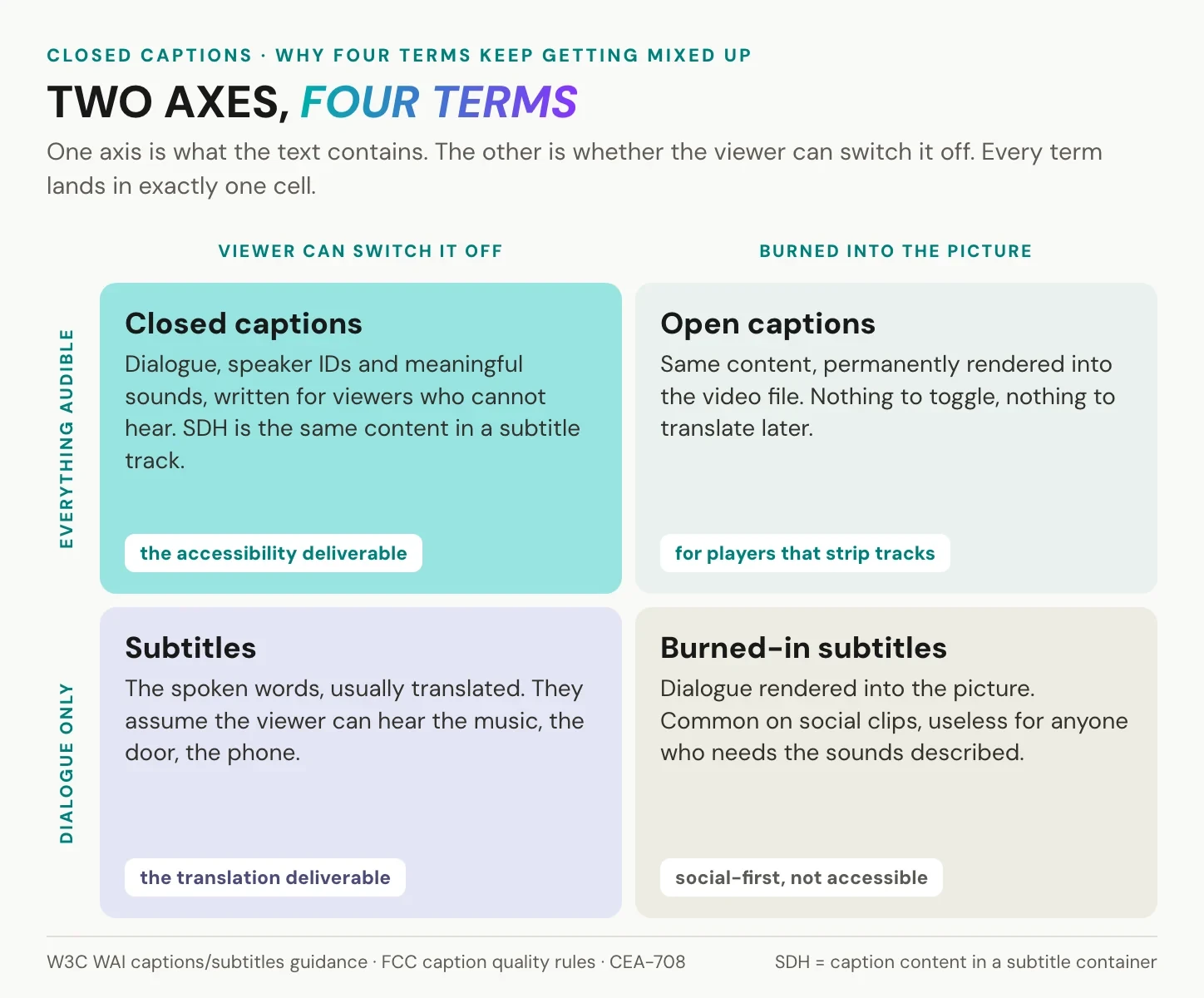
The practical consequence: a Spanish subtitle track on an English video serves a viewer who can hear but does not speak English. An English caption track on the same video serves a viewer who speaks English but cannot hear. Publishing one and calling it the other is the most common accessibility failure we see in corporate video libraries.
SDH sits in between. It was invented for DVD and streaming, where the player could not always display a broadcast caption stream, so the caption content was delivered through the subtitle mechanism. If you are asked for SDH, you are being asked for caption content in a subtitle container.
The file formats that carry closed captions
A caption track is a plain text file with timings. The format decides which players accept it and how much styling survives the trip.
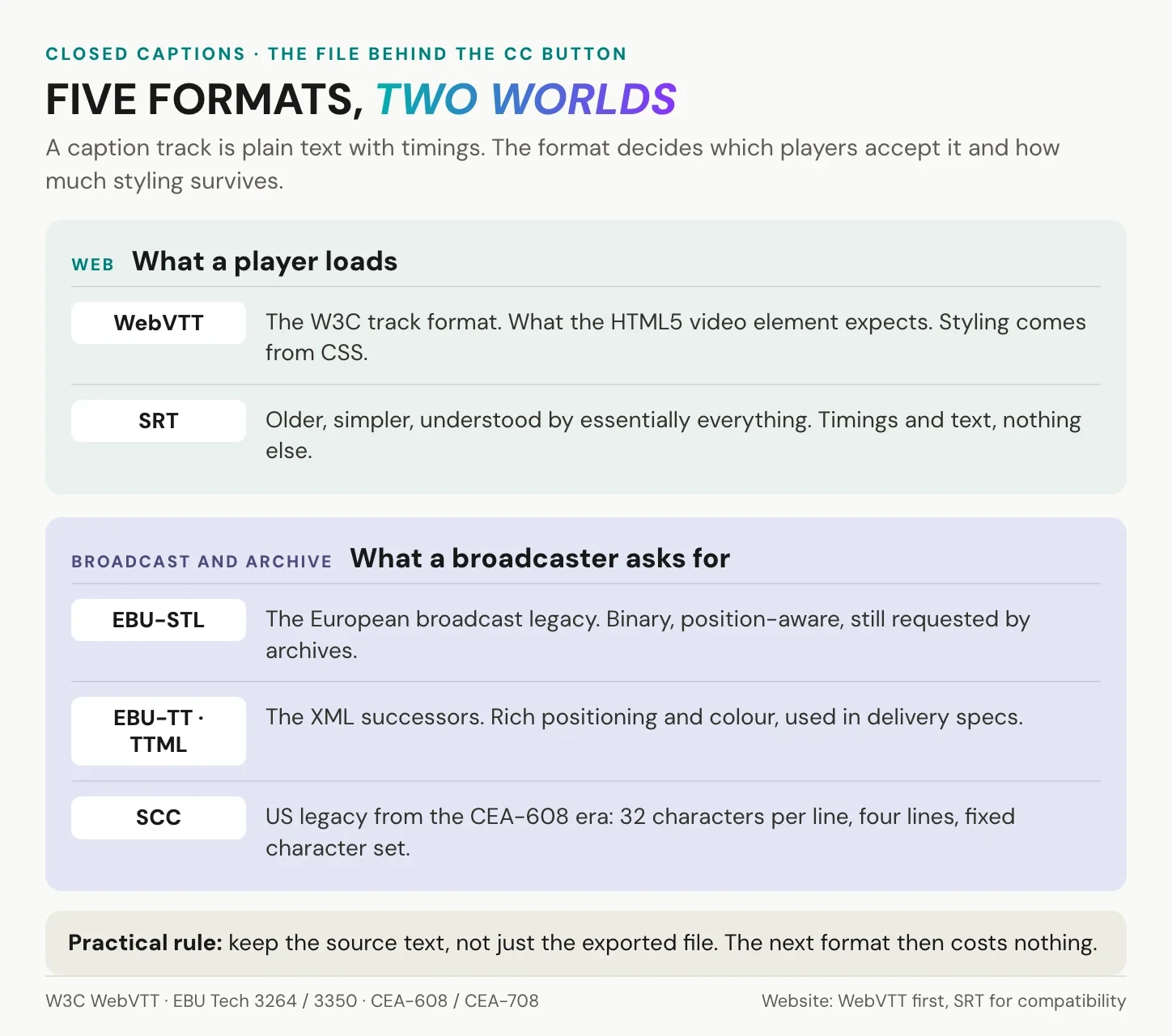
For the web, the choice is narrow and boring, which is a good thing. WebVTT is the format the HTML5 track element expects, and it is a W3C specification. SRT is older, simpler, and understood by essentially everything. Here is what a WebVTT cue looks like:
WEBVTT

00:00:07.180 --> 00:00:11.410
[SEBASTIAN] The report is out.

00:00:11.760 --> 00:00:14.020
[door closes]
Timings run hours to milliseconds, one cue per block, and anything in square brackets is a convention rather than a rule. That convention matters more than the syntax: it is how a screen reader user and a sighted deaf viewer both recognise that a line describes a sound rather than a spoken word.
If you already have a transcript, the step to a caption file is mechanical. We walk through it in five real transcript examples, including the SRT variant.
The standards behind the CC button
Two standards families explain why caption files look the way they do.
In North America, CEA-608 defined captions for analogue television. It was strict: 32 characters per line, up to four lines, a fixed character set, colours and positions encoded in the signal itself. Its digital successor CEA-708 lifted most of those limits but kept the model of captions travelling inside the broadcast stream. Anyone who has wondered why legacy caption files cut lines at exactly 32 characters now has the answer.
In Europe, the EBU-STL format did the same job for the EBU broadcast world, and EBU-TT brought it into XML. Both are still what broadcasters and archives ask for, which is why an enterprise video team occasionally receives a caption request that no web tool can fulfil.
On the web, none of this applies directly. The player reads WebVTT or SRT, and the styling comes from CSS. The broadcast heritage still shows up in the conventions: uppercase speaker labels, sound events in brackets, two lines at a time.
Where closed captions are legally required
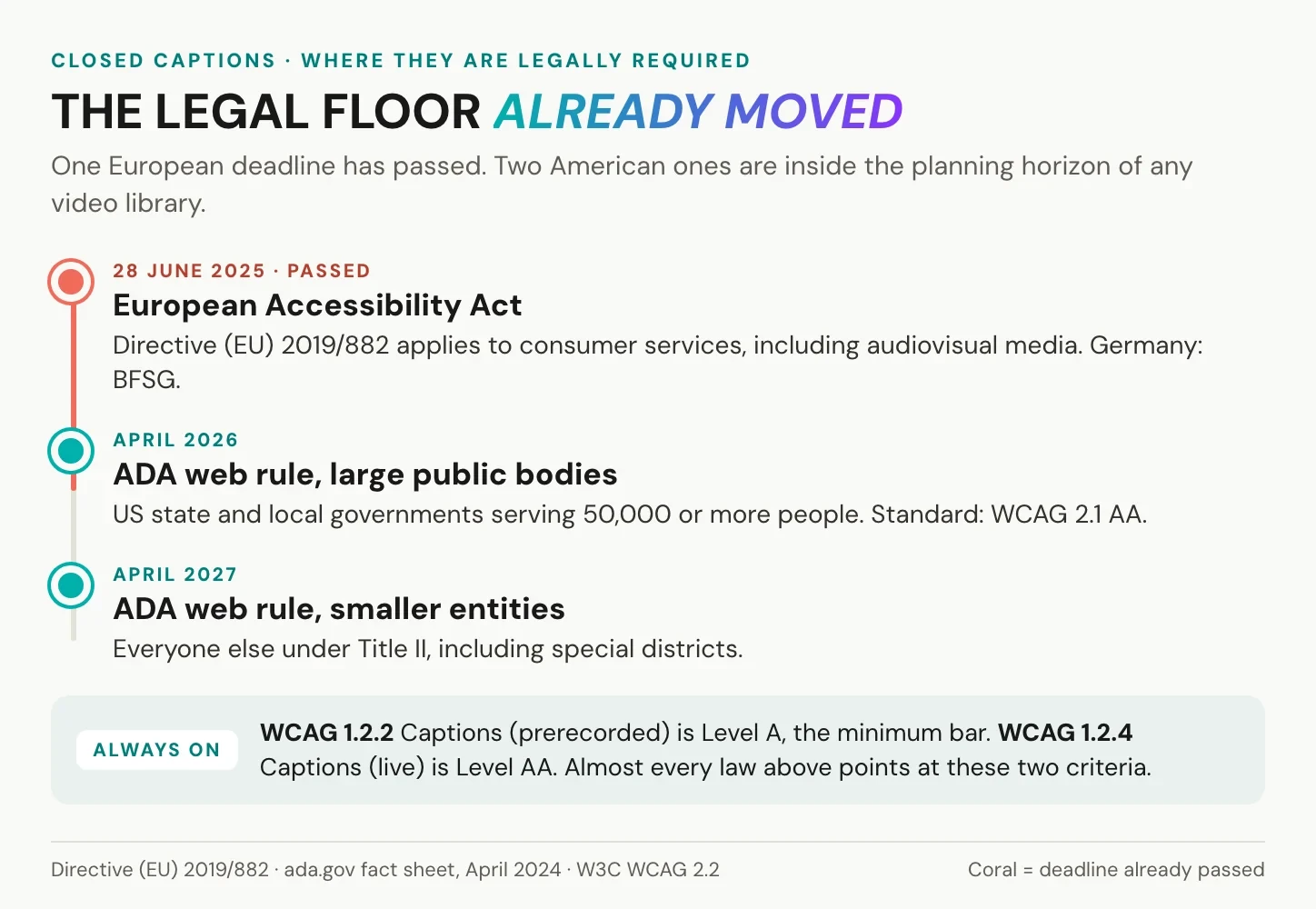
Captioning used to be a broadcast obligation and a nice gesture for everyone else. That is no longer true on either side of the Atlantic, and the deadlines are recent enough that many content libraries have not caught up.
Europe: the European Accessibility Act
The European Accessibility Act, Directive (EU) 2019/882, has applied since 28 June 2025. It covers services provided to consumers, including access to audiovisual media services and e-commerce, and it reaches private companies, not only public bodies. Germany implements it through the Barrierefreiheitsstärkungsgesetz. The directive does not print a caption style guide; it requires that the service be perceivable, and for video that means a caption track.
United States: ADA, Section 508 and the FCC
The Department of Justice published its web accessibility rule under Title II of the ADA in April 2024. State and local governments must comply from April 2026, with smaller entities following in April 2027, and the technical standard the rule points at is WCAG 2.1 Level AA. Federal agencies and their suppliers have lived under Section 508 for far longer. Broadcasters answer to the FCC, which grades captions on four criteria: accuracy, synchronicity, completeness and placement. That list is a useful quality checklist even if you never touch a broadcast feed.
What WCAG actually asks for
WCAG is the technical yardstick almost every law now points to. Two success criteria matter here. 1.2.2 Captions (Prerecorded) is Level A, the minimum bar, and it requires captions for all prerecorded audio in synchronised media. 1.2.4 Captions (Live) is Level AA and extends the requirement to live content. Audio description lives next door in 1.2.3 and 1.2.5, which is why the two features usually arrive in the same project. Our WCAG 2.2 guide for enterprise video hosting maps each criterion to a platform setting.
Need captions across a whole video library, not one file? alugha stores every language track and subtitle set next to the video on EU servers. Read how GDPR-compliant video hosting works.
What separates good closed captions from bad ones
A caption file can be technically valid and still unusable. Five things decide whether a viewer can follow it.
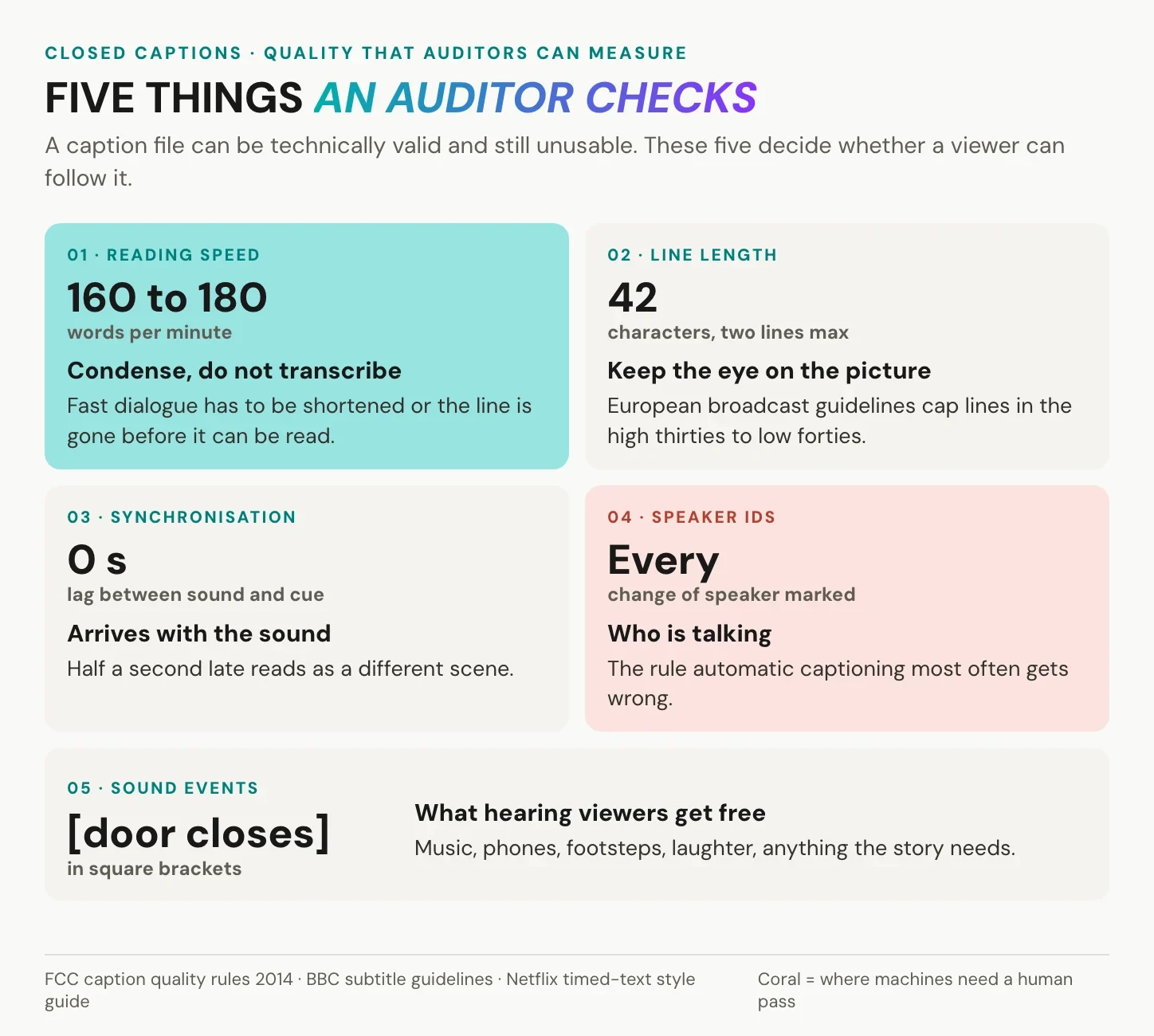
Reading speed is the one most often missed. Broadcast guidelines have long converged around 160 to 180 words per minute for adult content, and streaming platforms express the same limit as characters per second. Fast dialogue has to be condensed, not transcribed word for word, or the line disappears before it can be read.
Line length follows the same logic. European broadcast guidelines cap lines in the high thirties to low forties of characters and prefer two lines over three. A caption that spans the screen forces the eye away from the picture.
Synchronisation means the cue appears with the sound and leaves with it, not half a second late. Speaker identification keeps a multi-person scene readable. Sound events carry the information a hearing viewer gets for free. Those last three are also where automatic captioning most often needs a human pass.
Three ways to produce closed captions
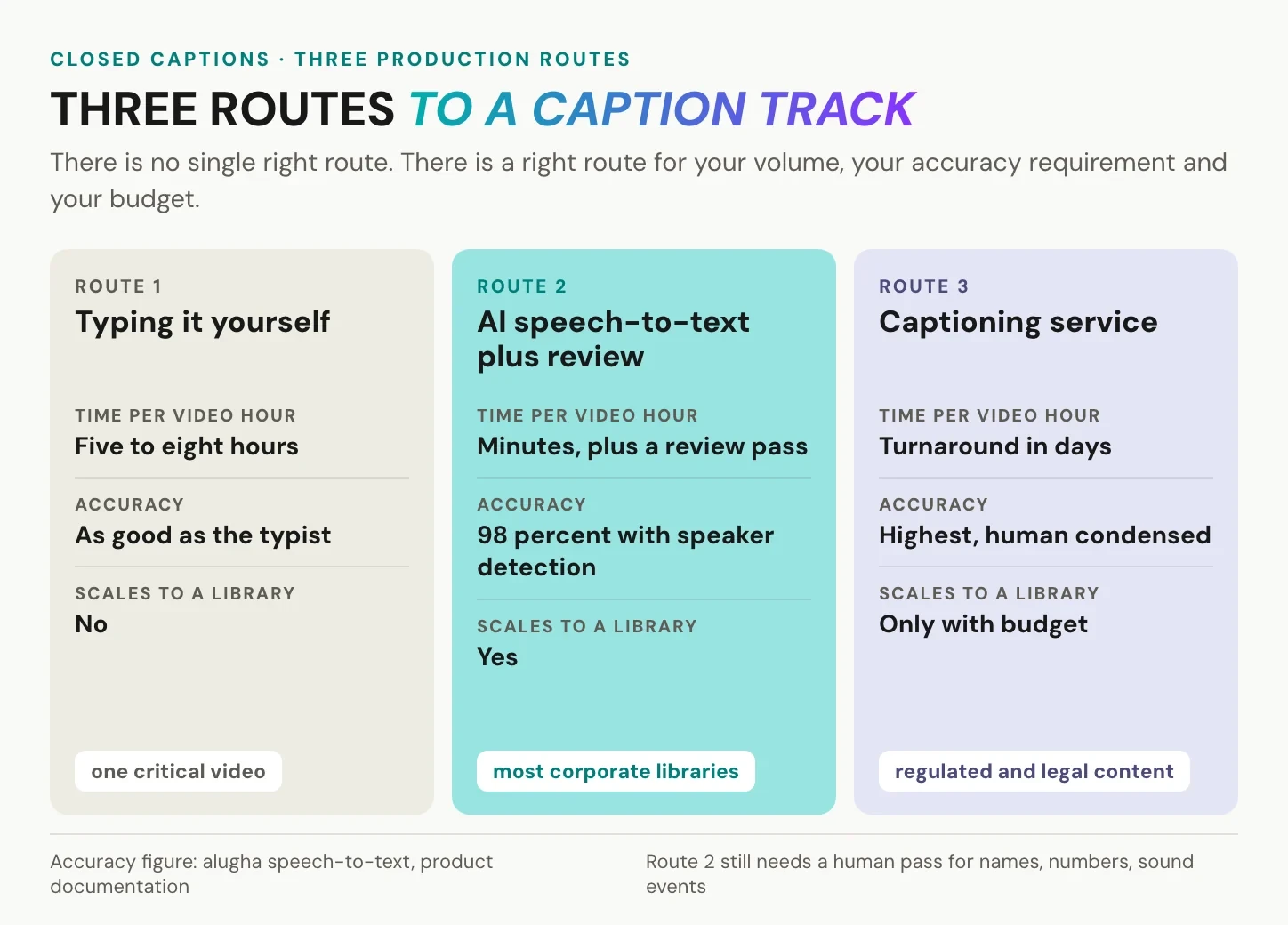
There is no single right route. There is a right route for your volume, your accuracy requirement and your budget.
Typing them yourself
Full control, no cost beyond time, and realistically five to eight hours of work per finished hour of video once you include timing and review. It is defensible for a handful of high-stakes videos and nothing else.
AI speech recognition
Speech-to-text produces a timed transcript in minutes, and modern models handle clean studio audio well. alugha’s speech-to-text runs at 98 percent accuracy with speaker detection, which means the machine gets the words and the speaker changes, and a human still decides on condensation, sound events and names. Budget a review pass. Anyone who tells you the review pass is optional has not shipped captions to an audit.
A professional captioning service
Human captioners deliver the highest accuracy and the cleanest condensation, and they charge per audio minute for it. This is the right answer for regulated content, legal material and anything where an error carries a cost. It is the wrong answer for a library of two hundred internal training videos.
How to add closed captions to a video with alugha
The workflow below turns a video into a caption track in one pass, without leaving the workspace. It is the same sequence whether the video is one internal update or the first of two hundred.
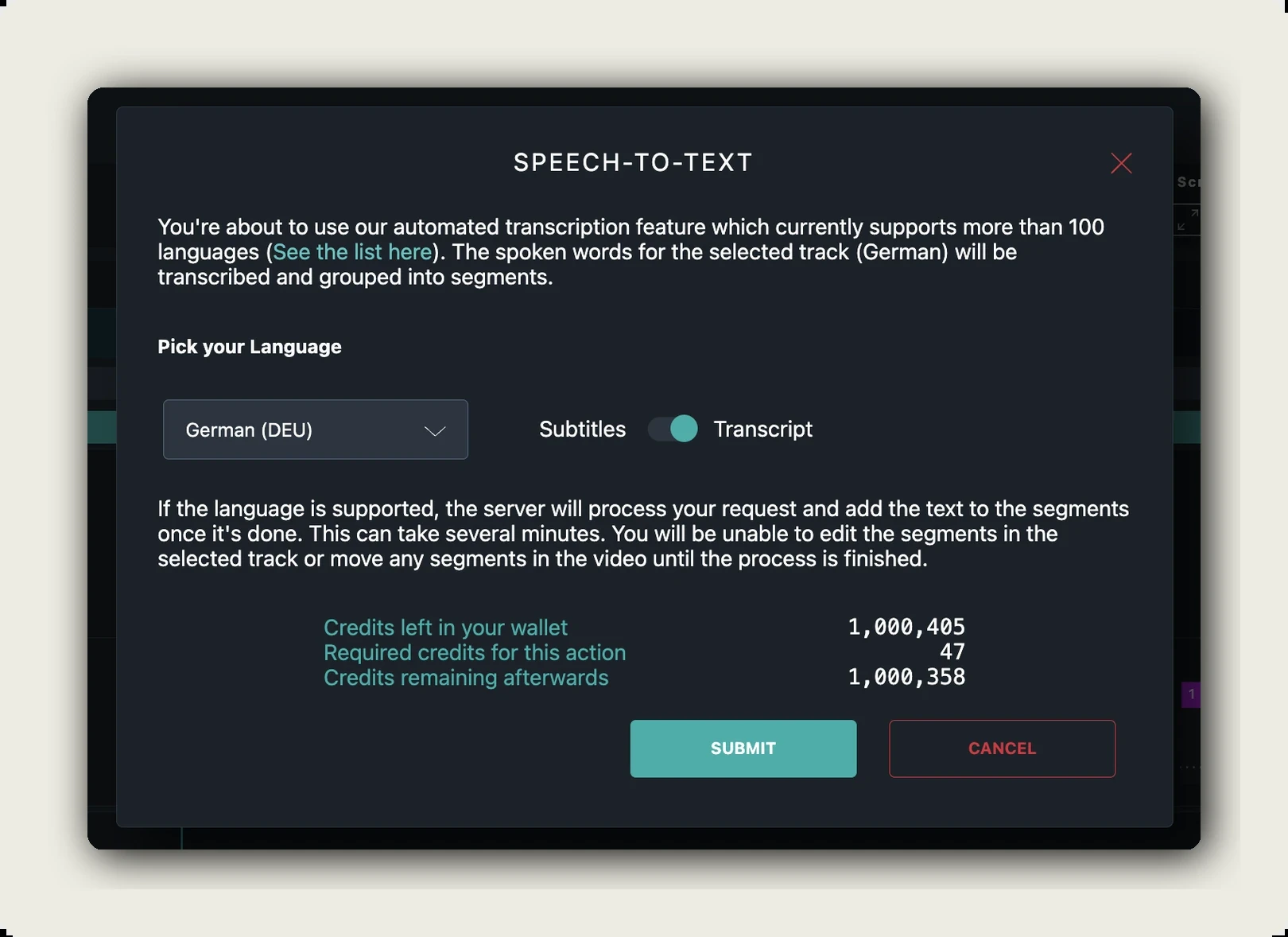
1. Generate the transcript
Open the video in the dubbr workspace and run speech-to-text from the Automation menu. The dialog shows how many credits the job needs and how many you have left before you confirm, so the cost is never a surprise.
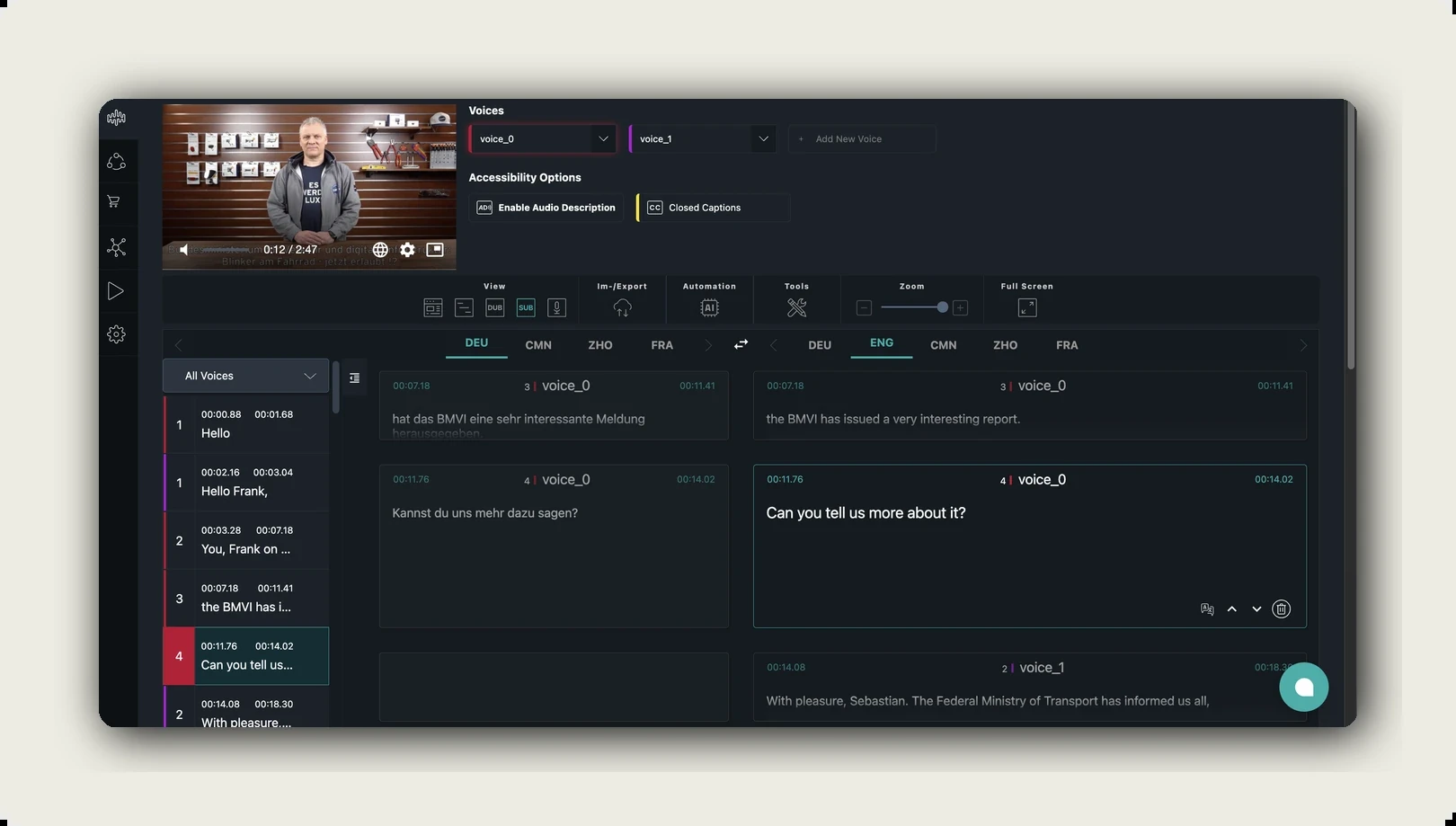
2. Turn the transcript into subtitles
The Tools menu converts the finished transcript into a timed subtitle track. Segments appear side by side per language, and the Accessibility Options row above them carries the two switches that matter here: Closed Captions and Enable Audio Description.
3. Review the lines that machines get wrong
Names, product terms, numbers and anything spoken over background noise. This is also where you add sound events and shorten cues that run past the reading speed limit.
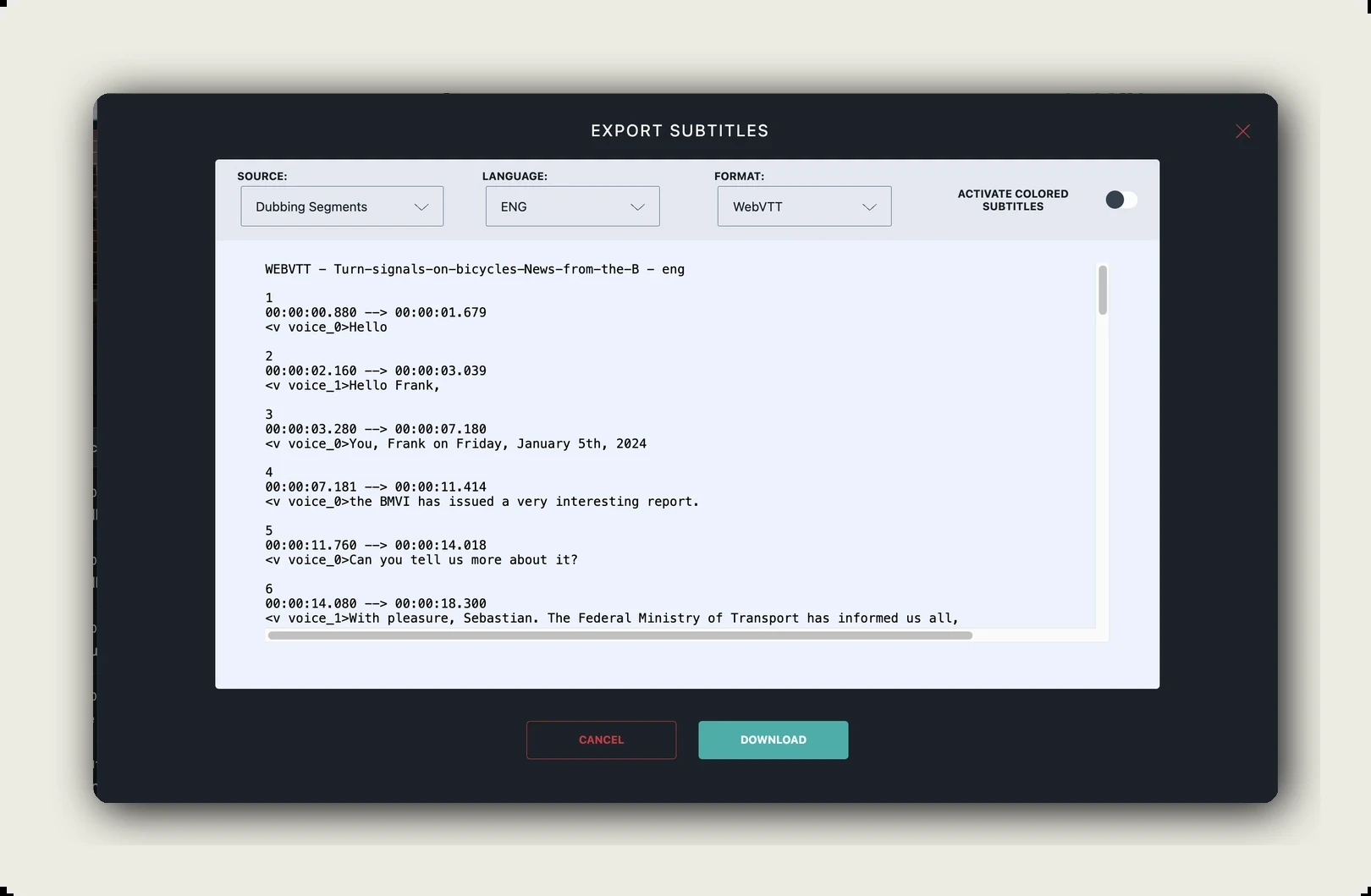
4. Export or publish
The Im-/Export menu writes the track out as WebVTT, SRT or plain text, and it can burn the captions into a video file when a platform will not accept a separate track. The preview shows the finished file before you download it, timecodes and all.
5. Add the next language
A finished caption track is also the fastest route to a second language, because the translation starts from clean text rather than from audio. The mechanics are the same as for AI dubbing, minus the voice.
What closed captions do beyond compliance
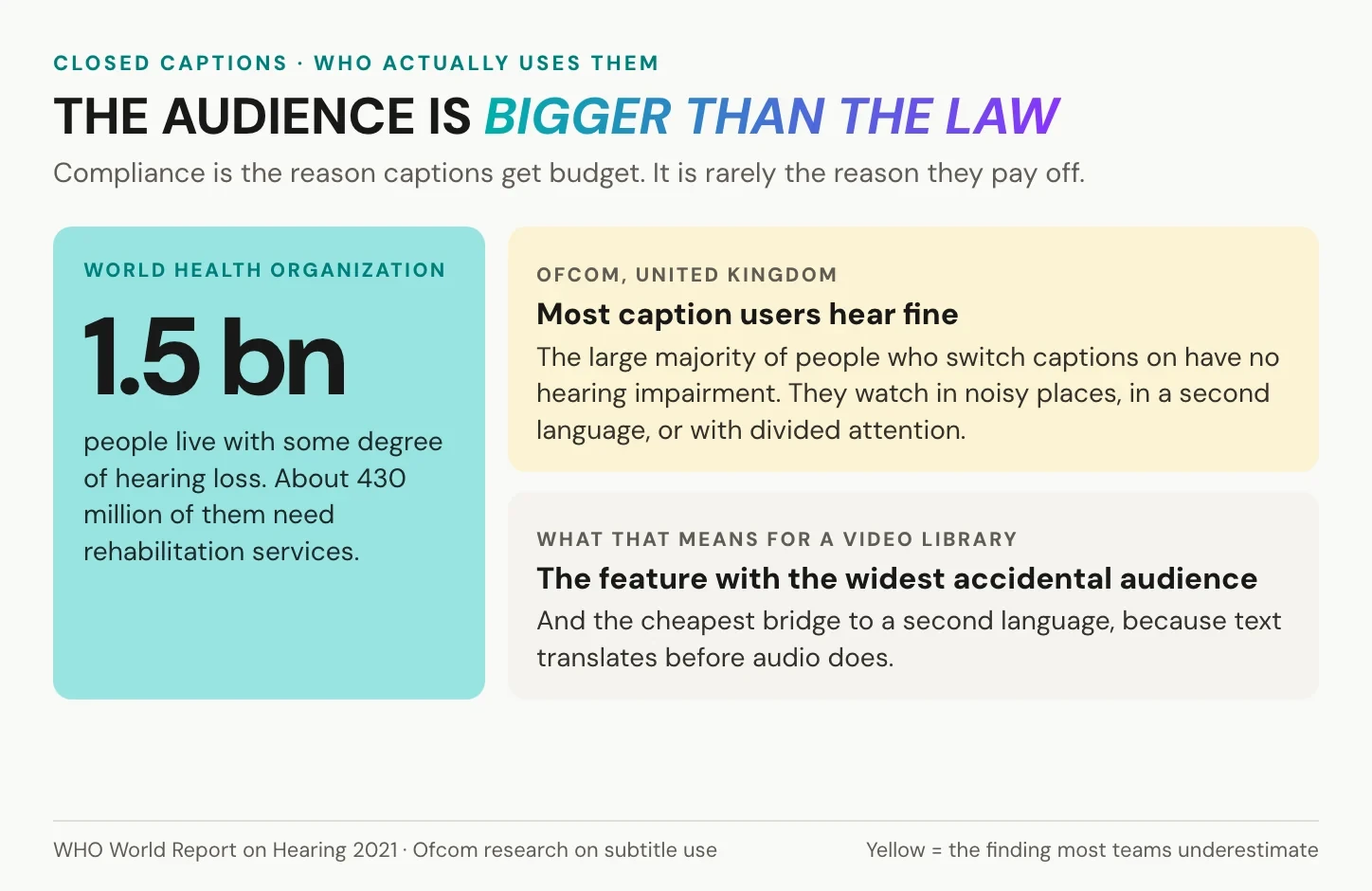
Compliance is the reason captions get budget. It is rarely the reason they pay off.
The audience is far larger than the requirement suggests. The World Health Organization counts more than 1.5 billion people living with some degree of hearing loss. Ofcom’s research in the United Kingdom found that a large majority of caption users have no hearing impairment at all: they watch in noisy places, in quiet places, in a second language, or with divided attention. Captions are the accessibility feature with the widest accidental audience.
There is a search argument too, and it is more modest than most vendors claim. A caption file is not a ranking factor on its own. What it does is give a page real, indexable text about the video, which is the difference between a video page with three sentences of copy and one with a full transcript. That is also why we recommend publishing the transcript alongside the caption track rather than only inside the player.
And there is the multilingual argument, which for most of our customers is the decisive one. A caption track is the cheapest bridge to a second market. Text translates before audio does, costs a fraction of a dub, and reaches a viewer who would otherwise have closed the tab. If that is the direction you are heading, accessible subtitles for corporate video covers the production side in more detail.
Frequently asked questions about closed captions
What is the difference between subtitles and closed captions?
Subtitles carry the dialogue and assume the viewer can hear the rest of the audio, which is why they are the usual choice for translation. Closed captions carry the dialogue plus speaker identification and meaningful sounds, written for a viewer who cannot hear the audio at all. Both can usually be switched off by the viewer.
What does the CC symbol mean?
CC marks a closed caption track that the player can show or hide. It comes from North American broadcast television, where the caption data travelled inside the signal and the television decoded it on request.
Are closed captions the same as open captions?
No. Open captions are burned into the picture and cannot be turned off. They are useful when a platform strips caption files, when a video autoplays without sound, or when you cannot control the player. The trade-off is that they are permanent and cannot be translated later.
What is an example of a closed caption?
A single cue looks like this: a start and end timecode, then a line such as [SEBASTIAN] The report is out. followed on the next cue by [door closes]. The bracketed speaker name and the bracketed sound event are what make it a caption rather than a subtitle.
Do closed captions help SEO?
Indirectly. Search engines do not rank a video higher for having a caption file, but the text it produces can be published as a transcript on the page, and that text is indexable. The measurable gains usually come from watch time and from the page having substance, not from the file itself.
Which caption format should I use for a website?
WebVTT if the video plays in an HTML5 player, because that is what the track element expects. SRT if you need the widest possible compatibility with older tools and social platforms. Keep the source text, not just the exported file, so the next format costs nothing.
Getting started
Captions stop being a project and start being a setting once the transcript, the subtitle track and the translations live in the same place as the video. That is what alugha is built for: one upload, every language, captions and audio description included rather than bolted on.
Start with a free account, or talk to us about a whole library at alugha.com.