A DRM video is encrypted so that only a licensed player on an approved device can decrypt it. The key stays inside a decryption module the web page cannot read. You have probably met one without noticing. You share your screen in a video call while a film plays in your browser, and on some devices the film turns into a black rectangle while everything around it stays sharp. That rectangle is DRM at work. Read on and you can explain how Widevine, FairPlay and PlayReady work, and why a DRM video plays on one screen but fails on another. You will know what the law says about getting around it, and you can decide whether your own videos need DRM at all.
Key takeaways
- Three DRM systems cover almost every screen: Google’s Widevine, Apple’s FairPlay and Microsoft’s PlayReady. Common Encryption, ISO/IEC 23001-7, lets one encrypted set of files serve all three on current devices.
- Android has defined five DRM security levels since 2018, from software-only to fully hardware-backed. Browser playback usually relies on software decryption, and Netflix lists some browsers at 1080p or 720p, not 2160p.
- DRM cannot stop a camera. Hollywood’s own 2018 content protection specification says camcording the screen cannot be prevented, and Widevine’s software level had its keys extracted publicly in 2020.
- Protection costs your viewers something. Vimeo’s help page lists playback capped at 720p in some environments, no third-party players and a slightly slower start once DRM is switched on.
- Removing DRM is circumvention. The 1996 WIPO Copyright Treaty obliges its parties to protect against it legally, and the US, the EU and Germany do, even where protection is weak.
- Piracy is real and measurable. The EUIPO counted 10 accesses to pirated content per EU internet user per month in 2023, yet studies disagree on how much it costs sales.
- Our player does not add DRM encryption and encodes at 1080p at most. For training and internal video, access control fits: visibility states, an embedding switch, hosting in Germany and the EU.
- Key takeaways
- What is a DRM video?
- How DRM video works
- Widevine, FairPlay and PlayReady
- What DRM stops, and what it cannot
- When DRM videos will not play
- Is it legal to remove DRM?
- Do you need DRM video protection?
- Where alugha fits, and where it does not
- Frequently asked questions about DRM video
- Getting started
What is a DRM video?
DRM is three parts working together.
DRM, short for digital rights management, means three things when the subject is video. The files are encrypted with a content key, and a licence server hands out that key with rules attached: which device may use it, at what quality, for how long. And a trusted client does the decrypting. In a browser, that client is the content decryption module, which the page reaches through Encrypted Media Extensions, a W3C Recommendation since 18 September 2017. You meet the result on streaming services, on paid course platforms and in broadcasters’ apps. The page never sees the key.
Encryption alone is not DRM
Plenty of streams are encrypted without being DRM-protected. HLS, the streaming format described in RFC 8216 in August 2017, can encrypt whole segments with AES-128. The key, though, sits behind a plain address in the playlist, with no licence policy and no device binding. Anyone who can play the stream can fetch the key.
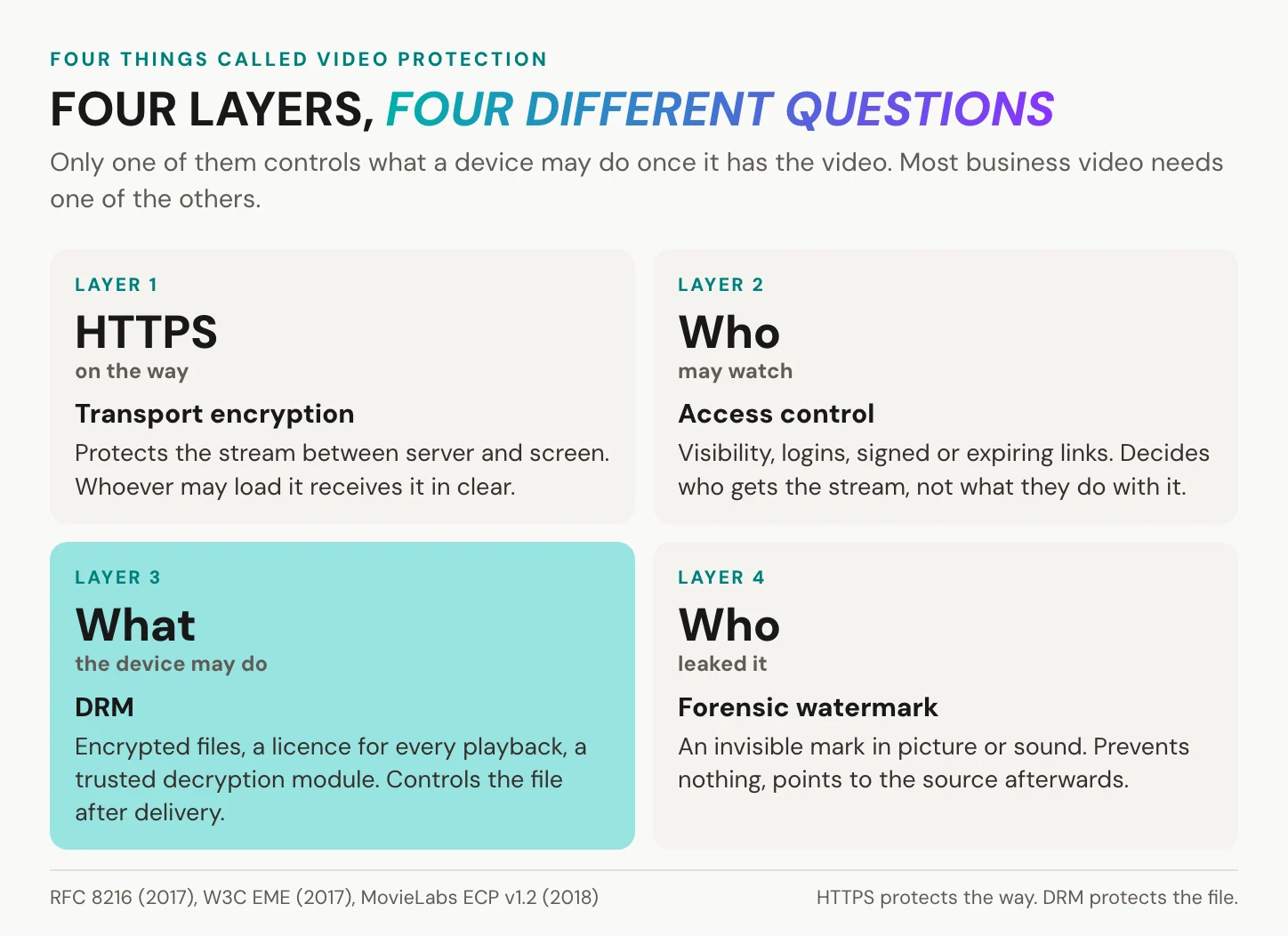
HTTPS is another layer again: it encrypts the stream on its way and ends at the viewer’s device, where the video arrives readable. So four different things get called video protection, and they answer four different questions. HTTPS protects the way. Access control decides who receives the stream at all, and DRM controls what the device may do after decryption. A forensic watermark prevents nothing; it points to the source of a leak afterwards.
HTTPS protects the stream on its way to the viewer. DRM protects it from the viewer.
In short: DRM is the only one of the four layers that keeps working after the video reaches a device you do not control.
Which raises the practical question: how does one encrypted file reach a phone, a laptop and a television that each run a different system?
How DRM video works
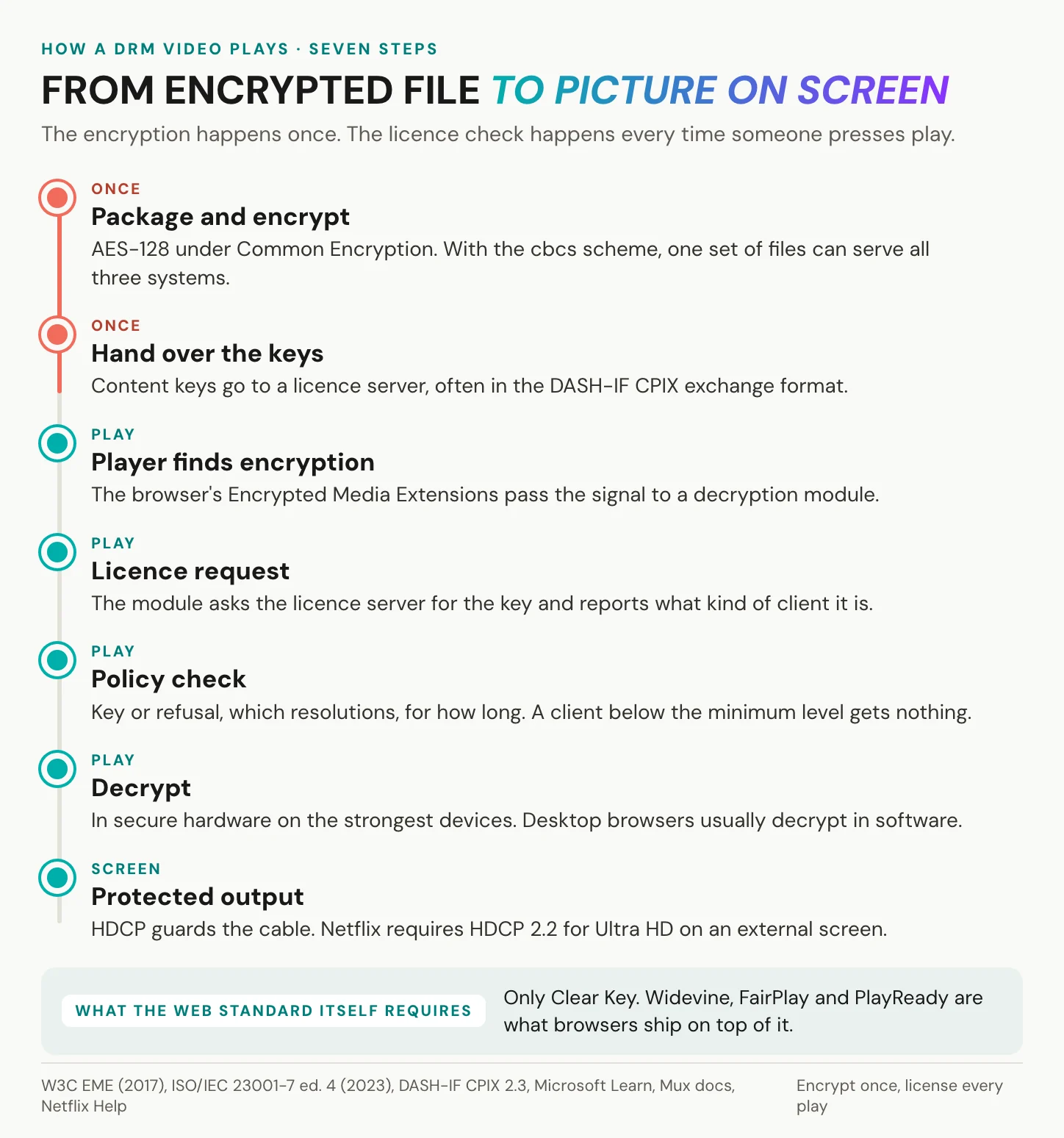
Encrypt once, license every play.
One package for every system
Common Encryption is the standard that lets several DRM systems read the same encrypted file. Its fourth edition, ISO/IEC 23001-7, was published in August 2023, and its cipher is AES-128. It defines four protection schemes, cenc, cbc1, cens and cbcs, and the pattern schemes among them encrypt only part of the data. In Google’s open-source Shaka Packager, the default pattern of 1:9 encrypts one block in ten.
FairPlay uses cbcs, while Widevine supports all four schemes, with support varying by platform. On current devices, then, one cbcs set of files, packaged as CMAF (ISO/IEC 23000-19) and delivered over MPEG-DASH (ISO/IEC 23009) or HLS, can serve all three systems. You may read that FairPlay forces you to package everything twice. With cbcs, one set of files usually does the job. Older players that read only cenc still need a second set, which is why Microsoft lists cbcs support for PlayReady client by client. Keys reach the packager in exchange formats such as the DASH Industry Forum’s CPIX, which AWS’s SPEKE v2.0 builds on.
The licence request
When the player reaches encrypted data, the browser hands it to the content decryption module, and the web page only relays messages. EME has worked across the major browsers since March 2019, according to MDN, and only on pages served over HTTPS. The standard itself requires just one key system, Clear Key, which is not DRM in any real sense. Widevine, FairPlay and PlayReady are what browser vendors ship on top.
The licence server answers with a key and a set of rules, and the rules can be strict. A PlayReady licence carries a minimum security level of 150, 2000 or 3000, and a client below that level refuses to play, according to Microsoft’s documentation. EME knows two session types. A temporary session ends with the playback, while a persistent licence is stored on the device and makes offline viewing possible. A second edition of EME is in progress; its latest Working Draft is dated 7 July 2026.
Output protection and HDCP
The last step is the cable. HDCP, High-bandwidth Digital Content Protection, was developed by Intel and is licensed by Digital Content Protection LLC. It encrypts the link between the source and the display, over HDMI or DisplayPort. For Ultra HD on a Windows PC, Netflix’s Help Center asks for a 60 Hz Ultra HD screen, built in or connected over HDCP 2.2, plus Windows 11 and 15 Mbit/s, and every active display has to comply. Hollywood’s Enhanced Content Protection specification, version 1.2, published by MovieLabs in August 2018, asks for HDCP 2.2 or better for Ultra HD content. A monitor or adapter in that chain that cannot meet the required version can mean a lower picture, or none.
In short: the file is encrypted once, the key is licensed on every play, and the licence decides how good the picture may be on that device.
Widevine, FairPlay and PlayReady
Every platform ships its own DRM.
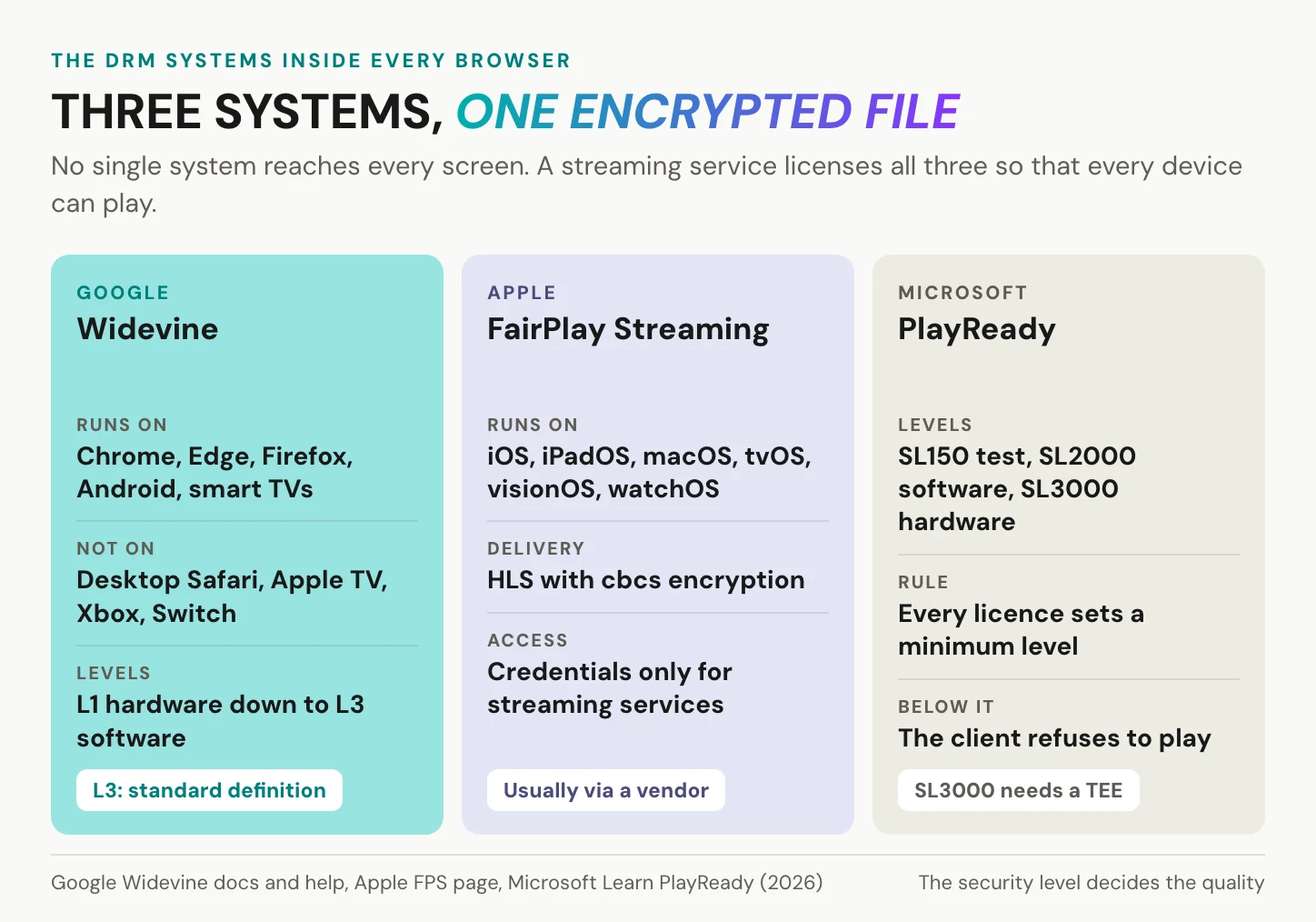
No single system reaches every screen. A service that wants every device therefore licenses all three, which the industry calls multi-DRM, and each of the three comes with its owner’s rules.
Three owners, three rulebooks
Google announced on 3 December 2010 that it would acquire Widevine. Today, according to Google’s overview, Widevine runs natively in Chrome, Edge and Firefox, on Android, Chromecast, Roku, Fire TV, PlayStation and smart TVs. Google lists it as not supported in desktop Safari, on Apple TV, on Xbox and on Nintendo Switch, and it reaches iOS only through a separate client library. Google puts Widevine on 5 billion devices, a figure given without a date or a method. Using it requires a licence agreement with Google.
Apple’s FairPlay Streaming delivers protected video over HLS, uses cbcs and runs on iOS, iPadOS, macOS, tvOS, visionOS and watchOS. Apple grants production credentials only to a team that itself runs a streaming service for consumers, and it refuses requests from third parties acting for content owners. For a business that does not run its own consumer streaming service, that settles it: FairPlay comes through a platform or a multi-DRM vendor.
Microsoft’s PlayReady defines three client security levels. SL150 is meant for development and is not suitable for commercial content, and SL2000 covers hardened software. SL3000 means hardware-backed playback inside a trusted execution environment, with PlayReady 3.0 or later.
Security levels decide the picture
The real split is hardware against software. Android’s platform DRM interface has defined five security levels since API level 28, released in 2018. At the bottom, keys are handled by software-based white-box cryptography; at the top, all handling of the media happens inside a hardware-backed trusted execution environment. Widevine’s three levels, as DRM vendors document them, follow the same line. L1 keeps processing inside the device’s trusted environment, L3 runs in software only, and L2 sits in between. Google’s own help pages give a field-provisioned Level 3 device the status “SD only”, and Mux’s documentation adds that browser playback usually relies on software decryption. What a software-level device finally receives is set by each service’s licence policy.
That is why one service looks different on different screens. Netflix’s Help Center lists up to 2160p in Chrome and Edge on Windows and in Safari on Mac. It lists up to 1080p in Firefox and in Chrome on Mac, and up to 720p in Edge on Mac. Netflix gives no reason, but the pattern fits the security path each browser can offer.
In short: the brand of DRM matters less than the level it runs at on the viewer’s device.
What DRM stops, and what it cannot
DRM is strong where it was built to be.
Against the threat it was designed for, copying the decrypted file, the hardware-backed levels are the harder target. When a Chrome extension extracted Widevine L3 keys on Windows in October 2020, Google said it was working to update its software DRM, and KrebsOnSecurity reported that levels 1 and 2 were not affected. Studios keep licensing on these terms for a reason. For licensed films and paid events, nothing else does the same job, and the contract often names the systems outright.
Can a DRM video be screen recorded?
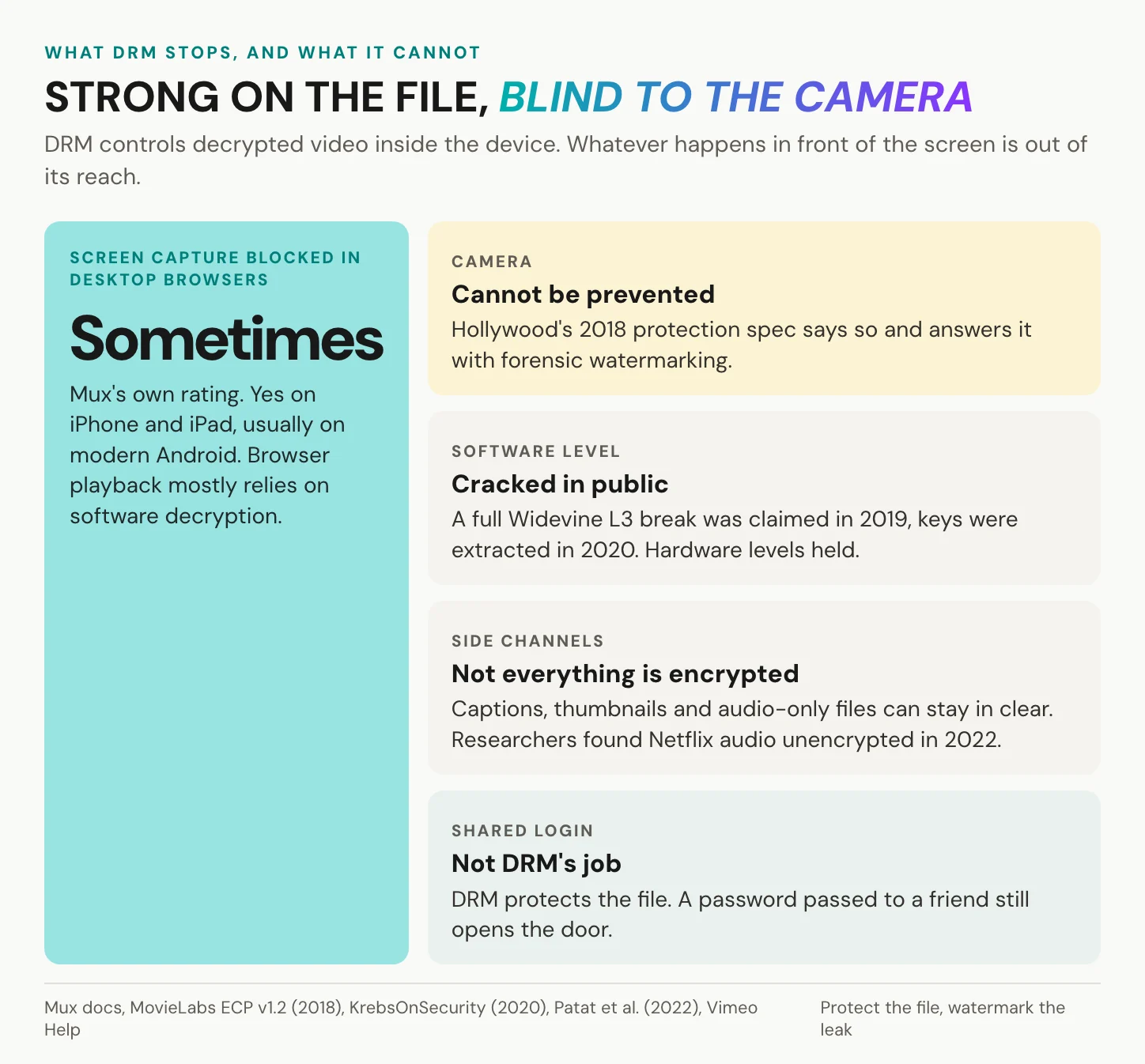
It depends on the device. Mux’s documentation rates screen-capture protection “Yes” on iPhone and iPad, “Usually” on modern Android and “Sometimes” in desktop browsers. Vimeo’s wording is just as careful: DRM “helps prevent screen recording on supported devices and browsers”. The black rectangle in your screen share comes from exactly this. On a protected output path, the decrypted picture never reaches the part of the system that recording or screen-sharing software can read. Where the path is not protected, the picture is there to capture. For a viewer, the rectangle in a meeting is therefore no fault of the call software. For a publisher, it means screen-capture protection depends on the viewer’s device, which you do not choose. So the answer is yes on some screens, no on others, and guaranteed on none.
What DRM cannot stop
First, a camera pointed at the screen. The MovieLabs specification of 2018 concedes that “camcording the screen cannot be prevented” and answers it with forensic watermarking.
DRM can stop a copy of the file. It cannot stop a camera pointed at the screen.
Second, software levels break. In January 2019 David Buchanan publicly claimed a full break of Widevine L3. A 2022 academic paper summarises that claim, and in October 2020 keys were extracted again. Third, side channels stay open: Vimeo leaves text tracks, transcripts and thumbnails unencrypted, and Mux does not protect audio-only assets. The same 2022 paper found that Netflix did not encrypt its audio with the content key, while the six other streaming apps examined did. Fourth, a shared login, because DRM protects the file, not the password.
Against the camera, the answer is a forensic watermark. It lives in the picture or the sound, not in the file’s metadata, and it is a separate technology from DRM. It prevents nothing; it identifies who leaked a copy. Because it ties a copy to a person, treat the mark as personal data from the day you plan it.
In short: DRM keeps the file inside the device. It does nothing about what happens in front of the screen or before the login.
When DRM videos will not play
Usually the device is the problem, not the video.
Why playback fails
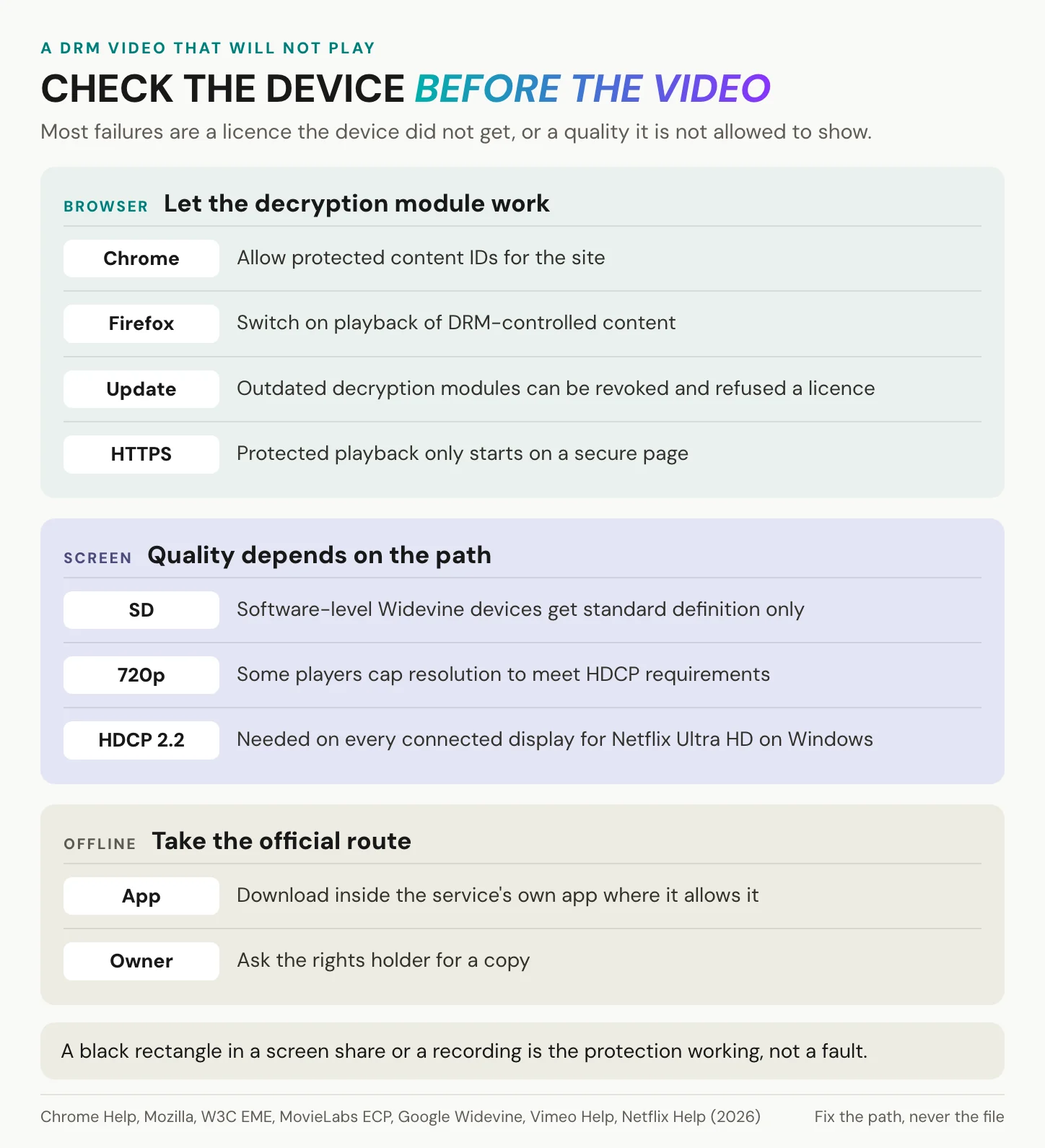
No licence, no picture. Your browser may not be allowed to use its decryption module: Chrome asks for “Protected content IDs” as a site permission, and Firefox has a setting to play DRM-controlled content. Your device may run below the minimum level the licence demands. Its decryption module may also have been revoked, which studio specifications require to be possible. The page may not be served over HTTPS. The service may not license the system your browser uses, as with Widevine in desktop Safari. Or the video sits in a third-party player that cannot request a licence at all. Work through the list from the top. The browser setting and the connection take a minute to check, while a device below the required level is a limit you cannot change from the page.
Why the picture looks worse
Here the video plays, but the licence allows less on this path. This is the security-level logic seen from the viewer’s chair. A software-level device can get less than the service’s best picture, a display without HDCP 2.2 can cost you Ultra HD, and two browsers on the same laptop can receive different maximums, as Netflix’s list shows. None of this is a fault in the file, and reloading the page changes nothing about the licence. Three checks cover most cases. Try another browser, then the service’s own app, then the display cable and any adapter in between.
In short: check the browser, the level and the cable before you blame the video. Removing the protection is not one of the fixes, and that brings in the law.
Is it legal to remove DRM?
In most countries, no.
The WIPO Copyright Treaty of 20 December 1996 obliges its parties, in Article 11, to protect effective technological measures against circumvention. The US, the EU and Germany have all written that into law. “Effective” is a legal test here. It does not ask whether a lock has ever been broken, and the EU directive names encryption and scrambling as examples.
The law protects effective measures, not unbreakable ones.
| Where | Rule | Consequence |
|---|---|---|
| United States | 17 U.S.C. § 1201, part of the DMCA since 28 October 1998: no circumvention of measures that control access to a work | Statutory damages of 200 to 2,500 dollars per act (§ 1203). Criminal penalties only for wilful circumvention for commercial advantage or private financial gain, up to 500,000 dollars or 5 years for a first offence (§ 1204) |
| US exemptions | Copyright Office rule in force since 28 October 2024 | Narrow exemptions for three years, until October 2027, when the next rule is due |
| European Union | Directive 2001/29/EC of 22 May 2001, Art. 6: protection against circumventing effective measures such as encryption or scrambling | Each member state sets its own sanctions |
| Germany | § 95a UrhG: no circumvention without the rights holder’s consent | § 108b UrhG: up to 1 year or a fine, up to 3 years if commercial. Purely private circumvention sits outside § 108b but stays prohibited under § 95a |
The legitimate routes are short. Ask the rights holder for a copy, or use the service’s own offline mode, which stores a persistent licence on your device inside the service’s app, where the service allows it. If you have an accessibility or scholarly need in the US, check the current exemptions first. This is not legal advice.
In short: removing DRM is prohibited almost everywhere, even when the protection is weak, and a licensed copy is the only clean route.
Do you need DRM video protection?
Start with what the video is for.
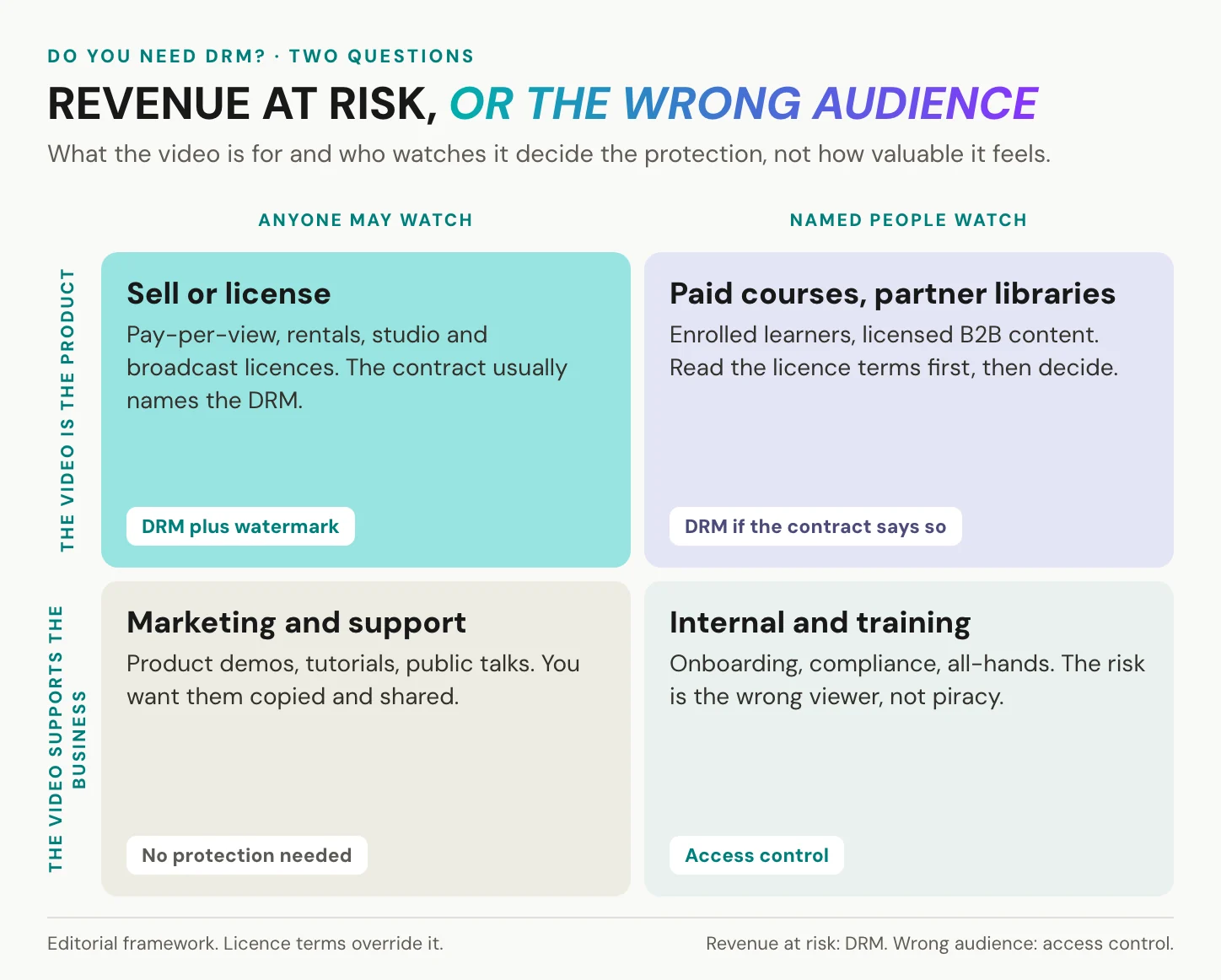
Two questions decide it. Is the video the thing you sell or license, or does it support your business, and does anyone watch, or only named people? A film you sell to the public needs DRM, often with a watermark. Paid courses and partner libraries need DRM when the contract says so. Marketing and support video needs no protection, because you want it seen, while internal and training video needs access control.
Piracy itself is real, and part of it is measured well. The EUIPO’s report of November 2024 counts 10 accesses to pirated content per internet user per month in the EU in 2023, with Germany at 7.7 per user. The loss figures are shakier. A 2019 study commissioned by the U.S. Chamber of Commerce estimated at least 29.2 billion dollars of lost US revenue a year. It assumed that 14 to 34 percent of pirated views would otherwise have been paid views, and the industry group CCIA disputed that method in March 2025. A 2020 meta-analysis found no robust evidence of an effect on sales across the literature. The case for DRM rests on your contract and your audience, not on headline losses.
When DRM is the right call
Three cases justify it. The first is licensed studio and broadcast content, where the licence names the systems and the security level, and Hollywood’s Ultra HD specification adds forensic watermarking. The second is pay-per-view, rentals and paid subscriptions, where a leaked copy is lost revenue. The third is pre-release material, where a per-viewer watermark matters as much as the encryption. If you can name the clause or the revenue a leak would break, you are in one of these cases. In practice you buy DRM through a platform or a multi-DRM vendor. It works alongside access control, not instead of it; at Mux, DRM requires signed URLs. Before you sign, ask the vendor which of the three systems it licenses, which security level it enforces for your highest resolution and whether it adds a per-viewer watermark.
What DRM costs your viewers
Vimeo offers DRM as a paid add-on, and its help page is frank about the trade. Playback may be capped at 720p to meet HDCP requirements, and protected videos do not work in third-party players. Start-up may be slightly slower. HLS and DASH downloads are disabled. At Brightcove, MP4 renditions are hidden once DRM is active, and existing videos need the support team to add it later.
The licence request also touches data protection: EME requires consent before a browser uses distinctive identifiers, and it lets users clear them. The 2022 Widevine paper warned that device identifiers let licence servers profile viewing. The EDPB’s Guidelines 2/2023, final version October 2024, place information read from a device within the ePrivacy consent rule, not only cookies. Whether a licence request is strictly necessary under section 25 TDDDG is a question for your data-protection officer.
When access control is enough
For most business video, the risk is the wrong viewer, not a pirate. Token and signed-URL systems are strong at deciding who gets a stream. Cloudflare Stream’s signed tokens are valid for one hour by default, and api.video’s private videos use single-use tokens with a 24-hour session. What neither decides is what an authorised viewer does next. For a training video, that is usually an acceptable gap.
YouTube’s reach is unmatched, and Unlisted is a convenient way to share, but Unlisted means anyone with the link can watch and pass it on. For onboarding, compliance and all-hands recordings, access control is the proportionate answer. Add a watermark only if insider leaks are the specific risk. For making the videos themselves, see how to create training videos.
If a leaked copy costs you revenue, you need DRM. If it costs you embarrassment, you need access control.
In short: DRM is for videos you sell or license under contract. For videos that inform, train or sell something else, decide who may watch and where the player may appear.
Your videos need the right audience rather than DRM? Create an alugha account and decide who may watch before your first project goes live.
Where alugha fits, and where it does not
Our player does not add DRM encryption to your videos. There is no Widevine, FairPlay or PlayReady, no licence server, no screen-capture blocking and no watermarking. We offer no expiring or per-recipient links and no view caps. We encode at 540p, 720p or 1080p, with 1080p on a paid tier, so Ultra HD is not on offer either. If a licence requires multi-DRM, or the video itself is what you sell, choose a DRM-capable host. That is not us. And if a video’s only job is reach, YouTube’s audience is hard to beat, so you do not need us for that either.
What we do is protect access. Every project is Private, Public or Not listed. Every language track has its own state, Private, Playable or Hidden, so one language can wait while the others are live. One switch, “Prevent this video from being embedded”, stops our player from working on any website. Folder-level permissions decide which users reach which sets of content. On a paid tier, you can also restrict the domains where the player embeds, and every stream goes over HTTPS.
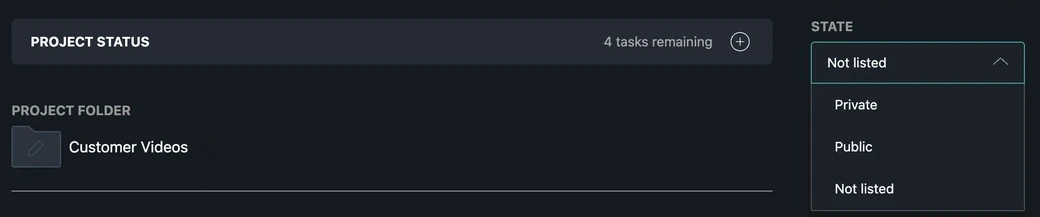
We protect access, not the file.

That has an honest edge: Not listed is a link, not a lock, and a forwarded link keeps working. Without DRM, a stream a viewer can play is a stream a determined viewer can keep. That is true for us, and for every host that does not encrypt.
On privacy, our position is plain: hosting in Germany and the EU, no third-party advertising cookies and trackers. Under section 25 TDDDG, a player without third-party advertising cookies and trackers narrows the consent question, but it does not remove it. Ask any host for its Art. 28 processing agreement before the first upload, us included. The wider picture is in GDPR-compliant video hosting.
In practice: Teejit’s hotel compliance training runs 50 training videos in 20 languages, embedded through our player in the MyHotelHub learning platform. Training needs the right audience in the right language, with every language under one link, and it does not need DRM.
In short: if a contract or a paywall demands DRM, use a DRM host. If the job is getting the right people to the right video, that is what we built our player for.
Frequently asked questions about DRM video
How do I play DRM-protected videos?
Use a current browser or the service’s own app. Allow protected content in your browser settings: in Chrome that is the site permission for protected content IDs, in Firefox the setting to play DRM-controlled content. Open the page over HTTPS. If the video plays but looks soft, the licence limits quality on that path. Try another browser, or check the display connection.
Can I unlock DRM-protected videos?
Not lawfully without the rights holder’s consent. Removing DRM counts as circumvention under the DMCA in the United States, under Article 6 of Directive 2001/29/EC in the EU and under § 95a UrhG in Germany. That holds even when the protection is weak. The lawful alternatives are the service’s own offline mode or a licensed copy from the rights holder.
Is stripping DRM illegal?
Yes, in the United States, the EU and Germany. The US allows narrow exemptions, renewed in October 2024. US statutory damages run from 200 to 2,500 dollars per act of circumvention. In Germany, criminal liability starts where circumvention is not purely for private use, and even private circumvention stays prohibited under § 95a UrhG. Not legal advice.
How do I add DRM to my own videos?
Through a video host or multi-DRM service that supports Widevine, FairPlay and PlayReady. It packages your files, runs the licence server and supplies a compatible player. Doing it yourself takes a licence agreement with Google for Widevine and a FairPlay certificate, which Apple issues only to teams that run a consumer streaming service. Our player does not add DRM.
Does DRM work on iPhone and Android?
Yes: Apple devices use FairPlay and Android uses Widevine. Protection strength differs, though. Mux lists screen-capture protection as “Yes” on iPhone and iPad and “Usually” on modern Android, with HDCP enforced on iPhone and iPad but not on Android. Devices without secure hardware play at a lower security level, which a service may answer with a lower resolution.
Is DRM good or bad?
Both sides have a point. Tim Berners-Lee argued in February 2017 that without a W3C standard, browser vendors would build DRM outside it anyway, and that EME can sandbox the DRM code. The W3C also presented EME as the end of plug-ins such as Flash and Silverlight. Against it, the EFF resigned from the W3C on 18 September 2017, the day EME became a Recommendation.
Do training videos need DRM?
Usually not, because the risk with onboarding and compliance video is the wrong audience, not piracy. Decide who may watch, where the player may appear and in which learning platform it runs; embedding in Moodle is one common case. Add DRM only if a licence for bought-in content demands it, for example a course library you license from a third party.
Getting started
Think back to the black rectangle in the screen share: that is DRM doing its job for a film studio. For your onboarding video, the job is the opposite. The right people should see it, on any screen, in full quality.
- Sort your videos with the two questions: sold or supporting, anyone or named people.
- For anything you sell or license, ask the licensor which systems and security level the contract names, then choose a host that supports all three.
- For everything else, set who may watch, decide where the player may appear, and keep one master copy.
Protect the audience first. Protect the file when a contract asks.
Not sure which side of the line your videos sit on? Book a call with our team, or create an alugha account and start with one project.