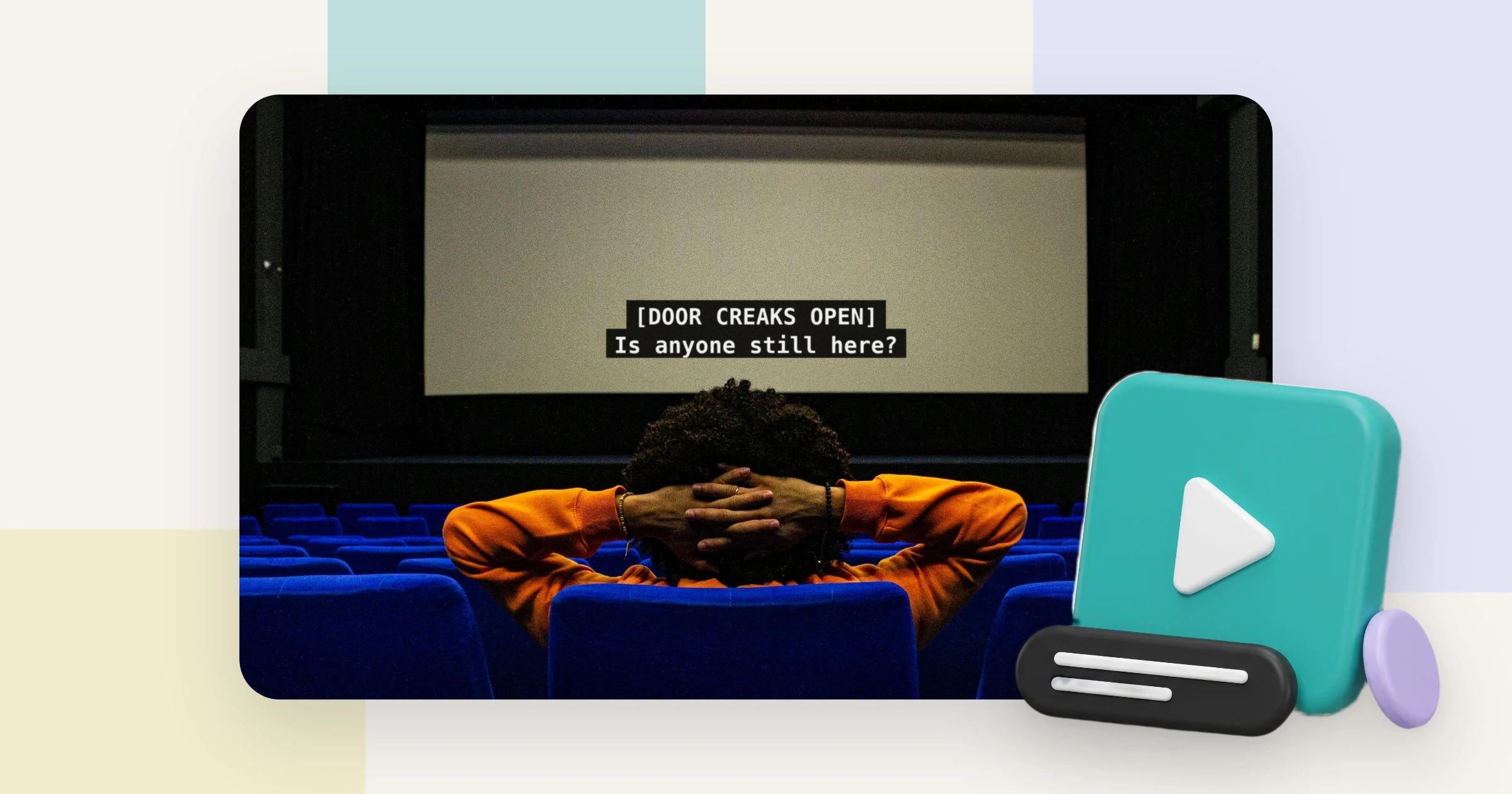
Closed captions are for viewers who cannot hear the sound. Subtitles are for viewers who cannot understand the language. The HTML standard, which browsers implement, draws the line in exactly that place: a subtitle track is meant for the moment “when the sound is available but not understood”, a caption track for the moment “when sound is unavailable or not clearly audible”. You have seen the split without naming it. Open the subtitle menu on Netflix and one language appears twice: English, and English [CC]. The second entry adds what the first leaves out. The door that slams off screen. The music under the scene. The name of whoever speaks in the dark. Two more terms stand beside these, SDH and open captions, and most of the confusion lives there. Read on and you can name all four, choose the right one for each of your videos, read the labels YouTube, Zoom and Teams put on them, and turn one kind of track into another without starting over.
Key takeaways
- The HTML standard defines 5 text track kinds. Subtitles serve viewers who hear the sound but not the language, captions serve viewers who cannot hear it, whether deaf or muted.
- Every text track answers 3 questions: what it contains, whether the viewer can switch it off, and which language it speaks. Most confusion comes from blending content and control.
- SDH is a label streaming services and device makers use, not a standard. Netflix lists it as English [CC], and its style guide, updated 2025, puts sound cues in square brackets.
- Open captions are burned into the picture. EN 301 549 clause 7.1.4 exempts such fixed text from its customisation rule, so a viewer who needs larger letters has nothing to adjust.
- WCAG 2.2 success criterion 1.2.2, Level A, asks for captions: speech plus meaningful sound. A dialogue-only subtitle track in the source language does not meet it on its own.
- In 4 of 6 common use cases, the answer is a source-language caption track plus one subtitle track per language. Broadcast follows its spec, and muted social feeds are the exception.
- Key takeaways
- Closed captions vs subtitles in one line
- Four terms on three axes
- SDH and open captions, the other two
- All four side by side
- What Netflix, YouTube and Zoom call them
- Closed caption vs subtitle, by use case
- How to turn one into another
- Which one the law counts
- Who actually turns them on
- Captions and subtitles on one player
- Frequently asked questions about closed captions vs subtitles
- Getting started
Closed captions vs subtitles in one line
The difference is who the text is for. Closed captions put speech and meaningful sound on screen for viewers who cannot hear. Subtitles put the dialogue, usually translated, on screen for viewers who hear it but do not understand the language.
Captions are written for people who cannot hear the sound. Subtitles are written for people who cannot understand the words.
The standards say the same thing in drier words. WCAG 2.2, the W3C’s accessibility guideline, calls captions “similar to dialogue-only subtitles” and then lists what they add: sound effects, music, laughter, speaker identification and location. DCMP’s Captioning Key, the style guide of the US Described and Captioned Media Program, treats subtitles as a translation of dialogue.
One line of a film, written both ways, shows the gap:
- As a subtitle: Get out.
- As a caption: [door slams] [Marta] Get out.
Marta is off screen, so the caption names her. The slam matters to the scene, so the caption describes it, in brackets and in lower case, the way Netflix’s English style guide asks. The subtitle does neither, because its viewer heard both.
One warning before you lean on the words alone. WCAG adds in a note that “in some countries, captions are called subtitles”. The UK is one of them, as the naming section below shows. For the full definition, with formats and quality rules, read what closed captions are.
Four terms on three axes
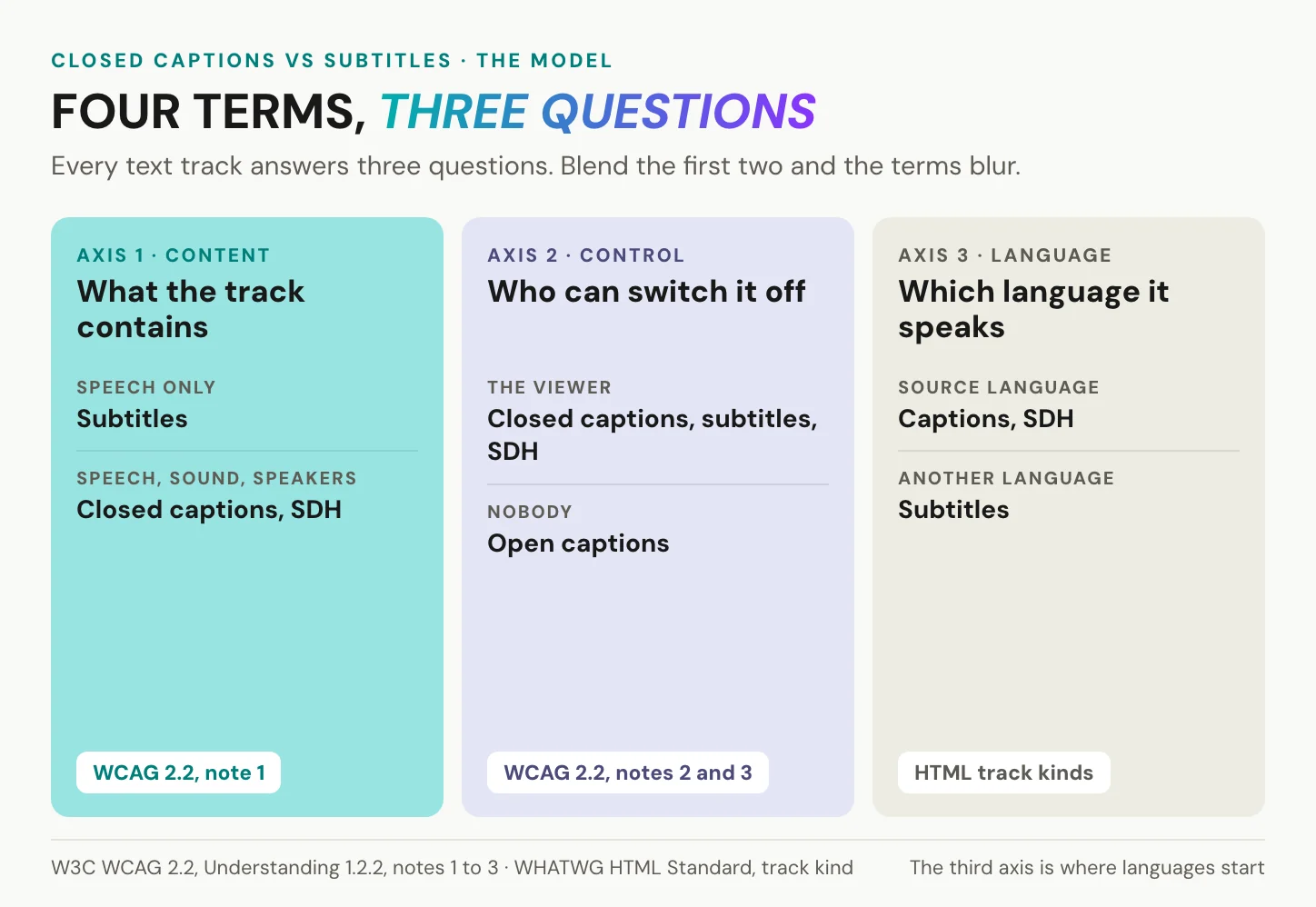
Two questions sort the four terms. A third decides your workload. Every text track on a video answers all three: what it contains, who can switch it off, and which language it speaks. Captions and subtitles differ on the first. Closed and open captions differ on the second. The third is where multilingual video begins.
What the track contains
Content is the first axis. A track with speech only is a subtitle track. A track with speech, speaker names and the sounds that carry meaning is a caption track. WCAG’s intent for success criterion 1.2.2 spells out the second kind: captions “identify who is speaking and include non-speech information conveyed through sound, including meaningful sound effects”. The word meaningful does the work. A phone that rings and gets answered earns a cue. Traffic under an interview does not. Music earns a cue when it carries the mood or the plot, as in [tense music]. So does a change of voice that changes the meaning, such as [whispering]. The HTML standard lists the same ingredients for a caption track: dialogue, sound effects, relevant musical cues and other relevant audio information. SDH sits on the caption side of this line, whatever its file is called.
Who can switch it off
Control is the second axis. WCAG defines closed captions as captions that “can be turned on and off with some players”. Open captions “cannot be turned off”, for example when the text is embedded in the image. Notice what this axis ignores. A burned-in translation is an open subtitle, and a switchable track with sound cues is a closed caption. Closed and open describe the delivery and say nothing about the words. On the web, closed means a separate file. The player loads a WebVTT or SRT track next to the video and draws the text on top, so the viewer can switch it off and, on players that support it, resize it. Open means pixels. The words are part of every frame, in every copy, and no player can reach them.
Which language it speaks
Language is the third axis. Captions live in the source language, because their viewer needs the audio of this video, not a version of it. Subtitles are usually a translation. The HTML standard allows either, “transcription or translation of the dialogue”, but the translated kind is what most people mean. This axis turns one decision into a count. A German video with an English and a French audience needs one caption track and two subtitle tracks. Dubbing is the same idea on the audio side, where the voice changes language instead of the text, and what dubbing is covers that route.
In short: content separates captions from subtitles, control separates closed from open, and language tells you how many tracks a multilingual video needs.
SDH and open captions, the other two
Two terms cause most of the mix-ups: one is a label without a standard, the other a caption nobody can switch off.
What SDH is, and where the label comes from
SDH stands for subtitles for the deaf and hard of hearing. It is caption content delivered as a subtitle track: dialogue plus sound cues and speaker names. No standards body defines the term. Streaming services and device makers use it as a label, and Apple’s accessibility setting reads “Closed Captions + SDH”, one switch for both. Netflix’s English Timed Text Style Guide, last updated 2025-12-19, sets the house rules: sound cues and speaker IDs in square brackets, lower case except for proper nouns, speaker IDs only when the speaker cannot be seen.
On DVD and Blu-ray, SDH usually ships as bitmap images laid over the picture. On the web it is a text track like any other. The term even has a legal anchor in Europe: recital 23 of Directive (EU) 2018/1808, which amended the Audiovisual Media Services Directive, names “subtitling for the deaf and hard of hearing”.
Forced subtitles, a fifth term
Delivery specs add one more label. Netflix calls it a Forced Narrative subtitle: a text overlay for foreign-language lines and on-screen text the viewer is meant to understand. It runs only when subtitles and CC are set to off. A character who switches to Russian for one sentence of an English film gets one. Netflix names three uses: dialogue in another language, translated on-screen text such as a sign or a letter, and dialogue that is hard to make out. Forced subtitles are not an accessibility track. A hearing viewer who speaks only English needs them too, which puts them on the subtitle side of the first axis. For your own video the lesson is simple. If a line in another language matters to the story, it needs text even for viewers who switched everything off. On the web that means burning that one line in, or setting a subtitle track to start on.
Open captions: text in the picture
Open captions are burned into the image. Nobody can switch them off, and WCAG still counts them as captions when they carry the sound information. Their strength is real. On a feed that autoplays muted, they are the only version guaranteed to be seen, on every device and in every repost.
Their cost shows up in the European standard EN 301 549. Clause 7.1.4 asks players to let viewers adapt how captions are displayed, “except where the captions are displayed as unmodifiable characters”, and a note names bitmap subtitles as the example. Open captions are exempt from the rule. That is exactly the problem: the viewer who needs larger letters or stronger contrast has nothing to adjust.
Open captions are the one version of the four that nobody can switch off, and nobody can enlarge.
In short: SDH is caption content in a subtitle track, and open captions are captions that nobody can turn off or adapt.
All four side by side
Read down a column for a definition, across a row for the difference that matters to your video. File formats such as WebVTT and SRT are in our closed captions explainer.
| Closed captions | Subtitles | SDH | Open captions | |
|---|---|---|---|---|
| Written for | viewers who cannot hear | viewers who do not understand the language | viewers who cannot hear, in a subtitle track | everyone, always on |
| Speech | yes | yes | yes | yes |
| Sound cues and speaker IDs | yes | no | yes | if the creator adds them |
| Language | source | usually a translation | usually the source | whatever was burned in |
| Viewer can switch it off | yes | yes | yes | no |
| Viewer can resize or recolour | on players that support it (EN 301 549, 7.1.4) | same | same | no |
| Counts for WCAG 1.2.2 | yes | not on its own | yes | yes, if sound is included |
What Netflix, YouTube and Zoom call them
Platforms name tracks their own way. Some merge the terms, because one menu is simpler than two.
Netflix deserves credit first. “English [CC]” is a clear label, and it tells a deaf viewer exactly which entry to pick. Still, it is a house label for SDH, and SDH is not a standard. YouTube deserves credit too. It generates free automatic captions by speech recognition, in 71 languages on its help page in September 2026. Its menu reads “Subtitles/CC” and treats both as one track type. Whether a track serves a deaf viewer depends on what the uploaded file contains, not on the button.
| Platform | What it shows or asks for | What it actually is |
|---|---|---|
| Netflix | “English” and “English [CC]” | dialogue subtitles and SDH; forced narrative runs when both are off |
| YouTube | “Subtitles/CC” menu; automatic captions from speech recognition | one track type; accessibility depends on what the uploaded file contains |
| Vimeo | upload asks for Type: Subtitle or Caption, as SRT or WebVTT | two track types, and the uploader decides |
| Zoom | automated captions; translated captions | captions in the spoken language; the translated ones are subtitles by the HTML definition |
| Microsoft Teams | live captions; live translated captions | the same split as Zoom |
| Apple devices | “Closed Captions + SDH” setting | one switch that prefers SDH and CC tracks when they exist |
| Browsers (HTML) | <track kind="subtitles"> or kind="captions" | two kinds defined apart; subtitles is the default when kind is missing |
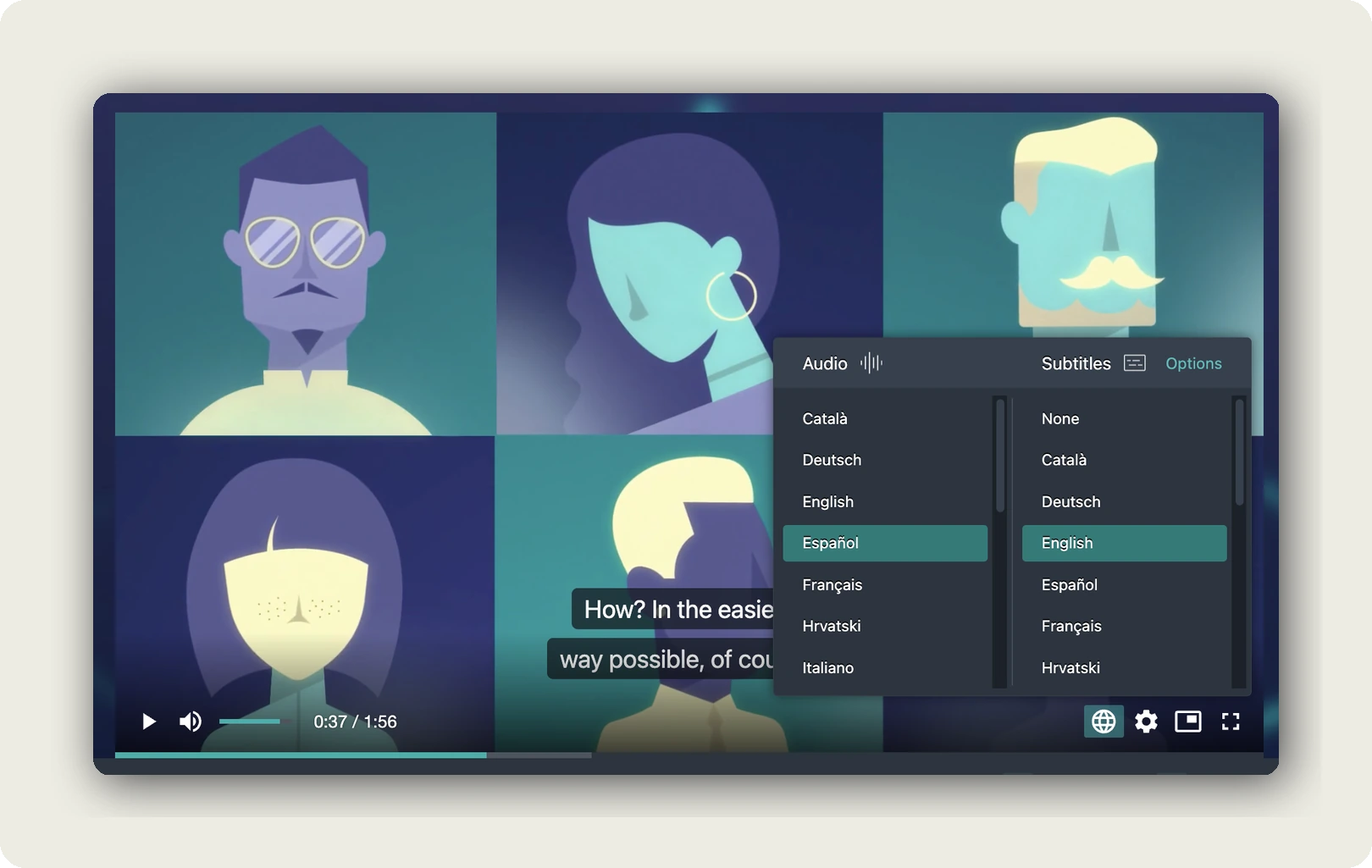
| Our player | an Audio column and a Subtitles column | audio language and subtitle language chosen independently |
Zoom and Teams earn the same concession. Their live captions are real captions of the room’s language, written as people speak. Their translated captions, which on both platforms need a higher paid tier or a paid add-on, are subtitles by the HTML definition. The sound is available, but the language is not understood.
Captions or subtitles in the UK and US
British usage folds both into one word. The BBC calls its same-language captions subtitles. Ofcom’s Code on Television Access Services, updated 2024-04-15, sets its quotas for “subtitling”: 80 percent of a channel’s non-excluded programmes from its tenth anniversary, 100 percent on BBC channels. So in the UK, “subtitles” covers both kinds. The fuller phrase “subtitles for the deaf and hard of hearing”, which EU law uses too, covers what streaming menus label SDH. In the US, “captions” is the accessibility track and “subtitles” the translation. If you publish for both markets, name each track by what it contains, such as “English, with sound cues”, instead of trusting one word to cross the Atlantic.
In short: read the platform label as a menu name, not a definition. Ask what the track contains and whether it is translated, and you know what you have.
Closed caption vs subtitle, by use case
One default covers most business video. A closed caption track in the source language, plus a subtitle track for each language your audience speaks. Four of the six cases below follow it. Broadcast delivery follows the buyer’s spec instead. The muted social feed is the one place where open captions earn their limits.
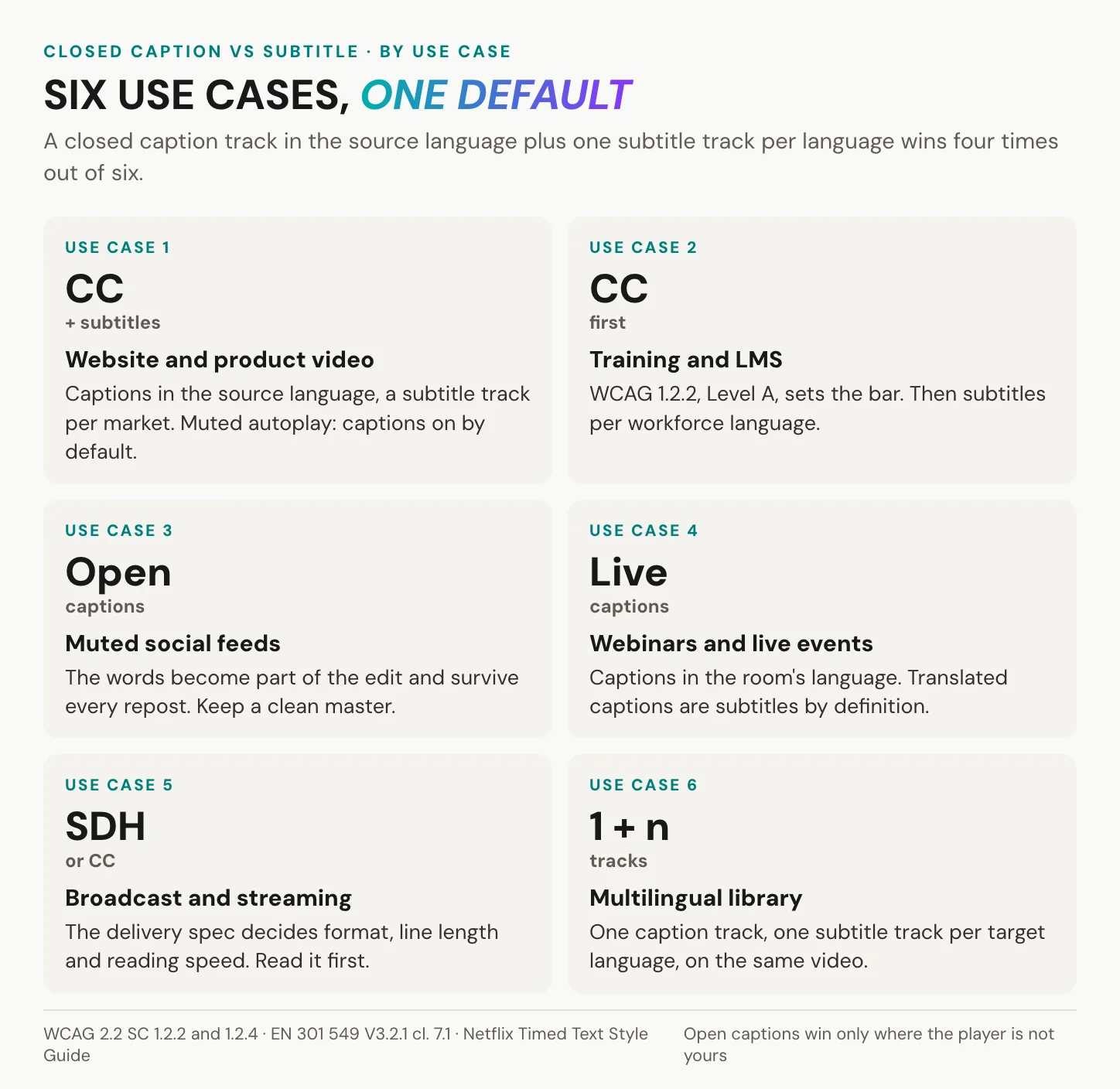
Website and product video
Visitors arrive with the sound off at work and on at home. Some cannot hear at all. Put a closed caption track in the source language on every product and explainer video, then add a subtitle track for each market you sell into. If the video autoplays muted, turn captions on by default in the player rather than burning them in. The text then stays a track, and your master stays clean. Use sound cues sparingly here. A product demo rarely needs more than [upbeat music] at the start and a cue when the interface makes a sound the viewer should notice. When the product changes and you re-cut the demo, the caption file changes with it, which is one more reason to keep text out of the picture. A transcript is the fastest start: how to transcribe a video to text. Verdict: captions first, subtitles per market.
Closed captions vs subtitles for training video
Training is where the choice stops being optional. Onboarding and compliance courses often sit under an accessibility policy, and those policies point to WCAG 2.2 success criterion 1.2.2, Level A. It asks for captions, not dialogue subtitles. Learners use them well beyond need. In a 2016 Oregon State University Ecampus study of 2,124 students at 15 US universities, co-funded by a captioning vendor, 98.6 percent of the students who used captions called them helpful, and 75 percent of them used captions as a learning aid. The reasons are ordinary: a noisy open-plan office, a trainer’s accent, a technical term the learner wants to read twice. Production advice sits in how to create training videos. Verdict: captions first, then subtitles per workforce language.
Social feeds that autoplay muted
Here open captions win, and for a good reason. The words become part of the edit. They survive every repost, and no platform setting can hide them. Keep a clean master without text all the same, because burned-in text cannot be turned back into a track. TikTok has generated its own auto captions since 2021-04-06, so check that your burned-in text does not end up stacked on the platform’s. Size the text for a phone held at arm’s length, and keep it clear of the bottom strip, where the platform draws its own buttons and descriptions. A 9:16 cut and a 16:9 cut need their own line breaks, so export one version per aspect ratio. Pulling the words out of a clip is covered in TikTok transcripts. Verdict: open captions, with the clean master kept.
Webinars and live events
Live video has its own success criterion. WCAG 1.2.4, Captions (Live), sits at Level AA. EN 301 549 clause 7.1.2 asks the player to show live captions within 100 ms of the moment they reach it. Zoom’s and Teams’ translated captions add further languages, and by definition those are subtitles. Live captions are written in seconds, so they carry more errors than a prepared track. Send the captioner, or the tool, a list of names and technical terms before the event. Plan a second pass as well. Once the recording goes on demand, it is prerecorded video and 1.2.2 applies: correct the live text, add the sound cues and speaker names, and publish it as a proper caption track. Verdict: live captions in the spoken language, translated captions on top where the audience needs them.
Broadcast and streaming delivery
Here the delivery spec decides, not you. Netflix asks for two lines at most, 42 characters per line and up to 20 characters per second for adult content. US television captions follow the FCC’s quality rules in 47 CFR 79.1: accurate, synchronous, complete, and placed so they do not cover faces or on-screen text. This is also the home of the CTA-608 and CTA-708 caption formats. The viewer keeps some control even here. US digital television receivers must let viewers choose among eight fonts and change caption size, colour and background, under 47 CFR 79.102. Netflix, for its part, keeps each subtitle event on screen for at least five-sixths of a second and no more than seven seconds. Verdict: SDH or closed captions, exactly as the spec defines them.
A library in several languages
One caption track in the source language, one subtitle track per target language, all on the same video. Not one upload per language, because every copy splits your view counts, your links and your corrections. Name each track by its language and its kind, so a viewer who needs sound cues finds them on the first try. Fix a mistake in the source caption before you translate, not after, or you will fix it once per language. The route from transcript to translated track is in how to translate a video. Verdict: one video, one caption track, one subtitle track per language.
In short: choose by two viewers, the one who cannot hear and the one who cannot understand. Most business video has both, so it needs both tracks.
How to turn one into another
Tracks are not fixed. Three of the four conversions are edits, and the fourth is a restart.
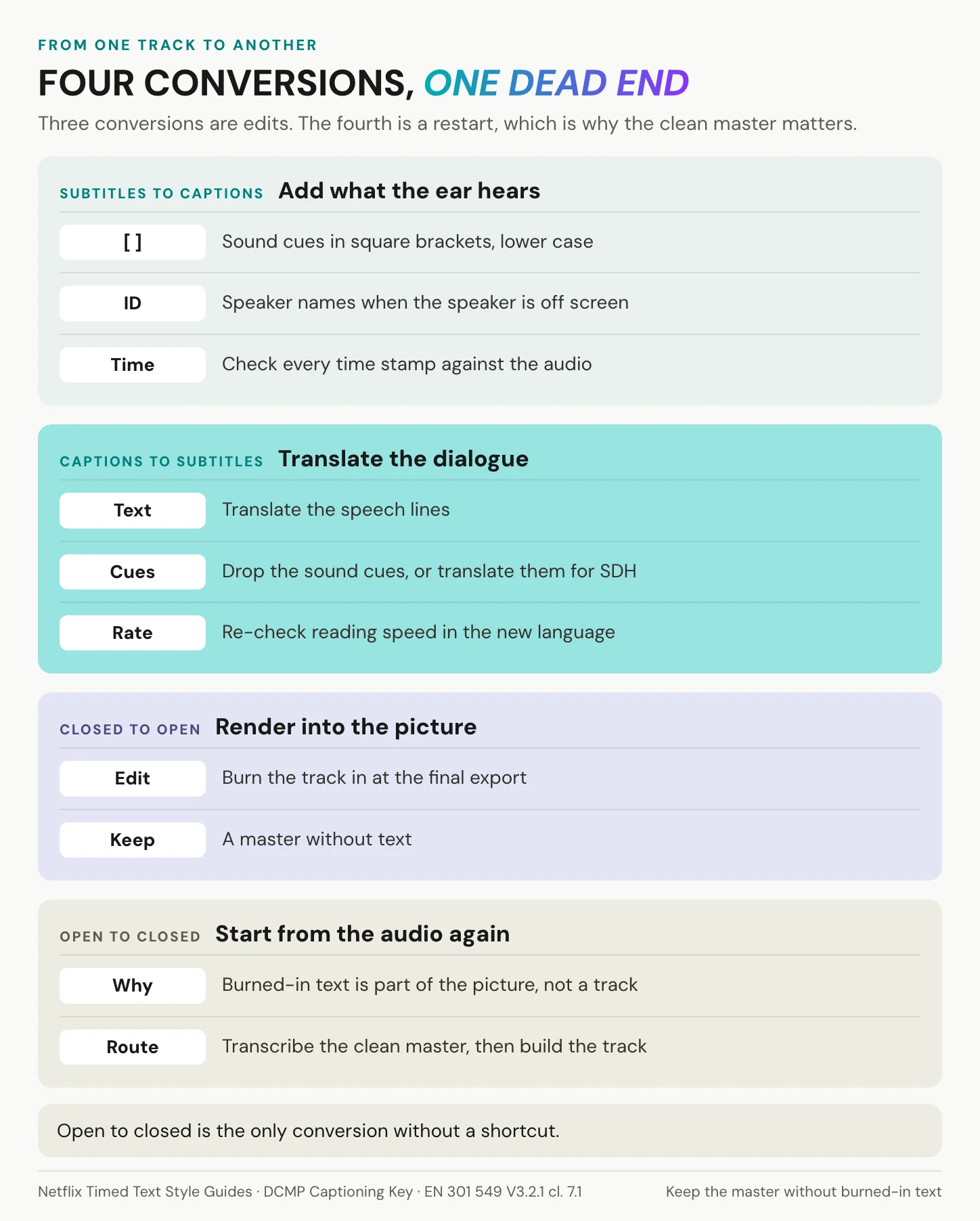
Subtitles to closed captions
Start from the subtitle file in the source language and add what the hearing viewer did not need. Sound cues go in square brackets, in lower case: [phone rings], [tense music]. Speaker names go in only where the speaker cannot be seen. Keep each caption to two lines. Then check every time stamp against the audio. EN 301 549 asks the player to show a caption within 100 ms of its time stamp, so the time stamp itself has to sit on the speech. For educational media, DCMP also caps the presentation rate. The limit is 130 words per minute at the lower level, 140 in the middle and 160 at the upper level. The full quality rules are in what closed captions are.
Captions to subtitles in another language
Translate the dialogue lines. For a plain subtitle track, drop the sound cues, and for SDH in the new language, translate them too. Then re-time, because a translated line can run longer than its source. A cue that stayed under Netflix’s English limit of 20 characters per second can break the target language’s limit. Keep the time codes of the source track as the skeleton. Most cues keep their in and out points, and only the lines that now read too fast need a split or a shorter wording. Machine translation gives you a fast first draft. Someone who knows the subject should still read every line before the track goes live, because a wrong term in a safety course is not a style problem. The full workflow is in how to translate a video.
Between closed and open captions
Closed to open is an export setting. Burn the captions in during the final export in your editing tool, and style them for the smallest screen they will play on: large type, a solid or semi-transparent box behind the text, and a position clear of faces. Then keep the clean master and the caption file, because you will need both for the next language.
Open to closed has no clean route. Burned-in text is part of the picture, not a track, and no player can lift it out. Go back to the clean master or the audio and transcribe again. How to transcribe a video to text walks through the process, and a video transcript example shows what the finished text looks like.
In short: three conversions are edits and the fourth is a restart. The master without burned-in text is the asset to keep.
Build the caption track and the subtitle tracks for one video in a single project. Create an alugha account and upload your first video.
Which one the law counts
The rules name captions, not subtitles. That one word decides most compliance questions.
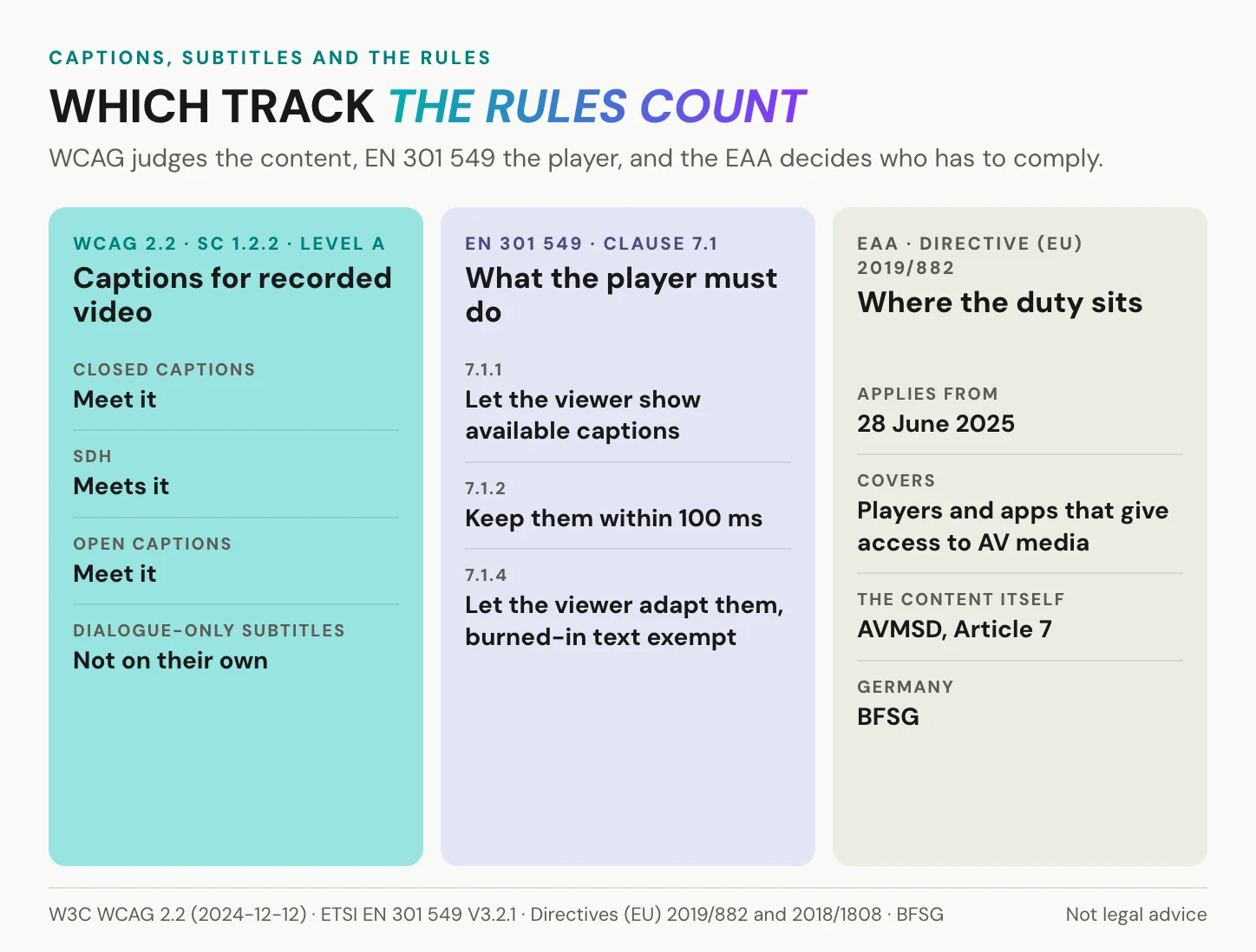
WCAG and EN 301 549
WCAG 2.2 asks for captions at two levels: success criterion 1.2.2 for prerecorded video at Level A, and 1.2.4 for live video at Level AA. A dialogue-only subtitle track in the source language does not meet 1.2.2 on its own. It lacks the speakers and sounds the criterion names. EN 301 549 V3.2.1, the European standard for accessible ICT, maps web content to WCAG 2.1 A and AA. Then it adds duties for the player. Clause 7.1.1 asks for a way to display the captions that exist. Clause 7.1.2 sets synchronisation within 100 ms. Clause 7.1.4 asks that viewers can adapt how captions look, unless the text is unmodifiable. Clause 7.1.5 adds a mode that speaks subtitles aloud, for viewers who cannot read them.
Europe: the EAA regulates the player
The European Accessibility Act, Directive (EU) 2019/882, has applied since 2025-06-28. It covers “services providing access to audiovisual media services”: the players, apps and guides people use to find and watch video. It does not require captions on every video. It requires the access layer to carry and expose the captions that exist. The content itself falls under Article 7 of the Audiovisual Media Services Directive. For a company that publishes training or product video on its own site, the practical reading is short. Your player has to show the captions you provide and let viewers switch them on. The captions themselves come from whatever rule covers your content, most often an accessibility policy or a contract that names WCAG. In Germany the EAA arrives as the Barrierefreiheitsstärkungsgesetz, BFSG, in force since the same date. The enterprise side is in WCAG 2.2 for enterprise video hosting.
United States: the FCC, not the ADA, for television
You will often read that the ADA requires captions on television. The instinct is right. The statute is not. Television captioning is FCC regulation, 47 CFR 79.1. Programmes that aired on TV and then stream online fall under the CVAA, with FCC rules effective since 2012. The ADA enters through the web: Title II requires state and local governments to meet WCAG 2.1 AA. An interim final rule of 2026-04-20 moved the deadlines to 2027-04-26 for entities serving 50,000 people or more, and to 2028-04-26 for smaller ones and special districts. Federal agencies follow Section 508, which points to WCAG 2.0 A and AA.
In short: WCAG decides whether a track counts, EN 301 549 what the player must do with it, and the EAA who has to comply. This is not legal advice.
Who actually turns them on
Most people who use subtitles can hear.
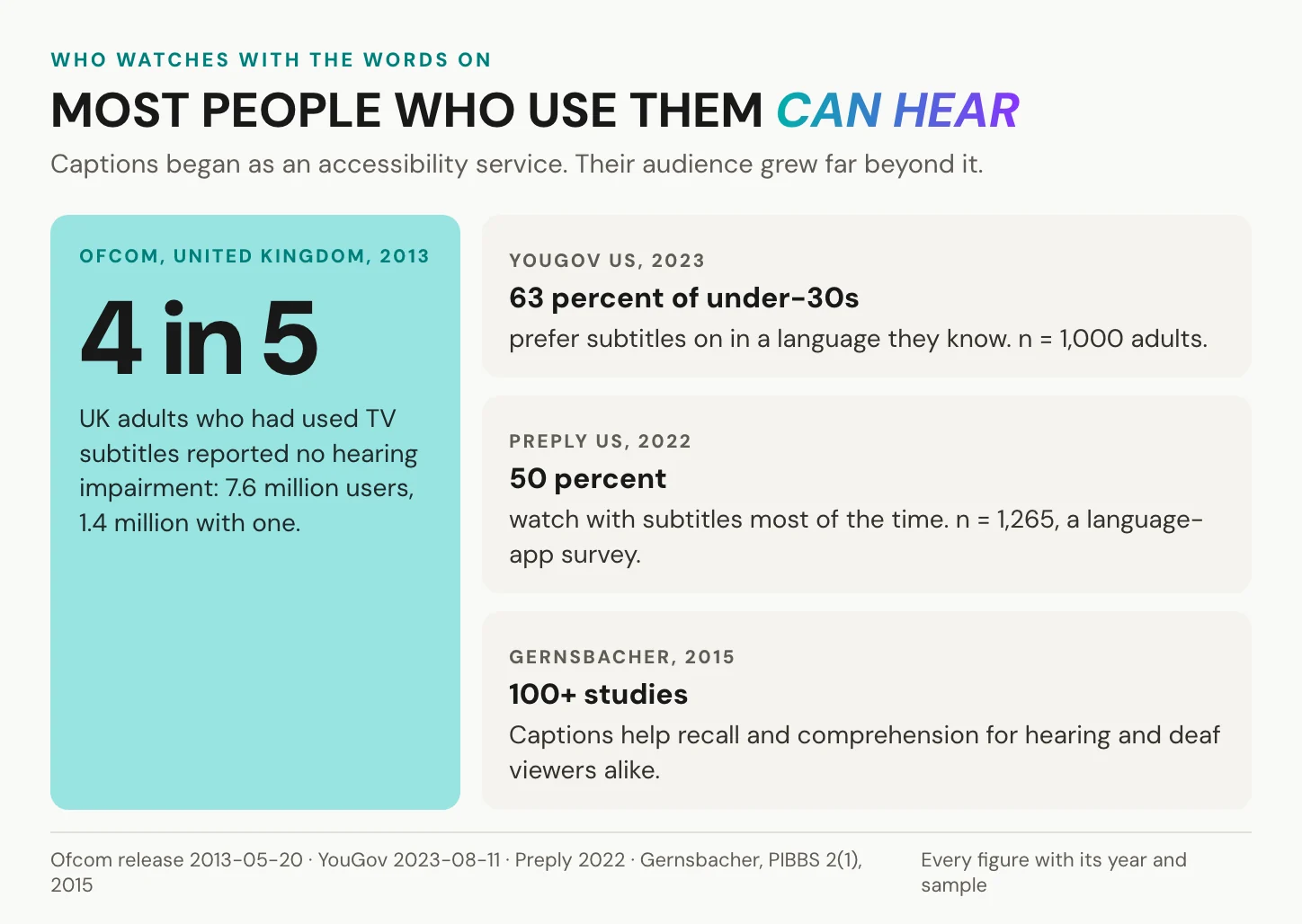
Ofcom reported in 2013 that about 7.6 million UK adults had used subtitles on television, and 1.4 million of them had a hearing impairment. That leaves about 6.2 million, roughly four in five subtitle users, with no reported hearing impairment. Younger viewers lead. YouGov asked 1,000 US adults in 2023: 63 percent of those under 30 prefer subtitles on when watching TV in a language they know, against 29 percent of those aged 45 to 64. A 2022 survey of 1,265 Americans by Preply, a language-learning app, found that 50 percent watch with subtitles most of the time. Among Gen Z it was 70 percent, and 55 percent of all respondents said dialogue is harder to hear than it used to be.
The benefit goes past preference. Morton Ann Gernsbacher’s 2015 review of more than 100 studies found that captions help viewers summarise main ideas, recall facts and define words, hearing and deaf viewers alike. And the need is large: the WHO counts 430 million people who require rehabilitation for disabling hearing loss, in its fact sheet of 2026-03-03.
Two figures travel further than their sources. “85 percent of Facebook video is watched without sound” began in a 2016 Digiday piece in which two publishers described their own pages. It was never a Facebook figure, and it has no denominator. The line that 80 percent of caption users are not deaf or hard of hearing comes from a 2019 online survey by Verizon Media and Publicis Media of 5,616 US adults aged 18 to 54. The survey is real, but its original release has been taken down, so Ofcom’s figures are the safer quote.
In short: most subtitle users can hear, and the young lead. Of the two most repeated numbers, one never had a source and the other has lost its original release.
Captions and subtitles on one player
Start with what we do not do: we do not decide what a track is. Our speech-to-text transcribes the speech and detects who is speaking. The [door slams] that turns a track into captions or SDH is yours to type in the editor. SDH is what you get when you add those cues to a subtitle track. Our documented exports are WebVTT, SRT and plain text, so a broadcast format such as SCC or EBU-STL needs a converter. Uploads encode at 540p, 720p or 1080p.
You may not need us at all. A single-language public video already on YouTube is best left there, with its caption upload and its reach. A caption file for a broadcast or disc pipeline belongs with a specialist tool. A one-off social clip whose captions are part of the edit needs an editor, not a host.
Where we help is the multilingual case. One video, one URL, every language as its own audio track and its own subtitle track. The viewer chooses audio and subtitles independently, English audio with French subtitles if that is what they need. The switch takes effect without a reload. The first language follows the browser’s Accept-Language header and falls back to the project’s default track, as the automatic language switcher article shows.
Captions and subtitles are not two files on two platforms. They are two switches on one player.
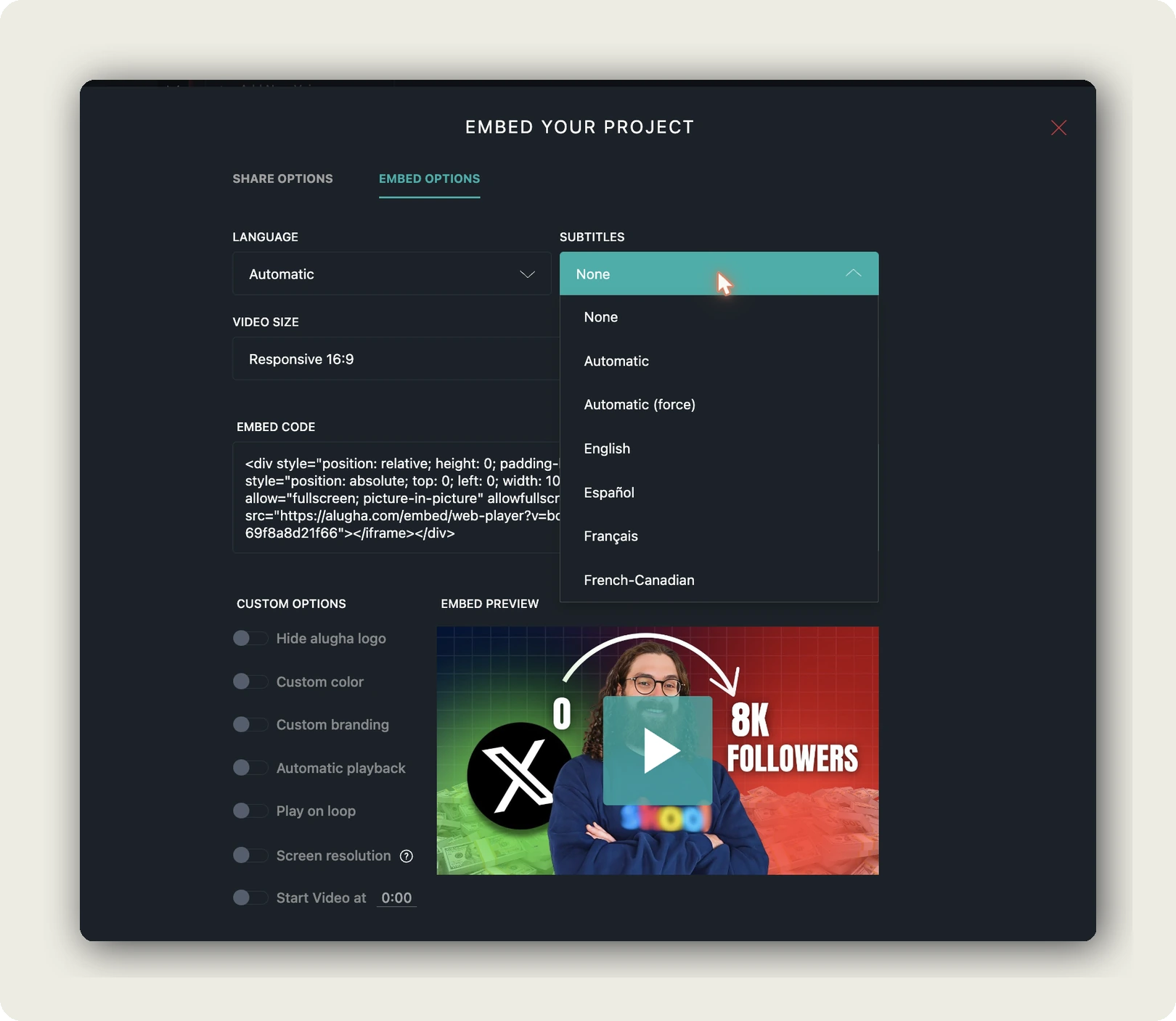
The embed settings handle the muted autoplay. The SUBTITLES option takes four kinds of value. None is the default: viewers switch subtitles on themselves. Automatic starts in the browser’s language when that track exists. Automatic (force) always shows subtitles and falls back to the best available track. A fixed language gives every visitor the same starting track. So captions can be visible from the first frame without being burned into the picture, as automatic subtitles for embedded videos shows.
When another system needs the files, export any language’s track as WebVTT, SRT or plain text. Exporting needs a paid tier. The steps are in export subtitles.
For public video, YouTube’s reach and free automatic captions usually win. Internal and regulated video changes the calculation, because the accessibility file has a second half: who processes the viewer’s data when the player loads. Our hosting is in Germany and the EU, and the player carries no third-party advertising cookies and trackers and shows no ads. That keeps the data inside one legal space. It does not settle consent. Whether an embed needs it under section 25 TDDDG, the German rule for embeds that read or store data on a device, depends on what the player does in the browser. Ask any host, us included, for a processing agreement under Art. 28 GDPR before the first upload, and see GDPR-compliant video hosting for the rest.
In short: we carry a caption track and a subtitle track per language on one URL and let the viewer combine them. The words in those tracks remain your editorial work.
Frequently asked questions about closed captions vs subtitles
Are closed captions better than subtitles?
Neither is better, because they serve different viewers. Closed captions are for people who cannot hear the audio and carry speech, speaker names and meaningful sound. Subtitles are for people who hear the audio but do not understand the language. For accessibility, only captions count: WCAG 2.2 success criterion 1.2.2 asks for captions, and a dialogue-only subtitle track does not meet it alone.
Why are they called closed captions?
Because a decoder had to open them. US television hid captions in line 21 of the picture signal, first broadcast on 1980-03-16, and only a decoder showed them. From 1993-07-01, every new US set with a screen of 13 inches or more had to contain one. On today’s players, closed simply means switchable.
What does SDH mean, and is it the same as closed captions?
SDH means subtitles for the deaf and hard of hearing. It carries the same content as closed captions, speech plus sound cues and speaker names, but ships in the format a platform uses for subtitles. The label comes from streaming services and device makers, not from a standard. For a viewer who cannot hear, SDH and closed captions do the same job.
What is the difference between English and English [CC] on Netflix?
“English” is a subtitle track with dialogue only. “English [CC]” is SDH: dialogue plus sound cues and speaker IDs in square brackets, written to Netflix’s English style guide. When both are off, Netflix still shows forced narrative subtitles for foreign-language lines and on-screen text. Pick English [CC] if you watch without sound or cannot hear the audio.
Are subtitles the same as open captions?
No. Open describes control: the text is burned into the picture and cannot be switched off. Subtitles describes content: the dialogue, for viewers who do not understand the language. The two axes combine freely. Open subtitles exist, such as a translation burned into a film print, and so do closed captions, a switchable track with sound cues.
Can I convert subtitles into closed captions?
Yes. Add sound cues in square brackets and speaker names where the speaker cannot be seen, then check the timing and line breaks. Going the other way, into a new language, is a translation job with a re-timing pass at the end. The one conversion that fails is open to closed: burned-in text has to be transcribed again from the audio.
Why does Gen Z like closed captions?
Surveys show the pattern but not the cause. YouGov found in 2023 that 63 percent of US adults under 30 prefer subtitles on, from a sample of 1,000. Preply, a language-learning app, reported 70 percent of Gen Z in 2022, from 1,265 respondents. The reasons people give are muddy audio mixes, accents and concentration. None of these surveys isolates which one drives the habit.
Is it subtitles or captions in the UK?
Subtitles, for both. British broadcasters and Ofcom’s access code use “subtitles” for same-language text for deaf viewers as well as for translations, and “subtitles for the deaf and hard of hearing” for what streaming menus label SDH. WCAG records the difference in a note: in some countries, captions are called subtitles. For a UK audience, label each track so it says which kind it is.
Getting started
Back to the Netflix menu. English and English [CC] answer two different questions: can you understand the language, and can you hear the sound? A business video that reaches both kinds of viewer needs both answers. Three steps get you there.
- Decide for each video who cannot hear and who cannot understand, using the use cases above.
- Build the caption track in the source language from a transcript, then add the sound cues and speaker names.
- Add one subtitle track per language, and decide in the embed settings whether it starts on.
On our player, those two menu entries become two switches. Your viewer sets them.
Captioning a training or product library in several languages? Book a call and we will walk through the caption and subtitle tracks on one of your own videos, or create an account and start with one upload.