Key takeaways
- A video transcript is the complete text record of spoken content. Five formats cover nearly every professional use case.
- Clean verbatim suits documentation and legal records: every word preserved, filler removed, no timestamps.
- Timestamps and speaker labels add navigation and attribution, the standard for interviews, podcasts, and research.
- SRT is the exchange format for subtitles: sequence number, timing line, caption text, blank line.
- alugha generates transcripts automatically at 98% speech accuracy, with speaker detection and export to SRT, WEBVTT, and plain text.
Need transcripts for a whole video library, not a single file? alugha’s speech-to-text runs at 98% accuracy with speaker detection. Compare plans ?
What is a video transcript?
A video transcript example teaches you more than any definition could. Read the same 30 seconds of speech as a legal record, then as a subtitle file, then as a blog paragraph, and you are looking at three different documents built from identical words. A transcript is the full text record of everything spoken in a video; what changes between formats is structure. That record runs longer than most people expect: at a conversational pace of roughly 120–150 words per minute, one hour of video converts to some 7,000–9,000 words of text. Each example of a video transcript below comes from the same fictional 30-second product-demo clip, so you can compare all five formats line by line.
This guide is written for the people who handle transcripts after the recording stops: the content team repurposing a webinar, the L&D manager closing an accessibility gap, the podcaster assembling show notes on a deadline, the compliance officer who needs a record that holds up. For the full workflow, start with our pillar guide on how to transcribe a video to text, then come back here to pick your format.
Video transcript example 1: the clean verbatim transcript
Clean verbatim is the baseline format. It keeps every sentence and strips what the ear forgives but the page does not: filler words (“um,” “uh”), false starts, stutters. No timestamps, no speaker labels when one person talks. What remains reads like continuous prose yet stays a faithful record. Here is the fictional 30-second demo clip in clean verbatim:
Welcome to the thirty-second tour of TaskRail. This is the dashboard you see after your first login. Your projects sit on the left, sorted by deadline. Click any card and the task view opens. Invite your team, assign the first three tasks, and the board starts filling itself. That is the whole setup.
Choose clean verbatim when exact wording matters but navigation does not: internal documentation, compliance archives, source text for web copy. It is also the most common starting point. Every other format in this article derives from it.
Example 2: the timestamped transcript
A timestamped transcript pins time markers to the text, either at regular intervals or at every new thought. Any line now points to an exact moment in the video. The same clip:
[00:00] Welcome to the thirty-second tour of TaskRail.
[00:04] This is the dashboard you see after your first login.
[00:09] Your projects sit on the left, sorted by deadline.
[00:14] Click any card and the task view opens.
[00:19] Invite your team and the board starts filling itself.
[00:26] That is the whole setup.
Timestamps earn their keep wherever someone searches inside a long recording: webinar archives, lectures, editing notes for post-production. A paralegal who knows a witness said one decisive sentence somewhere in a 90-minute deposition does not scroll through the footage. She searches the text, finds the line in seconds — and the marker beside it takes her straight to the moment on tape. For a 30-second clip, timestamps look excessive. For that deposition, they are the difference between a usable document and a wall of text.
Example 3: the speaker-labeled interview transcript
The moment a second voice enters the recording, attribution becomes the core requirement. Who made the claim, who pushed back, who committed to what? A speaker-labeled transcript answers by naming the speaker at every turn, usually alongside timestamps. An interview segment about the fictional product:
Interviewer [00:00]: You launched TaskRail eight months ago.
What surprised you most?

Maya Lindgren [00:05]: The onboarding data. We assumed teams
needed a week to adopt the board. The median was two days.

Interviewer [00:14]: What did that change on your roadmap?

Maya Lindgren [00:17]: We cut the tutorial videos from
twelve to four.
This is the standard for interviews, podcasts, panels, user research, and HR or legal documentation where “who said what” carries weight. Naming conventions vary; full names, roles (“Interviewer,” “Participant 2”), and anonymized codes all work. Switching conventions mid-document does not. Pick one and hold it.
Example 4: the SRT subtitle file
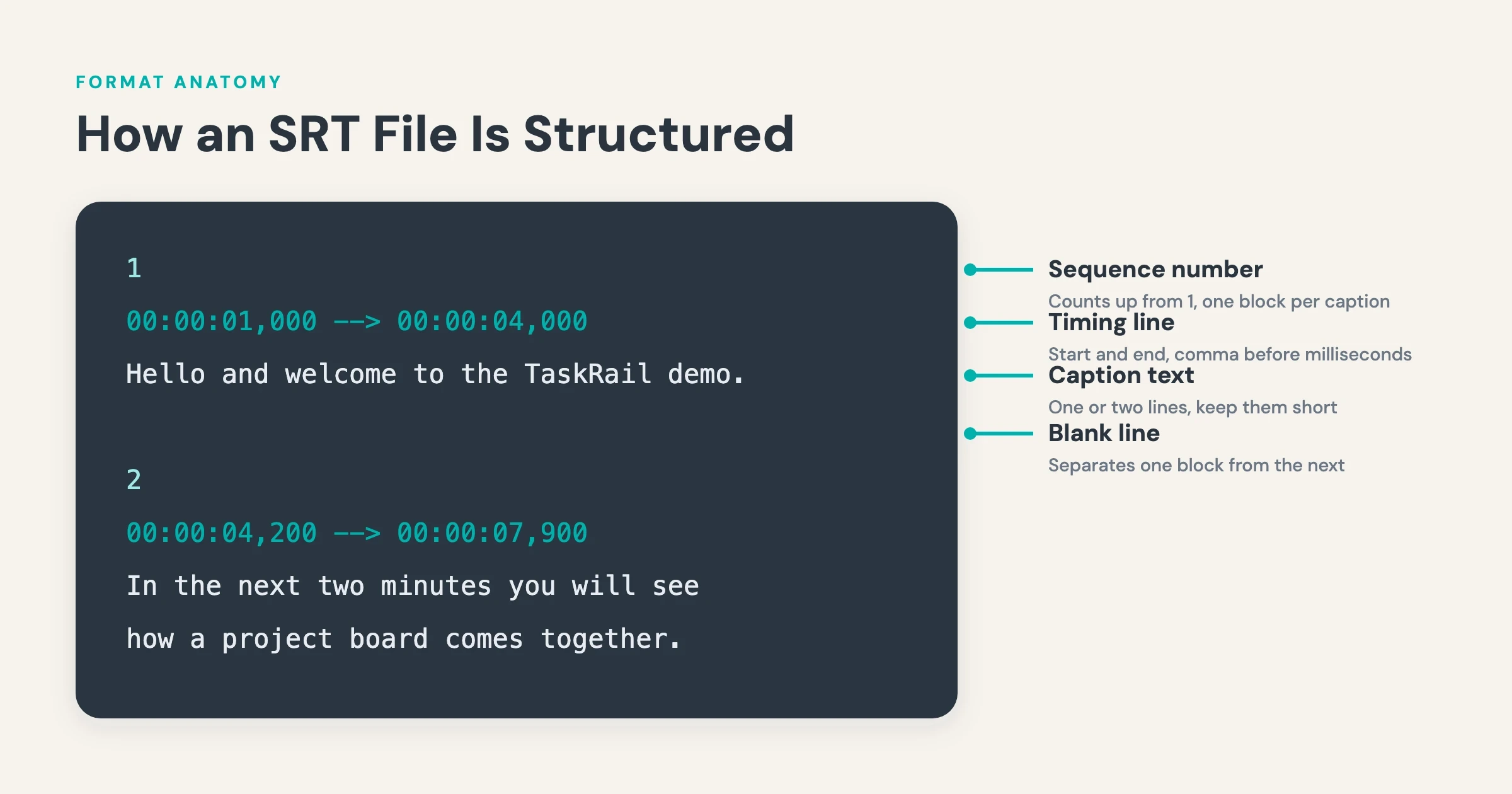
SRT (SubRip Text) is not written for human eyes. It is a set of instructions telling a player which text to show at which moment. Each block has four parts: sequence number, timing line, one or two lines of caption text, and a blank line as separator. The opening of the demo clip as a valid SRT file:
1
00:00:01,000 --> 00:00:04,000
Welcome to the thirty-second
tour of TaskRail.

2
00:00:04,200 --> 00:00:08,500
This is the dashboard you see
after your first login.

3
00:00:08,700 --> 00:00:12,900
Your projects sit on the left,
sorted by deadline.
Two details break more SRT files than everything else combined. The timing line takes a comma before the milliseconds (00:00:01,000), never a period, and every block ends with a blank line. Keep caption lines under roughly 42 characters. WEBVTT, the web-native sibling, reverses the first rule: a period instead of the comma, plus a WEBVTT header on the first line. In short: SRT is the file you upload wherever a player asks for captions. Expect it to be asked for often — in a 2023 YouGov poll, 63% of US adults under 30 said they prefer watching TV with subtitles on, even in a language they know.
Example 5: the edited transcript for blog repurposing
An edited transcript stops being a record and becomes copy. This is the editor pasting a raw transcript into show notes and reworking it until nobody misses the video: speech turns into written prose, repetition disappears, and the structure serves a reader instead of a viewer. The same 30 seconds, rewritten for a blog post:
TaskRail’s dashboard is built around one idea: deadlines decide the layout. After the first login, projects appear on the left, sorted by due date rather than alphabetically. Opening a card reveals the task view; once a team is invited, the board populates on its own.
Use this format for blog articles, newsletters, documentation, and show notes that should rank in search. One caution applies: an edited transcript trades fidelity for readability. It is no longer a faithful record, so never use it where verbatim accuracy is required.
“A transcript format is a distribution decision: the same 30 seconds of speech becomes a legal record, a subtitle file, or a blog paragraph depending on how you structure it.”
Every format in this article starts from one accurate transcript. alugha generates it automatically and exports SRT, WEBVTT, and plain text. See what your plan includes ?
Which transcript format should you choose?
The format follows the destination. Five destinations, five answers:
- Accessibility: WCAG 2.1 AA requires captions for prerecorded video with audio (success criterion 1.2.2). Deliver SRT or WEBVTT in the player, plus a verbatim transcript on the page for screen-reader access.
- YouTube uploads: upload an SRT file instead of relying on auto-generated captions; a reviewed file gives you control over names, terminology, and line breaks.
- Podcast show notes: an edited transcript for readability, plus a timestamped outline so listeners can jump to segments.
- Legal and compliance: clean verbatim with speaker labels and timestamps; accuracy and attribution outrank readability.
- Translation: a corrected verbatim transcript is the source text for every target language. When you translate your video, transcript quality sets the ceiling for every language that follows.
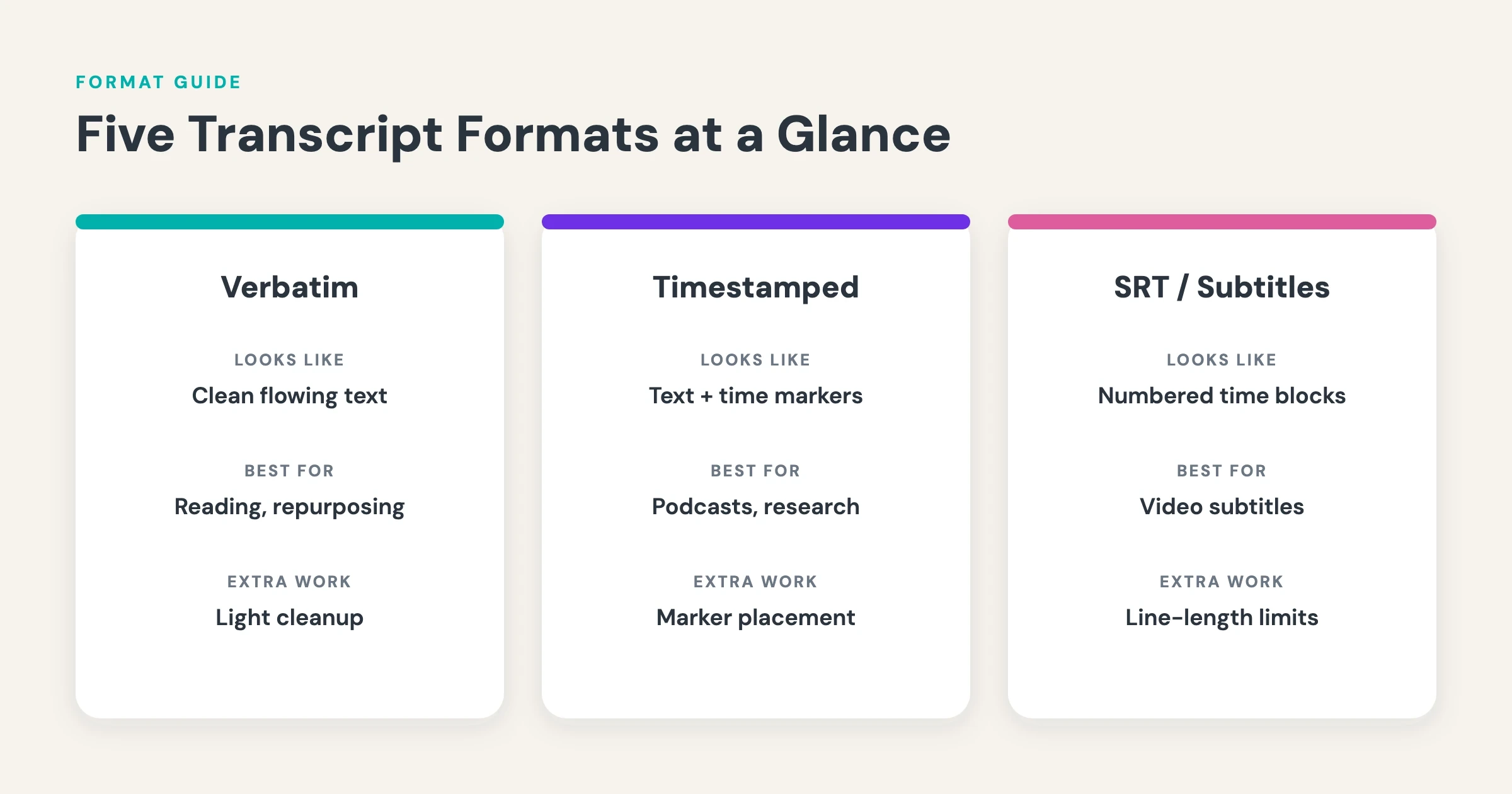
In short: produce one corrected verbatim transcript first, then derive whatever each channel needs. The correction pass is the investment. The derivations are cheap.
How to generate a transcript automatically with alugha
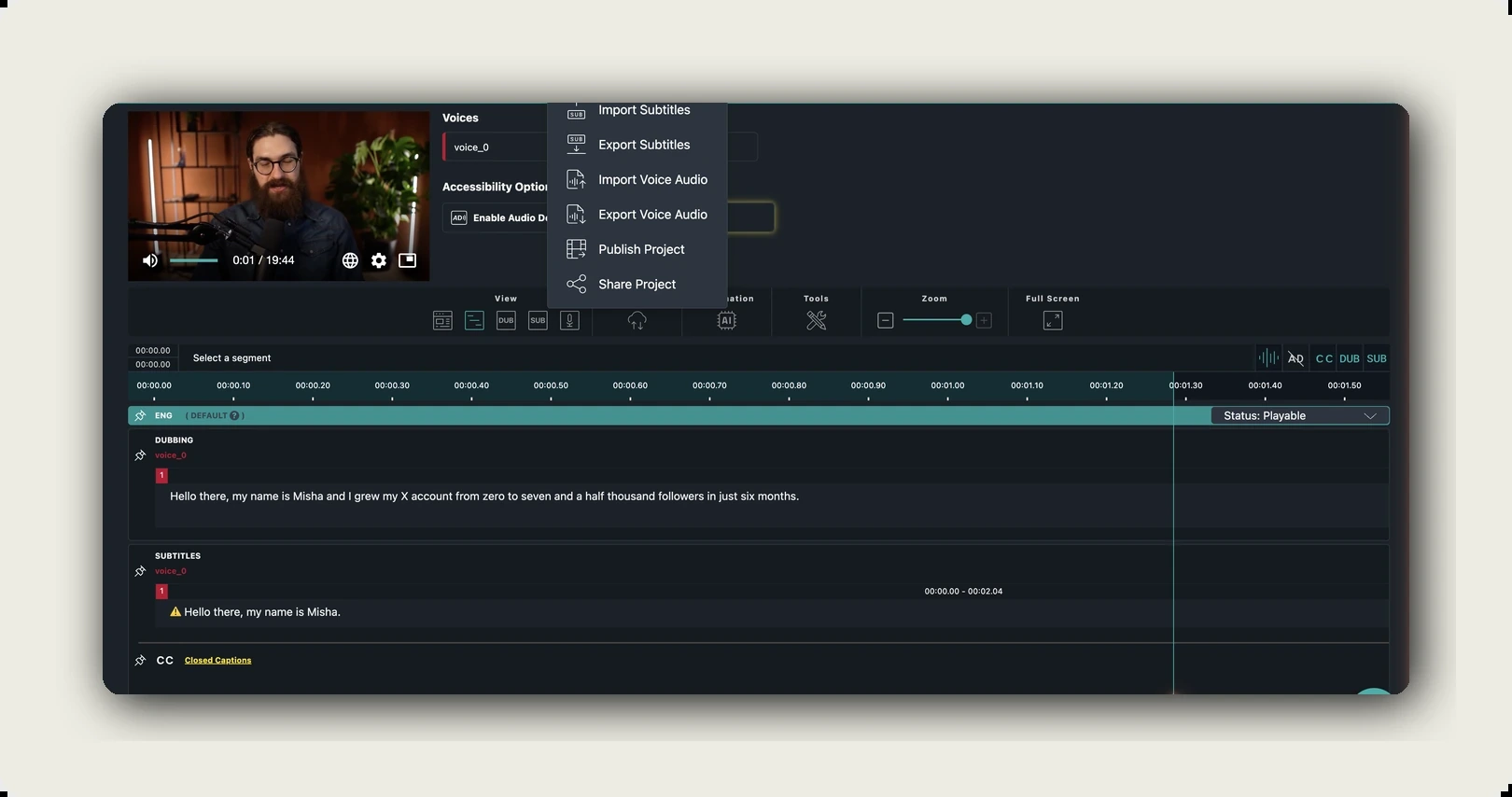
Typing out every format by hand is a poor use of anyone’s hours; professional transcribers budget four to six hours of work for every hour of clear audio, and beginners or noisy recordings push that ratio higher. alugha’s speech-to-text, part of the dubbr workspace, converts audio into text at 98% speech accuracy with automatic speaker detection; each speaker arrives color-coded, so interview transcripts land pre-attributed. The transcript stays editable, which means the correction pass happens right where the text was generated.
From that single corrected transcript, the export menu covers every format in this article: SRT and WEBVTT for players, plain text for verbatim workflows, and burned-in subtitles when the captions must travel inside the video itself. Speech-to-text costs credits, and the dialog shows the cost and your balance before you confirm. If translation comes next, alugha carries the transcript into 200+ languages, with a glossary to keep terminology consistent. In short: one upload, one correction pass, every format as an export.
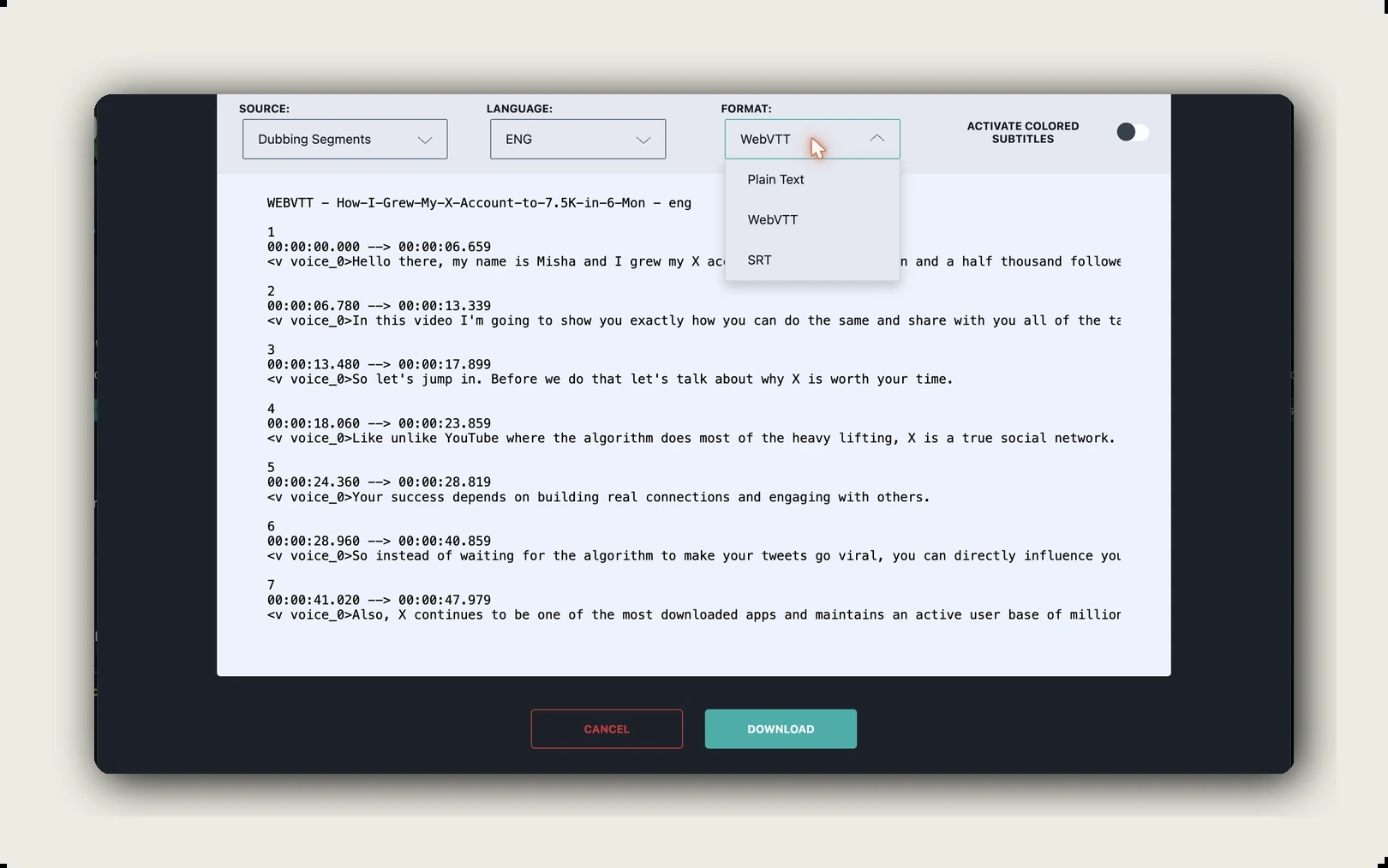
The step-by-step walkthrough lives in the pillar guide on how to transcribe a video to text.
Frequently asked questions
What does a good video transcript example look like?
A good example matches its use case; there is no universal template. Clean verbatim serves records, timestamps serve navigation, speaker labels serve interviews, SRT serves subtitle players, and edited prose serves publishing. The five samples above show one identical clip in each structure.
What is the difference between a transcript and subtitles?
A transcript is a standalone text document of everything spoken, readable without ever pressing play. Subtitles are short, timed segments displayed inside the player. Adding timing and segmentation converts a transcript into subtitles; alugha treats the two as distinct outputs of the same speech-to-text process.
How is an SRT file structured?
Each SRT block has four parts: a sequence number, a timing line in the format 00:00:01,000 –> 00:00:04,000 with a comma before the milliseconds, one or two lines of caption text, and a blank line before the next block. The most common error is a period where the comma belongs.
Should a transcript include filler words?
The purpose decides. True verbatim keeps every “um,” false start, and repetition, which matters in legal and research contexts where hesitation itself is evidence. Clean verbatim removes the fillers while preserving every substantive word; it is the right default for business use. Edited transcripts go further and rewrite speech into readable prose.
Which transcript format meets accessibility requirements?
WCAG 2.1 AA, the standard behind the European Accessibility Act, requires captions for prerecorded video with audio (success criterion 1.2.2), delivered as timed files such as SRT or WEBVTT. A full text transcript on the same page extends access further, to screen-reader workflows and deaf-blind users.
Can AI transcribe a video accurately?
alugha’s speech-to-text reaches 98% speech accuracy and detects speakers automatically. The remaining 2% clusters around names and specialist vocabulary, which is why a short review pass in the dubbr workspace belongs in every workflow. Once corrected, the transcript exports to SRT, WEBVTT, or plain text without re-processing. The same transcript is also where dubbing starts: see how AI dubbing works, from transcript to translated voice track.
Getting started with alugha
Transcription is rarely the end goal. It is the first stage of a text pipeline that feeds subtitles, accessibility documents, blog content, and translations. That makes the tooling an infrastructure decision: the transcript you correct today becomes the source for every format and language you publish tomorrow.
For a solo creator, alugha closes the loop from upload to speech-to-text to SRT export in one place. For teams, the same pipeline continues into automated translation across 200+ languages, so transcript work done once serves every market.
Start transcribing with alugha’s free tier ? alugha.com/plans
Scaling to a team or a video library? Compare Creator, Business, and Enterprise ? alugha plans