Key takeaways
- Three methods, one decision: you can transcribe a video manually, with AI speech-to-text, or through a professional service. Each buys its result in a different currency: your time, your budget, or your tolerance for errors.
- Manual is free but slow: typing a transcript yourself swallows several times the video’s runtime, and accuracy lasts only as long as your patience does.
- AI is the practical default: alugha’s speech-to-text reaches 98% accuracy with automatic speaker detection, and a short human review pass closes the last two percent.
- Export in the format you need: a finished transcript leaves alugha as plain text, SRT, or WebVTT, or baked into the video as burned-in subtitles.
- The transcript is the starting point: subtitles, translation into 200+ languages, AI voice-over, and indexable text for search all grow from the same file.
Want to test the workflow before reading the theory? alugha offers a free plan, and every AI action shows its credit cost before you confirm. Create a free alugha account ?
What video transcription is and why it matters
Every video you publish contains a document nobody can read yet. To transcribe a video to text means converting every word spoken in the recording into a written document: you type what you hear, run the audio through AI speech-to-text software, or hand the file to a professional service, then review the result and export it as a searchable, editable transcript. What separates the three methods is how long the trip takes, what it costs, and how much cleanup waits at the end. This guide weighs them on exactly those terms, walks through a step-by-step AI workflow you can start on a free plan, and shows what a transcript unlocks afterwards: subtitles, translation, and search visibility. If you have never held a finished transcript, these video transcript examples show what you are working toward.
The workflow scales in both directions. A creator captioning two videos a month follows the same steps as a team documenting accessibility across a corporate library of hundreds. The creator wants captions and repurposable text; the compliance officer wants an audit trail. Different jobs, identical starting point: accurate text out of the audio track without losing a day to it.
Why video transcription earns its place in your workflow
Accessibility for viewers who need text
A video without text turns viewers away at the door. It shuts out people who are deaf or hard of hearing (the WHO counts more than 430 million people living with disabling hearing loss), the colleague watching on mute in an open-plan office, and every viewer whose first language is not the speaker’s. The mute habit is measurable: in a 2019 Verizon Media and Publicis Media survey, 69% of consumers watch videos with the sound off in public places, and 80% were more likely to finish a video when captions were available. A transcript closes that gap, and it feeds straight into subtitles. For organizations serving EU consumers, this stopped being a courtesy: the European Accessibility Act (EAA) has been enforceable since June 28, 2025, and video content sits squarely within its scope. The transcript is the raw material. Once the text exists with timestamps, subtitles shrink from a second project to a formatting step.
Search engines index text, not audio
Google cannot listen to your video. It reads what surrounds it: the title, the description, and, when you publish one, the transcript. A transcript drops every product name, question, and answer from the recording into indexable form. A ten-minute talk yields well over a thousand words that search engines can rank, mined from material you already paid to produce. The classic proof: after the podcast This American Life transcribed its full archive, transcript pages drove a 6.68% lift in organic search traffic, measured back in 2013—still the cleanest public experiment we have. alugha extends the effect with AI-generated metadata for each language version of a video, so the search visibility multiplies with every language you publish in.
One recording, many formats
Record once, publish everywhere is a slogan until a transcript makes it mechanical. The same text becomes a blog draft, a set of quotes for social posts, or the source document for a translated version of the video. Teams that produce multilingual content feel this most: the transcript opens every translation and dubbing workflow, so a clean one pays for itself several times over. In short: you are not producing a text file. You are producing the source format everything else derives from.
Three ways to transcribe a video
Manual transcription: full control, at real cost
Typing the transcript yourself costs nothing in cash, and that deserves a fair hearing. You control every formatting decision, every speaker label, every term, and for a two-minute clip that control is often worth the keystrokes. Then the economics turn. Speech runs at 120 to 150 words per minute, so an hour of video holds 7,000 to 9,000 words, and transcription vendors budget four to six hours of typing per hour of clear audio once pausing, rewinding, and correcting are counted. Fatigue quietly erodes accuracy through the second half — exactly where nobody proofreads twice. For a single short video, manual works. As a recurring workflow, it does not scale.
AI speech-to-text: fast, low-cost, near-accurate
Speech-to-text software converts the audio automatically, usually in a fraction of the video’s runtime. Modern engines handle clear speech well: alugha’s speech-to-text reaches 98% accuracy, detects individual speakers automatically, and color-codes each one in the editor so an interview stays readable instead of collapsing into one voice. The honest caveat stands: AI transcription is near-accurate, not flawless. Heavy accents, crosstalk, and niche terminology still trip the engine, which is why every serious AI workflow ends with a human review pass. Budget minutes of cleanup, not hours of typing.
Professional services: highest accuracy, highest cost
Professional transcriptionists deliver the most reliable output, and for some recordings nothing else is defensible: courtroom audio, medical dictation, a panel where three voices fight for the microphone. If the transcript carries legal or medical weight, pay the human. The trade-offs are price and patience. Services bill per audio minute, and delivery is measured in hours or days rather than minutes. For everyday content production, that cost structure is hard to justify when an AI pass plus a self-review reaches comparable quality on clean audio.
Manual vs. AI vs. professional at a glance
No method wins every column, which is exactly why the table below exists. It compares the three on the dimensions that decide the choice: time, cost, and accuracy. Manual transcription is free but consumes several times the video’s runtime. AI speech-to-text finishes in a fraction of the runtime at low cost, with alugha’s engine reaching 98% accuracy before review. Professional services deliver the most dependable text for difficult audio, billed per audio minute with turnaround in hours or days.
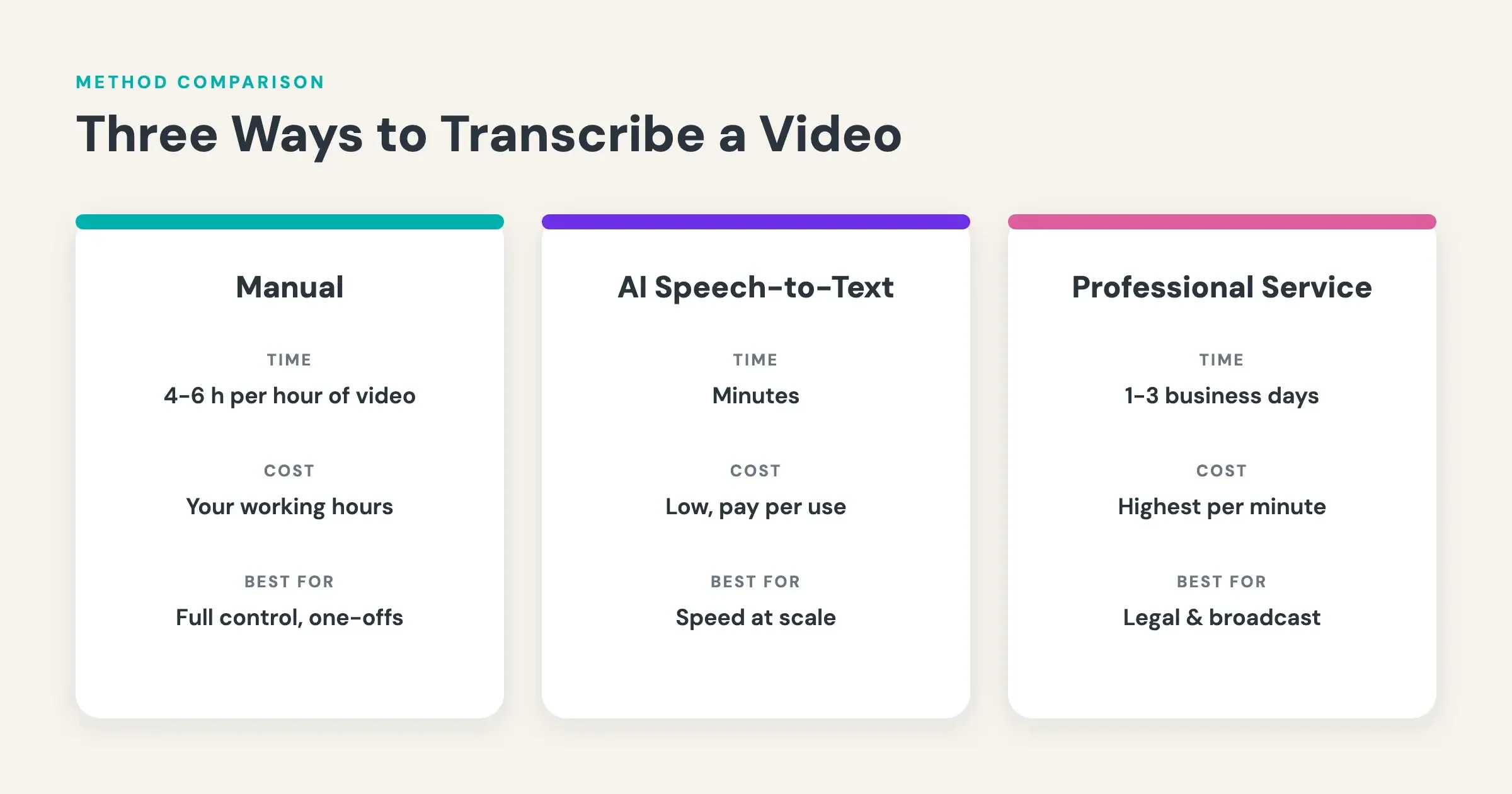
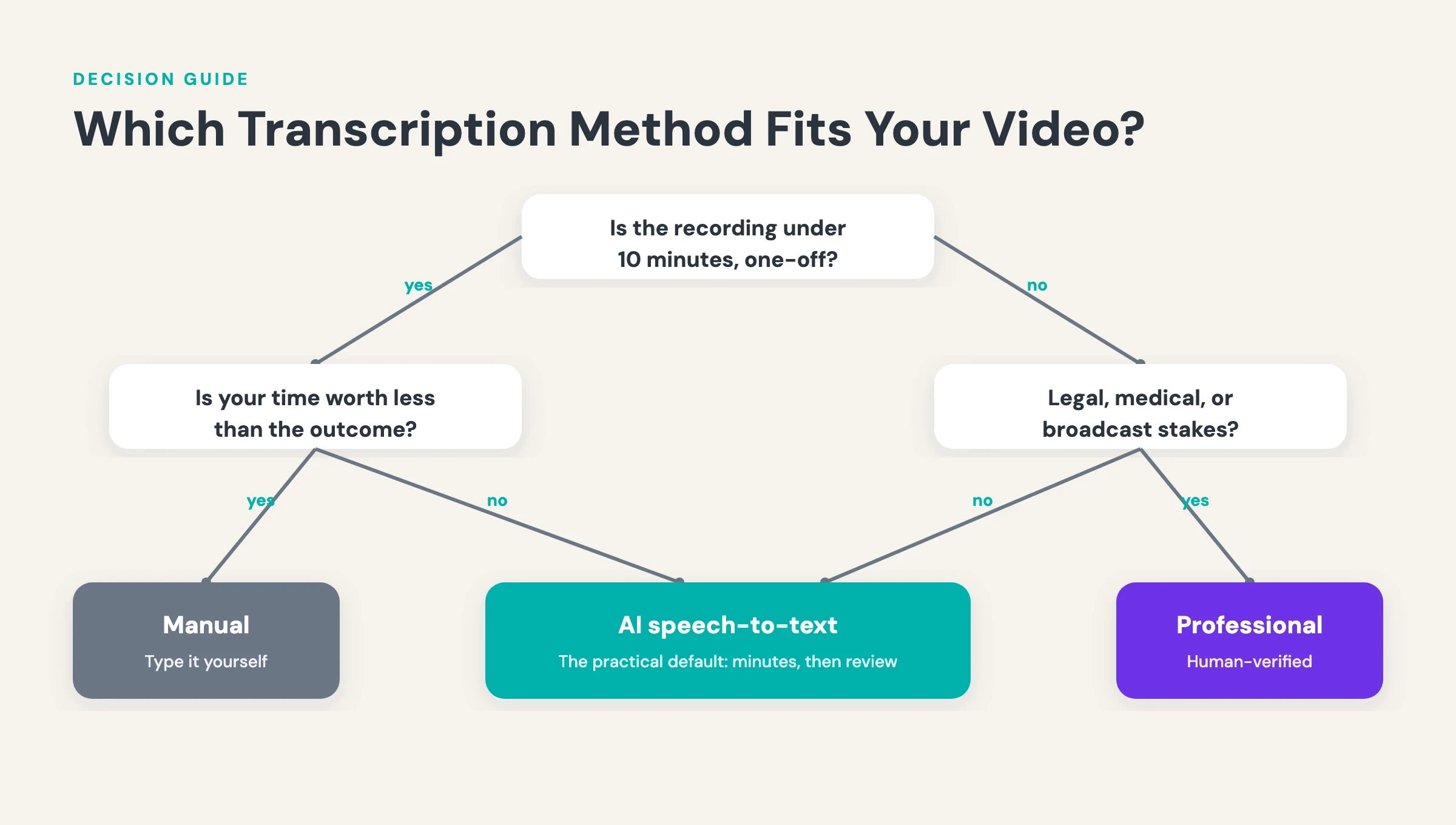
Read it as a decision rule, not a scoreboard. Manual suits the one-off short clip with a budget of zero. Professional services suit the high-stakes recording where an error costs more than the invoice and turnaround is not the constraint. In short: for most creators and content teams, AI transcription with a human review pass is the default, and the other two methods cover the edges.
How to transcribe a video to text with alugha
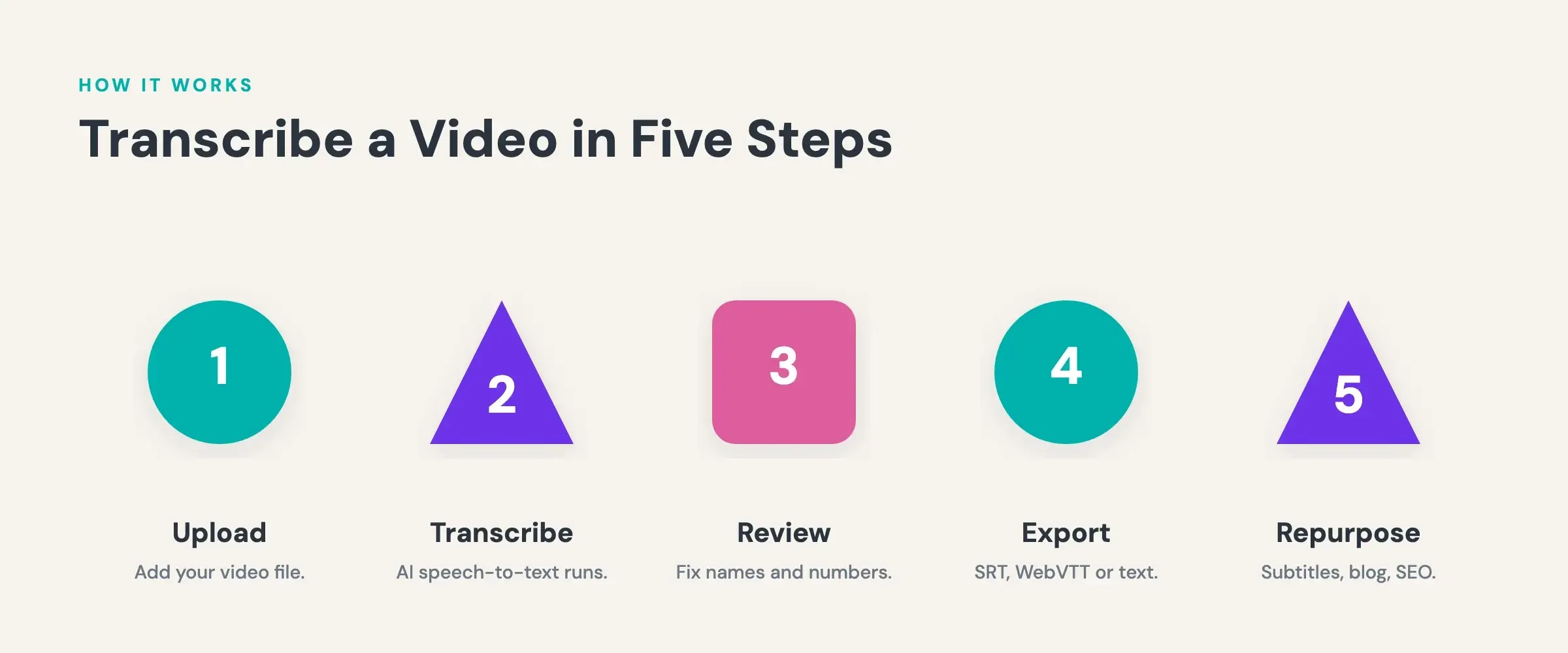
Step 1: Create a free alugha account
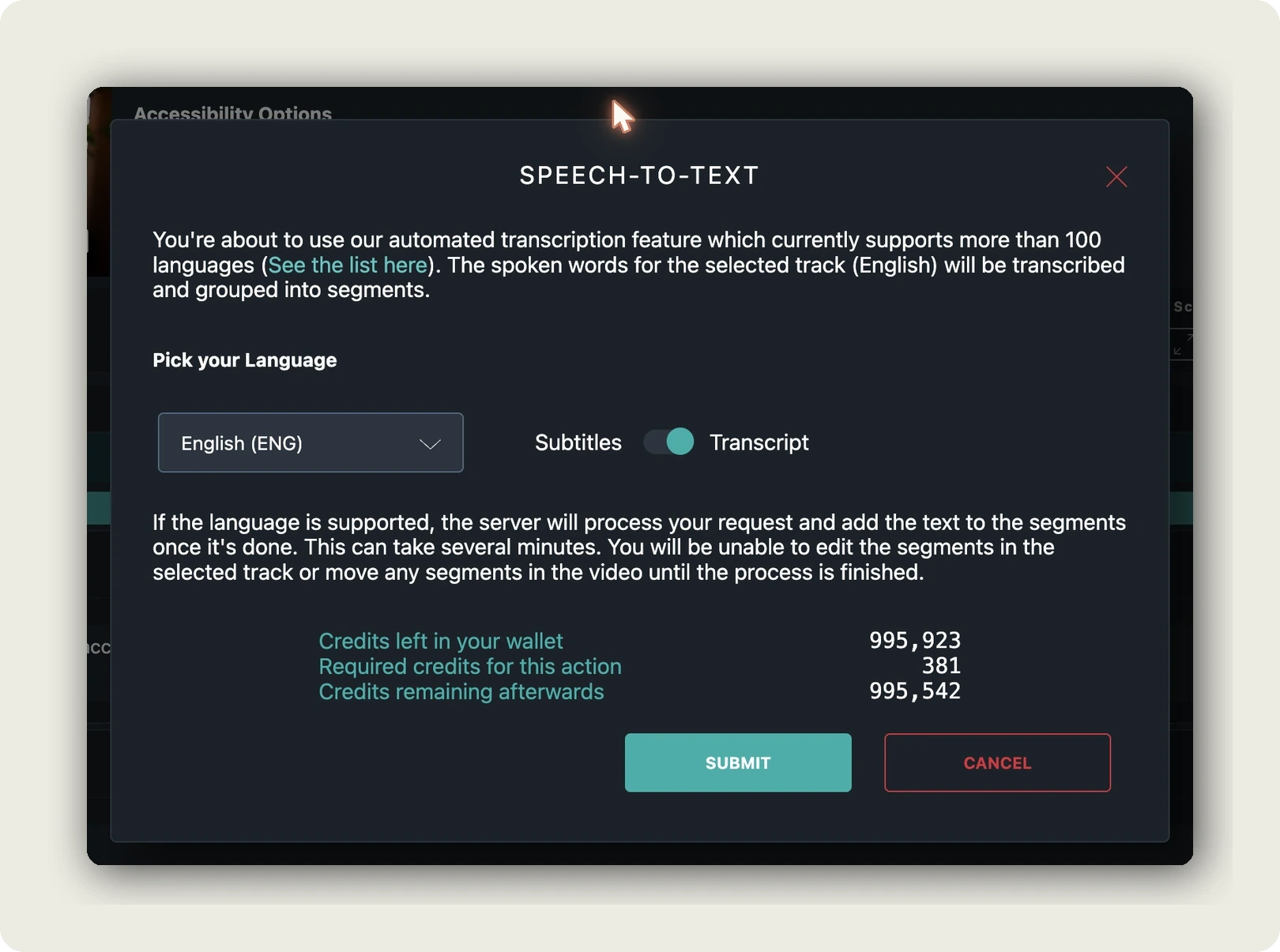
alugha offers a free plan alongside its paid tiers; current plan details are listed at alugha.com/plans. AI actions on the platform are priced in credits, and the pricing is transparent by design. Before you confirm anything, the AI dialog shows three numbers: the credits left in your wallet, the credits the action requires, and the balance afterwards. Nothing runs before you approve it.
Step 2: Upload your video
Upload the video file to your alugha account. From there it appears in the dubbr workspace, the environment where all of alugha’s AI features live: speech-to-text, automated translation, and text-to-speech. Every step that follows in this guide happens in that one place, against the same video.
Step 3: Run speech-to-text
Open the video in dubbr and start the speech-to-text action. Before anything runs, the confirmation dialog shows the credit cost for your video’s length, so you decide with the numbers in front of you. Then the engine goes to work: a timed transcript at 98% accuracy, each speaker detected and color-coded. For an interview or a panel recording, that separation is the difference between a transcript you can use and a wall of unattributed text.
Step 4: Review and edit the transcript
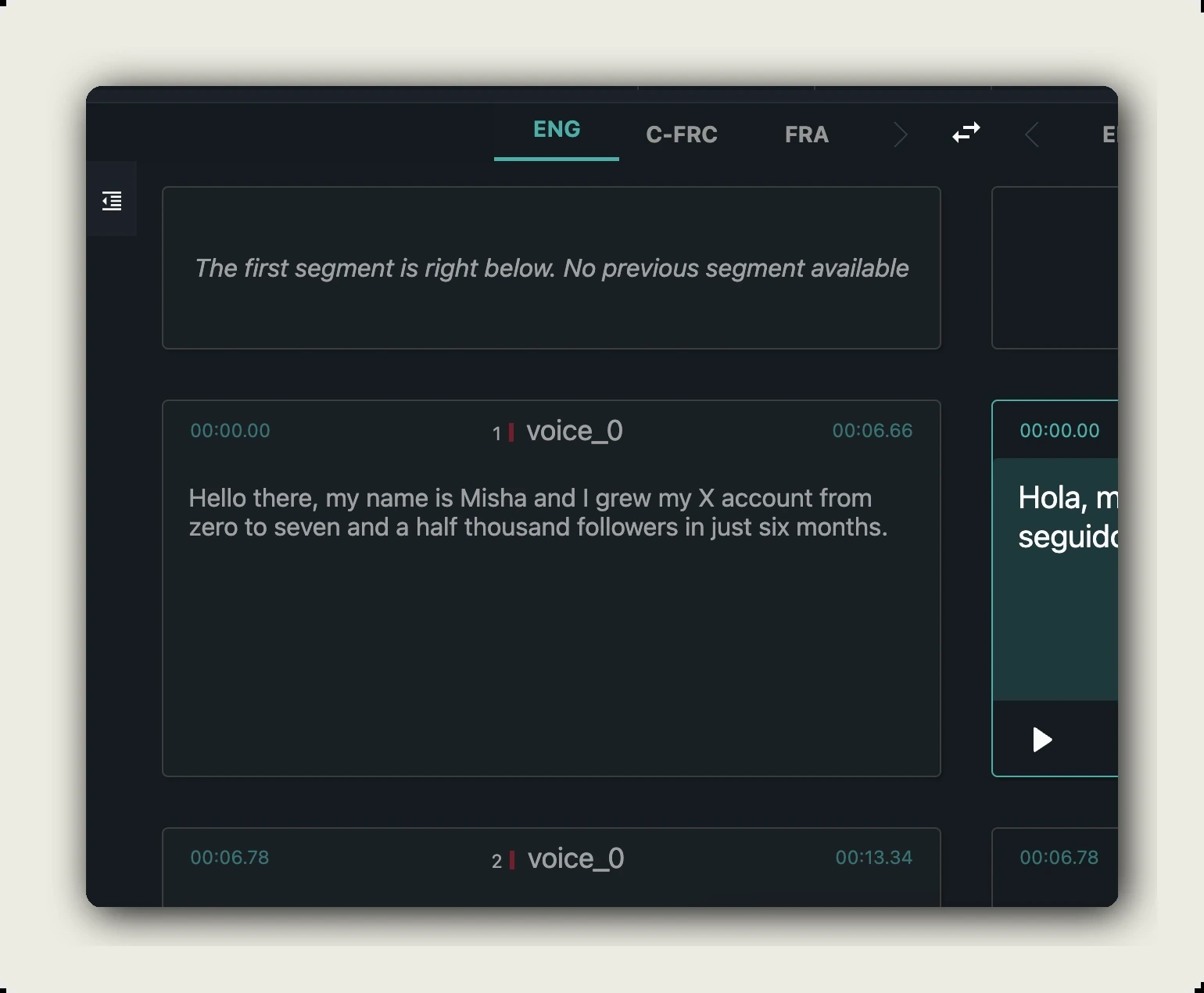
AI output deserves a review pass, whatever the engine behind it. Play the video against the transcript in the dubbr workspace and correct what the machine missed: proper names, product terminology, numbers. The speaker color coding makes a misattributed line jump out of a multi-person recording. On clean audio the whole pass takes minutes, and it is the step that turns 98% machine accuracy into a transcript you can publish with your name on it.
Step 5: Export in the format you need
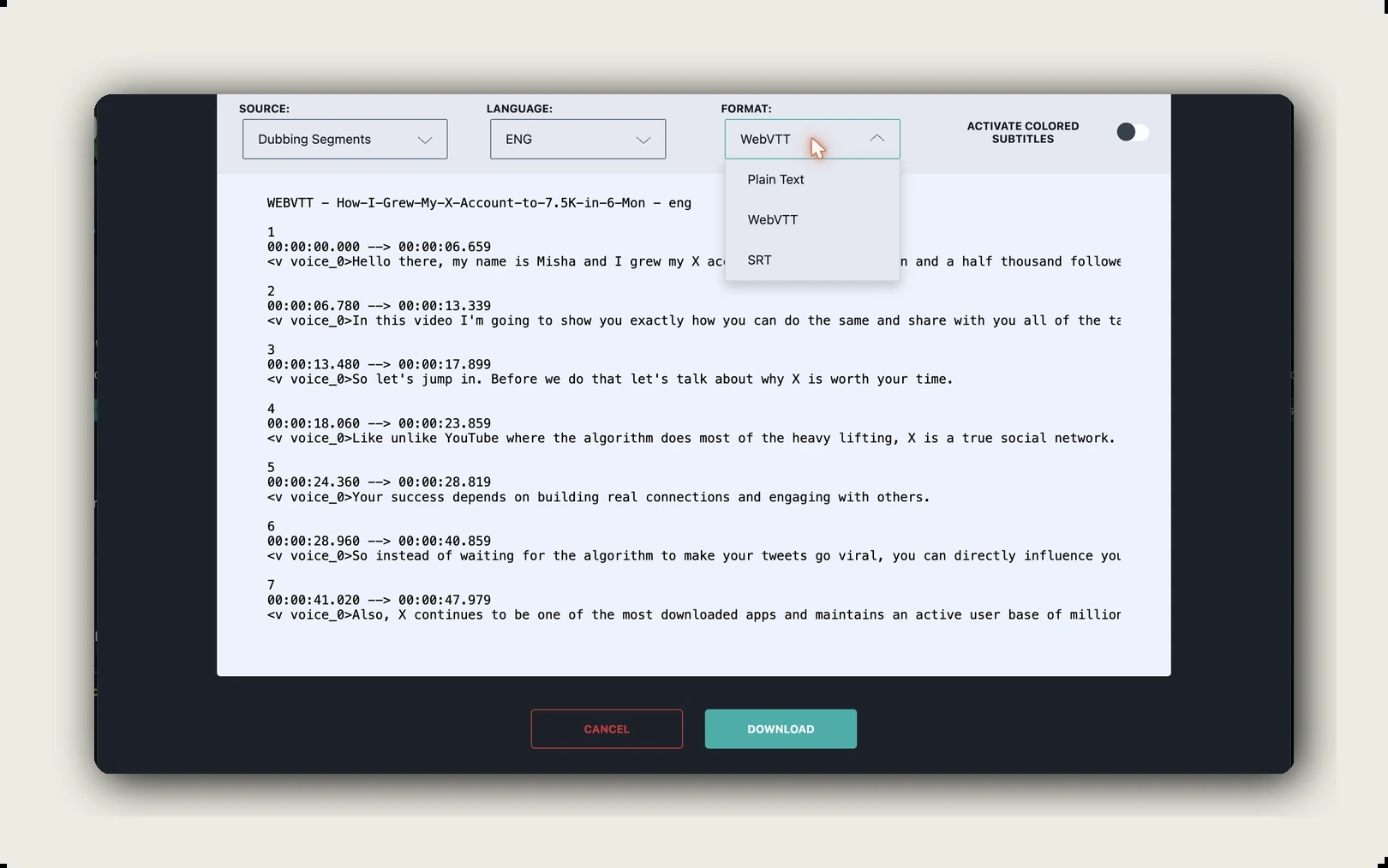
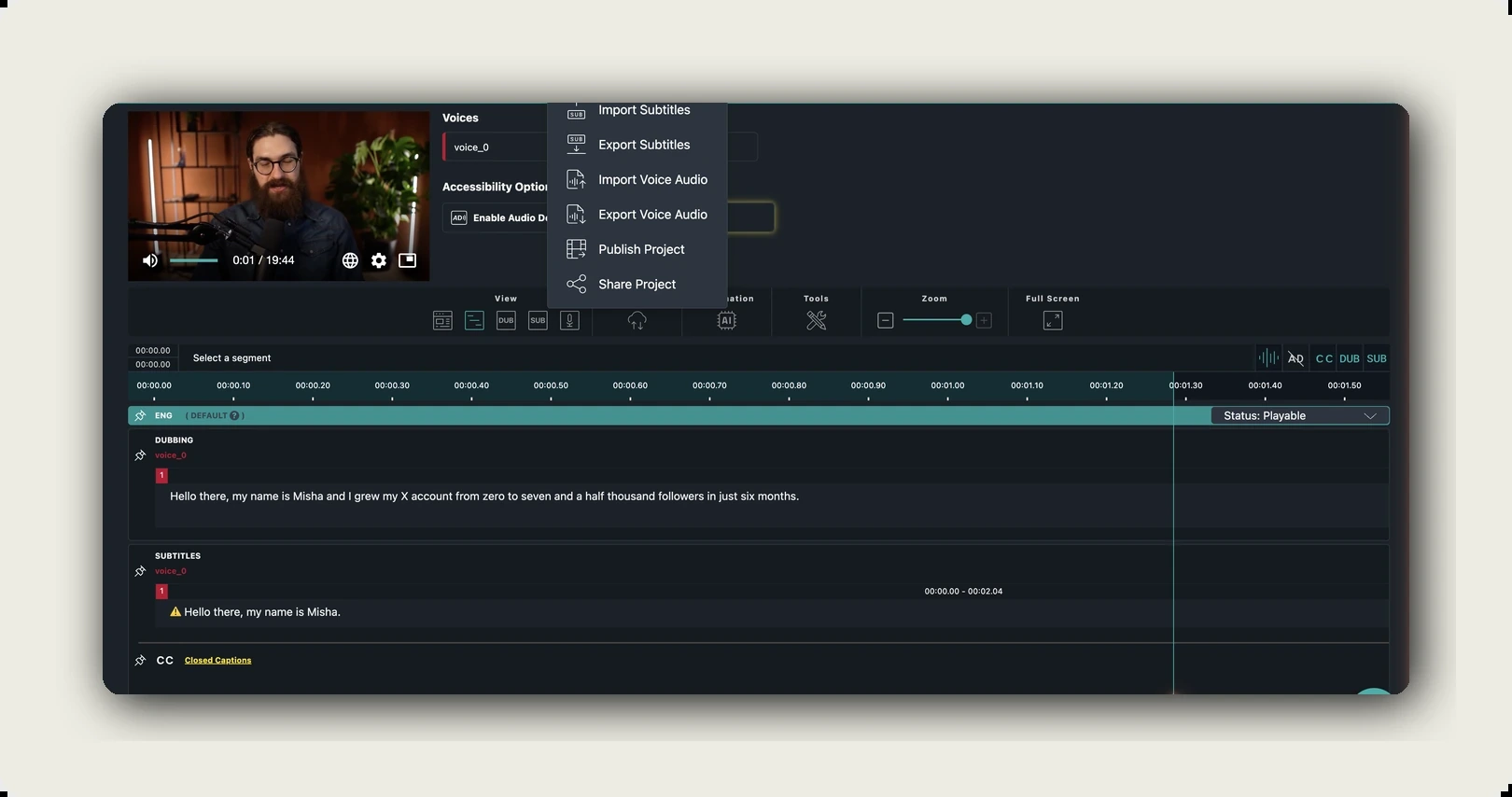
The Im-/Export menu in dubbr hands the finished transcript over as plain text for documents and blog posts, or as SRT and WebVTT files for subtitle workflows on any platform that accepts caption files. Torn between the two subtitle formats? SRT is the safe default for YouTube and most social platforms, while WebVTT is the web-native choice for HTML5 players and supports styling. You can also export the video itself with burned-in subtitles for players that cannot handle separate caption tracks. In short: the transcript leaves alugha in whatever format the next tool in your chain expects, not trapped in the platform.
Try the five steps on one of your own videos. The credit cost appears in the dialog before anything runs, so you can judge the workflow with no commitment. Start with alugha’s free plan ?
Tips for more accurate video transcription
Transcription accuracy is mostly decided before the AI ever runs. The engine transcribes what it hears, nothing more. The cleaner the input, the less you correct afterwards, which puts the highest-leverage improvements at recording time, not review time.
- Record clean audio: a decent microphone close to the speaker beats any amount of post-processing. Background noise and room echo kill more accuracy than anything the software does afterwards.
- Avoid crosstalk: speaker detection separates voices well, but two people talking at once degrade every engine on the market. Moderate panel discussions with that in mind.
- Review with playback, not memory: correct the transcript while the audio plays, and go straight to names, numbers, and technical terms. That is where machines still miss.
What to do with your transcript
Turn it into subtitles
A transcript and subtitles are not the same artifact, though teams routinely conflate them. The transcript is the full text of the recording; subtitles are that text broken into timed, readable segments in the player. Viewers increasingly expect them: in a 2023 YouGov poll, 63% of US adults under 30 preferred TV with subtitles on, even in a language they understand. alugha generates subtitles directly from the speech-to-text output, so the transcript you just reviewed becomes the subtitle track without a second tool or a re-sync. For published videos, subtitles are the accessibility layer, and the WebVTT and SRT exports carry them to any player that accepts caption files.
Translate and dub it
The transcript is also the source text for every language version of the video. alugha translates transcriptions into 200+ languages, and a glossary feature holds brand and product terminology steady across all of them. From there, text-to-speech with 400+ AI voices turns the translated text into audio tracks, including voice cloning that carries the original speaker’s identity across languages. The full path from transcript to a video that speaks another language is covered in our guides on how to translate a video and how AI dubbing works.
Publish it for search and repurposing
Published text compounds; an unpublished recording just plays. A transcript on the video page gives search engines the complete content of the recording, and alugha’s AI-generated metadata extends that visibility to each language version separately. Beyond search, the transcript stocks the rest of your content calendar: a blog post from the main argument, quote graphics from the sharpest lines, a newsletter section from the summary. One recording, several assets — and every one of them starts from the text file you produced in five steps.
Frequently asked questions
How can I transcribe a video to text for free?
Two routes cost nothing in cash: typing the transcript yourself, or starting with the free plan of a platform that offers AI speech-to-text. Manual typing charges you in time instead, several times the video’s runtime, so it only makes sense for short clips. On alugha, you create a free account, upload a video, and start speech-to-text in the dubbr workspace; the AI dialog shows the exact credit cost before you confirm, so nothing runs without your approval.
Fully free routes exist, each with a catch. YouTube’s auto-captions produce a rough transcript without punctuation or speaker labels. Voice typing in Google Docs or Word captures audio played aloud, minus all timestamps. The open-source Whisper model is genuinely accurate if you can run it yourself. All three send the same bill: review time, the real cost of a free transcript.
How accurate is AI video transcription?
On clear audio, modern engines are highly reliable. alugha’s speech-to-text reaches 98% accuracy and detects individual speakers automatically. Accuracy drops with background noise, heavy accents, crosstalk, and niche terminology. Plan a short human review pass for anything you publish: on clean audio it takes minutes and catches the names, numbers, and technical terms machines still get wrong.
How long does it take to transcribe a video?
The method sets the clock. Manual transcription typically takes several times the video’s runtime once pausing, rewinding, and correcting are included. AI speech-to-text processes most videos in a fraction of their runtime, leaving a human review pass measured in minutes. Professional services deliver in hours to days, depending on the turnaround option you pay for.
What is the difference between a transcript and subtitles?
A transcript is the complete text of everything spoken in a video, delivered as one continuous, readable document, while subtitles are the same words segmented into short, timed units that appear in the player as the video plays, matched to the moment each line is spoken. alugha treats them as distinct artifacts and generates subtitles from the speech-to-text transcript, so you never maintain the two by hand in parallel.
What file formats can I export a video transcript in?
alugha’s dubbr workspace exports transcripts as plain text, SRT, and WebVTT files. Plain text suits documents and blog posts. SRT and WebVTT are the standard subtitle formats accepted by most video players and platforms. You can also export the video itself with burned-in subtitles for destinations that cannot handle separate caption files.
Can I translate my video transcript into other languages?
Yes. The transcript is the source text for every translation. alugha translates transcriptions into 200+ languages, and a glossary feature keeps recurring terminology consistent across all of them. The translated text can then become subtitles in each language or, via text-to-speech with 400+ AI voices, a dubbed audio track that plays in the same multilingual player.
Can I get a transcript of a YouTube video?
Yes. Any YouTube video with captions has a built-in transcript: open the video’s description, choose Show transcript, and copy the text with timestamps. Treat it as a rough draft: auto-captions lack punctuation and speaker labels. For a publishable transcript, run the original file through an AI speech-to-text workflow and review it; other creators’ videos remain their copyright.
Is AI transcription GDPR-compliant?
It can be; compliance depends on the provider and your process, not the technology. A recording of identifiable people is personal data under the GDPR, so where the audio is processed, on what legal basis, and how long it is stored all matter. Check the provider’s data processing agreement before uploading interviews or HR footage. alugha is an EU-based provider running on EU infrastructure, which keeps the data-residency review short for European teams.
Getting started with alugha
Transcription is one step in a longer chain, and the chain is where the tooling choice starts to matter. The platform that transcribes your video also hosts it, generates the subtitles, translates the text into 200+ languages, and gives every language its own audio track in one multilingual player. That makes the choice an infrastructure decision, not a one-off utility pick: the transcript you produce today feeds every downstream workflow, from accessibility to AI dubbing.
For creators, a free account is the entry point, and the credit dialog keeps every cost visible before every action. For enterprise teams, consolidating hosting, transcription, subtitling, and dubbing into one platform means one vendor review instead of several. Start with one video and judge the output for yourself.
Get started with alugha’s free plan ? alugha.com/plans
For enterprise teams: request compliance documentation ? alugha secure video infrastructure