Premium video hosting is paid hosting that hands you control of everything around your video: no ads you did not place, no suggested videos from someone else, your brand on the player, limits written into a contract and a known place where the files live. Ad-free alone no longer earns the word. Vimeo says its whole platform is ad-free, free plan included, and Wistia markets its free player as ad-free, as published in September 2026.
Picture the last frame of your product demo on your own pricing page. On a free YouTube embed, what comes next is YouTube’s decision: since September 2018, the most you can ask for is related videos from your own channel, and since August 2023, the logo stays too. On a paid host, that frame is yours.
Read on and you can take any premium video hosting offer apart row by row. You will know which of your videos free hosting already serves well and where the fair-use line hides behind “unlimited”, and you will have the questions to put to any host before you sign, us included.
Key takeaways
- Ad-free is no longer the line. Wistia’s free tier already plays without ads, as published in September 2026, yet caps you at 25 GB of storage, one user and Wistia branding.
- On a free YouTube embed, the frame after your video belongs to YouTube. Since 25 September 2018, related videos can be narrowed to your own channel, never switched off.
- Compare paid tiers on 13 rows, from ads and branding to bandwidth, access, processor contract, storage location and exit terms. No single host promises all 13, so get each in writing.
- Read the fair-use line behind any bandwidth promise. Vimeo contacts accounts passing 2 TB a month twice in 12 months, and a suspended account’s videos stop playing wherever they are embedded.
- Premium hosting is not content protection. If you sell access to video, you need a paywall and DRM, usually all three major systems, Widevine, FairPlay and PlayReady, which is another product.
- Paying does not make embeds GDPR compliant. Rules for transfers out of the EU, an Art. 28 contract and section 25 TDDDG consent are three separate duties, and consent stays yours.
- We stop at 1080p and sell no DRM or password protection. In exchange, our player carries every language of a video under one URL, hosted in Germany and the EU.
- Key takeaways
- What is premium video hosting?
- What free video hosting really gives you
- What premium video hosting services add
- Do you need premium video hosting?
- Playback quality: the ladder, not 4K
- Storage and bandwidth: the fair-use line
- Who may watch: access control
- Premium hosting is not premium content
- Does paying buy GDPR compliance?
- Where alugha fits, and where it does not
- Frequently asked questions about premium video hosting
- Getting started
What is premium video hosting?
Premium is a relative word. In video hosting it means paid, and it is always measured against free.
Free comes in two kinds. YouTube is free because attention pays for it: it may run ads on your videos, and it suggests other videos after yours. Vimeo’s and Wistia’s free tiers carry no ads, as both vendors state, but they cap storage, seats or branding. Premium video hosting sits above both. You pay to decide what surrounds the video and what the contract says about it.
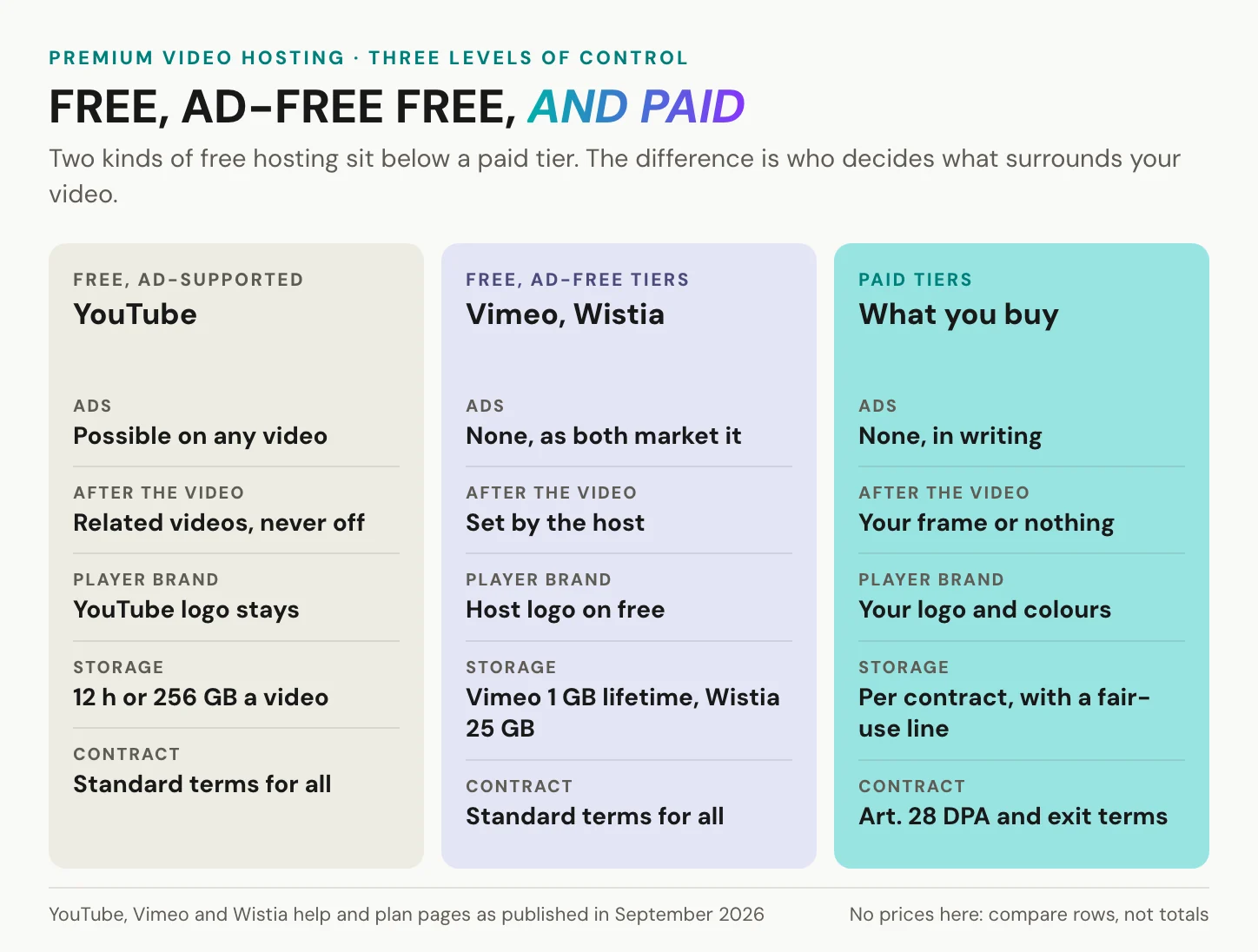
What you actually buy fits in five lines. First, the frame around the video: no ads, no one else’s suggestions, your brand on the player. Second, a defined playback ladder, so the video adapts to each connection, and third, limits you can read, including what happens when you pass them. Fourth, access rules that match who should watch, and fifth, a contract with a processor agreement and exit terms.
Premium hosting is not about more pixels. It is about who owns the last frame.
The word has one more reading. Sometimes premium means premium content, such as paid courses or licensed film, and that needs different tools, covered further down. If you came for names, you will find types of host here rather than a ranking, because which type fits depends on the job each video does.
Premium video hosting is not YouTube Premium
YouTube Premium is a subscription for viewers. It removes ads for the person who pays for it, while creators’ own promotions still appear. Your audience does not get it through you, and Google makes no claim that the subscription applies to YouTube videos embedded on other sites.
So treat it as a viewer product, not a hosting tier. For every visitor to your page who has not bought it, a YouTube embed behaves exactly as the next section describes: YouTube may serve ads, related videos follow your last frame and YouTube’s logo stays on the player. None of that changes because one of your visitors pays YouTube for a quieter feed.
The mix-up is understandable, since both phrases share a word and both promise fewer ads. They answer different questions, though. YouTube Premium decides what one viewer sees on YouTube, while premium video hosting decides what every visitor sees on your page, and who made that call.
What free video hosting really gives you
Free hosting is never free of terms. You pay for it in one of two currencies: attention or ceilings.
YouTube: the reach is free, the frame is not
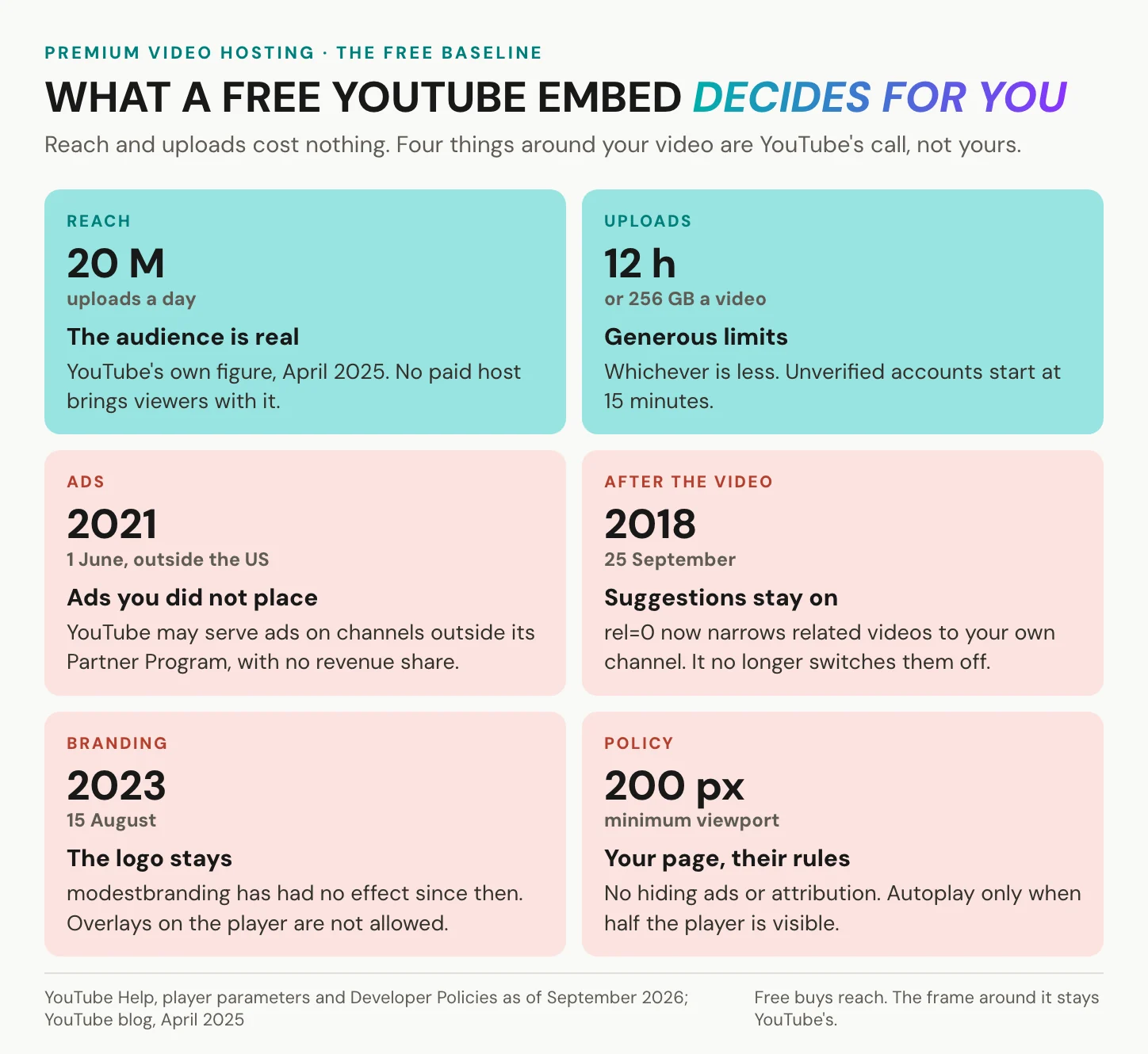
Start with what YouTube does better than any paid host. More than 20 million videos are uploaded to it every day, YouTube’s own figure from April 2025. A single upload may run up to 12 hours or 256 GB, whichever is less, although unverified accounts start at 15 minutes. If you want to be found, nothing you can pay for comes close to that audience.
The price is the frame, and four parts of it are not yours to set. First, ads. Since November 2020 in the US and 1 June 2021 elsewhere, YouTube may serve ads on videos from channels outside its Partner Program, with no revenue share for you. Second, what follows your video. Since 25 September 2018, the rel=0 parameter only narrows related videos to your own channel and no longer switches them off. Third, the logo. The modestbranding parameter has had no effect since 15 August 2023. Fourth, the rules around the player. YouTube’s developer policies forbid blocking its ads or hiding its attribution, and its minimum-functionality rules forbid overlays. The player must be at least 200 by 200 pixels, and autoplay is allowed only when more than half of it is visible.
None of this is hidden. It is the deal, written in YouTube’s own terms, and for many videos it is a fair one. For the videos where it is not, our overview of YouTube alternatives walks through the options.
Ad-free free tiers, and where they stop
The second currency is ceilings. Vimeo markets itself as ad-free, with no pre-roll and no mid-roll. Its free tier, for accounts opened on or after 17 June 2024, allows 1 GB of uploads for the account’s lifetime, an allowance that does not reset or renew.
Wistia’s free tier is marketed as ad-free too, and it is generous by comparison: 25 GB of storage and 200 GB of bandwidth. It also gives you one user and puts Wistia branding on your player. Vidyard’s free tier allows 5 videos a month, with recordings up to 30 minutes, and its pricing page makes no statement about ads either way. All of these limits are as published in September 2026.
Each is a fair offer for a trial, a portfolio or a single campaign, but none is built for a library that grows, a team that shares it or a brand that owns the player.
In short: free hosting is paid for with ads and suggestions or with ceilings, and premium video hosting starts where you want neither.
What premium video hosting services add
Compare rows, not totals. A price page folds everything into one number and one plan name, but the decisions about premium video hosting sit in single rows. The ledger below has thirteen of them.
Column two says what free hosts and free tiers give you, with the vendor named, as published in September 2026. Column three says what a paid tier typically adds across the market, which is not a promise from any single host. Column four is the question to put in writing, to every host you consider, us included. A row that decides a sales demo may not matter for a recorded all-hands.
| What you compare | On free hosts and free tiers, as published in September 2026 | What a paid tier typically adds | Ask before you sign |
|---|---|---|---|
| Ads | YouTube may run ads on any video, Partner Program or not; Vimeo calls its platform ad-free, Wistia its free player | No ads, in the contract | Can an ad ever appear in our embeds? |
| After the last frame | YouTube shows related videos; rel=0 only narrows them to your channel | Your end screen or nothing | What does the player show when the video ends? |
| Player branding | YouTube’s logo cannot be removed; Wistia brands its free player; Vimeo hides its logo only for paid accounts | Your logo and colours, host logo hidden | Can we remove your logo everywhere the video plays? |
| Playback quality | Adaptive streaming is standard; YouTube takes uploads up to 8K | A defined top rung and ladder | Which rungs, in which formats (HLS, DASH, MP4)? |
| Storage | YouTube 12 h or 256 GB per video; Vimeo 1 GB for the account’s lifetime; Wistia 25 GB | More, per contract | What happens when we reach the ceiling? |
| Bandwidth | Vimeo reviews accounts above 2 TB a month on every self-serve tier; Wistia free 200 GB | A written threshold | What happens to our embeds if we pass it? |
| Access control | Vimeo free: public or private only | Unlisted, password, embed-only, domain rules | Which settings, on which tier, in writing? |
| What the player loads | Google does not promise that YouTube’s privacy-enhanced mode sets no cookies; Vimeo’s dnt switch is off by default | Privacy modes exist, rarely tied to a tier | What does your player load before the visitor presses play? |
| Analytics | Basic on Wistia’s and Vidyard’s free tiers | Deeper, per video | Which metrics, and where is that data processed? |
| Team | Wistia free: one user | Seats and roles | How many seats, which roles? |
| Contract and DPA | Standard terms for everyone; some hosts publish a DPA (Wistia) | An Art. 28 processor contract | Send us your Art. 28 DPA and subprocessor list. |
| Storage location | Vimeo processes data in the US and other countries, under the Data Privacy Framework | Sometimes a named region, sometimes an EU host | Where are files stored and streamed from, and which law can compel access? |
| Exit | Varies by host; check what you can download, and in which quality | Export terms | How do we get every file and caption out, and at what cost? |
For most business video, four rows decide: what follows the last frame, whose brand is on the player, what the player loads, and the contract. The first two are what your visitor sees, and the last two are what your data protection officer will ask about.
Branding is the clearest case of a feature gated by tier. Vimeo’s player parameters let you hide its logo only on videos hosted on paid accounts. On a free tier, the host’s brand is part of the price, and on a page that sells, that matters more than it sounds.
The rows a demo skips: contract, owner and exit
Two of the best-known premium names now share one owner. Bending Spoons closed its purchase of Brightcove on 4 February 2025, for about USD 233 million, and its purchase of Vimeo on 24 November 2025, for about USD 1.38 billion. Neither fact says anything about product direction. It does say that the company behind your contract can change while your embeds stay live.
That is why exit terms belong in the comparison. From 12 January 2027, the EU Data Act bars providers of data processing services from charging switching or data-egress fees. Whether a video host counts as one is a legal question, so ask, and ask any host for its Art. 28 DPA too, us included. For what a change of owner has meant in practice, read why businesses look for a Vimeo alternative.
In short: compare premium video hosting row by row, and get the rows a sales demo skips in writing, because they are the ones that bind you.
Do you need premium video hosting?
Two questions decide it. How do viewers reach the video, and who may watch it?
Some viewers find you on a platform, while others have already come to your website, help centre or training portal. Some videos are for anyone, others only for customers, staff or people who paid. Cross the two and every video lands in one of four boxes.
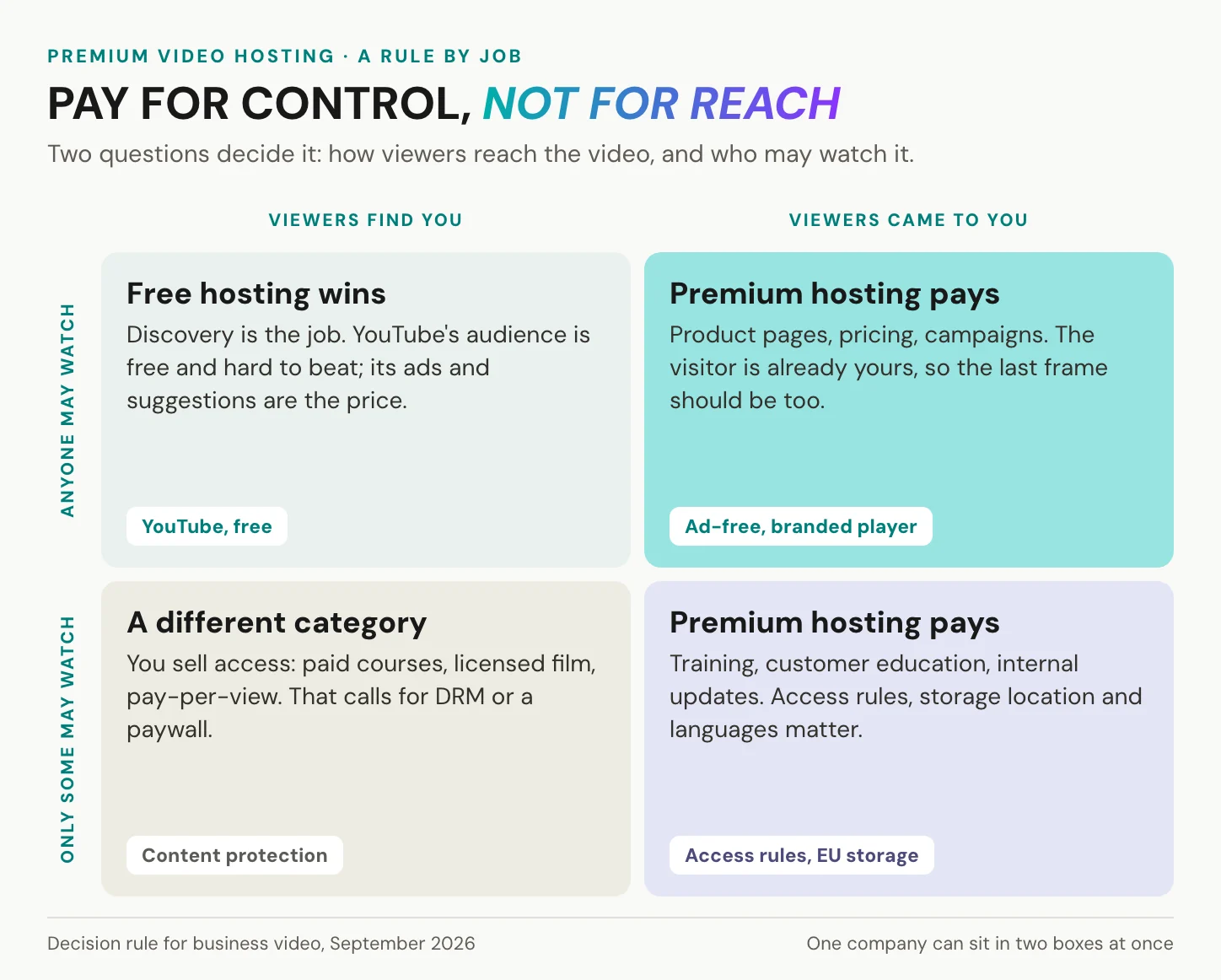
Viewers find you and anyone may watch: free hosting wins. Viewers came to you and anyone may watch: premium video hosting pays, because the visitor is already yours. Viewers came to you and only some may watch: premium hosting pays again, now for access, storage location and languages. Viewers find you but only paying ones may watch: you sell access, and that is a different category altogether.
When you do not need premium video hosting
Often, you do not. Free is the right answer in at least four cases.
- Reach and discovery are the job. YouTube’s audience is the product, and no paid host rents it to you.
- You want ad revenue. A paid host runs no ads on your video, so there is nothing to share.
- A short silent loop or hero clip on your own site. A self-hosted
<video>element handles it, and Chrome has allowed muted autoplay since Chrome 66, in April 2018. - A one-off recording for a handful of colleagues. Your collaboration suite already stores it.
If reach is the goal, YouTube is free and hard to beat. If the viewer should stay with you, pay for it.
The split can run through a single website. Tourette.de moved its own videos off YouTube and kept YouTube for third-party videos that only exist there, as its story describes. And if the job is simply to get one video in front of one person, a linked video in an email may be all you need.
When a paid tier starts paying for itself
Four triggers tell you the free deal has stopped working. Someone else’s suggestion appears after your demo, or a logo you cannot remove sits on a page that sells. A storage cap or a bandwidth review arrives in the middle of a campaign. Or procurement asks for a processor agreement and a storage location, and your free host’s standard terms are the only answer you have.
Three kinds of video tend to hit those triggers first. Training and customer education comes first, whether the training videos live on your pages or inside a learning platform such as Moodle. Regulated content follows, in finance, healthcare and pharma, where the hosting questions get sharper. The third is one video for several language markets, where the real question is whether you publish one file per language or one video for all of them. We come back to that one below.
In short: stay free when reach is the job, and pay once the viewer has already come to you.
See what the last frame looks like when it is yours. Start on our free tier and embed a test video, or talk to us about your use case.
Playback quality: the ladder, not 4K
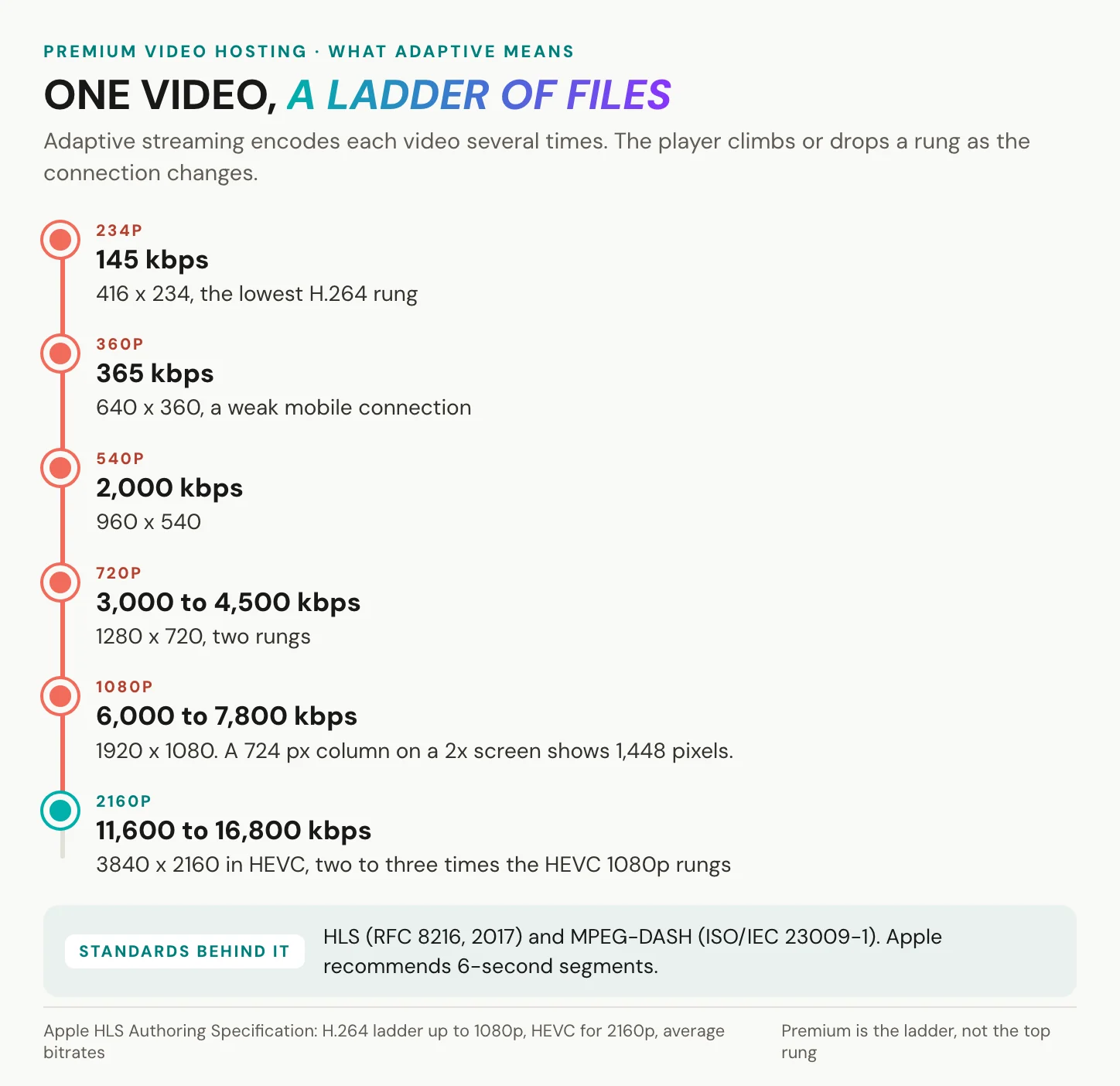
Quality is a ladder. Adaptive streaming encodes one video several times, at rising resolutions and bitrates, and the player switches rungs as the viewer’s connection changes.
Two standards carry it: HLS, published as RFC 8216 in August 2017, and MPEG-DASH, standardised as ISO/IEC 23009-1. Apple’s HLS authoring specification shows what a sensible H.264 ladder looks like. It starts at 416 by 234 pixels at 145 kbps and ends at 1920 by 1080, at 6,000 and 7,800 kbps. Apple also says target segment durations should be 6 seconds.
Good hosts go further than one fixed ladder. Netflix described per-title encoding in December 2015: a ladder computed for each title from its complexity, rather than one ladder for everything. Codecs move on too: AV1 was released on 28 March 2018, AV2 on 9 June 2026.
Why 4K is rarely the premium feature
For showreels, stock footage and film festivals, 4K is the product. YouTube recommends 35 to 45 Mbps for a 2160p SDR upload at standard frame rates, against 8 Mbps for 1080p, so every step up costs storage and bandwidth before anyone presses play. Some premium hosts sell 4K as a headline feature. Jetpack VideoPress advertises full 4K at 60 frames per second, and Vimeo advertises playback up to 8K HDR, both as published in September 2026.
For a business embed, it rarely shows. Apple’s HEVC ladder puts its 4K rungs at 11,600 and 16,800 kbps, two to three times its 1080p rungs of 4,500 and 5,800 kbps. Now look at your page. A video 724 pixels wide, on a screen with twice the pixel density, shows 1,448 device pixels, and the 1080p rung is already 1,920 wide. Whether you need more depends on what you sell, so ask what the top rung costs you in bandwidth before you pay for it.
What a heavy player costs your page
Quality also covers what the player does to your page. Lighthouse, Google’s audit tool, puts a YouTube embed facade at 3 KB, against 540 KB for the full player it defers.
That weight lands on Core Web Vitals. Google calls a page good when, at the 75th percentile of visits, Largest Contentful Paint stays within 2.5 seconds, Interaction to Next Paint within 200 milliseconds and Cumulative Layout Shift within 0.1. INP replaced First Input Delay on 12 March 2024.
Video on the page is common enough for this to matter. The Web Almanac 2024 found a video element on 6.7 percent of mobile and 7.7 percent of desktop pages in the HTTP Archive crawl. Its 2025 edition found at least one third party on more than nine in ten crawled pages. Ask any host what its player weighs.
In short: from premium video hosting, buy a clean ladder in HLS and DASH and a light player, and buy 4K only if you sell on image quality.
Storage and bandwidth: the fair-use line
Unlimited is a contract word. In premium video hosting, storage and streaming are two different limits, set separately, and Vimeo shows both. Its free tier gives 1 GB of storage for the account’s lifetime, while its bandwidth threshold is 2 TB a month on every self-serve tier, paid ones included.
To be fair to that threshold, it is high. Vimeo says more than 99 percent of its users stay below it. The line matters for everyone else. Vimeo contacts accounts that pass 2 TB twice within 12 months, or 10 TB once, and gives them seven days to respond. After that, Vimeo may suspend the account for a time, and its videos stop playing wherever they are distributed or embedded.
Other hosts draw the line elsewhere: Wistia’s free tier includes 200 GB of bandwidth, and Jetpack VideoPress offers up to 1 TB of total storage, both as published in September 2026.
Four questions make any fair-use clause readable. What counts towards the limit? What happens at the line? Who is warned, and how early? And does the embed stop, or does it only degrade?
In short: there is always a line, so buy the host whose line you can read.
Who may watch: access control
Access is the row most buyers underrate. Across premium video hosting, access settings form a ladder. Public means anyone can find the video, unlisted means anyone with the link can watch, and private keeps it inside the account. Above those sit password protection, embed-only playback, restrictions to named domains and roles for your team.
What premium video hosting platforms gate by tier
Vimeo publishes a clear example, as of September 2026. Public and private work on all its tiers, while unlisted, password and embed-only are, in Vimeo’s words, available with paid plans. A setting that limits a video to people in your company sits on its top tier.
Domain-level embed privacy, for up to 50 domains, is harder to pin down. Vimeo’s help centre says it is included with all plans, while its features page lists domain-level embed restrictions among paid features. Ask which applies to your account, and get the answer in writing.
To be fair to the simpler settings, most marketing video needs nothing more than an unlisted link and an embed you control. Just know what unlisted does not do. Anyone with the link can watch, and a forwarded link keeps working. It is a visibility setting, not access control.
Private video hosting is a topic of its own. If you run enterprise video and weigh access together with data sovereignty, Schrems II and enterprise video hosting goes deeper.
In short: check each setting against the tier you will actually buy, and get the list in writing.
Premium hosting is not premium content
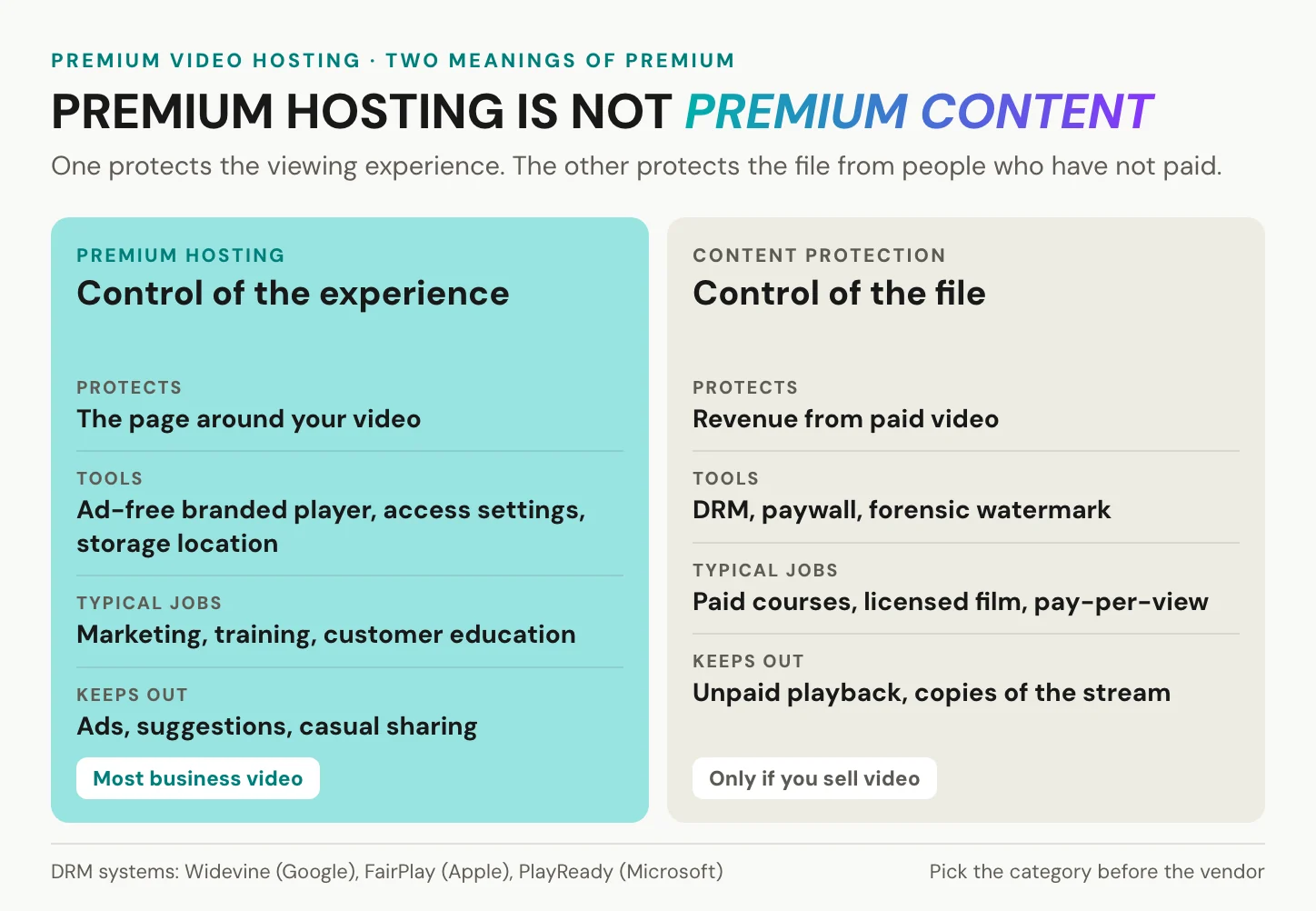
Some readers mean something else by premium. They sell access to the video itself: paid courses, licensed film, pay-per-view events. For them, the question is not the frame around the video but who can copy the file.
That calls for content protection, a separate product category. Digital rights management encrypts the stream and releases it only to licensed players. Three systems cover the major platforms, and each protects playback on different ones, so most services license all three: Widevine from Google, FairPlay from Apple and PlayReady from Microsoft. On top sits a paywall or membership layer that decides who gets access. Some services add a forensic watermark that traces a leak back to an account.
For licensed or paid video, that protection is the product, and it is worth paying for. No amount of premium video hosting replaces it.
We are not that host. Our player has no DRM, no password protection and no paywall. Where we do fit is the other half of the picture, business video on your own pages that sells, trains or explains, where the question is who owns the frame rather than who holds a key.
In short: premium hosting controls the frame around your video, content protection controls the file, and video you sell needs the second.
Does paying buy GDPR compliance?
Paying helps. It does not finish the job.
Start with what YouTube gets right. Its reach is unmatched, and its privacy-enhanced mode keeps embedded views from shaping the viewer’s YouTube experience and ad personalisation. What Google does not promise is that the mode sets no cookies, and that gap is where three separate duties begin. Premium video hosting can settle only the first of them outright.
Where the files live: the first of three duties
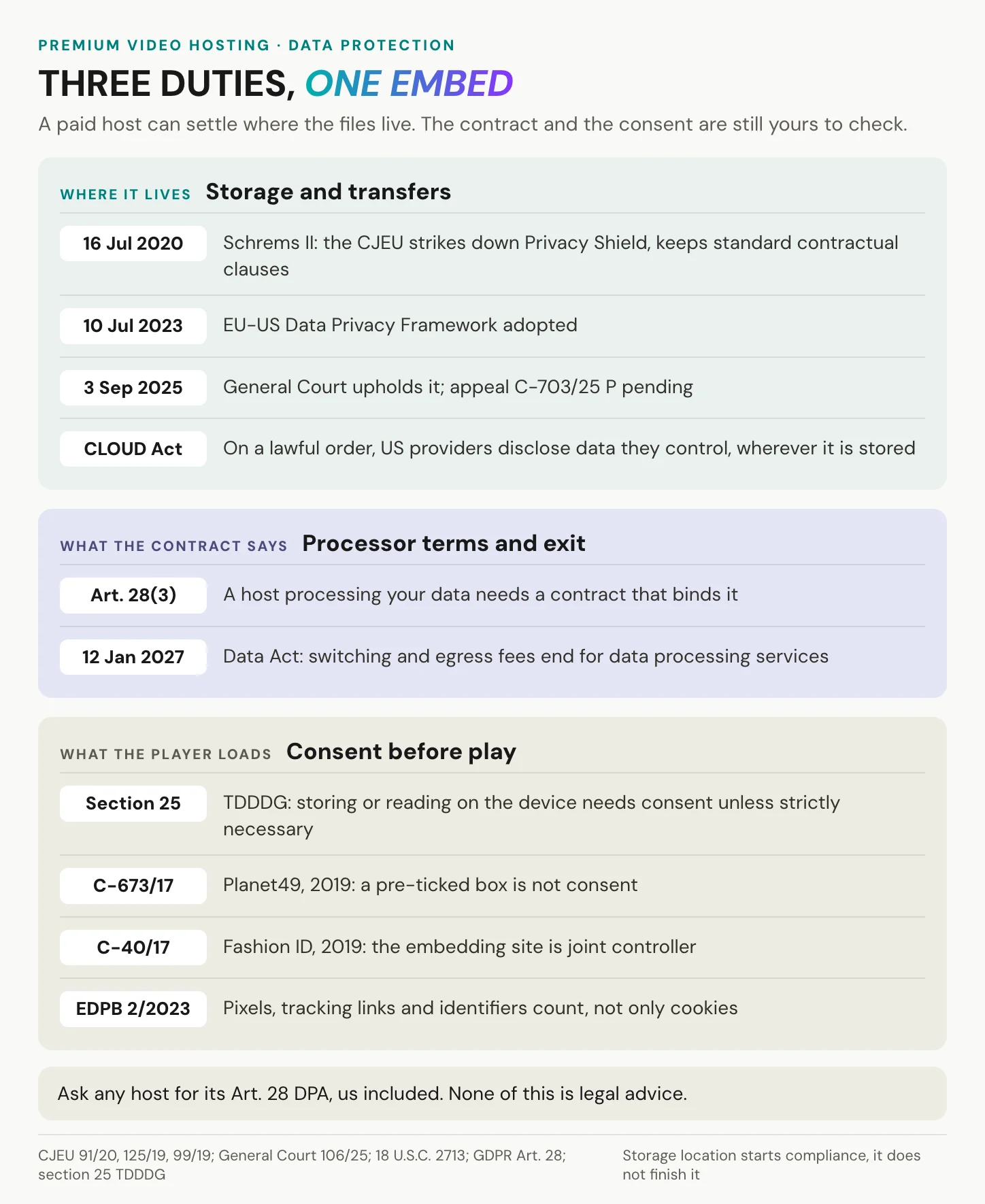
The first duty follows from where the files live, because every transfer out of the EU has to meet the GDPR’s transfer rules. On 16 July 2020, in Schrems II (C-311/18), the Court of Justice struck down the Privacy Shield. The EU-US Data Privacy Framework followed on 10 July 2023, and the General Court upheld it on 3 September 2025 (T-553/23). That judgment is under appeal as C-703/25 P, lodged on 31 October 2025, so the framework stands for now.
US premium hosts rely on it. Vimeo processes data in the US and other countries, relies on standard contractual clauses and certifies to the framework, while Wistia certifies too and offers a downloadable DPA. What remains is statute, not a verdict on any vendor. Under the US CLOUD Act of 23 March 2018, a US provider served with a lawful order must disclose data in its possession, custody or control, wherever it is stored. GDPR Art. 44 makes every transfer to a third country meet the conditions of Chapter V. So an EU region of a US host and an EU host are different answers.
EU storage is necessary for many buyers, but not sufficient. The second duty is the contract: under Art. 28(3) GDPR, a processor works under a binding contract. Ask any host for its Art. 28 DPA, us included.
Storage location is where compliance starts, not where it ends.
HFM Bonn compared YouTube and Vimeo before moving its videos to us. In their words: “Data privacy and the server location were the main arguments for our decision.”
What your embed loads before consent
The third duty sits in your own page. Section 25(1) TDDDG requires consent before information is stored on or read from a visitor’s device, unless it is strictly necessary for a service the visitor explicitly asked for. The law has applied since 1 December 2021; until 14 May 2024 it was called the TTDSG. In Planet49, on 1 October 2019, the Court of Justice held that a pre-ticked box is not consent, personal data or not. In Fashion ID, on 29 July 2019, it held that a site embedding a third-party plugin is joint controller for collecting and passing on its visitors’ data. The EDPB’s Guidelines 2/2023, adopted in October 2024, interpret Art. 5(3) of the ePrivacy Directive, which section 25 transposes. In the EDPB’s reading, it covers more than cookies: pixels, tracking links and unique identifiers too.
Premium hosts do offer tools here. Vimeo’s dnt parameter blocks session data and analytics, but it is off by default and set per embed. Wistia’s Privacy Mode disables session and cookie tracking and can be the account default, although some functional cookies may remain after consent is withdrawn.
An analogy from fonts, not video: on 20 January 2022, LG München I awarded EUR 100 in damages because a site passed a visitor’s IP address to Google Fonts without consent.
This is not legal advice. Have your data protection officer check the consent setup of your site, as with any embed. The wider picture is in GDPR-compliant video hosting.
In short: a paid host can settle where the files live, the contract is a document you request, and the consent is a decision about what your page loads.
Where alugha fits, and where it does not
Here is our side, limits first.
Our limits first
We encode at 540p, 720p or 1080p, and you choose the quality in our upload wizard. Our free tier stops at 720p. 1080p needs a paid tier, and no tier goes above it.
We offer no DRM, no password protection, no expiring or per-recipient links and no paywall. Our access control is three visibility states, Private, Public and Not listed, and beside them sit a switch that blocks embedding on every website and permissions by folder. A paid tier can also restrict where our player may be embedded, and the settings are in our help centre under visibility and privacy.
We count plays per language, and enhanced analytics sit on our top tier. We publish no uptime figure. Storage and streaming draw on credits, so a traffic spike uses them up. At zero balance, your videos stay online at the lowest resolution until you top up, as our plans and credits page explains. And our player needs JavaScript, in the browsers we support.
Premium video hosting in every language, under one URL
This is what we built the player for. One embed code and one URL carry every language of a video. Your viewers switch audio and subtitles independently, English audio with French subtitles if they like, without reloading the page. The player picks the starting language from the browser’s language setting, not from the viewer’s location, and falls back to your default track if that language is missing.
One embed code, one URL, every language.
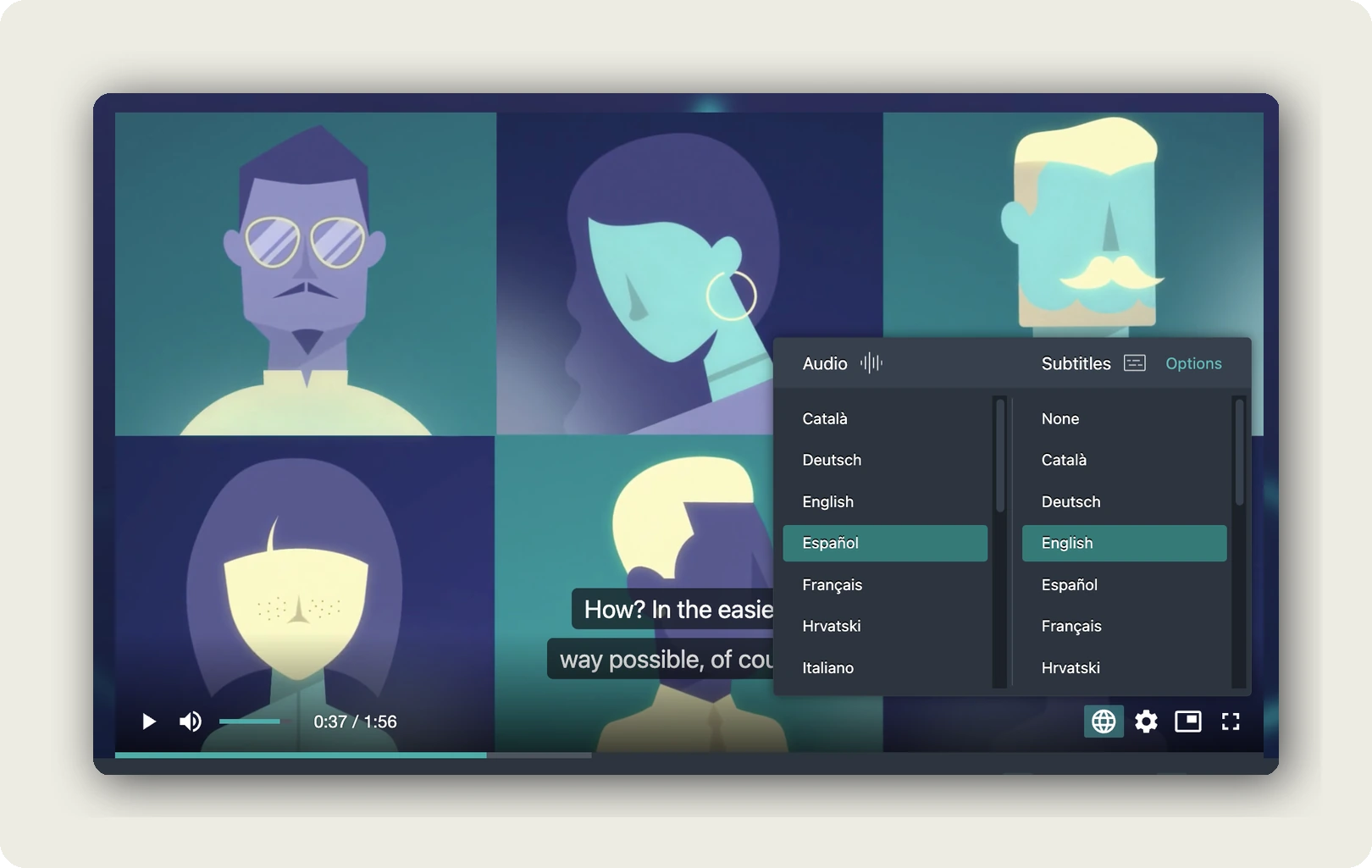
Transcription, translation, subtitles and dubbing happen in the same project and draw on credits. A paid tier allows more language tracks per video, and the embed guide for multilingual video shows the code.
To be fair to the single-language setup: Meet Your Master, a premium masterclass platform, ran on Vimeo, and it worked reliably for one language. Every further language, though, meant another separate file. How Meet Your Master scaled its masterclasses is a short read.
Whichever host you consider, ask in these words: can one embed carry every language, with audio and subtitles chosen separately?
Your frame, hosted in Germany and the EU
Our player shows no external ads and no third-party recommendations.
When your video ends on our player, nothing else starts.
We host in Germany and the EU, and our player loads no third-party advertising cookies and trackers. It still counts plays for you with our own first-party analytics, so have your data protection officer check the consent setup of your site, as with any embed.
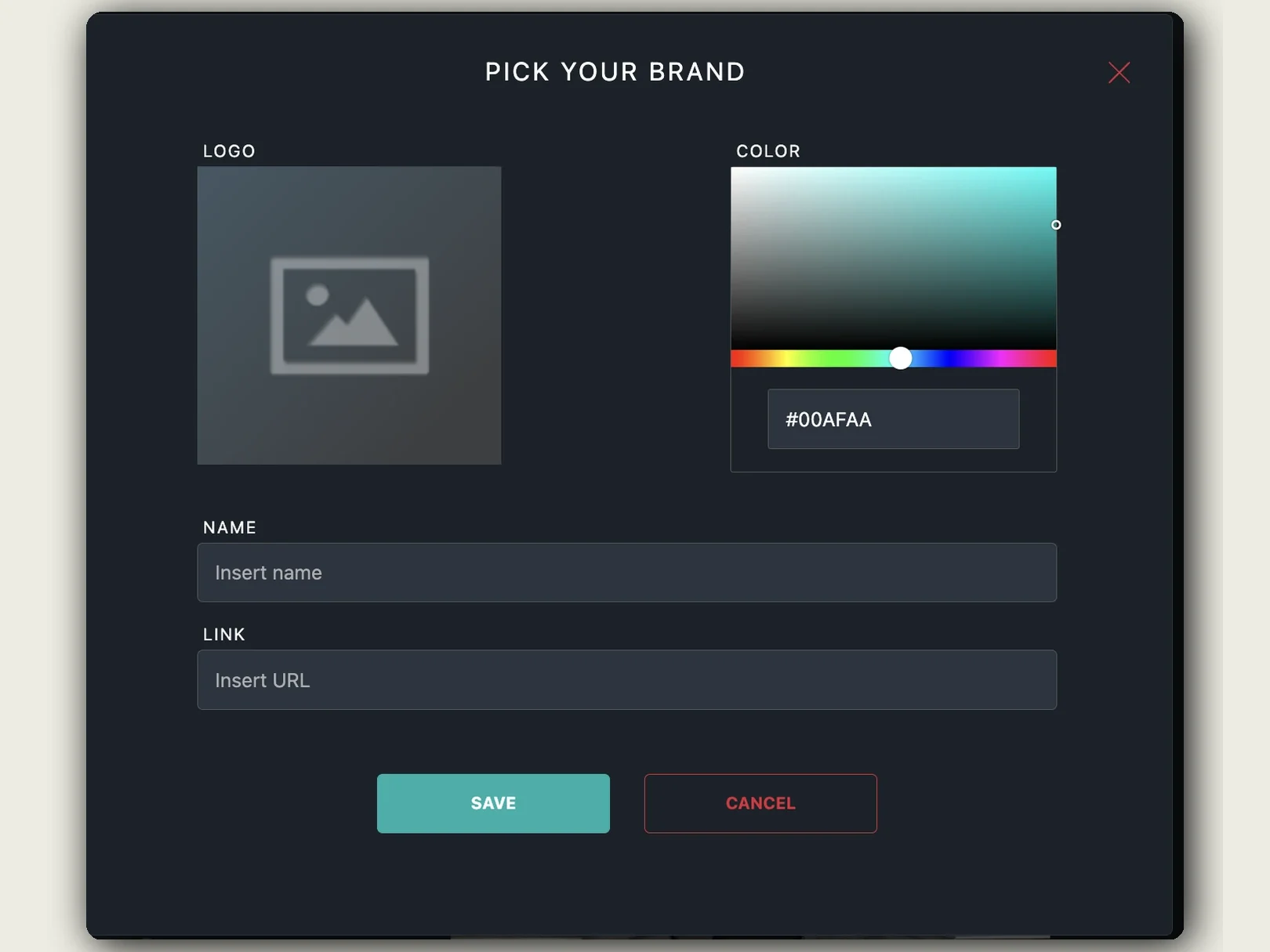
Custom player branding sits on a paid tier, where your logo, as PNG or SVG, replaces our play button. A hex colour styles the controls, an optional click-through link sits on the logo, and one profile covers every project. The details are in customise the player’s appearance. Delivery runs as a ladder of resolutions in MP4, HLS and MPEG-DASH, in any aspect ratio, 9:16 included.
And when you do not need us, or any premium video hosting: if a public video’s job is reach, YouTube does it better. If you want ad revenue, we have none to share. If you need 4K, DRM or a paywall, pick a host built for that.
In short: we stop at 1080p and sell no content protection. In exchange, every language of your video plays under one URL, from hosting in Germany and the EU, and the frame around it is yours.
Frequently asked questions about premium video hosting
Is premium video hosting the same as ad-free video hosting?
No. Ad-free describes one property of the player, and several free tiers already have it. Vimeo calls its whole platform ad-free and Wistia markets its free player as ad-free, as published in September 2026. Premium video hosting is paid hosting that adds control over the rest: what follows the video, whose brand is on the player, readable limits, access rules and a contract.
Is premium video hosting worth it for a small business?
Yes, when video sits on your own pages and sells, trains or explains. No, when reach is the job, because YouTube’s audience is free. The practical test is four triggers: a stranger’s suggestion after your demo, a logo you cannot remove, a cap or bandwidth review mid-campaign, and a customer asking for a processor agreement. One trigger is usually enough.
What is the difference between free and paid video hosting?
Free hosting is paid for in another currency. YouTube takes attention: it may run ads and always suggests related videos. Free tiers of paid hosts take ceilings instead, such as Vimeo’s 1 GB for the account’s lifetime or Wistia’s 25 GB with one user. Premium video hosting buys control of the frame, limits in a contract and a known storage location.
Is there free video hosting without ads?
Yes. Vimeo calls its whole platform ad-free and Wistia markets its free player as ad-free, as published in September 2026. What their free tiers do not offer is unlimited storage. Vimeo’s free tier allows 1 GB of uploads for the account’s lifetime, while Wistia’s gives you 25 GB, one user and Wistia branding on the player. Ad-free free tiers are trials with a ceiling.
Do I need DRM for premium video?
Only if you sell access to the video itself, such as paid courses, licensed film or pay-per-view. Then you need DRM, usually all three major systems, Widevine, FairPlay and PlayReady, plus a paywall or membership layer. We offer no DRM, so for paid courses choose a host built for it. For business video on your own pages, DRM solves the wrong problem.
Does premium video hosting make my embeds GDPR compliant?
Not by itself. Three duties apply: transfer rules for where the files are stored, a processor contract under Art. 28 GDPR, and consent under section 25 TDDDG for what your page stores on a visitor’s device. A paid host can settle the first, while the consent setup stays yours. Ask any host for its Art. 28 DPA, us included. This is not legal advice.
Can one video play in several languages under one link?
On our player, yes. One embed code and one URL carry every language of a video, and viewers choose audio and subtitles separately, without a page reload. The player starts in the language set in the visitor’s browser and falls back to your default track. With any other host, ask the same question in the same words before you sign.
What should you ask premium video hosting providers before signing?
Six questions cover most of the risk. Can an ad ever appear in our embeds, and what shows after the last frame? Can we remove your logo everywhere? Where is your bandwidth line, and what happens past it? What does your player load before play? Will you send your Art. 28 DPA and subprocessor list? And how do we get every file out?
Getting started
Three steps. Start the first one today.
1. List your videos by job, and put each one in one of the four boxes from the decision rule above. 2. For the boxes that need premium video hosting, send the ledger’s last column to two providers, us included. 3. Test one video on your own page. Watch its last frame, check what the page loads before play, and switch the browser language once.
Then go back to the last frame of your demo, on your pricing page. If what follows should be your call to action, in your visitor’s language, and not someone else’s suggestion, that frame is what you pay for.
Bring one video and the ledger’s questions. Book a call and we answer them for our player, limits included, or start on our free tier.