Search for a YouTube alternative and one of the first results is usually a Reddit thread. Scroll a little further and you find Vimeo and Wistia listed between BitChute and Odysee. Those are not the same category of product. One group of readers wants somewhere else to watch. The other wants somewhere else to publish, because the YouTube embed pulls advertising, foreign recommendations and Google cookies onto a page they own. Almost every comparison mixes the two.
Key takeaways
- The phrase YouTube alternative covers two jobs. One reader wants a place to watch, the other a place to publish, and the shortlists share no criteria.
- For watching, the realistic names are PeerTube, Odysee, Rumble, Nebula and Dailymotion. Each gives up something YouTube has, usually catalogue or discovery.
- For publishing, the field splits into three groups. Creative and general purpose, marketing and sales, enterprise and regulated.
- Vimeo and Brightcove have shared one owner since 24 November 2025. Bending Spoons closed both acquisitions and took both off the Nasdaq.
- Where the data sits belongs in the criteria, not in a footnote. Ask for the storage region, the edge locations and the transfer mechanism in writing.
- Most platforms treat a second language as a second channel. Few carry several audio and subtitle tracks under one URL, and reversing that is expensive.
- For a company website, the embed is a GDPR decision, not a design choice. A standard YouTube embed connects the visitor to Google before consent; an EU-hosted player with no third-party trackers moves the whole question to one controller and one contract.
- Key takeaways
- Why look for a YouTube alternative
- The two kinds of YouTube alternative
- YouTube alternatives for watching
- YouTube alternatives for hosting
- Who owns your YouTube alternative
- Where a YouTube alternative stores data
- Where most YouTube alternatives stop
- Multilingual video hosting with alugha
- Choosing your YouTube alternative
- Frequently asked questions about YouTube alternatives
- Getting started
Compare a real embed side by side: create a free account and put one video on two platforms.
Why look for a YouTube alternative
The two audiences arrive from different frustrations. Side by side, they show which list you need.
What viewers are running from
The related searches are blunt: without ads, without censorship, unblocked, app. Four complaints sit behind them. Advertising has become heavier. Age verification asks for documents people do not want to hand over. The recommendation feed decides what gets watched. Moderation feels arbitrary to some communities and too loose to others.
Leaving has a price. YouTube runs localised versions in more than 100 countries and 80 languages, takes more than 20 million uploads a day, and reports that Shorts averages over 200 billion views a day. No alternative comes close on catalogue. They offer different rules or a different funding model instead.
What the embed does to your own page
The publisher problem has nothing to do with the catalogue. A YouTube embed is third party code inside your page. It sets cookies, it can show advertising you did not sell, and it ends playback by recommending other channels, including competitors. The branding is someone else’s, and so is the viewer data. Hence the neighbouring searches: video hosting platforms, private video hosting, free video hosting.
The two kinds of YouTube alternative
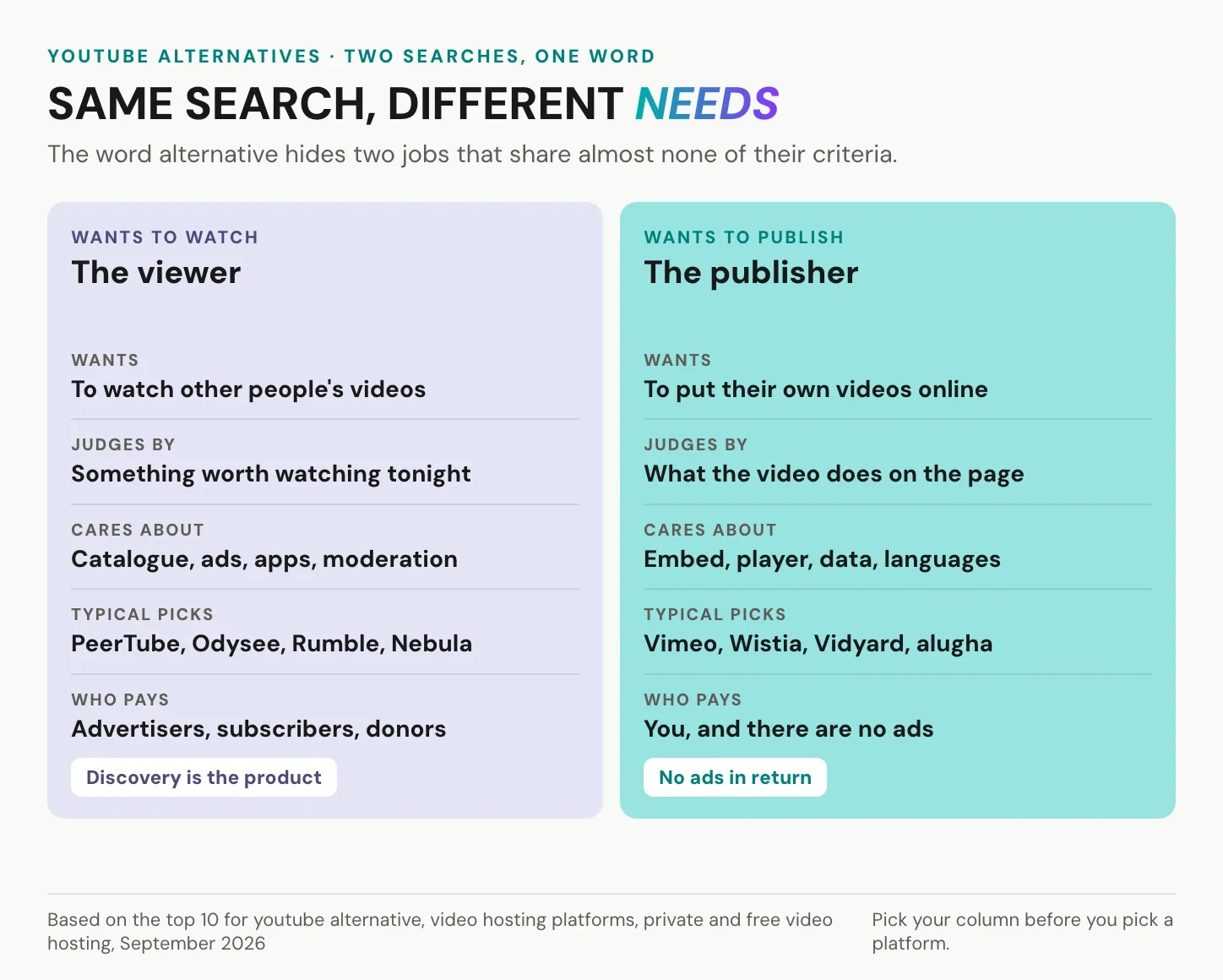
Decide which column you are in before any list is useful. Viewers judge a platform by what they can watch. Publishers judge it by what it does to their own page.
What to judge a viewing platform on
Five things settle it. Catalogue size and freshness. Apps for phone and television. The funding model, whether advertising, subscription or donations. Who writes and enforces moderation rules. Whether you can follow creators without an advertising account.
What to judge a hosting platform on
Six things settle it here. Does the embed run without advertising and third party trackers. Can you control the player and what happens after playback. Where is the video stored, and who can be compelled to hand it over. Do the analytics belong to you. Can one video carry several languages. Who owns the vendor.
YouTube alternatives for watching
Each entry below has a real strength and a real limit.
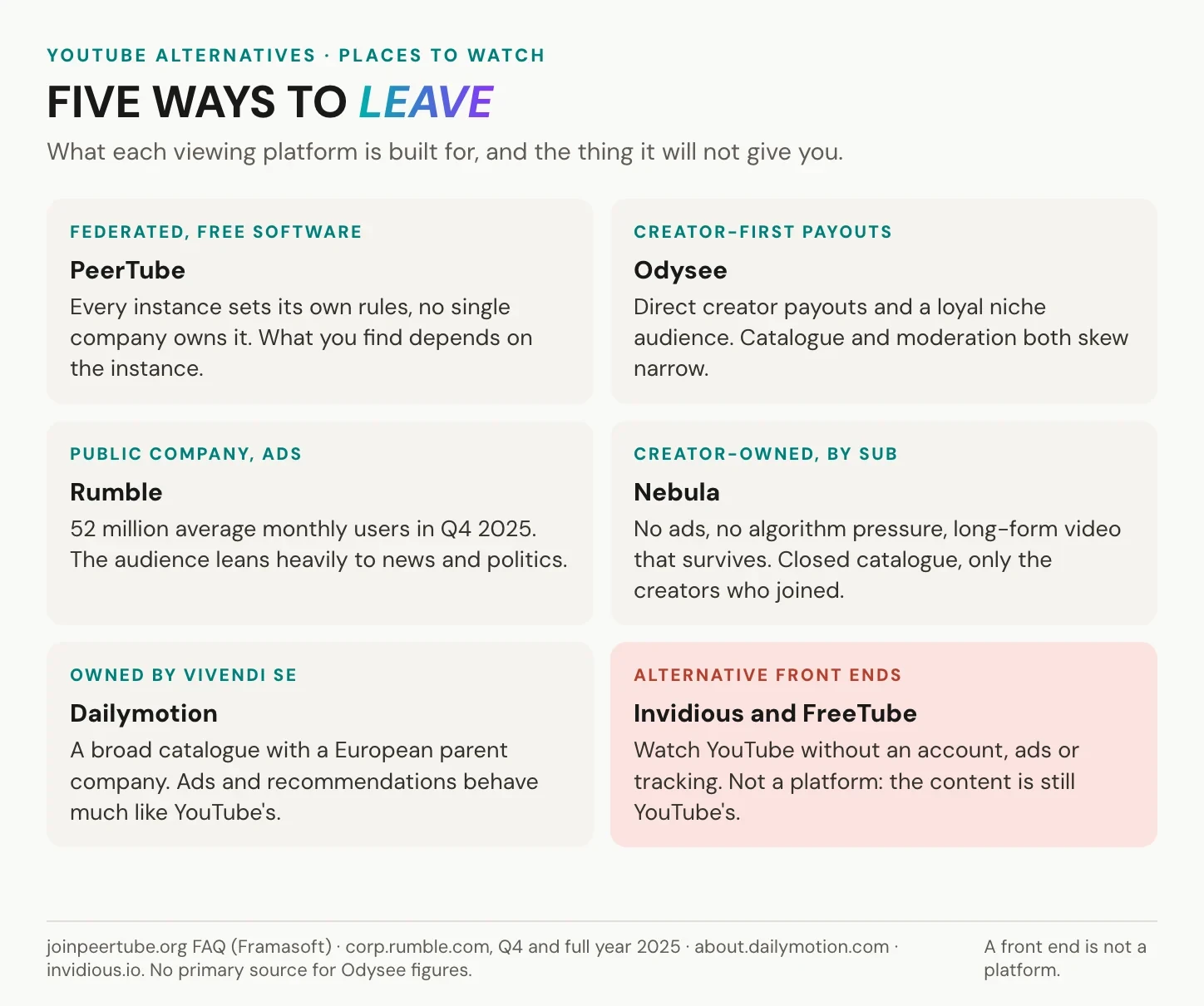
PeerTube: federated, no single owner
PeerTube is free software from Framasoft, a French non profit association. It is not one website but many independent instances that federate over ActivityPub, the W3C recommendation Mastodon also uses, so an account on one instance can follow channels on another. Videos are additionally distributed peer to peer over WebRTC, which an operator can switch off.
The strength is structural: each instance is moderated by whoever runs it, and no company can change the terms for everybody. The limit is that same design from the other side, because what you find depends on the instance.
Odysee and Rumble: reach outside the algorithm
Odysee is a creator first platform. Its own help pages describe monetisation through memberships, tips and hyperchat, paid out through a wallet on its blockchain. Catalogue and moderation culture both skew narrow, which is why some viewers go there and others stay away.
Rumble is far larger. It reported 52 million average global monthly active users for the fourth quarter of 2025, up 11 percent from 47 million in the third. That is real scale outside YouTube, but the audience leans heavily towards news and political commentary.
Nebula: subscription instead of ads
Nebula is funded by subscriptions rather than advertising, and the catalogue holds only the creators who joined it. For long form documentary and explainer video the trade works: no advertising break, no feed pushing the next thing. For everyone else the closed catalogue is the deal breaker.
Dailymotion: a general catalogue with an EU parent
Dailymotion is the closest thing here to a conventional general purpose video site, and it belongs to Vivendi SE. For European organisations that care who owns the platform, that matters. Its advertising and recommendations resemble YouTube’s, so you get a different company, not a different model.
Invidious and FreeTube: front ends, not platforms
Invidious is an alternative web front end for YouTube, FreeTube a desktop application doing something similar. Both let you watch and subscribe without an account, advertising or the usual tracking.
They need one correction. A front end is not an alternative platform. The content and the terms are still YouTube’s, and public instances come and go. If your goal is less tracking, they help. To leave YouTube, they do not.
YouTube alternatives for hosting
Business hosts are easier to judge in groups than in a ranking, because they were built for different departments.
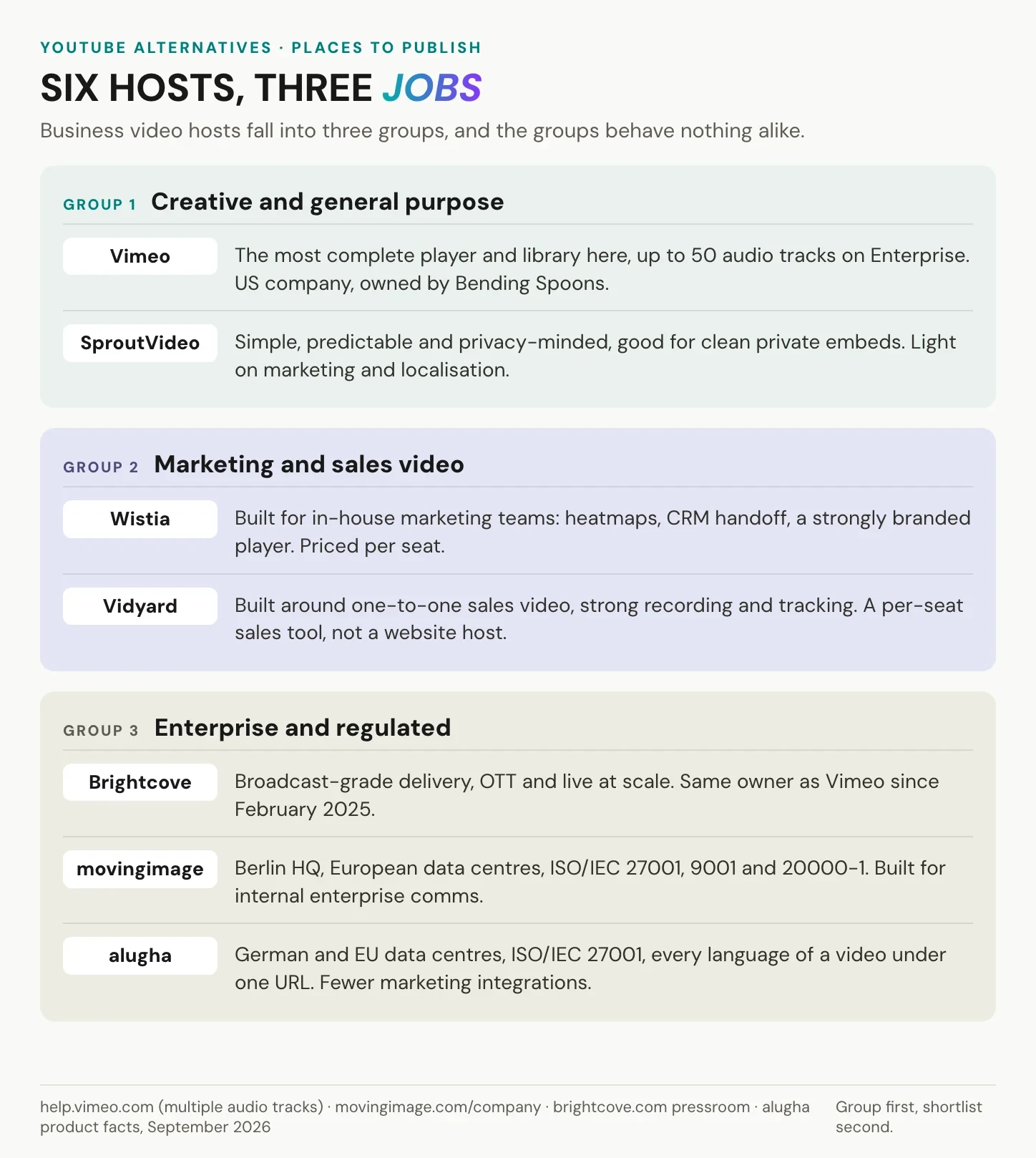
Creative and general purpose
Vimeo is the most complete general purpose host here. It supports several audio tracks per video: one additional language track on the free tier and up to 50 on Enterprise, with AI translation and dubbing alongside. It is a US company, owned by the Italian company Bending Spoons since November 2025.
SproutVideo is the quieter option: clean, predictable embeds without advertising, plus lead capture, calls to action and captions in several languages. Multiple audio tracks are not part of its documented feature set.
Marketing and sales video
Wistia is built for in house marketing teams: heatmaps, form capture, CRM handoff, a strongly branded player. Its plans are priced by seats, storage and bandwidth rather than by the number of videos, so the maths changes with team size rather than library size.
Vidyard is built around one to one sales video: recording, sending, tracking who watched what. Hosting every video on a public website is a different job from the one it was designed for.
Enterprise and regulated industries
Brightcove delivers broadcast grade streaming, OTT applications and live at scale. Bending Spoons has owned it since February 2025, which is how it ended up under the same roof as Vimeo.
movingimage is headquartered in Berlin, hosts in European data centres and holds ISO/IEC 27001, ISO 9001 and ISO/IEC 20000-1 certification. Its platform is built around corporate use cases: internal communication, webinars, hybrid events and corporate learning.
alugha stores and processes video in data centres in Germany and the EU, and carries every language of a video under one URL. Its documented integrations are about embedding, on WordPress, Squarespace and around twenty other platforms, not the CRM and marketing automation stacks the US incumbents plug into.
Who owns your YouTube alternative
None of the comparisons ranking for this term says who owns the platforms it recommends, and ownership changes the two names recommended most.
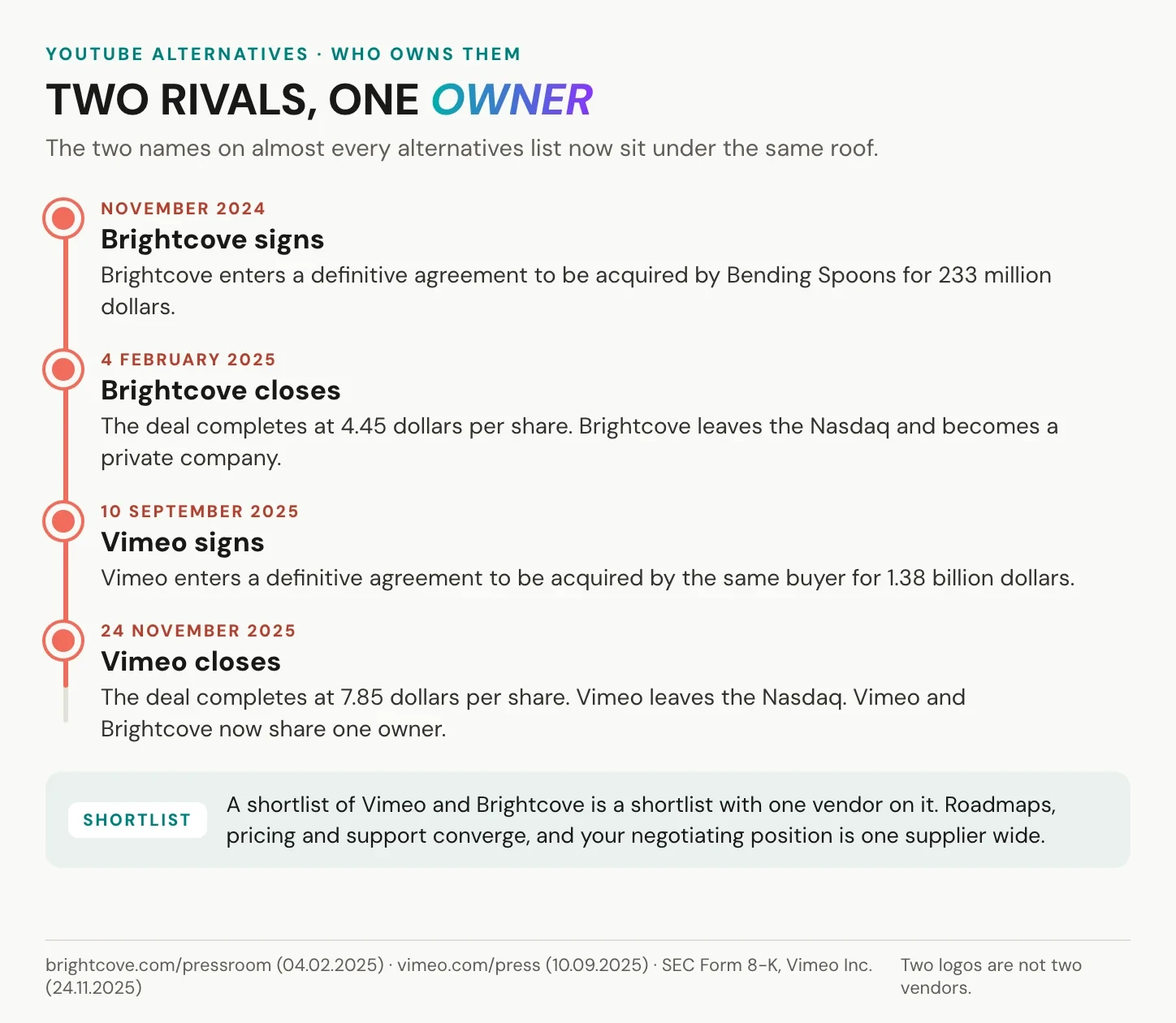
Two names, one owner since November 2025
Bending Spoons closed its acquisition of Brightcove on 4 February 2025, a 233 million dollar transaction at 4.45 dollars per share, and Brightcove left the Nasdaq. On 10 September 2025 Vimeo signed a definitive agreement with the same buyer for 1.38 billion dollars. That deal closed on 24 November 2025 at 7.85 dollars per share, and Vimeo is no longer listed either. Since that date the two names on almost every alternatives list have had one owner.
We covered why businesses reconsider Vimeo after the 1.38 billion acquisition separately.
What consolidation does to a shortlist
A shortlist containing Vimeo and Brightcove looks like two options and behaves like one. Roadmaps, pricing policy and support converge, and your negotiating position is one supplier wide.
Not sure which column your project is in? Book a call and go through your requirements with us.
Where a YouTube alternative stores data
An embed hands your visitors to whoever runs the player. Three questions cover most of the risk, and they apply to every vendor, not only those advertising compliance.
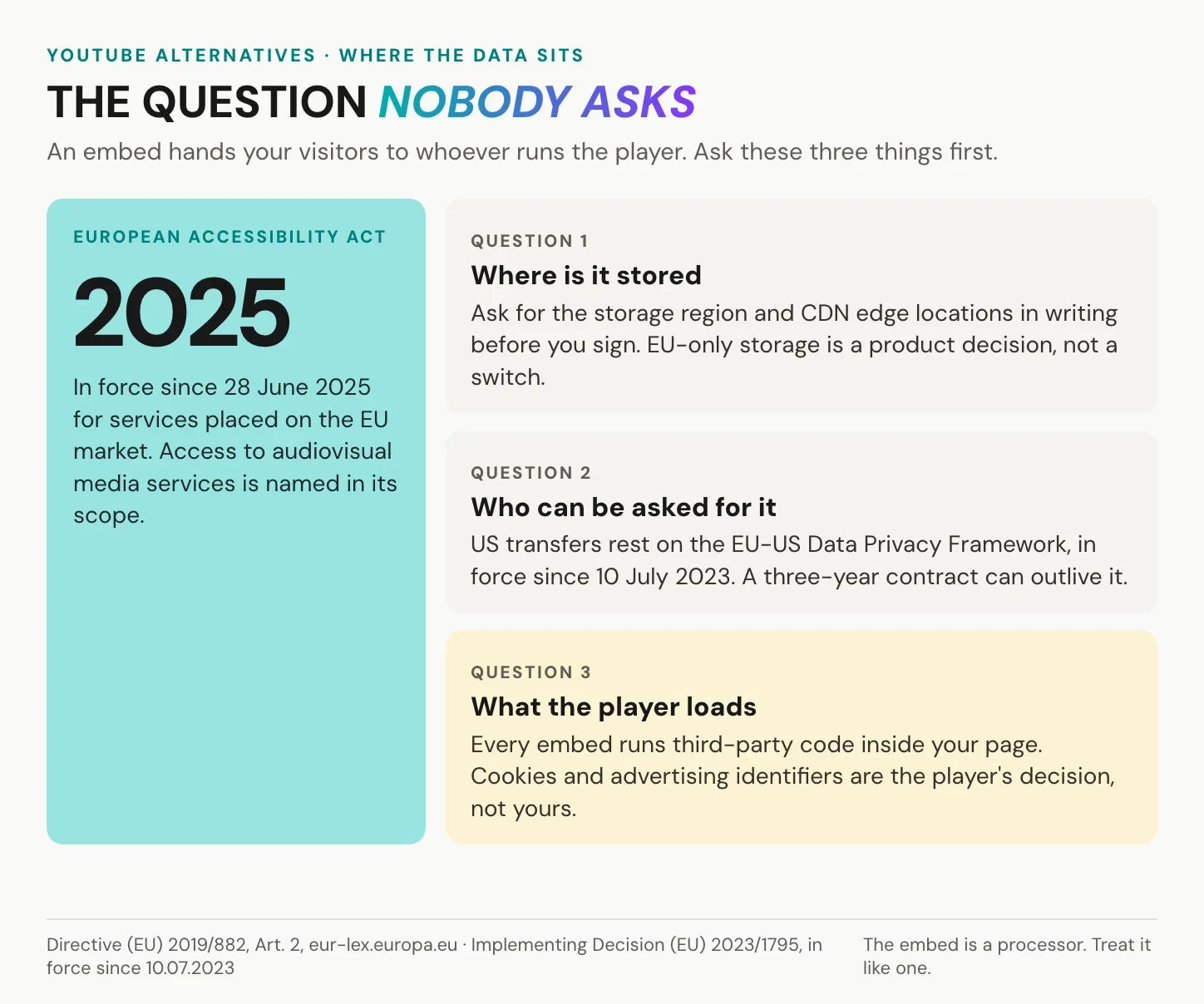
Storage region and CDN edge
Ask for the storage region and the CDN edge locations in writing, before signing. These are two answers, not one. Storage is where the master file and the metadata live. The edge caches copies for delivery, and a global CDN is normal for playback speed. What matters is that storage and processing sit where you say they must. Our longer treatment: GDPR-compliant video hosting.
Transfers and the adequacy question
Transfers to US providers currently rest on the EU-US Data Privacy Framework. The Commission adopted that adequacy decision on 10 July 2023 and reviews it at least every four years. The basis exists today, and it gets revisited. A three year contract can outlive the framework it was signed under, which is reason enough to know where your files sit. See data sovereignty and Schrems II for enterprise video hosting.
What a DPO asks before the embed goes live
YouTube is an extraordinary platform for reach and discovery, and for public marketing content it is often the right home. As infrastructure for a company website it carries a structural problem no cookie banner fixes. A standard embed loads scripts from Google the moment the page renders, before the visitor has agreed to anything, and German courts have treated that connection as a consent matter under section 25 TDDDG. So the question a data protection officer asks is not whether YouTube is a good product. It is who the visitor is handed to, and on what legal basis.
The checklist is short. A data processing agreement under Article 28 GDPR with the host, and a named sub-processor list. Storage and processing inside the EU, so Chapter V transfers do not have to be argued at all. A player that sets nothing on the visitor’s device until play is pressed, and no third-party advertising trackers. And a deletion path: when the video goes, the copies and the analytics go with it.
alugha answers all four in one contract. Video is stored and processed in Germany and the EU, the player carries no third-party advertising cookies or trackers, embedding can be restricted to your own domains, and the data processing agreement covers hosting, transcription, translation and dubbing as one processor rather than four. For a procurement team that is the difference between a two-week review and a two-day one: one controller relationship, one DPA, one place where the data lives.
Accessibility is a procurement criterion now
None of the comparisons ranking for this term names a date. Here is one. The European Accessibility Act, Directive (EU) 2019/882, applies to products placed on the market and services provided after 28 June 2025, and access to audiovisual media services is named in its scope. The platform decides whether subtitles and audio description are practical to produce, so ask how they are created, corrected and exported before the contract.
Where most YouTube alternatives stop
Across the highest ranking comparisons for this keyword, the words multilingual, subtitle and AI dubbing barely appear. Yet language decides how much work your team does for the next five years.
One URL or one channel per language
There are two ways to publish a video in five languages. You create five uploads, five URLs and often five channels, and every correction, thumbnail and embed then exists five times. Or one video carries five audio and five subtitle tracks under one URL, and the viewer chooses inside the player.
The first model is the default, and it makes late localisation expensive: the EU alone has 24 official languages, and a catalogue that grew for three years in one language does not migrate cheaply. Vimeo supports the second model on its higher plans, and so does alugha. For the rest of the field, put the question to the vendor.
What the player has to do at playback
Multiple tracks are half the requirement. The player has to switch audio and subtitles without reloading and without restarting playback, because a reload loses the viewing position and the analytics event attached to it. It should detect the browser language or fall back to a default you define, and the language menu has to be visible.
Multilingual video hosting with alugha
We built alugha for teams that publish in more than one language and cannot hand their visitors to an advertising platform: HR and training departments, healthcare and pharma communication, public bodies, and marketing teams with a data protection officer in the room. Hosting in Germany and the EU, a player without third-party trackers and every language of a video under one URL are not add-ons here, they are the product. It runs through three areas: Publisher for upload, Producer for the library, dubbr for translating, editing and publishing.
1. Upload and encode
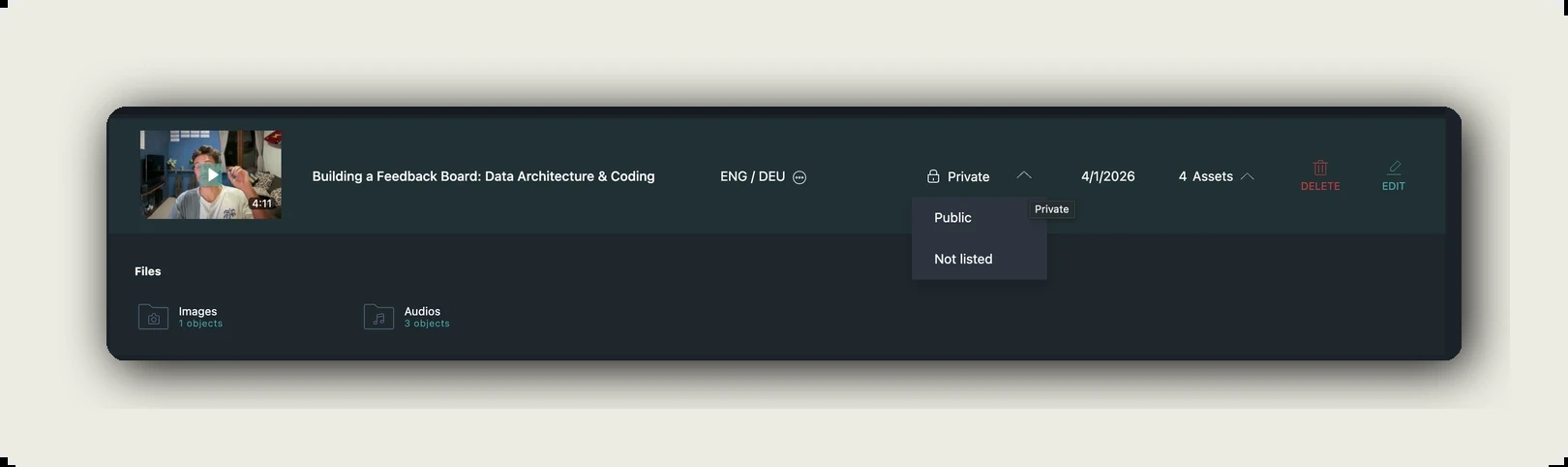
Upload in nearly any format. You choose the encoding quality at upload, 540p, 720p or 1080p, and delivery adapts to the viewer’s connection and screen. You set metadata, thumbnail and tags, the status of private, public or unlisted, and the domains allowed to embed it.
2. Transcribe and translate
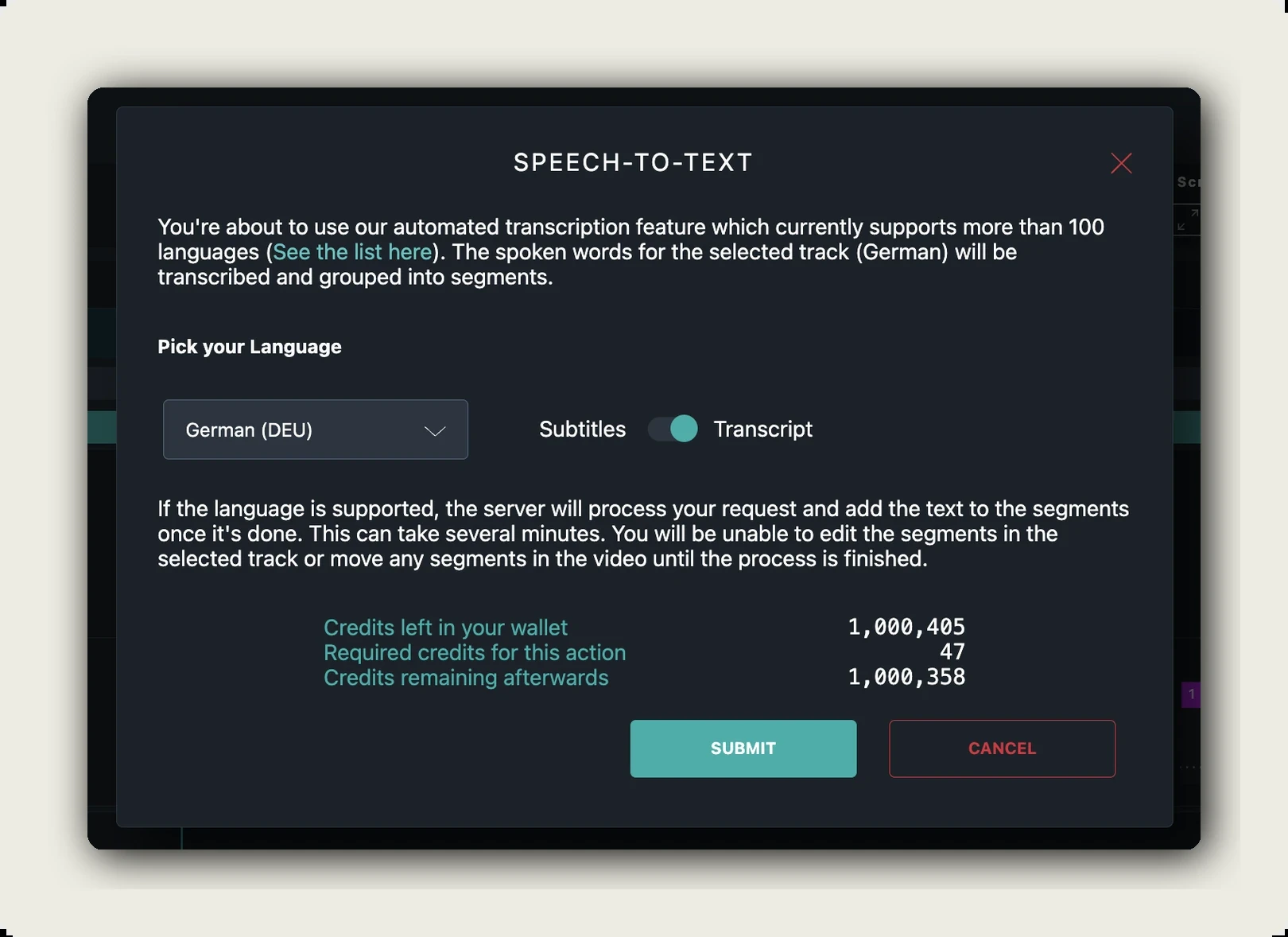
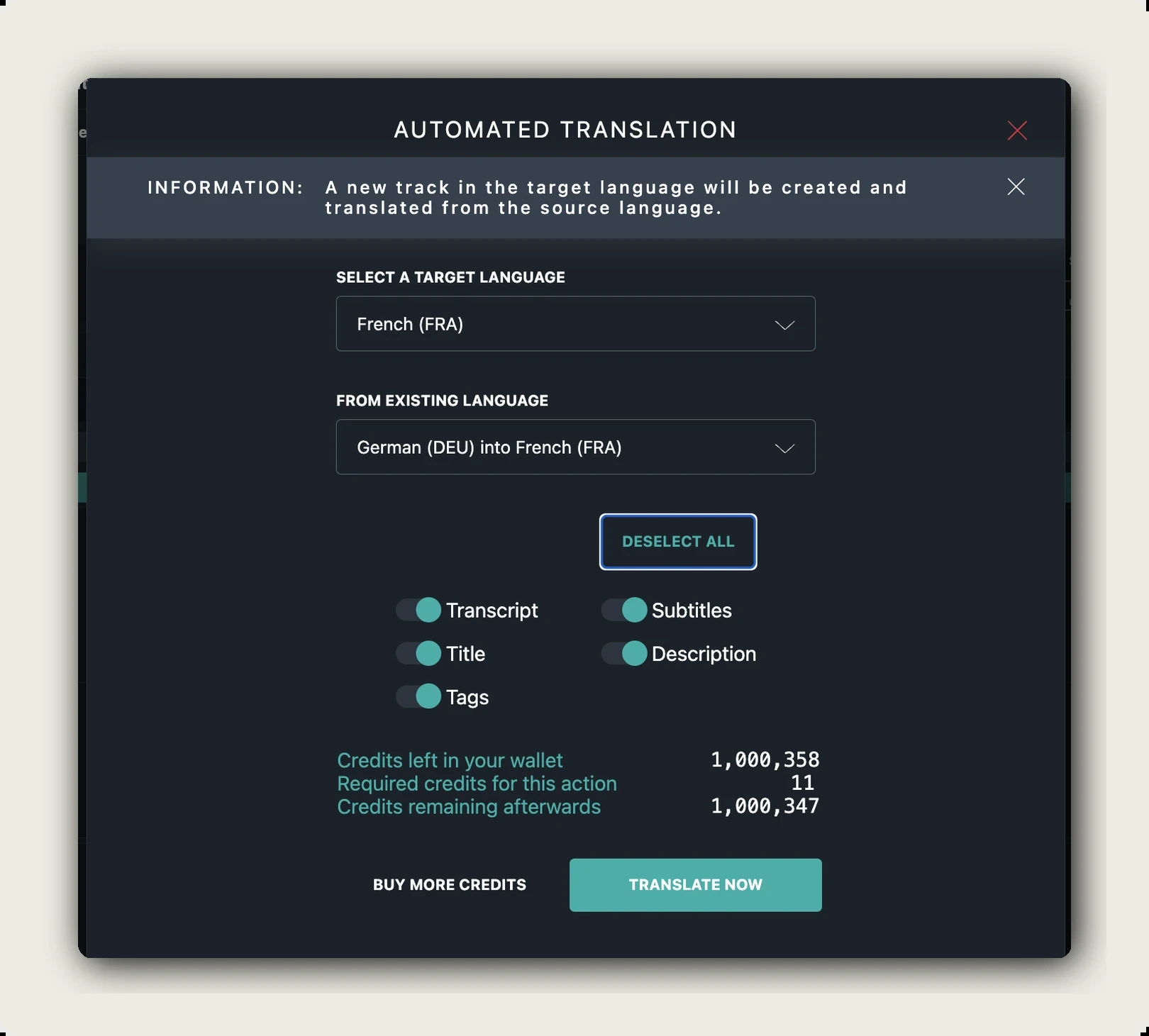
Speech to text runs with speaker recognition, colour coded per speaker, at an accuracy alugha states as 98 percent, so an interview arrives as a usable transcript. Automatic translation covers more than 200 languages, and a glossary keeps product names and technical terms consistent.
3. Add the next audio track
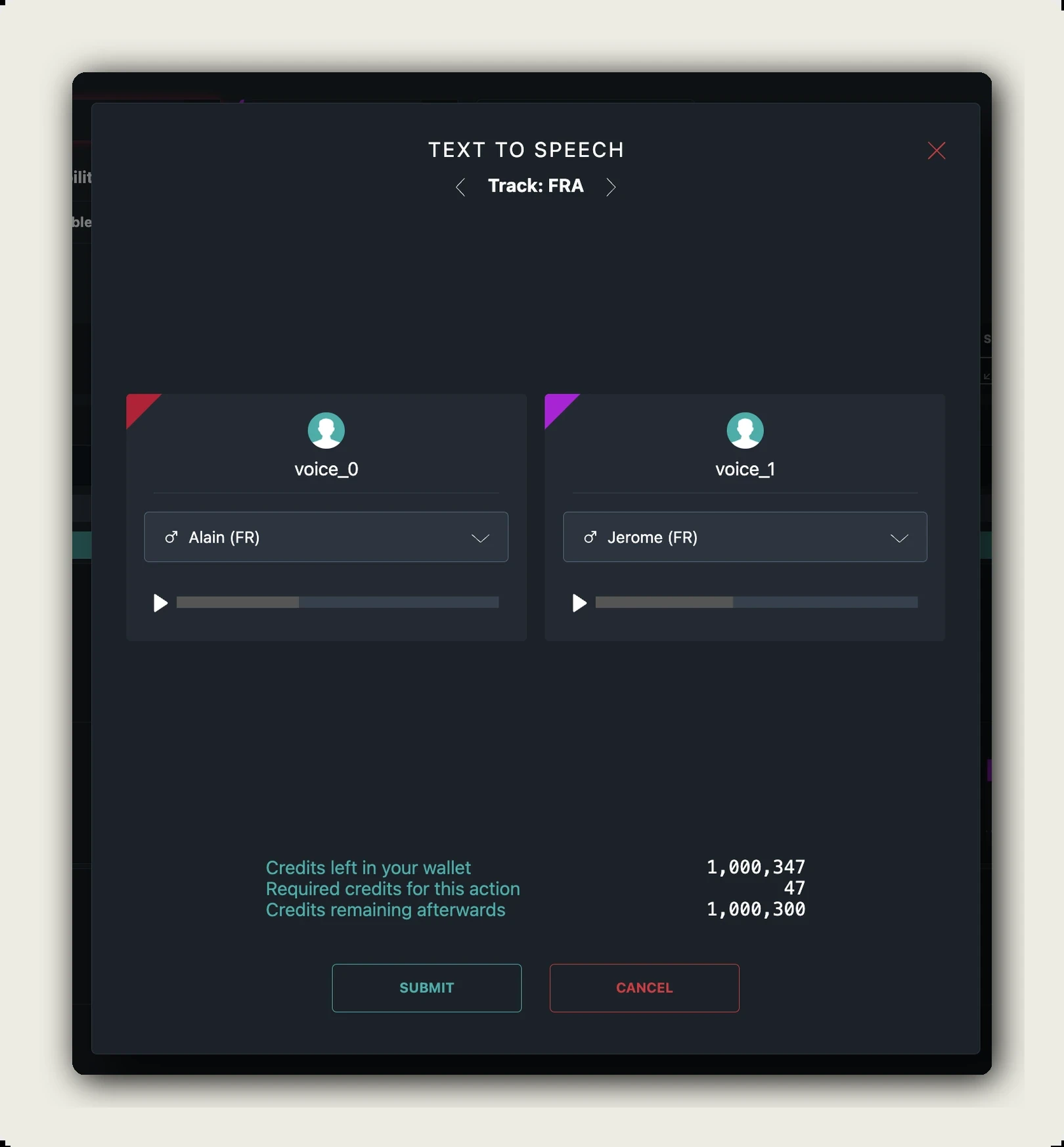
The second language is a track in the same project, not a second video. More than 400 AI voices are available, with voice and emotion cloning. Subtitles export as WEBVTT, SRT or plain text, or burned into a video export.
4. Embed with language switching
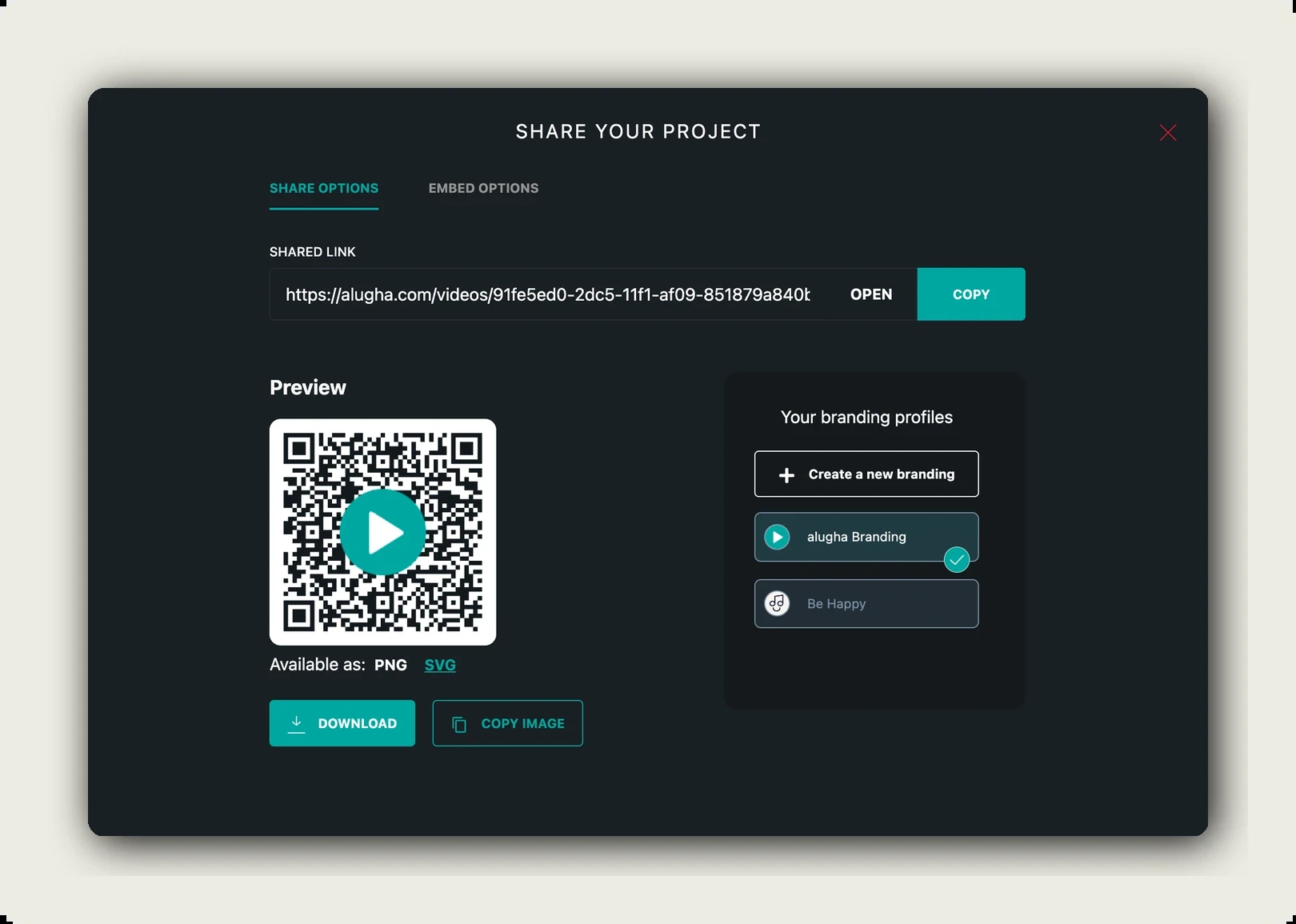
The embed code comes from the share tab, and one URL carries every language. The player switches audio and subtitles without reloading, detects the browser language or opens in a default you set, and runs without advertising or third party trackers. You can set its colour and your own logo, and hide ours in the embedded player. Here is how to embed a multilingual video.
Choosing your YouTube alternative
Rankings age badly. Two questions do not.
Two questions that settle most shortlists
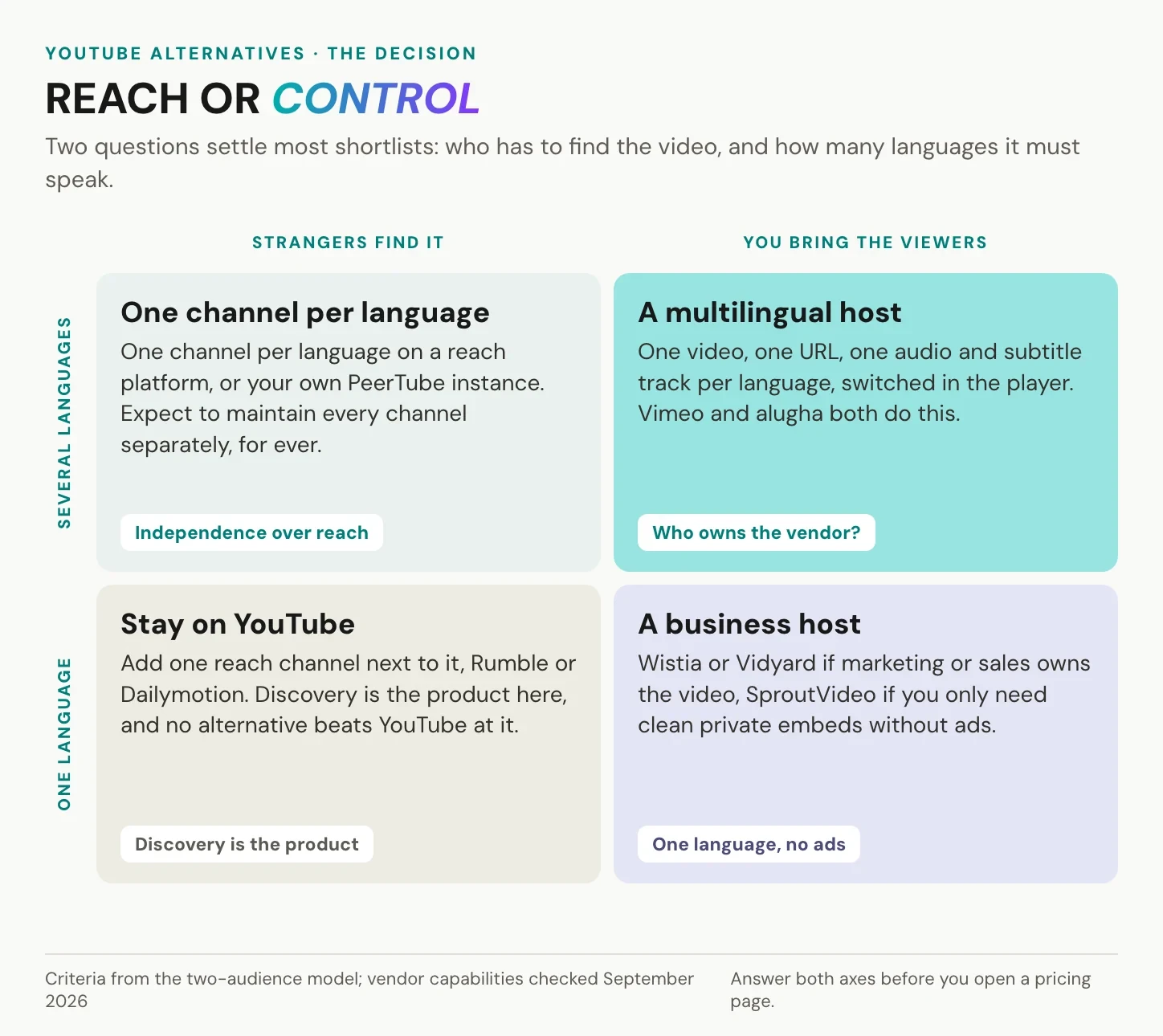
First: do strangers have to find this video, or do you bring the viewers yourself. If discovery is the job, no alternative beats YouTube, so keep it and add one reach channel such as Rumble or Dailymotion beside it. If the audience comes from a newsletter or your own site, discovery is worth nothing to you and control is worth a lot.
Second: how many languages must this video speak, now and in three years. One language plus your own traffic points to a business host, chosen by department: Wistia or Vidyard if marketing or sales owns the video, SproutVideo for clean private embeds. Several languages points to a multilingual host, where Vimeo and alugha are the candidates and the tiebreaker is data location and ownership.
Free plans deserve one caution. Free hosting is paid for elsewhere: advertising in the embed, branding on your page, bandwidth caps that fail on your best day, or a missing export path.
A shortlist you can defend internally
Three names is enough. For each, write down the storage region, the transfer mechanism, whether one video carries several audio and subtitle tracks, what the player loads, and who owns the company. If a vendor will not answer the first two in writing, that is the answer. Our procurement playbook for enterprise video hosting has the longer question list.
Frequently asked questions about YouTube alternatives
Is there a better alternative to YouTube?
Not in general, and yes for specific jobs. Nothing matches YouTube’s catalogue or discovery, so as a place to watch it is hard to beat. As a place to publish on your own site, several platforms are better: no advertising, no foreign recommendations, no third party cookies.
Who is YouTube’s biggest competitor?
It depends what you count. For attention, the competition is short form video and live streaming rather than another video library. For scale outside YouTube, Rumble reported 52 million average monthly active users in the fourth quarter of 2025. For business hosting, it is Vimeo, Brightcove, Wistia and Vidyard.
Is there a YouTube alternative without ads?
Yes, in two senses. For watching, Nebula is subscription funded and PeerTube instances generally carry no advertising, while Invidious and FreeTube show YouTube itself without ads. For publishing, most paid business hosts including alugha run an ad-free player.
What is the best YouTube alternative for a business website?
Start with the department that owns the video. Marketing and sales teams usually land on Wistia or Vidyard, teams needing a clean private embed on SproutVideo. Regulated organisations and anyone whose website falls under a data protection review should shortlist EU-hosted platforms first: movingimage, and alugha if the same videos have to work in several languages. Anyone publishing in several languages should check multiple audio tracks first.
Is a YouTube embed GDPR compliant for a company website?
Not out of the box. The standard embed connects the visitor’s browser to Google before any consent, which German courts have treated as a consent requirement under section 25 TDDDG, and YouTube’s privacy-enhanced mode narrows the problem without removing it. A compliant setup either gates the embed behind a real consent click or uses a host whose player loads nothing from third parties. alugha’s player sets no third-party advertising trackers and the data stays in the EU, so the embed itself needs no consent gate. Our detailed treatment: GDPR-compliant video hosting.
Is there a free YouTube alternative for hosting my own videos?
Free tiers exist, including on Vimeo and on alugha, and they are useful for testing rather than as a foundation. Read the storage limit, the bandwidth cap, the branding in the player, and the export path. File sharing services are not hosting: they serve a download or a viewer page, not an adaptive stream you can embed.
Can I keep YouTube and use an alternative at the same time?
Yes, and for most organisations that is the right answer. Publish on YouTube for reach, and embed from a host you control on your website, help centre and campaign pages. The videos can be identical. Only the rules change where you own the page.
Getting started
Take one existing video and put it on two platforms this week. Embed both on a real page of your own site, then compare four things: what the player loads, whether advertising or foreign recommendations appear, where the analytics land, and how much work a second language would be. The test takes an afternoon and settles arguments that otherwise run for months.
Ready to run the test? Create your free alugha account, or look at the plans first.