Video localization adapts a recorded video for viewers in another language and market: the speech or subtitles, the text in the picture, and the title and thumbnail that make someone click. The method matters more than the tool. Netflix, where non-English titles made up more than a third of all viewing in the first half of 2026, tells its dubbing partners to put voice-over on nonfiction interviews and keep lip sync for recreated scenes. Much company video is an interview in all but name: a product manager at her desk, a trainer at a whiteboard.
Skipping localization has a price. In CSA Research’s 2020 survey of 8,709 online shoppers in 29 countries, 76 percent preferred product information in their own language.
Read on and you can localize videos with a plan: which method fits which video, what drives the cost, a workflow with an owner for every step, the checks each language must pass, and where the versions should live.
Key takeaways
- Match the method to the content. Netflix’s nonfiction guidelines give interviews a voice-over that trails the original by 1 to 2 seconds, and keep lip sync for recreations.
- Budget in localized minutes, not videos. Twelve eight-minute videos in five languages make 480 localized minutes; add two full revisions in a year and you localize 1,440.
- Fix the transcript before anything is translated. One wrong product name in the source becomes five wrong names in five languages, each of which someone has to find again.
- Give every language its own subtitle spec. Netflix allows 42 characters per line in English and German alike, but 20 characters per second for English adults and just 17 for German.
- Where the versions live decides who finds them. YouTube says creators using multi-language audio drew, on average, over 25 percent of their watch time from other-language views, as of July 2025.
- Since 2 August 2026, Article 50 of the EU AI Act applies. A cloned voice of a real employee is likely a deepfake to disclose; get written consent before cloning anyone.
- Key takeaways
- What video localization means
- Why companies localize videos
- Video localization methods, compared
- What drives the cost
- The video localization workflow
- Quality checks for every language
- Where localized videos should live
- Consent, data protection and the AI Act
- Where alugha fits, and where it does not
- Frequently asked questions about video localization
- Getting started
What video localization means
Video localization is the adaptation of a video for a specific language and market. It covers the spoken language, subtitles, text inside the picture, units, names and examples, and the title, description and thumbnail around the video. The goal is that viewers in that market understand it as easily as the original audience did.
The W3C, which sets the web’s language standards, defines localization as adapting content “to meet the language, cultural and other requirements of a specific target market (a locale)”. Practitioners write it as l10n, for the ten letters between the l and the n.
The W3C also names the step before: internationalization, in its words, is the design that “enables easy localization”. For video, that means three things before anyone translates a word: a locked cut, speech on a clean track, and text kept out of the picture wherever it can. Video localization then costs less in every language the video will ever need.
Translation changes the words. Localization changes what the viewer has to do to understand them.
Video localization vs translation
Where translation stops at the words, localization decides everything around them. Which voice speaks the German version, and whether the viewer reads or listens. Whether 5 miles become 8 kilometers, and whether 9/10/2026 becomes 10.09.2026. What stays in the original: Netflix’s rules for localized nonfiction keep a brand name when the brand is the subject, and never swap a well-known person for a local equivalent. And the packaging, because a translated video under an English title and an English thumbnail is still an English video in the feed.
At the far end, reversioning re-edits the video for one market, and transcreation rewrites the message itself. Most company video sits between plain translation and that far end: the message stays, while the words, the voice and the packaging change. For the translation step on its own, see translating a video.
Why companies localize videos
The audience case starts in Europe. In the European Commission’s Special Eurobarometer 540, published in 2024 from fieldwork in autumn 2023, 47 percent of respondents said they can hold a conversation in English. Turned around, 53 percent cannot. The EU works in 24 official languages. On the web, English is the content language of 49.5 percent of the websites whose language W3Techs can determine, as of September 2026.
The buying case comes from the same CSA Research survey: of its 8,709 shoppers, 40 percent never buy from websites in other languages. And 65 percent prefer content in their language “even if it’s poor quality”, so an imperfect localized version still beats none.
Sometimes the choice is not yours. France’s Loi Toubon makes French mandatory in the presentation and instructions of goods and services, and applies the same rule to audiovisual advertising.
One popular number has no traceable source. The claim that every dollar spent on localization returns 25 is credited to LISA, an association that closed in 2011, but no LISA report containing it is known.
And you may not need any of it. An audience that works in the source language every day, a clip that will be irrelevant in a week, an internal update for one site: leave those alone. Once the audience spans languages, the question of video localization is which method, not whether.
Video localization methods, compared
Nine video localization methods cover the whole range, from doing nothing to rewriting the message. The table rates what each one asks of the viewer, of the budget and of the source file.
| Method | Best for | Viewer effort | Relative effort | Needs from the source | Main risk |
|---|---|---|---|---|---|
| None (source language only) | Audiences working in the source language, short-lived clips | None | None | Nothing | Excludes whoever does not follow |
| Captions in the source language | Accessibility, sound-off viewing, second-language viewers | Reading | Low | An accurate transcript | Machine errors left in |
| Translated subtitles | Talking heads, social clips, training with screen content | Reading while watching | Low | A locked cut, a corrected transcript | Line length and reading speed ignored |
| Voice-over, original audible underneath | Interviews, documentary, testimonials | Low | Low to medium | A clean speech track | A voice that does not match the speaker’s role |
| AI voice-over (synthetic voice, optional clone) | Narration, screencasts, internal updates | Low | Low | Clean speech, a corrected transcript | Mispronounced names and numbers, consent for a cloned voice |
| Lip-sync dubbing | Acted scenes, brand films with long close-ups, entertainment | Lowest | High | Separate music and effects tracks, actors, a mix | Cost, time, stilted adaptation |
| On-screen text adaptation | Lower thirds, slides, interface demos | None extra | Medium | Editable project files, text on separate layers | Text burned into the picture forces a re-edit |
| Reversioning | Market-specific cuts, local footage, regulatory versions | None extra | High | The edit project | Drifts from the master over time |
| Transcreation | Campaigns, humor, slogans | None extra | High | A creative brief | No longer the same message, needs its own approval |
Pin down the difference between dubbing and voice-over first. Dubbing replaces the original voice with a new one timed to the picture, and lip sync is its strictest form. Voice-over lays a translated voice over the original, which stays faintly audible. Netflix’s nonfiction guidelines let it trail the original by a “1-2 second delay”. Subtitles translate the speech, while captions write it down in the same language and add the sounds.
Subtitles deserve their place at the top of most plans: they are the lightest treatment, and viewers keep up with faster ones than most people expect. Their price is attention: the viewer reads while watching, which a screencast full of small interface text makes harder.
Lip-sync dubbing earns its reputation too. Netflix treats a dub “not as merely a language asset but as a production”, and calls excellent dub quality crucial to engage the audience, especially in the first 15 minutes. Most company video does not need it. Netflix’s nonfiction guidelines give interviews to voice-over and keep lip sync for recreations, the acted scenes. When foreign dialogue runs to roughly 40 percent of the runtime or more, Netflix prefers voice-over to a stream of forced subtitles.
Text in the picture follows its own rule: Netflix’s nonfiction guidelines subtitle burned-in text in every language where it is not redundant, and never dub it. A lower third or a screencast button has to be rebuilt or subtitled, whatever carries the speech.
An EU study from 2011 sorted Europe traditionally into dubbing, voice-over and subtitling countries. Yet even among 1,515 language students in dubbing countries, 65 percent preferred subtitles for a foreign language they did not know.
Mixing methods by channel
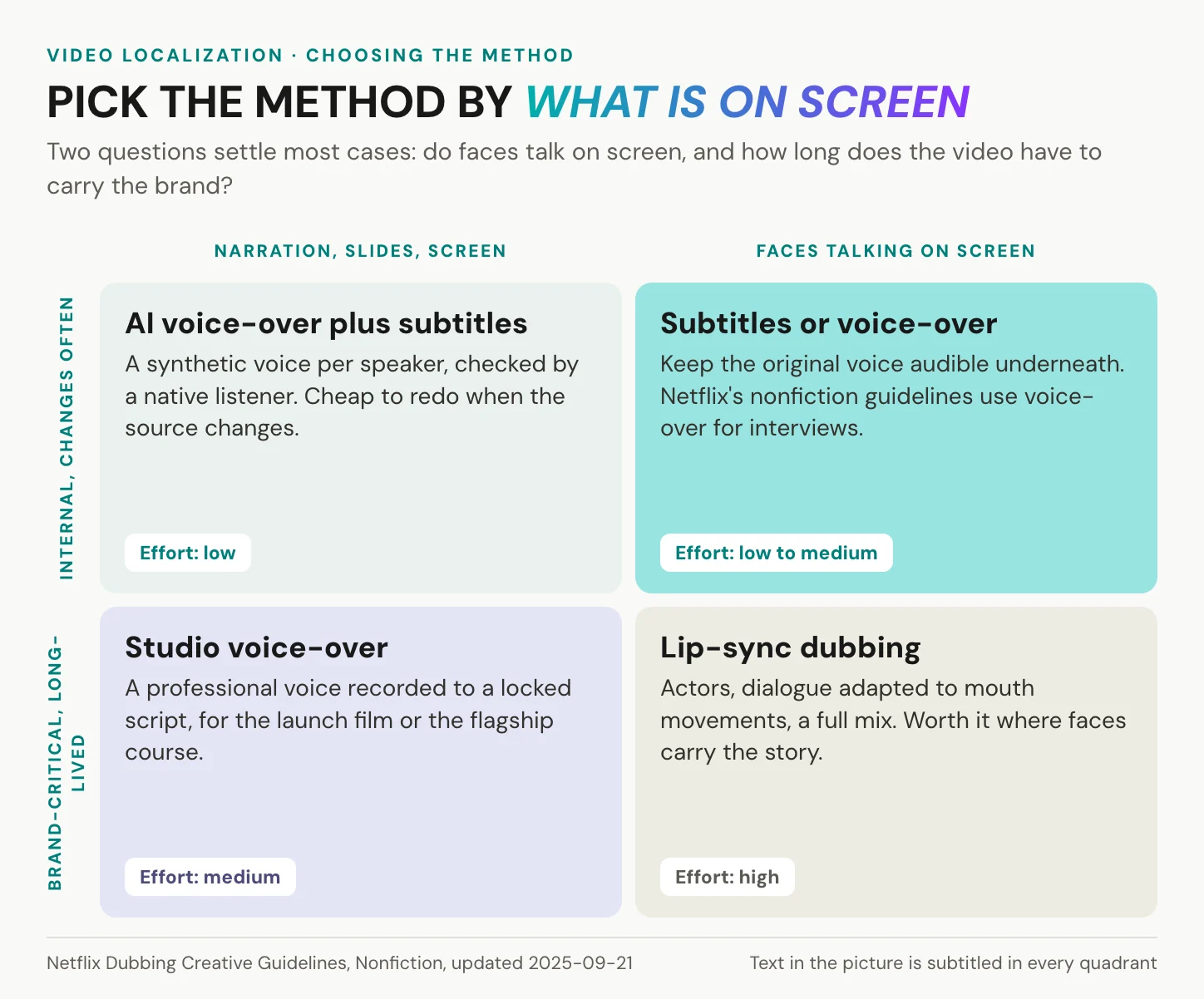
Most video localization plans need a mix, not one method. Take a product launch. The launch film, with the founder in long close-ups, gets a studio voice-over or a lip-synced dub in the two biggest markets. The social cuts get translated subtitles, because a social cut has to work before anyone turns the sound on. The internal training on the same product gets an AI voice-over, since it changes every quarter and nobody is watching a mouth. The help-center screencast keeps its original voice, with subtitles and rebuilt interface labels, because the viewer’s eyes are on the buttons. Same master, four treatments, and one glossary behind all of them.
The matrix sorts it by two questions: do faces talk on screen, and how much is the brand staking?
Where AI dubbing stands in 2026
The platforms have made AI dubbing an ordinary part of video localization, and YouTube’s automatic dubbing is enabled by default for eligible creators. Meta translates, dubs and lip-syncs Reels for free, and labels every one “Translated with Meta AI”. Meta says over half a billion Facebook users watch AI-translated videos weekly (June 2026, no method published). For reach with low-stakes content, that is hard to argue with.
The limits sit in the detail. YouTube’s language pairs are narrow: most source languages dub only into English, while English dubs into 20 languages. German to English works. German to French does not. Videos longer than 120 minutes are ineligible.
Nimdzi’s 2026 report draws the line: AI dubbing is spreading “in low-risk environments like YouTube”, while high-profile content still needs humans to “arbitrate identity, tone, and cultural nuance”. Use AI where a slip costs little, and a human where it costs trust.
In short: faces on screen and brand stakes push you toward dubbing, while everything else is subtitles or voice-over, and most company libraries need a mix, not one method.
What drives the cost
Vendors rank video localization costs the same way, and the logic behind the ranking holds. Subtitles need the fewest people and steps per minute. Voice-over adds a voice. Lip-sync dubbing adds actors, dialogue adapted to mouth movements and a full mix. What the ranking hides are the drivers that decide a budget.
Per-minute prices for subtitling, voice-over or dubbing come from vendors, not from a standards body or an independent benchmark. Any single figure is one vendor’s quote, and it misleads as a budget, so budget with drivers instead:
- Minutes. The runtime of the source, not the number of videos.
- Languages. Every language multiplies the minutes.
- Method. Subtitles, voice-over or dubbing, chosen per channel.
- Speakers. Each speaker needs a voice, and a dub needs a cast.
- Text in the picture. Every lower third and slide title is a separate edit.
- Review depth. Hours of a native reviewer per language, the line most budgets forget.
- Update frequency. How often the source changes.
The last two are where AI changes the picture. A machine draft makes production fast. It does not make review optional. Effort moves from producing a version to checking it, so budget the review, per language, as a line of its own.
A worked example in minutes, not money
Take twelve training videos, eight minutes each, going into five languages: 12 × 8 × 5 = 480 localized minutes. Now the part the first quote leaves out. The videos change twice a year, and if every revision touches every minute, the year’s plan covers 1,440 localized minutes. Three times the first estimate.
The lever is upstream. A locked source, a glossary and a corrected transcript make each revision cheaper, because unchanged segments carry over and need no second review. Only the sentences that changed go back through translation, voice and sign-off. Skip the transcript step and you pay for it at every revision, in every language.
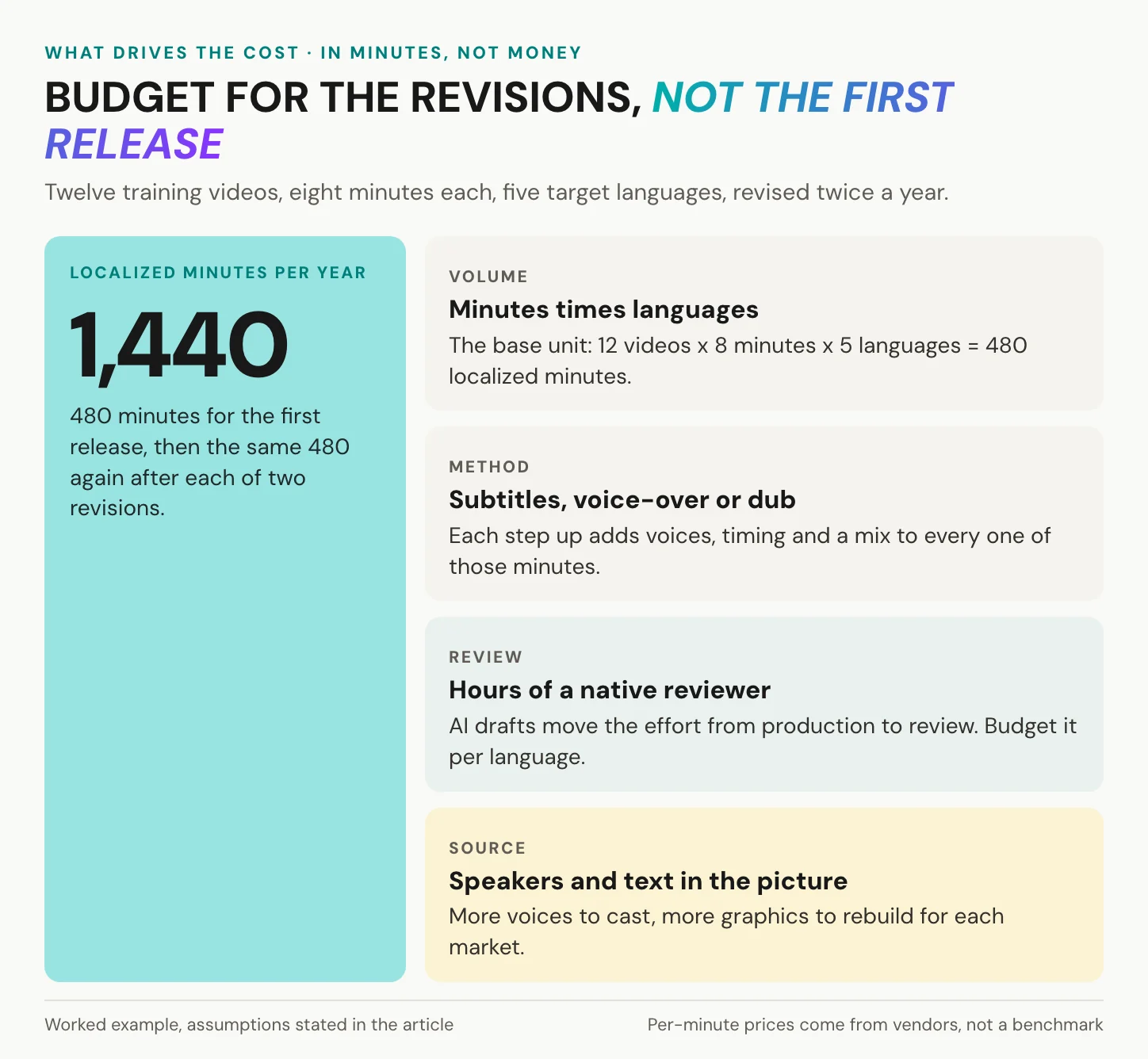
In short: video localization cost is minutes × languages × method × review, multiplied by how often the source changes. Plan for the revisions, not for the first release.
The video localization workflow
The video localization workflow has eight steps: three happen once per video, five repeat for every language, and each has one owner. The split is the point. An error fixed in the first three steps is fixed in every language at once.
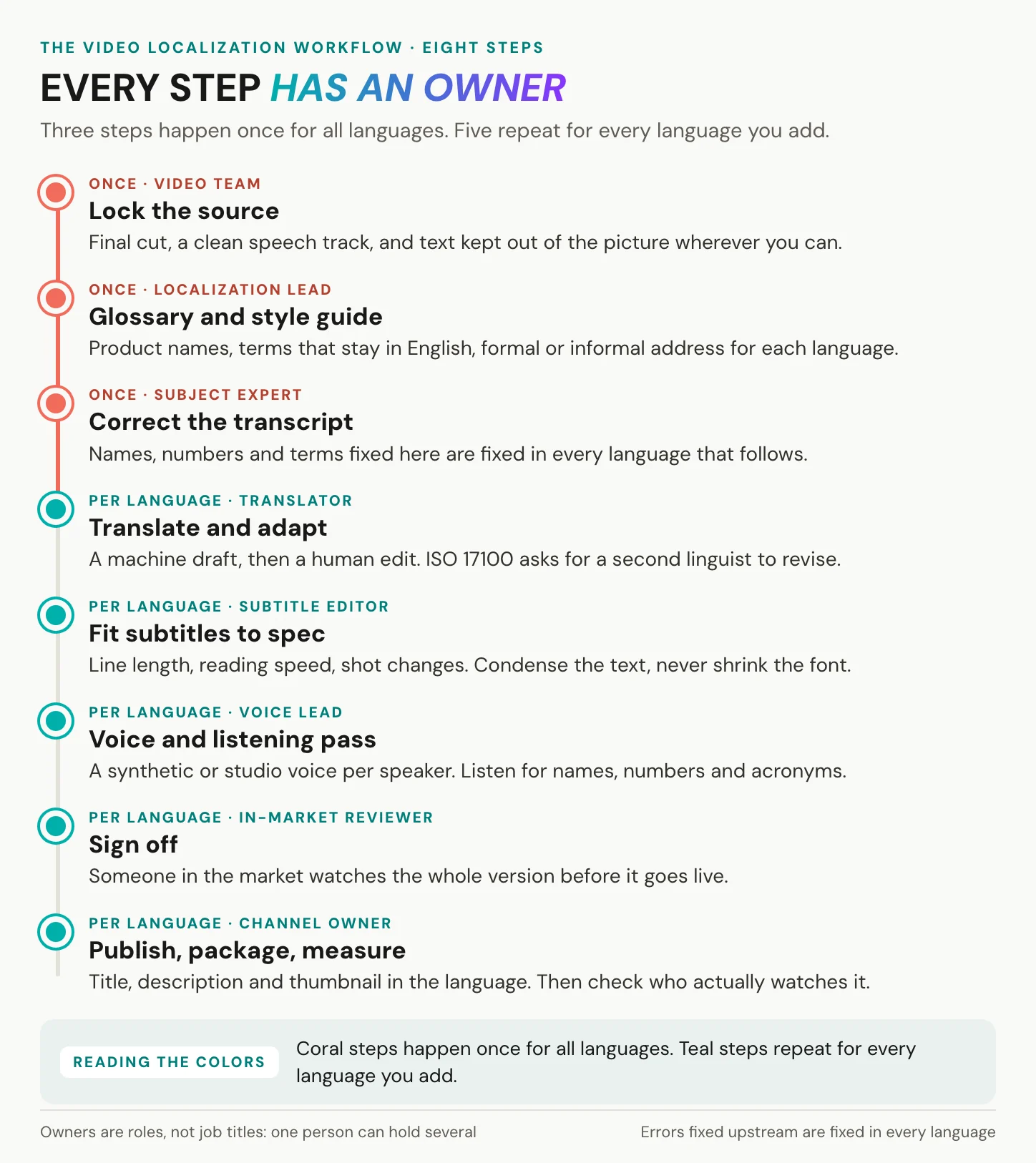
Once per video:
1. Lock the source. The video team owns this step: final cut, a clean speech track, and text kept out of the picture where you can. If a dub is planned, keep music and effects on separate tracks. Every change after this point is paid for once per language.
2. Set the glossary and style guide. The localization lead fixes product names, the terms that stay in English, and formal or informal address per language. Glossaries and translation memories from document translation carry over to video.
3. Correct the transcript. A subject expert owns it, because the machine transcript is a draft, and names, numbers and product terms are where it slips. Transcribing the video properly is the cheapest quality step in the whole chain.
Fix the transcript once. Every error you leave in the source is copied into every language.
Then, for every language:
4. Translate and adapt. A translator owns this step. Machine translation gives a fast first draft, and for a talking-head video it is often a good one, but it is still a draft. ISO 17100, the standard for translation services, requires a second linguist to revise every translation and leaves raw machine output with post-editing outside its scope. ISO 18587 covers that post-editing. A training video needs no certificate, only the principle: a second person reads it.
5. Fit subtitles to spec. A subtitle editor fits every language to its own line length and reading speed, set out in the quality checks below. When a line runs long, condense the text. Never shrink the font.
6. Voice and listening pass. The voice lead gives each speaker one voice, the same across videos. Do not time a dub by word count. A 2019 study of 17 languages in Science Advances found that they carry information at a similar rate, about 39 bits per second, however fast they sound. A Spanish track that sounds hurried is not necessarily longer.
7. Sign off. An in-market reviewer, one named person, watches the whole version from start to finish with the sound on.
8. Publish, package, measure. The channel owner puts out the title, description and thumbnail in the language, then checks which markets actually watch which version.
In short: three steps once, five per language, one owner each. The cheapest quality fix is the transcript, because it is the one fix every language inherits.
Run the workflow on one video: transcribe it, translate it and review every language in one project. Create an alugha account
Quality checks for every language
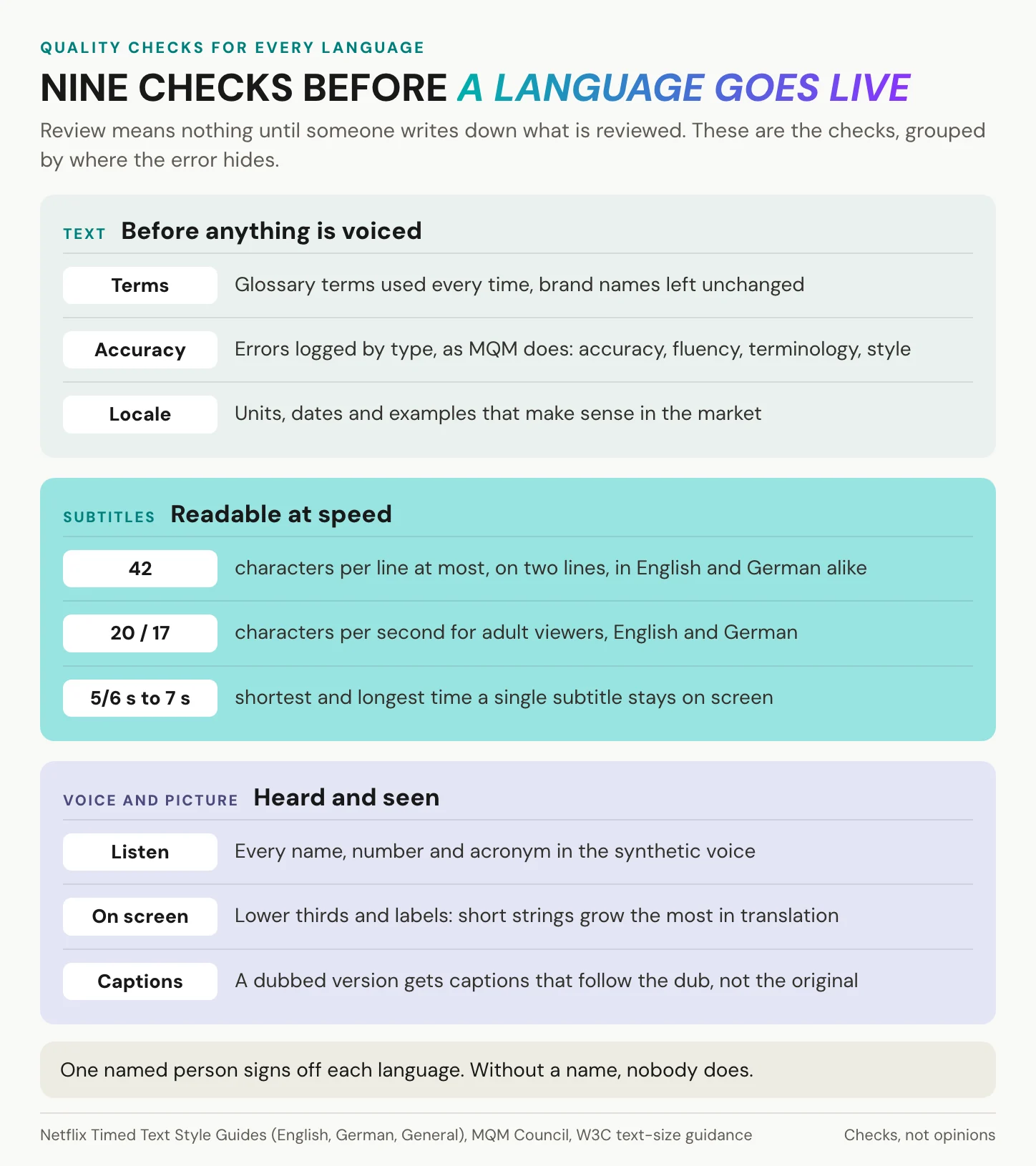
In video localization, having a native speaker look at it is a start, but it is not a procedure. A procedure names the checks.
Start with a shared vocabulary for errors. MQM, a framework aligned with ISO 5060, sorts translation errors into accuracy, fluency, terminology, style and further categories, with a scoring model on top. Log every error by type, and an AI draft, a vendor and your own reviewer can be compared on one scale.
Run the checks in this order:
- Terminology. Product names and glossary terms, first and always. In B2B video a wrong product name is an error every customer can spot, and a glossary makes it cheap to catch.
- Locale. Units, dates, currencies and examples, while brand names and well-known people stay as they are.
- On-screen text. Short strings grow most. The W3C, citing IBM’s guidelines, puts translated strings of up to 10 characters at 200 to 300 percent of their English length, and strings over 70 characters at about 130 percent. Dialogue grows less, but lower thirds and screencast buttons behave like interface text.
- Accessibility. Every version needs captions (WCAG 2.2, Level A), and a dubbed version’s captions follow the dub, as Netflix requires.
- Sign-off. One named person per language, who watches the whole version and answers for it.
Subtitle limits, by language
Netflix publishes its subtitle specs per language, and they differ. Every subtitle gets two lines at most and stays on screen between five-sixths of a second and seven seconds. English and German share a 42-character line, but German cuts the adult reading speed from 20 to 17 characters per second, and the children’s from 17 to 13.
| Language | Characters per line | Reading speed, adults | Reading speed, children |
|---|---|---|---|
| English | 42 | 20 characters per second | 17 characters per second |
| German | 42 | 17 characters per second | 13 characters per second |
Same line budget, lower reading speed, longer words. A German subtitle has to be condensed, not just translated.
The limits are conservative. In an eye-tracking study of 74 viewers (Szarkowska and Gerber-Morón, PLOS ONE, 2018), most kept up even at 20 characters per second. Stick to the limits for training content anyway. For educational media, the Described and Captioned Media Program recommends slower rates still, 130 to 160 words per minute.
The listening pass for AI voices
A synthetic voice fails in predictable places. Listen for them on purpose: names, numbers (especially dates and amounts), units, and acronyms, which a voice may spell out or pronounce as a word. Listen for the product name in every sentence where it appears. Then the pauses: a voice that runs over a shot change sounds wrong even when every word is right. When a name comes out wrong, correct the text the voice reads and generate that segment again, rather than patching the audio.
Give the opening the most attention. Netflix asks for excellent dub quality especially in the first 15 minutes of a title; in a three-minute explainer, that stretch is the first few sentences.
In short: five kinds of error, a spec for each, and one person who signs.
Where localized videos should live
Video localization does not end at the export: there are two basic ways to publish the versions, and search adds a condition to both.
The first is one upload per language. It is simple, and every platform supports it. The costs arrive later: links multiply, views split across copies, and every edit to the source means re-uploading every copy.
The second is one video with language tracks, and the platforms have made it mainstream. YouTube’s multi-language audio defaults each viewer to their preferred language, which it infers from watch history. YouTube reports that creators who used the feature drew, on average, over 25 percent of their watch time from views in a non-primary language, as of July 2025. Those creators chose the feature themselves, and YouTube gives no sample size. Vimeo offers AI audio translation on its top tier, and Wistia lets viewers switch to alternate audio in the player. Avatar platforms such as Synthesia offer a player that picks the language from browser settings. For viewers, one video with tracks is the better experience.
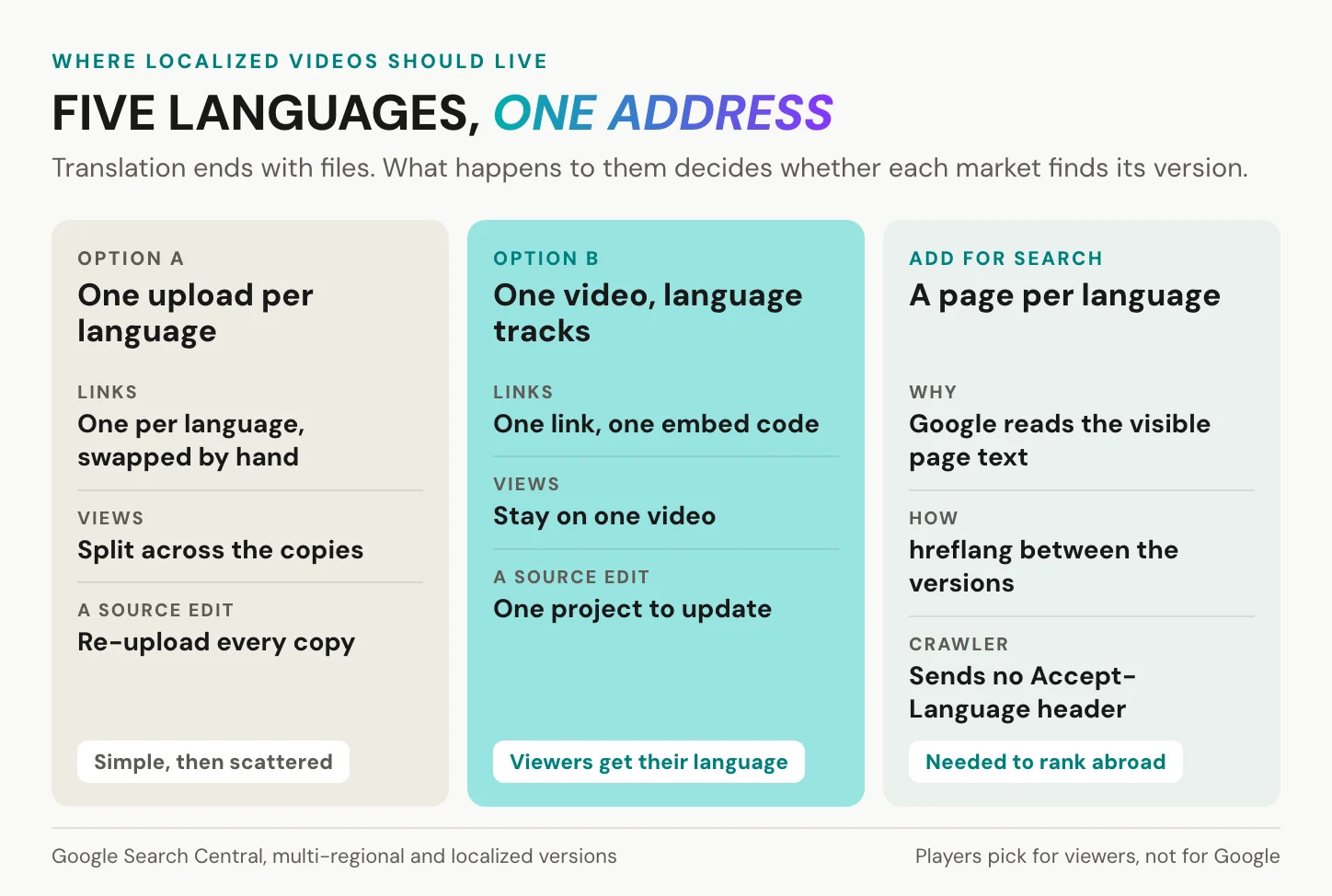
Search is where teams get caught out. Google determines a page’s language from its visible content, not from lang attributes or the URL. Googlebot sends no Accept-Language header and crawls mostly from the United States. Localized versions of a page are not treated as duplicates once the main content is translated, and each version should list itself and all the others in hreflang.
A player can choose the language for the viewer. It cannot choose it for Google.
If a video should rank in Madrid and in Munich, each market needs a page in its language. That means a translated title and description, the transcript as page text, and hreflang links to the other versions. The player looks after the viewer who arrives. The page looks after being found. More on delivering multilingual video in an enterprise.
In short: keep the language versions together for viewers, and give each market its own page for search.
Consent, data protection and the AI Act
Video localization used to be a translation question. With synthetic voices it is also a consent question, and since August 2026 a labeling question. What follows is orientation, not legal advice.
Cloned voices need written consent
A cloned voice lets the translated version speak in the voice of the person on screen. Under Article 4(14) of the GDPR, voice data can be biometric data when it is technically processed to identify a person. Article 9(1) restricts processing biometric data for that purpose, unless an exception such as explicit consent applies.
Whether a given clone falls under Article 9 is a question for counsel, but the practical rule does not depend on the answer. Get written consent from anyone whose voice you clone, and agree in writing how long and where the clone may be used. Consent under the GDPR can be withdrawn at any time (Article 7(3)). Plan for the day an employee leaves or changes their mind, and settle in advance what then happens to the clone. More on voice cloning in the enterprise.
What the AI Act asks from August 2026
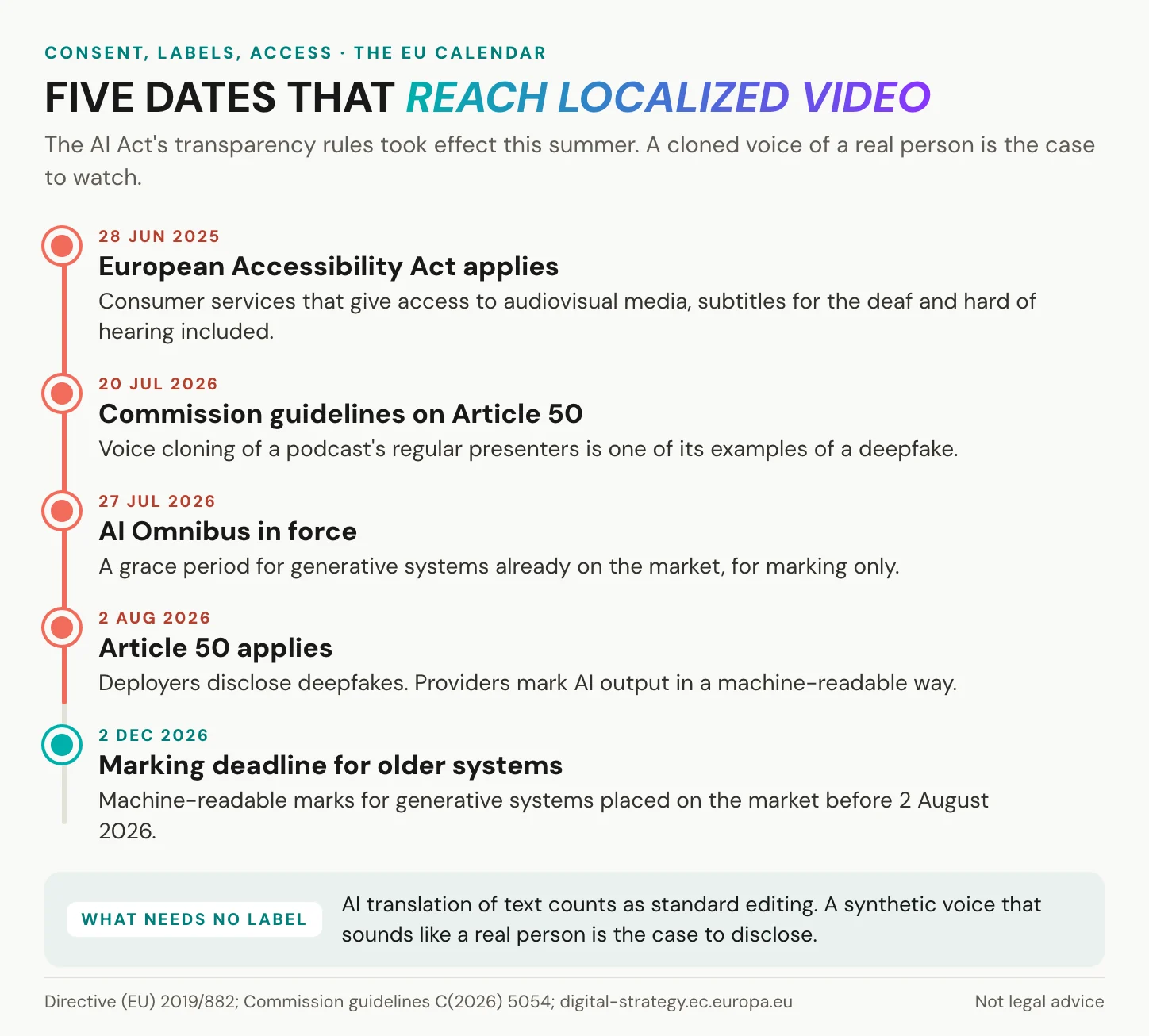
Article 50 of the EU AI Act has applied since 2 August 2026. Providers of AI systems must mark synthetic output in a machine-readable way. Deployers, the companies that publish it, must disclose deepfakes. The Commission’s guidelines of 20 July 2026 name voice cloning of a newspaper podcast’s regular presenters as an example of a deepfake. By the same logic, a cloned voice of a real employee or executive is likely a deepfake the publishing company has to disclose. Check your case with counsel.
Translated text is not the issue. The guidelines count AI translation of text as standard editing, outside the marking duty, so translated subtitles need no label. A synthetic voice that sounds like a real person does.
The AI Omnibus, in force since 27 July 2026, gives providers of systems already on the market until 2 December 2026 for the marking duty. Deepfakes generated before 2 August 2026 need no label after the fact. The lighter rule for artistic and satirical work does not cover corporate training or marketing by default. Meta already labels every AI-translated reel “Translated with Meta AI”. More on the AI Act and voice cloning.
Every vendor in the chain is a processor
YouTube’s reach is real, and its multi-language features come built into the platform. A full-service language service provider brings human linguists, certified processes and studio capacity. But an unreleased video, often with an employee’s face and voice, passes through every vendor in the chain. Each of them processes personal data on your behalf and needs a contract under GDPR Article 28(3). Ask the translation agency, the voice tool and the host for it before the first upload.
The embed on your own site adds a German rule. Under section 25 TDDDG, the Telecommunications Digital Services Data Protection Act, storing or reading information on a viewer’s device needs consent unless it is strictly necessary for the service the viewer asked for. Check what each player does before it loads, as set out in GDPR-compliant video hosting.
In short: consent for every cloned voice, a label for voices that sound like real people, and a processing contract with every vendor who touches the video.
Where alugha fits, and where it does not
We are not a translation agency: we have no human translators, no voice-actor casting and no studio. Our AI voice-over is a voice-over, not a lip-synced dub. For a talking-head explainer that is usually enough; for a brand film with long close-ups it is not. We localize the video you recorded.
Language service providers bring what we do not: linguists, casting, studios. Their work ends with a file per language, and getting it to the right viewer is where we start.
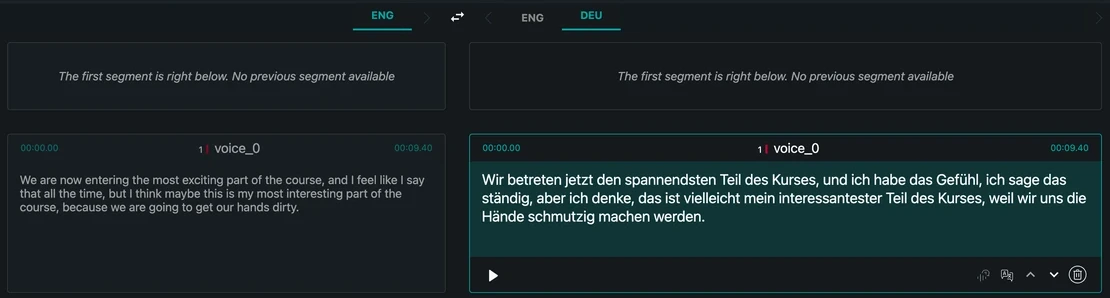
You upload the master once in our Publisher. In the dubbr, our Speech-To-Text turns the audio into time-coded segments, and you correct names and terms there, once. Machine translation drafts the transcript, subtitles, title, description and tags for each new language. Text-To-Speech gives every speaker a synthetic voice of its own. Voice cloning is a paid-tier add-on, on request, and a glossary on a paid tier keeps product names consistent.
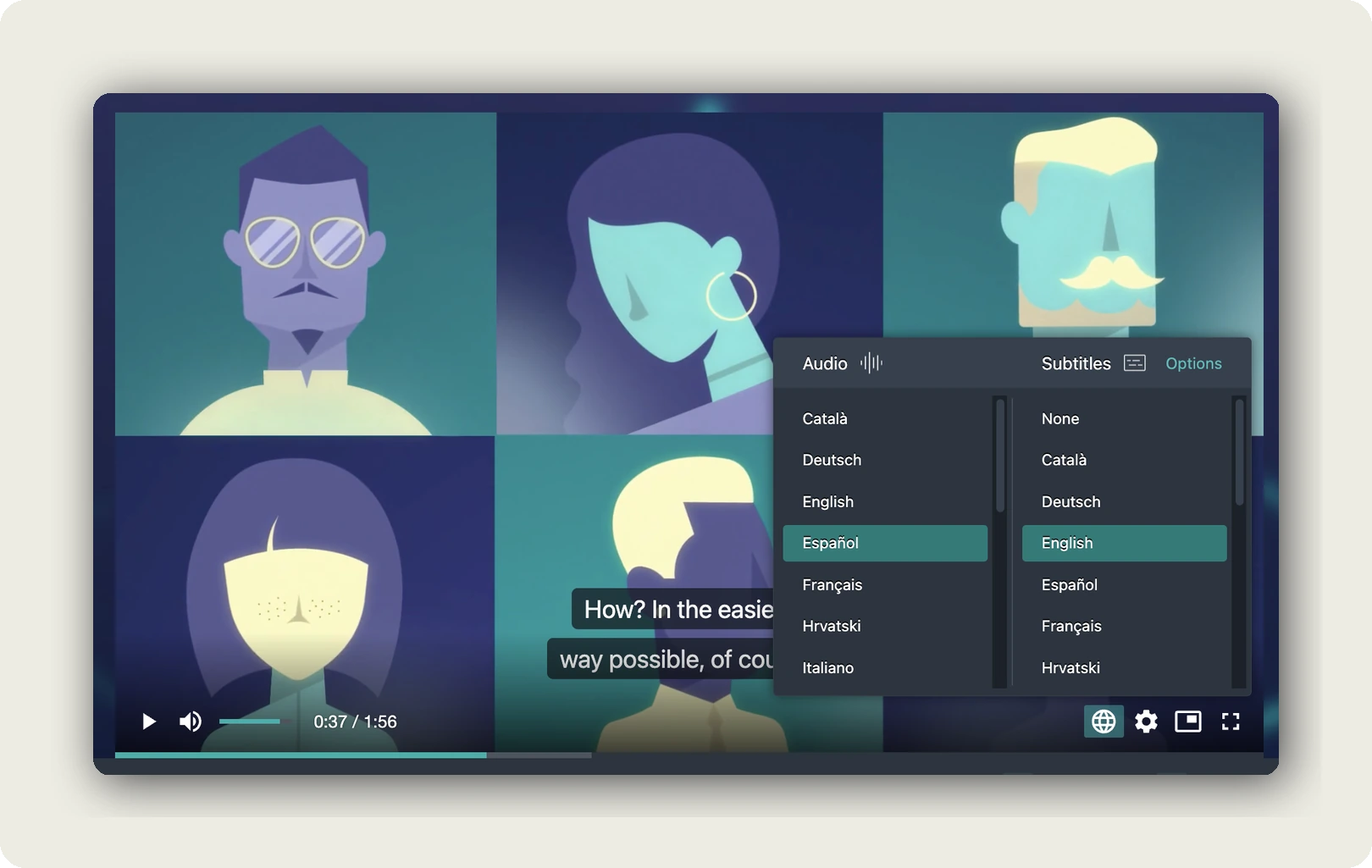
Every language is a track of the same project, with its own title, description, tags and thumbnail. Our player reads the browser’s Accept-Language header, opens the matching track and falls back to the default you set. Audio and subtitle language are chosen independently, so a viewer can hear Spanish and read English. The link you published keeps working when you add a language.
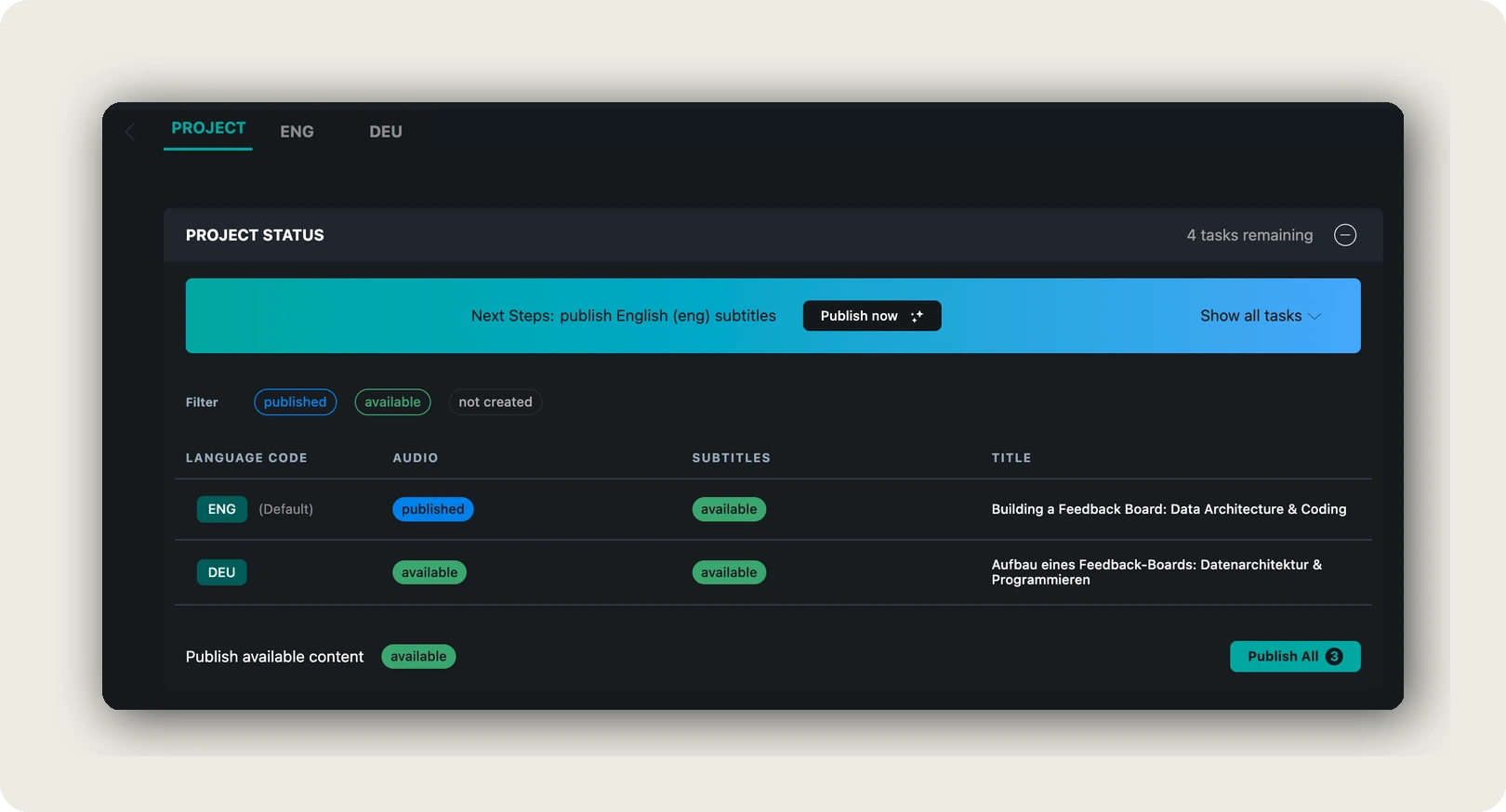
Review happens in place, segment by segment, and each language track has its own state: Private, Playable or Hidden. “Available” means finished but not live; “Published” means our player serves it. The Spanish version can wait for your reviewer in Madrid while the English one is already live. See automatic language switching and Available and Published.
Our per-language title and description give each market its own preview card; to rank there, you still need a page in that language. Every AI step shows its credit cost before you confirm. We host in Germany and the EU, and our player carries no third-party advertising cookies and trackers.
In short: one master, one project and one link, with a track per language that you publish once its reviewer has signed off.
Language tracks are not ours alone. YouTube, Vimeo, Wistia and Synthesia have them too. What we add is the whole chain for the video you recorded, from transcript to player, in one project, and hosting in Germany and the EU.
You do not need us when the deliverable is a file for a broadcaster, a cinema, an airline or a separate YouTube channel per language. A full-service provider is the right partner there, and on a paid tier our export still gives you WebVTT, SRT or plain text. Nor for one language in one market, subtitles on a video that already lives where it should, a synthetic presenter, or a live event.
If your deliverable is a file for a broadcaster, you need a studio. You need us when the video lives on your own site and has to speak five languages.
Frequently asked questions about video localization
What is an example of video localization?
A product demo recorded in English. The social cut gets German subtitles, the help page gets a Spanish AI voice-over, and the lower thirds are rebuilt in both languages. Each version gets its own title and thumbnail, and a reviewer in each market signs it off. For one language pair in detail, see a worked Spanish and English example.
How much does video localization cost?
Video localization costs depend on seven drivers: minutes, languages, method, speakers, text in the picture, review hours per language, and how often the source changes. Per-minute prices come from vendors, not an independent benchmark, so one vendor’s figure will not budget your project. Plan in localized minutes instead. Twelve eight-minute videos in five languages make 480, or 1,440 in a year with two revisions.
Can AI do video localization?
Much of it. AI handles transcription, translation drafts and synthetic voices well. Humans still own terminology sign-off, cultural fit, legal and safety wording, and the final listen. Nimdzi’s 2026 report sees AI dubbing spreading in low-risk settings, while high-profile content still needs humans to arbitrate identity, tone and cultural nuance. Let AI write the draft and a person make the call.
Can ChatGPT translate videos?
A chat model can translate a transcript you paste into it, often well. It does not by itself produce timed subtitles within line-length and reading-speed limits, or an audio track synced to the picture. Those need a subtitle or dubbing tool, and a review. Treat the chat translation as a first draft, step four of eight.
Do localized videos need their own captions?
Yes. WCAG 2.2 success criterion 1.2.2 requires captions for prerecorded video at Level A. A dubbed version’s captions should follow the dub, or deaf viewers read something other than what hearing viewers hear. In the EU, the European Accessibility Act has applied since 28 June 2025 to consumer services that give access to audiovisual media; purely internal video sits outside it.
Does video localization help SEO?
Video localization helps SEO when each language has a page Google can read. Google detects a page’s language from its visible content, its crawler sends no Accept-Language header, and hreflang links the language versions to each other. A translated title, description and transcript on each page does the work. A language-switching player helps the viewer, not the crawler.
How does video localization work?
In eight steps. Once per video, you lock the source, set the glossary and correct the transcript. Then, for each language, you translate and adapt, fit the subtitles to spec, generate or record the voice and listen to it, have an in-market reviewer sign off, and publish with a title and thumbnail in that language. Every step has one owner.
Getting started
Start video localization with one video, not the library. The product manager at her desk is a good first candidate. Lock the cut. Fix the transcript. Then pick subtitles or a voice-over, not a lip-synced dub; Netflix would make the same call for an interview. Add one language, have someone in that market watch the whole version and sign it off, and publish it on a page in that language. What that market does with it tells you more about the next language than any estimate.
The product manager is still at her desk, explaining the same feature. Now she does it in two languages.
Localizing a whole library, or need to check the data-protection side first? Book a call and we walk through methods, review and delivery with your team. Or start with one video: create an alugha account.