Internal communications is how a company tells its own people what it decided, why, and what that means for their work, and how it hears back. Most of it travels as text. A knowledge worker receives 117 emails and 153 Teams messages on an average weekday, according to Microsoft’s 2025 telemetry, which leaves out EU tenants. The people who read none of them stand in a warehouse, sit in a truck, work a night shift, or read the company language as their second or third.
Video reaches them, when it is short, captioned and in their language. It does not replace the email or the manager.
By the end you will know which channel carries which message, which internal video formats earn their place and how long each should run, and how to reach a multilingual frontline. You will also know how to measure understanding instead of opens, and what the GDPR and a German works council ask of the host.
Key takeaways
- Gallup’s State of the Global Workplace 2026 counts 20 percent of employees worldwide as engaged, and 12 percent in Europe. Most people your message reaches are not engaged at work.
- Text stays the backbone of internal communications: adults read about 238 words a minute (Brysbaert, 2019), faster than most people speak, so a memo should stay a memo.
- Keep most internal videos under three minutes. Across 6.9 million edX sessions, median engagement never exceeded six minutes, however long the video ran (Guo, Kim and Rubin, 2014).
- In Germany, 26 percent of employed persons had an immigration history in 2024 (Destatis), so plan the working languages of each site, not only the language of head office.
- Measure understanding, not opens. ContactMonkey’s 2026 benchmark puts the average internal email open rate at 76 percent across its customers’ campaigns. That proves delivery, not a changed decision.
- In Germany, a tool that shows which employee watched a video needs the works council (section 87(1) no. 6 BetrVG). The Federal Labour Court confirmed in 2016 that suitability alone is enough.
- Key takeaways
- Internal communications, defined
- Why internal communication breaks down
- The channel map: where video fits
- Internal communications video formats
- Making internal videos people finish
- Frontline and multilingual workforces
- How to measure internal communications
- Data protection and the works council
- Where alugha fits, and where it does not
- Frequently asked questions about internal communications
- Getting started
Internal communications, defined
Internal communications is the planned flow of information between an organization and its employees: leadership to staff, staff to leadership, and across teams. It covers what the company decided, why, and what each person has to do next, through channels such as email, the intranet, chat, meetings, managers and video.
The boundaries matter, because they decide who owns a message. Corporate communications is the umbrella over everything a company says, and external communication speaks to customers, the press and investors. HR owns the employee lifecycle and uses internal channels to carry it. The inward and the outward voice have to say the same thing, because employees read the press release too.
Who does the work depends on size. In a large company, an internal communications team sits inside corporate communications or HR. In a company of eighty people, it is the founder or an HR generalist, and the job is the same.
Types of internal communication
- Top-down. Leadership to staff: the quarterly results, a new strategy, a site closure. The most common type, often sent as a wall of text.
- Bottom-up. Staff to leadership: surveys, questions at an all-hands, an idea box that someone actually reads. Without it, the top-down flow runs blind.
- Horizontal. Between teams and sites: the plant in one country learning what the plant in another has already solved.
- Change communication. A reorganization, a new system or a changed shift model, which has to explain the why before the what.
- Crisis communication. An outage, an accident, a data breach: speed first, then accuracy, then the follow-up.
The type decides the channel: a crisis note goes out as text within the hour, while a change program needs a face explaining it.
Why internal communication breaks down
Gallup’s State of the Global Workplace 2026, built on 141,444 employed respondents in 2025, counts 20 percent of employees worldwide as engaged. In Europe the share is 12 percent, the lowest of any region. Gallup estimates the cost of low engagement at USD 10 trillion in lost productivity, 9 percent of global GDP. That is a model, not a receipt, but the direction is not in doubt.
The first cause is attention. Microsoft’s June 2025 Work Trend Index report found knowledge workers interrupted about every two minutes during core hours, in the same telemetry that excludes EU tenants. In it, 57 percent of meetings were ad hoc calls without a calendar invite. Two years earlier, Microsoft 365 telemetry for 28 days ending in March 2023 put 57 percent of working time into meetings, email and chat, and 43 percent into creating. Another memo competes with all of that.
The second cause is the cascade. Most internal messages travel through managers, the voice employees hear every day. Gallup found in 2014 that managers account for at least 70 percent of the variance in engagement across business units. Those managers are now less engaged themselves: 22 percent in 2025, down from 31 percent in 2022, according to Gallup’s 2026 report. The cascade depends on the people with the least energy left to pass it on.
The third cause is reach, because some messages never arrive. In Firstup’s 2026 survey of employees in North America and the UK, 61 to 67 percent said they had missed an important policy or procedural update. Firstup is a vendor, and its page gives no sample size.
Gallup’s own work points the way out: consistent communication connects to higher engagement, whether it happens in person, by phone or electronically.
In short: attention is taken, the cascade is tired and some people never receive the message at all. The fix is not more messages but the right channel for each one.
The channel map: where video fits
Email, the intranet and the line manager carry most internal messages, and they should. They reach everyone at a desk, they are searchable, and they cost nothing extra. Video is one channel among them, with a narrower job than most vendors suggest.
What text does better
Reading is fast. Brysbaert’s 2019 meta-analysis of 190 studies and 18,573 participants puts silent reading of English non-fiction at 238 words a minute. Most adults fall between 175 and 300, and people reading in a second language are slower. Conversational speech runs at about 196 words a minute, according to a 2006 analysis of 2,438 telephone conversations by Yuan, Liberman and Cieri. A two-minute video is slower than the same words on screen.
Readers also skim. Jakob Nielsen estimated in 2008 that web users read at most 28 percent of the words on an average page. That figure comes from the open web, not intranets. Even executives who like video lean on text. In Forbes Insights’ 2010 survey of more than 300 US executives, 62 percent preferred text in general and 22 percent preferred video. Only when both sat on the same page, on the same topic, did 59 percent choose to watch.
So a policy change, a holiday schedule and an IT outage stay text, because text is exact and can be quoted later.
Where video earns its place
Video earns its place where the words are not the whole message. A leader explaining a hard decision needs a face and a voice. A change needs its why told by someone who believes in it, and a safety step needs hands on a machine. Onboarding needs a welcome that is not a PDF. An employee without a desk, or reading in a second language, needs something that does not depend on text.
Microsoft reported from its old Stream (Classic) portal that 83 percent of page views came from direct links or embeds outside the portal. Another 12 percent came from group and channel pages, and 5 percent from the portal home page. Internal video is watched where it is linked: in the intranet article, the chat, the newsletter. A video portal is storage, not an audience.
One more case: in Microsoft’s 2023 survey of 31,000 workers in 31 countries, 56 percent said it is hard to summarize a meeting. A two-minute recorded recap with a transcript beats another invite.
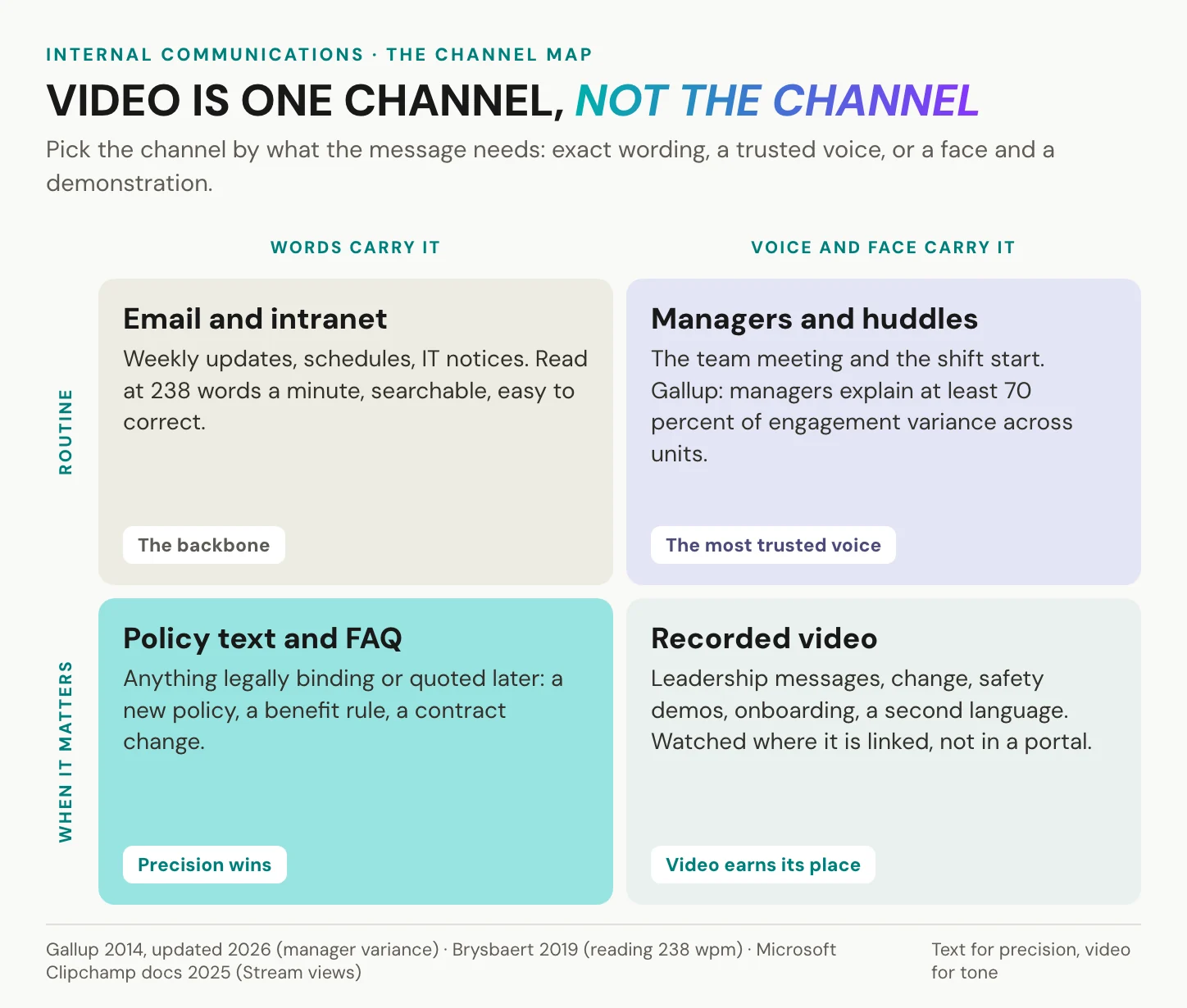
The manager stays the closest channel, and video should arm managers rather than bypass them. A two-minute clip that a team lead plays at the start of a shift, then discusses, carries the leadership voice and keeps the local one. The questions land with someone who can answer them.
Send text when the words matter. Send video when the voice does.
In short: text carries the routine and the binding, managers carry trust, and video carries tone, demonstration and language.
Internal communications video formats
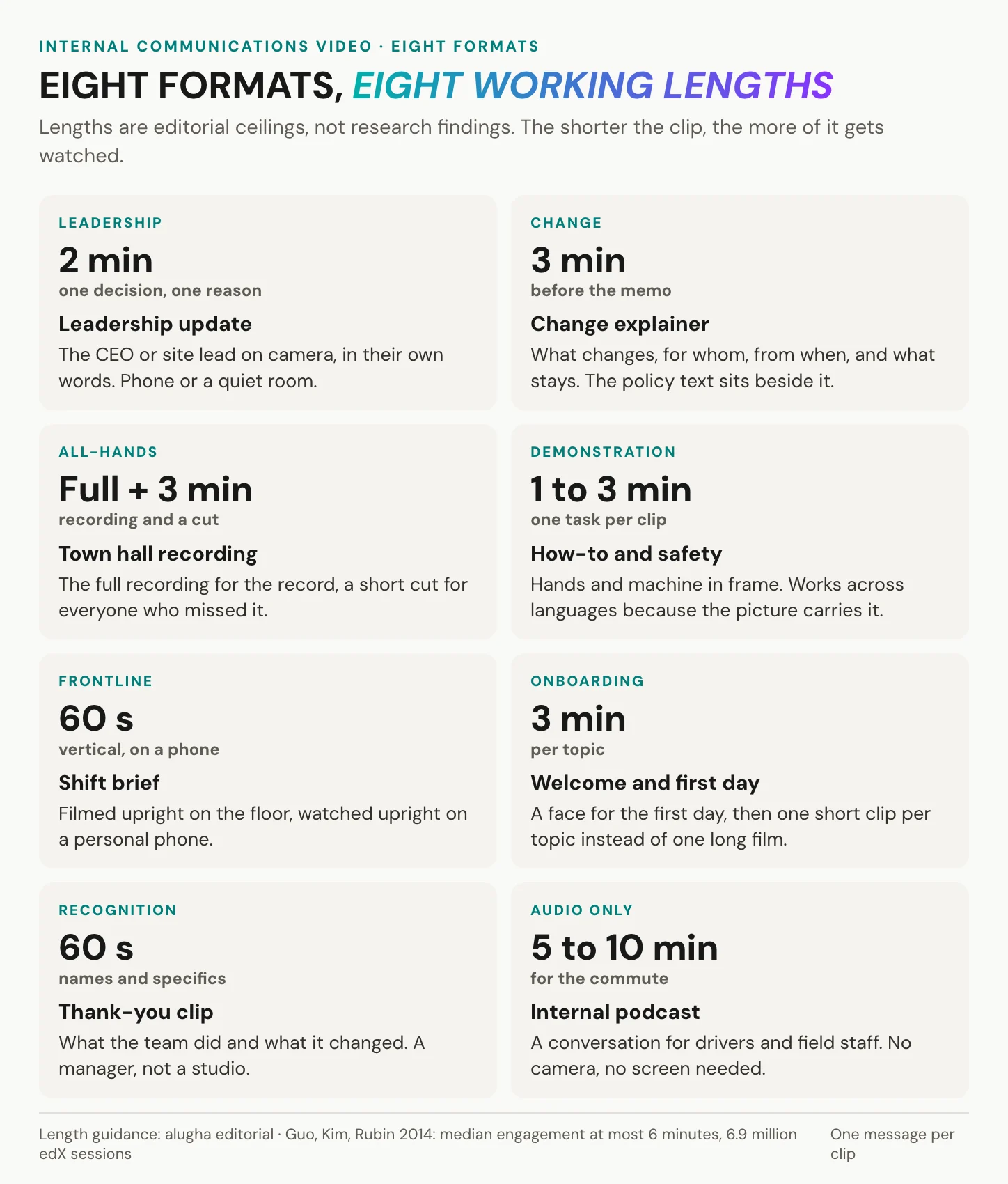
Eight formats cover almost every internal video a company makes. They differ in who is on camera, where it is filmed, and how long it can run before attention goes.
Messages from leadership
The leadership update, the change explainer and the town hall recording share one feature: the speaker is the message. A CEO filmed on a phone in their own office, in their own words, beats a studio production that sounds as if legal wrote it. Keep a change explainer to what changes, for whom, from when, and what stays the same, and link the policy text beside it.
The town hall has a practical problem this year: Microsoft retired Teams live events on 30 June 2026. Events scheduled before that date are supported until 28 February 2027, and the replacement is Teams town halls. Their recordings expire after 30 days by default, extendable to 60, and then have to be uploaded again. Give the full recording a permanent home, and cut a three-minute version for everyone who missed it. In Microsoft’s 2025 telemetry, which again excludes EU tenants, 30 percent of meetings spanned several time zones, so much of your audience will watch later anyway.
Messages that show how
How-to clips, safety demonstrations and onboarding travel across languages better than any other format, because the picture carries most of the meaning. Keep one task per clip and the hands in frame. Film from where the operator stands, so the viewer sees the machine the way they will meet it on shift. If a common mistake is dangerous, show it once, name it, and end on the correct move. Onboarding works as a short series rather than one long film: who we are, where things are, who to ask. The welcome should come from the site manager the new hire will actually meet. The method for making training videos applies almost unchanged. One boundary: if an auditor needs proof that each employee completed a mandatory training, that belongs in your learning management system, not in a comms video.
Messages for the frontline
For people on a shop floor, in a store or in a truck, film upright. A 60-second shift brief, recorded vertically on a phone, gets watched vertically on a phone. A recognition clip names the team and what it changed. An internal podcast, audio only, reaches drivers and field staff who cannot look at a screen. Emergence’s 2020 survey of 1,532 deskless workers found 56 percent using personal devices to fill gaps in the tools their employer provides. So the link has to play in a mobile browser, without an app and without a company login the worker does not have. Where people have no work email at all, a printed QR code on the noticeboard beside the time clock does the job of the newsletter.
How long should internal videos be?
The best public data on video length is not about employees. Guo, Kim and Rubin analyzed 6.9 million viewing sessions across 862 edX videos in 2014. Median engagement never exceeded six minutes, however long the video was. Clips of zero to three minutes held viewers best. The limits are real: these were online learners in maths and science courses, and engagement meant watch time, not understanding. The pattern is still worth following.
At a calm presenting pace, slower than the 196 words a minute of conversation, two minutes hold about 250 to 300 words. That is roughly one screen of text, a rule of thumb rather than a measured result. If the script runs longer, the message is two messages.
In short: eight formats, one message each, most of them under three minutes. The town hall is the exception, and it gets a short cut.
Making internal videos people finish
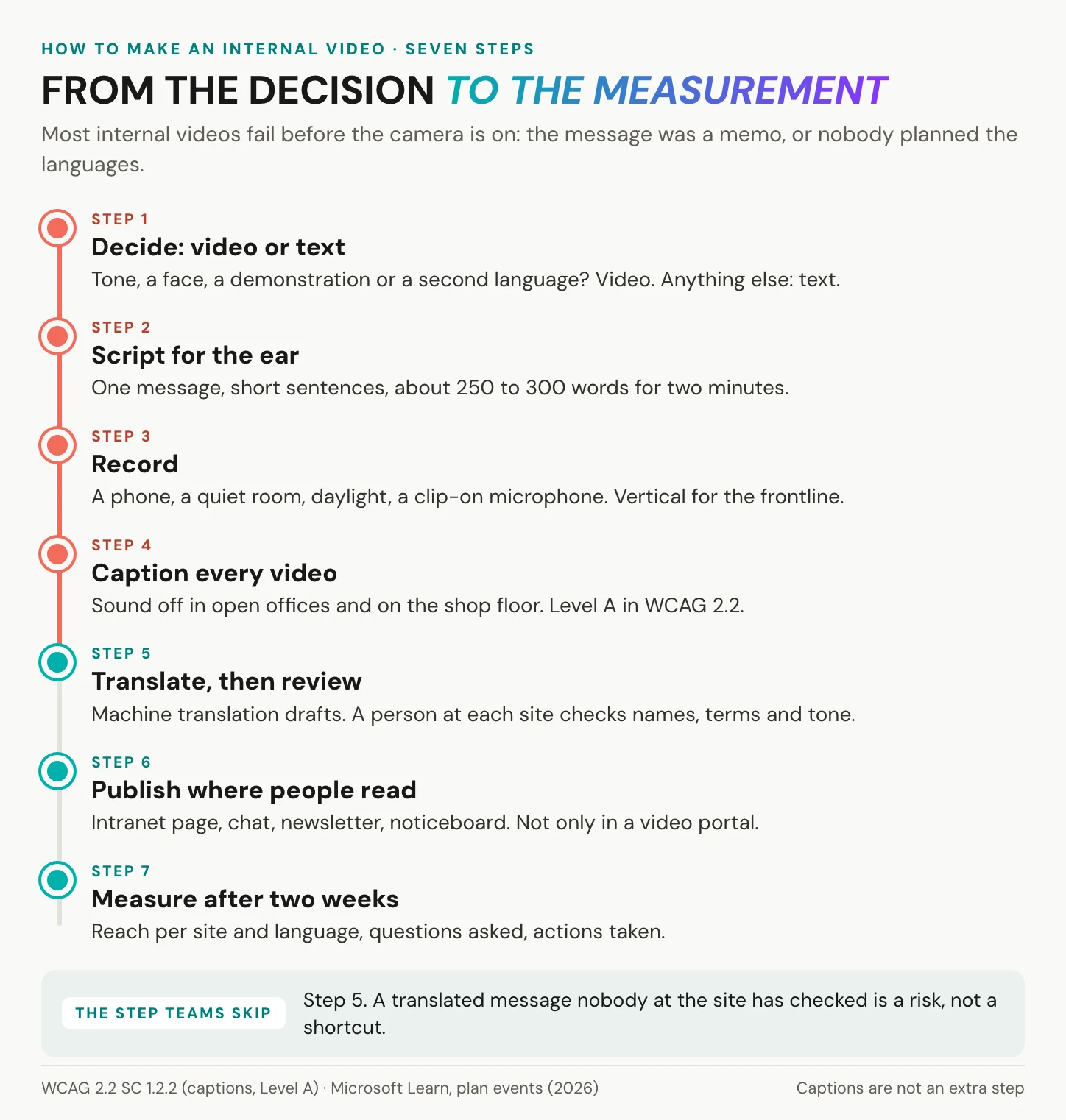
Most internal videos fail before the camera is on, because the message was really a memo or nobody planned the languages. Seven steps avoid both. The first three happen before anyone records, and the last four decide whether the frontline understood.
Before the camera: decide, script, record
Step 1: Decide whether it should be a video. Apply the test from the channel map. If the message needs tone, a face, a demonstration or a second language, make a video. If not, send text, and send it today.
Step 2: Write for the ear. One message per clip, in short sentences you can say in one breath, and about 250 to 300 words for two minutes. Say the action at the start and again at the end, because some viewers join late and others leave early.
Step 3: Record with what you have. A current phone, a quiet room, daylight from the side and a clip-on microphone. Sound matters more than picture: people forgive a soft image, but they switch off at echo. Film vertically for frontline clips and horizontally for anything shown on a meeting-room screen.
After the camera: caption, translate, publish, measure
Step 4: Caption every video. Captions are not an extra. The WHO counts 430 million people, over 5 percent of the world’s population, who need rehabilitation for disabling hearing loss, according to its 2026 fact sheet. Sound is often off, too. In a 2019 Verizon Media and Publicis survey of 5,616 US adults, 69 percent watched video with the sound off in public. That is consumer data, but the open-plan office and the shop floor give people the same reasons to mute.
The standards point the same way. WCAG 2.2 makes captions for prerecorded video a Level A requirement, success criterion 1.2.2. Public-sector intranets launched or substantially revised since 23 September 2019 fall under the EU Web Accessibility Directive. The European Accessibility Act covers consumer services, so it does not by itself require captions on internal video. Caption anyway: closed captions are the baseline.
Step 5: Translate, then review per language. Machine translation is fast, and its real merit is a good first draft in minutes. It still gets names wrong, flattens product terms, mistranslates legal wording and misses tone. A CEO who sounds warm in German can sound curt in Polish. So give each language a reviewer at the site that will watch it, and release that language only after they have checked it. The translation workflow itself does not change.
Step 6: Publish where people already read. The Stream figures point the way: 83 percent of page views came through links and embeds, not the portal. Put the video in the intranet article, the team chat and the newsletter, and link it from the noticeboard. A video does not play inside an email, so link a still frame from the email instead.
Step 7: Measure after two weeks. Wait two weeks, then check reach per site and language, and what people did. The next section shows how.
In short: decide, script, record, caption, translate with a review, publish where people read, measure. Captions and the language review are the steps teams skip, and the ones that decide whether the frontline understood.
Try it with one message. Create an alugha account, upload a two-minute update and add a second language track to it.
Frontline and multilingual workforces
Head office usually writes in one language. The sites rarely work in only one.
Who needs another language
Start with where your people come from, then ask what they speak. In Germany, 26 percent of employed persons had an immigration history in 2024, according to the Mikrozensus published by Destatis. In welding the share was 60 percent, and in food production and among cooks 54 percent. Destatis also reported for 2023 that 6 percent of the population in private households speaks no German at home, and 17 percent is multilingual. In the United States, the Bureau of Labor Statistics counted 19.1 percent of the civilian labor force as foreign-born in 2025.
An immigration history is not a language count. Many of those employees work in German every day without difficulty. The numbers tell you where to ask, not what the answer is. So ask each site two questions: which languages do people work in, and who could check a translation?
Subtitles, voice-over or dubbing
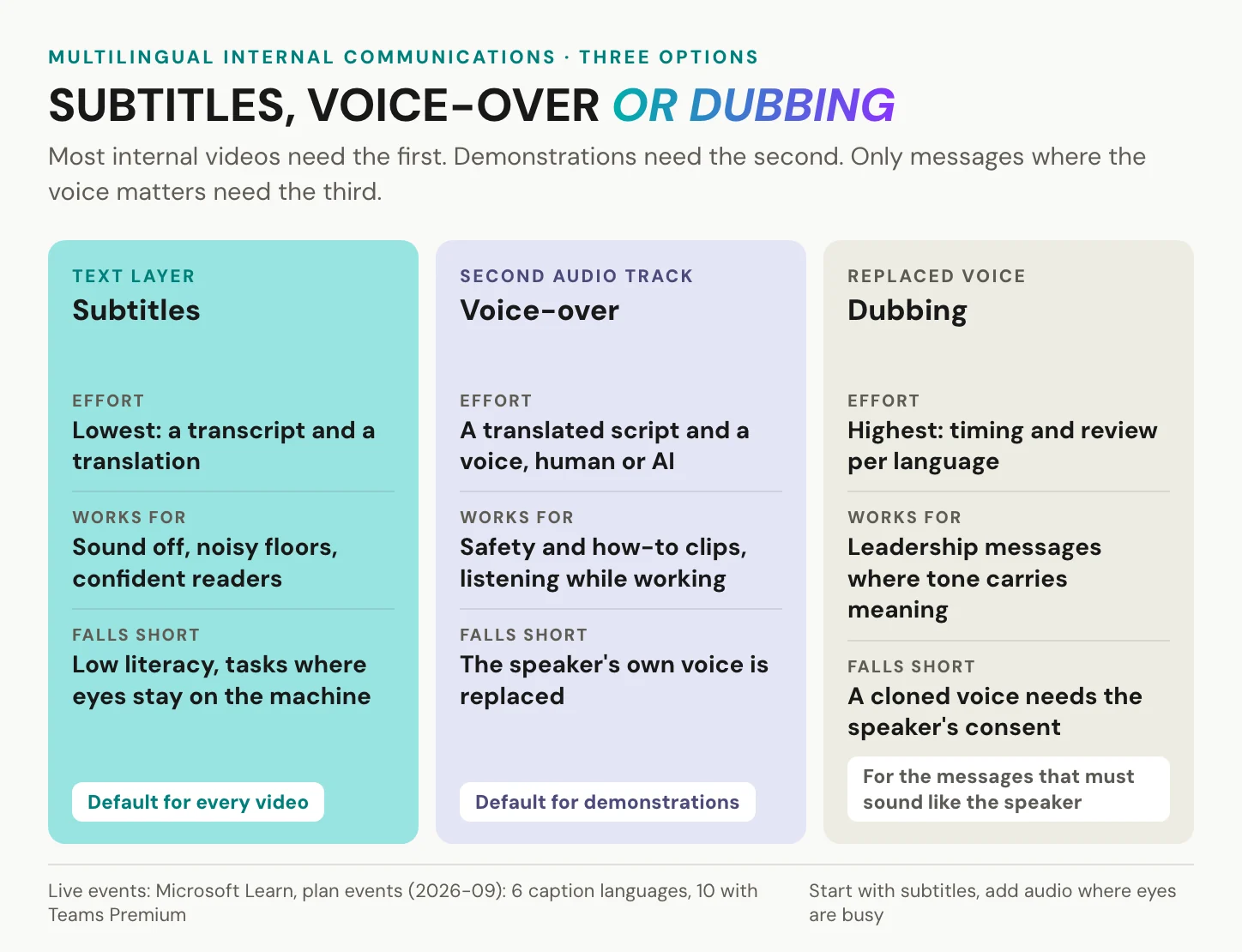
For live events, Microsoft covers part of the problem. Large Teams events can offer live translated captions in 6 languages, or 10 with a Teams Premium license. In large-audience events, only AI-generated captions are available. For the live moment, that is a real service.
The gap opens afterwards, when the recording plays in the language that was spoken on stage. The live caption languages came from a fixed, short list. And the people who most need the message were on the night shift, not at the live event.
Three options cover the recording. Subtitles are the default for every video: the lowest effort, fine with the sound off, weaker for low literacy and for tasks where the eyes stay on a machine. Voice-over is the default for demonstrations, because the viewer can listen while watching the task. Dubbing, a replaced voice timed to the speaker, suits leadership messages where tone carries meaning. An AI clone of the speaker’s own voice is a consent decision for the speaker, not a technical setting. More on dubbing and AI dubbing.
One link, not five
The quiet cost of languages is the link count. Five language files mean five links, five intranet posts and five places to correct when a date in the video changes. Sooner or later, someone posts the wrong version to the wrong site. The Polish team watches last month’s shift plan, and nobody notices until the questions arrive. Separate files also split your numbers: five counts in five places, and no view of the message as a whole. Behind one link, a correction happens once, in one place, and every site sees it on the next play. Whatever host you choose, ask two questions: can every language version live behind one link, and can each version be released on its own, once its site has checked it?
In short: find the working languages per site, subtitle everything, add audio where eyes are busy, and keep the versions behind one link.
How to measure internal communications
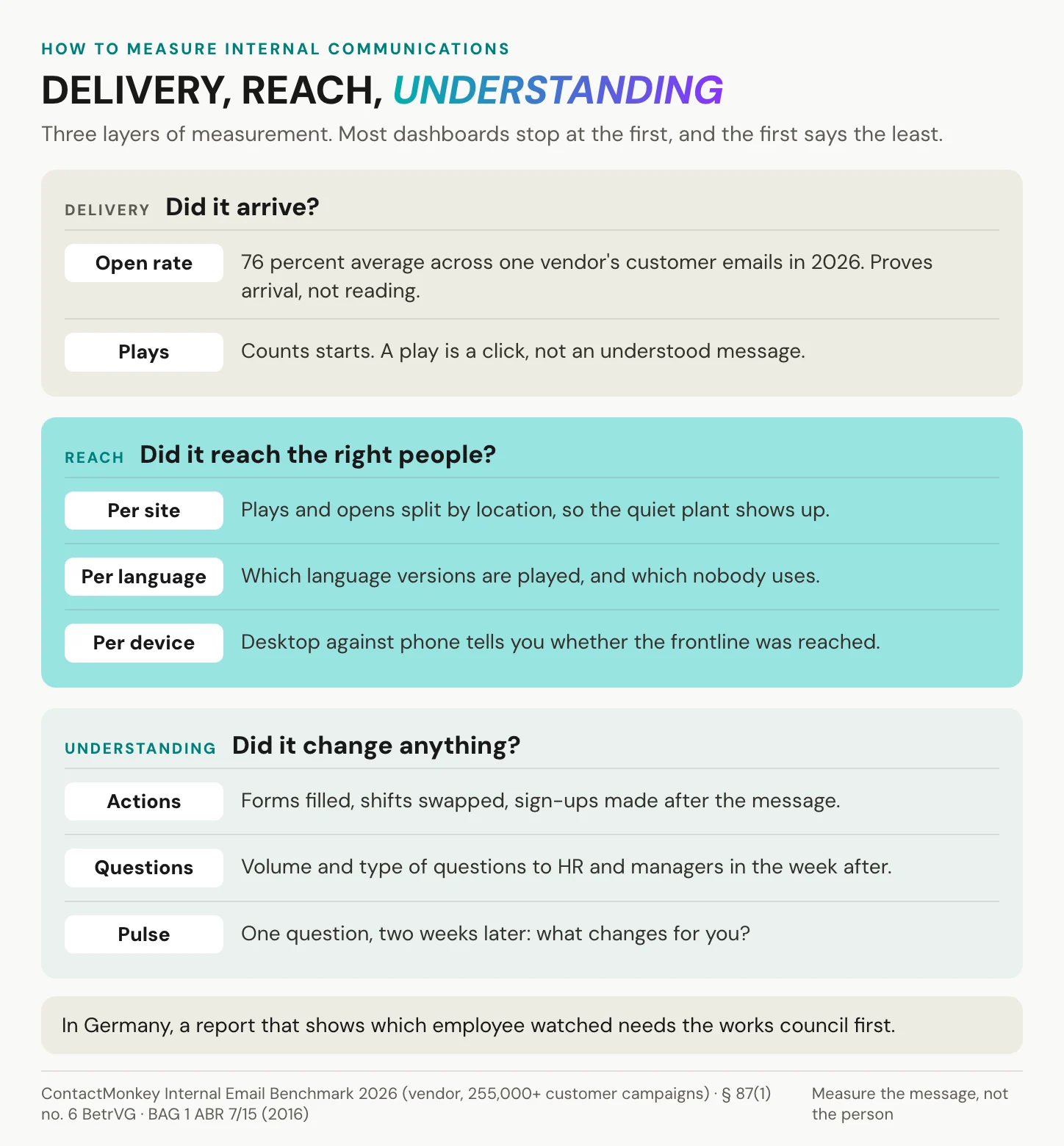
Open rates are real data. ContactMonkey’s Internal Email Benchmark 2026, drawn from more than 255,000 campaigns sent by its customers, puts the average internal email open rate at 76 percent and the click rate at 9 percent. Figures like these show quickly when a distribution list is broken, but an open measures delivery. And with 16 percent of those opens on mobile, the benchmark says more about who reads email at a desk than about the frontline.
Delivery, reach and understanding
Measure in three layers.
Delivery asks whether the message arrived: opens for email, plays for video. It is the easiest layer to count and says the least.
Reach asks whether the message arrived at the right people. Split every count by site, by language and by device. The plant that stays silent shows up, and so does the language version nobody plays. For a video in several languages, plays per language version answer a precise question. Did the Portuguese version reach Porto, or did everyone there fall back to English?
Understanding asks whether anything changed. Count the actions the message asked for: forms filled in, shifts swapped, sign-ups made. Track the questions that reach HR and managers in the week after. Two weeks later, ask one pulse question: what changes for you? If the answers match the message, it landed.
An open rate tells you the email arrived. It cannot tell you the message did.
Numbers to leave out of your business case
Two figures turn up in many business cases, quoted in good faith. Neither should. The claim that viewers retain 95 percent of a message in video against 10 percent in text goes back to Insivia. Its own page now calls the figure a small survey of about 200 B2B respondents from the late 2000s, not a peer-reviewed study. The line that employees are 75 percent more likely to watch a video than read is credited to Forrester, with no report title, date or link. The Forbes Insights survey above is traceable, and it cuts both ways.
In Germany, a report that shows which employee watched which video, and for how long, counts as a technical device suited to monitoring under section 87(1) no. 6 of the Works Constitution Act. It needs the works council before it goes live, while aggregate counts per site or per language are a different case. Measure the message, not the person.
In short: count delivery, then reach per site and language, then what people did. Stop before you measure individuals without the works council.
Data protection and the works council
Internal video is personal data in both directions. The employees on camera can be identified, and so can the employees who watch. That shapes which host you may use and how.
YouTube’s reach and the unlisted link
YouTube’s merits are real. It is localized in over 100 countries and 80 languages, and it takes more than 20 million uploads a day. It plays on every device and needs no procurement. For public content, nothing reaches further.
For internal messages, the unlisted setting is the weak point. Google’s help page says an unlisted video can be seen and shared by anyone with the link, and viewers do not need a Google account. A forwarded link to a restructuring update reaches whoever receives it. Private videos work only for people invited by email, and privacy-enhanced mode reduces ad personalization. Google’s help page does not say it stores nothing on the viewer’s device, so it does not settle the consent question on its own. Compare the YouTube alternatives.
Unlisted means nobody can find the video. It does not mean nobody can watch it.
Microsoft 365 and the EU
Microsoft’s own video tools start with a real advantage: they are already where your employees work. Stream on SharePoint keeps videos as ordinary files in SharePoint, OneDrive and Teams. Teams meeting recordings land in the organizer’s OneDrive or the channel’s SharePoint site, where Microsoft Purview, retention and eDiscovery apply. There is no new tool to buy, license or archive.
Under the EU Data Boundary, Microsoft commits to store and process Microsoft 365 customer data in the EU and EFTA, with limited documented exceptions, and tenants with Multi-Geo are out of scope. In 2022 the German supervisory authorities concluded that Microsoft 365 could not be used without transfers of personal data to the US. The Data Privacy Framework and the Data Boundary both came later. For a company with one language and a works agreement already in place, Microsoft 365 is often enough.
What the GDPR asks of a video host
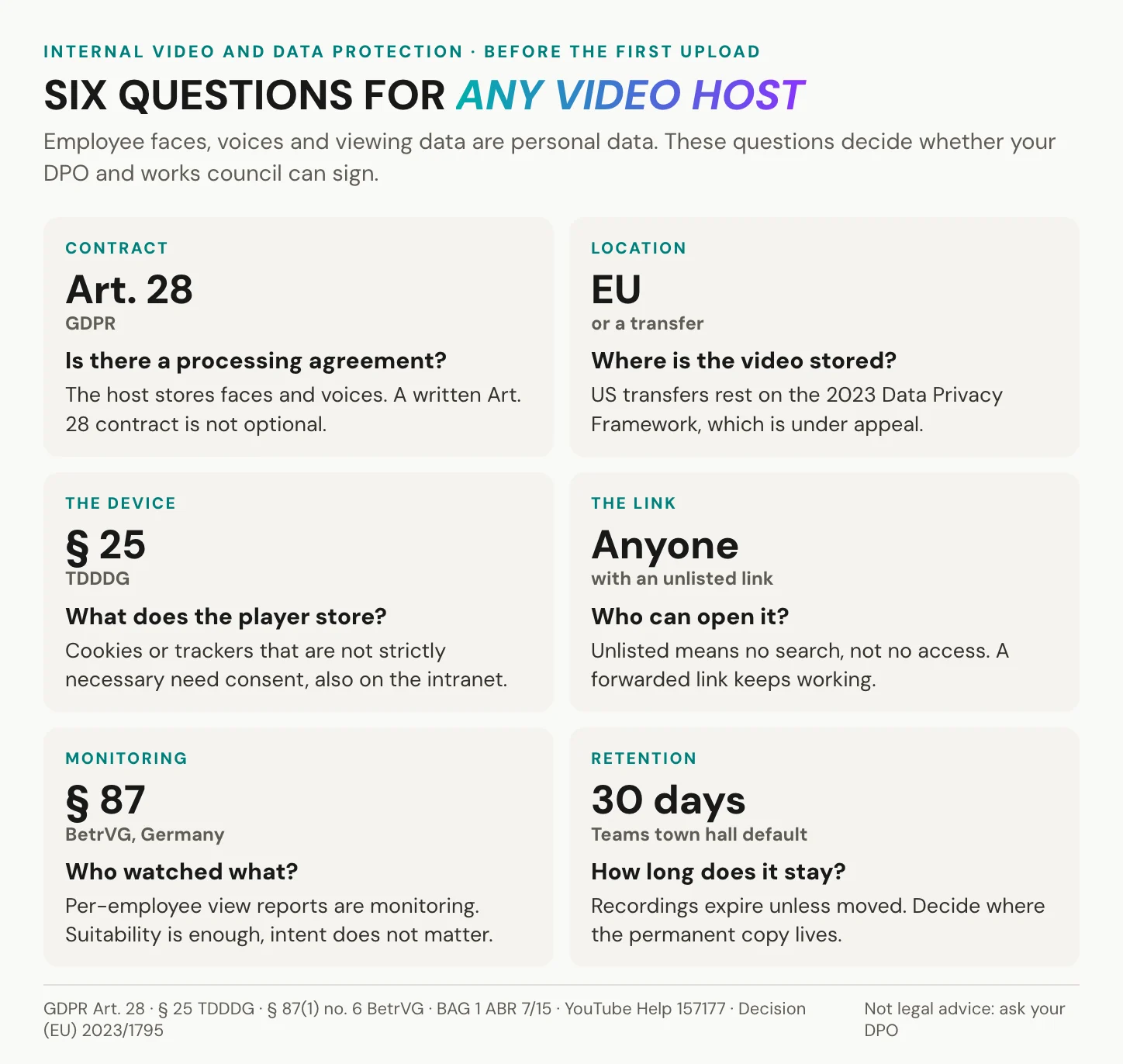
The host that stores employee faces, voices and viewing data is a processor. Article 28 GDPR requires a contract that sets out the subject matter, duration, purpose, types of data and the people concerned. Ask any host for its Art. 28 agreement before the first upload.
The employment context adds a layer. In case C-34/21 in 2023, the Court of Justice held that live-streaming teachers’ classes processes their personal data, and that a national rule merely repeating the GDPR is not a more specific rule under Article 88. The ruling is widely read as putting section 26(1) of Germany’s Federal Data Protection Act (BDSG) in doubt.
The device is the next question. Under section 25 of the TDDDG, Germany’s telecommunications and digital services data protection act, anything a player stores on a device, or reads from it, beyond what is strictly necessary needs consent. Consent from an employee is hard to give freely. US transfers rest on the Data Privacy Framework, Decision (EU) 2023/1795, which the General Court upheld at first instance on 3 September 2025, and an appeal is pending. More on GDPR-compliant video hosting.
Germany: involve the works council early
Section 87(1) no. 6 of the Works Constitution Act (BetrVG) gives the works council co-determination over technical devices designed to monitor employees’ behavior or performance. The Federal Labour Court confirmed its broad reading of that rule in December 2016 (1 ABR 7/15). A device that is objectively suited to monitoring is enough, whatever the employer intends. A video platform that shows who watched which message, and for how long, fits that description.
Section 26(4) BDSG lets a works agreement, the Betriebsvereinbarung, serve as the legal basis, so it is the usual vehicle. Involve the works council and your data protection officer before rollout, and ask every vendor what its player logs. Get that answer in writing, because the works council will ask to see it. This is orientation, not legal advice.
In short: a processing agreement, EU storage or a lawful transfer, a player that stores nothing it does not need, and the works council at the table before anyone counts views per person.
Where alugha fits, and where it does not
This is our platform, so our limits come first. We are not an internal communications platform: we have no newsletter editor, no audience segmentation, no scheduling, no surveys and no employee app. We do not tell you which employee watched. What we count is plays per language track and subtitle views, which you read through our API. These are totals per language track, not a list of viewers, and enhanced analytics sit on our top tier. We host and translate the video that goes into your channels.
One message, every language, one link
Record the message once. In our dubbr, every language is a track of the same project, behind the same link and the same embed code. Adding Polish next month does not change the link you sent today. How many audio tracks one video holds depends on your tier.
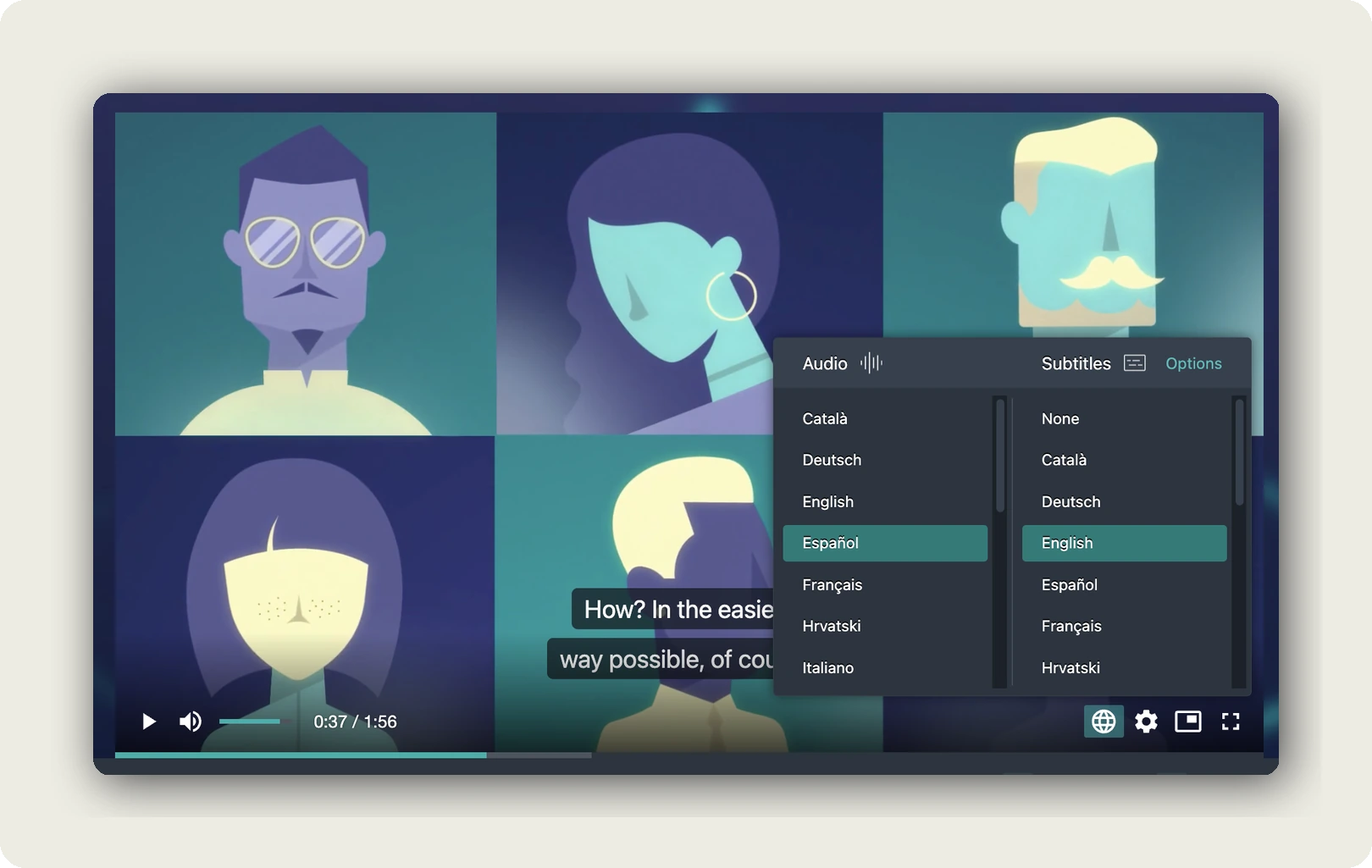
Our player reads the browser’s language setting and opens the matching track, or falls back to the default you set if there is none. The warehouse team in Poznań hears Polish without clicking anything. Audio and subtitles are chosen separately, so a viewer can mix English audio with Portuguese subtitles, and switching needs no reload. Title, description and thumbnail are set per language, and the preview card in the chat is built from that metadata. Add the language code to the link, such as ?lang=pol, and the card shows the Polish title.
Embed our player on any intranet page that accepts an iframe. In the dubbr, open Im-/Export, then Share Project, then EMBED OPTIONS, and leave the language on Automatic. Paste our link into Slack, Teams or WhatsApp and it unfurls into a card. One click opens our player; it does not play inline. A vertical shift brief plays vertical, without black bars, and audio-only uploads work for the internal podcast. We encode at 540p, 720p or 1080p, the last on a paid tier. We set no length limit per video, so a 90-minute town hall goes up as one file.
We host in Germany and the EU, and our player carries no third-party advertising cookies and trackers.
A review gate for each language
Our Speech-To-Text produces a time-coded transcript. Machine translation carries it into the target language, including title, description and tags, and Text-To-Speech gives it a voice. Every result is a draft. A glossary on a paid tier keeps your product names and internal terms consistent across languages. Voice cloning, the speaker’s own voice in the translated track, is a paid-tier add-on and a consent decision first.
The review gate is the track state. Each language has its own state, Playable, Private or Hidden, and it overrides the project’s visibility. Keep the Polish version private until someone in Poznań has watched it, while the English one is already live. The right reviewer is a native speaker at the site who knows your product terms, not a translator at head office. Then publish that one language without touching the rest.
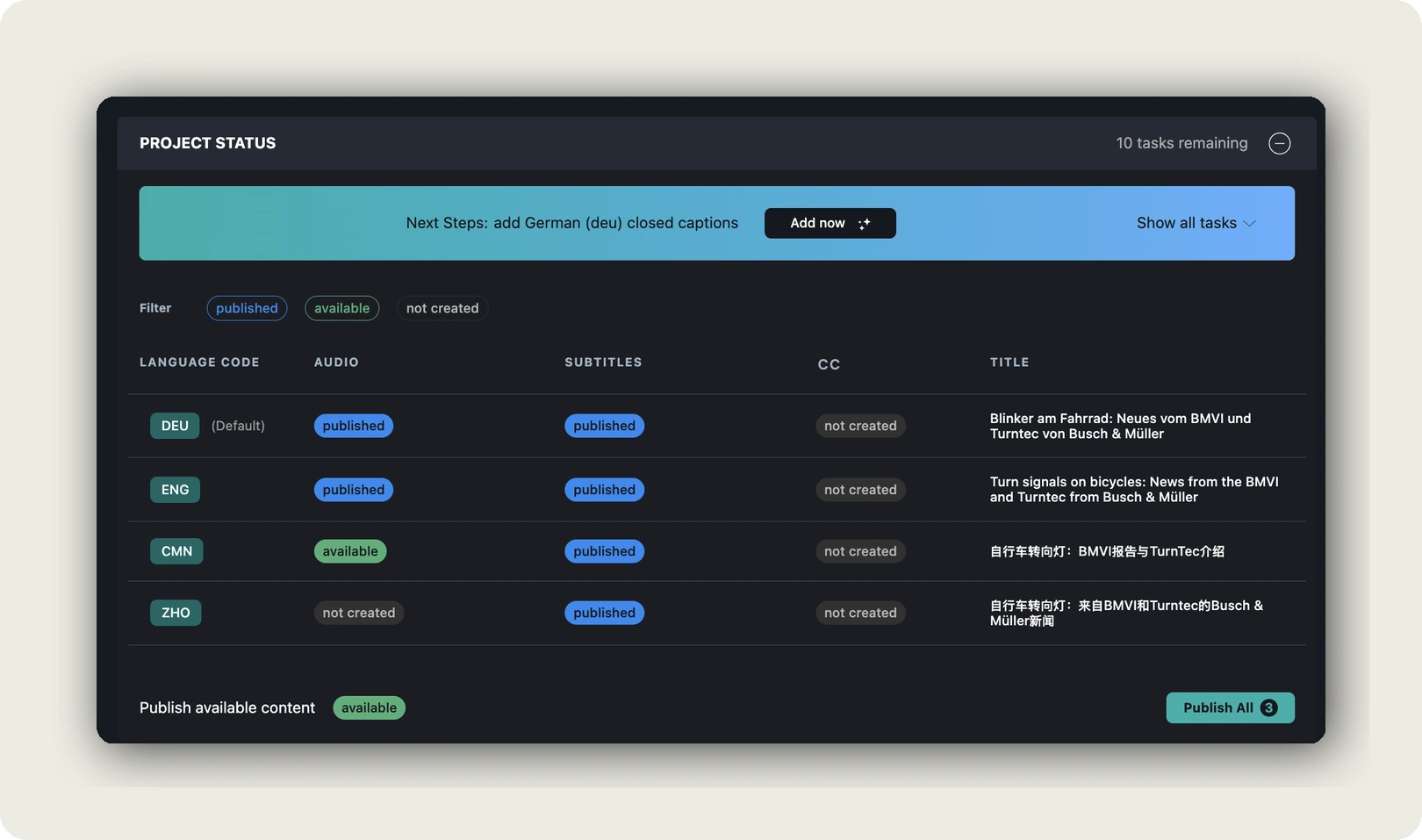
In short: record once, release each language when its site has checked it, and keep one link.
When you do not need us
Some limits count against us. A Not listed link can be forwarded, so a confidential message about a restructuring belongs behind your own login, not in our player. Our player needs JavaScript and a current browser, which rules out some locked-down terminals on factory floors.
Some situations do not need us at all. If your whole company works in one language and one office, the video hosting in your intranet or collaboration suite is enough. If text does the job, send text. If you need proof that each employee watched, use your LMS. For a live all-hands, your meeting tool runs the live part, and we take the recording afterwards. If your video already sits in an approved, authenticated suite and languages are not the problem, leave it there.
If your whole company speaks one language, the video hosting in your intranet is enough. You need us when the languages start.
Frequently asked questions about internal communications
What is internal communications?
Internal communications is the planned exchange of information between a company and its employees, in every direction: down, up and across teams. It explains what was decided, why, and what each person should do next. It travels through email, the intranet, chat, meetings, line managers and, where tone or language matters, recorded video.
What are the main types of internal communication?
Five types cover most of it. Top-down communication carries leadership decisions to staff. Bottom-up communication carries questions, survey answers and ideas back up. Horizontal communication connects teams and sites. Change communication explains a reorganization or a new system, the why before the what. Crisis communication handles an outage or an accident, where speed comes first and the follow-up matters.
What is the difference between internal and corporate communications?
Corporate communications is the umbrella for everything a company says. Internal communications is the part addressed to employees, while external communication speaks to customers, the press and investors. They need different channels, but they must say the same thing. Employees read the press release too, and a gap between the versions costs trust quickly.
How long should an internal comms video be?
Most should run under three minutes, with one message per clip. In a 2014 study of 6.9 million edX viewing sessions, Guo, Kim and Rubin found that median engagement never exceeded six minutes, regardless of length. Those were online learners, not employees, and engagement meant watch time. Town hall recordings are the exception: keep the full recording and add a three-minute cut.
How do you measure internal communications?
In three layers. Delivery shows whether a message arrived, through opens and plays. Reach shows whether it arrived at the right sites, languages and devices. Understanding shows whether anything changed: actions, questions and a pulse question two weeks later. ContactMonkey’s 2026 benchmark puts the average internal email open rate at 76 percent, which proves arrival, not understanding.
Do internal videos need captions?
In most cases, yes. WCAG 2.2 makes captions for prerecorded video a Level A criterion, and public-sector intranets can fall under the EU Web Accessibility Directive. The European Accessibility Act covers consumer services, not internal video. The stronger reasons are practical: the WHO counts 430 million people who need rehabilitation for disabling hearing loss, and many employees watch muted or in a second language.
Can we use YouTube for internal communications?
For public content, yes, and its reach is unmatched. For internal messages, three points need your data protection officer. An unlisted link opens for anyone who has it, without a Google account. The embed loads a third party’s player, which raises consent questions under section 25 TDDDG. And data can travel to the US, so check the Art. 28 contract and the transfer basis.
Does the works council have to approve internal video tools?
In Germany, yes, if the tool can show who watched what, because section 87(1) no. 6 BetrVG applies. The Federal Labour Court held in 2016 that objective suitability to monitor is enough, and that intent does not matter. A works agreement is the usual solution. Involve the works council and your data protection officer before rollout. This is orientation, not legal advice.
Getting started
Three moves are enough for the first month.
- Sort next month’s messages into text and video with the channel map, and expect most to stay text.
- List the working languages of each site, and ask who there can check a translation.
- Pick one leadership message, record two minutes, caption it, add one language, and measure reach per language after two weeks.
Tomorrow a knowledge worker will again receive 117 emails and 153 Teams messages. Nobody needs to send the 118th. The person on the night shift who never opens Outlook needs two minutes, in their own language, one tap away in the team chat or one short link on the noticeboard.
If your messages have to reach a workforce in several languages, book a call. We will walk through the language review and the intranet embed on one of your own videos, and answer your data-protection questions about hosting.