
Audio description is a second narration that tells blind and low-vision viewers what the picture shows. It is spoken in the natural pauses between the dialogue. Picture a training video. A chart slide fills the screen, and the narrator says “as you can see here”. For a viewer who cannot see, the information ends with that sentence. Description is the short line that fills the pause before it: what the chart is, and which way it points. If you met “AD” in a TV or streaming menu, it is that extra audio track, and the same menu switches it off. By the end you can decide whether a video needs description at all and choose between the standard and the extended form. You can also name the rule that asks for it, write the lines yourself and publish the track where a viewer can actually find it.
Key takeaways
- Audio description is a second narration for blind and low-vision viewers. WCAG 2.2 success criterion 1.2.5 requires it at Level AA for all prerecorded video with sound.
- Standard description fits into the natural pauses of the dialogue. Extended description stops the picture to make room, and WCAG asks for it only at Level AAA, criterion 1.2.7.
- Not every video needs a described track. W3C technique G203 exempts a single speaker against an unchanging background, and a script that reads on-screen text aloud closes many of the other gaps.
- In 2020, 43.3 million people worldwide were blind and 295 million had moderate or severe vision impairment, according to the Global Burden of Disease study in The Lancet Global Health.
- Since 28 June 2025, the European Accessibility Act makes apps and players that give access to TV and on-demand services carry audio description. Producing it falls mainly to media law.
- In 2026, ABC, CBS, Fox and NBC affiliates in the top 120 US TV markets owe 87.5 described hours per quarter. The quota reaches all 210 markets on 1 January 2035.
- Key takeaways
- What is audio description?
- Who audio description is for
- Standard vs extended audio description
- Does your video need audio description?
- How a described track is made
- Where the described track plays
- Audio description and the law
- Where alugha fits, and where it does not
- Frequently asked questions about audio description
- Getting started
What is audio description?
Audio description is narration added to a video’s soundtrack. It describes the important visual details that the main soundtrack does not carry. That is almost word for word the definition in the WCAG 2.2 glossary. US law describes the same thing from the broadcaster’s side: descriptions of a programme’s “key visual elements” inserted “into natural pauses between the program’s dialogue” (47 U.S.C. 613, 2010).
In practice it sounds like this.
Narrator: “Let’s look at the results.”<br>Description: “A bar chart. Complaints fall in each quarter, lowest in the fourth.”
The description does not interpret. It says what is there, briefly, in a gap the speaker leaves. Everything else about the craft follows from that constraint.
Captions carry the sound to people who cannot hear it. Audio description carries the picture to people who cannot see it.
The two are counterparts, and closed captions are the half most teams already know. You will meet several names for the second half: AD, described video, descriptive audio and, in US law, video description. The Metropolitan Washington Ear dates the technique to 1981, when Margaret and Cody Pfanstiehl developed it there. The FCC’s first television rules followed in 2000, were struck down by a federal court in 2002, and returned with the CVAA in 2010.
How to turn audio description off
On streaming services the described track sits in the audio or language menu, labelled “Audio Description”, “AD” or something close. Pick the plain language track and it is gone. On US television, description travels on the secondary audio feature. Some remotes call it SAP, and the FCC’s consumer guide notes it may even appear as “Spanish”, since the same channel carries translations. Set the audio back to main. If the track comes back on a rerun, that is by design. Once a US station has aired a programme with description, every later airing on that station must carry it (47 CFR 79.3). In the EU, apps and players that give access to TV and on-demand services must leave the choice with you, because the European Accessibility Act requires access services to run under the user’s control. At a live theatre performance, description comes through a small personal receiver or an app, so there is nothing to switch off in the room.
Who audio description is for
The core audience is people who are blind or have low vision. How many there are depends entirely on the definition. The Global Burden of Disease study, published in The Lancet Global Health in 2021, estimates that 43.3 million people worldwide were blind in 2020. Another 295 million had moderate or severe vision impairment.
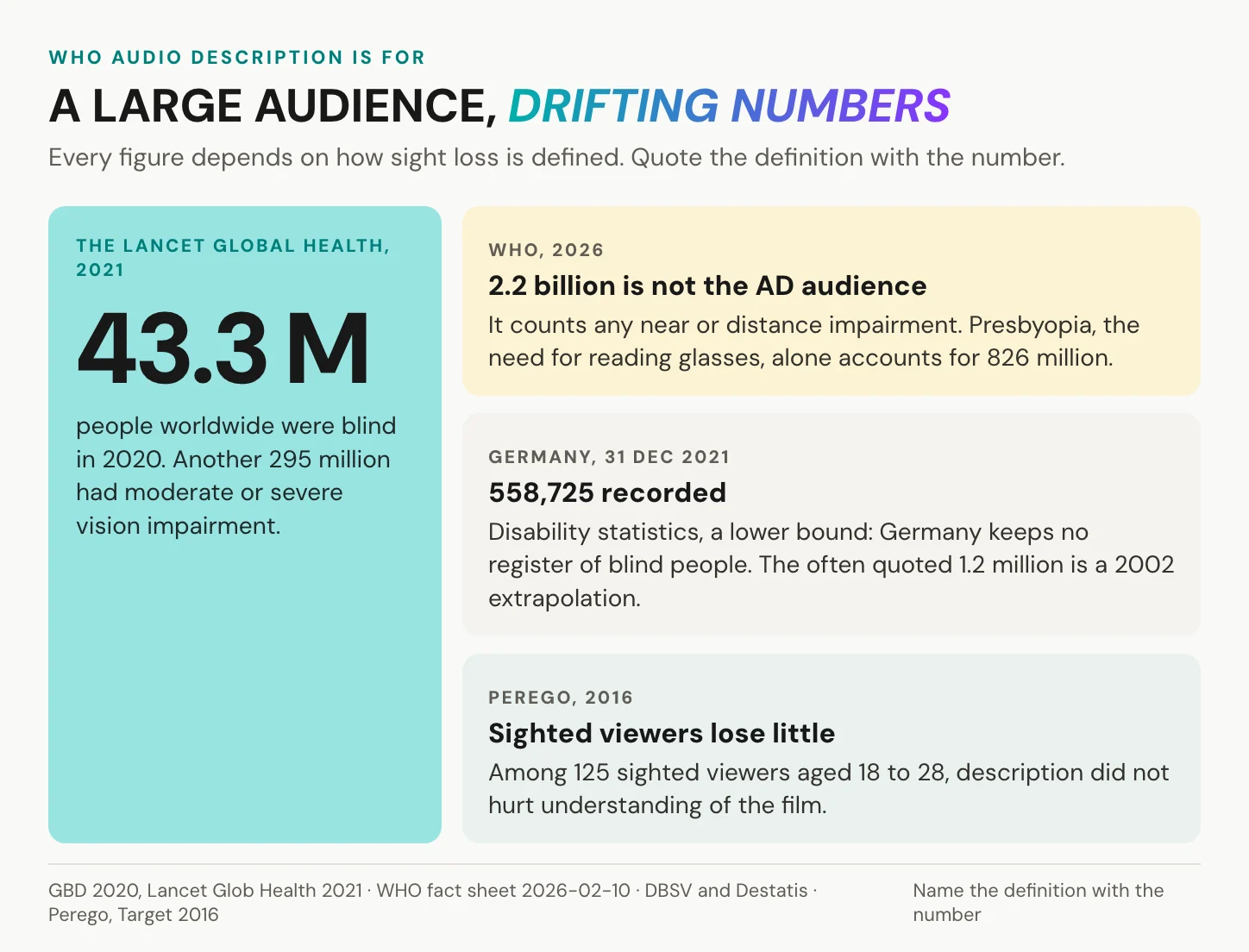
Two other numbers travel widely. The WHO fact sheet of February 2026 counts at least 2.2 billion people with a near or distance vision impairment. Its largest single cause of near vision loss is presbyopia, the age-related need for reading glasses, at 826 million people. The WHO figure is right for what it measures, which is every kind of sight problem, including the ones a pair of glasses solves. It is not the audience for description. The 285 million that still circulates is a WHO estimate from 2010, since replaced by the Lancet figures above.
Germany keeps no register of blind people. The only hard number comes from its disability statistics: 558,725 blind or visually impaired people on 31 December 2021, a figure the blind association DBSV calls a lower bound. The often quoted 1.2 million is an extrapolation from WHO data for 2002.
Sighted viewers lose little. In a 2016 study by Perego in the journal Target, description did not hurt the understanding of 125 sighted viewers aged 18 to 28. You will also read that description helps language learners or autistic viewers. Both ideas are plausible, and teachers do use description in class. That work, however, mostly has students write descriptions as an exercise, which is a different use from listening to a described track. Treat both claims as possibilities, not findings.
In short: plan for the 43.3 million blind people and the 295 million with moderate or severe vision impairment, not for WHO’s 2.2 billion, a count that includes 826 million people with presbyopia. Expect little cost to the sighted audience.
Standard vs extended audio description
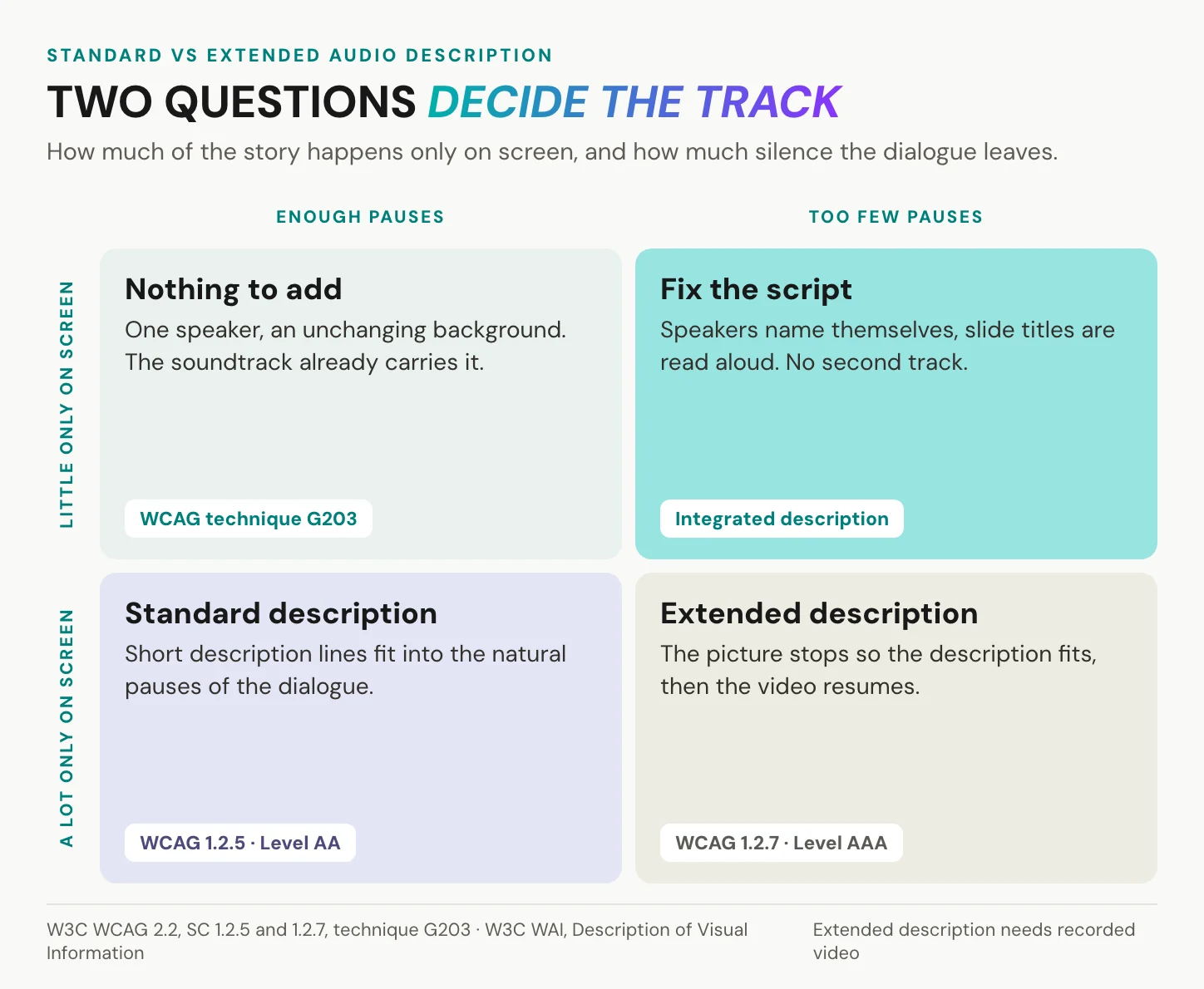
The difference is time. Standard description works with the silence a video already has, while extended description makes more of it by stopping the picture.
Standard description: in the pauses
Standard description lives inside the soundtrack you already have. Each line goes into a natural pause in the dialogue, which is exactly how US law defines it. WCAG 2.2 success criterion 1.2.5 requires this form for all prerecorded video with sound at Level AA. The constraint is hard. Every line must fit the gap it gets, so the writer chooses what matters most and drops the rest. The Described and Captioned Media Program (DCMP) adds a rule that surprises beginners: do not try to fill every pause. A pause is part of the film too.
Standard is also the form the rules count. The US definition inserts description into natural pauses, and WCAG stops at standard description for Level AA. For the writer, that means a word budget set by the film, not by the writer. A short gap holds a short phrase, not a sentence, and the choice of which detail gets those words is where the craft lies.
Extended description: the picture waits
Some videos leave no room at all, like a software demo with nonstop narration or a lecture that talks over every slide. WCAG’s answer is extended audio description: the video pauses for the description, then resumes. Success criterion 1.2.7 asks for it only at Level AAA, and only where the pauses are too short to convey the sense of the video. It works only for recorded content, since a live broadcast cannot be paused. EN 301 549, the European standard for accessible ICT, calls player support for it merely “useful”. Players are built for uninterrupted viewing, and for most audiences that is the right design. Many of them, YouTube’s among them, cannot pause for description, so extended description often ships as a separate described edit of the video.
In short: standard description fits into the soundtrack you have. Extended description changes the running time, which is why only WCAG AAA asks for it.
Does your video need audio description?
Often less than you fear.
When the script already describes
W3C is generous here, and rightly so. Its technique G203 says one person speaking against an unchanging background needs no description, because nothing important happens on screen. More broadly, if the audio already conveys all the important visual information, no additional description is necessary.
The exception is where corporate video gets caught. G203 stops applying when several speakers appear and each is identified only by text on screen. Think of panel discussions with name captions, webinars with slide titles nobody reads aloud and product demos where the narrator says “click here”. All of them hide information in the picture.
The fix often sits in the script, not in a second track. The University of Washington’s accessibility guide gives the simplest version: speakers introduce themselves, and a narrator reads the credits.
The cheapest audio description is a script that already says what the screen shows.
Plan the script before the shoot, as in how to create training videos, and build the description in from the first draft.
Level A: a text alternative can do
Success criterion 1.2.3, at Level A, accepts either audio description or a full text alternative for prerecorded video. At Level AA, criterion 1.2.5, the text alternative is no longer enough: the video itself needs description. For Level A, the alternative is a transcript that includes what the screen shows, not only what is said. A video transcript example shows the format. Add the visual lines where they happen. One more exception sits in the criterion itself: a video that is a media alternative for text, and clearly labelled as such, needs neither.
Few rules stop at Level A, though. The 2024 ADA Title II rule asks US state and local governments for WCAG 2.1 Level A and AA, and EN 301 549 carries the AA criterion 1.2.5 into European public-sector web content. For those publishers, a transcript alone does not close the gap.
Which videos to describe first
You rarely describe a whole library at once. The University of Washington’s guidance ranks videos by audience, traffic and publication date, and the rules point the same way. The EAA excludes pre-recorded media published on websites and apps before 28 June 2025. The EU’s public-sector directive excludes video published before 23 September 2020, and all live video. WCAG has no success criterion for live description. So start with new, public, high-traffic video, and leave the archive for last.
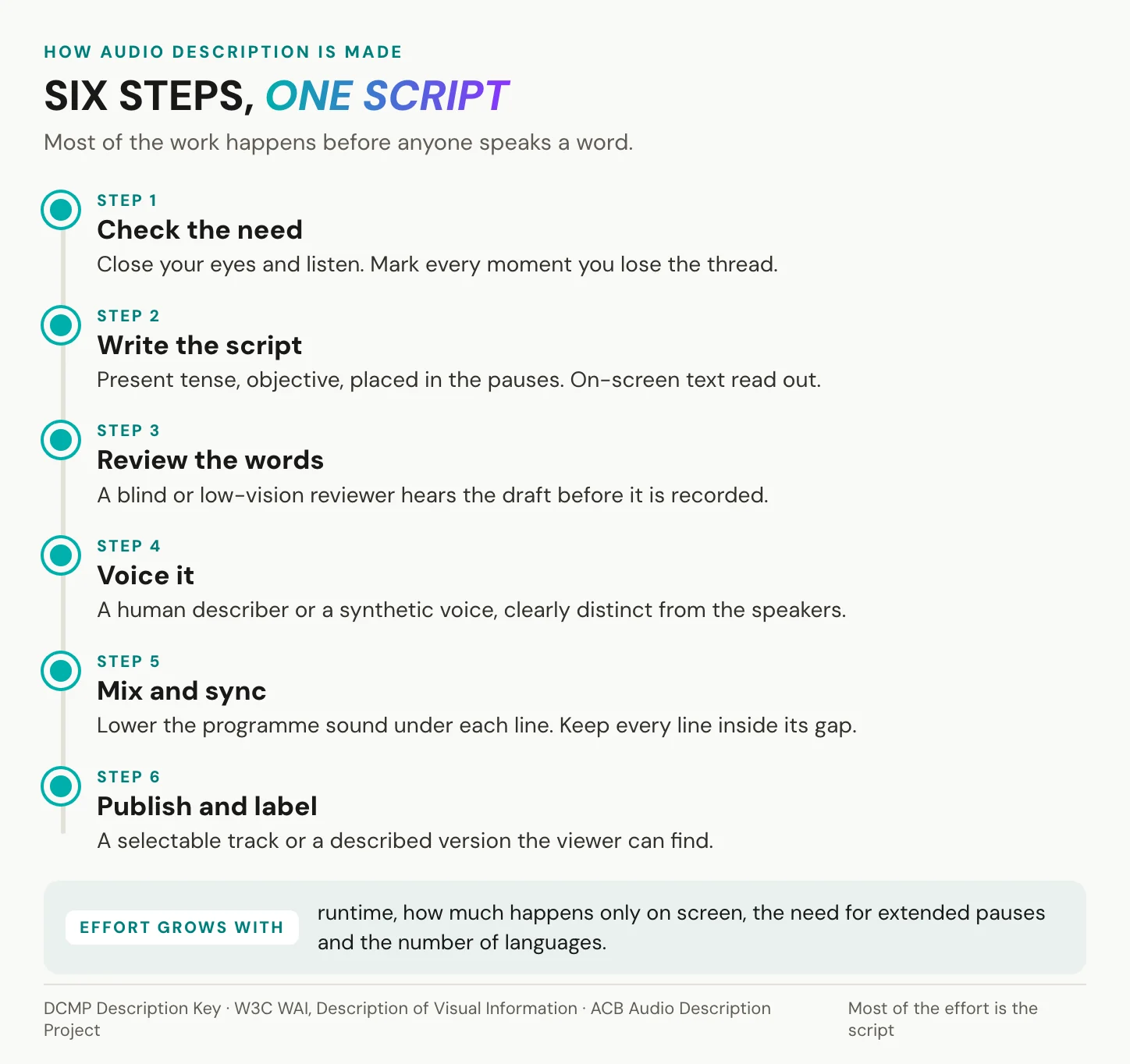
The test for each video is simple. Listen once with your eyes closed, and mark every moment you lose the thread.
In short: one speaker who says everything needs nothing, a video with unread slides and name captions needs a better script, and what the script cannot carry needs a described track, new and public video first.
How a described track is made
Most of the work happens before anyone speaks a word.
Start from a time-coded transcript
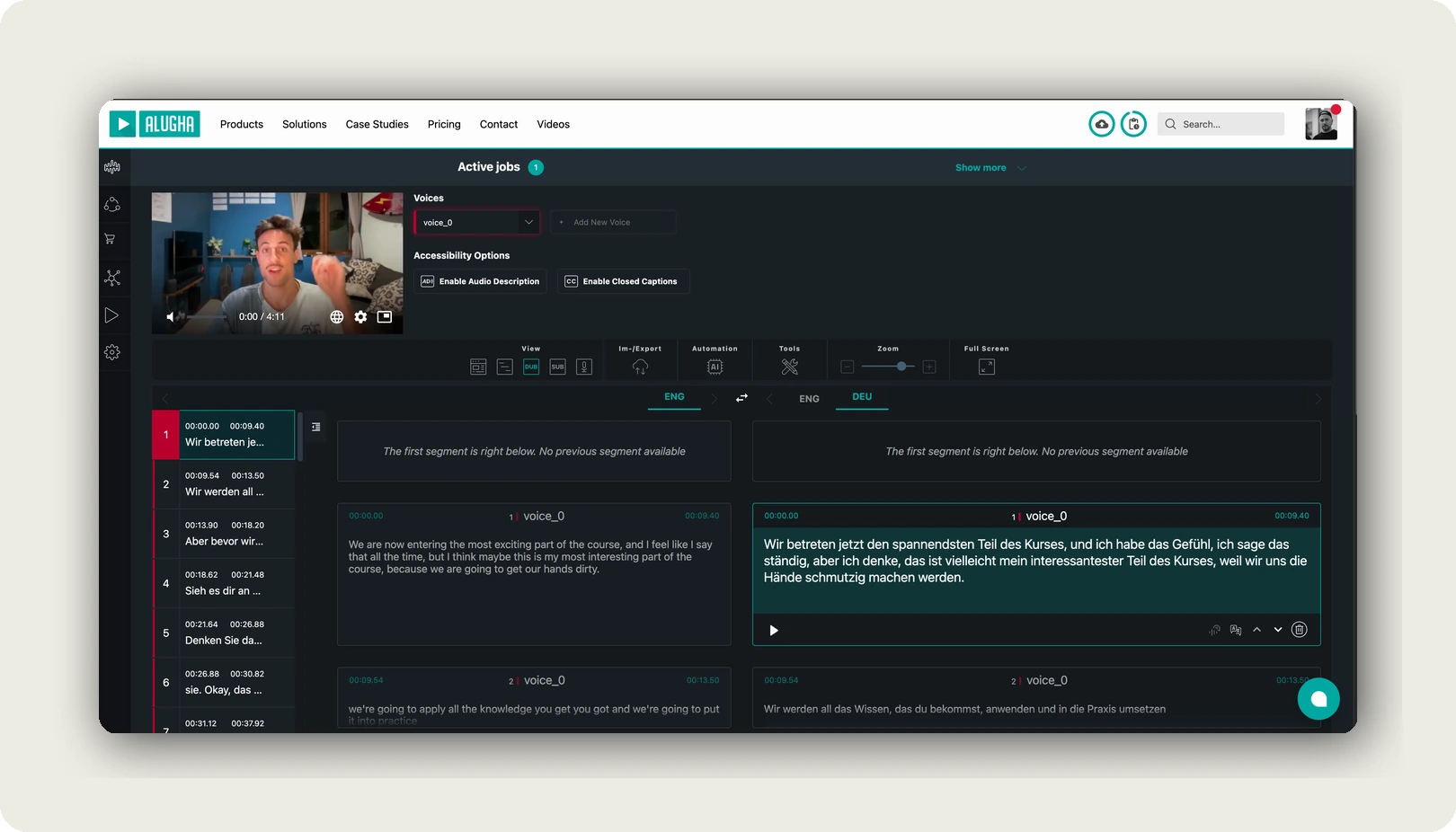
Standard description fits in the pauses, so you need to see them. A time-coded transcript shows every line of dialogue with its start and end. The gaps between the lines are your space. Our Speech-To-Text turns the dialogue into time-coded segments in the dubbr, which puts the start and end of every line in front of you. Any transcript with timestamps does the same job, and how to transcribe video to text walks through the routes.
Then make a second list next to it. Watch the video once with the sound off and note every moment where the picture carries something the speech does not: a chart, a name caption, a click, a change of place. Now lay the two lists side by side. Where a visual moment sits next to a gap, standard description will fit. Where it sits inside a stretch of continuous speech, you have two choices: change the script so the speaker says it, or plan for extended description.
How to write audio descriptions
The DCMP Description Key sets the working rules. Write in the present tense, in the active voice, in the third person. Describe what can be seen, not what it implies: a clenched fist, not anger. Do not fill every pause. Speak over dialogue only when there is no other way. DCMP sums up quality in five words: accurate, prioritised, consistent, appropriate, equal.
Two more habits matter in corporate video. Read on-screen text aloud when it carries meaning, because the ear never gets a slide title. And place each line as close to the visual as you can, ahead of it only when the pause demands.
Three rewrites show the difference, starting with the chart slide.
Narrator: “As you can see, the trend is clear.”<br>Description, in the pause before it: “A bar chart. Complaints fall in each quarter.”
Second, a product demo.
Narrator: “Just click here and you’re done.”<br>Description, with it: “She clicks Export, top right. A green tick appears.”
Third, a new speaker named only in a caption.
A new voice begins: “Thanks for having me.”<br>Description, in the pause before it: “On screen: Maria Costa, Head of Training.”
That last one is the G203 exception made concrete. Without that line, a blind viewer hears a new voice and never learns whose it is.
Human voice or synthetic voice
The American Council of the Blind prefers human-voiced description and said so formally in Resolution 2021-22. The evidence gives that preference weight. In a Catalan study of 67 blind and partially sighted participants (JoSTrans, 2015), natural voices scored statistically higher than text-to-speech. Yet most of them accepted the synthetic version, and a Polish study from 2011 found it acceptable as an interim solution. The ACB has also published guidelines for using text-to-speech responsibly, so the question has moved from whether to how. Either way, keep the describer’s voice clearly distinct from the speakers, so a listener never mistakes a description for a line of dialogue. Synthetic voices make one thing practical that studio sessions rarely do: description in several languages, built much like a dub. Each language still needs its own translated script, checked against its own pauses, because a translated line is rarely the same length as the original.
Mix, review, publish
Lower the programme sound under each description line so the words stay clear. Keep each line inside its gap. Then let a blind or low-vision reviewer hear the result before release. A sighted team can check timing and levels well. What it cannot judge is whether a line lands, because it can see the picture.
Two details decide whether the finished track survives delivery. Label it with the words viewers already know from streaming menus, “Audio Description” or “AD”, so nobody has to guess. And check it after every export or conversion, because EN 301 549 clause 7.2.3 asks that description data is preserved when video is converted, and a transcoding step that drops secondary audio tracks undoes the work silently. Keep the final script as text, too. It is most of the full text alternative that WCAG criterion 1.2.8 asks for at Level AAA.
What drives the effort
Six things set the effort, and none of them is a price per minute. They are the runtime, how much happens only on screen, and standard or extended, because extended means a second edit. Then come the voice, a human session or a synthetic one, the number of languages and the review rounds. Some vendors now draft scripts with AI and offer human review on top. That moves the effort from writing to checking, not away from judgement.
Two costs hide in the future. A described edit is a second file to host, caption and keep in step with the original. And every new cut of the video moves the pauses, so the description has to be checked again. A script built into the narration from the start carries neither cost, which is one more reason to fix what you can in the script first.
In short: the script is the work. Voice, mix and upload follow from it, and each extra language repeats the voice step, not the thinking.
Start with the transcript. Create an alugha account, upload one video and let our Speech-To-Text show you where the pauses are.
Where the described track plays
Writing the lines is half the job, and delivery is the other half, the one that decides which player you need.
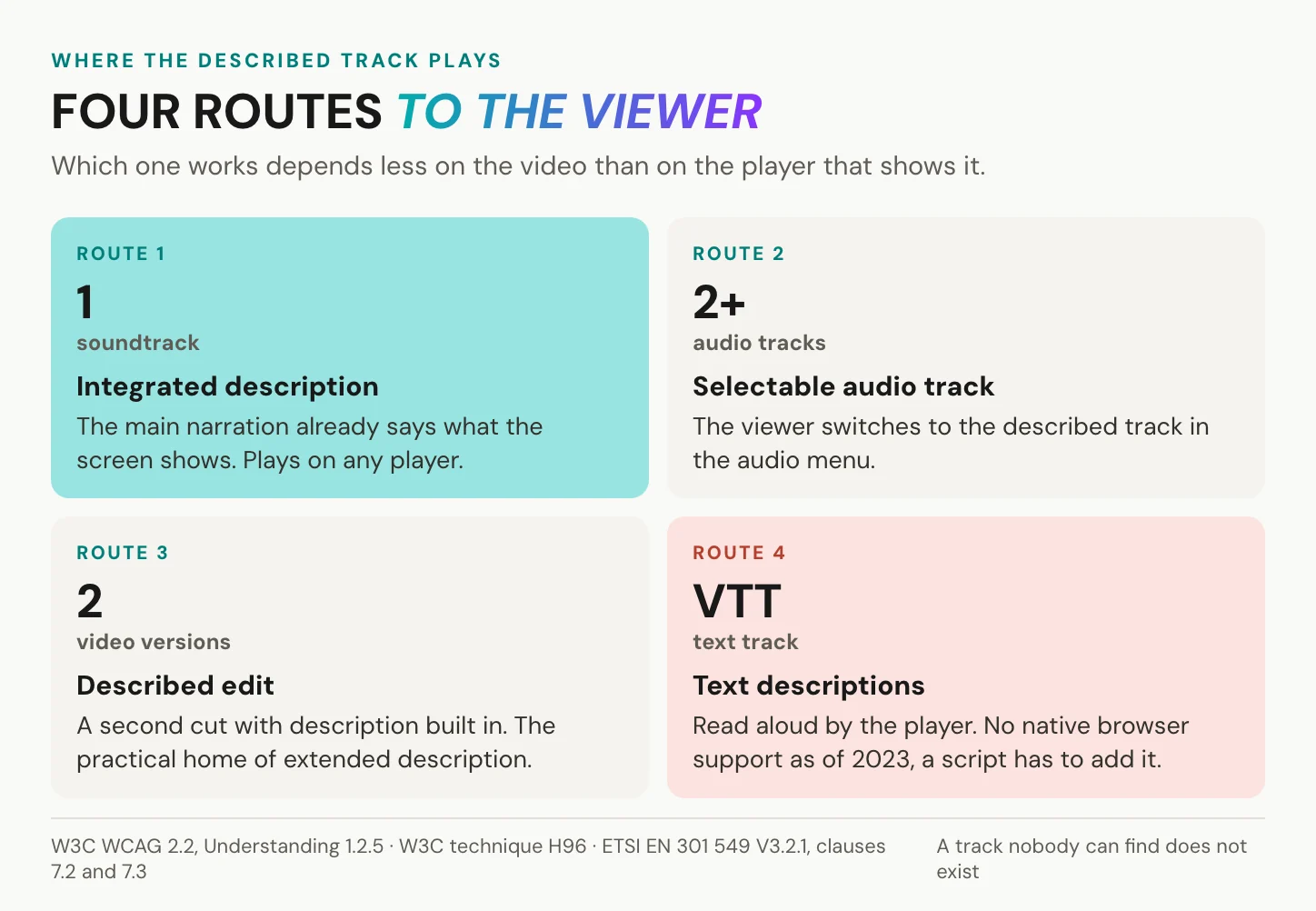
W3C’s Web Accessibility Initiative names four routes. Integrated: the description is part of the main soundtrack, so everyone hears it and nothing needs switching. A selectable audio track: the viewer picks a described version next to the original, which is W3C technique G78. A described edit: a second video file with description in its pauses, technique G173, or with extended pauses cut in, technique G8. And a text track: the HTML standard defines a descriptions track kind, text meant to be spoken by speech synthesis. At W3C’s last review, in September 2023, no browser supported it natively. It needs a JavaScript polyfill, and W3C lists it as advisory only.
The player has duties too. EN 301 549, clause 7.2.1, requires a way to select and play available audio description. It counts a player that lets the user select and play several audio tracks as meeting that clause. Clause 7.2.2 keeps description in sync, and 7.2.3 requires that it survives when video is transmitted or converted. Clause 7.3 puts the control at the same level of interaction as the main media controls. The US Section 508 standard asks for the same thing: the description selector at the same menu level as volume or programme selection.
YouTube deserves credit here. Creators with access to advanced features can upload a descriptive audio track in YouTube Studio, on a free platform, in front of YouTube’s own audience. The limits are specific. The file must be audio-only and roughly the same length as the video, so extended description has no place. And an original or dubbed track in that language must already exist.
A described track that nobody can find does not exist for the viewer who needs it.
In short: the route decides the player. A selectable track needs a player that offers it at the same level as play and volume; a described edit works everywhere, at the cost of a second version.
Audio description and the law
Three layers answer three questions: is the video described, what must the player offer, and who has to deliver?
WCAG 2.2 and EN 301 549
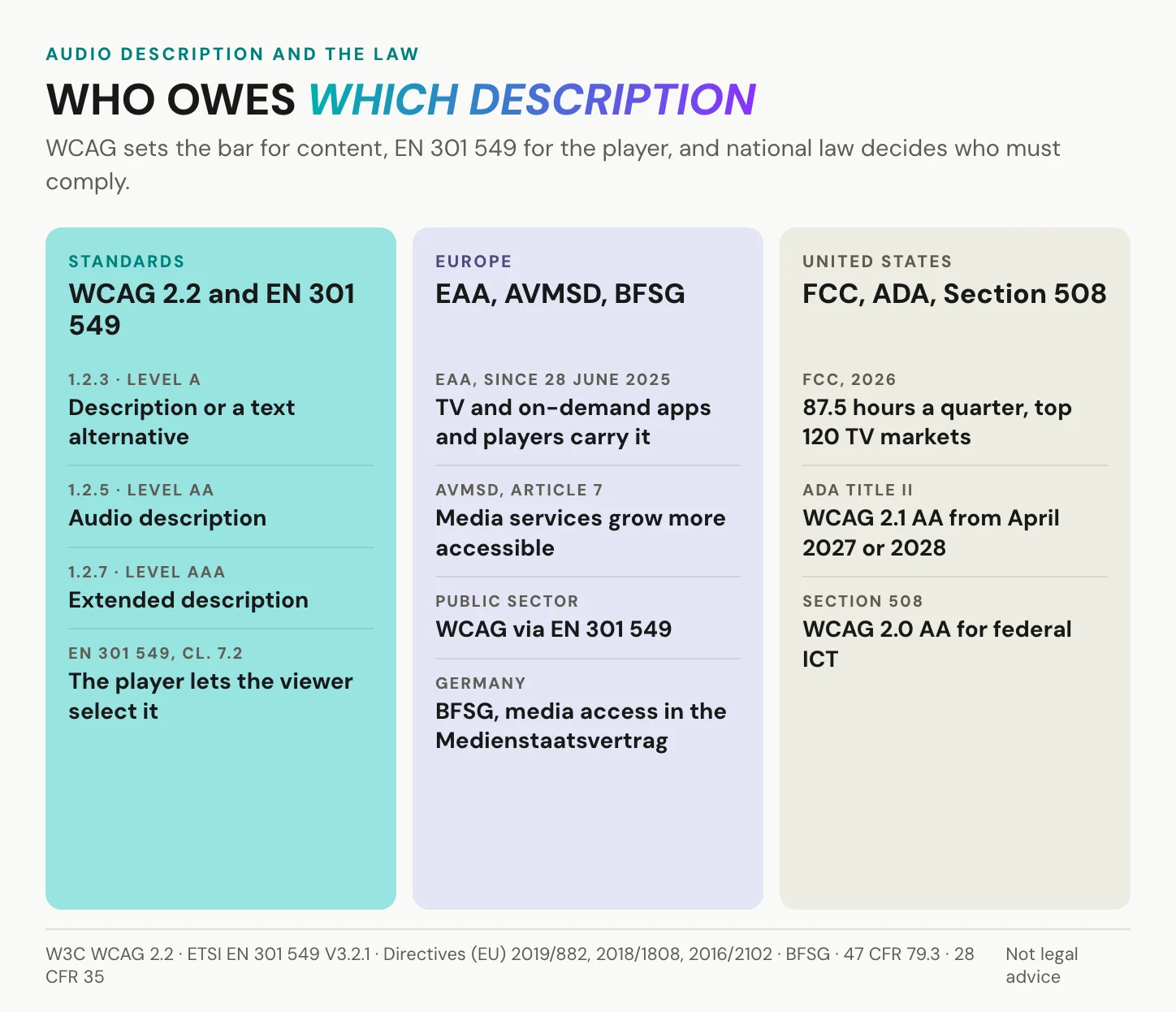
WCAG 2.2 has been a W3C Recommendation since 5 October 2023, in a version last dated 12 December 2024. It sets the levels. Level A, criterion 1.2.3: description or a text alternative. Level AA, criterion 1.2.5: description. Level AAA, criteria 1.2.7 and 1.2.8: extended description and a full text alternative. At AA, description is required, not recommended. AA is also the practical ceiling: the WCAG 2.2 text itself advises against requiring Level AAA as a general policy for entire sites, because some content cannot meet every AAA criterion. The wording of 1.2.3 and 1.2.5 has not changed since WCAG 2.0, so the same test applies whether a rule cites 2.0, 2.1 or 2.2. EN 301 549 V3.2.1, the standard behind European public-sector rules, carries 1.2.3 and 1.2.5 into web content as clauses 9.1.2.3 and 9.1.2.5, next to the player clauses above.
Europe: the EAA regulates the player
The European Accessibility Act is the reason most European teams look at audio description at all, and its annex names it explicitly. Since 28 June 2025, services that give access to audiovisual media must transmit description in full, synchronised and under the user’s control (Directive (EU) 2019/882). That is the access layer: programme guides, apps, players, connected TV.
The duty to produce description sits elsewhere, in Article 7 of the Audiovisual Media Services Directive. It asks for media services that are “continuously and progressively more accessible”, with no EU quota. So the EAA does not require description on every company video. A company’s own video is caught indirectly, inside a consumer service such as e-commerce or banking, or through procurement. Pre-recorded media published on websites and apps before 28 June 2025 is outside the EAA. Microenterprises providing services are exempt: fewer than 10 persons, and no more than EUR 2 million in turnover or balance sheet.
Germany transposed the EAA as the BFSG, whose transition ends on 27 June 2030. The BFSG does not list services giving access to audiovisual media. That part sits in the Medienstaatsvertrag. Our articles on the BFSG and on WCAG 2.2 for enterprise video hosting go deeper.
United States and the UK
In the US, the CVAA of 2010 handed video description to the FCC. In the top 120 TV markets, affiliates of ABC, CBS, Fox and NBC owe 87.5 described hours per quarter (47 CFR 79.3). Ten more markets join each 1 January until all 210 are covered in 2035. Live programming is excluded.
Online, the route is WCAG, not an ADA amendment. Under ADA Title II, a 2024 Justice Department rule requires state and local governments to meet WCAG 2.1 Level A and AA. An interim final rule of 20 April 2026 set the deadlines at 26 April 2027 for governments serving 50,000 or more people, 26 April 2028 for smaller ones. Federal agencies follow Section 508, built on WCAG 2.0 Level AA since its 2017 refresh, which applied from January 2018. In the UK, the Communications Act 2003 sets a target of at least 10 percent of the programmes on every relevant TV service.
In short: WCAG decides whether a video counts as described, EN 301 549 what the player must offer, and the EAA, media law or the ADA who has to deliver. This is orientation, not legal advice.
Where alugha fits, and where it does not
The limits first: we do not write your description script, and we offer no describer service. Deciding what matters on screen is judgement, and it stays with you or a professional describer. How many audio tracks one video can hold depends on your tier. Our player needs JavaScript and a current browser. It opens the viewer’s language automatically, not a described track, which the viewer picks. If your video needs extended description, the described edit is your route.
You may not need us at all. If your narrator already says what the screen shows, you need nobody for a second track. The same holds if a Level A text alternative is enough, if the video lives on a platform with its own description pipeline, or if you need live description. For a single-language public video, YouTube’s descriptive audio track and its reach are the right answer.
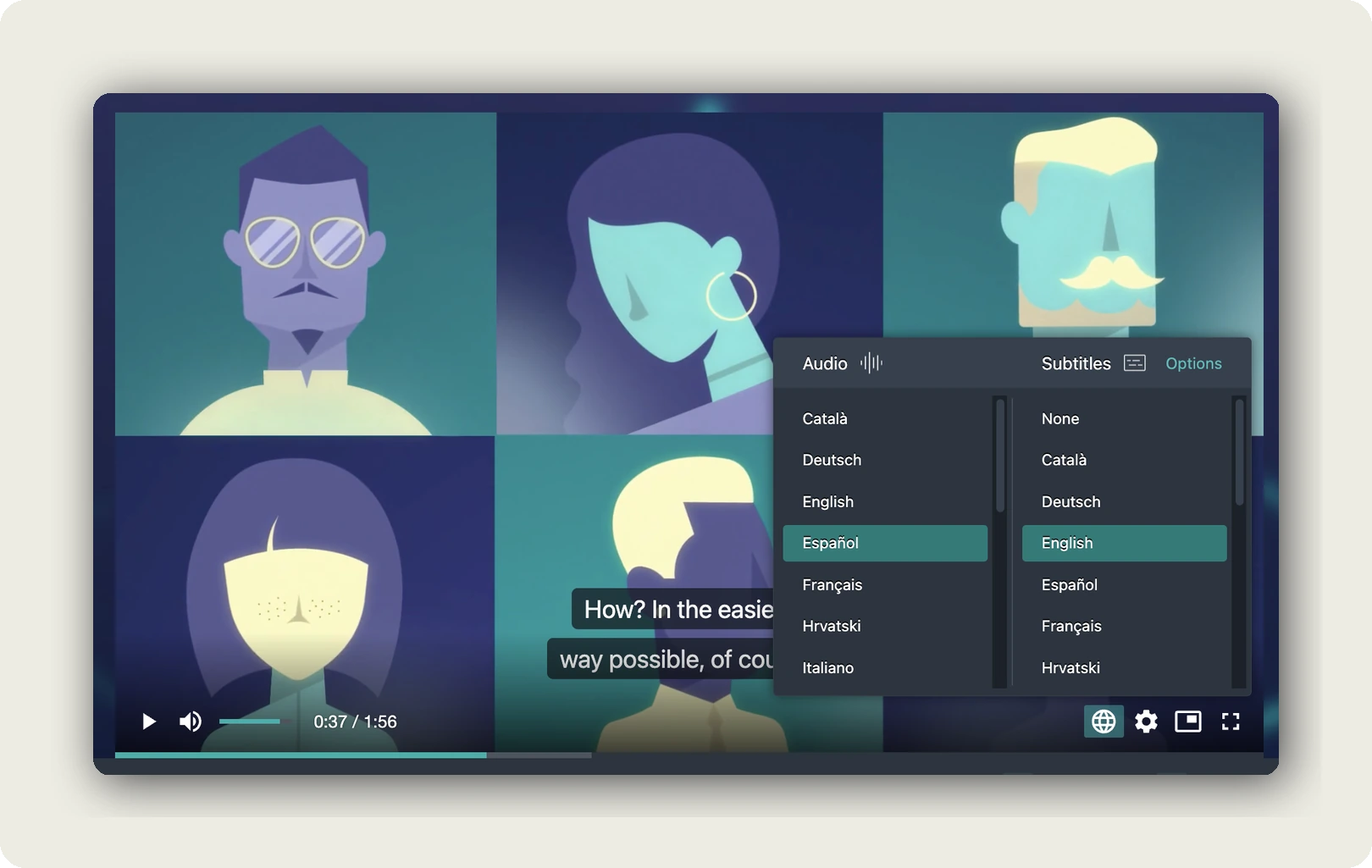
Where we help is the layer around the script. Every project in our dubbr carries more than one audio track. Our player lets the viewer choose between them in an Audio column, with subtitles chosen separately in their own column. Switching takes effect without a page reload, and every language version sits under one URL. Set that next to EN 301 549 clause 7.2.1, which accepts a player that lets the user “select and play several audio tracks”. More on the automatic language switcher.
Release can be staged, because each language track has its own state, Playable, Private or Hidden, and that state overrides the project’s visibility. You can finish and check a new track while the rest of the video stays live. For a described version, that check means a blind or low-vision reviewer. See published vs available content.

Then there is data protection. For a public brand film, YouTube’s reach and its free descriptive audio track win. Training, intranet and patient video are different. When the script describes identifiable people on screen, such as patients or employees, script and audio are personal data the host processes. We host in Germany and the EU, and our player carries no third-party advertising cookies and trackers. Our embed stores nothing on the viewer’s device, while our own first-party analytics run. Have your data protection officer check the consent setup under section 25 TDDDG, whichever host you use. Ask any host, us included, for an Art. 28 GDPR processing agreement before the first upload. GDPR-compliant video hosting has the checklist.
In short: the description is your editorial work. We carry the tracks, the languages and the viewer’s choice around it, on one URL, hosted in Germany and the EU.
Frequently asked questions about audio description
Is audio description the same as subtitles?
No. Subtitles and captions turn speech and sound into text for people who cannot hear or understand the audio. Audio description turns the picture into speech for people who cannot see it. The two often sit side by side in the same player, and a viewer can use both at once. Our article on closed captions covers the text side.
Can you give an example of audio description?
A narrator in a training video says: “As you can see, the trend is clear.” In the pause just before it, a second voice says: “A bar chart. Complaints fall in each quarter.” The line is in the present tense and names only what is visible. It comes before the narrator’s sentence, so the viewer has the picture when the comment arrives.
How do I turn off audio description?
Open the audio or language menu and pick the plain language track instead of the one marked “Audio Description” or “AD”. On US television, description runs on the secondary audio feature, sometimes labelled SAP or even “Spanish”. Switch the TV’s audio back to main. The TV’s manual or your provider’s customer service can show where that setting sits.
What is audio description on TV?
In US law it is narration of a programme’s key visual elements, inserted into natural pauses in the dialogue. In 2026, affiliates of the four big networks in the top 120 markets owe 87.5 described hours per quarter, and all 210 markets follow by 2035. In the UK, the statutory target is at least 10 percent of the programmes on each relevant service.
Does audio description affect the film for sighted viewers?
Not for those who leave it off, because it is a separate track. And not much for those who hear it. In a 2016 study by Perego, 125 sighted viewers aged 18 to 28 watched with description, and their understanding of the film did not suffer. The same study found that description without the picture is hard work for sighted listeners.
Can AI write or voice audio descriptions?
It can voice them acceptably for many listeners. In a Catalan study of 67 blind and partially sighted participants, most accepted synthetic description, although natural voices scored higher. The American Council of the Blind prefers human voices. For scripts, some vendors now draft with AI and offer human review. Deciding what matters on screen stays human judgement, and we do not write scripts.
What is the difference between audio description and a transcript?
A transcript is text, description is sound. WCAG accepts a text alternative at Level A, through success criterion 1.2.3, but not at Level AA, where 1.2.5 requires description itself. At Level AAA, 1.2.8 asks for a full text alternative as well. For this purpose, a transcript must include what the screen shows. Our video transcript example shows the format.
Is audio description required by law?
It depends on who you are. Where web content must meet WCAG Level AA, as for US state and local governments under ADA Title II or European public bodies, success criterion 1.2.5 requires it. Federal agencies meet it through Section 508, and broadcasters follow FCC quotas. The EAA makes TV and on-demand apps and players carry existing description. This is orientation, not legal advice.
Getting started
Go back to the chart slide. The narrator still says “as you can see here”. Nothing about the video has changed except one line in the pause before it: “A bar chart. Complaints fall in each quarter.” Three steps get you there.
- Listen to your most-watched video with your eyes closed, and mark every gap.
- Close the small gaps in the script, and write description for the rest.
- Publish the described version where the viewer can select it at the same level as play and volume.
Do that once, and the slide sounds different. The sentence that used to end the information now starts it.
Making a training or product library accessible in several languages? Book a call and we will look at one of your videos with you, or create an account and start with one upload.