Two things decide how you transcribe audio to text: how long the recording is, and who is allowed to hear it. A two-minute voice memo of your own becomes text with an app that is probably already on your phone. Now take a one-hour interview with a customer, recorded on the same phone. At measured conversation speed (Yuan et al., 2006), that hour holds roughly 10,000 words. Typed at the average 52 words per minute (Dhakal et al., 2018), it is more than three hours of work before anyone checks a name. And the file carries someone else’s voice, which changes where you may send it. Read on and you can pick the route that fits your file and get a draft. You can correct it in a fraction of the typing time, export the right format, and say where the recording went.
Key takeaways
- One hour of conversation holds 9,800 to 11,800 words (Yuan et al., 2006). At the average 52 words per minute (Dhakal et al., 2018), typing it takes over three hours.
- Word for Microsoft 365 transcribes uploaded MP3, WAV, M4A and MP4 files up to a monthly cap of 300 minutes. Microsoft’s support page says the recordings stay in OneDrive.
- On clean benchmark English, the best system in the March 2026 Open ASR Leaderboard snapshot missed about one word in twenty. Twelve German interviews averaged 17.4 percent WER (Sponholz et al., 2025).
- Correcting an AI draft took 2.3 hours per audio hour in the same 2025 study, up to three quarters less than a 2024 textbook’s 5 to 10 hours by hand.
- Do not clean up the audio first. Google’s Speech-to-Text best practices say noise reduction typically lowers accuracy, and they recommend sampling at 16,000 Hz or more with a lossless codec.
- A recording of other people is personal data. Uploading it makes the transcription service your processor, and Art. 28 GDPR requires a contract before the first file leaves your desk.
- Key takeaways
- How to transcribe audio to text: pick a route
- Free ways to transcribe audio files
- How to transcribe an audio file in seven steps
- How accurate is AI transcription?
- Transcribing by hand: the real hours
- When a human service is worth it
- Transcript styles and file formats
- Confidential recordings and the GDPR
- Where alugha fits, and where it does not
- Frequently asked questions about how to transcribe audio to text
- Getting started
How to transcribe audio to text: pick a route
Five routes lead from a recording to text. You can use a tool you already own, an AI transcription tool, a model on your own computer, your own keyboard, or a human service. Two questions choose among them: how long is the recording, and whose voices are in it?
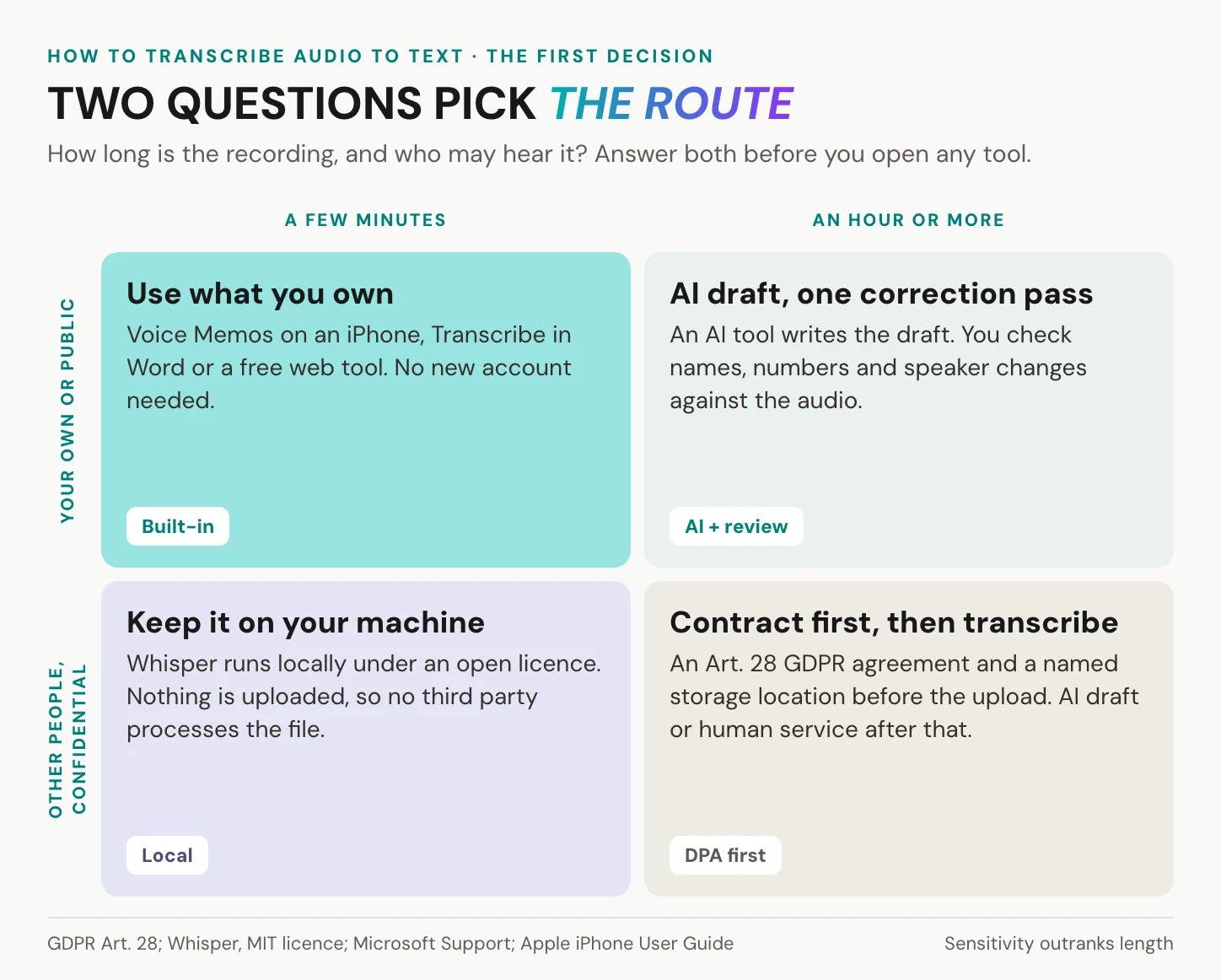
A few minutes of your own voice, or of something already public, needs nothing new: use what you own, which the next section lists. An hour or more calls for an AI draft that you correct against the audio, and the seven steps below walk through that. Other people’s voices change the order. Settle consent and a processor contract first, or keep the file on your own machine with a local model. Then nothing is uploaded at all.
Sensitivity outranks length. A five-minute call with an employee about a sick note is a confidential file, even though it fits into any free tool. A three-hour lecture you gave yourself is not.
The routes are not rivals, either. Transcribe often? Keep two: a built-in tool for your own notes, and a careful route for any file with a customer or a patient on it.
In short: sensitivity picks the route before length does, and other people’s voices need consent and a contract before any upload.
Is your recording the soundtrack of a video? The steps are the same, with one extra decision about the picture, and our article on how to transcribe a video to text covers it.
Free ways to transcribe audio files
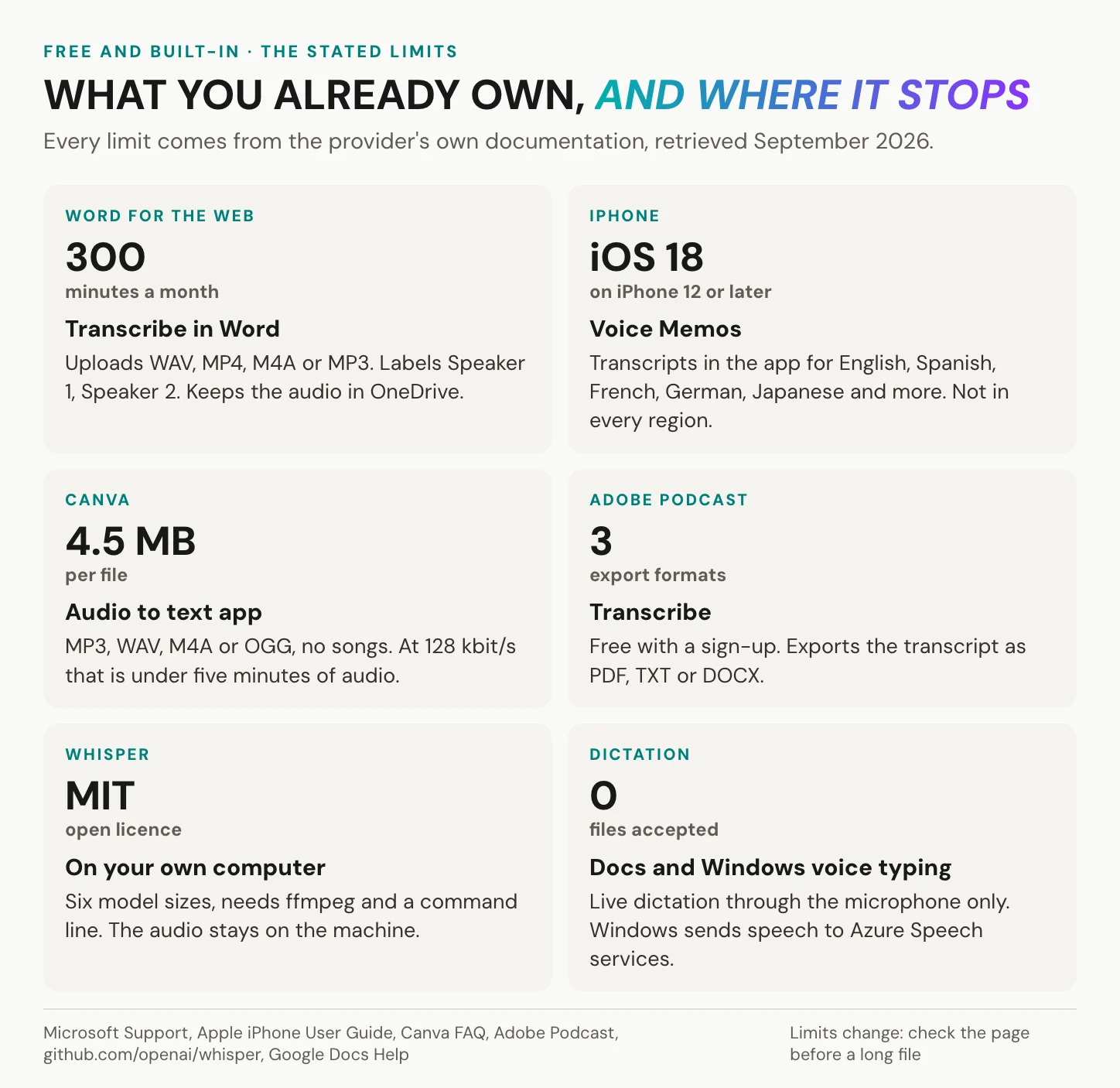
You probably own a transcription tool already, and each one has a single limit that matters, stated on the provider’s own help page.
Transcribe audio to text in Word
Word’s Transcribe is the rare mainstream tool that states its limits plainly and names where your audio ends up. It works in Word for the web, in Word for Microsoft 365 on Windows and in OneNote for Microsoft 365. In the browser, only Microsoft Edge and Chrome are supported. You upload a WAV, MP4, M4A or MP3 file. With a Microsoft 365 subscription, Microsoft’s support page sets a monthly cap of 300 minutes of uploaded audio. That is five one-hour interviews a month, enough for occasional interviews and too little for a research project. Speakers appear as “Speaker 1” and “Speaker 2” for you to rename, and more than 80 locales are covered. The audio itself lands in a “Transcribed Files” folder in your OneDrive. Remember that detail for later.
Voice memos, web tools and dictation
On an iPhone, Voice Memos has transcribed recordings since iOS 18, on iPhone 12 or later. Apple lists English, Spanish, Portuguese, Italian, French, German, Japanese, Korean and Chinese, and notes that the feature is not available in every country or region. Recordings made before iOS 18 are transcribed when you open them. Android phones vary by maker, so check your recorder app’s help page before you rely on it.
Canva’s audio-to-text app is fast and free for a short clip. Its FAQ caps files at 4.5 MB, in MP3, WAV, M4A or OGG, and rules out songs. At 128 kbit/s, that works out to under five minutes of audio. Adobe Podcast transcribes free after a sign-up and exports PDF, TXT or DOCX. If you are at ease with a command line, OpenAI’s Whisper runs on your own computer under the MIT licence. One habit saves you a failed upload: find the file cap before you start, because a one-hour MP3 at 128 kbit/s weighs 57.6 MB.
Google Docs voice typing and Windows voice typing are excellent for writing as you speak, but neither takes a file. Docs listens through the microphone, and Windows voice typing, opened with the Windows key and H, uses online speech recognition powered by Azure Speech services. Playing a file into the microphone is a workaround, not a route. Dictation is not transcription.
In short: the free routes cover short recordings of your own. A monthly cap, a file cap or a cloud you did not choose is where each one stops.
How to transcribe an audio file in seven steps
The procedure is the same whichever route you take.
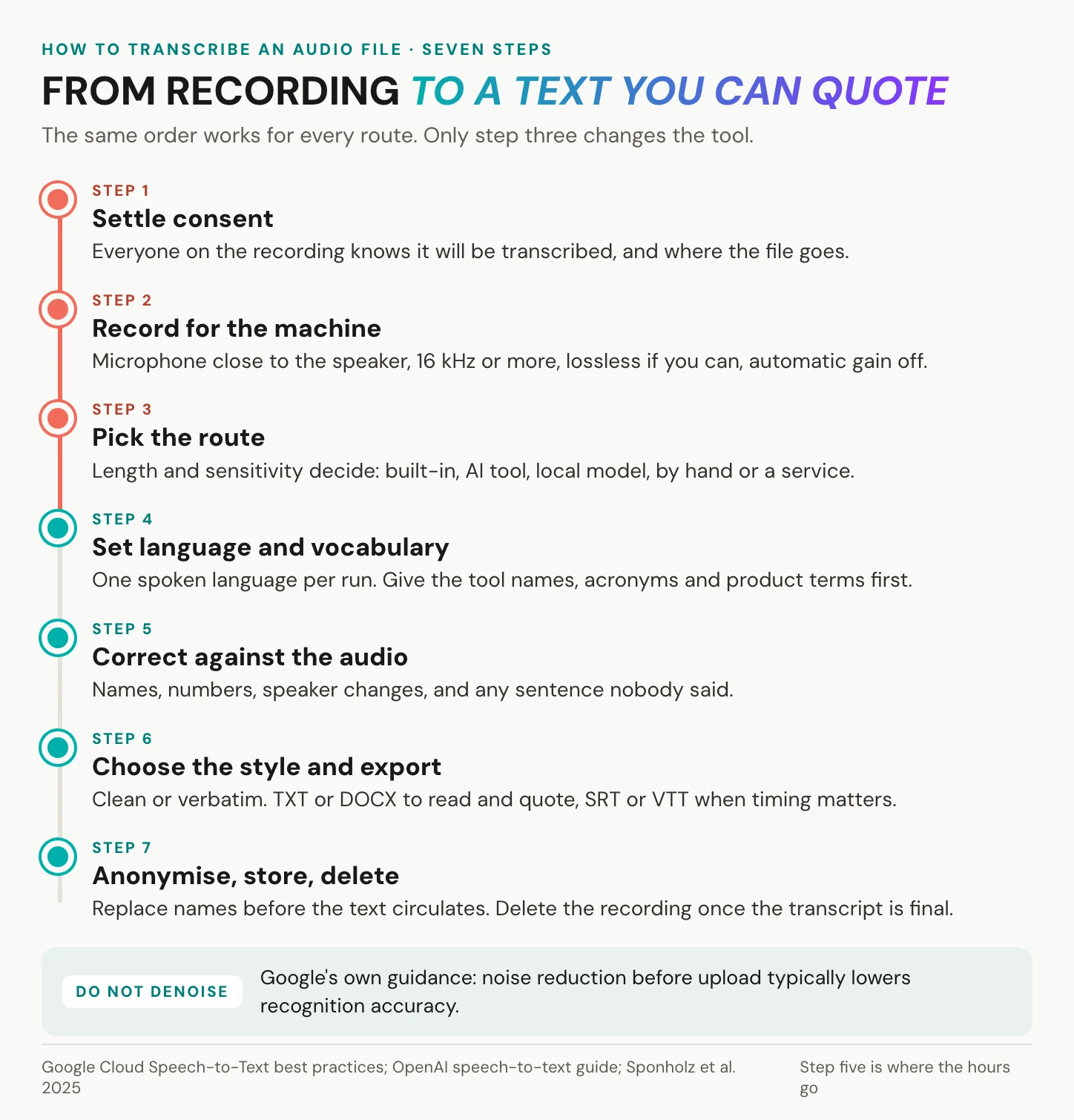
1. Settle consent. Everyone on the recording knows it will be transcribed and where the file will go. Say so at the start of the recording, so the consent is on tape as well. The legal detail differs between Germany, the US and California, and it follows in the section on confidential recordings. 2. Record for the machine. Put the microphone as close to the speaker as you can. Google’s Speech-to-Text best practices ask for 16,000 Hz or more and a lossless codec such as FLAC where you control the settings. Lossy codecs such as MP3 or M4A “may reduce accuracy”. Switch automatic gain control off. Then the counter-intuitive one: do not denoise before you upload, because Google states that noise reduction typically lowers recognition accuracy. 3. Pick the route. Go back to the matrix, where length and sensitivity decide. If the file must not leave your machine, the route is a local model or your own keyboard. 4. Set language and vocabulary. Transcribe one spoken language per run; the tool in the 2025 German interview study required exactly that. Give the tool names, acronyms and product terms before it starts. OpenAI documents a prompt for this purpose, limited to 224 tokens on its whisper-1 model. 5. Correct against the audio. Play the recording and read along, fixing names, numbers and every change of speaker. Then look for the error you do not expect: whole sentences nobody said, which Whisper’s own authors list among its failure modes. This step is where the hours go. 6. Choose the style and export. Decide between clean and verbatim before the first correction. Export TXT or DOCX to read, quote and code, and SRT or WebVTT when the text must stay in sync with the audio. Both choices are explained further down. 7. Anonymise, store, delete. Replace names before the text circulates, and keep the key separately if you need it. Delete the recording once the transcript is final, unless you have a reason and a legal basis to keep it.
In short: the recording and the correction pass decide the quality of a transcript. The tool you pick in step three matters less than either.
Your recording belongs to a video or podcast you publish anyway? Upload it to alugha, switch on Process audio only, and correct the transcript next to the audio in the dubbr. Create your account
How accurate is AI transcription?
An AI draft of a clear recording is good, and often it is very good. The trouble is the number printed next to it. In 2026, tool pages quote 85 to 99 percent, each on the seller’s own page. None names the test set behind its number.
What word error rate means for your audio
Speech recognition is measured as word error rate, WER. It counts substitutions, deletions and insertions against a reference transcript typed by people, divided by the words in that reference. A 5 percent WER sounds small, yet on a 10,000-word hour of conversation it means about 500 wrong words. A “95 percent accurate” claim with no test set behind it is not a WER you can compare with anything.
The Open ASR Leaderboard’s paper, in a snapshot of 27 March 2026, ranks 86 systems. The lowest average word error rate on short-form English was 5.42 percent, and Whisper Large v3 reached 7.44 percent. On clean benchmark English, then, the best systems miss about one word in twenty.
Your recording is not a benchmark. Sponholz, Weilinghoff and Schopf (2025) put twelve German semi-structured interviews, 9 hours 40 minutes in total, through one mainstream tool. The mean WER was 17.36 percent, driven by background noise, fast speech and technical terms. “Barrieren”, barriers, came out as “Bayern”, Bavaria. The lesson: the gap between models is smaller than the gap a bad recording opens.
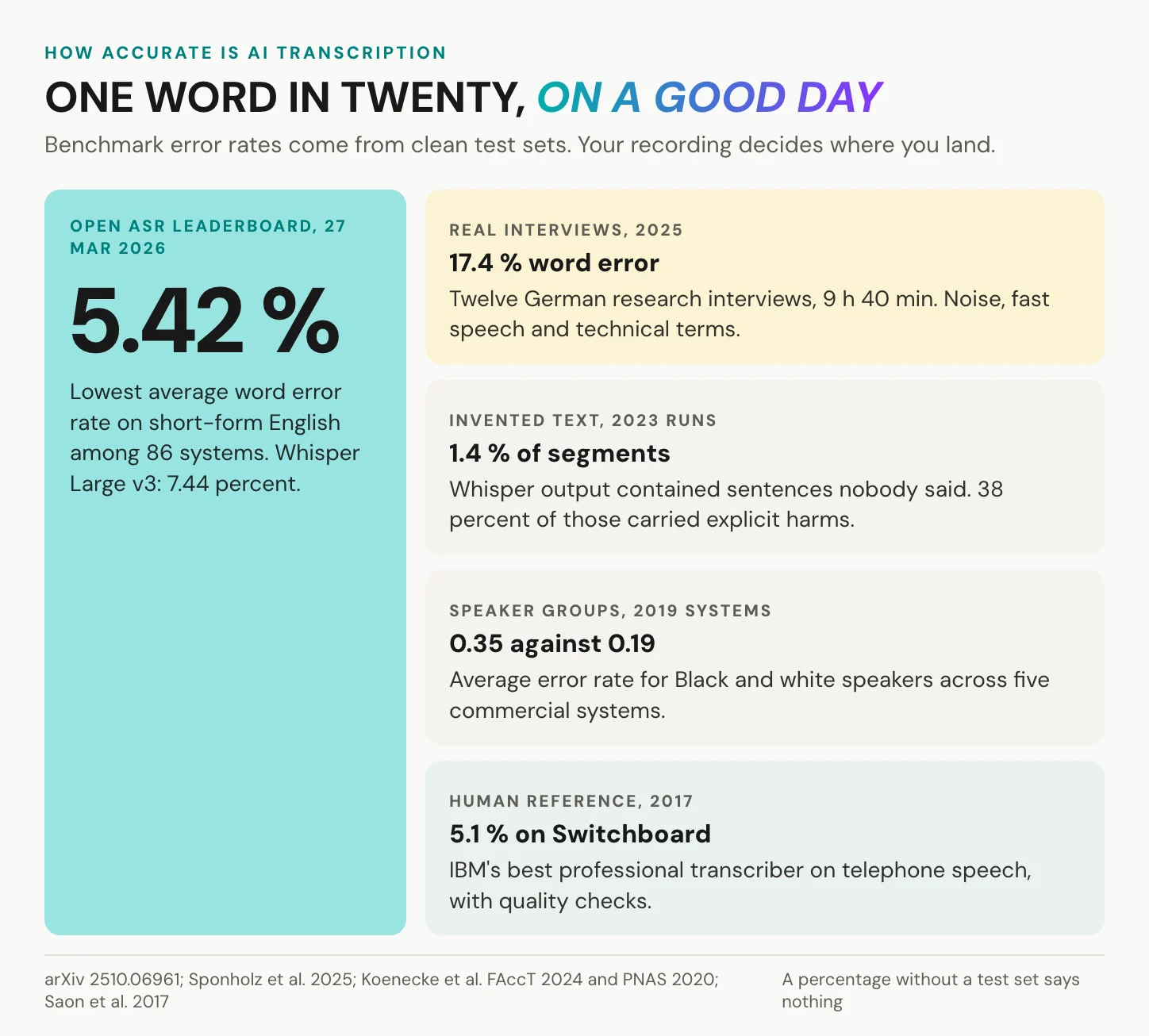
Accuracy belongs to your recording, not to the tool’s landing page.
Where machines invent text
Whisper deserves its reputation. In its own paper, it came within a fraction of a point of pure-human services on 25 English recordings. The same paper names its failure modes: repeat loops, missing first or last words of a segment, and “complete hallucination” unrelated to the audio. Koenecke and colleagues (FAccT 2024) found invented text in 1.4 percent of 13,140 audio segments, run in April and May 2023. Of those, 38 percent carried explicit harms. Accents and dialects matter too: a 2020 PNAS study tested five commercial systems of 2019 on 115 speakers. Their average WER was 0.35 for Black speakers and 0.19 for white speakers.
Human parity? Microsoft reported a machine at 5.8 percent on Switchboard telephone calls against professional transcribers at 5.9 percent, in a 2016 paper revised in 2017. IBM re-measured humans with quality checks in 2017 and got 5.1 percent. Close to human on clean English, no further.
In short: expect about one error in twenty words on a clean recording, and several times that on a noisy interview. Check every name, number and quote against the audio.
Transcribing by hand: the real hours
Typing it yourself is slow, and it still has a place as the only route with full control over conventions. Conversation analysis uses systems such as GAT 2 and HIAT, which mark pauses, overlaps and pitch with special characters that AI output cannot produce.
The arithmetic of one hour
Across 2,438 Switchboard telephone conversations, Yuan, Liberman and Cieri (Interspeech 2006) measured an average of 196 words per minute, and 164 per speaking turn. The average typing speed of 168,000 volunteers was 51.56 words per minute (Dhakal et al., CHI 2018). Put the two together and one hour of talk comes to 9,800 to 11,800 words. That is 3.2 to 3.8 hours of pure typing, before any rewinding, labelling or checking. The popular rule of four hours per audio hour traces back to no study, and it sits just above that floor. A methods textbook plans 5 to 10 hours per interview hour (Kuckartz and Rädiker, 2024, as cited by Sponholz et al.). For a basic GAT 2 conversation-analysis transcript, the German vendor audiotranskription.de puts the effort at 18 hours per interview hour (2024), without publishing its method.
An hour of talk is ten thousand words. A draft does not remove them. It changes who types them.
Saving hours: technique and an AI draft
Slow the playback down and work a sentence or two at a time. Abbreviate recurring names and terms while you type, then expand them with find-and-replace at the end, as experienced transcribers do. Set a timestamp at every change of speaker, in a format your analysis software reads, such as [hh:mm:ss.xx] for MAXQDA and ATLAS.ti.
The 2025 German study measured the middle route. Correcting the AI drafts took 22 hours 21 minutes for 9 hours 40 minutes of audio, which is 2.31 hours of work per audio hour. Against the textbook’s 5 to 10 hours, it saves between 53.8 percent and about three quarters. The saving holds for good recordings and standard language, while loud noise, overlapping talk and strong accents need more correction, the authors note.
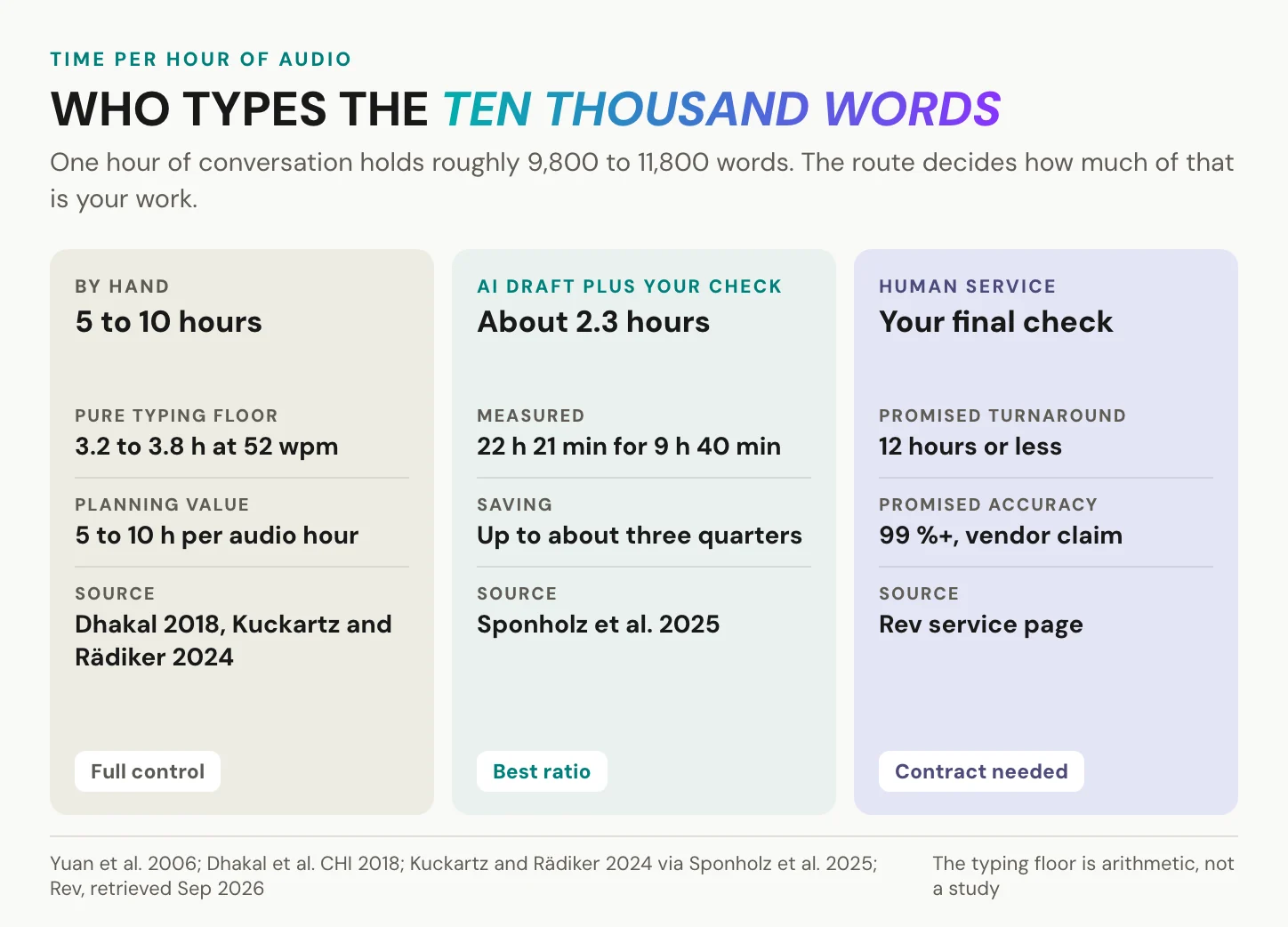
In short: by hand, plan five to ten hours per audio hour. An AI draft you correct costs a little over two, if the recording is clean.
When a human service is worth it
Human transcribers still win on hard audio. In the Whisper paper’s comparison on 25 English recordings, a computer-assisted human service came out 1.15 percentage points better than the model. Pure-human services were a fraction of a point better. Crosstalk, heavy accents and anything that has to stand up in court still belong to people.
The published promises are harder to use. Rev’s service page promises 99 percent accuracy and turnaround in 12 hours or less for human work. For legal work it promises 99.7 percent, with no test method alongside. Its own machine product scored 7.12 percent WER in the Open ASR Leaderboard’s March 2026 snapshot, the same band as the open models.
A service costs more and takes longer than an AI draft, but for certified or court transcripts it is the only route. It is also a processor like any tool, so the contract question applies in full.
Transcript styles and file formats
Verbatim or clean verbatim
Two styles cover most work. Clean verbatim removes fillers, stutters and false starts without changing a word of substance. Full verbatim keeps all of them, because in some work the hesitation is the finding. Conversation-analysis systems go further still. Here is one invented passage, written both ways.
[00:12:04] INT: So how did the, um, the new roster work out?
[00:12:07] P1: It was, it was fine at first. Then, uh, (2.0) then the night shifts doubled and nobody, nobody told us why. [laughs]
[00:12:04] INT: How did the new roster work out?
[00:12:07] P1: It was fine at first. Then the night shifts doubled and nobody told us why.
Which one fits depends on what happens to the text next. A report, a published podcast transcript or a study that codes content reads best in clean verbatim. Linguistics, conversation analysis and any question about how people speak need full verbatim. Records for HR or legal use sit in between, so ask whoever will rely on the transcript before you choose.
Decide the style before the first line, and write it at the top of the file. A transcript that switches halfway is harder to quote than either style.
Which file format to export
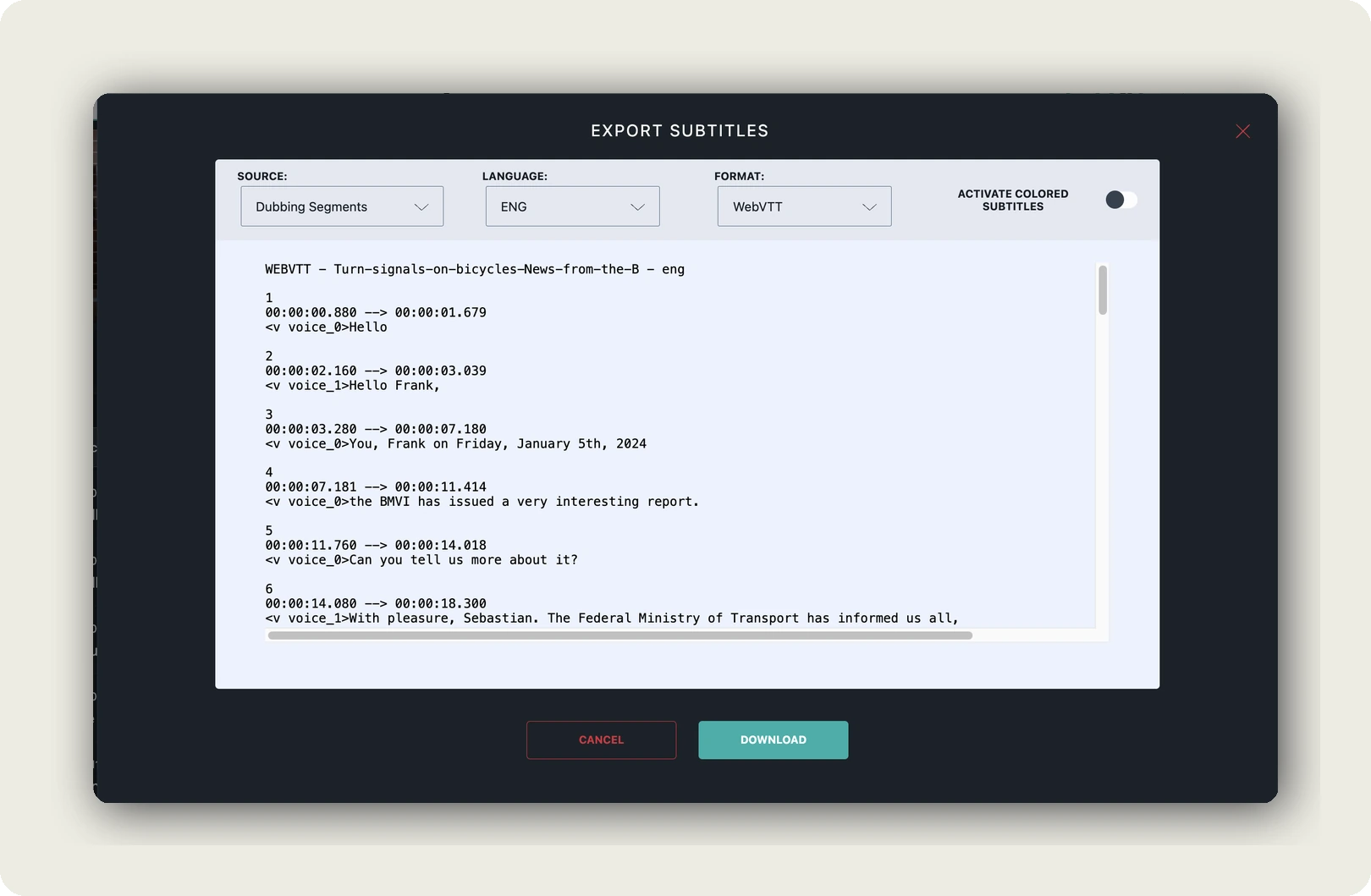
Export TXT or DOCX for reading, quoting and coding. Export SRT or WebVTT when the text must stay in sync with a player. The two differ by a comma. WebVTT is a W3C specification, a Candidate Recommendation Draft dated 20 May 2026. A WebVTT file starts with “WEBVTT” and puts a period before the milliseconds. SRT is a de facto format with no standards body behind it, and it puts a comma there. Most tools export from the same small set. Word gives you document text with speakers and timestamps. OpenAI’s API returns text or JSON, plus SRT or VTT on its whisper-1 model, and Adobe Podcast offers PDF, TXT and DOCX. Two settings save the most cleanup later: timestamps and speaker labels, so switch both on. Our video transcript examples show what a finished file looks like in each format. On the input side, FLAC is lossless and has been an IETF standard since December 2024 (RFC 9639).
When a transcript is required
Sometimes a transcript is not optional. WCAG 2.2 success criterion 1.2.1, at Level A, requires a text alternative for prerecorded audio-only content, and for audio that alternative is a transcript. The European Accessibility Act has applied since 28 June 2025, to specific products and services rather than to every website. In the US, the ADA Title II web rule covers state and local governments. Its deadlines now fall on 26 April 2027 and 26 April 2028. Where one of these rules covers your site, a podcast or an audio training needs a transcript beside it. For video, the counterpart is closed captions.
In short: pick clean or verbatim before you start. Export TXT or DOCX to read and SRT or VTT to sync, and publish a transcript beside any audio on a site these rules cover.
Confidential recordings and the GDPR
Most recordings raise no privacy question, because a lecture, your own voice memo or a published podcast is yours or already public. Vendors’ security reports such as SOC 2 are real work and worth having, though they answer a different question. The picture changes when the recording carries someone else’s voice.
Consent comes before the recording
In Germany, recording someone’s privately spoken word without authorisation is a crime under § 201 StGB. The penalty is up to three years in prison or a fine. US federal law requires the consent of one party (18 U.S.C. § 2511). California requires all parties to a confidential communication to consent (Penal Code § 632). AI notetakers already meet this in court. Brewer v. Otter.ai, filed on 15 August 2025, alleges recording without consent and training on the conversations. These are allegations, not findings.
One habit works in all these places: ask everyone on the call, say it on tape, and keep the consent with the file. For research interviews, name the transcription step and the tool in the written consent form, so participants know where their voice goes.
Uploading makes the tool a processor
A recording of identifiable people is personal data, and the service that transcribes it processes that data on your behalf. Art. 28 GDPR therefore requires a contract setting out subject matter, duration, nature and purpose, the type of personal data and the categories of people concerned. Interviews often contain special categories under Art. 9: health, political opinions, religious beliefs, trade union membership. Transcription is not biometric identification. Voice cloning or speaker verification can be, under the logic of Recital 51. University ethics boards often forbid uploading interview audio to clouds run by companies outside the EU, Sponholz and colleagues report. Before the first file, ask the service for its processing agreement and read where it stores audio, and for how long.
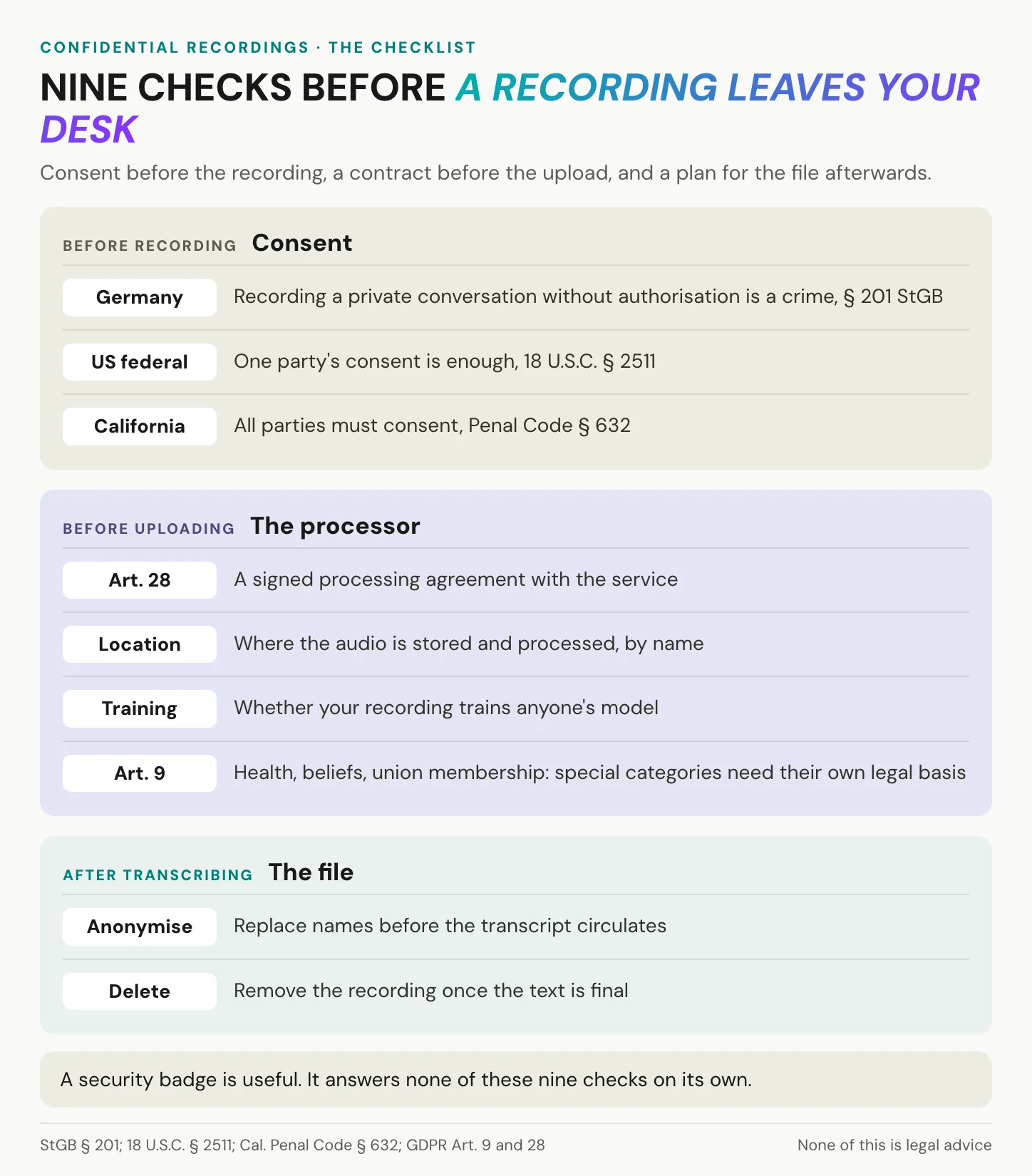
The question is not whether a tool is compliant. It is whether you can name where the recording goes.
Cloud terms, transfers and local models
Some cloud terms are better than their reputation. OpenAI states that data sent to its API has not been used for training by default since 1 March 2023. Abuse-monitoring logs are kept for up to 30 days, the transcription endpoint is eligible for zero data retention, and EU data residency is available. A transfer to a certified US company still rests on the EU-US Data Privacy Framework of 10 July 2023. The EU General Court dismissed a challenge to it on 3 September 2025, though the framework can still be challenged before the Court of Justice. Word’s Transcribe follows the same logic: the audio sits in your OneDrive, so the terms of your Microsoft account decide whether an interview may go there. For small volumes, a local Whisper model avoids the question, because nothing leaves the machine. The hosting side is covered in GDPR-compliant video hosting.
In short: consent before the recording, an Art. 28 contract and a named storage location before the upload, and a plan to anonymise and delete afterwards.
Where alugha fits, and where it does not
We are a video platform that also takes audio. Start with what that rules out.
Our limits, and when you do not need us
We are not a dictation app or a transcription agency. We do not transcribe live, we have no recorder app, and no person at alugha types your file. There is no Word or PDF export. We make no accuracy promise for your recording either, because every machine transcript needs your pass, ours included.
For a voice memo, a lecture you only want to read or a short recording with nothing confidential in it, your phone or Word is enough. If your meeting tool already transcribes the call and the text never leaves it, stay there. A certified transcript is a human service’s job. And if the recording becomes a public podcast episode, a large platform’s reach may matter more to you than where the file sits.
How to transcribe audio to text with alugha
Upload the recording, either an audio file or a video of which you only need the words. In our upload wizard, switch on Process audio only, which costs no encoding credits. Set Language to the language actually spoken. Then open the project in the dubbr, our editing workspace, and choose Automation, then Speech To Text. You pick Transcript or Subtitles, and the dialog shows the credits the job will use before you confirm.
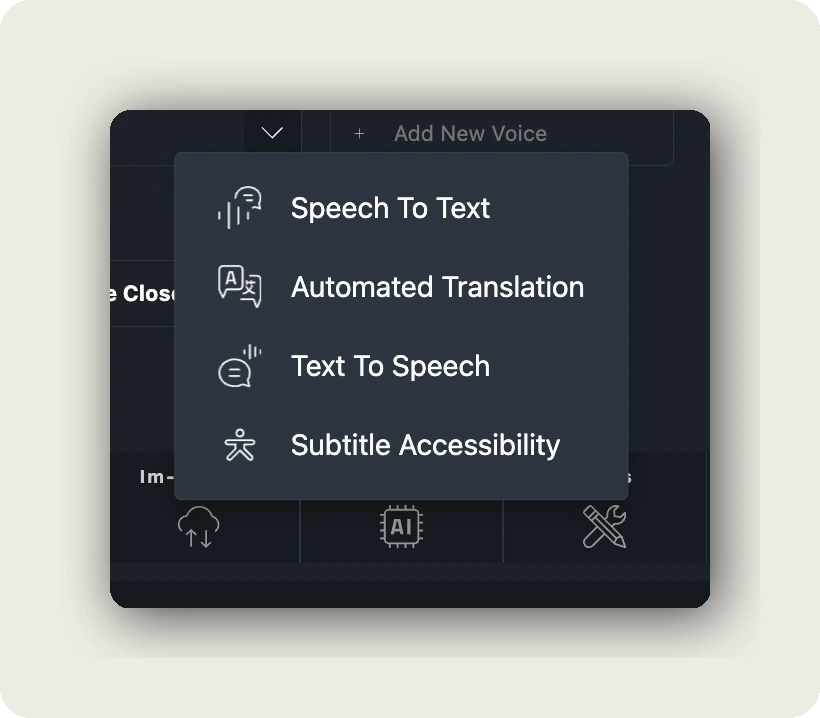
The transcript arrives as timed segments. You play the audio beside them and correct names, terms, numbers and who said what, and segments can be assigned to voices. When it reads right, export it from Im-/Export, Export Subtitles, as Plain Text, SRT or WebVTT. Exporting needs a paid tier. The corrected transcript can also be machine-translated into more than 200 languages, each as its own track in the same project.
A project stays Private for as long as you want, and its visibility changes only when you change it. Transcribing publishes nothing. Folder-level permissions decide who on your team reaches which recording. Our wording for it is short: hosting in Germany and the EU, no third-party advertising cookies and trackers. That matters once the episode plays on your own site. Under section 25 TDDDG, storing or reading information on a visitor’s device needs consent unless it is strictly necessary. Before the first upload, ask any provider, including us, for its Art. 28 agreement.
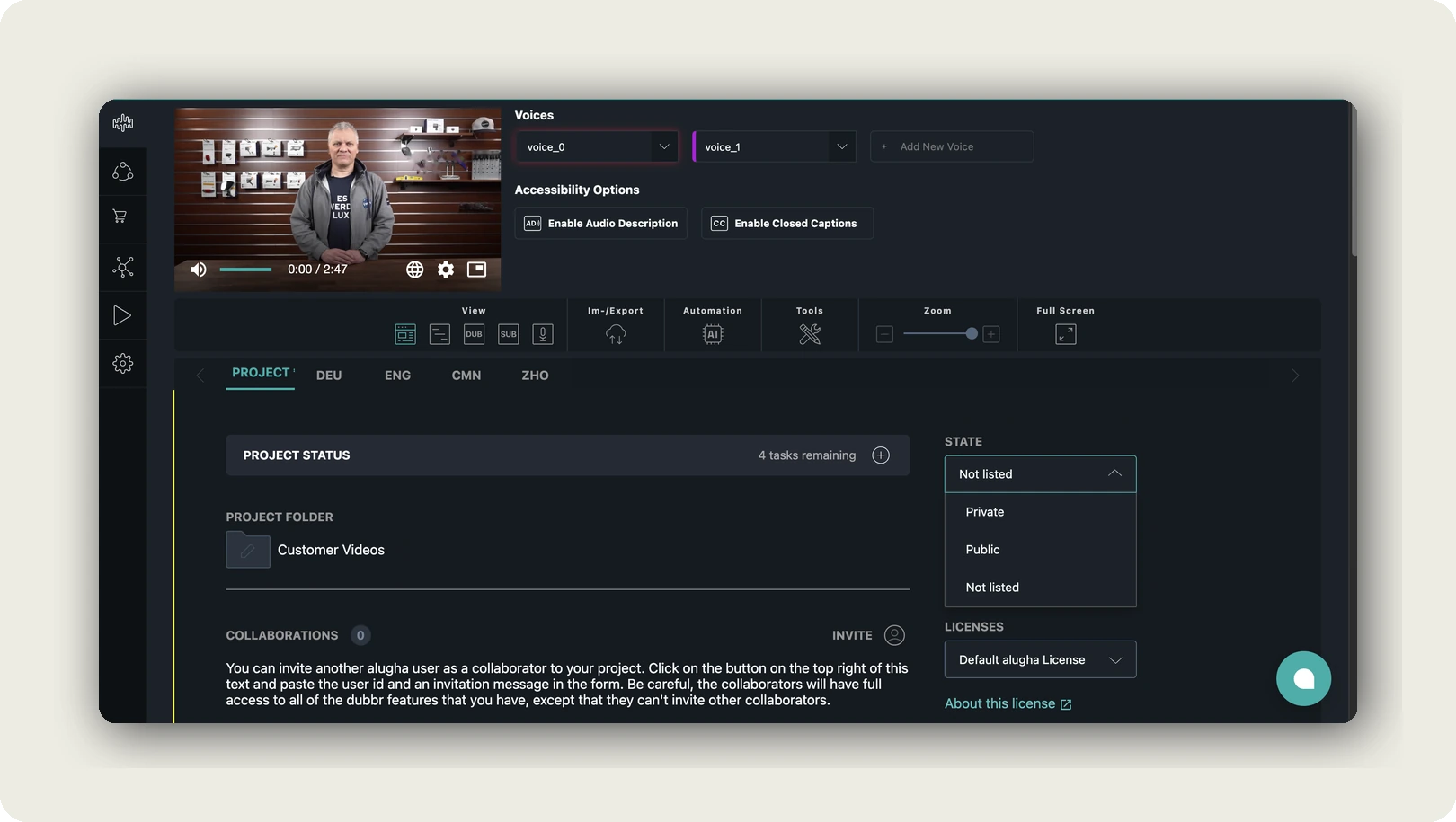
In short: upload with Process audio only, run Speech To Text in the dubbr, correct against the audio, and export Plain Text, SRT or WebVTT.
Frequently asked questions about how to transcribe audio to text
How can I transcribe audio to text for free?
Start with what you own. Word’s Transcribe handles uploads up to a monthly cap of 300 minutes with a Microsoft 365 subscription. Voice Memos transcribes on an iPhone 12 or later. Adobe Podcast transcribes after a free sign-up, and Canva takes files under 4.5 MB. Whisper runs on your own computer under the MIT licence, with nothing uploaded.
How accurate is AI transcription?
On clean benchmark English, leading systems scored 5.4 to 7.8 percent word error rate in the Open ASR Leaderboard’s March 2026 snapshot. At best, that is roughly one wrong word in twenty. On twelve real German interviews in a 2025 study, the error rate was 17.4 percent. Your recording decides where you land.
How long does it take to transcribe one hour of audio?
By hand, 3.2 to 3.8 hours of pure typing at measured speech and typing rates (Yuan et al., 2006; Dhakal et al., 2018). A methods textbook plans 5 to 10 hours per interview hour, checking included. Correcting an AI draft took about 2.3 hours per audio hour in a 2025 study of German interviews.
Can ChatGPT transcribe audio files?
OpenAI’s transcription API can. It takes files up to 25 MB in mp3, mp4, mpeg, mpga, m4a, wav or webm. It returns text or JSON, plus SRT or VTT on the whisper-1 model. Larger recordings must be compressed or split; at 128 kbit/s, 25 MB holds about 26 minutes. Consumer-app limits differ, so check OpenAI’s current help page.
How do I transcribe a voice memo on my iPhone?
Use Voice Memos. Transcription arrived with iOS 18 and works on iPhone 12 or later, in English, Spanish, Portuguese, Italian, French, German, Japanese, Korean and Chinese. Apple notes it is not available in every region. Older recordings are transcribed when you open them. A long interview still needs one correction pass.
How do I transcribe an MP3 file?
Word’s Transcribe accepts MP3 uploads directly. Check the file cap of any other tool first. A one-hour MP3 at 128 kbit/s weighs 57.6 MB, which is over Canva’s 4.5 MB and over the 25 MB of OpenAI’s API. Convert the file to mono at 64 kbit/s, which fits about 52 minutes into 25 MB, or split it into parts.
Is it safe to upload confidential recordings to a transcription tool?
Only once three things are settled: consent from the people recorded, an Art. 28 GDPR agreement with the service, and a storage location you can name. Health, beliefs or union membership are special categories under Art. 9 and need their own legal basis. Otherwise, a local model avoids the upload entirely.
Can I transcribe audio in one language and translate it?
Yes, in two steps. Transcribe in the language that was actually spoken, one language per run, and correct that transcript against the audio. Then translate the corrected text and keep both files, so every quote can be traced back to the original words. Our article on how to translate a video follows the same order.
Getting started
Back to the hour on your phone, the interview with a customer. Consent was given at the start and is on the recording, and the microphone sat close to the speaker. An AI draft arrived, and one careful pass against the audio fixed the names, the numbers and one sentence nobody said. A clean-verbatim TXT went into the report. The recording itself is deleted, or stored somewhere you can name.
Start with the route from the matrix, not with a tool. When the recording becomes part of a video, a podcast or a release in several languages, we are one option for the working copy.
Want the transcript corrected next to the audio and hosted in Germany and the EU? Create your alugha account, or book a call to ask your data-protection questions before the first upload.