YouTube publishes no storage cap for what you upload and may run its own ads on it, even when it plays on your website. Vimeo’s free plan holds 1 GB for the life of the account. Streamable deletes a free upload after 90 days. Every free video hosting service has a line like that, and you meet it in the last frame. When your video ends, the visitor sees what the host decided. Suggestions and a channel title. A video that is also public on someone else’s site. Or a link that plays nothing at all. If you only need a link today, Streamable holds a free clip of up to 250 MB and 10 minutes for 90 days. Jumpshare’s no-account tool keeps one for 24 hours. Read on, and you will know which free host fits a link, a website and a team library, what each takes in exchange, and the day free stops being the cheaper option. The limits are as each vendor publishes them in September 2026.
Key takeaways
- Vimeo’s free plan holds 1 GB for the life of the account. It offers no Unlisted setting, so a video that plays in your embed is also public on vimeo.com.
- YouTube publishes no storage cap and takes files up to 256 GB or 12 hours, but embedded videos may show ads, and the site they play on earns nothing from them.
- Streamable deletes free uploads after 90 days and caps them at 250 MB and 10 minutes. Jumpshare’s no-account tool keeps a video for 24 hours. Both are links, not hosting.
- One default YouTube embed weighed 1,149 kB before anyone pressed play in Zach Leatherman’s December 2023 measurement, roughly half the median mobile page in the 2024 Web Almanac.
- Vimeo signs no data processing agreement with self-serve users. Before any free host plays video on a company site, ask it for an Art. 28 GDPR contract, us included.
- Our free tier encodes up to 720p and meters storage and streaming in a monthly credit allowance. When it runs out, videos stay online at the lowest resolution.
- Key takeaways
- Which free host fits your job
- Free video hosting sites compared
- Free video hosting platforms, one by one
- What free video hosting really costs
- Is YouTube good enough for business?
- Host a video on your site for free
- Where a free host keeps your data
- alugha's free tier, limits first
- When free video hosting is not enough
- Frequently asked questions about free video hosting
- Getting started
Which free host fits your job
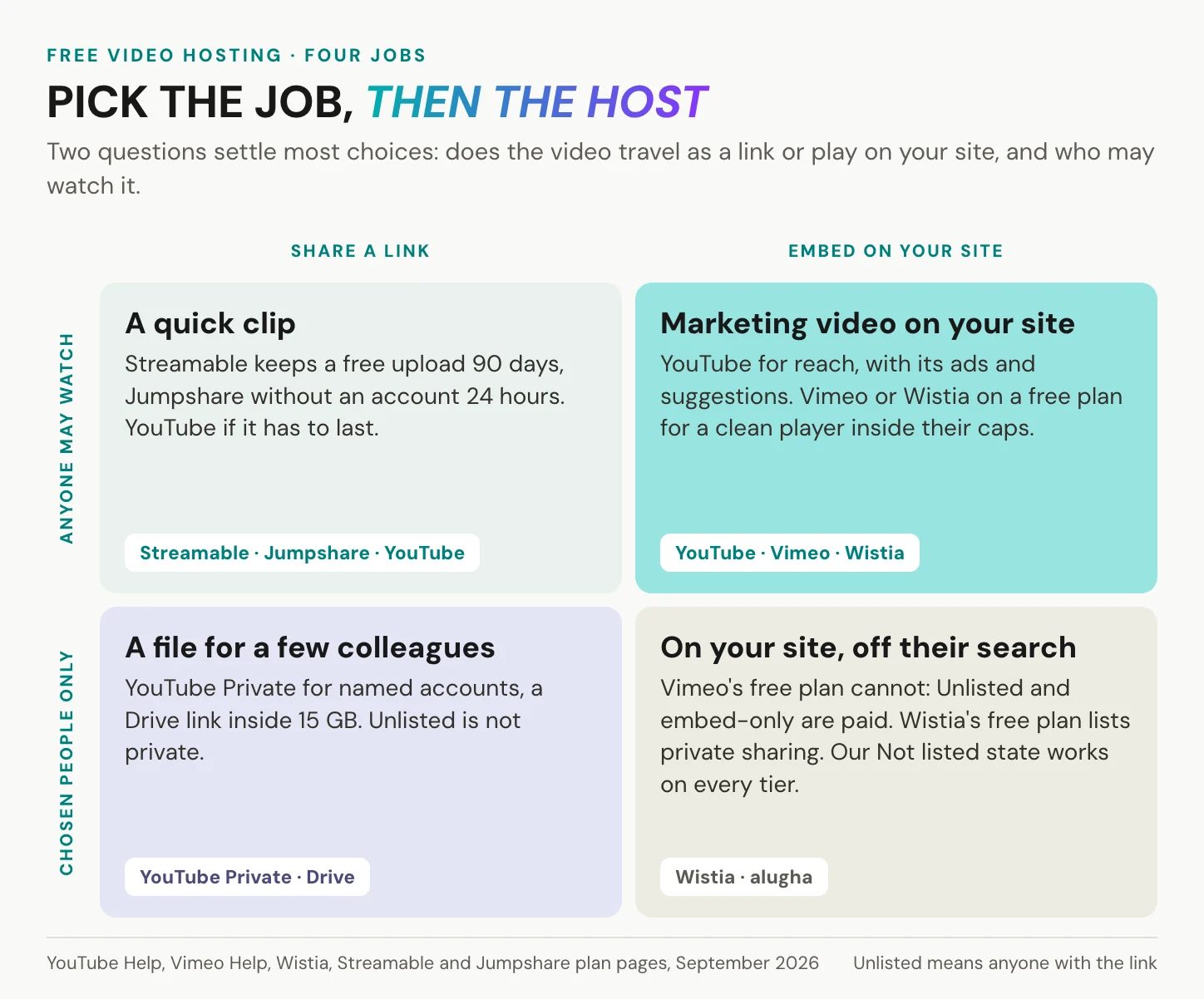
Two questions decide which free video hosting service you need, and neither is about storage. Does the video travel as a link, or does it play on your own site? And may anyone watch it, or only people you choose?
You need a link today
Nothing is faster than a link host. Streamable takes a clip of up to 250 MB and 10 minutes with no setup. Jumpshare shares a video without any account: up to 1 GB for an MP4, 250 MB for other formats, one video at a time. Speed is the whole offer, and it is real.
The price is the date. Streamable deletes videos from free accounts after 90 days and archives uploads made without an account after 24 hours. Jumpshare deletes after 24 hours. Loom’s free plan, with 5-minute recordings and 25 videos per person, is a recorder that shares, not a host. If the link goes out by email, the page behind it matters more than the host. How to embed a video in an email covers that half.
You need a video on your website
This is the largest group, and most of what follows is written for you. The upload is the easy part. What matters is what the player does on your page. Does it show ads? What does it suggest after the last frame? How much does it weigh before play, and does it need consent? The sections below answer each of those.
Three free hosts come up for this job again and again, and each has a real case. YouTube gives you reach and no storage ceiling, Vimeo’s free plan gives you a clean player with no ads, and Wistia’s free plan gives one person 25 GB for a small library. Our own free tier sits in the same comparison with its limits stated first. If the video also has to reach people who search on YouTube, you will probably end up using two hosts, one for reach and one for your own page.
You need a private library for a team
Here the words mislead. On YouTube, an Unlisted video can be seen and shared by anyone with the link, while a Private one is visible only to you and the people you choose. On Vimeo’s free plan, Private means only you and the team members on your account, even when the video is embedded elsewhere. Unlisted is reserved for paid plans.
Unlisted is a link, not access control. Forward it once and it has left the room. When only named colleagues should watch, a setting that checks who is signed in does more than any link, whether that is YouTube’s Private mode, a Drive share limited to their accounts, or a team seat on a paid plan. For onboarding and training libraries, the audience decides the host, and how to create training videos covers that side.
In short: a link, a site or a team. The host follows the job, and the job decides which limit will hurt first.
Free video hosting sites compared
Here are nine free video hosting options side by side, on the terms each vendor publishes in September 2026. “Not published” means the vendor’s plan, help and privacy pages leave that question open. For a business, that silence is an answer in itself.
| Free option | Storage or count | Per file | Ads in the player | Off search, still embeddable | Removal rule | Data stored |
|---|---|---|---|---|---|---|
| YouTube | No cap published | 256 GB or 12 h; 15 min until verified | May run, no share for your site | Unlisted: anyone with the link | Google in 2023: no plan to delete accounts with videos | Google servers worldwide |
| Vimeo, free plan | 1 GB for the account’s life | Inside the 1 GB | None | Paid plans only | Inactive a full year: may be removed | US, under the DPF |
| Wistia, free plan | 25 GB, 200 GB bandwidth, 1 user | Not published | None, Wistia branding | Private sharing listed | Not published | US, DPF and SCCs |
| Dailymotion | 15 videos or 10 h per 24 h | 4 GB, 2 h | Ads are part of the service | Not published | Not published | Transfers outside the EU under SCCs and the DPF |
| Streamable | Not published | 250 MB, 10 min | Not published | Not published | Deleted after 90 days | Outside your country, no location named |
| Jumpshare, no account | One video at a time | 1 GB MP4, 250 MB other | Not published | Not published | Deleted after 24 h | US, on AWS |
| ScreenPal, free plan | Its own pages disagree | 15 min recording, 720p | “No ads ever” (its own claim) | Not published | Not published | US |
| Google Drive | 15 GB shared with Gmail and Photos | Plays up to 1080p | Not a player, a file preview | Share settings | Account unused 2 years: may be deleted | Google servers worldwide |
| alugha free tier | Monthly credit allowance | No published limit; up to 720p | None, no third-party suggestions | Not listed state | Stays online at lowest resolution when credits run out | Germany and the EU |
Limits as each vendor publishes them, September 2026. Accounts opened before a plan change may keep older limits.
Older accounts, older limits
Vimeo says accounts created before 17 June 2024 may have different storage limits on the free plan. Its older non-paid plan, now closed to new customers, kept 5 GB of total storage and up to 10 uploads a day. You may still hear “500 MB a week” quoted for Vimeo. No current Vimeo plan page lists a weekly cap, not even for that retired plan, so plan with 1 GB for a new account. Wistia introduced new plans on 17 March 2026, and older accounts sit on legacy plans with their own terms.
Before you plan around any number, open the plan or storage page inside your own account rather than the vendor’s pricing page. That is where the limits you actually have are shown. It matters most when you inherit an account from a colleague who opened it years ago, because the two sets of limits can differ by several gigabytes.
Not free video hosting, though often listed
Some names come up whenever free hosting is discussed and do not belong in the table. Vidyard’s free plan allows 5 videos a month and recordings of up to 30 minutes, and its own pricing table lists video hosting as “Not included”. Cloudflare Stream has no free tier at all: sending your content in and encoding it are free, while storing and delivering it are billed. Cloudflare R2 gives you 10 GB-month of object storage for free, but storage is not hosting. There is no encoding, no adaptive streaming and no player.
Social feeds are video sharing, not video hosting: the platform decides the player, the feed and the audience. A sharing site gives your video an audience. A hosting service gives it a player on your page.
In short: three columns decide most choices, namely storage, ads in the player and where the data sits. Read the removal rule before you send the link.
Free video hosting platforms, one by one
Every free video hosting platform below gets the same three labels: its free limits, what it costs you, and who it suits best. Our own free tier follows later under the same labels, judged by the same rules.
YouTube: no storage cap, someone else’s ads
The biggest free host has no ceiling.
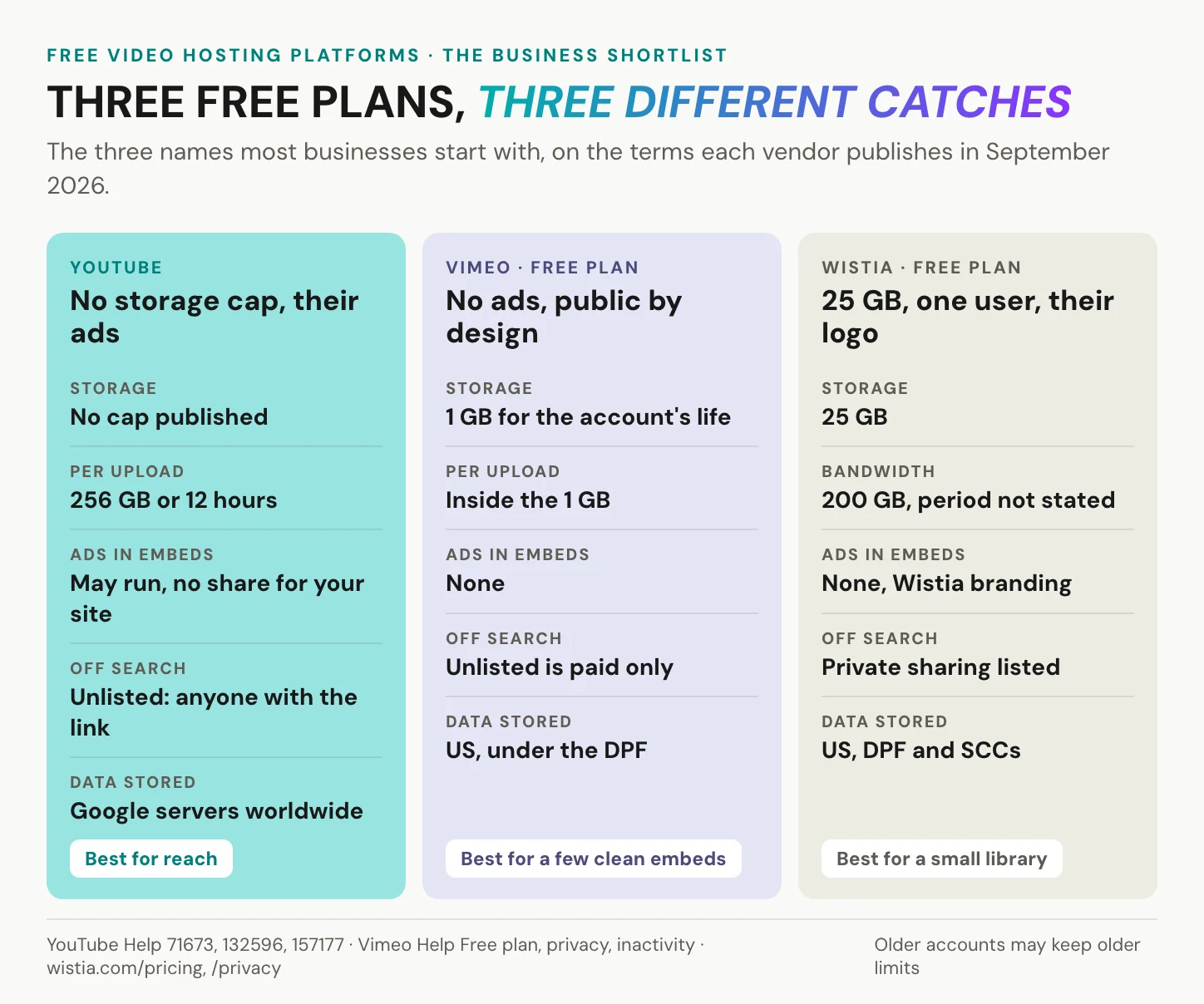
Free limits: YouTube publishes no storage cap and no limit on the number of videos. A single file can be 256 GB or 12 hours long, whichever comes first. Until you verify your account by phone, uploads stop at 15 minutes.
What it costs you: reach comes first, and it is enormous. YouTube ads could reach 2.53 billion users in January 2025, according to DataReportal, a measure of ad reach rather than unique people. The catch is that the reach belongs to YouTube. Embedded videos may show ads, and only YouTube and the video owner earn from them. Outside the US, since 1 June 2021, YouTube may also run ads on videos from channels outside its Partner Program without paying the owner.
Best for: public video that wants to be found. For the other side, see the best YouTube alternatives.
Vimeo’s free plan: no ads, public by design
Vimeo’s free plan is clean and small.
Free limits: 1 GB of storage for the life of the account, and it does not reset. No cap on the number of videos, one seat, and recordings of up to 30 minutes. Bandwidth has a 2 TB monthly threshold. Vimeo says over 99 percent of its users never reach it, without giving the count behind that share.
What it costs you: for a free plan, the player is genuinely good: no ads before, during or after your video, and support for 4K and HDR. The catch is visibility. Unlisted and embed-only settings belong to paid plans, so any video a visitor can watch in your embed is also public on vimeo.com. Accounts unused for a full year may be removed, with notice. And the company has a new owner: Bending Spoons completed its acquisition of Vimeo in November 2025, according to Vimeo’s SEC filing.
Best for: a handful of clean embeds you do not mind being public.
Wistia’s free plan: 25 GB, one user, their logo
The most generous free plan for a business here has one seat.
Free limits: 25 GB of storage, 200 GB of bandwidth and one user. Wistia does not say over what period the bandwidth is counted, or what happens above it.
What it costs you: for a small business, 25 GB goes a long way, the player is ad-free, and private sharing is listed. The catch is the rest of the list: Wistia branding stays on the player, and a second colleague means a paid plan. Wistia stores and processes personal information in the United States, under the Data Privacy Framework plus standard contractual clauses, according to its privacy policy of 20 March 2026.
Best for: a small library run by one person.
Dailymotion: 4 GB and 2 hours per file
Dailymotion is the other big public catalogue.
Free limits: for users and standard creators, 4 GB and 2 hours per file, with at most 15 videos or 10 hours of content uploaded per 24 hours. Hit a limit and upload privileges may be suspended for 24 hours.
What it costs you: a large audience outside YouTube, and a per-file size that fits long recordings. The catch is the business model: Dailymotion’s privacy policy calls content and ads “an essential and non-dissociable part” of its service. It moves data outside the EU under standard contractual clauses, and its US company is certified under the Data Privacy Framework. For a public video that may not matter. For a company page, read both before you embed.
Best for: public long-form video that should live outside YouTube.
Streamable: 250 MB, gone after 90 days
Streamable is a link, and a fast one.
Free limits: 250 MB and 10 minutes per file. Free accounts keep a video for 90 days, after which it is deleted automatically. Without an account, a video is archived after 24 hours.
What it costs you: nothing to set up, and a playable link moments after the upload. The catch is the calendar: a link you send today stops working in three months, and any embed goes with it. On a paid Streamable account, videos are deleted only on request, so the date is a property of the free plan, not of the service. If a clip still matters in week twelve, keep the original file on your own drive and move it to a host without a deletion date before the 90 days run out.
Best for: a clip in a chat thread this week.
Jumpshare: 24 hours without an account
Jumpshare works without signing up.
Free limits: the no-account tool takes an MP4 of up to 1 GB, or 250 MB in other formats, one video at a time, with daily limits on top. The file stays on Jumpshare’s server for 24 hours. Then it is deleted.
What it costs you: no account, no form, no login. For a single handover it is hard to beat. The catch is that it is a handover, not hosting: tomorrow the link is dead. Send it on a Friday afternoon, and a recipient who opens it on Monday finds nothing. Jumpshare links a data processing agreement in its footer, but nothing says it covers a video shared without an account.
Best for: one file, one recipient, today.
ScreenPal: two pages, two answers
ScreenPal records and hosts in one place.
Free limits: its plans page lists a 15-minute recording limit, 10 hosted videos, 720p and no watermark on the free plan. Its upload tool page promises free hosting with “no ads ever” and says you can upload unlimited videos.
What it costs you: for tutorials, recording and sharing in one tool saves a step. The catch is that ScreenPal’s own pages disagree on how many videos the free plan hosts. Ten or unlimited is not a detail once your library grows. Plan with the lower number, and treat anything above it as a bonus that may not last. Automated captions are not part of the free plan either, which matters for a tutorial that people watch with the sound off.
Best for: tutorial recordings with a share link.
Google Drive: storage, not hosting
You probably have Google Drive already.
Free limits: 15 GB per Google account, shared across Drive, Gmail and Google Photos. Videos play back at up to 1920 x 1080.
What it costs you: nothing new to sign up for, and Full HD playback. The catch is that Drive is a file store with a preview, not a player for your website. Heavily shared files can hit a message that too many users have viewed or downloaded them recently, at a threshold Google does not publish. Google may also delete accounts, with their contents, that have not been used for two years. The exception Google made in 2023 covers accounts with YouTube videos, not Drive files, so a folder of training clips in a former colleague’s account is not safe by default.
Best for: a file for a few colleagues.
PeerTube: free software, your server
PeerTube has no owner to change the terms.
Free limits: the software is free under the AGPL licence, developed by Framasoft, a French non-profit. It federates over ActivityPub and can deliver a popular video peer to peer over WebRTC. The stated minimum server is 1 vCore, 1.5 GB of RAM and 20 Mbit/s of upload.
What it costs you: no built-in ads, no platform owner, no plan change you did not choose. The catch is that the server is yours, and so are the storage, the bandwidth, the updates and the night the disk fills up. The lighter developer version, object storage plus a plain video tag, is free storage with no encoding, no adaptive streaming and no player.
Best for: an organisation that already runs its own servers.
In short: every free host gives one thing generously and takes something back elsewhere. YouTube trades storage for ads, Vimeo a clean player for publicity, Wistia storage for a single seat, and Streamable speed for a deletion date.
What free video hosting really costs
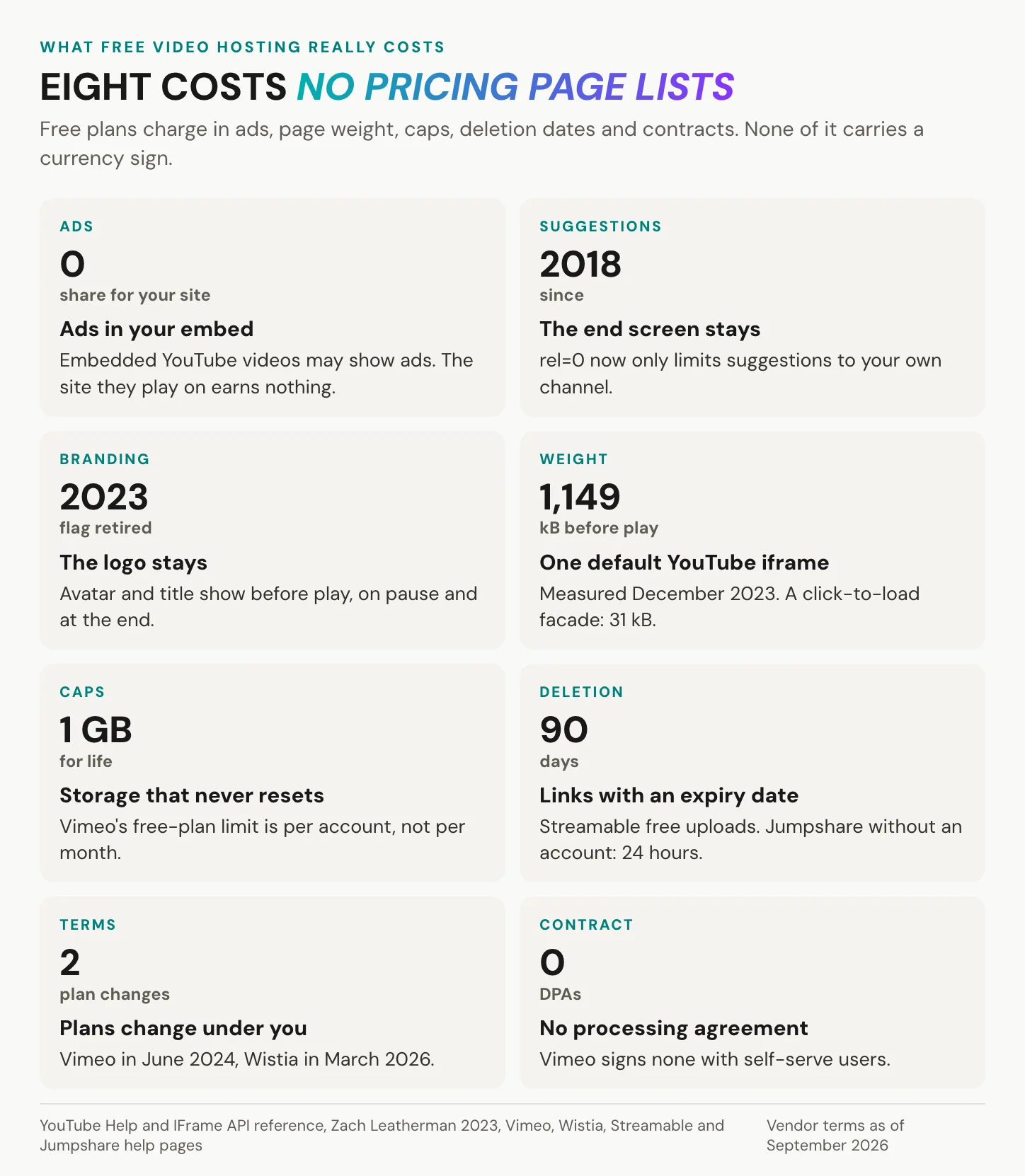
Every free video host sends a bill. It arrives as an ad, a cap or a deletion date, never as a price.
The bill for free video hosting has eight lines, and most are printed nowhere near the storage number.
Ads and the end screen
Ads are what pay for YouTube’s storage. For a creator building an audience, that is a fair trade. On a company page, it looks different. YouTube’s help centre says embedded videos may show skippable or non-skippable ads, and that the site where the video is embedded will not earn a share.
The end of the video is where the second cost shows. Since 25 September 2018, the rel=0 parameter no longer removes suggested videos. It only limits them to the same channel. The modestbranding parameter has had no effect since 15 August 2023. The channel avatar and title always show before playback, on pause and when the video ends. On a product page, that last screen is the moment a visitor decides what to do next. At best, the default player fills it with more videos from your own channel, under YouTube’s branding rather than your call to action.
Page weight before anyone presses play
In December 2023, web developer Zach Leatherman measured one default YouTube iframe at 1,149 kB compressed before play, 971 kB of it JavaScript. A lightweight facade of the same video weighed 31 kB. For scale, the median mobile page weighed 2,311 KB in October 2024, according to the HTTP Archive Web Almanac 2024. One embed is roughly half a page.
The same Almanac found that 92 percent of the pages in its crawl load at least one third party, with youtube.com the most popular video domain among them. You may also meet a more dramatic figure, a load time falling from 17.38 to 3.6 seconds once the embed is deferred. It comes with no method, page, device or date, so it is not a number to plan with. The fix is free, and the how-to below shows it.
Caps, deletion dates and plans that change
The third cost is time. Streamable keeps a free video for 90 days, Jumpshare for 24 hours. Vimeo may remove accounts inactive for a full year, and Google may delete accounts unused for two years.
The terms move too. Vimeo accounts opened since 17 June 2024 get 1 GB, where the older non-paid plan kept 5 GB. Wistia replaced its plans on 17 March 2026, and Vimeo itself changed owners in November 2025. On a free plan you have accepted terms, not signed a contract, and nothing holds them in place. YouTube’s terms, for example, promise advance notice by email only for significant changes that affect your access. The practical answer is simple. Keep your original files in your own storage, because a free host holds a copy, never the archive.
Free video hosting without ads
You can have free video hosting without ads, but each option comes with a condition. Vimeo’s free plan shows no ads, but every embeddable video is public. Wistia’s free plan has an ad-free player that carries Wistia’s branding. ScreenPal promises “no ads ever” on its own tool page. PeerTube has no built-in ads, on a server you run. Our player shows no ads on any tier, with conditions of its own set out below.
YouTube’s privacy-enhanced mode, youtube-nocookie.com, does help. The view is not used to personalise YouTube or advertising elsewhere, and any ads shown are non-personalised. Still, it is often mistaken for the fix. It reduces what happens with the view. It does not remove it.
In short: a free plan’s price is paid in the player, on the page and in the terms. Read those three before the storage number.
Is YouTube good enough for business?
Often, yes. For a public channel whose job is discovery, YouTube’s search and recommendations are the product, and no other free video hosting service comes close. DataReportal put YouTube’s ad reach at 2.53 billion users in January 2025, 30.9 percent of the world’s population, with the caveat that ad reach is not a count of unique people.
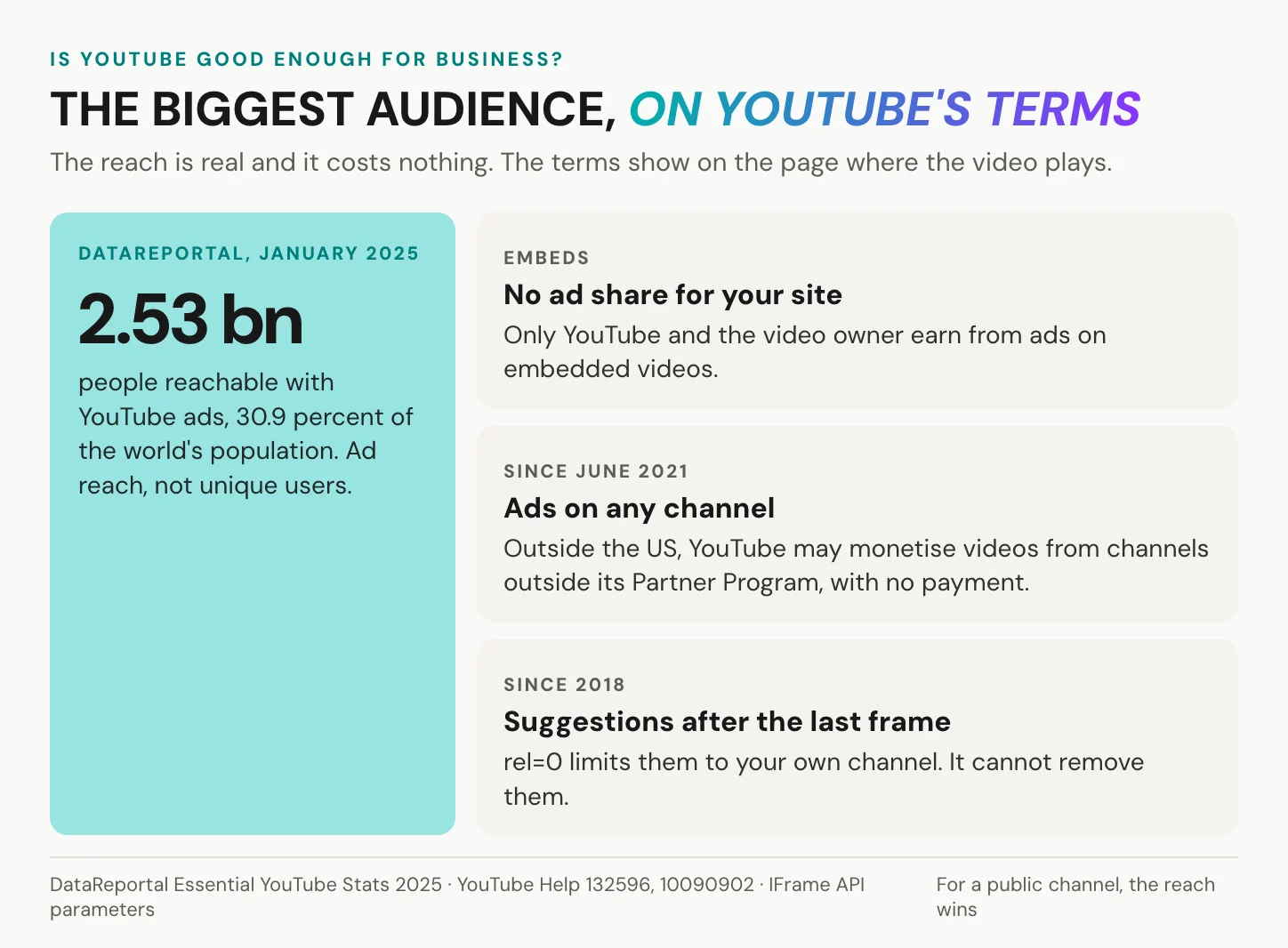
The calculation changes when the video moves onto your product page, onboarding page or customer portal. There, reach no longer counts, because the visitor is already on your site. What remains is the rest of the package. Someone else’s ads, which may run on any channel and pay your site nothing. Suggestions from the channel after the last frame. The channel’s branding before play and on pause. And a visitor whose data flows to Google the moment the player loads, which makes the embed a data protection question too.
On YouTube, the audience is the product. On your product page, the audience is yours.
Many teams settle on a split. The public version goes on YouTube for reach and search. The embed on the company site comes from a host whose player carries no ads and no suggestions from anyone else. Two uploads, two jobs. If you are weighing that second host, the best YouTube alternatives lays out the field.
Host a video on your site for free
Six steps get a free-hosted video onto your page without the usual side effects.
1. Pick the host by the route. A link, a site or a team: the first section settles it.
2. Export at the size the page needs. YouTube recommends 5 Mbps for 720p at 24 to 30 frames per second, and 8 Mbps for 1080p. At 5 Mbps, one minute is 300 megabits, which is about 37.5 MB for each full view. The FAQ below works it through.
3. Set visibility before you copy anything. Unlisted on YouTube means anyone with the link. On Vimeo’s free plan, an embed is always a public video.
4. Copy the embed, and know what the parameters no longer do. rel=0 narrows suggestions to your own channel. modestbranding does nothing. youtube-nocookie reduces personalisation and nothing more. YouTube asks for a player of at least 200 x 200 pixels.
5. Load the player on click, not on page load. Show a still image with a play button, and create the iframe only after the click. In the December 2023 measurement above, that is 31 kB instead of 1,149 kB. In Germany it is also the common way to ask for consent before an embed loads. Section 25 TDDDG requires consent before anything is stored on or read from the visitor’s device, unless it is strictly necessary for a service the visitor explicitly asked for. The German data protection conference, the DSK, treats embedded videos as extra services a visitor has not requested by loading the page. Host the still yourself, so nothing contacts the video host before the click. Then put one short line under it that names who the player loads from. This is not legal advice.
6. Test on a phone, with the network throttled. Office Wi-Fi hides what a train shows.
The whole pattern fits in a few lines of HTML and script:
<!-- Click to load: nothing from YouTube is requested until the visitor clicks. -->
<a class="video-facade" href="https://www.youtube.com/watch?v=VIDEO_ID" data-id="VIDEO_ID">
  <img src="/images/demo-still.jpg" alt="Play the product demo, 2 minutes" width="640" height="360">
</a>
<p class="video-note">Plays from YouTube (Google) after you click.</p>
<script>
document.querySelectorAll('.video-facade').forEach(function (link) {
  link.addEventListener('click', function (event) {
    event.preventDefault();
    var frame = document.createElement('iframe');
    frame.src = 'https://www.youtube-nocookie.com/embed/' + link.dataset.id + '?autoplay=1';
    frame.width = 640;
    frame.height = 360;
    frame.title = link.querySelector('img').alt;
    frame.allow = 'autoplay; encrypted-media; picture-in-picture';
    frame.allowFullscreen = true;
    link.replaceWith(frame);
  });
});
</script>
The same pattern works for any host that gives you an iframe URL. Swap the src line, keep the still and the note.
In short: the upload is the easy part. What loads on your page, and when, is the part you control.
Want a player on your own site that shows no ads and no suggestions from anyone else? Create an alugha account, verify it, and embed your first video.
Where a free host keeps your data
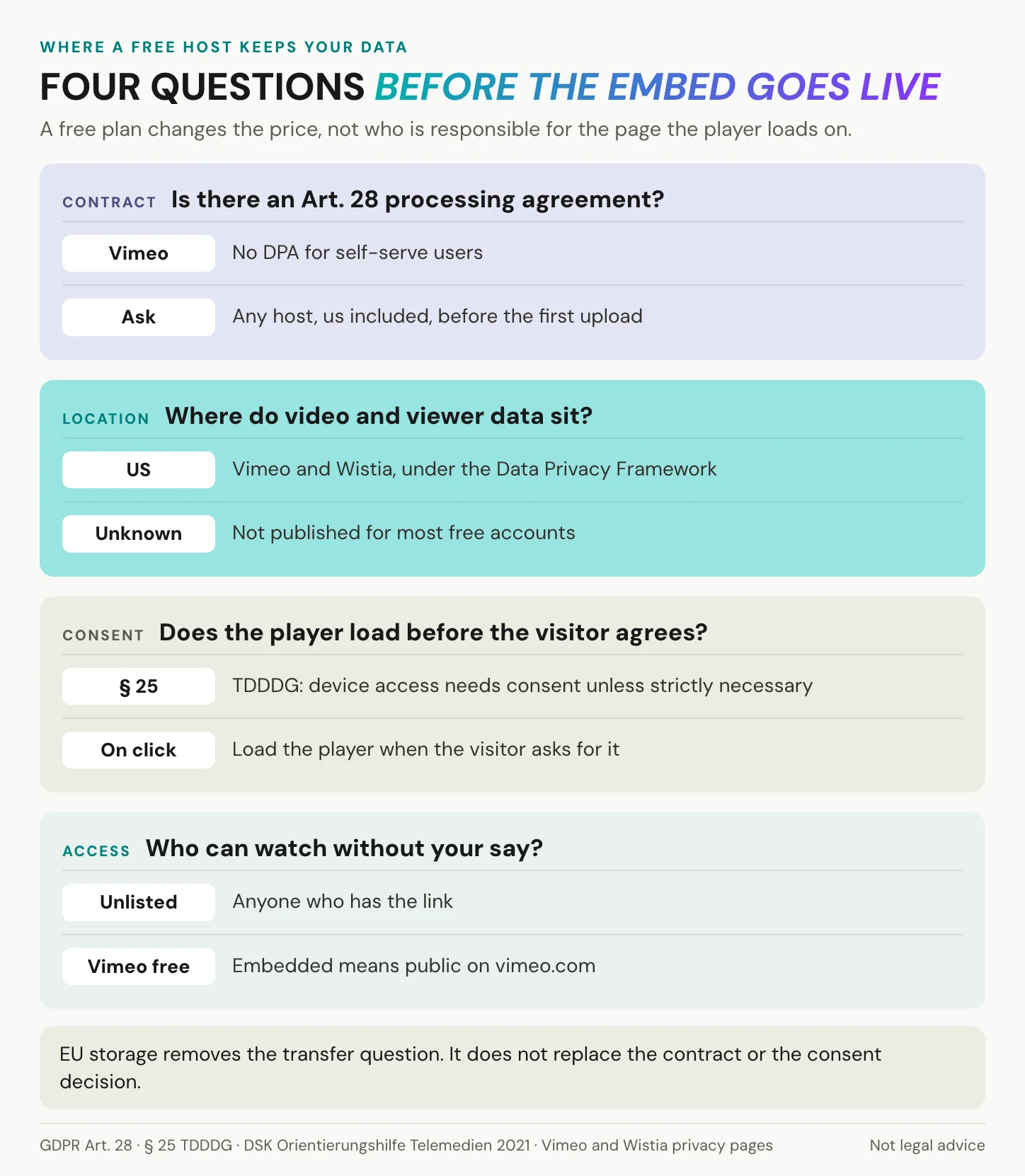
For a public channel, the viewer chose YouTube, and the data question is theirs. The moment the player sits on your company’s website, it is your page.
A free plan changes the price. It does not change who is responsible for the page the player loads on.
The contract a free plan leaves out
Article 28 GDPR lets a controller use only processors that provide sufficient guarantees, under a binding contract. Vimeo is unusually clear about where it stands: “we do not enter into data processing agreements (DPAs) with our users”. It classes itself as a controller, offers controller-to-controller clauses instead, and keeps a DPA for contracts above its self-serve plans. Wistia’s terms include its DPA only “if so indicated in your Order Form”, so do not assume a free account comes with one. Without that contract, the company embedding the player has nothing in writing about what the host may do with its visitors’ data. That is the first gap a data protection officer will ask about. Ask any host, us included, before the first upload, and get the answer in writing.
Where the video and the viewer data go
Transfers to US companies certified under the EU-US Data Privacy Framework are lawful today. The framework, Commission Decision 2023/1795, was upheld by the General Court on 3 September 2025 in case T-553/23, and an appeal is pending. Vimeo transfers data to the US under that framework. Wistia stores and processes in the US under it plus standard contractual clauses. Dailymotion transfers data outside the EU under standard contractual clauses, and its US company is certified under the framework. Jumpshare and ScreenPal host in the United States. YouTube, Streamable and Loom publish no EU storage option for free accounts. The framework’s predecessor fell in 2020 with the Schrems II judgment. EU storage removes that dependency instead of betting on the appeal.
Consent for the embed
Section 25 TDDDG and the DSK’s reading of embeds, set out in the how-to above, make the player a consent question in Germany. The Court of Justice’s Fashion ID ruling of 29 July 2019 (C-40/17) applies by analogy. A website that embedded a Facebook Like button can be joint controller for collecting and transmitting its visitors’ data. Google’s own EU User Consent Policy puts the job of obtaining consent on the site that uses its products. None of this depends on whether the host charges you. This is not legal advice, and GDPR-compliant video hosting covers the full picture.
In short: ask for the contract, find out where the data sits, and load the player on consent. A free plan changes none of the three.
alugha’s free tier, limits first
Our free tier gets the same labels as the nine entries above, limits first.
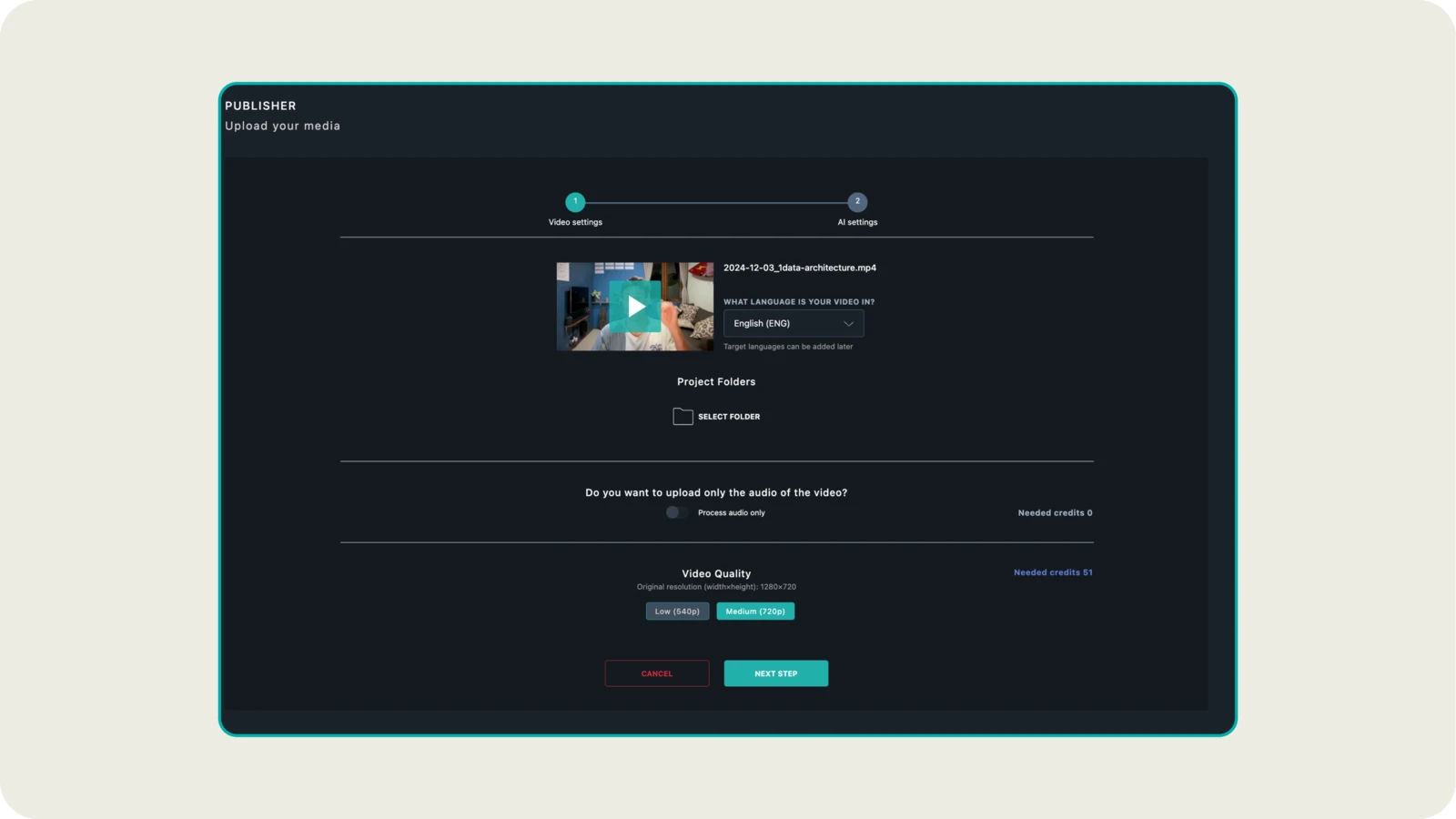
Free limits: our upload wizard offers three encoding qualities, 540p, 720p and 1080p. The free tier tops out at 720p. 1080p needs a paid tier, and no tier goes above 1080p. Storage and streaming draw from a monthly credit allowance, metered per HD minute stored per month and per gigabyte streamed. Every upload shows its encoding cost in credits before you confirm. Credits reset each cycle and do not roll over; understand plans and credits sets out how they are counted. Before the first public share or embed, every account, free ones included, goes through an account verification with Paddle. You need no credit card to sign up. The free tier allows a limited number of audio tracks per video. Our logo sits on the player by default, and custom branding belongs to a paid tier.
When you do not need us: a public video that lives on reach, where YouTube’s search and recommendations are the point. A file for three colleagues, where a Drive link is enough. A clip for a chat thread. And in B2B, a company already on a paid host with a signed processing agreement, where a free tier of anything is the wrong instrument.
What it costs you, and what it does not: when the allowance is spent, nothing comes down. Videos stay online at the lowest available resolution until the next cycle, and we notify you before that happens. The player shows no ads and no third-party recommendations, on every tier. The free tier runs on the same hosting and player as the paid ones: hosting in Germany and the EU, no third-party advertising cookies and trackers. And every language of a video sits under one URL. The player starts in the browser language and falls back to the default track. Viewers pick audio and subtitles separately, as the automatic language switcher shows.
Free hosting is never free. The only question is whether you pay in ads, in data, or in a meter you can see.
Controls: three visibility states, Private, Public and Not listed. Not listed means anyone with the link can watch, and a forwarded link keeps working. A single switch blocks embedding on every website. Set video visibility and privacy shows where the three states sit in the dubbr, and embed your multilingual video shows the embedding switch. Restricting embeds to your own domains belongs to a paid tier.
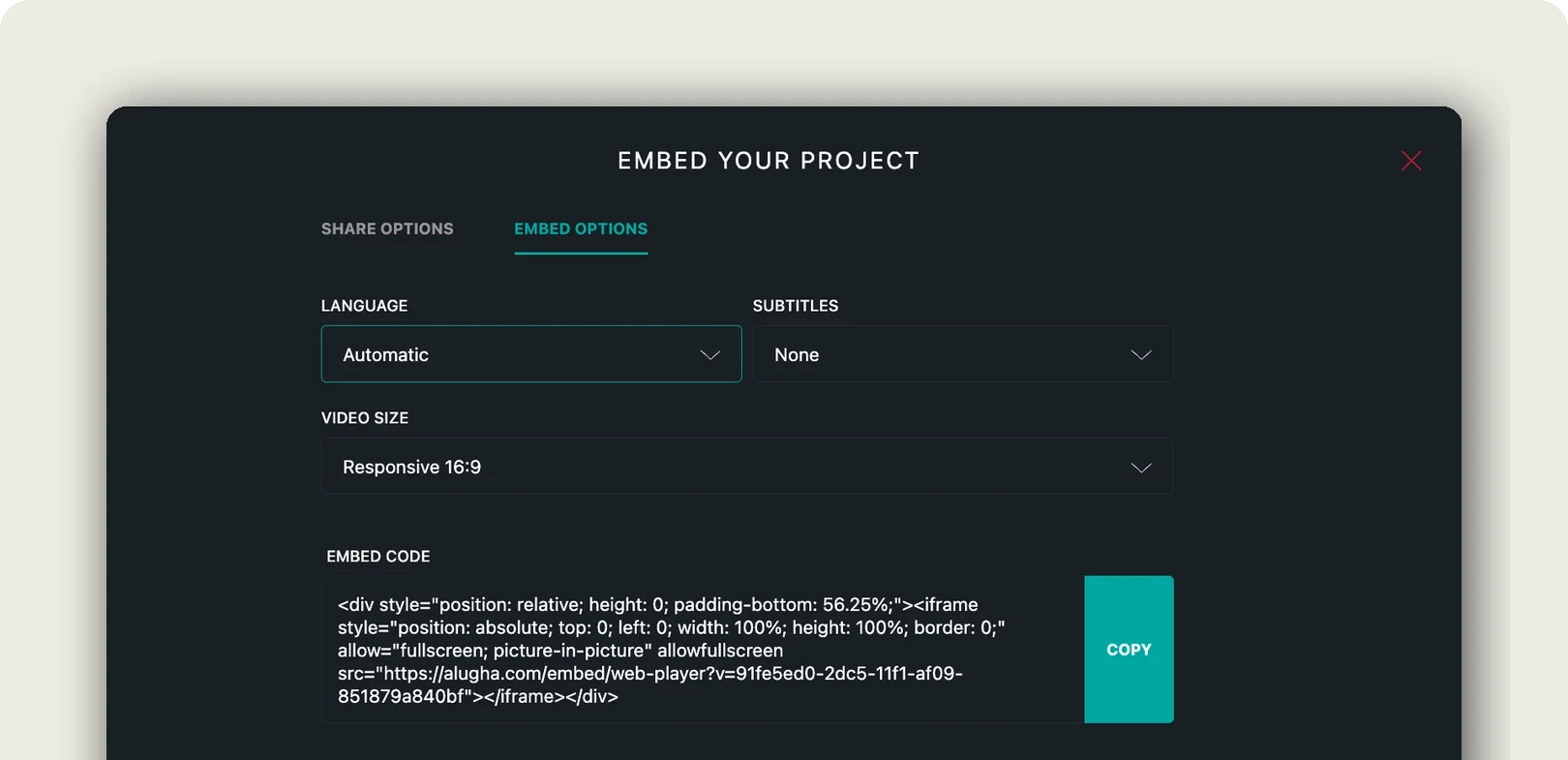
Best for: a company video that plays on your own site, in more than one language, without anyone else’s ads.
In short: our free tier trades the uncapped storage of an ad-funded host for a visible meter, a 720p ceiling, and a player that shows nobody else’s videos or ads.
When free video hosting is not enough
Free video hosting stops being the cheaper option at a moment, not at a price.
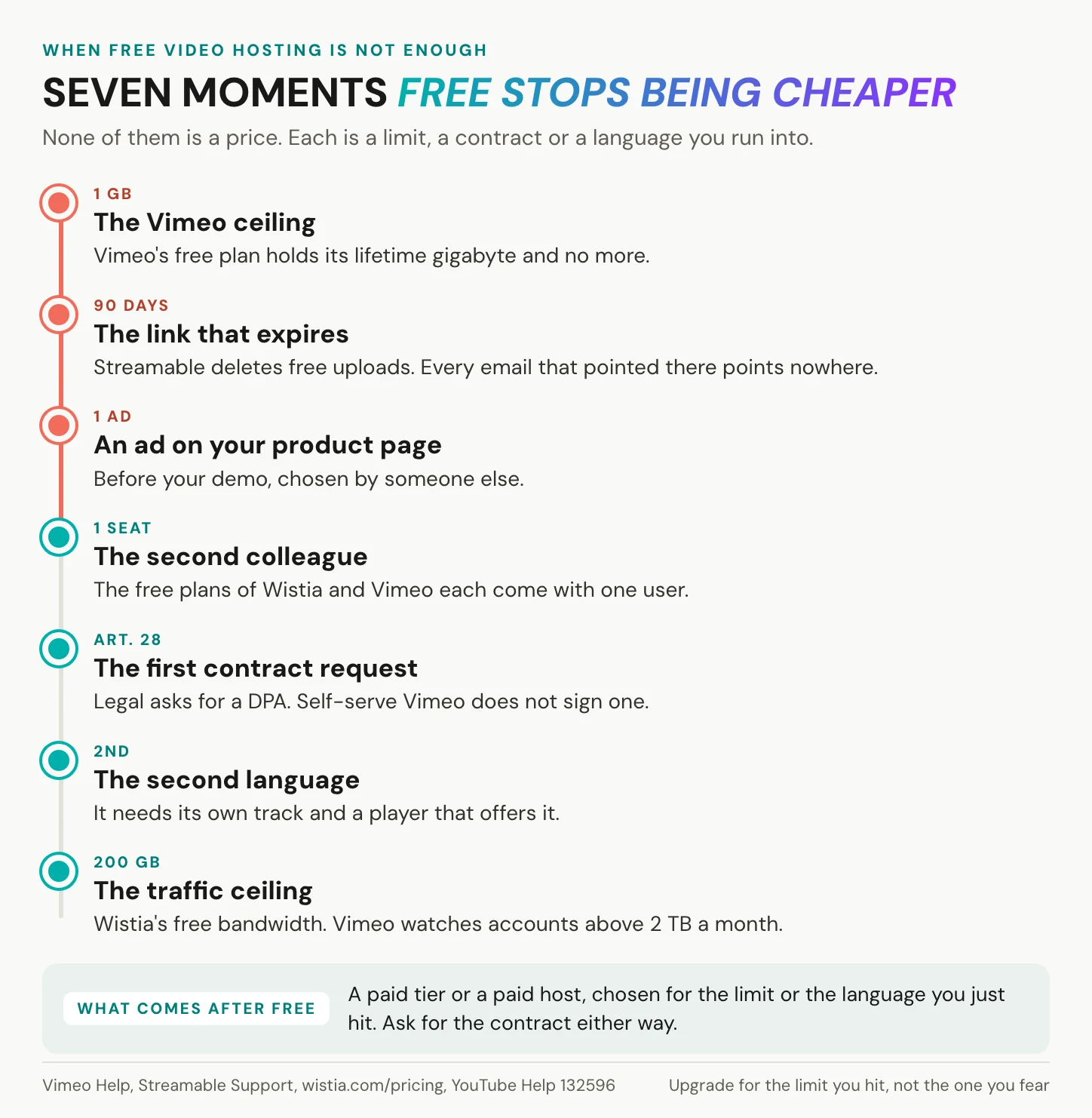
The moments are predictable. Your Vimeo library reaches 1 GB, and the free plan has no room left, ever. A Streamable link reaches its 90th day while a customer still uses it. A prospect watches your product demo, and the next thing on screen is an ad you never chose. A second colleague needs access to a Wistia account built for one user, or a Vimeo account with one seat. Your legal team asks for the Art. 28 processing agreement, and the host does not sign one with self-serve users. Your audience needs a second language. Or your traffic heads towards Wistia’s 200 GB of bandwidth or Vimeo’s 2 TB monthly threshold.
Upgrade for the limit you actually hit. A paid tier on any host, ours included, is worth buying for a higher ceiling or a feature you need. It is not worth buying for the logo it removes. Ask for the processing agreement either way, before you pay. If none of these moments has arrived, stay free and spend the time on the video.
Frequently asked questions about free video hosting
Can you host videos for free without ads on your website?
Yes, with conditions. Vimeo’s free plan shows no ads, but every embeddable video is public on vimeo.com. Wistia’s free plan has an ad-free player that carries Wistia branding. PeerTube runs without ads on a server you pay for. Our free tier’s player shows no ads and no third-party suggestions. YouTube embeds may carry ads, and your site earns no share of them.
Can you host private videos for free?
Partly. YouTube’s Private setting limits a video to the people you choose, while Unlisted lets anyone with the link watch. On Vimeo’s free plan, Private means only you and the team members on your account, and Unlisted needs a paid plan. Our Not listed state is a link as well: anyone who has it can watch. A link anyone can forward is not access control.
What are the limits of Vimeo’s free plan?
Vimeo’s free plan gives you 1 GB of storage for the life of the account, and it never resets. There is no cap on the number of videos, one seat, and recordings of up to 30 minutes. Monthly bandwidth has a 2 TB threshold. Unlisted and embed-only settings need a paid plan, and accounts inactive for a full year may be removed.
Does free video hosting slow down your website?
It can. In Zach Leatherman’s December 2023 measurement, one default YouTube iframe weighed 1,149 kB before anyone pressed play. That is roughly half the median mobile page of 2,311 KB in the 2024 Web Almanac. A click-to-load facade of the same video weighed 31 kB. Loading the player only when the visitor clicks removes most of the cost, whichever host you use.
What happens when you exceed a free video hosting limit?
It depends on the host. Vimeo may contact accounts passing 2 TB of bandwidth in a month twice in 12 months, or 10 TB once. They get seven days to choose, then playback may be suspended. Dailymotion may suspend uploads for 24 hours. Streamable deletes free videos after 90 days. On our free tier, videos drop to the lowest resolution and stay online.
How can you share a video online for free without a website?
Send a link. A YouTube video set to Unlisted plays for anyone with the link, and Google said in 2023 it had no plans to delete accounts with YouTube videos. Streamable holds a free clip for 90 days, Jumpshare’s no-account tool for 24 hours. A Google Drive link works within your account’s 15 GB. Pick by how long the link must work.
Can you self-host videos for free?
The software, yes. PeerTube is free under the AGPL licence and turns your own server into a video platform with its own player. The server, the storage and the bandwidth are not free, and the stated minimum is 1 vCore, 1.5 GB of RAM and 20 Mbit/s of upload. Object storage plus a plain video tag costs less, but skips encoding and adaptive streaming.
How much bandwidth does a video on your website use?
Less than you might think. At YouTube’s recommended 5 Mbps for 720p, one viewer-minute is at most 37.5 MB, so ten one-minute views use about 375 MB. The unsourced “one gigabyte for ten viewers” rule overstates that 2.7 times. Across 189 public 1080p renditions on our platform, the median is 6.89 MB per minute, the middle half 4.23 to 14.65 MB.
Getting started
Open the page where your video will live, press play, and watch it to the last frame. What you see there is the price you chose: suggestions from a channel, someone else’s logo, a dead link, or only your video. Then take three steps.
1. Name the job. A link, a site or a team, as in the first section.
2. Read that host’s row in the table. The removal rule counts as much as the storage.
3. Ask the four questions before a company page goes live. The contract, the location, the consent, and who can watch.
Every video ends. The last frame belongs to whoever hosts it, so choose the host whose ending you would sign.
Putting company video on your own site, in more than one language? Book a call and we will set up one of your videos with you, or create an account and start with a single upload.