Three in ten new hires decide within their first week whether the job is right for them. Seven in ten decide within the first month. Those figures come from BambooHR’s 2023 survey of 1,565 US office workers. The top frustration in the same survey was plain: 65 percent named the lack of a clear contact for their questions.
An employee onboarding video answers the same questions for every new hire, on day one and at eleven at night on day three. That frees the first conversations for people. The manager stops repeating the parking rules, and the buddy gets to talk about the work.
Read on for ten formats, each with a target length and a production route, and a placement plan for the first 90 days. Then three scripts to adapt, and a way to deliver one video in every language your sites speak, without fourteen shoots.
Key takeaways
- Seven in ten new hires decide within their first month whether the job fits, according to BambooHR’s 2023 survey of 1,565 US office workers. Onboarding videos belong in weeks one to four.
- Keep each clip short. Across 6.9 million edX viewing sessions, median engagement topped out at about six minutes, whatever the video’s length (Guo, Kim and Rubin, 2014).
- A video does not replace the manager. Gallup (2021) found employees 3.4 times more likely to rate their onboarding as successful when their manager took an active part.
- Ten formats cover most programs, from a 60-second manager welcome to a safety clip at the workstation. Each needs one outcome sentence, a target length and a production route.
- In June 2025, 16.7 percent of employees subject to social insurance in Germany had no German citizenship (Federal Employment Agency). One onboarding video often has to work in several languages.
- Before the first upload, ask any host for its Art. 28 GDPR processing agreement, and agree per-person viewing statistics with the works council under section 87 BetrVG.
- Key takeaways
- What an employee onboarding video is for
- Ten employee onboarding video formats
- When to send each onboarding video
- How to make an employee onboarding video
- Three onboarding video scripts to copy
- Onboarding videos in every language
- Where onboarding videos should live
- How to measure onboarding videos
- Where alugha fits, and where it does not
- Frequently asked questions about employee onboarding videos
- Getting started
What an employee onboarding video is for
An employee onboarding video is a short recorded clip that gives every new hire the same answer to a recurring question. The questions are familiar: who we are, who to ask, where to go, how a tool works, what keeps you safe. It supports the people who onboard and never replaces them.
Start with what matters more than any clip. In BambooHR’s 2023 survey, 93 percent of new hires wanted to shadow colleagues, 86 percent valued an onboarding buddy and 87 percent hoped to make friends at work. Gallup reported in 2021 that employees whose manager took an active part were 3.4 times more likely to rate their onboarding as successful. People carry onboarding. Video takes the repeatable facts off their plate, so the first days go to conversation.
The same BambooHR survey shows where those repeatable facts hide. Its most common frustrations were information gaps, and each maps to one clip:
- No clear contact for questions, 65 percent: a who-to-ask clip on day one.
- Insufficient training on the product or service, 62 percent: a product tour.
- Limited access to tools, 58 percent: a tool walkthrough.
- No dedicated onboarding guide, 50 percent: a day-one logistics clip.
Every one of these questions comes up with every hire. Today it gets answered by whoever happens to be free, while a video answers it the same way each time.
In Germany the law sets a floor under all of this. Section 81(1) of the Works Constitution Act (BetrVG) obliges the employer to brief every new employee on their tasks, their responsibility and the hazards of the job before work starts. A video can support that briefing, but it never replaces the conversation.
A video can answer who to ask. It cannot be the person who answers.
Ten employee onboarding video formats
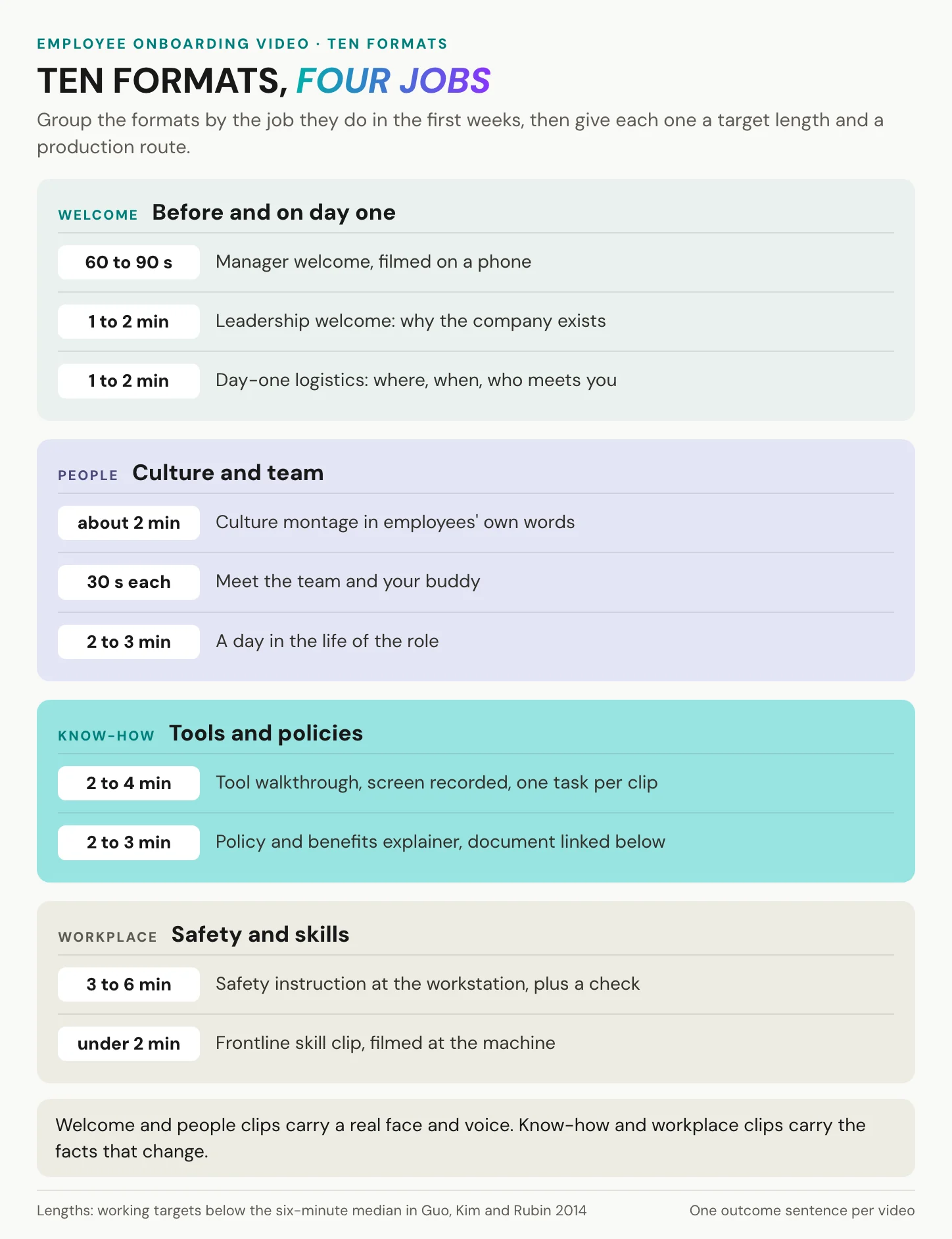
The example lists that circulate online are fun to browse, and some of them are worth borrowing from. A big-tech culture reel or a retailer’s playful welcome can be genuinely inspiring. The trouble is that you cannot copy a brand, only a format. Here are ten, in four groups by the job they do, each with a working target length and a way to make it.
Welcome and team formats
Before and on day one.
- Manager welcome, 60 to 90 seconds: the direct manager says hello, sketches the first week and names the buddy. A phone propped on a desk is enough.
- Leadership welcome, one to two minutes: why the company exists and where the new hire’s team fits into it. Film it once and reuse it for a year.
- Day-one logistics, one to two minutes: address, entrance, parking, who meets you, what to bring. This is the clip that closes the “no onboarding guide” gap.
These three set the first impression, and first impressions hold. In BambooHR’s 2023 survey, 62 percent of respondents said their first-day impressions stayed accurate. And 44 percent had second thoughts during their first week.
Culture and team.
- Culture montage, about two minutes: employees in their own words, filmed where they work. No stock footage: the point is to show your own people.
- Meet the team and your buddy, about 30 seconds per person: a face and a name before day one. With 86 percent of new hires in BambooHR’s survey valuing a buddy, the buddy’s clip is the one to make first.
- Day in the life, two to three minutes: filmed on a real shift. Show the handover, the break, the small routines nobody writes down.
Ask every colleague before you film them, and agree how long their clip stays in use. People change teams and leave. A welcome reel full of former colleagues tells a new hire more about turnover than about culture.
Tool, policy and safety formats
Tools and policies.
- Tool walkthrough, two to four minutes: one task per clip, screen recorded. In the edX data Guo, Kim and Rubin analyzed in 2014, learners rewatched tutorials more often than lectures, so keep these findable long after week one.
- Policy and benefits explainer, two to three minutes: the video explains, and the document linked beneath it is the policy. In Germany, the written terms under the Evidence Act (Nachweisgesetz) stay on paper or in text form. The video walks through them but is never the record.
Name every tool clip after the task, not the system. “Book a day off” is findable in month three, while “HR portal, part 3” is not.
Safety and frontline skills.
- Safety instruction at the workstation, three to six minutes plus a comprehension check: section 12 of the German Occupational Safety and Health Act (ArbSchG) requires instruction during working time, at hiring, adapted to the workplace. The accident insurers’ DGUV Regel 100-001 adds that the employer must make sure it was understood.
- Frontline skill clip, under two minutes: filmed at the machine, reachable on a phone or a break-room screen. A QR code printed next to the station, made with any QR tool, gets people there in one scan.
In short: welcome and people clips carry a face and a voice. Know-how and workplace clips carry the facts that change, which is why they need to be easy to find and easy to update.
When to send each onboarding video
Timing decides much of a clip’s value. The right video in week six answers a question the new hire stopped asking in week one.
Before day one
Send the welcome and logistics clips with the offer pack or the first email. The first impression forms early, and for most people it sticks. A linked thumbnail is the reliable way to put a video into an email. Our article on how to embed a video in an email shows the construction. Keep this viewing optional. In Germany, training that the employer must provide by law, collective agreement or works agreement counts as working time under section 111 of the Trade Regulation Act (GewO), even outside regular hours. Safety instruction and other mandatory training therefore wait for day one.
Keep the pre-start pack to two or three clips, each under two minutes. The aim is a familiar face on day one, not homework before the contract starts.
The first week
Of BambooHR’s 2023 respondents, 29 percent decided within the first week whether the job fit, so that week carries the most weight. Put the who-to-ask clip on day one, next to the buddy’s name and phone number. Safety instruction happens before work starts: section 12 ArbSchG requires it during working time, and DGUV Vorschrift 1 requires it at least once a year, documented. The day-in-the-life clip belongs here as well, not at day 30. It answers the question the new hire is quietly asking all week: what will a normal day feel like?
Keep the rest of the week light on video. A new hire who spends day two in front of a playlist is not shadowing anyone, and 93 percent of new hires in BambooHR’s survey wanted exactly that.
Days 30 to 90
BambooHR’s average decision point was 44 days, while HR professionals in the same survey put their own at 33. So everything that shapes the decision belongs before day 44: the team, the tools, the first real task. After that come policies in depth, benefits, deeper tools and career paths. Gallup puts the time to full performance at about a year. The tool clips therefore need to stay findable, not archived when the onboarding checklist closes.
Growth topics age fastest. Give each of these clips an owner and a review date, so that a benefits explainer recorded last January does not reach a new hire in October.
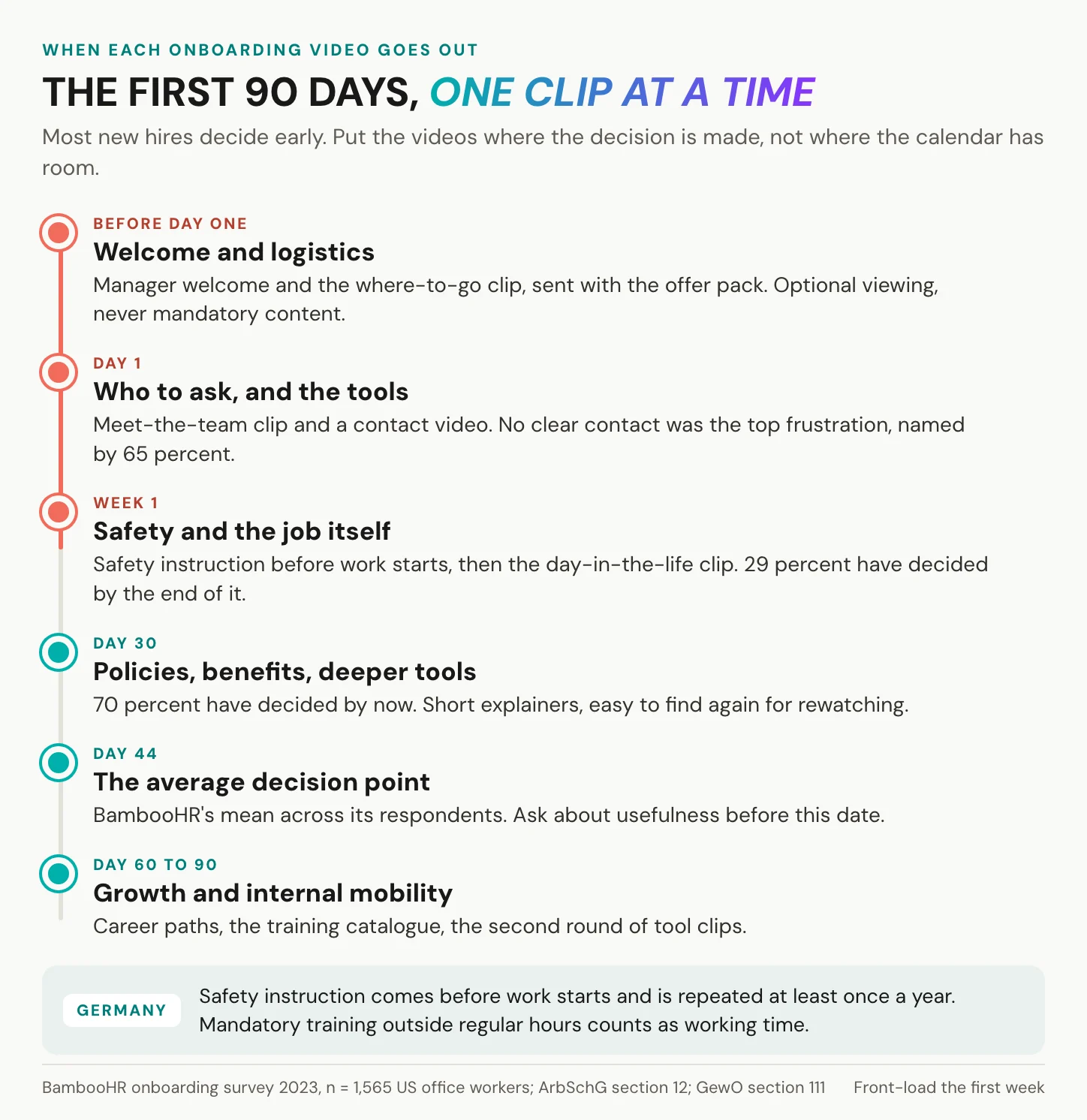
In short: the first week carries the most weight. Send the welcome before day one, the safety clip before work starts, and everything else before day 44.
How to make an employee onboarding video
Five steps, each small enough to start this week. For lighting, sound and scripting structure in depth, our piece on how to create training videos goes further.
Step 1: write one outcome sentence
Before anything else, finish this sentence: “After this clip, a new [role] at [site] can …”. One outcome per clip: if you need two sentences, you need two clips.
Then write the script in the second person and read it aloud. Richard Mayer’s 2017 review of multimedia learning reports a median effect size of d = 0.79 for a conversational style that addresses the viewer as “you”. For a human voice rather than a machine one, the median is d = 0.74. Both are medians from his own lab’s studies, and they point the same way as every good welcome: talk to one person.
Keep the outcome sentence in the file name as well. Six months later, it tells whoever maintains the library what the clip was for and whether it still does that job.
Step 2: keep each clip under six minutes
One of the largest studies of engagement with educational video analyzed 6.9 million viewing sessions on edX. Guo, Kim and Rubin (2014) found that median engagement lasted at most six minutes, regardless of the video’s total length. Beyond nine minutes, viewers often stopped before the halfway point. That is watch time in university courses, not learning, but a second line of evidence agrees. A 2019 meta-analysis by Rey and colleagues, covering 56 investigations, found that segmenting a lesson improves retention (d = 0.32) and transfer (d = 0.36).
People will tell you they want more. In TechSmith’s 2024 viewer study of 1,000 people in six countries, the most desired length for instructional video was 10 to 19 minutes. Stated preference and watch time disagree. Segment anyway.
Step 3: choose a production route
You do not need a studio. In the same edX data, informal recordings at a desk could be more engaging than studio productions. A talking head interspersed with slides held attention better than slides alone. That leaves three realistic routes.
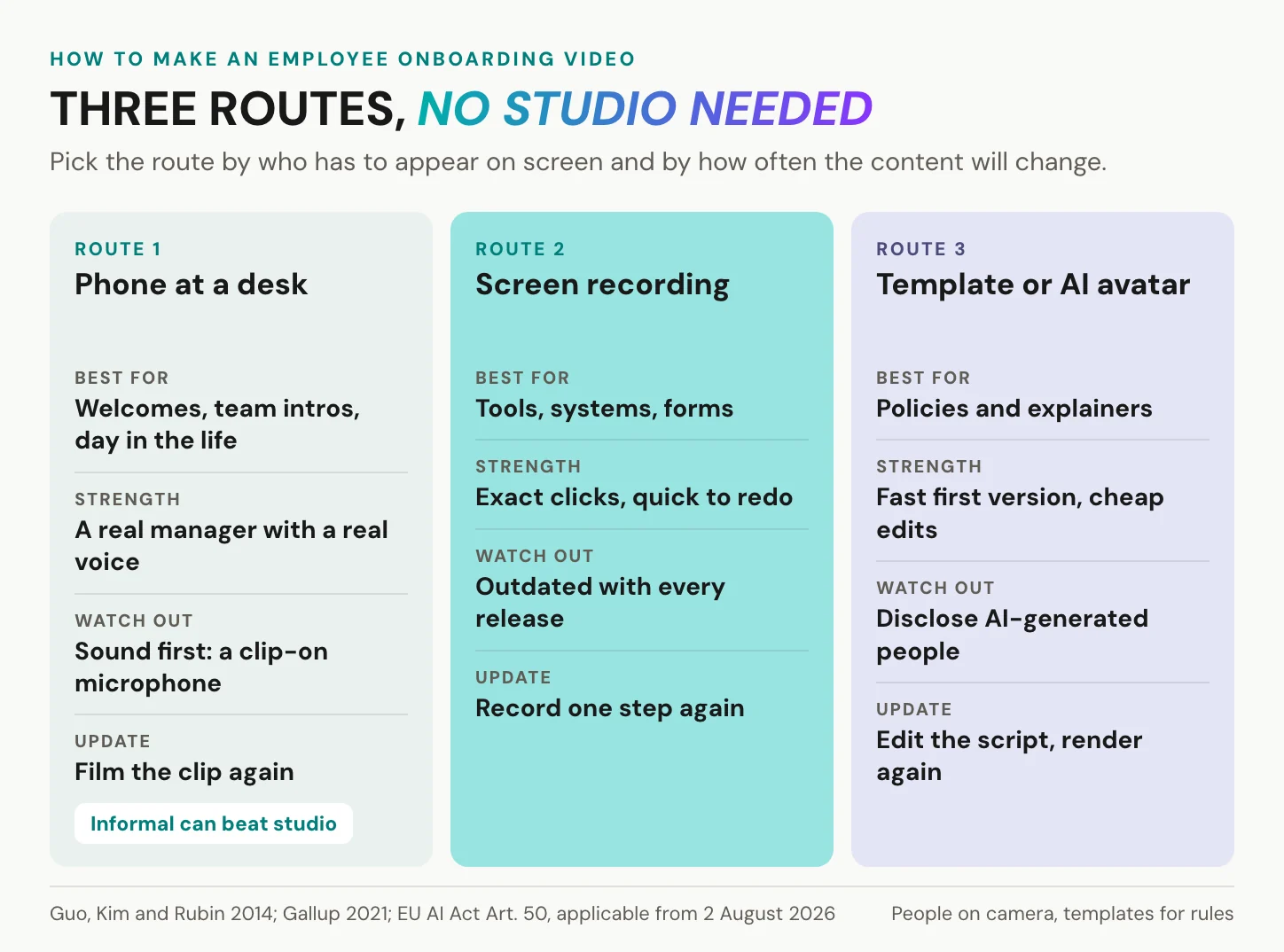
AI avatars and templates deserve their due. They produce a first version fast, and changing one sentence means editing text, not booking a reshoot. For a benefits explainer that changes every January, that is a real advantage.
What they cannot supply is the person. A welcome from the real manager carries the conversational style and the human voice from step 1, and Gallup’s manager effect along with them. There is also a legal step: since 2 August 2026, Article 50 of the EU AI Act has required deployers to disclose deep fakes. A cloned CEO who appears to speak Polish can count as one, so label AI-generated people and voices clearly.
Step 4: caption every clip
Captions are not only for viewers who cannot hear. Morton Ann Gernsbacher’s 2015 review of more than 100 studies found that captions improve comprehension of, attention to and memory for video. WCAG 2.2 lists captions for prerecorded video at Level A, its most basic level.
One honest limit. The European Accessibility Act, transposed in Germany as the BFSG, covers consumer products and services. It does not cover internal onboarding videos. The reasons to caption are practical ones: deaf and hard-of-hearing colleagues, non-native speakers, and a shop floor where nobody can turn the sound up. Let a person check names and jargon before release. A clean transcript pays off twice, because it is also the text every translation starts from. More in our explainer on what closed captions are.
Step 5: plan the second language before you film
Write short sentences. They are easier to say on camera, and they translate and dub cleanly. Keep text out of the picture where you can, because burned-in text has to be re-edited for every language. Put site-specific content, a car park or a canteen rule, into its own short clip.
Leave a short pause between sentences. Translated speech often needs more time than the original, and the pauses give a voice-over room without re-editing the picture. Keep music low under speech, or leave it out, because a voice in another language has to sit on the same mix. How to translate a video covers the next step.
In short: one outcome, under six minutes, a real face where trust matters, captions on everything, and the second language planned before the camera runs.
Three onboarding video scripts to copy
The sentences are short on purpose, because they are easy to say without a teleprompter and they translate cleanly. Placeholders are in brackets.
The manager welcome, 75 seconds.
- 0 to 10 seconds: “Hi, I’m [name]. I lead [team]. Welcome.”
- 10 to 30 seconds: “We [what the team does]. It matters because [one reason].”
- 30 to 50 seconds: “Your first week has three parts: [item one], [item two], [item three].”
- 50 to 65 seconds: “For everything else, ask [buddy]. [Buddy] knows where everything is.”
- 65 to 75 seconds: “See you on [day] at [place]. We’re glad you’re coming.”
Meet the team, 30 seconds per person.
- “I’m [name].”
- “I [what I do, in one sentence].”
- “Ask me about [topic].”
- One personal detail they chose, such as a favorite lunch spot.
Film everyone in the same spot with the same framing. The clips then cut together into one reel, and each still works alone.
The first-week roadmap, two minutes.
- Day one: where you go, who meets you, what you receive.
- Days two and three: your tools, your first shadowing slot, lunch with the team.
- End of week one: a short check-in with your manager.
- Where to find these clips again: the page or course where they live.
- If something is missing: one name and one number to call.
Already have a welcome video? Create an alugha account, upload it, and add a second language to the same link.
Onboarding videos in every language
Start with who needs another language. On 30 June 2025, 16.7 percent of employees subject to social insurance in Germany had no German citizenship, about 5.8 million people, according to the Federal Employment Agency. In temporary agency work it was about half of all employees, in hospitality 44.5 percent. Citizenship is not language, though. One in six without a German passport is not the same as one in six not speaking German.
The language figure is smaller and still real. In 2023, 6 percent of the population in private households spoke no German at home and 17 percent spoke several languages, according to the Federal Statistical Office (Destatis). In the US, 19.1 percent of the civilian labor force was foreign-born in 2025, according to the Bureau of Labor Statistics.
For safety content, Germany’s statutory accident insurers are explicit. DGUV Regel 100-001 (2025) requires instruction in an understandable form and language. Where language alone is not enough, it names video as one means, and it requires the employer to make sure the content was understood. A video alone never closes that duty.
Subtitles, voice-over or dubbing
Subtitles keep the manager’s own voice, which is the whole point of a welcome or culture clip. Where the eyes must stay on the task, in a safety or tool clip, a voice in the viewer’s language works better than text at the bottom of the screen. Our explainer on what dubbing is lays out the options.
Voice cloning keeps the speaker’s own voice in another language. The recording is personal data either way, so get the speaker’s written consent first. It becomes a special category of data under Art. 9 GDPR only when it is processed to uniquely identify the speaker. And under Article 50 of the AI Act, a synthetic voice or face presented as real has to be disclosed.
One video per topic, one clip per site
Separate MP4 files have a real advantage: they play anywhere and need no special player. The cost arrives with version two. One policy sentence changes, and you have fourteen files to re-export, fourteen uploads and fourteen links in fourteen intranet tiles.
Microsoft 365 can host additional WebVTT subtitle files and alternative audio tracks for a video. Microsoft’s feature list from October 2025 does not include producing the translation or the dubbed track, so that work still happens somewhere else.
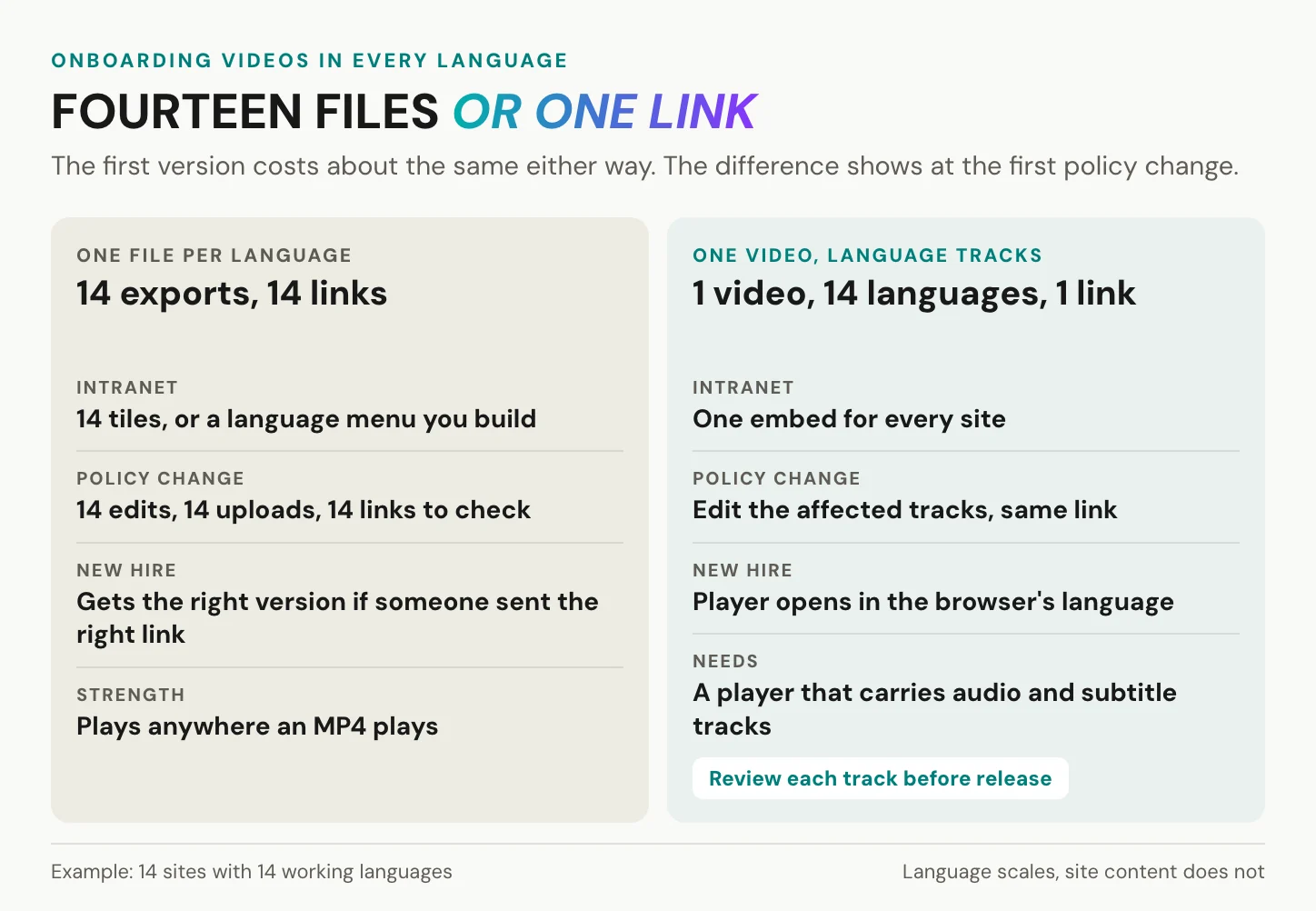
Language is not the same as site, though. If site 9 has its own forklift route and site 3 its own canteen rules, those are different clips. One video scales across languages, not across site content. Keep site-specific facts in short clips of their own, and the shared video stays shared.
Fourteen sites do not need fourteen shoots. They need one video that speaks fourteen languages.
In short: decide per format between subtitles and voice, keep one video per topic with its languages inside it, and split by site only where the content really differs.
Where onboarding videos should live
YouTube has earned its place. It is free, everyone knows it, it needs no procurement, and it is the right home for a public employer-branding welcome that you want candidates to find. Microsoft 365 has a different strength. Its videos are files in SharePoint, Teams and OneDrive, under the retention and permission rules you already run, and Microsoft itself names onboarding training as a use case.
Microsoft also reports that 83 percent of page views in Stream (Classic) came from direct links or embeds rather than from the portal. People watch where they already are. Whether a video can be embedded in the intranet or the LMS matters more than any portal.
Internal onboarding is where the public options strain. Onboarding clips often show internal systems, floor plans and colleagues’ faces. On YouTube, an unlisted video can be watched and reshared by anyone who has the link, and no Google account is needed. Privacy-enhanced mode, in Google’s words, prevents embedded views from influencing the viewer’s browsing experience on YouTube. It does not stop YouTube from receiving the view. On Vimeo, unlisted, password and embed-only privacy settings require a paid tier.
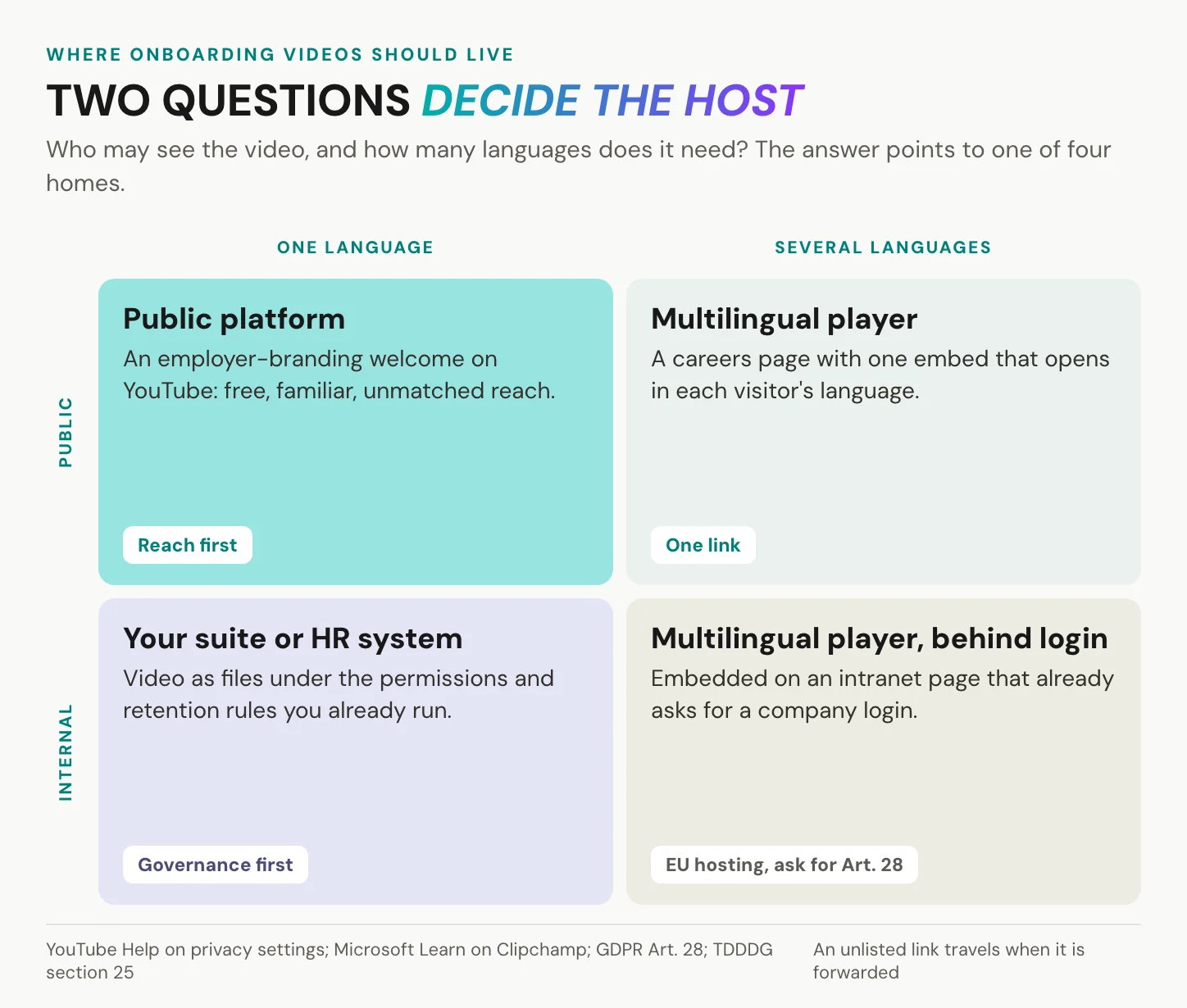
Four questions for any video host
- Where are the videos and the viewer data stored?
- Will the host sign an Art. 28 GDPR processing agreement? Art. 28 requires processors that provide sufficient guarantees, and a contract that sets out the subject matter, duration, nature and purpose of the processing.
- Does the player store or read anything on the viewer’s device? Under section 25 of the German TDDDG, that needs consent unless it is strictly necessary. The rule is not limited to public websites, so check the intranet embed as well as the careers page.
- What does the player log per person? Per-person viewing statistics are a works-council matter under section 87(1) no. 6 BetrVG. Microsoft’s report of who watched a specific video is an example of such a feature.
Ask any host for its Art. 28 agreement before the first upload. Agree tracking with your works council and your data protection officer before rollout, not after. For the wider picture, see our overview of GDPR-compliant video hosting.
In short: public reach and internal onboarding want different homes. The four questions decide which one your data protection officer and works council can sign.
How to measure onboarding videos
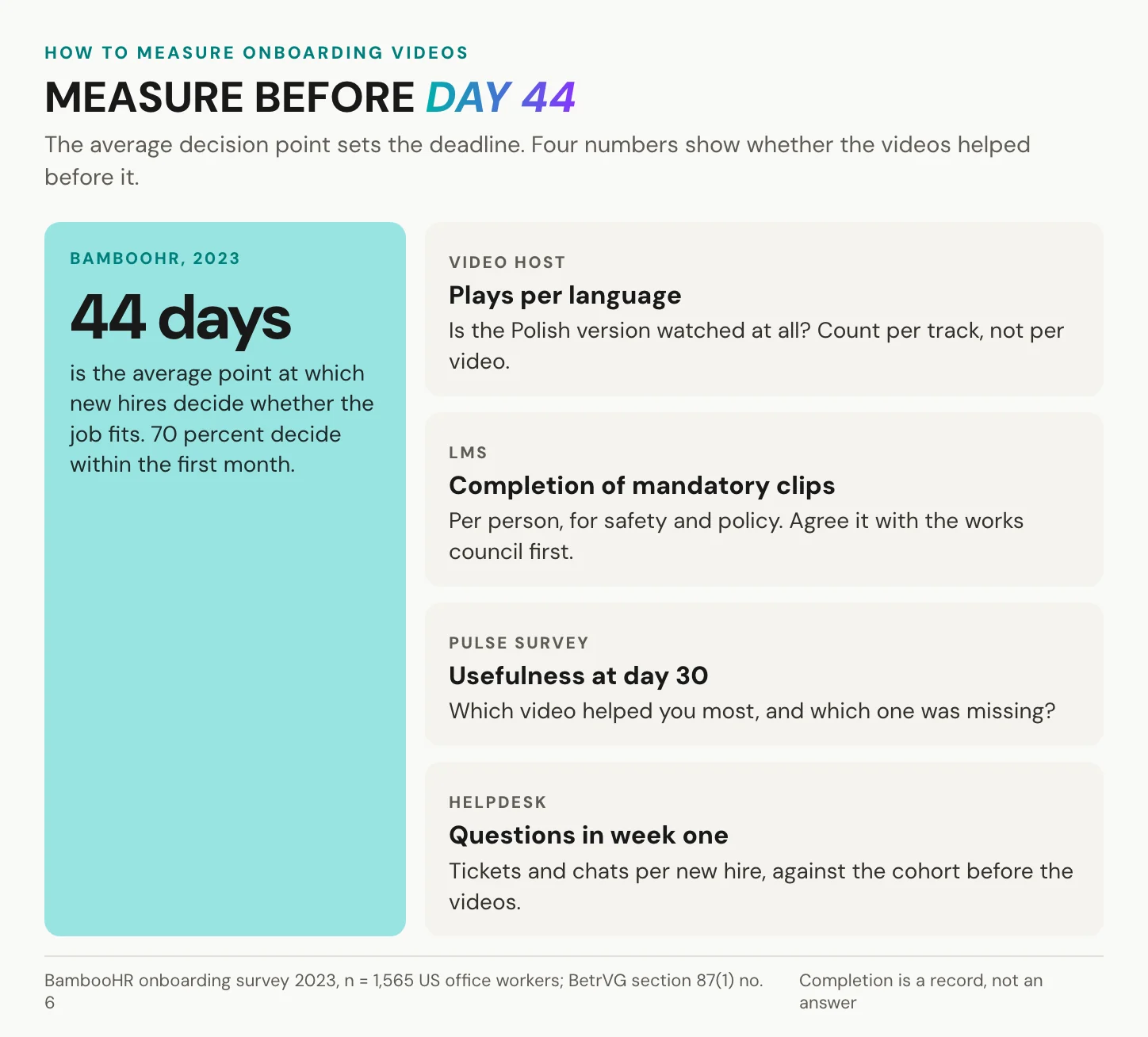
Measure before day 44, BambooHR’s average decision point. After that, the numbers describe people who have already made up their minds. Four numbers are enough:
- Plays per language, from the host, which show whether the Portuguese version is watched at all.
- Completion of mandatory clips, from the LMS, per person, agreed with the works council first.
- Usefulness at day 30: one pulse question. Which clip helped most, and which one was missing?
- Questions in week one: tickets and chat messages per new hire, compared with the cohort before the videos existed.
Per-person completion is legitimate for mandatory safety and policy content, where you need a record. For welcome and culture clips it measures nothing worth knowing.
Completion is a record. Whether the video helped is a different question.
Cutting counts as a result too. In BambooHR’s 2023 survey, 36 percent of respondents were frustrated by lengthy onboarding, and 56 percent needed only one to two days to ease in. If a clip scores low on usefulness twice, remove it.
In short: four numbers, all collected before day 44, and the readiness to cut whatever does not help.
Where alugha fits, and where it does not
What we do not do, and when you do not need us
We do not film or edit your onboarding video. Once it exists, we make it speak every language your sites speak, from one link. We are not an LMS or an onboarding platform either: no quizzes, no sign-off, no per-person completion record, no xAPI. There is no employees-only viewing gate. A video set to Not listed plays for anyone who has the link, including a forwarded one, so internal clips belong on a page that already requires a company login. And we version language, not site content.
That leaves four situations where you can skip us:
- All your sites speak one language: the host you already have will do. A single-language company already on Microsoft 365 may not need us at all.
- A handful of clips live inside an HR platform that already hosts video and tracks completion, where a second host only adds a step.
- You still need to produce the video: start with a creation tool, and come back when it is finished.
- You need quizzes and completion records: that is LMS work, and we can be the player inside it, not the replacement.
One link for every site
Your onboarding video is one project in our dubbr. Polish, Portuguese and Romanian are tracks inside it, not three more files to keep in sync. It plays from one URL and one embed code. Our automatic language switcher reads the browser’s language setting, not the viewer’s location, and starts in that language. If the language is missing, it plays the default you set. Audio and subtitles are chosen independently, so a new hire can watch the German original with Polish subtitles or switch to the Polish voice-over.
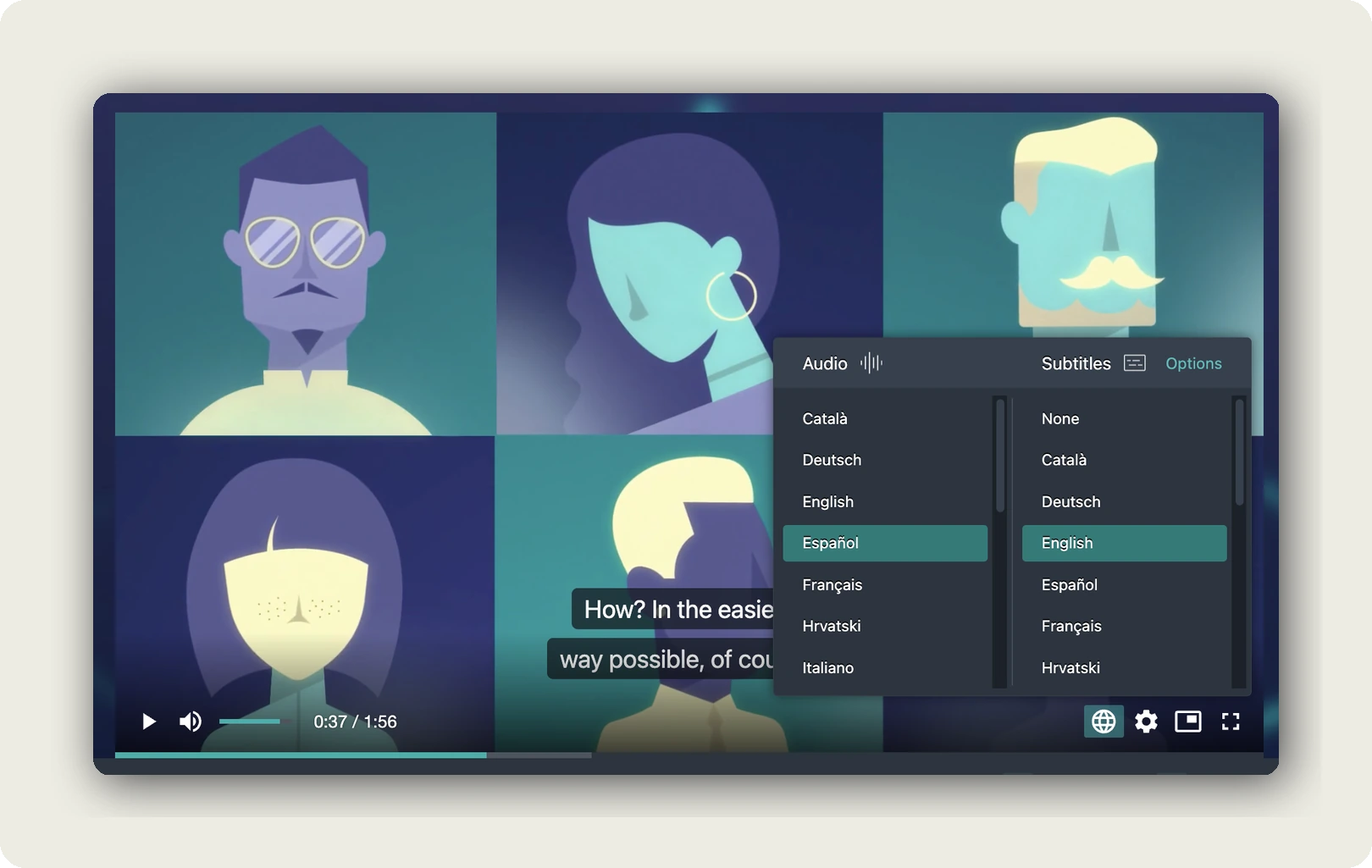
For a printed link at one site, add ?lang= with a three-letter ISO 639-3 code. ?lang=pol works, while ?lang=pl falls back to the default without an error.
The embed code goes on your intranet page or into your LMS. We document the route for embedding in Moodle, and some LMSs strip iframes or block third-party cookies. A link pasted into Teams or Slack unfurls into a preview card and opens our player; it does not play inline. A smart TV with a current Chromium browser can serve as the break-room screen. Vertical phone video plays vertical, with no letterboxing. Encoding at upload is 540p, 720p or 1080p, with 1080p on a paid tier, and we do not cap the length of a single video. We host in Germany and the EU, with no third-party advertising cookies and trackers, and no external ads or third-party recommendations after the welcome ends.
The link you send on day one should still work after the next policy update.
A review gate per language
Our Speech-To-Text writes the transcript, machine translation carries it into the next language, and Text-To-Speech can voice it. We translate into more than 200 languages. Each language is a draft until someone at that site has read it, and for safety content that review is never optional. A glossary, on a paid tier or as an add-on, keeps job titles and in-house terms fixed, so “Schichtleiter” does not become three different words at three sites. Voice cloning, on our top paid tier or as an add-on, needs the speaker’s consent and a governance decision first.
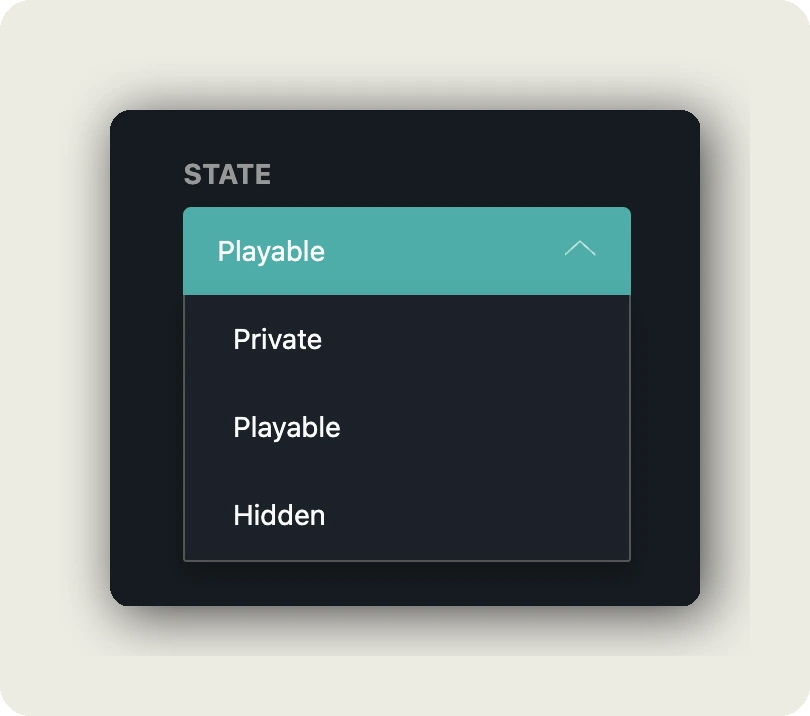
Each language track has its own state: Playable, Private or Hidden. Keep the Romanian track private until the site HR lead has signed it off, while the other languages already play. The difference between published and available content is explained in our help center.
Titles and thumbnails are per language too. Thumbnails are public images, so keep anything confidential out of them. We count plays per language track and subtitle views separately, with detailed analytics on our top paid tier. We provide no per-person completion record, so completion stays in your LMS.
In short: one video, every language inside it, each language released when its site has read it.
Frequently asked questions about employee onboarding videos
What is an employee onboarding video?
It is a short clip that answers a question every new hire asks, the same way each time. Typical examples are a manager welcome before day one, a who-to-ask clip and a tool walkthrough. In BambooHR’s 2023 survey of 1,565 US office workers, 65 percent named the lack of a clear contact for questions as a frustration, the gap to close first.
How long should an onboarding video be?
Under six minutes per clip, with one outcome each. Guo, Kim and Rubin’s 2014 analysis of 6.9 million edX viewing sessions found that median engagement topped out at about six minutes, whatever the length. Welcomes work at 60 to 90 seconds. Safety instruction can run toward six minutes, and it needs a comprehension check afterwards, not only a play count.
What are the 5 C’s of employee onboarding?
Talya Bauer’s 2010 guideline for the SHRM Foundation named four: compliance, clarification, culture and connection. Many HR sources add a fifth C, often confidence or check-back. Video carries compliance and clarification best, because both are repeatable facts. It can show culture in part. Connection needs people: a manager, a buddy and colleagues to shadow.
What is the 30-60-90 onboarding rule?
It is a planning convention, not a law or a standard: you set goals for day 30, day 60 and day 90. Mapped to video, welcome and safety clips come before day 30, policies by day 30 and growth topics by day 90. BambooHR’s 2023 average decision point of 44 days argues for front-loading everything that shapes the decision.
Should onboarding videos be in the employee’s language?
For safety content in Germany, in substance yes. Section 12 ArbSchG requires sufficient and appropriate instruction, and DGUV Regel 100-001 spells out an understandable form and language, plus a check that it was understood. Elsewhere it is good practice. Where a full translation is not yet available, captions help: Gernsbacher’s 2015 review of more than 100 studies found they improve comprehension and memory.
Can new hires watch onboarding videos before their first day?
Welcome and logistics clips, yes, as optional viewing. In Germany, training required by law, collective agreement or works agreement counts as working time under section 111 GewO, and section 12 ArbSchG places safety instruction inside working time. Keep those clips for day one. Send the welcome with the offer pack or the first email instead, where it sets the first impression.
Is YouTube safe for employee onboarding videos?
For public employer branding, it is a good fit. For internal clips, weigh two facts from Google’s own help pages. An unlisted video can be watched and reshared by anyone who has the link. Privacy-enhanced mode limits personalization rather than stopping YouTube from receiving the view. Ask any host where data is stored, and ask for its Art. 28 agreement.
Getting started
Three moves for this week:
- Ask your last ten hires which questions they asked most in week one. Those are your first clips.
- Film the manager welcome and a who-to-ask clip on a phone, under two minutes each, and caption both.
- Count the languages your sites work in, and decide per format between subtitles and voice.
Then go back to the new hire in week one, one of the 65 percent in BambooHR’s survey frustrated by having no clear contact for their questions. Now picture the same person at site 9, pressing play on the link everyone else got. The answer arrives in their own language, with a name and a face attached.
If your onboarding runs across several sites and languages, book a call. We will walk through one of your own videos, the language review per site and the embed on your intranet, and answer your data protection questions about hosting.