Every YouTube video with captions already has a transcript: open the description and click Show transcript. What appears is the video’s caption track, set out as running text, and it is no better and no worse than those captions. Picture a recorded conference talk and one sentence you half remember from somewhere around minute 41. Without the panel, you scrub the timeline back and forth and listen. With the panel open, the hunt becomes Ctrl+F. Click the line, and the video jumps to that second. Read on, and you can open and copy the transcript on a computer or a phone. You can pick the right route for a file or a whole playlist, and tell why a video has none. You will know what you may do with someone else’s words. And you can give your own videos a transcript that is correct in every language you publish.
Key takeaways
- YouTube’s help page listed 67 automatic caption languages in September 2026, and any video with captions shows its full transcript under the description, behind one Show transcript button. No extension needed.
- YouTube names six reasons a video has no automatic captions, from unsupported languages to long silence at the start. Most fixes belong to the creator, since community captions ended in September 2020.
- The official YouTube Data API downloads captions only for videos you are allowed to edit, at 200 quota units per call, so a default daily quota covers at most 50 downloads.
- For your own video, YouTube Studio lets you download, correct and re-upload the caption file. Auto-sync times a pasted script, though YouTube advises against it for videos over 60 minutes.
- Reading a transcript is fine. Republishing someone else’s words is a copyright question, YouTube’s terms bar automated access, and its developer policies limit most stored API data to 30 days.
- We do not fetch YouTube transcripts. Our Speech-To-Text transcribes your own file, you correct it in the dubbr, and machine translation carries it into 200+ languages. Export needs a paid tier.
- Key takeaways
- How to open a YouTube video transcript
- Which method fits which job
- Why some videos have no transcript
- Where the text comes from
- Using someone else's transcript
- YouTube video transcripts for creators
- Transcripts that start with your file
- Frequently asked questions about YouTube video transcripts
- Getting started
How to open a YouTube video transcript
Start on the video’s own page.
On a computer
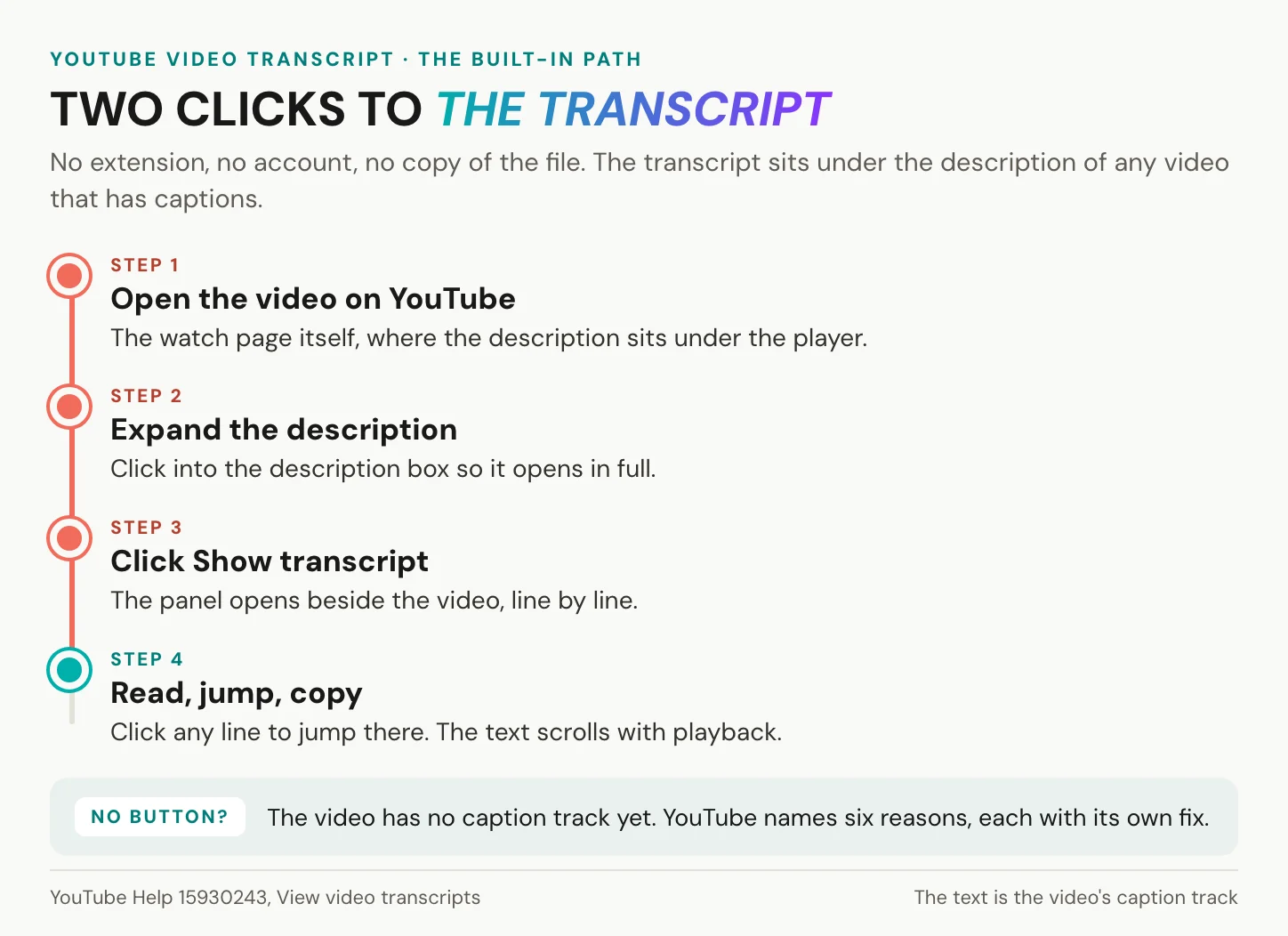
YouTube’s help page puts it in one line: in the video description, click Show transcript. On a long description, expand it first. The panel opens beside the player and scrolls with playback, so the current line is always in view. Click any line, and the video jumps there. The CC button at the bottom right of the player shows the same words over the picture, one line at a time. The same page notes that the panel can also surface chapters, people and places mentioned in the video, and affiliate products. If the description shows no button, look in the three-dot menu under the player, where older layouts kept it. One trap catches many readers. An embedded player on another website has no description and therefore no button. Open the video on YouTube itself.
On a phone
YouTube’s help page gives one instruction, with no separate steps for phones: the description, then Show transcript. In the app, the description opens when you tap the video’s title. The panel then behaves as it does on a computer: it scrolls along, and a tap on a line takes you to that moment. Copying is a different matter. YouTube documents no way to copy the transcript on a phone, and selecting text inside the app’s panel does not work on every device. When you need the words in a document, open the same video on a computer and copy it there, which takes a minute. On a small screen, it also helps to know what the panel is for. Captions show the same words one line at a time over the picture, which is enough to follow a talk without sound. The panel earns its place when you need to find something, because you can read back and forth through the whole text and tap straight to the line you want.
Copy a YouTube video transcript without timestamps
YouTube’s documentation mentions no copy or download button for viewers, so you work with what the panel shows. Open the panel’s own menu at its top and switch the timestamps off, if your layout offers that option. Then select from the first line to the last, copy, and paste into a document. Keep the timestamps when you want to cite a moment or return to it later. Our video transcript examples show what a clean transcript looks like in the common formats. If the video carries caption tracks in several languages, check which one the panel shows before you copy. Where your layout offers a language menu in the panel, switch it there. In the player, Settings, then Subtitles/CC, picks the caption language for watching. YouTube also offers Auto-translate there, which is machine translation, not a subtitle a person wrote.
In short: on any captioned video the transcript is two clicks away, and copying it cleanly takes one toggle and a paste.
Which method fits which job
The panel covers most jobs, but a few do not fit it.
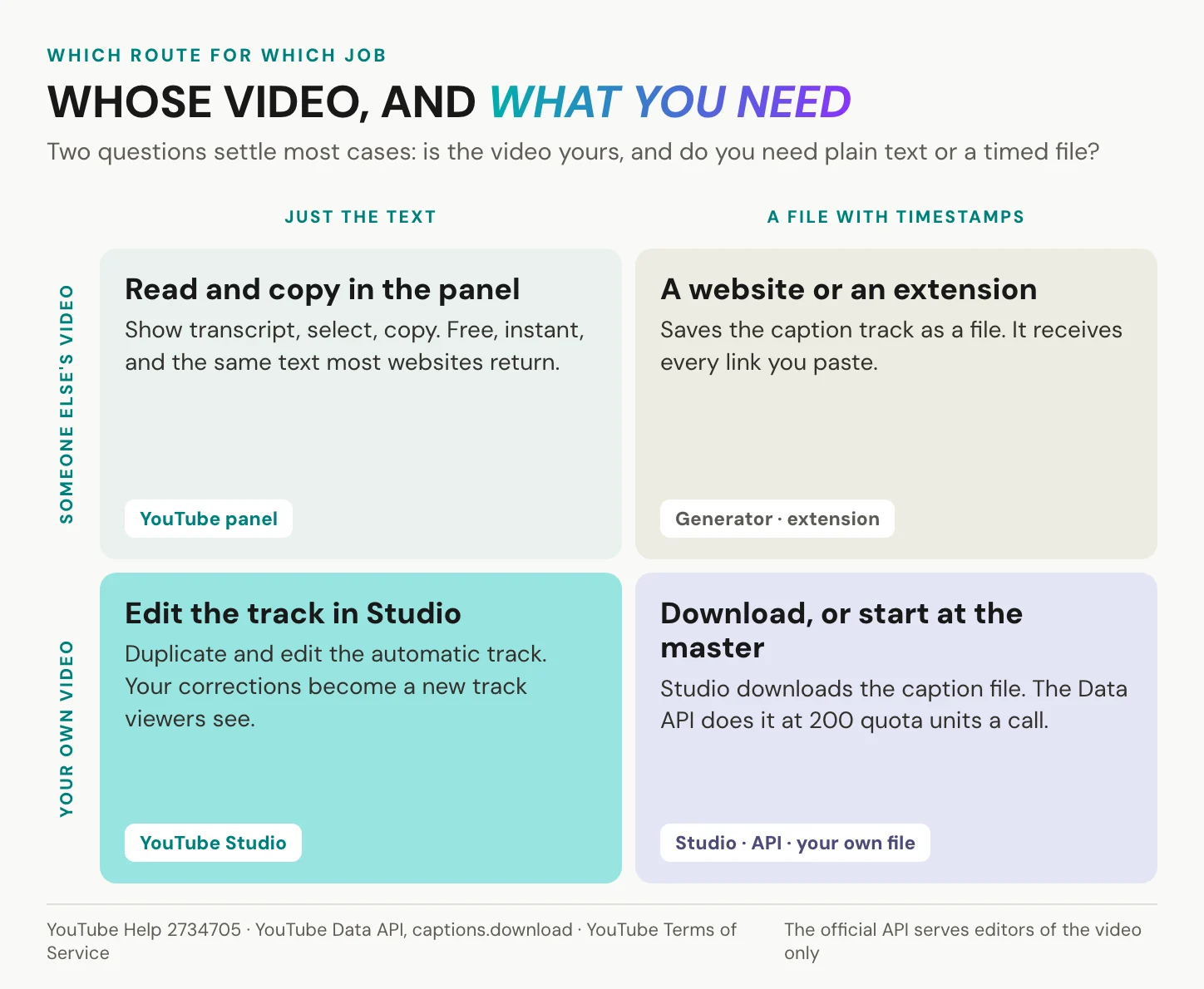
| Goal | Route | Cost | Limit |
|---|---|---|---|
| Read or quote a passage | The Show transcript panel | Free | Only as good as the caption track |
| A text file of someone else’s video | A transcript website or extension | Free tiers with limits | Reads the same track as the panel, and receives your link |
| An SRT or VTT of your own video | YouTube Studio, Download subtitles | Free | Channel owners only |
| Many videos, a playlist, research | Open-source tools such as yt-dlp | Free | Undocumented interfaces, YouTube’s terms |
| Captions through the official API | YouTube Data API, captions.download | 200 quota units per call | Only videos you can edit |
| A video with no captions at all | Speech recognition on a file you are entitled to | Varies | Your own file, or ask the creator |
Transcript websites and extensions
They are convenient, and that is a real merit: paste a link, get a text file, and some handle whole playlists in one go. What most of them do not do is transcribe. They read the caption track that the panel already shows. Tactiq, one of the best known, says on its own tool page that a transcript “might not be available for every video”. That is exactly what reading an existing track implies. A tool that promises text for videos without captions has to get the audio first, and YouTube’s terms restrict downloading. One widely used extension, called simply YouTube Transcript, showed about 100,000 users in the Chrome Web Store in September 2026. Remember what these tools see: a website receives every link you paste, and an extension can read the pages it runs on. For a public video that is harmless. For an unlisted company recording it is not, and we come back to that below.
The YouTube Data API and developer tools
YouTube’s official route has one rule that decides everything. The captions.download method “requires the user to have permission to edit the video”. It returns the track as sbv, scc, srt, ttml or vtt and costs 200 quota units per call. The default quota stood at 10,000 units a day in September 2026, so at most 50 downloads if nothing else runs. The captions.list method returns metadata, not text. It does mark automatic tracks as ASR, though, which tells you the track came from speech recognition, not from a person.
Open-source tools serve everyone else, and they are free, popular and easy to script. The Python library youtube-transcript-api reads transcripts through what its README calls an undocumented part of the YouTube API. The same README warns that YouTube blocks most IP addresses belonging to cloud providers. yt-dlp fetches subtitle files with --write-subs and automatic ones with --write-auto-subs. Both work. Neither is sanctioned: YouTube’s developer policies forbid scraping and undocumented APIs without express permission.
AI assistants that take a YouTube link
For a quick summary, an assistant is the most convenient route of all. Google’s notebook tool, now called Gemini Notebook and long known as NotebookLM, imports only the text transcript of public videos with captions. Uploads less than 72 hours old may fail, videos without speech are not supported, and caption files over 500,000 words are rejected. The Gemini API accepts public YouTube links in preview. Its free tier allows up to 8 hours of video a day, and Gemini 2.5 and later take up to 10 videos per request. No captions, no notebook source. Unlisted and private videos are out for both. Keep one consequence in mind: because the notebook works from the caption track, its summary inherits every error in that track. For anything you will quote, go back to the panel and the audio.
In short: almost every route reads the same caption track. The only real choices are whether you own the video and whether you need a file.
Why some videos have no transcript
No button means no caption track.
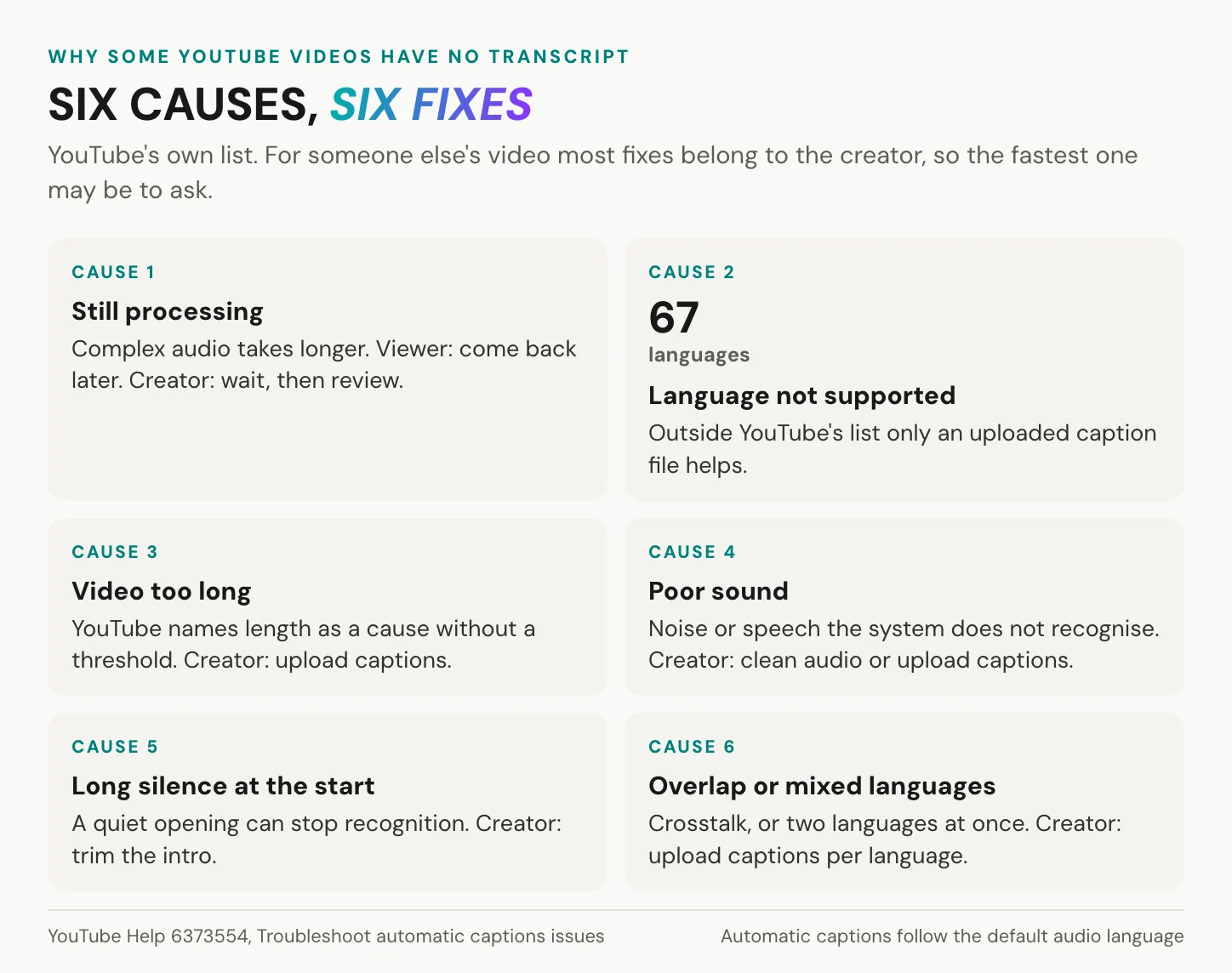
The transcript panel exists only where a caption track exists, uploaded by the creator or generated by YouTube. YouTube generates automatic captions in the video’s default language only, and when a video has several audio tracks, the default wins. YouTube’s help page on automatic captions lists six reasons they fail to appear.
- The audio is still processing. Complex audio takes longer, so as a viewer you come back later. As the creator, wait, or upload a caption file, which YouTube encourages anyway.
- The language is not supported. YouTube’s list had 67 languages in September 2026. Viewers can only ask the creator, who can upload a caption file in that language.
- The video is too long. YouTube publishes no threshold. Viewers can ask the creator, and the creator can upload captions made elsewhere.
- The sound is poor or the speech is not recognised. Viewers can ask the creator, who can upload corrected captions and record cleaner audio next time.
- A long silence at the start. Viewers can do nothing here. The creator can upload captions now and trim the opening in the edit next time.
- Several people talk at once, or several languages are spoken. Viewers can ask the creator, who can upload one caption file per language.
For someone else’s video, almost every fix belongs to the creator, and you cannot add captions yourself: YouTube ended community contributions on 28 September 2020. Ask the channel for its caption file instead. A common tip is to record the audio through your speakers, or to download the video and transcribe it. Both are quick, which is their appeal. Both also route around the creator, and the second around YouTube’s terms as well. If you hold a legitimate copy of the file, from the speaker, the organiser or your own archive, transcribe that file. Our article on how to transcribe video to text covers the methods.
In short: a missing transcript is a missing caption track, and the creator can fix all six causes. The viewer can wait or ask.
Where the text comes from
The transcript is not a separate document.
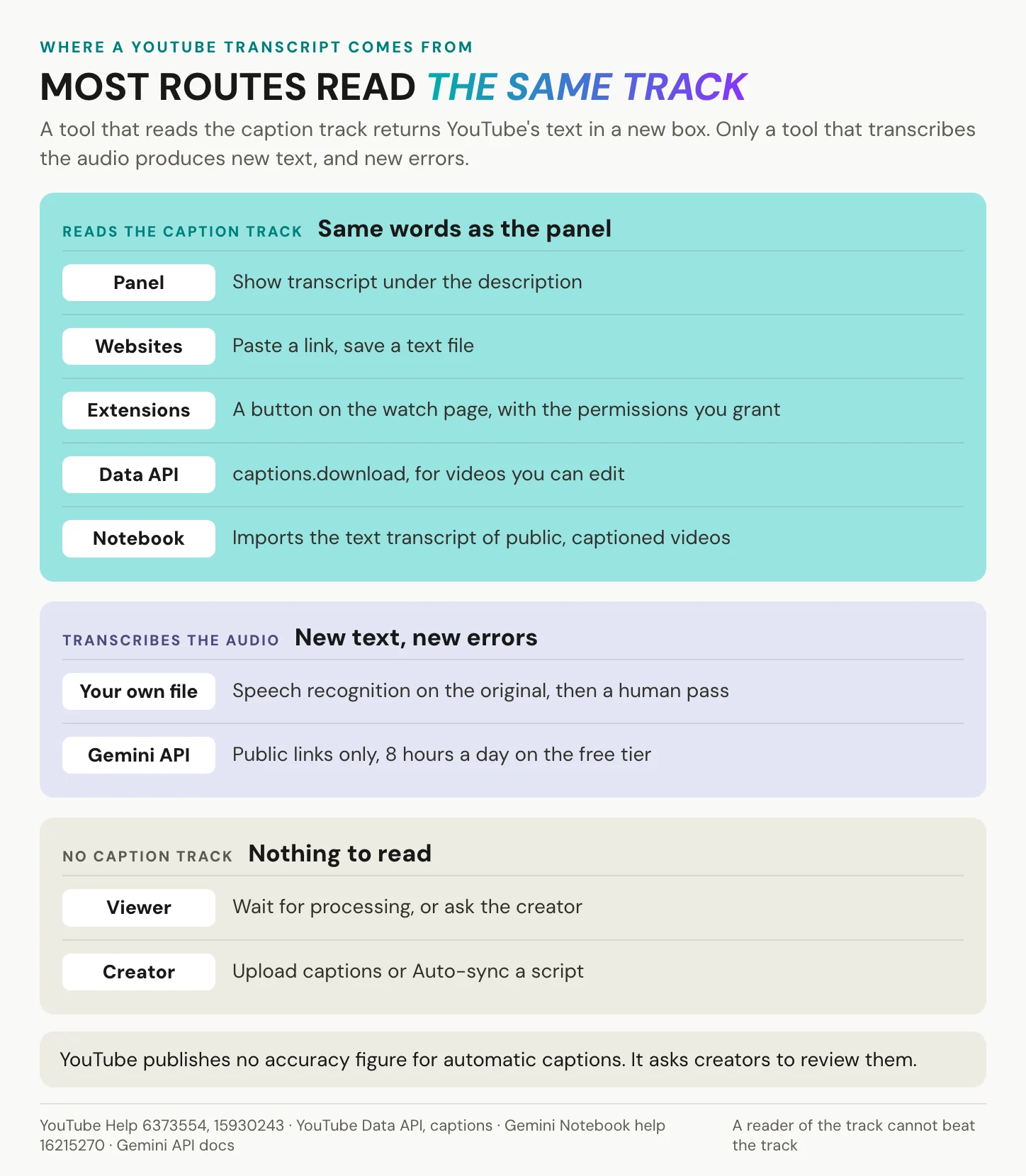
YouTube’s own glossary defines a transcript as unformatted, untimed text transcribed verbatim. It keeps captions, for the same language, apart from subtitles, for viewers of another language. Our piece on what closed captions are walks through the difference. The panel shows a caption track laid out as text. That track is either standard, uploaded by the creator, or ASR, generated by automatic speech recognition. Since 2 December 2025, English automatic captions can also carry expressive cues such as sighs, gasps and emphasis. They started on uploads from October 2025 onward, and YouTube is extending them to older videos.
The automatic system has earned its reach. YouTube introduced automatic captions in 2009, and in February 2017 it reported more than one billion videos with them, along with a 50 percent improvement in English accuracy. That was relative to its earlier results, and YouTube gave no baseline.
What YouTube does not publish is an accuracy figure. Its only statement is a warning: automatic captions “might misrepresent the spoken content due to mispronunciations, accents, dialects, or background noise”, so creators should always review them. A number does circulate: 60 to 70 percent accurate, often called a university study. It traces back to an estimate on a University of Minnesota Duluth help page, not to a published study with a sample and a method. One vendor has put a method on paper. In August 2026 youtube-transcript.ai, which sells transcripts, compared automatic captions of 264 English videos with the captions their creators uploaded. The median word error rate was 9.9 percent, roughly one word in ten, with a wide spread between videos. The study is vendor-published and not peer reviewed, and its reference captions were not professional transcripts either.
A transcript website cannot be more accurate than the caption track it reads.
Before you quote, check the places where machines slip: names, numbers, product terms, and anything said over music or crosstalk. Then compare three random passages with the audio.
In short: every route inherits the track’s errors unless someone transcribes the audio again. YouTube states no accuracy figure, and the one vendor measurement has not been independently checked.
Using someone else’s transcript
Reading is not the question.
Reading a transcript, taking notes from it and quoting a line with attribution are everyday uses, and they are what the panel is for.
A transcript reproduces the speaker’s words, though, so republishing it beyond a quotation needs permission or a legal defence. In the US, fair use is decided case by case on four factors: purpose, the nature of the work, the amount used and the effect on the market (17 U.S.C. §107). In Germany, §44b UrhG allows copies of lawfully accessible works for automated text and data mining. That holds unless the rights holder has reserved it, which for works online counts only in machine-readable form, and the copies must be deleted once they are no longer needed.
Reading a transcript is research. Republishing it is publishing someone else’s words.
YouTube’s Terms of Service add a second layer. They bar access by automated means such as robots or scrapers, except for public search engines or with YouTube’s prior written permission. They also restrict downloading except where YouTube authorises it. Its developer policies forbid scraping and undocumented APIs, and limit how long most API data may be stored to 30 days. For bulk research, ask the channel, use the official API for videos you manage, and keep what you store short-lived. This is not legal advice.
In short: read, take notes and quote with attribution. Anything beyond that needs the rights holder’s permission, and bulk collection also has to respect YouTube’s terms.
YouTube video transcripts for creators
On your own channel, you decide what the panel shows.
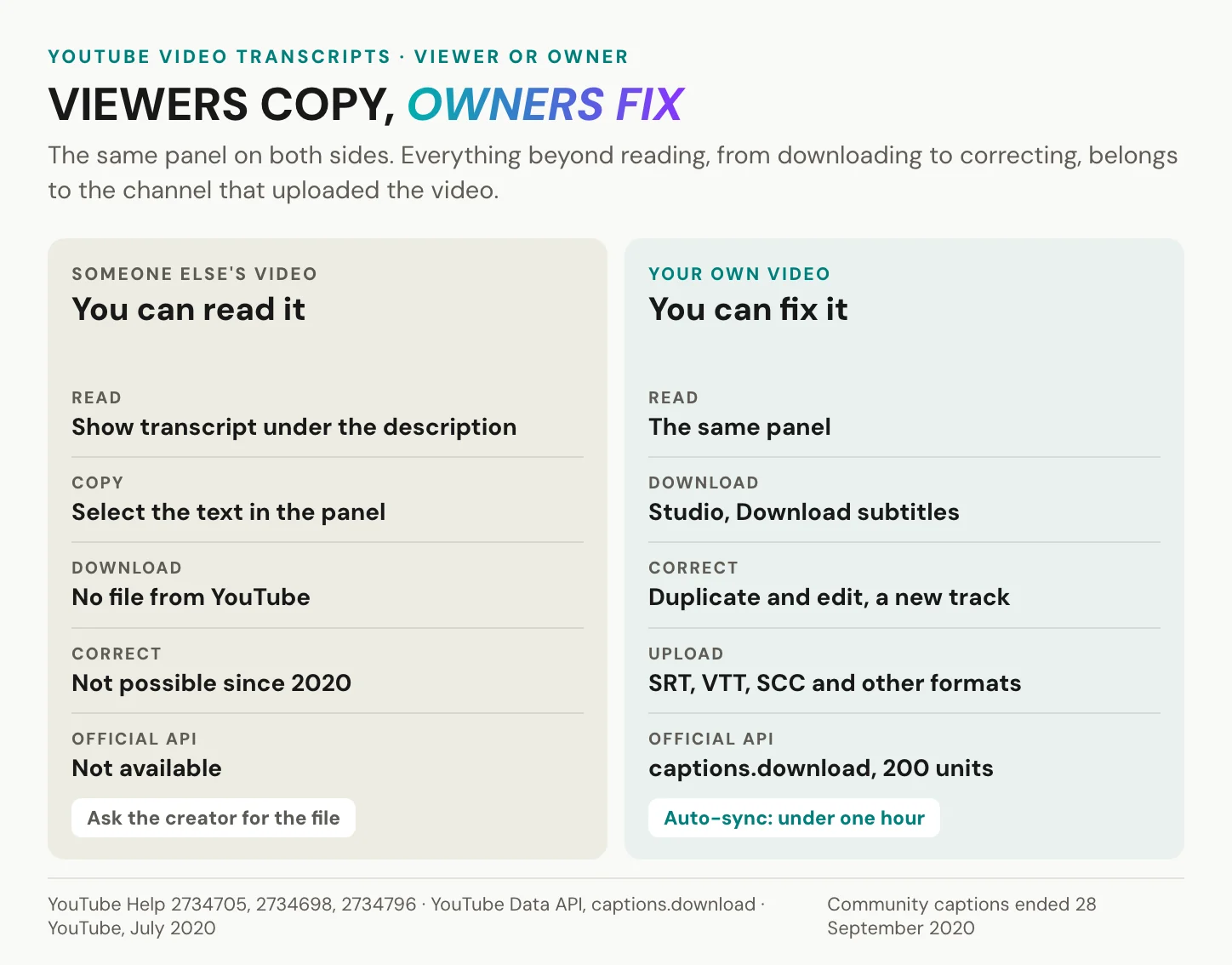
Download and fix the transcript in YouTube Studio
In YouTube Studio, open Subtitles, choose the video, and click Edit next to the language, then Options, then Download subtitles. The path is on YouTube’s help page, but the download formats are not listed there, so take the caption file your Studio offers. To correct an automatic track, use Duplicate and edit, and YouTube generates a new caption track that includes your revisions. Uploading works the other way round. YouTube accepts SRT, SBV, VTT, SCC and about a dozen other formats, and it asks that SRT and SBV files be plain UTF-8, without styling. It names SCC as its preferred format for broadcast-style CEA-608 captions and still describes its WebVTT support as in initial implementation. If your tool offers both, SRT avoids that caveat. Channels that manage many videos can do the same through the Data API, where captions.insert costs 400 quota units and captions.update 450. Before you upload, check four things machines get wrong: names, numbers, product terms and speaker changes.
Start from a script with Auto-sync
If you already have the script, Auto-sync is the fastest route to timed captions: paste the text and YouTube sets the timings. The limits are YouTube’s as well. It works only in a language YouTube’s speech recognition supports, and only for the language actually spoken. YouTube does not recommend it for videos over an hour long or with poor audio. More generally, YouTube encourages creators to add professional captions before relying on automatic ones. A script has one weakness of its own. Speakers rarely deliver it word for word, and Auto-sync times the words you paste, not the words that were said. Edit the script to match the recording first, or the captions will show sentences nobody spoke. The result is an ordinary caption track, so the transcript panel shows it like any other, and you can still correct it in Studio.
Give viewers other languages
Automatic captions exist only in the video’s default language. That matters for dubbed videos: if you add an audio track in a second language, YouTube does not caption it automatically, because automatic captions follow the default. Auto-translate is the quick answer, and it costs the creator nothing, since viewers get a machine translation on top of your track. You do not control its wording, though. Channel owners can pull the same kind of machine translation through the API’s tlang parameter and correct it before upload. An uploaded subtitle file per language is the controlled route, because the words your viewers read are the words you approved. Our article on how to translate a video covers the workflow from one language to many.
In short: as the owner, you can replace an automatic track with a corrected one, and everything else is quality control before upload.
Transcribing your own recordings before they go to YouTube? Create an alugha account and run Speech-To-Text on the master file.
Transcripts that start with your file
We do not fetch transcripts from YouTube. There is no YouTube link import in our product, no extension and no transcript generator page, because we transcribe files you upload. For someone else’s video, open YouTube’s panel and copy it; you do not need us. The same goes for your own video if it lives only on YouTube, in one language, and the automatic captions are good enough after a pass in Studio. Stay in Studio. A developer pulling captions at scale needs the Data API and YouTube’s terms, not a video platform.
Where we help is the transcript as a working document. You upload the original file, the one you exported from your editor, or only its audio with Process audio only, which costs no encoding credits. In the dubbr, our editing workspace, choose Automation, then Speech To Text. Pick the language that is actually spoken, and save the result as a transcript or as subtitles. The dialog shows the credits the job will use before you confirm. Every segment carries a start and an end time. You read it next to the picture and correct the names, numbers and terms our Speech-To-Text got wrong.
Fix the names and numbers once, at the source, and every language inherits the fix.
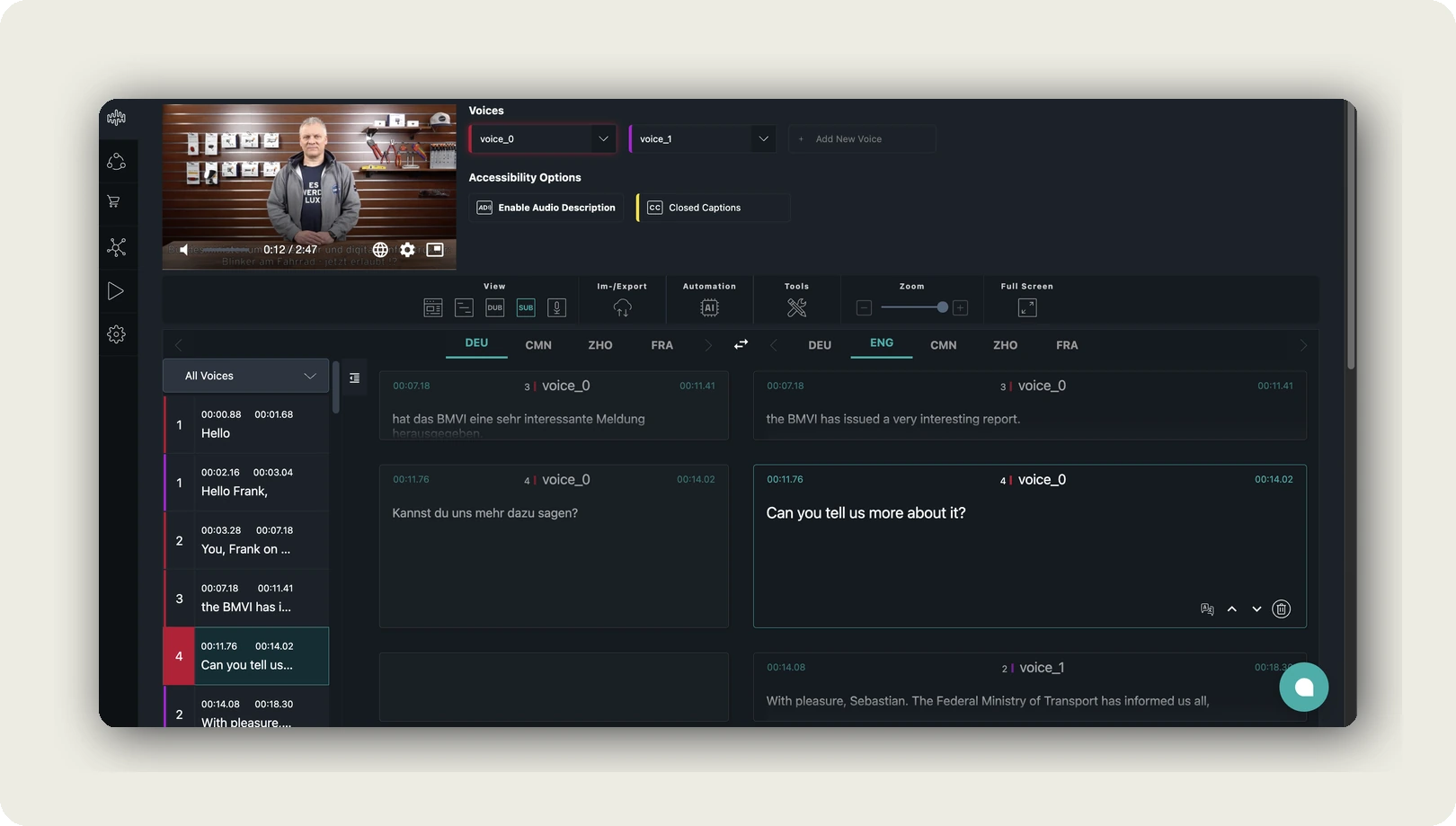
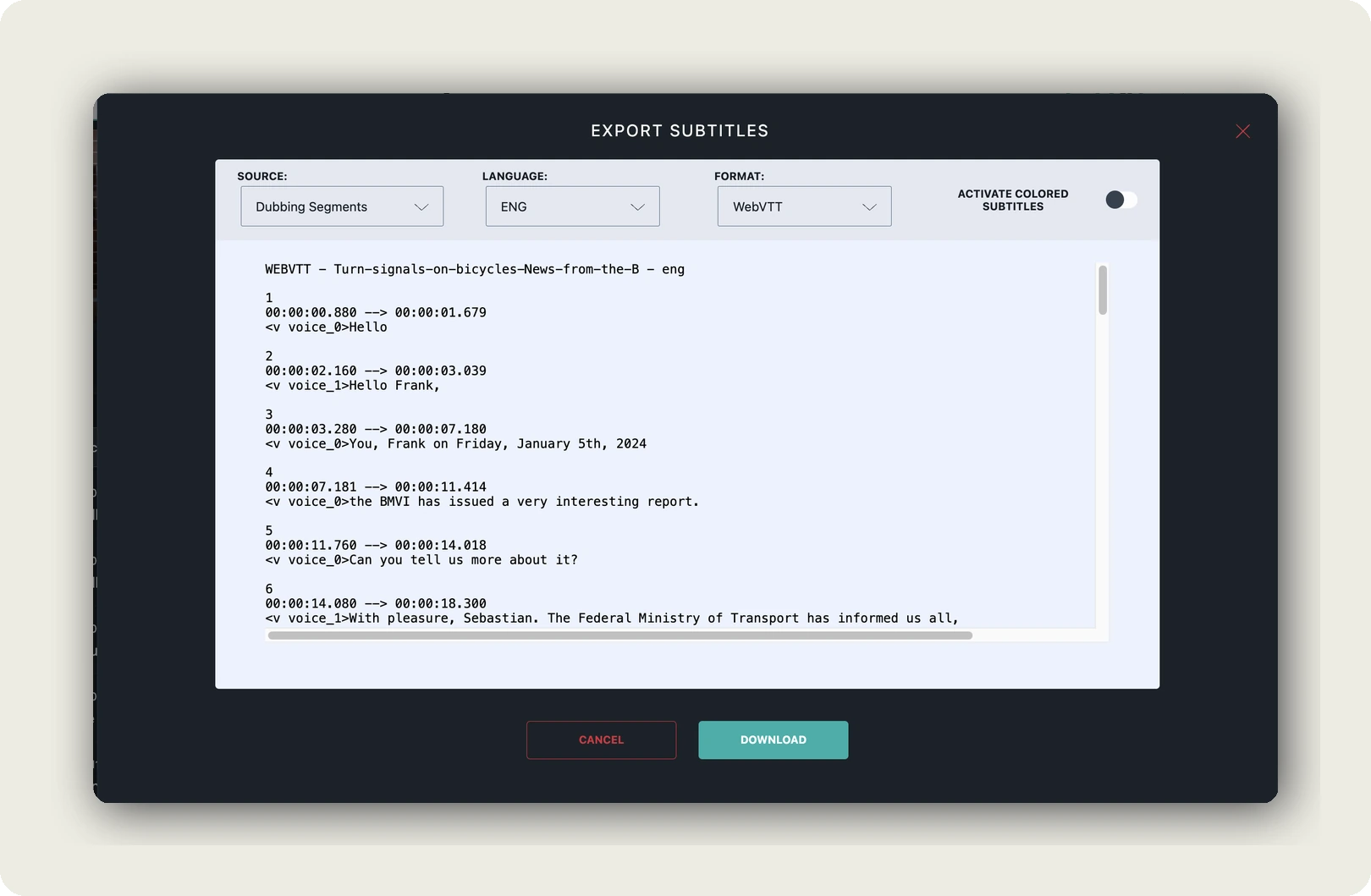
Then the text leaves, and exporting the file needs a paid tier. Under Im-/Export, Export Subtitles gives you plain text for reading and quoting, or SRT and WebVTT when the timestamps matter. That is the file you upload in YouTube Studio. Already corrected your captions in Studio? Import the subtitle file, such as WebVTT, instead of transcribing again.
The corrected transcript is also the start of every other language. Machine translation takes it into more than 200 languages, and each language becomes its own subtitle track in one project. With a voice-over it gets its own audio track too; how many audio tracks a video carries depends on the tier. Our player carries every language under one URL, and viewers choose audio and subtitle language separately.
Internal and unlisted videos
YouTube’s reach and zero cost are real merits. For a public marketing video, there is no data-protection question at all. It changes with an all-hands, a training or a customer call uploaded unlisted just to get automatic captions. Paste that into a transcript website or extension, and personal data reaches parties you have no processing agreement with. Ask any provider, including us, for its Art. 28 GDPR agreement before the first upload; for ours, book a call. Embeds on a German company page have their own rule. Section 25 TDDDG requires consent for anything stored on or read from the visitor’s device beyond what is strictly necessary. YouTube’s privacy-enhanced mode keeps embedded views from shaping the viewer’s YouTube experience; YouTube does not call it cookie-free. Our side: hosting in Germany and the EU, no third-party advertising cookies and trackers, as our article on GDPR-compliant video hosting sets out. One habit helps with any provider: cut or mask the parts with customer data before you transcribe.
In short: if the video is not yours, you do not need us. If it is, start the transcript from the master file, correct it once, and let every format and language inherit the fix.
Frequently asked questions about YouTube video transcripts
How can I download the transcript of a YouTube video?
As a viewer, you get no download button from YouTube. Copy the text from the Show transcript panel into a document, or use a transcript website, which saves the same caption track as a file. As the channel owner, open YouTube Studio, then Subtitles, the video, Edit next to the language, Options and Download subtitles, which gives you a timed caption file.
How can I get a YouTube transcript for free?
The Show transcript panel is free on every video that has captions, and copying from it costs nothing. Transcript websites and browser extensions usually offer free tiers with limits on length or volume. Channel owners download their own caption files in YouTube Studio at no cost. If a video has no captions, no free route can show you a transcript that does not exist.
How do I copy a YouTube transcript on my phone?
Open the video in the YouTube app, tap the title to open the description, and tap Show transcript. The panel scrolls and jumps like the desktop version. YouTube documents no copy function on phones, and selecting text in the app does not work on every device. For a clean copy, open the video on a computer, switch the timestamps off, then select and paste.
Can I get a YouTube video transcript if the video has none?
Not from YouTube. No caption track means no transcript, and YouTube’s help page lists six causes, from unsupported languages to overlapping speakers. Community captions ended on 28 September 2020, so you cannot add them yourself. Ask the creator for the caption file. If you hold a legitimate copy of the video, transcribe that file with speech recognition instead of downloading anything from YouTube.
Can AI tools read a YouTube video’s transcript for me?
Some can, within limits. Google’s notebook tool imports only the transcript of public videos that have captions. The Gemini API accepts public YouTube links, up to 8 hours of video a day on its free tier. Unlisted and private videos work with neither. The dependable route is to copy the transcript from the panel and paste that text into the assistant.
Is it legal to use a transcript of someone else’s YouTube video?
Reading it and quoting short passages with attribution are ordinary uses. Republishing the transcript needs the rights holder’s permission or a legal defence, such as US fair use, which courts weigh on four factors. YouTube’s terms also bar automated access and restrict downloading. For anything beyond notes and quotes, ask the channel first. This answer is general information, not legal advice.
How do I get a YouTube video transcript in another language?
If the creator uploaded a subtitle track in your language, pick it under Settings, then Subtitles/CC, and check that the transcript panel shows the same language before you copy. Auto-translate in that menu gives a machine translation, useful for understanding, weak for quoting. Channel owners can request a machine-translated file through the API’s tlang parameter, or better, upload a corrected subtitle file per language.
Getting started
Back to the conference talk. Minute 41 is now a search result, and the sentence sits in your notes with its timestamp. On your own channel, the same panel can show a track you corrected once, in every language you publish.
- Open the description and click Show transcript.
- If the button is missing, check YouTube’s six causes, then ask the creator.
- If the video is yours, fix the track at the source.
Two clicks, then the right words.
Want the transcript of your own videos correct in every language? Create an alugha account or book a call with our team.