Hosting video on YouTube costs you nothing, and the player you embed on your website still belongs to YouTube. That is the whole trade. Picture your product video on your pricing page, playing to the end. Then the player fills with suggestions for other videos, and your visitor’s next click leads to YouTube. An ad may have run before your demo started, and unless your site gates the player, no one asked the visitor about cookies before it loaded. None of this makes YouTube the wrong home for your video. It makes the embed a decision of its own. Read on and you can decide per video where it should live, embed YouTube in a way your data-protection officer accepts, and tell when your own player is worth paying for.
Key takeaways
- YouTube runs localised versions in over 100 countries and receives over 20 million uploads a day, per its press page as of September 2026. No business host matches that reach.
- Related videos in a YouTube embed cannot be switched off. Since September 2018 the rel=0 setting only limits them to your own channel, and the logo cannot be hidden either.
- Embedded videos may show ads, and your site earns nothing from them. Under 2020 terms, YouTube may also run ads on some videos from channels outside its Partner Program, without sharing revenue.
- In Germany, section 25 TDDDG requires consent before anything not strictly necessary is stored on or read from a visitor’s device. Privacy-enhanced mode narrows that question. It does not settle it.
- Three Community Guidelines strikes within 90 days can remove a whole channel, and in 2021 YouTube turned old unlisted videos private, which broke the embeds pointing to them.
- We bring no audience, hosting with us is metered, and 1080p is our ceiling. In return our player shows your video and nothing else, hosted in Germany and the EU.
- Key takeaways
- When hosting video on YouTube works
- What YouTube does well
- What a YouTube embed does on your page
- Hosting videos on YouTube and GDPR
- Risks you do not control
- How to host a video on YouTube well
- Keep the channel, change the embed
- Frequently asked questions about hosting video on YouTube
- Getting started
When hosting video on YouTube works
Decide per video, not per company.
Two decisions hide inside one question: uploading a video to YouTube is the first, and putting YouTube’s player on your own domain is the second. The data-protection authority of Baden-Württemberg draws exactly that line in its November 2022 guidance on embedding videos. Its concern is not the platform’s reach but what the embedded player sends from your page, often as soon as the page loads.
Hosting a video on YouTube and embedding YouTube on your website are two different decisions.
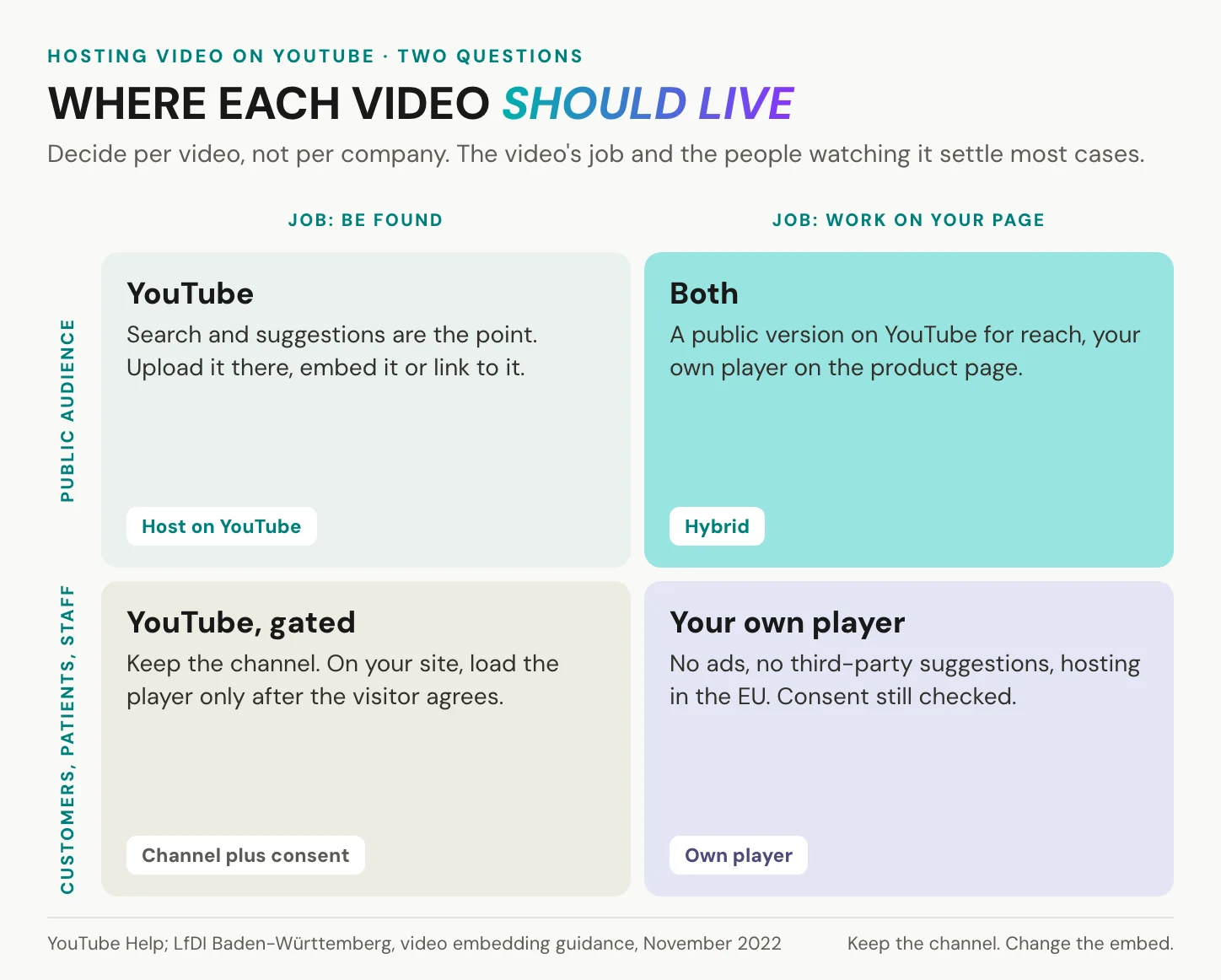
Two questions sort almost every video. First, what is its job: to be found by people who do not know you yet, or to inform, sell or train people who are already on your page? Second, who watches: anyone at all, or customers, patients and employees, people whose visit you answer for?
The answers fall into four cells. A video the public should find belongs on YouTube, and that cell needs no business host at all. A video that should be found and should also work on your product page gets both: a public version on YouTube, your own player on the page. A video for your own audience that you still want on the channel stays there, and your site loads it only after the visitor agrees. A video whose whole job happens on a page you answer for, such as a demo, an onboarding clip or a patient explainer, gets your own player.
Some videos need no second thought. A tutorial channel, a public conference talk, a recruiting clip meant to travel: host them on YouTube and let the platform do its work. Creators who want Partner Program revenue belong there too.
In short: YouTube is the right host when a video’s job is reach, and the embed on your own page is a separate choice with separate costs.
What YouTube does well
Start with what no one else offers.
Reach comes first. As of September 2026, YouTube’s press page lists localised versions in over 100 countries across 80 languages, over 20 million uploads a day and over 200 billion daily Shorts views. It gives no precise user count, only “billions of monthly logged-in users”. The famous line that YouTube is the second-largest search engine comes from a comScore comparison of US search queries for November 2008, so treat it as history, not as a measurement.
The scale shows in the money. Alphabet’s annual report for 2025 puts YouTube’s advertising revenue at USD 40.4 billion, up from USD 36.1 billion in 2024. That is not a moral point, but it explains the embed: the platform is built to keep viewers watching, because watching is what advertisers pay for.
The tools are generous. Automatic captions come in many languages, with YouTube’s advice to review them. On 10 September 2025 YouTube began rolling out audio tracks in other languages to all creators. At that launch, YouTube said creators who had uploaded such tracks saw on average over 25 percent of their watch time come from views in a language other than the video’s original. Eligible creators get automatic dubbing, and every channel gets Studio analytics at no cost.
One argument for YouTube is also fair. A raw MP4 file on your own web server streams at one fixed quality, and every gigabyte it sends is yours to pay for. The real alternative to YouTube is a managed host, not your server.
YouTube is free because advertising pays for it.
What a YouTube embed does on your page
The embed is YouTube’s player, on your page.
Grant it its merits first. A YouTube embed is the quickest way to put video on a page: it costs you no bandwidth, it plays in every major browser, and one line of code does it. The rest is written down in YouTube’s own documents.
Related videos and ads you cannot switch off
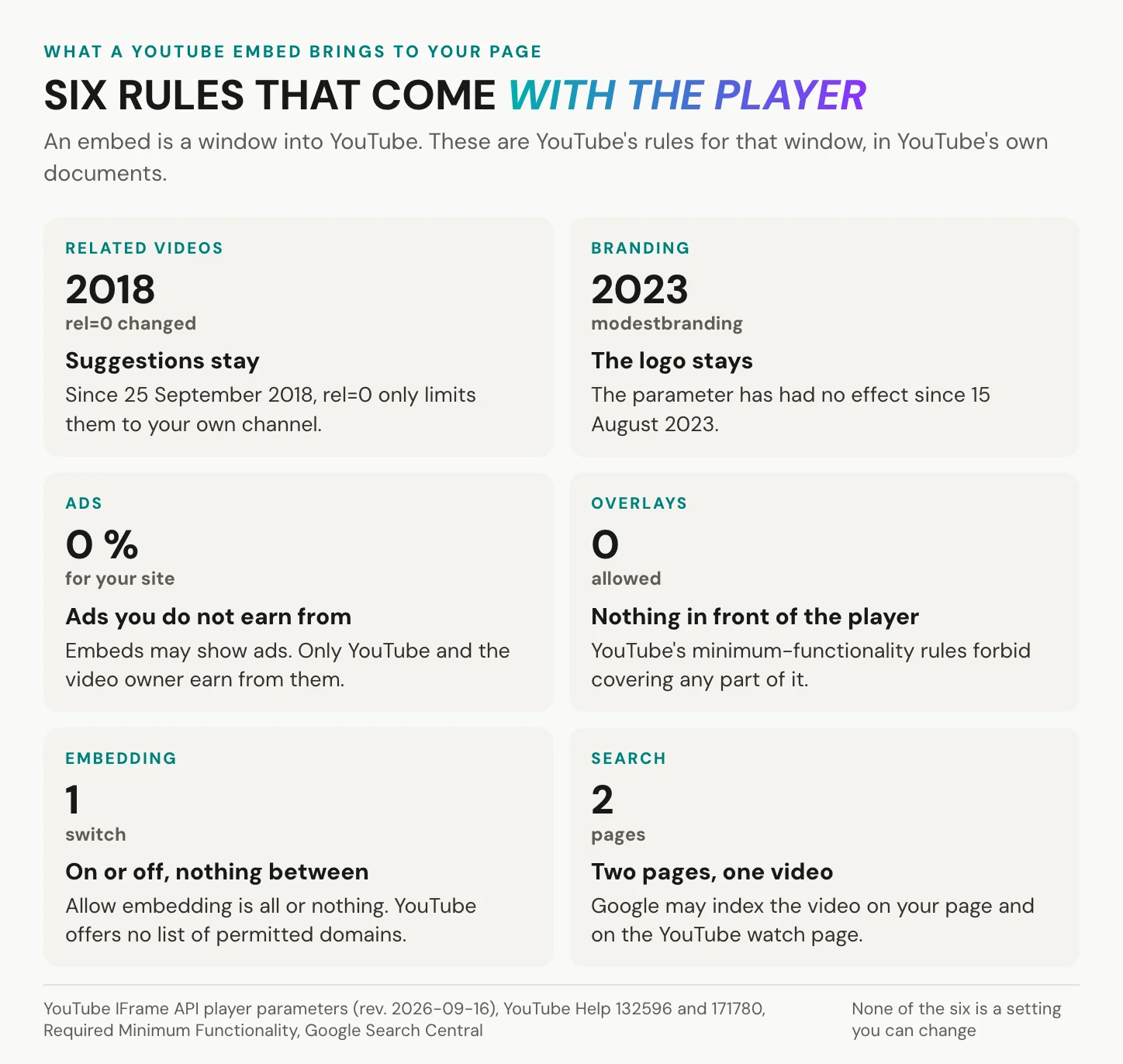
YouTube’s player parameter documentation records a change from 25 September 2018: related videos can no longer be disabled. If you set rel=0, they come from the same channel as the video that just played, which for a company channel means your own older videos and for a default embed means anyone’s. Back on your pricing page, the demo ends and the next thing on screen is a choice of other videos. If an embedding tip tells you rel=0 turns them off, it predates September 2018.
Ads follow the same logic. YouTube Help states plainly that embedded videos may show skippable or non-skippable in-stream ads, and there is no way to turn off ads on embeds only. The one lever is to disable embedding altogether. Only YouTube and the video owner earn from those ads, and the site where the video plays earns nothing. A terms update in November 2020 went further. Since then, and outside the US since 1 June 2021, YouTube also serves ads on a limited set of brand-safe videos from channels outside its Partner Program, without sharing revenue with them. So an ad can run before your own product demo, and if your channel is outside the Partner Program, you cannot rule it out.
Branding and control stay with YouTube
The modestbranding parameter was deprecated on 15 August 2023 and has no effect. YouTube’s Required Minimum Functionality forbids overlays, frames or other visual elements in front of any part of the player, controls included, and requires a viewport of at least 200 by 200 pixels. The Developer Policies forbid blocking or modifying the player or the ads YouTube serves. The player may autoplay only when more than half of it is visible, and two autoplaying YouTube players on one page are not allowed. Embedding itself is one switch in YouTube Studio, “Allow embedding”. YouTube documents no list of domains that may embed your video. It plays everywhere, or nowhere.
An embed is not a copy of your video. It is a window into YouTube, and YouTube decides what the window shows.
Hosting videos on YouTube and your SEO
Google’s video SEO documentation, last updated in December 2025, is direct about embeds. If your page embeds a video from YouTube, Google “may index the video both on your web page and on the third-party platform’s equivalent page”. Since December 2023, Google’s video mode only shows pages where the video is the main content. A blog post with a supporting YouTube embed will usually not win the video result, because the YouTube watch page competes for it. For a video that should rank in YouTube search, that is exactly what you want. For a product page that should own its result, it is not. The same documentation lists what helps a page own its video: a thumbnail Google can fetch, VideoObject structured data and a video sitemap.
In short: you control the video, and YouTube controls the player. It decides what plays before your video, what follows it and whose logo sits on it.
Hosting videos on YouTube and GDPR
A player on your domain is your responsibility.
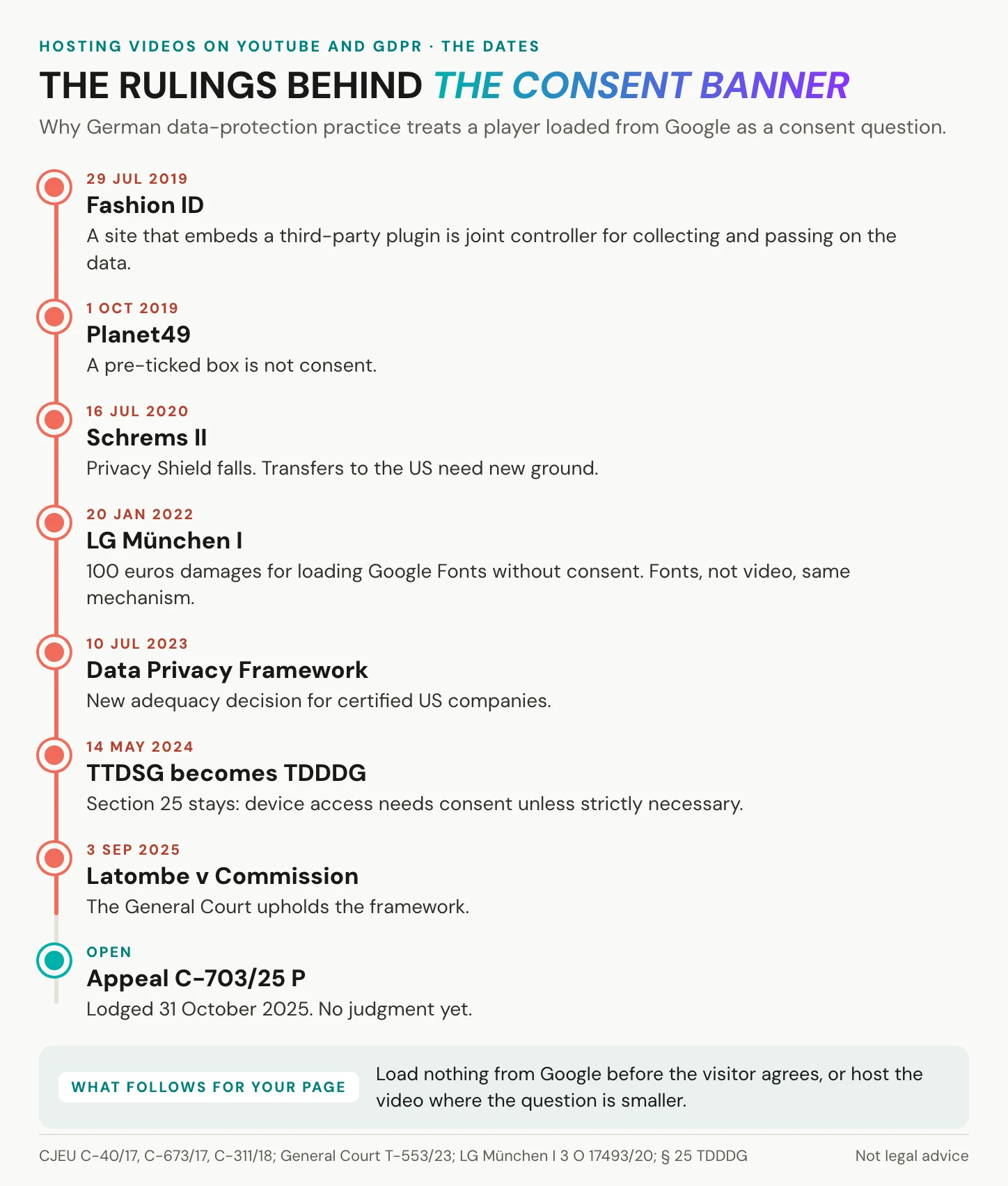
YouTube’s reach does not change who answers for your page. In its Fashion ID judgment of 29 July 2019, the Court of Justice of the EU made a site that embeds a third-party plugin joint controller with the provider. That covers collecting visitors’ data and passing it on, not what the provider does with it afterwards. In Germany, section 25 TDDDG, called TTDSG until May 2024, requires consent before information is stored on or read from a visitor’s device. The exception is what is strictly necessary for a service the visitor asked for. Consent cannot be a pre-ticked box, as the same court ruled in Planet49 in October 2019. Google’s cookie page says VISITOR_INFO1_LIVE, one of the cookies a standard embed sets, “may enable personalized recommendations”.
What privacy-enhanced mode changes
Privacy-enhanced mode is a real improvement, and it takes one edit: you swap www.youtube.com for www.youtube-nocookie.com in the embed code. YouTube promises that views in this mode “will not be used to personalize the YouTube browsing experience”, and that ads served will be non-personalised as well. What it does not promise is that nothing reaches Google. The privacy-enhanced player still loads its scripts and images from Google’s servers, and every one of those requests carries the visitor’s IP address, as soon as the page loads.
German counsel take that seriously for a reason. In January 2022 the Munich regional court awarded 100 euros in damages because a website passed a visitor’s IP address to Google without consent. The case was about Google Fonts, not video, but the mechanism is the same.
Privacy-enhanced mode narrows the consent question. It does not answer it.
Two-click embeds and consent
Direct embeds from commercial platforms, the Baden-Württemberg guidance says, usually transmit the IP address or cookies, often when the page loads and at the latest on the click. Its first recommendation is to host videos yourself, or with a provider without third-country transfer problems. Its fallback is a two-click solution, in which the preview transmits nothing until the visitor clicks. That has a technical consequence: YouTube’s own preview images load from Google’s image server, i.ytimg.com, so the still image in your placeholder has to come from your own server. The same paper adds that a two-click embed only makes consent possible. It does not complete the check, and it has a practical cost: every visitor who declines sees a placeholder instead of your video.
Transfers to the US
The Schrems II judgment ended the Privacy Shield in July 2020. The EU-US Data Privacy Framework followed on 10 July 2023. It covers certified US companies, and Google lists itself among them. The General Court upheld the framework on 3 September 2025, so transfers to certified companies are lawful today. The framework is still under appeal, as case C-703/25 P, lodged on 31 October 2025 and pending before the Court of Justice. If that appeal succeeds, the legal basis for US transfers would have to be rebuilt, as it was after Schrems II. Note in your records which basis you rely on, and look at it again when the court decides.
| Embed | Loads from Google on page view | Consent before load |
|---|---|---|
| Standard YouTube embed | Yes | Usually required |
| Privacy-enhanced embed | Yes | Usually required |
| Two-click placeholder | No, not until the click | Asked at the click |
| Your own EU-hosted player | No | Still checked, one jurisdiction |
For the due diligence on any provider, us included, see what GDPR-compliant video hosting takes. This is not legal advice.
In short: on a German site, consent is usually needed before YouTube’s player loads. Privacy-enhanced mode and a two-click placeholder make that manageable, not unnecessary.
Risks you do not control
The likely case is that nothing happens.
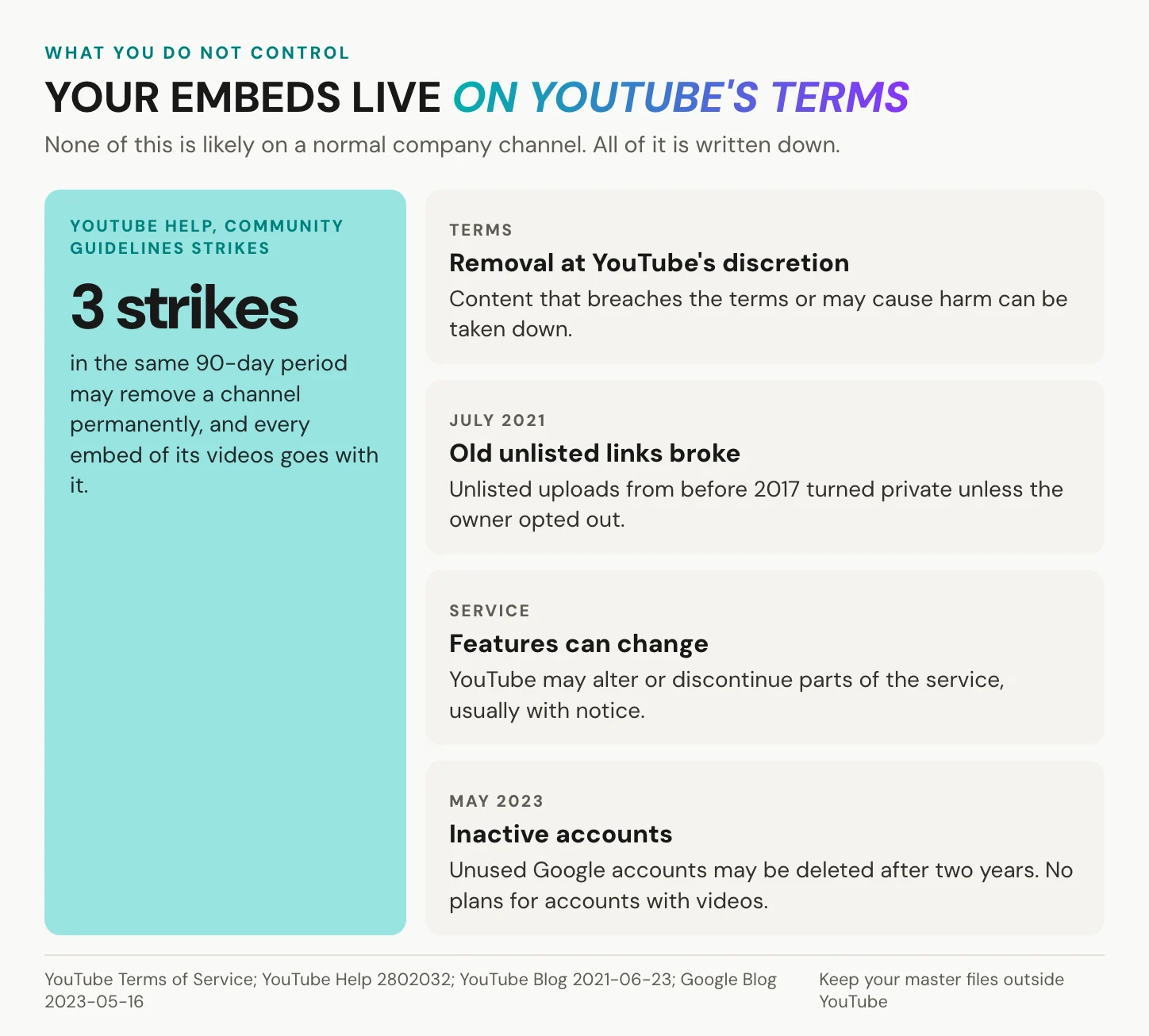
In May 2023 Google announced that accounts inactive for two years may be deleted, and in the same announcement it said it had no plans to delete accounts with YouTube videos. That is a stated plan, not a guarantee. The rest is written down too.
YouTube’s terms let it remove content that breaches them “or may cause harm” to YouTube, its users or third parties, at its discretion. YouTube may also alter or discontinue features; for changes that hurt users it promises reasonable notice, except in urgent cases. Then there are Community Guidelines strikes. A first violation usually brings a warning. Each strike lasts 90 days, and three in the same period may remove the channel permanently. Every embed of its videos goes with it.
Embeds can also break without any fault of yours. From 23 July 2021, YouTube made unlisted videos uploaded before 2017 private unless their owners opted out, and every embed pointing to them stopped working.
Can you use YouTube as free storage for your site?
Embedding through YouTube’s player is allowed; using YouTube as a file store is not. The terms bar downloading or reproducing content except as the service authorises, and they bar circumventing any part of the service. The Developer Policies bar modifying the player, so a custom player on top of YouTube’s streams is out. Unlisted uploads, the usual trick for keeping such videos off the channel, change nothing here: the player, its rules and its ads stay the same. What a site usually wants from the idea is adaptive streaming, several qualities of the same video, with the player picking the one that suits the viewer’s connection. That is what any managed host sells. YouTube gives it to you only inside its own player, with its suggestions, logo and ads attached.
In short: the risk is not that YouTube deletes your channel tomorrow but that the rules for every embed are YouTube’s to change.
How to host a video on YouTube well
If YouTube is the right home, set it up properly.
Upload and copy the privacy-enhanced embed code
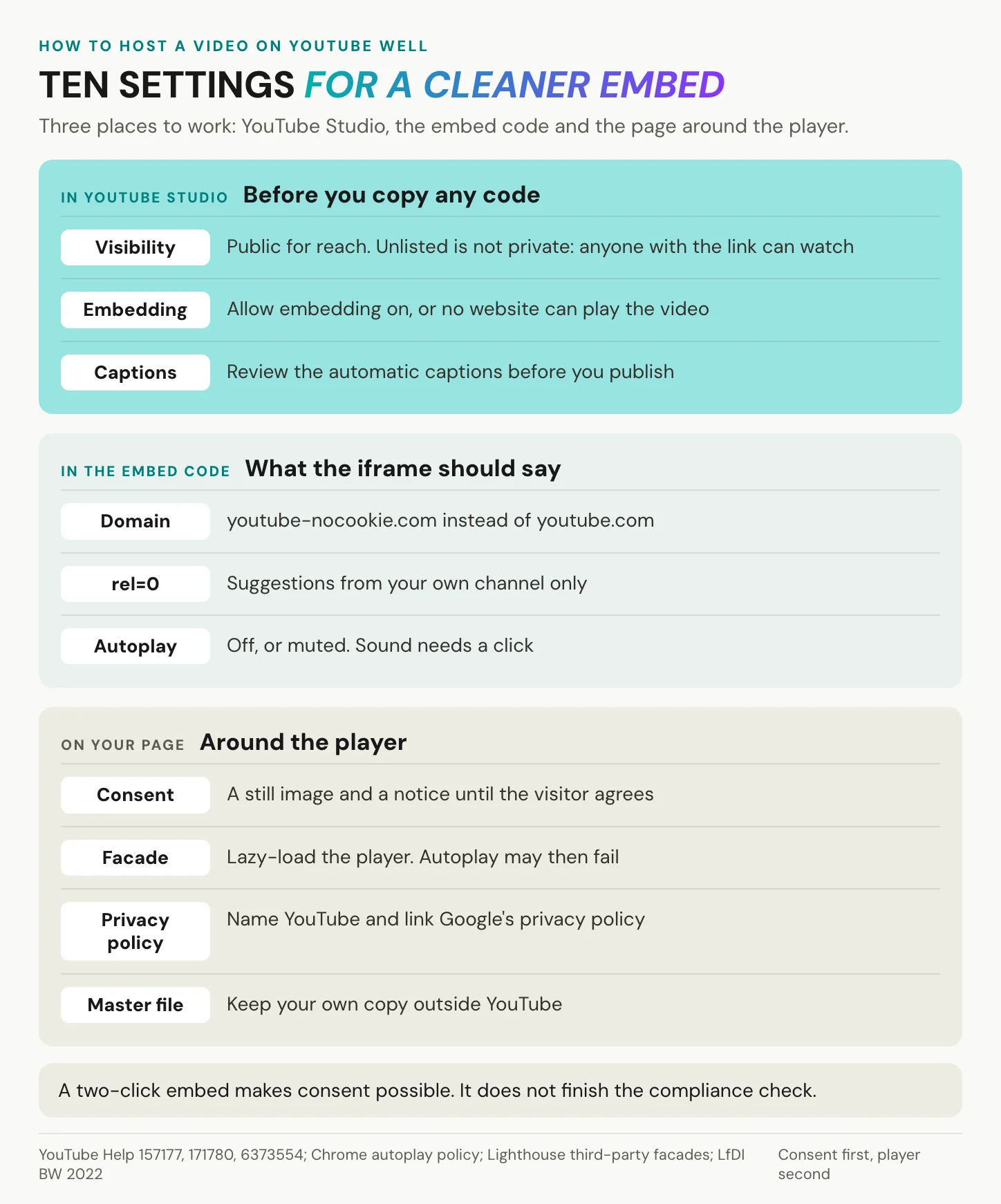
Upload from YouTube Studio. Until you verify the account by phone, videos are limited to 15 minutes; after that the ceiling is 256 GB or 12 hours, whichever is less. Choose the visibility on purpose. Public is for reach, and Private is for viewers you name. Unlisted means anyone with the link can watch and share the video, so it is not access control. For creators, unlisted watch time also does not count toward the Partner Program.
Then open Share, then Embed, and copy the code. Change the domain from www.youtube.com to www.youtube-nocookie.com: that one edit is privacy-enhanced mode, and there is no switch for it in the dialog. Add rel=0 so suggestions at least come from your own channel. Leave autoplay off. If you need it, keep it muted and give the iframe allow="autoplay", because Chrome always allows muted autoplay and usually wants a click or tap first for sound.
<iframe width="560" height="315"
  src="https://www.youtube-nocookie.com/embed/VIDEO_ID?rel=0"
  title="Product demo" allowfullscreen>
</iframe>
Gate the player and keep your own copy
Show a still image from your own server and a short notice until the visitor agrees, then load the iframe. Check whether your consent tool already ships such a placeholder for YouTube before you build one. The same pattern helps speed: Lighthouse lists YouTube embeds as candidates for a facade that loads the real player only on interaction, with the caveat that autoplay may then fail. In your privacy policy, name YouTube and link Google’s privacy policy. YouTube’s API policies require that of API clients; whether a plain embed counts as one is a legal reading, so ask your data-protection officer.
Keep the master file outside YouTube, so a strike or a takedown never takes your only copy with it. Review automatic captions before you publish, as YouTube itself advises. Captions for prerecorded video are a Level A success criterion in WCAG 2.2, which makes them the lowest bar, not a nice-to-have. The kinds of caption track are explained in what closed captions are.
In short: privacy-enhanced code, rel=0, no sound on autoplay and a consent gate turn a default embed into one you can defend.
Keeping YouTube for reach but want your product pages to play your video and nothing else? Create an alugha account and upload your first video.
Keep the channel, change the embed
We bring no audience.
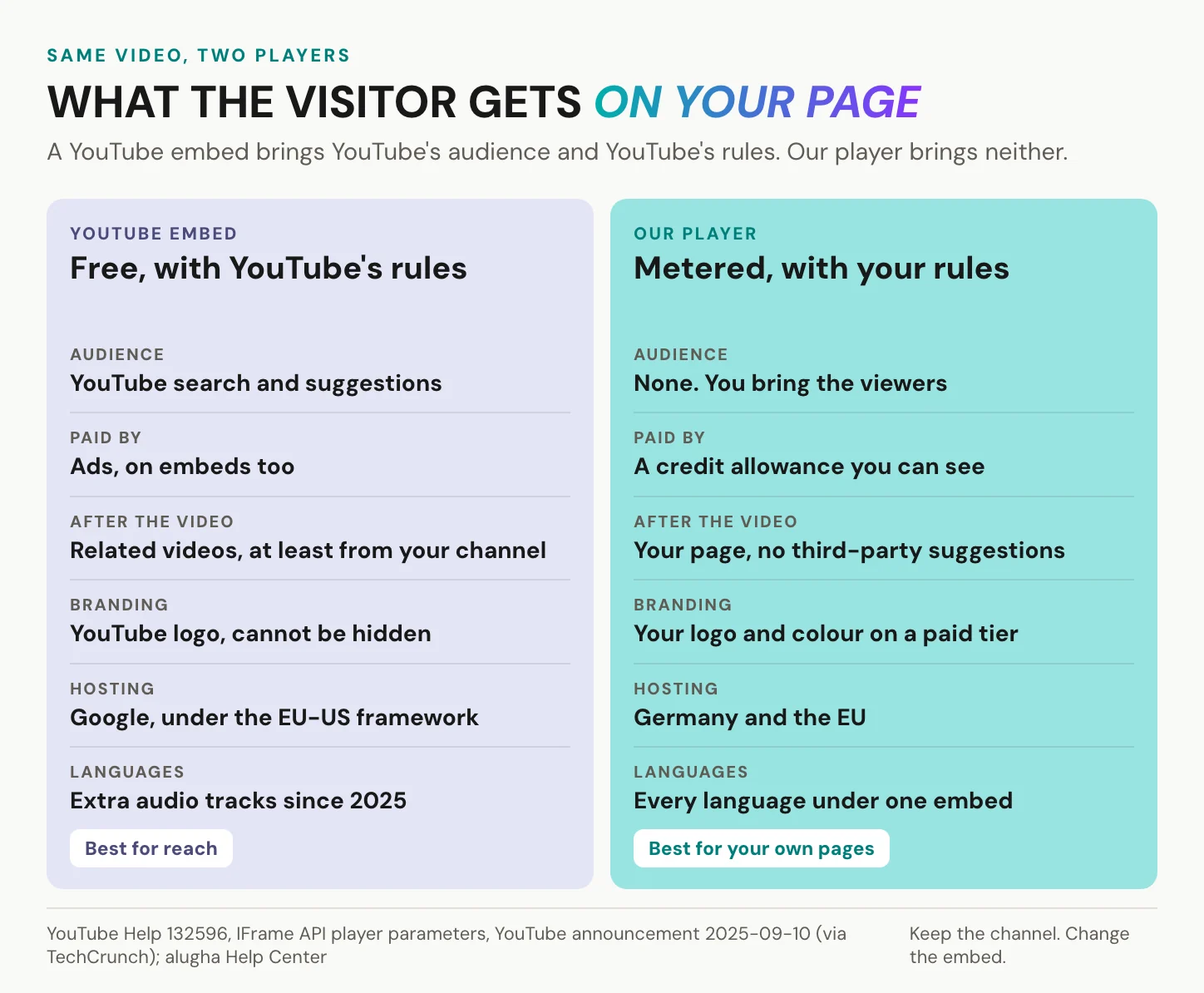
We have no search engine, no recommendation feed and no subscribers, so every viewer of a video on alugha arrives through your site, your mail or your link. Hosting with us is not free either. Storage and streaming draw from a monthly credit allowance, and every upload shows its credit cost before you confirm. When your credit balance reaches zero, the video stays online at the lowest available resolution. We encode at 540p, 720p or 1080p, with 1080p on a paid tier, and our analytics are lighter than YouTube Studio’s on lower tiers. If a video’s job is reach, keep it on YouTube. You do not need us for it.
Where we differ is the player. Our player shows your video and nothing else: no ads, no third-party recommendations when it ends, hosting in Germany and the EU, no third-party advertising cookies and trackers. The visitor who finishes your product video is still on your pricing page. Our player records a pageview and a viewing session on servers we operate, so the privacy question does not vanish. Hosting in Germany and the EU and a player without third-party advertising cookies and trackers narrow the consent question to one jurisdiction, but do not remove it. Ask any host for its Art. 28 processing agreement before the first upload, us included.
Your brand replaces ours. A branding profile puts your logo in place of the play button, your colour on the controls and a link behind the logo; you set it once and apply it to any project. Custom branding sits on a paid tier, and customising the player has the steps. Every project has three visibility states, Private, Public and Not listed, and one switch stops embedding on every website at once.
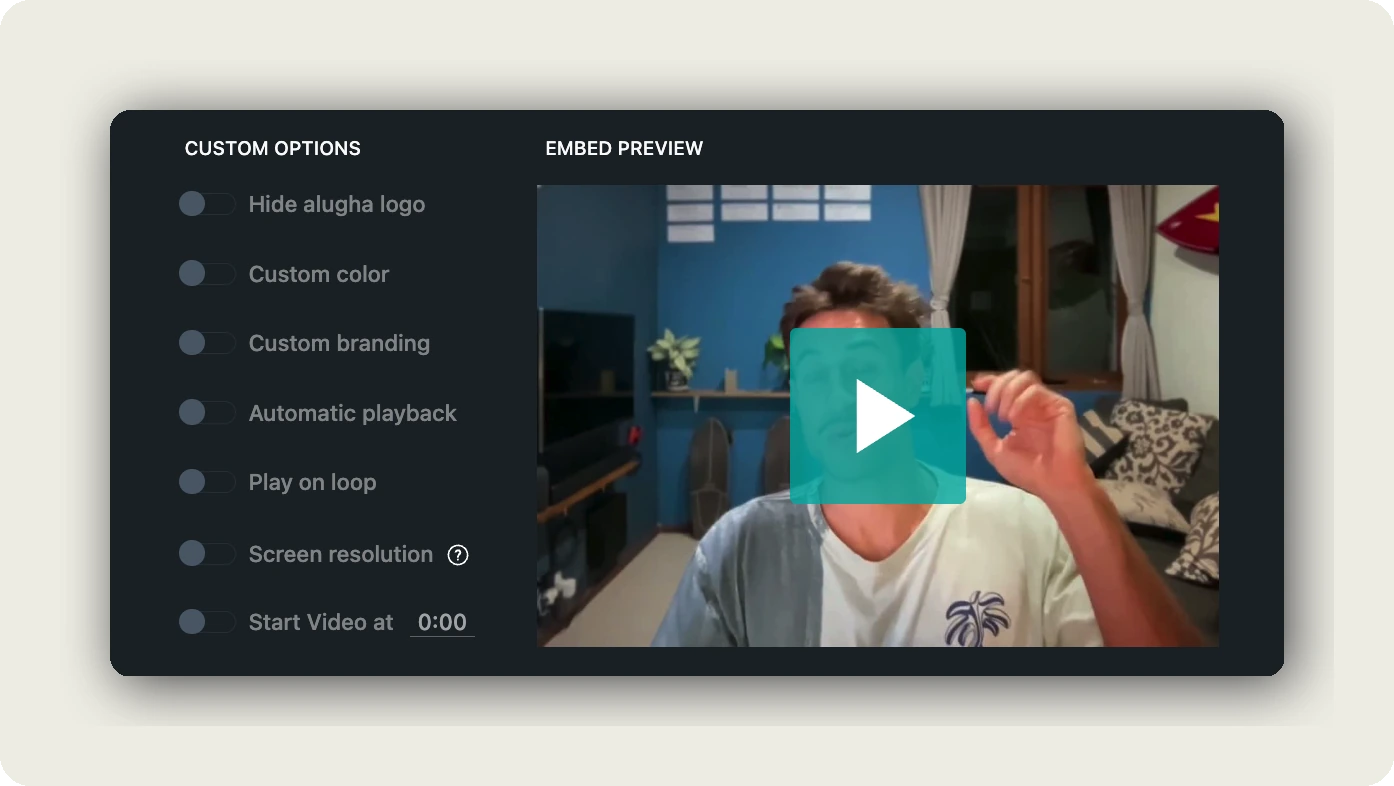
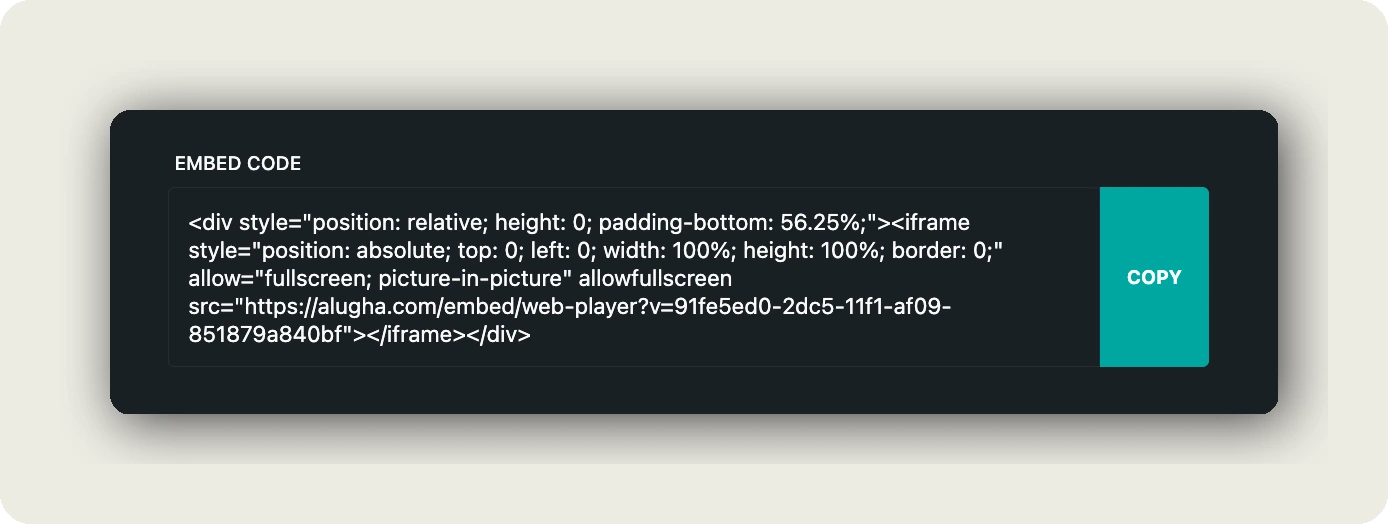
Swapping the embed leaves your channel alone. In the dubbr, our editing workspace, you open Im-/Export, then Share Project, then EMBED OPTIONS, and copy a responsive iframe that replaces the YouTube iframe on your page. A one-time account verification comes before the first public embed. The steps are in embedding a multilingual video, and WordPress has its own walkthrough.
One embed also carries every language of the video, as separate audio and subtitle tracks, and starts in the visitor’s browser language. YouTube now offers multi-language audio too; the difference is what loads around it. More on the tracks in how to translate a video.
The German health-information site tourette.de made exactly this move. It took the videos it owns off YouTube embeds and onto our player, without rebuilding its site. Its YouTube channel stayed, and third-party clips that exist only on YouTube are still embedded from there. The one step that took real work was connecting the player to its existing consent tool.
Keep the channel. Change the embed.
Weighing other hosts as well? The best YouTube alternatives sets them side by side.
In short: if the video must be found, host it on YouTube. If it must work on a page you answer for, use a player that shows your video and nothing else.
Frequently asked questions about hosting video on YouTube
Can I use YouTube to host videos for my website?
Yes. Upload the video, leave embedding allowed and paste the embed code into your page, since YouTube’s terms permit embedding through its own player. What you accept with it is YouTube’s player, rules and ads, and on a German site a consent question under section 25 TDDDG. The decision matrix above sorts which videos suit that trade.
Is hosting video on YouTube free for a business?
There is no fee, but the costs sit elsewhere. Ads may run before your video, and your site earns no share; unless your channel is in the Partner Program, neither does your channel. Suggestions for other videos follow it when it ends. On a European site, the consent setup around the player takes work too. For a quick shareable link, any free host will do.
Can I remove YouTube branding, ads or related videos from an embed?
No. The modestbranding parameter has had no effect since August 2023. Since September 2018, rel=0 only limits suggestions to your own channel. Ads cannot be switched off for embeds alone; the only lever is to disable embedding. And YouTube’s policies forbid overlays in front of any part of the player, so you cannot cover any of it either.
Does youtube-nocookie.com make an embed GDPR compliant?
Not on its own. In YouTube’s words, views in privacy-enhanced mode do not personalise the viewer’s YouTube experience, and the ads stay non-personalised. The player still loads from Google’s servers, though, so the visitor’s IP address reaches Google. Consent under section 25 TDDDG is usually still required, and a two-click placeholder is the common answer. Your data-protection officer has the last word.
Should I upload website videos as unlisted?
Only if a shared link is acceptable. Unlisted keeps a video off your channel page and out of YouTube search, unless someone adds it to a public playlist. Anyone with the link can watch it and pass it on. It is not access control. In 2021 YouTube also turned unlisted videos uploaded before 2017 private, and their embeds broke.
Can I use YouTube as a free CDN for my site?
Only through YouTube’s own player. The terms bar downloading or reproducing content except as the service authorises. The Developer Policies bar modifying or blocking the player and its ads. Pulling the streams into a player of your own, hiding YouTube’s player or stripping its ads breaks both. If you need your own player, you need a host that serves one.
How much does YouTube pay per 1,000 views?
YouTube publishes no rate. RPM, revenue per mille, is what a creator earned per 1,000 views, and it moves with ads, audience and format. Earning at all needs the Partner Program: 1,000 subscribers plus either 4,000 public watch hours in 12 months or 10 million Shorts views in 90 days. New applicants face stricter thresholds from 1 February 2027. That is a creator decision.
Getting started
Back to the pricing page. Your product video ends, and the next thing your visitor sees is your page: your offer, your button, your next step. Meanwhile your channel keeps reaching people who have never heard of you, and both can be true at once. Three steps get you there.
- Sort your videos by the two questions: what is the job, and who watches.
- For everything that stays on YouTube, switch to privacy-enhanced code and put a consent gate in front of it.
- For the pages you answer for, move the embed to a player that shows your video and nothing else.
Your visitor stays on your page.
Keep the channel, change the embed. Create an alugha account or book a call with our team.