Key takeaways
- 13 compliance parameters enforced automatically. alugha’s subtitle accessibility checker enforces 13 compliance parameters including maximum characters per line, minimum gap duration, and reading speed in characters per second, aligned to Netflix, ARD/ZDF, and WCAG 2.1 standards.
- AI re-times, not just flags. Unlike most captioning tools that flag issues for manual review, alugha’s automation restructures and re-times subtitles to achieve compliance automatically.
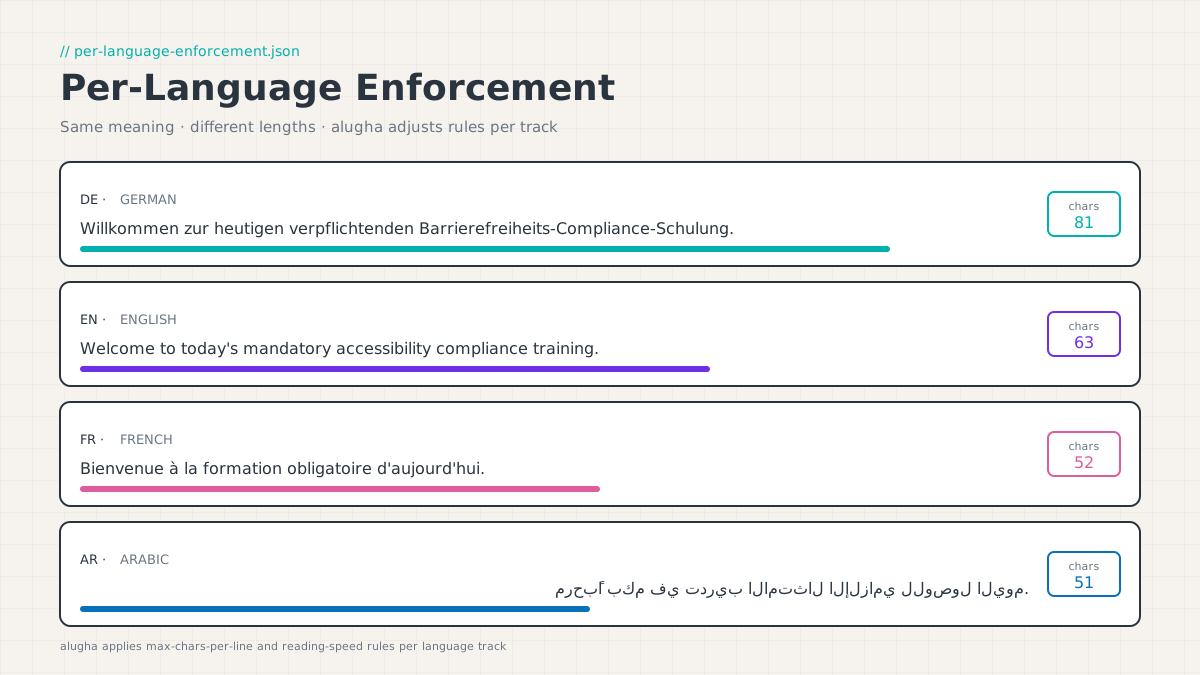
- Per-language enforcement, the same CPS and CPL rules produce different results in German (long compound nouns) vs. Arabic (compact script); alugha applies language-appropriate standards to each track independently.
- BFSG and EAA enforcement is live, the European Accessibility Act (EAA / BFSG in Germany) took enforcement effect on June 28, 2025; corporate video content falls within its scope.
- Available from Creator plan, the Subtitle Accessibility automation is included from the Creator plan upwards. Current pricing is published on alugha.com/plans.
The Subtitle Accessibility automation is available from Creator plan upwards. Explore plans →
The hidden cost of “good enough” subtitles
You recorded the video. You got it translated. You added subtitles. You’re done, right?
Not quite.
For many teams, this is where the real work begins. Subtitles that were auto-generated or imported from a translation tool often carry invisible problems: lines that are too long, text that flashes past too quickly to read, gaps between segments that are too short, or formatting that fails viewers with cognitive or hearing impairments.
These aren’t just quality issues. As the EU’s European Accessibility Act (EAA / BFSG in Germany) took full effect in June 2025, accessibility compliance for video content moved from “nice to have” to a legal requirement for a growing number of organizations. Getting subtitles right is not just about inclusivity anymore. It’s about managing risk.
The BFSG (Barrierefreiheitsstärkungsgesetz). Germany’s implementation of EAA Directive 2019/882. Applies to private-sector companies providing digital products and services from June 28, 2025, covering corporate training video, onboarding content, and audiovisual communications distributed to EU employees and consumers.
The problem is that making subtitles truly compliant is technically complex. Professional subtitle standards used by Netflix, ARD/ZDF, and defined by WCAG 2.1 specify more than a dozen individual parameters: maximum characters per line, maximum reading speed in characters per second, minimum and maximum segment duration, gap timing between segments, line break positioning, and more. Checking and correcting all of these by hand, across a 10-minute video, across five languages. Is genuinely painful work.
That’s the problem alugha’s Subtitle Accessibility feature was built to solve. The latest update makes it meaningfully better.
In short: subtitle compliance isn’t a finishing touch. It’s a structural requirement. One that compounds in complexity with every language track you add.
What makes subtitles accessible for corporate video?
alugha’s Subtitle Accessibility automation is a one-click AI tool inside the alugha dubbr editor. After you’ve created or imported your subtitle track in any supported language, you trigger the automation from the Automation menu. It analyzes every subtitle segment against the standards you’re targeting. Netflix, ARD/ZDF, WCAG, or your own custom ruleset, and automatically restructures, re-times, and reformats the subtitles to bring them into compliance.
Think of it as a specialist subtitle editor that works in the background while you get on with something else.
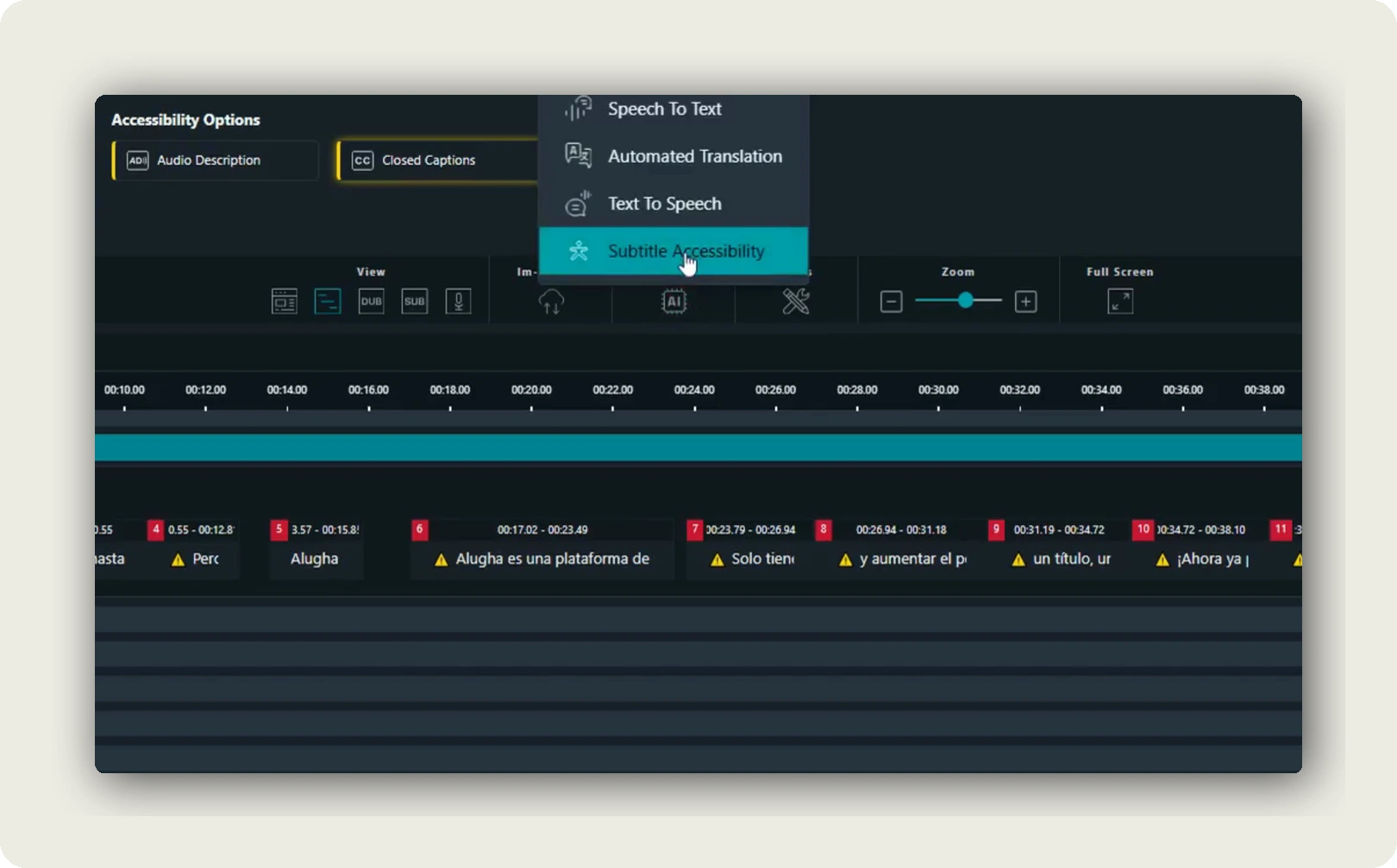
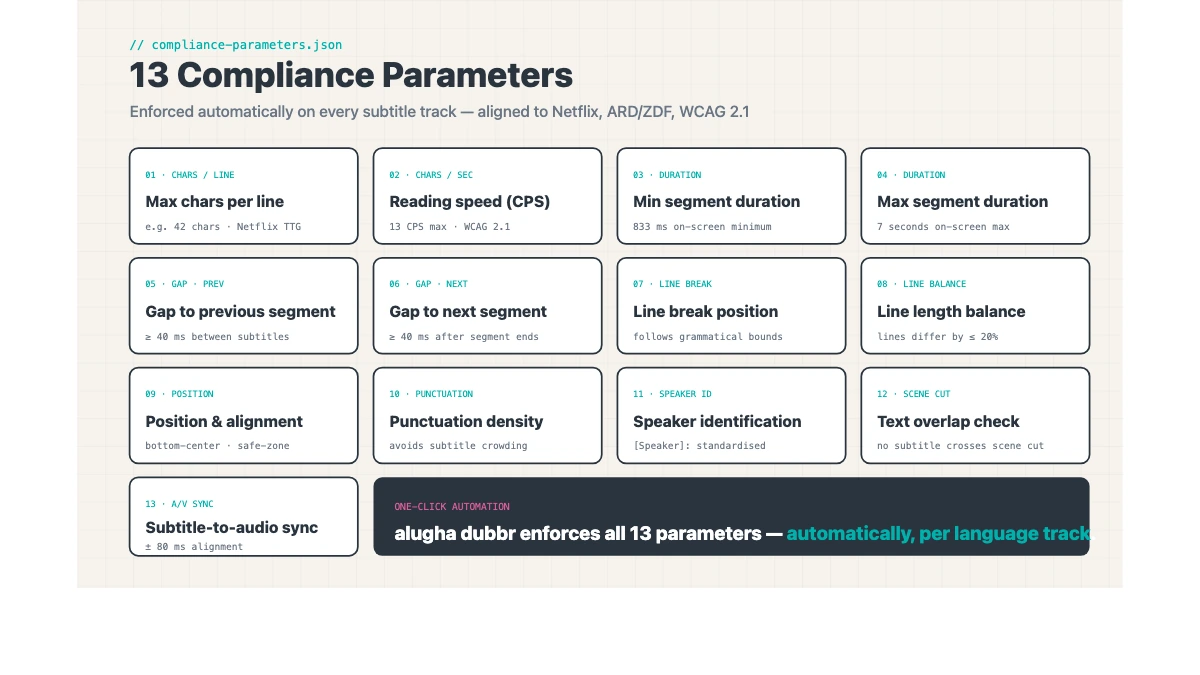
alugha’s subtitle accessibility checker evaluates subtitle tracks against 13 compliance parameters. Including maximum characters per line, reading speed in characters per second, minimum and maximum segment duration, gap timing, line break balance, and position rules. Aligned simultaneously to Netflix Timed Text Style Guide, ARD/ZDF Untertitelstandard, and WCAG 2.1 Success Criterion 1.2.2.
When the job completes, you can review the results directly in the timeline editor. Any segments that couldn’t be auto-resolved are flagged for manual attention. Giving you a clear, prioritized list rather than a sea of undifferentiated red warnings.
The 13 parameters alugha’s checker evaluates
Understanding what the checker actually measures matters. Not every subtitle compliance issue is equal. Some cause genuine comprehension failures; others are presentational.
Reading speed (characters per second. CPS)
Reading speed is the single most important compliance parameter. If text appears faster than a viewer can comfortably read, the subtitle fails its purpose. Regardless of accuracy. Netflix’s general guideline is a maximum of 17 CPS for most languages; ARD/ZDF targets 12–15 CPS for German-language content (slower, accounting for German word length). WCAG 2.1 does not specify an exact CPS figure but references industry standards.
alugha’s checker flags segments exceeding the applicable standard’s threshold and can automatically split or re-time the segment to bring it within limits.
Characters per line (CPL)
Long lines force viewers to scan horizontally, breaking the visual flow and often overlapping with critical on-screen content. Netflix’s general maximum is 42 characters per line. ARD/ZDF specifies 37–42 depending on the medium. alugha applies the appropriate standard per the chosen ruleset.
For multilingual content, this parameter is particularly important. German compound nouns frequently exceed line limits that are comfortable in English. alugha’s per-language enforcement accounts for this. It doesn’t apply the same character ceiling to every language track.
Segment duration (minimum and maximum)
A subtitle that appears for less than 0.83 seconds (approximately 5 frames at 24fps) cannot be read by most viewers. Netflix specifies a minimum of 0.833 seconds; ARD/ZDF requires similar minimums. At the other end, a segment remaining on screen for more than 7 seconds creates timing misalignment with the spoken audio. alugha’s checker flags both violations and can split or merge segments to achieve the appropriate duration range.
Gap between segments (minimum gap / adjacent segment distance)
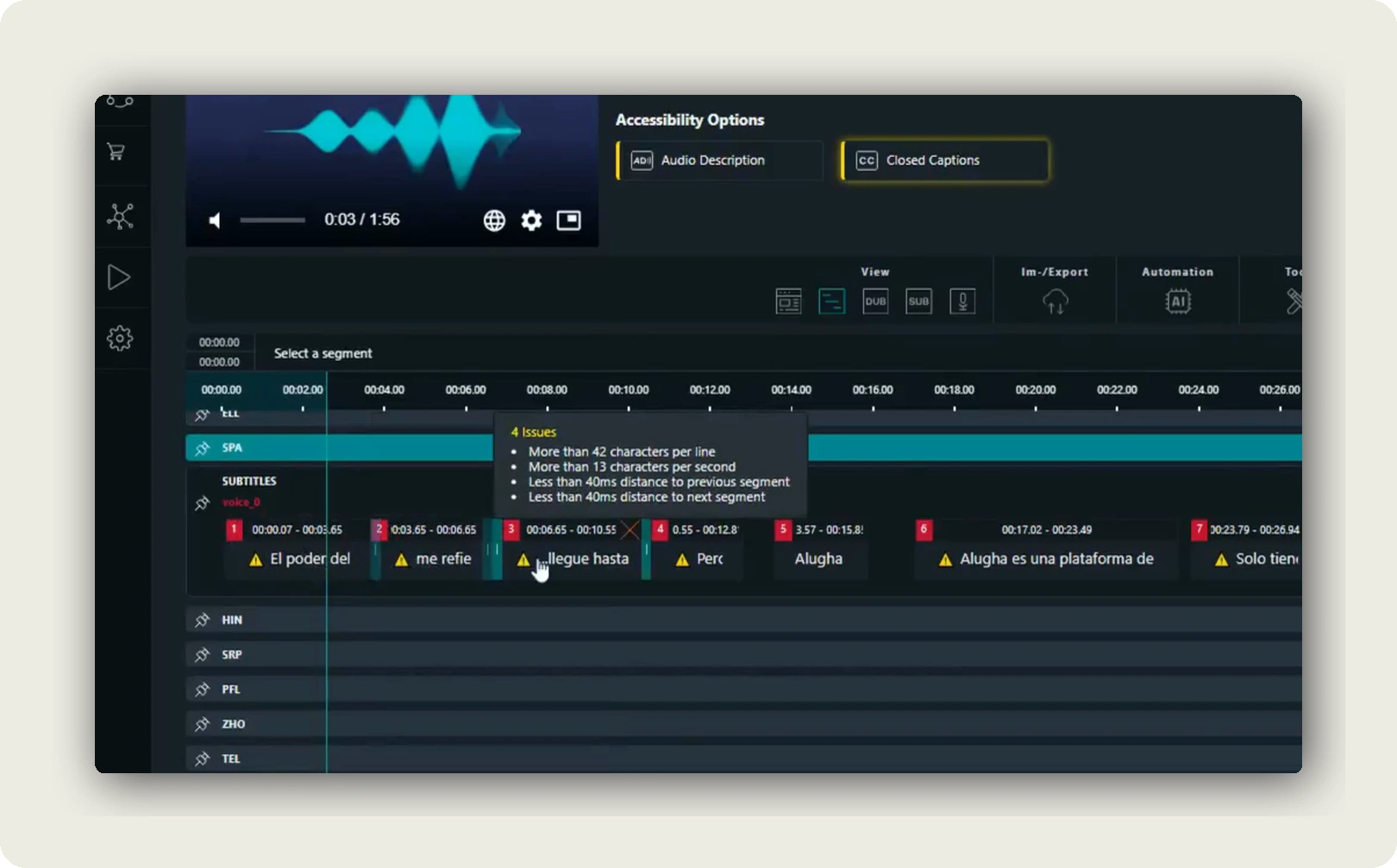
When two subtitle segments are displayed too close together in time, viewers cannot distinguish where one thought ends and another begins. The Netflix standard requires at least 2 frames (approximately 83ms at 24fps) between consecutive segments. As shown in the real screenshot in this article, the Spanish track flagged “Less than 40ms distance to previous/next segment”, a gap violation that the automation resolves.
Line break position, line balance, position and alignment
Where a line breaks within a two-line subtitle matters for readability. A break mid-phrase is harder to read than a break at a natural linguistic boundary. Two-line subtitles should also have roughly balanced line lengths, a first line of 40 characters followed by a second line of 8 characters is visually unstable. SDH (Subtitles for the Deaf and Hard of Hearing) content has specific positioning requirements: speaker identification, sound effect cues, and music indications must appear in defined screen zones. alugha enforces line break position, line balance, and positioning conventions of the chosen standard.
Text formatting, character encoding, frame accuracy, overlap and density
The remaining parameters cover: text formatting conventions (italics for off-screen speakers, uppercase for emphasis, quotation conventions); character encoding for multilingual script accuracy; frame-accurate timing for broadcast-standard content; overlap detection (even a single frame of overlap causes playback issues); and segment count per scene to prevent caption density that overwhelms viewers. Together these 13 parameters define what “accessible” means in practice for subtitle tracks under WCAG 2.1 AA, Netflix Timed Text Style Guide, and ARD/ZDF Untertitelstandard.
What’s new in the latest update?
The core feature has been available in alugha dubbr for some time. The latest release focuses on significantly improved accuracy in how the AI resolves compliance issues.
Previous versions would often resolve one parameter. Say, the character-per-line limit, while inadvertently introducing a new timing gap violation in the process. The updated model approaches corrections more holistically, weighing multiple parameters simultaneously when deciding how to restructure a segment. The result is fewer residual issues after the automation runs, and less manual cleanup required afterward.
For teams processing large volumes of video. Global compliance content rolled out across regional offices, or product update videos distributed to a multilingual workforce. This accuracy improvement translates directly into fewer revision cycles and faster time to publish.
Accessible subtitles for corporate video at scale: why it matters
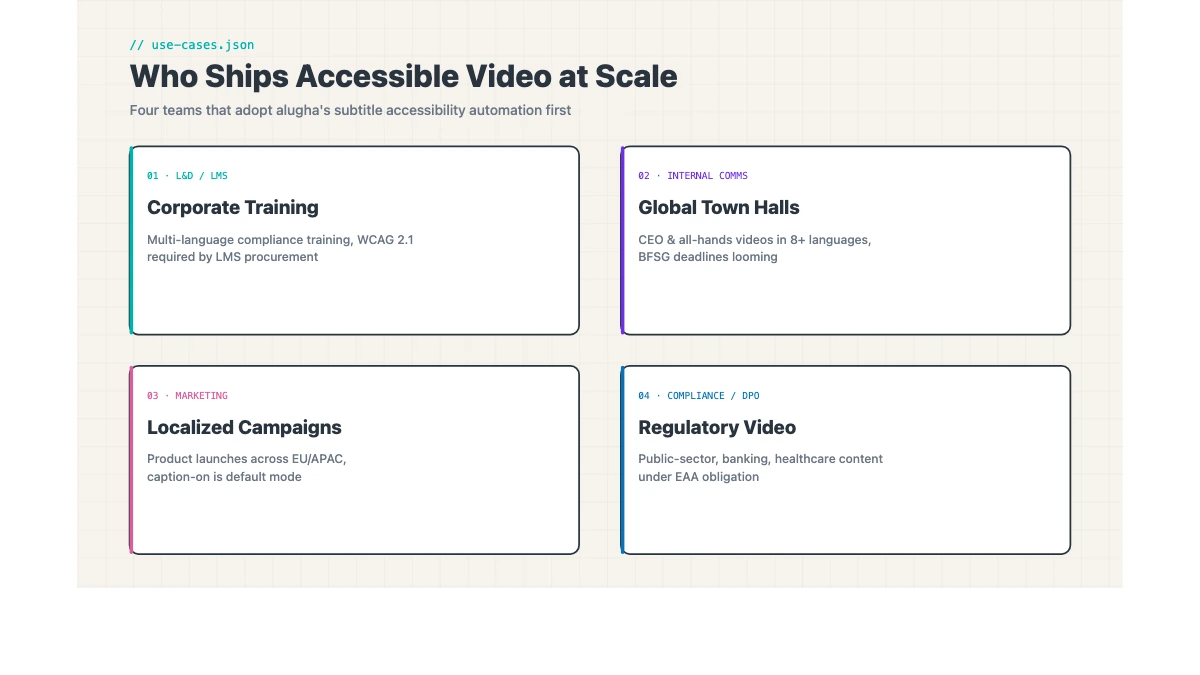
Video production teams across industries share a common set of challenges when it comes to subtitle accessibility. Whether you’re in corporate communications, learning and development, marketing, or compliance, the friction points tend to look the same.
The volume problem
Any team managing a library of video content faces the same arithmetic: the more videos, the more subtitle tracks, and the more manual correction work stacks up. A dozen training modules across four languages means dozens of individual tracks to check and fix. Automation changes the math entirely.
L&D teams specifically: BFSG 2025 enforcement has put existing video libraries in scope, not just new content. A team with 200 training videos and five language tracks each is facing 1,000 subtitle track audits. Manual correction at that scale is a multi-month project. Automation reduces that to a matter of days.
The multilingual problem
The same script in German and in Arabic will produce subtitle segments of very different lengths. Arabic script is more compact; German compound nouns are famously long. A single compliance rule applied uniformly — “maximum 42 characters per line”. Will produce correct results in English and systematically fail in German, where a single compound noun can exceed that limit.
alugha’s subtitle accessibility automation processes each language track independently, applying language-appropriate compliance rules. ARD/ZDF parameters for German tracks, RTL formatting conventions for Arabic and Hebrew, and ideographic-character CPL standards for Japanese, Chinese, and Korean content.
The compliance risk problem
Under the BFSG (Germany’s implementation of the EAA), companies providing digital products and services in Germany face accessibility obligations that took effect in June 2025. The EAA Directive 2019/882 applies EU-wide. The scope is broad: digital services, including corporate video accessible to consumers and employees, fall within it.
For organizations not yet legally required to comply, the direction of travel is clear. Building accessible video production habits now reduces future remediation costs significantly. Retroactive accessibility remediation typically costs 10× more than building compliance in from the start.
For teams that are also reviewing their broader video infrastructure for compliance. Specifically replacing YouTube embeds that carry third-party tracking issues. alugha’s approach to GDPR-compliant video hosting is addressed in a separate article. Subtitle accessibility and GDPR-compliant hosting are two distinct compliance layers; both are native capabilities in the alugha platform.
The specialist gap problem
Most teams don’t have a subtitle compliance specialist on staff. The knowledge required to consistently apply Netflix or ARD/ZDF standards manually is niche, and hiring or outsourcing for it is expensive. alugha encodes that expertise into the tool itself. The standards are built into the checker; the AI applies them automatically.
See the full workflow in action with your own content. Book a demo →
A realistic workflow: from raw subtitles to compliant output
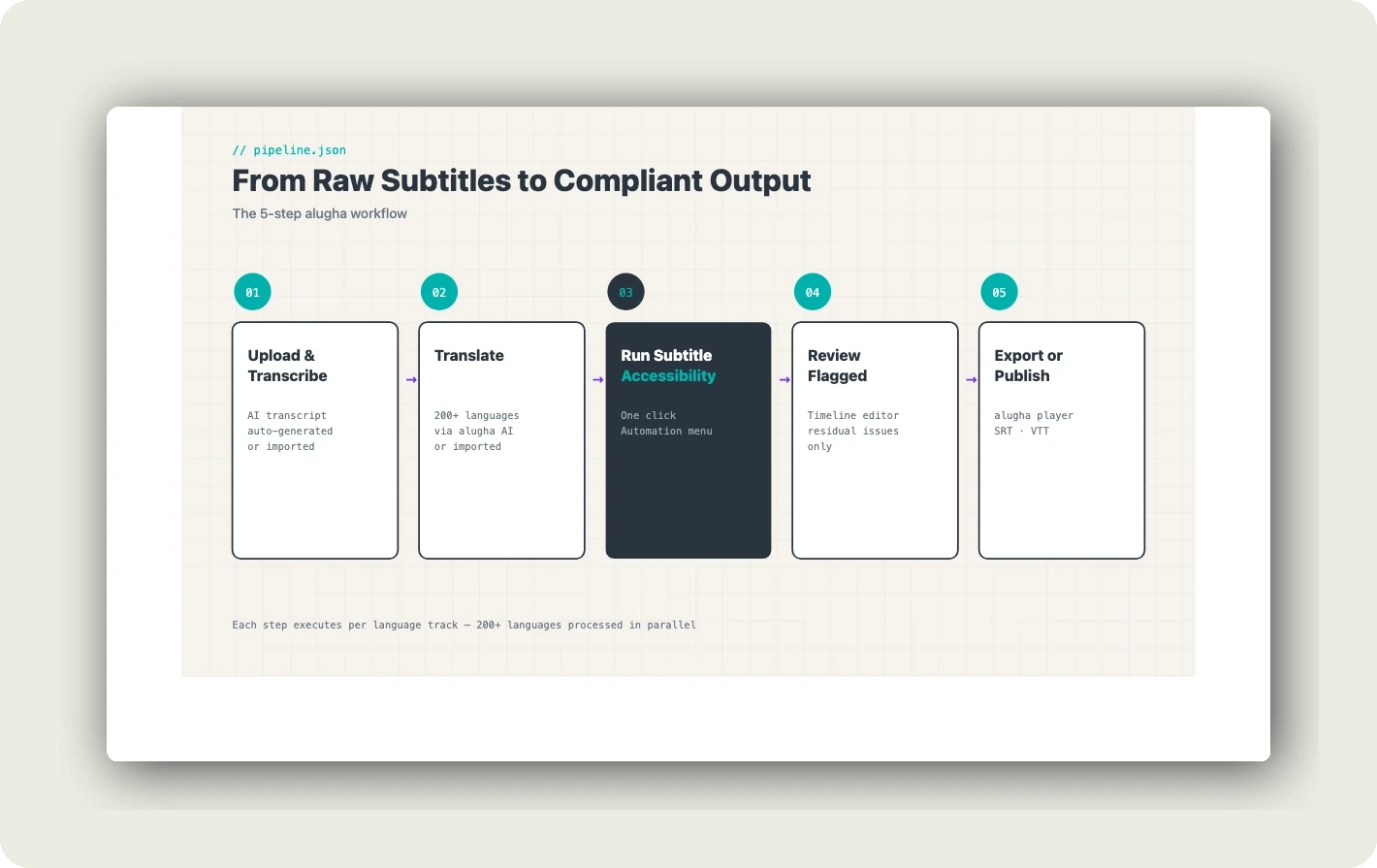
Here is how the feature fits into a typical content production cycle:
Step 1. Upload and transcribe. Upload your video to alugha dubbr. The AI generates a time-coded transcript automatically, or you can import an existing file.
Step 2. Translate. Use alugha’s built-in AI translation (supporting 200+ languages) to generate subtitle tracks for each target language, or import translations prepared by your team or a translation agency.
Step 3. Run Subtitle Accessibility. Open the Automation menu, select “Subtitle Accessibility,” and choose the language track to process. The job runs in the background. Typically 2–5 minutes for a standard corporate video.
Step 4. Review flagged segments. Once complete, any remaining issues are clearly flagged in the timeline editor. A human editor can resolve these in a fraction of the time it would have taken to work through the entire track from scratch.
Step 5. Export or publish. Publish via the alugha player with full multilingual subtitle support, export as.SRT or.VTT files for use in your LMS or platform, or burn subtitles in for platforms that require it.
The workflow is the same whether you’re processing a single video or a batch of content.
Real-world example: before and after
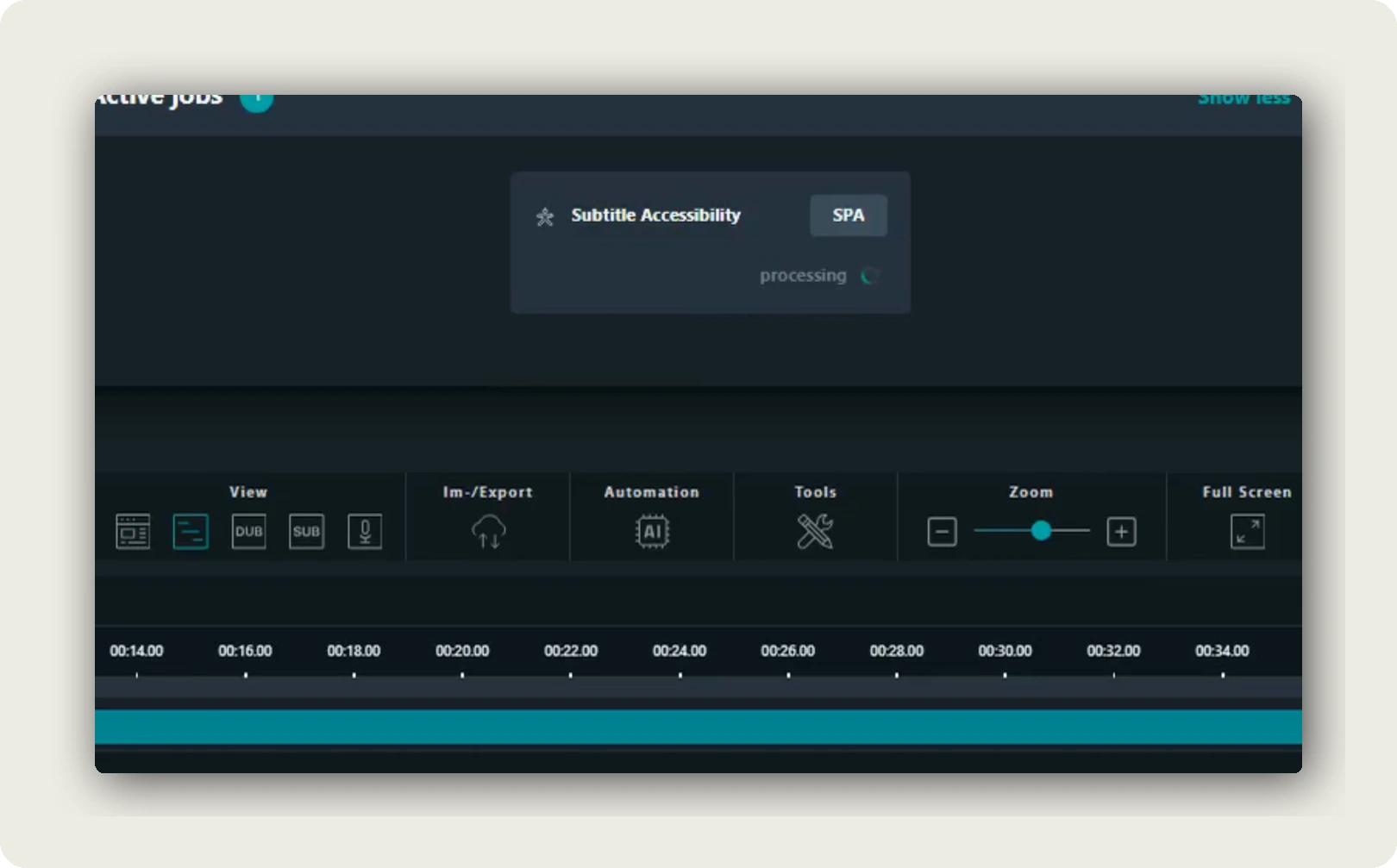
The product screenshots in this article come from a real accessibility automation run on a Spanish subtitle track.
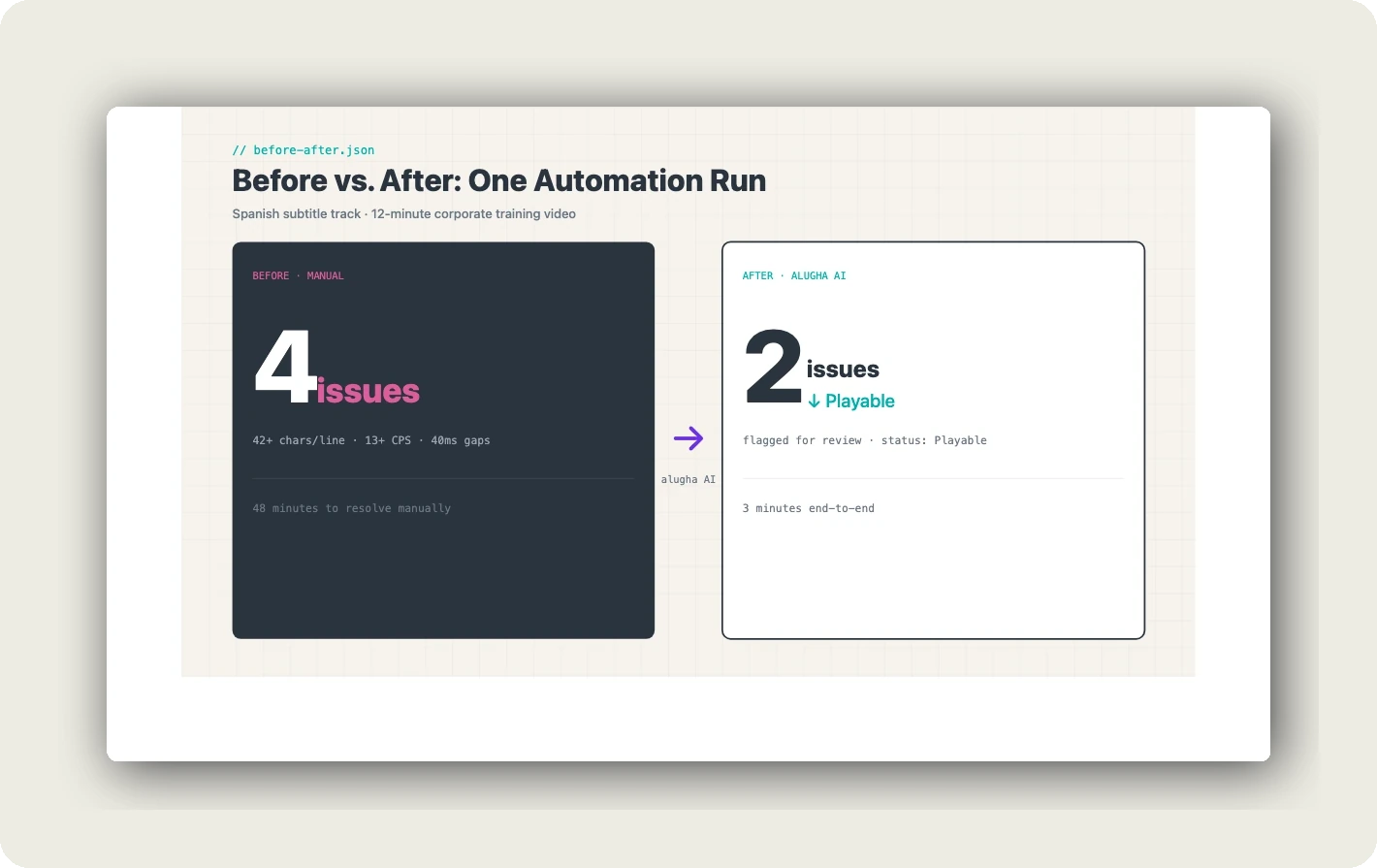
Before the automation ran, the checker identified 4 issues in the segment shown:
The issues identified were:
- More than 42 characters per line, the Spanish translation had expanded beyond the Netflix standard CPL limit
- More than 13 characters per second, the reading speed exceeded the configured standard’s threshold
- Less than 40ms distance to previous segment, the gap from the preceding subtitle was below the minimum
- Less than 40ms distance to next segment, the gap to the following subtitle was also below minimum
After running the Subtitle Accessibility automation:
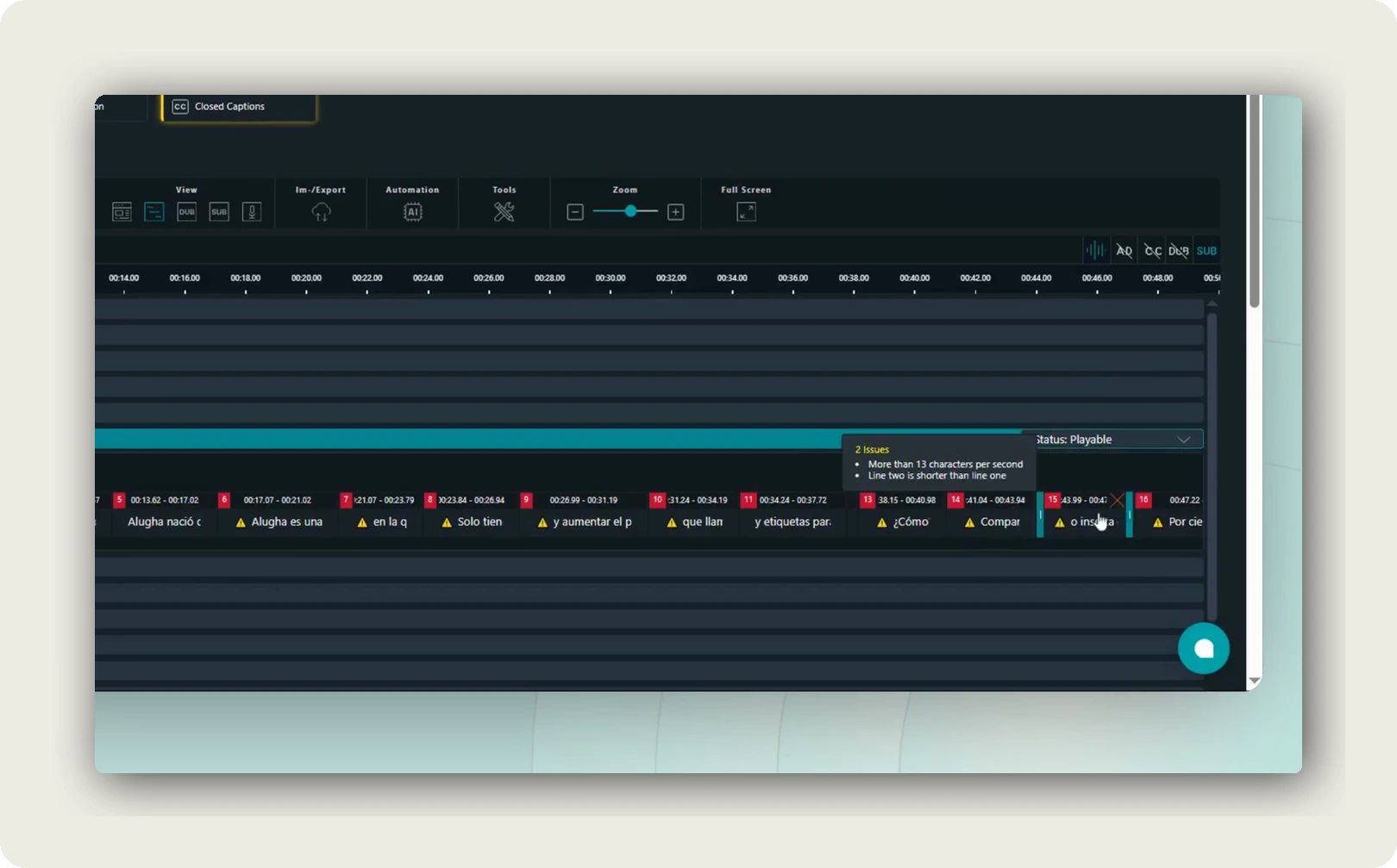
Two issues remain, a 50% reduction in compliance failures. The segment now carries a “Status: Playable” badge in the timeline view. The remaining two issues are flagged for manual review, a specific, manageable list rather than a general compliance failure.
The standards behind the automation
It’s worth being specific about what “accessibility compliance” means here, because the term is used loosely in many contexts.
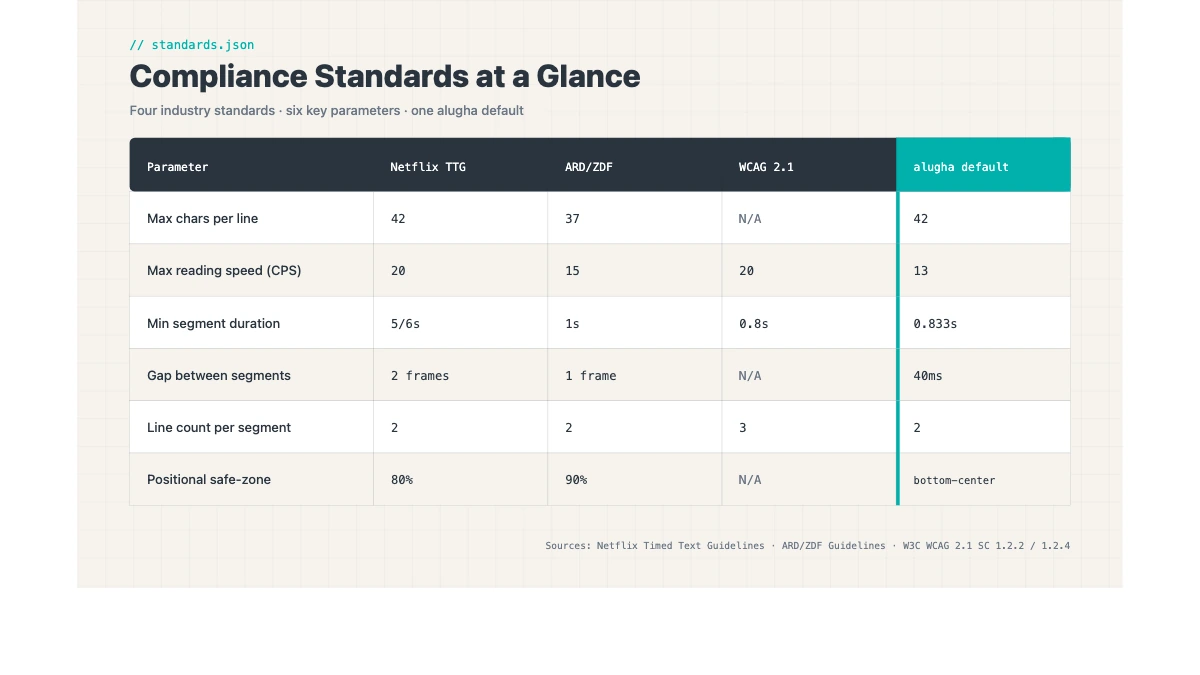
| Parameter | Netflix (General) | ARD/ZDF | WCAG 2.1 |
|---|---|---|---|
| Max characters per line | 42 | 37–42 | References industry standards |
| Max reading speed (CPS) | 17 CPS | 12–15 CPS | References industry standards |
| Min segment duration | 0.833 seconds | ∼0.8 seconds | No specific value |
| Max segment duration | 7 seconds | 7 seconds | No specific value |
| Min gap between segments | ∼83ms (2 frames at 24fps) | Strict gap requirement | No specific value |
| SDH-specific rules | Required | Required | SC 1.2.2 requires captions |
| Custom rulesets | Platform variants | Broadcaster variants | No. Principle-based |
| Legal jurisdiction | Netflix platform | German broadcasting | EAA / BFSG (EU/Germany) |
WCAG 2.1 Success Criterion 1.2.2 requires captions for all prerecorded audio content in synchronized media at Level AA, the minimum standard for EAA/BFSG legal compliance. In practice, applying Netflix Timed Text Style Guide or ARD/ZDF Untertitelstandard parameters satisfies and exceeds WCAG’s intent; alugha’s checker enforces all three simultaneously.
Netflix is the international reference point that most professional subtitle tools use as their baseline. Its parameter specificity is high, and its enforcement is real. ARD/ZDF are particularly relevant for DACH corporate teams in regulated industries whose content reaches audiences calibrated to public broadcaster standards. WCAG 2.1 is the legal framework. WCAG itself is principle-based and references industry standards for specific parameter values.
Accessible subtitles aren’t just a compliance checkbox
It’s worth stepping back from the compliance framing for a moment.
Accessible subtitles make video content measurably more effective. Studies in educational contexts consistently show that well-formatted captions improve information retention for all learners. Not just those with hearing impairments. For content being accessed in a second or third language, good subtitles are often the primary comprehension aid.
For viewers watching in a noisy environment, on a mobile device in a busy space, or simply without headphones, subtitles are not an accommodation. They are the default mode of consumption. Research on subtitle usage patterns indicates that a significant proportion of subtitle use comes from viewers without hearing impairments.
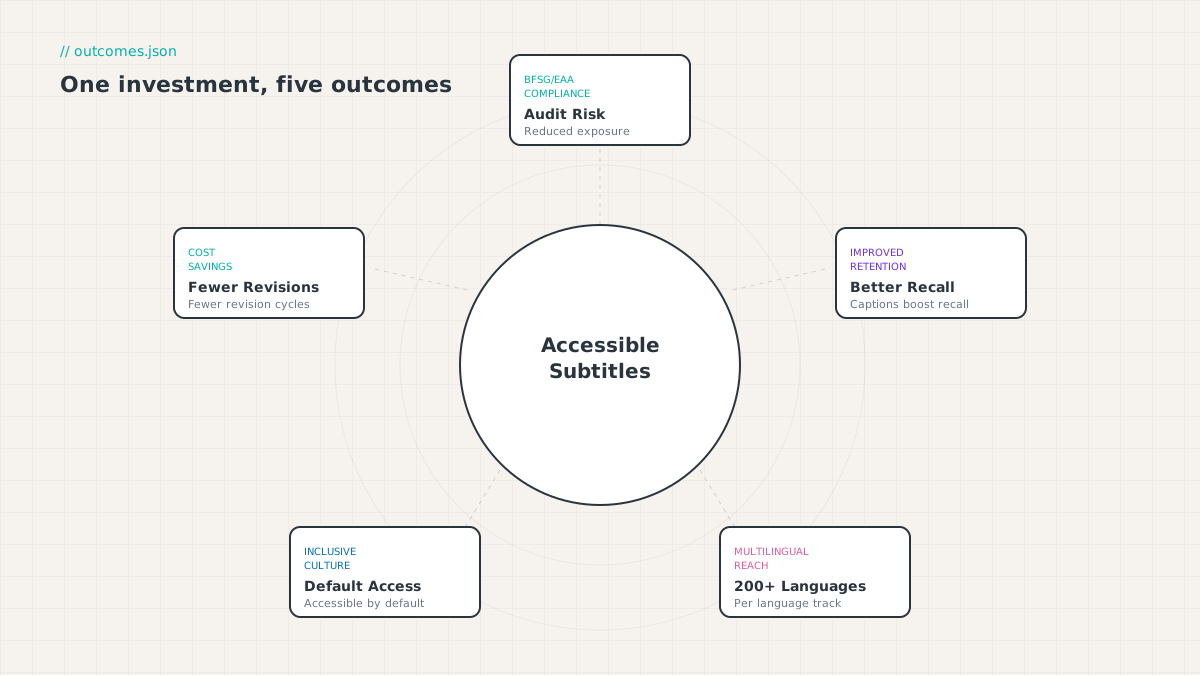
Accessible subtitles serve two simultaneous purposes: they reduce legal risk under EAA/BFSG enforcement and they increase the measurable impact of video content. Improving comprehension for second-language viewers, enabling consumption in noisy environments, and increasing information retention in learning contexts.
That matters for L&D teams, specifically. A training video with subtitles that exceed the reading speed standard does not just fail a compliance audit. It reduces the retention of the training content for every viewer who relies on the subtitle track. Which, in a global multilingual workforce, may be the majority of viewers.
When organizations invest in accessible subtitle quality, they’re not just managing legal risk. They’re increasing the measurable impact of the content they’ve already paid to produce.
Per-language implications: why one rule does not fit all
German: the compound-noun problem
German compound nouns are structurally long. “Barrierefreiheitsstärkungsgesetz”, the BFSG law name itself. Contains 35 characters. A subtitle standard that caps lines at 42 characters leaves only 7 characters of margin for the rest of the line after that single word appears.
In practice, German-language subtitle tracks systematically exceed standard CPL limits when the source content includes technical or legal terminology. Common in corporate communications, compliance training, and L&D content. alugha’s per-language enforcement calibrates the CPL threshold to language-appropriate norms and applies ARD/ZDF’s German-specific parameters when processing German tracks.
Arabic: the compact-script opportunity
Arabic script is structurally more compact than Latin script at equivalent semantic density. However, Arabic’s right-to-left reading direction introduces positioning and line-break rules that a tool applying Latin-script defaults will get wrong. alugha’s checker applies language-appropriate rules. Including RTL-specific formatting conventions, when processing Arabic, Hebrew, and other RTL language tracks.
East Asian languages: character vs. ideograph standards
Japanese, Chinese, and Korean content has fundamentally different CPL standards. A single ideographic character carries significantly more semantic content than a single Latin letter. Standard CPL limits of 42 characters are inappropriate for these scripts. alugha applies the appropriate character-unit definition per language.
Getting started
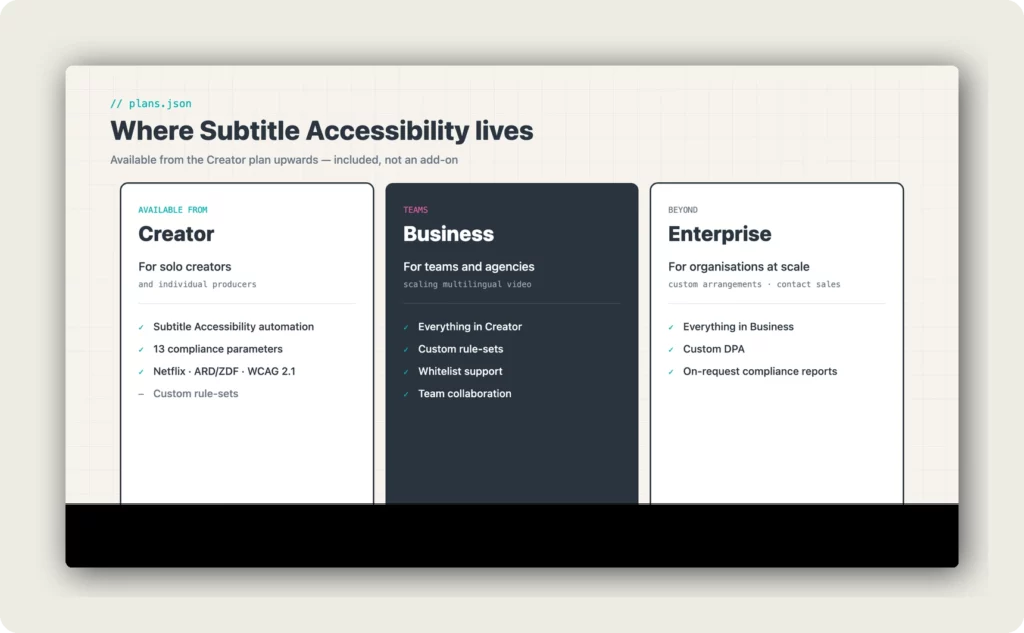
The Subtitle Accessibility automation is available inside alugha dubbr from the Creator plan upwards.
Where Subtitle Accessibility lives in the plans
- Creator plan: Subtitle Accessibility included. Available from the Creator plan upwards
- Business plan: Everything in Creator, plus custom rule-sets, whitelist support, and team collaboration
- Enterprise: Custom arrangements. Contact sales
- Free plan: Accessibility tools not included
Current pricing is published on alugha.com/plans. Pricing may change from time to time, and the pricing page is the canonical source.
If you’re already using alugha for multilingual video, the feature is accessible directly from the Automation menu in your editor, with no additional setup required.
If you’re evaluating alugha for the first time, you can explore available plans or book a demo to see the full accessibility workflow with your own content.
For a deeper dive into WCAG and BFSG compliance requirements for video, alugha also offers a free accessibility checklist and guide, a practical starting point if you’re mapping your obligations under the European Accessibility Act.
For teams already using alugha, the accessible subtitles documentation provides setup guidance and parameter reference.
FAQ: subtitle accessibility compliance
What is the European Accessibility Act and does it apply to my company’s videos?
The European Accessibility Act (EAA), implemented in Germany as the BFSG (Barrierefreiheitsstärkungsgesetz), took enforcement effect on June 28, 2025. It applies to businesses providing digital products and services within the EU market, including corporate video content. If your company distributes training videos, product demos, or onboarding content to EU employees or customers, it falls within scope. Contact your DPO or legal team for a specific scope assessment.
What subtitle compliance standard should I use. Netflix, ARD/ZDF, or WCAG?
The minimum legal requirement for BFSG/EAA compliance is WCAG 2.1 Level AA (Success Criterion 1.2.2 for prerecorded video). In practice, applying Netflix or ARD/ZDF parameters meets and exceeds the WCAG intent. For DACH corporate content, ARD/ZDF is the recommended starting point. For international content, Netflix provides the most comprehensive parameter set. alugha’s checker supports all three, plus custom rulesets.
What is the difference between the subtitle accessibility checker flagging issues and fixing them?
Most caption tools flag compliance issues and leave correction to a human editor. alugha’s Subtitle Accessibility automation does both: it checks compliance and automatically restructures, re-times, and reformats subtitle segments to resolve issues. Remaining flagged issues are edge cases requiring human judgment. Typically less than 20% of total identified issues.
Does the automation work per language or does it apply one ruleset to all language tracks?
Per language. alugha runs the accessibility automation independently on each subtitle track and applies language-appropriate parameters. German tracks are processed with CPL and CPS thresholds calibrated for German’s structural characteristics. Arabic tracks use RTL-specific formatting rules. This per-language enforcement requires the compliance engine to be integrated with the language model.
Which alugha plan includes accessible subtitles for corporate video?
The Subtitle Accessibility automation is available from the Creator plan upwards. The Free plan does not include Accessibility tools. Accessibility tools are also included in the Business plan and in Enterprise arrangements. Current pricing is published on alugha.com/plans.
How long does the subtitle accessibility automation take to run?
For a standard corporate video (up to 20 minutes, single language track), the automation typically completes within 2–5 minutes. The job runs in the background. You can work on other tasks in alugha dubbr while it processes.
Can I apply a custom ruleset rather than Netflix, ARD/ZDF, or WCAG?
Yes. alugha’s checker supports custom rule configurations for organizations with platform-specific requirements, a corporate LMS with its own character-per-line standard, or a regulated-industry broadcaster with stricter compliance requirements than the standard profiles.
Does the automation affect my subtitle file’s translation accuracy?
No. The Subtitle Accessibility automation restructures timing and line breaks. It does not modify the textual content of your subtitle file. Translation accuracy and terminology remain unchanged.
What export formats are supported after the automation runs?
Processed subtitle tracks can be exported as.SRT or.VTT files for use in your LMS, video platform, or broadcast workflow. You can also embed them natively in the alugha player for direct publication with full multilingual support.
Is there an accessibility checklist I can use before running the automation?
Yes. alugha offers a free WCAG and BFSG accessibility checklist covering both the technical subtitle parameters and the broader player and platform accessibility requirements, a practical starting point for teams assessing their current compliance posture.
Conclusion
Subtitle compliance is not a peripheral quality concern. For any team distributing video content in the EU in 2026, it is a documented legal obligation, and one that manual processes cannot keep pace with at scale.
alugha’s Subtitle Accessibility automation changes the equation: 13 compliance parameters, checked and corrected automatically, across every language track, against the standards that matter. The latest update improves the accuracy of multi-parameter holistic correction. Fewer residual issues, less manual cleanup, faster time to compliance.
The before/after shown in this article, a Spanish track moving from 4 issues to 2 issues with a “Playable” status badge. Is what compliance automation looks like in practice. Not perfection at one click, but a structurally reduced correction burden and a clear path to compliant output.