
Quick Start: What Is Audio Description?
Audio description is an additional narration track that verbally explains what’s happening on screen, actions, expressions, scene changes, and on-screen text. It fits into natural pauses in dialogue, making videos fully accessible to blind and low-vision viewers. Think of it as “alt text for video,” but professionally crafted to match the rhythm and emotional tone of your content.
- Quick Start: What Is Audio Description?
- 1. Why Audio Description Matters for Your Organization
- 2. Understanding the Landscape: What You're Evaluating
- 3. How Audio Description Works: What Happens Behind the Scenes
- 4. What Your Users Actually Experience (And Why It Matters to You)
- 5. Technology and Innovation
- 6. What Audio Description Really Costs – And What It Saves
- 7. Building Your Team’s AD Capacity
- 8. Building the Business Case and Overcoming Barriers
- 9. Conclusion & Getting Started
1. Why Audio Description Matters for Your Organization
Imagine launching a training program or public service campaign that reaches 20% more people, avoids legal risk, and demonstrates your commitment to inclusion without creating separate video files for every language and accessibility need. That’s what audio description makes possible.
When you close your eyes while watching a video, how much do you actually understand? You hear voices and music, but most of the story lives in the images. For 285 million people worldwide with blindness or low vision (WHO data), that’s the reality every day. Video description closes that gap by adding carefully timed narration that describes essential visual information.
1.1 The Strategic Value for Decision-Makers
If you’re responsible for video content in government, education, or corporate training in Europe, audio description delivers three critical benefits you can’t ignore:
First, compliance is no longer optional. Public sector bodies in the EU are bound by accessibility legislation such as the EU Web Accessibility Directive and, increasingly, the European Accessibility Act, which push digital services including video towards WCAG 2.2 conformity. Many Member States go further, with national media and equality regulators setting concrete expectations for accessible audiovisual content. Private companies are also feeling this through procurement rules and contracts that now routinely include accessibility requirements for training and communication materials. For a more detailed overview of the legal landscape and how it applies to online video, see Section 2.2.
Second, your audience is bigger than you think. Beyond blind and low‑vision viewers, audio description benefits people with cognitive disabilities who need explicit verbal guidance, language learners who gain additional context, and employees who listen to training while commuting or multitasking. You’re not just checking a box you’re expanding reach and making your content usable in more real‑world situations.
Third, brand reputation and risk management. In a European context where inclusion, ESG, and corporate social responsibility are under scrutiny, organizations that lead on accessibility are viewed as more trustworthy, progressive, and people‑centric. Conversely, complaints to equality bodies, regulators, or the media about inaccessible content can generate negative publicity and legal exposure that far exceed the cost of implementing audio description properly from the start.
1.2 The Multi-Track Shift: How Modern Platforms Change the Equation
Historically, adding audio description meant creating entirely separate video files. A single training video with English and Spanish versions, each with and without AD, required four separate files. Update one logo? Re-export all four. At scale, this file explosion made AD economically unfeasible for most organizations.
Modern multilingual platforms fundamentally change this dynamic. By allowing unlimited audio tracks on a single video file, they eliminate the version control nightmare. When you update the video once, all audio variants stay synchronized. This architectural approach, where multiple audio experiences attach to one visual core, is what makes scalable AD practical today.
What this means for implementation: When evaluating video platforms, support for audio description isn’t a feature it is a prerequisite for cost-effective video accessibility at scale.
Audio description is a strategic tool for compliance, audience expansion, and risk mitigation. Modern multi-track technology makes it scalable without multiplying your video files.
2. Understanding the Landscape: What You’re Evaluating
Before choosing an audio description project, you need to understand how the practice evolved, what’s legally required, and who the key players are. This context helps you ask the right questions when evaluating providers.
2.1 From Theater to Digital: Why Technology Matters Now
Audio description began as volunteers whispering in theaters. The digital streaming era changed everything by making multiple audio tracks technically simple. This shift is why you can now deliver accessible video at scale, something that was nearly impossible a decade ago.
For your organization, this means you are not pioneering unproven technology. Multi-track delivery is the same infrastructure that powers streaming platforms and their language options. You’re adopting established technology for a new purpose.
2.2 The Regulatory Reality You Need to Know
Three layers of policy affect your decision:
Anti-discrimination laws (like the EU Accessibility Act or ADA in the US) establish your fundamental obligation to provide equal access. While they may not name “audio description” specifically, courts and regulators interpret them to require accessible audio and video.
Media-specific regulations set concrete quotas. The FCC requires broadcasters to provide audio description for a percentage of prime time and children’s programming. The Communications and Video Accessibility Act created the foundation for these rules.
Web content accessibility guidelines (WCAG 2.2) are most relevant for online video. Level AA compliance requires audio description for videos where visual information is essential. Many government contracts now require WCAG conformance documentation.
Bottom line: if you produce video content for public consumption, employee training, or educational purposes, you likely have a compliance obligation now or in the near future, especially in the EU and, for US readers, under the ADA and FCC rules.
2.3 The Ecosystem: Who Does What
When you commission audio description, you’re engaging with several partners:
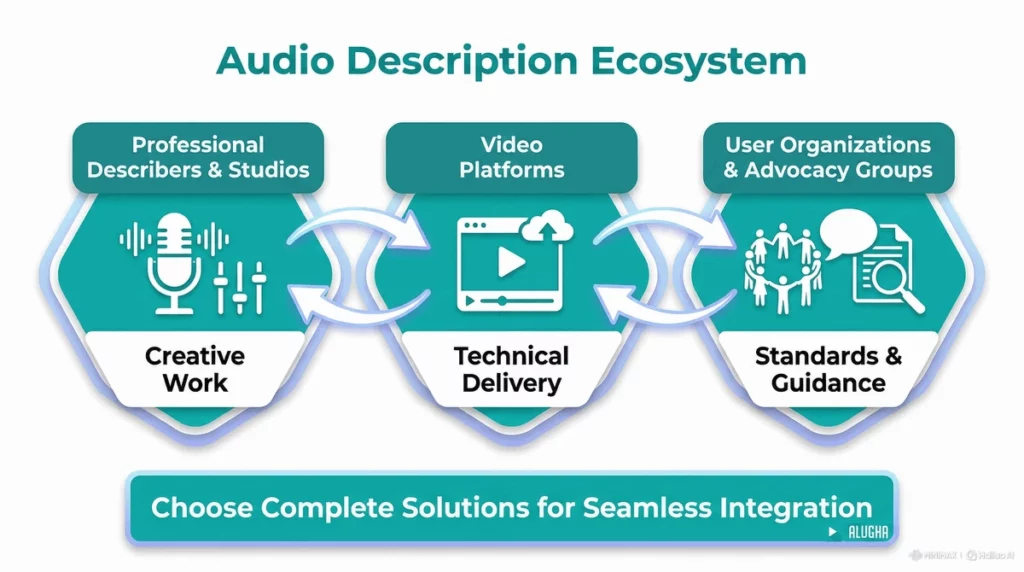
Professional describers and studios do the creative work, analyzing your video, writing scripts, and recording narration. This is specialized craft work you’ll typically outsource.
Your video platform handles the technical delivery, managing multiple audio tracks, ensuring playback works across devices, and making updates simple.
User organizations and advocacy groups, such as national associations of blind and visually impaired people and pan‑European bodies like the European Blind Union (EBU), campaign for quality standards and can provide guidance on best practices. In Europe, these organizations have been influential in shaping accessibility requirements through instruments such as the EU Web Accessibility Directive and the European Accessibility Act, as well as through dialogue with regulators and broadcasters in individual Member States.
You’re not buying a single product you’re choosing a solution that combines specialized creative services with robust technical infrastructure. Understanding this ecosystem helps you evaluate complete audio description offerings, not just isolated features.
3. How Audio Description Works: What Happens Behind the Scenes
Understanding the production process helps you set realistic timelines, budget accurately, and evaluate provider quality.
3.1 The Step-by-Step Workflow: Two Approaches
Here’s what happens when you add audio description to a video:
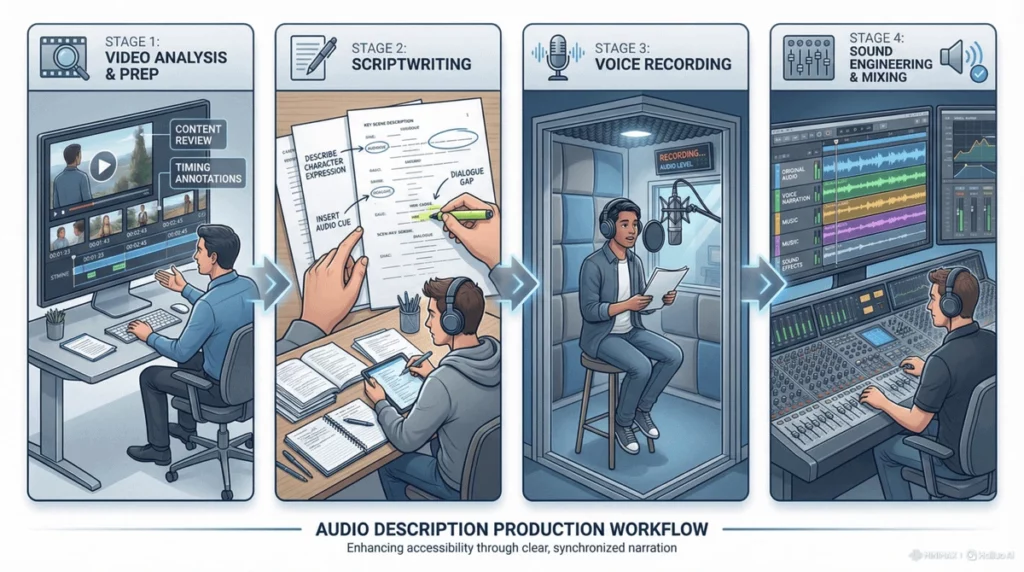
Approach 1: Without Multi-Track Infrastructure
- Hire a describer to analyze your video and identify key visual elements
- Write a script describing facial expressions, actions, and on-screen text
- Record narration, ensuring it fits into natural pauses without overlapping original audio
- Mix as a separate audio track
- Export a completely new video file with AD burned in
- Repeat for every language variant: Spanish AD, German AD, etc.
- Upload each version separately to your CMS
- When you update the video, start over from step 1 for every variant
Result: 10 videos become 40 files. A simple logo change requires 40 re-exports. Version control becomes impossible.
Approach 2: With Multi-Track Infrastructure
- Upload your single master video to the platform
- Hire a describer to analyze and write a script
- Record narration, either externally or directly in modern platforms with built-in recording
- Upload the AD audio file; it automatically syncs and attaches to the master video
- Need Spanish AD? Upload that audio track too, with no new video file needed
- Users select their preferred audio in the media player; one video serves all variants
- Update the video? Upload once; all audio tracks remain perfectly synced
Timeline: A 10-minute video takes 3–5 days for professional AD creation, regardless of platform. The difference is that with proper infrastructure, attaching and managing those tracks takes minutes, not hours.
3.2 Choosing the Right Type for Your Use Case
| Content type | AD type | Why it fits |
|---|---|---|
| Standard training videos, internal comms | Standard (in-sync) AD | Fits in natural pauses; easiest to implement |
| Complex tutorials with diagrams | Extended audio description (pausing) | Video pauses for longer descriptions; needs player support |
| Content on your website or LMS | Integrated track | Users toggle AD like language; best UX |
| Live events or cinema screenings | Second-screen/app | Workaround when you cannot modify the main feed |
Extended audio description is particularly valuable for children’s programming and educational content where visual complexity requires more description time than natural pauses allow.
3.3 Infrastructure as the Key Enabler
The fundamental barrier to scalable AD is not creative, it is technical. Traditional video architecture forces you to create new files for every variant. Modern multi-track architecture treats audio as separate layers that attach to a single video core.
The creative process is similar across approaches. The difference is infrastructure: traditional methods create file chaos; multi-track platforms keep everything organized under one video asset. We go into more detail about platform capabilities and what to look for in Section 5.
4. What Your Users Actually Experience (And Why It Matters to You)
Understanding real user impact helps you justify budget, prioritize content, and evaluate quality.
4.1 Your Primary Audience: Blind and Low-Vision Employees/Citizens
This group includes employees who need training, citizens accessing public services, and students in online courses. Without AD, they experience “mysterious gaps” emotional reactions without context, key information missed.
Impact on your organization: when individuals who are blind cannot access your video content, you face complaints, accommodation requests, and potential legal challenges. The American Council of the Blind reports that lack of accessible media is one of the top barriers to employment and education for people who are blind.
4.2 Secondary Audiences That Expand Your ROI
- Employees with cognitive disabilities: AD provides explicit guidance that improves comprehension and retention
- Global workforce learning new languages: AD adds contextual reinforcement
- Field workers listening while driving: AD makes visually dense safety training accessible in audio-only form
Public broadcasting organizations like PBS have found that AD for children’s programming benefits not just visually impaired children but also those learning language skills.
4.3 Quality Tensions You Need to Manage
Users have different preferences that affect how you brief providers:
- Detail level: some want minimal plot info; others prefer rich atmosphere. Specify your preference.
- Tone: neutral description vs expressive narration. Match tone to your brand.
- Sensitive content: violence, trauma, medical procedures. Set explicit guidelines upfront.
Solution: include 2–3 blind/low-vision users in your pilot project testing. Their feedback is more valuable than any quality checklist.
AD serves your primary accessibility audience but creates value across multiple user groups. Quality means meeting diverse needs, not following a one-size-fits-all formula.
5. Technology and Innovation
Your choice of technology determines whether AD becomes a manageable process or an ongoing challenge.
5.1 Software & Infrastructure: Making Sense Of A Messy Tool Landscape
At minimum, you need three components:
- Creative services: professional describer to write and record AD (you can outsource this)
- Recording solution: studio time or platforms with integrated recording tools
- Distribution platform: a system that supports multiple audio tracks (this is where most organizations fail)
Historically, these three components operated in isolation. You would hire a studio for audio description services, like scripting and recording, then struggle to integrate the resulting audio files into your existing video hosting system, which often lacked proper support for audio description.
If you look at how most organizations currently handle audio description, the tool landscape is usually fragmented. One tool is used for timing, another for script writing, another for recording, another for file conversion, and yet another for hosting. Each of these may work reasonably well in isolation, but together they create a fragile chain that is hard to maintain and even harder to scale.
A typical setup might look like this:
- A subtitling or captioning tool is repurposed for spotting and timing AD cues.
- Scripts are drafted in Word, Google Docs, or shared spreadsheets, with versioning managed by email.
- Narration is recorded in a desktop audio editor, with files passed around manually between teams.
- Mixing happens in a separate DAW project, exported as a standalone WAV or MP3.
- The final AD audio file is uploaded somewhere in the CMS or on a generic video host, often as a completely separate video or as a “described” version that duplicates the original.
In other words, it is a patchwork. Every handoff between tools is a chance for mistakes, outdated versions, and confusion. It also means that adding more AD tracks or more languages multiplies complexity rather than being a simple, repeatable step.
Modern integrated platforms are changing this model. Take an audio description project built on alugha: the platform provides all three components in one continuous workflow. You upload your video for hosting, use the built-in dubbr tool for recording voiceover directly in the browser (or upload externally produced AD tracks), and deliver to end-users through alugha’s accessible video player, all managed from a single interface. This eliminates the handoff friction between separate tools and ensures your description is provided consistently across all distribution channels.
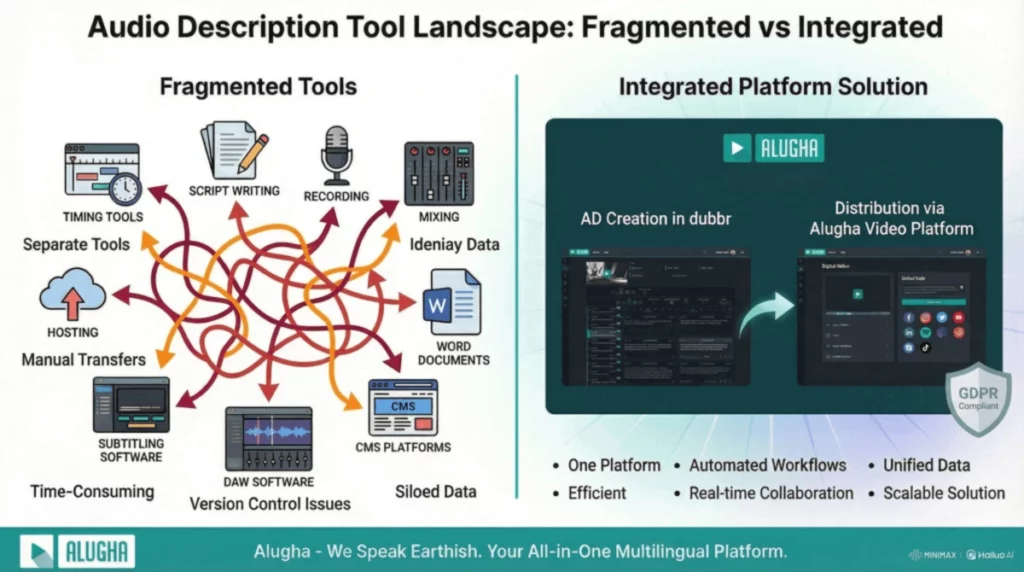
For organizations managing large libraries, this integration means you do not have to coordinate between three different vendors and systems. The same platform that hosts your video also handles the technical complexity of audio and video synchronization and provides the player interface where users can select their preferred audio language and description options.
The traditional toolchain fragments across multiple vendors. Modern platforms like alugha combine hosting, AD creation support, and delivery via player into one integrated system, removing the integration headaches that often prevent organizations from scaling their accessibility efforts.
5.2 Multi-Track Management: The Foundation for Scale
The fundamental problem: most video platforms were designed for primary audio only. They treat AD as an afterthought.
What to look for: platforms where multi-track support is core architecture. These systems naturally extend their capabilities to accessibility without workarounds.
Capability comparison:
- Track limits: some platforms cap you at 2–3 audio tracks. Look for unlimited.
- Update process: can you replace just the audio, or must you re-encode the entire video?
- Management interface: is there a single dashboard showing all tracks for all videos?
- Player accessibility: are track controls keyboard-accessible and screen-reader compatible?
Secondary Audio Program (SAP) channels on broadcast television pioneered this concept, but modern platforms bring it to streaming and on-demand video accessibility.
5.3 The Hybrid Approach: Human Creativity + AI Efficiency
Full automation does not work for quality AD. AI cannot judge narrative importance or handle cultural nuance. But manual-only approaches do not scale for large video libraries.
Best-practice workflow:
- Humans create the AD script (analysis, writing, quality review)
- You choose voice method: professional recording for high-visibility content, integrated recording tools for mid-tier, instant TTS for rapid updates
- Platform handles distribution seamlessly
This gives you quality where it matters and speed where you need it, all managed in one system.
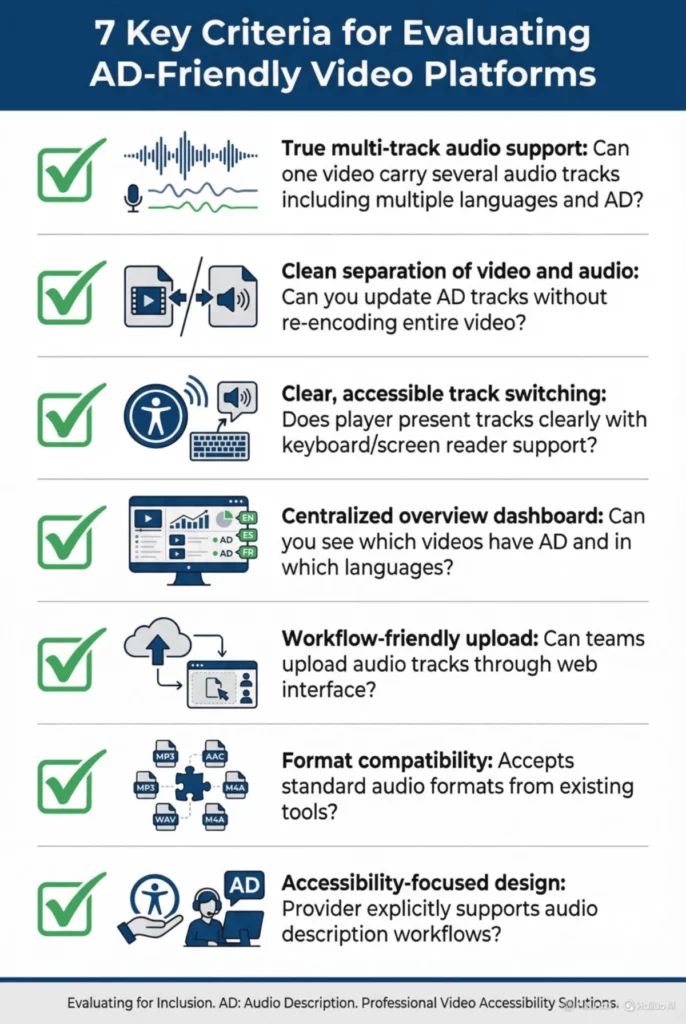
5.4 What To Look For In An AD‑Friendly Platform
When you evaluate a hoster or technical provider for audio description, you want to know whether they actually help you tame the tool zoo, or just add another piece to it. The following checklist is a good starting point.
1. True multi‑track audio support
- Can one video carry several audio tracks at once, including multiple languages and at least one audio description track?
- Is there a practical limit on the number of tracks, or is it designed for multi‑language, multi‑AD use cases?
2. Clean separation of video and audio
- When you update an AD track, do you have to re‑encode and re‑upload the entire video, or can you simply replace that single audio track?
- Can you attach new AD tracks later without touching the original video file?
3. Clear, accessible track switching in the player
- Does the player present audio tracks in a clear list, with labels such as “English”, “German”, “English audio description”?
- Is switching between tracks possible with keyboard and screen reader support, not just with a mouse?
4. Centralized overview of what has AD
- Is there a dashboard or library view where you can see which videos have audio description and in which languages?
- Can you filter or export this information, for example to report on accessibility coverage?
5. Workflow‑friendly upload and management
- Can your team upload audio tracks directly through a web interface, without needing developer support every time?
- Is it easy to correct mistakes, replace files, and keep track names consistent?
6. Compatibility with existing authoring tools
- Does the platform accept standard audio formats that you can export from your existing timing, recording, or mixing tools?
- If you already use a specific subtitling or DAW workflow, can the platform slot in at the end rather than forcing you to change everything at once?
7. Designed with accessibility in mind
- Does the provider talk explicitly about audio description and accessibility in their documentation, not just language tracks?
- Can they point to examples or customers who already host multi‑language, multi‑track content, ideally with audio description?
A platform like alugha is built around exactly this idea of one video with many audio experiences. Instead of adding yet another tool to an already messy chain, it gives you a central, multi‑track environment where audio description becomes just one more track to manage, alongside your existing languages. That is the kind of software foundation that makes it realistic to move from “we did AD once” to “we do AD as a normal part of how we publish video.”
5.5 Future Trends: What to Plan For
- Adjustable verbosity: users selecting detail levels
- Spatial AD: for VR/360° video, descriptions positioned in 3D space
- On-demand explanations: users requesting extra detail for specific scenes
All these depend on flexible, track-aware infrastructure. Investing in proper multi-track foundations now ensures you can adopt these innovations later.
Technology should serve your workflow, not complicate it. Look for platforms where multi-track support is core architecture, offering integrated recording and flexible voice options.
6. What Audio Description Really Costs – And What It Saves
Understanding what audio description actually costs, and what financial upside it can deliver, helps you build a business case that resonates with finance and leadership. It also clarifies why infrastructure choices (like multi‑track hosting) matter so much to the economics. As explained in Section 5, the choice between separate files and a multi‑track setup is not just technical. It has direct financial implications.
6.1 What Audio Description Projects Typically Cost
There is no single universal rate card, but several studies, vendor disclosures, and accessibility guides converge on similar order‑of‑magnitude ranges:
- Traditional, fully human‑produced audio description (script plus human voice plus studio workflow) is frequently quoted in the range of 10–30 € per minute of video for online or broadcast content, depending on complexity and vendor.
- Accessibility guidance aimed at universities and educational institutions notes that audio description is significantly more expensive than captions, which are often 1–2 € per minute, while AD can be several times that amount because it involves additional creative and production work, not just transcription of existing speech.
- Software‑based or hybrid solutions that use text‑to‑speech (TTS) and streamlined, browser‑based workflows often move to a per‑minute-of‑footage model at a lower unit price, because many steps are automated. Case studies of such tools describe fixed per‑minute pricing as a way to replace unpredictable studio and voice‑talent costs with more stable, scalable budgets.
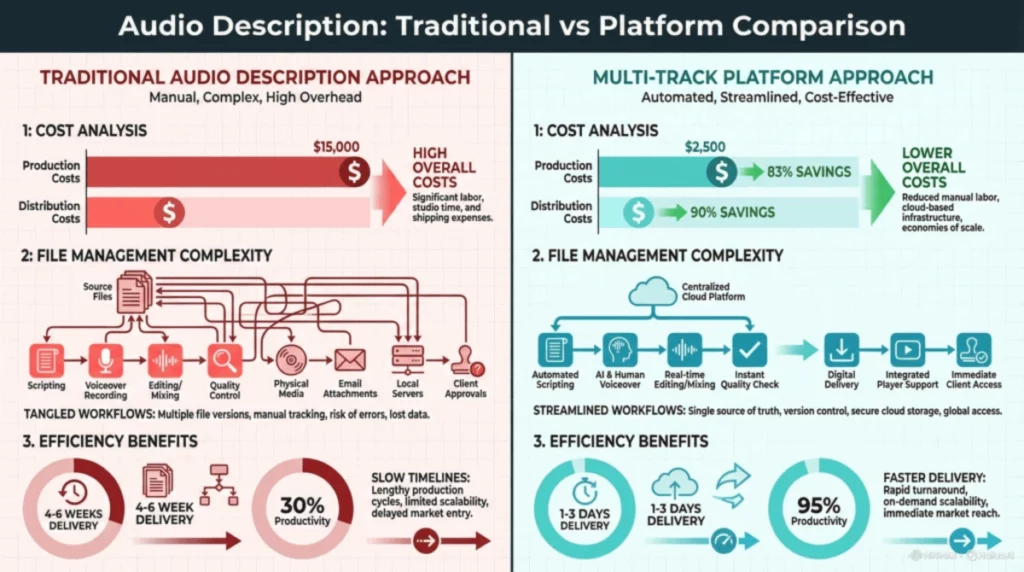
In practice, your per‑minute cost will vary with:
- Genre and density of visuals
- Number of languages
- Turnaround times
- Human vs hybrid workflows
The important point for leadership is this: raw per‑minute cost is only half the picture. What matters just as much is how often you have to re‑do work and how many duplicate video versions you create or maintain.
6.2 Hidden Operational Costs (And Where You Save)
The differences between file‑per‑version setups and multi‑track setups have direct financial implications:
| Without multi‑track platform | With proper multi‑track infrastructure |
|---|---|
| New video file for each language and AD combination | One video, multiple audio tracks (languages + AD) |
| Manual version tracking and naming schemes | Centralized, automated track and version management |
| Full re‑encode and re‑upload for every minor update | Swap or update audio tracks without touching the video |
| Scattered files across drives and platforms | Single dashboard with all variants per video |
| High risk of outdated or inconsistent versions | One source of truth, always current everywhere |
These differences have direct financial implications:
- Storage and CDN: many separate video files cost more in storage and distribution than one master plus audio tracks.
- Engineering time: each new file version needs embedding, testing, and sometimes code changes.
- Content operations: re‑publishing, re‑tagging, and manually updating links across sites and LMSes takes hours.
- Error correction: outdated “described” versions or missing AD in some locales create user complaints, support tickets, and rework.
Multi‑track platforms, like alugha, compress all of that into one hosted asset with multiple audio streams. That is where the long‑term savings come from.
7. Building Your Team’s AD Capacity
You do not need to turn your organization into a studio full of audio describers. You do, however, need enough internal competence to make good decisions, manage providers, and run smooth workflows. Think of it as building a light but reliable layer of expertise that lets you commission, integrate, and maintain audio description without chaos.
7.1 Skills Your Team Needs
At the core, it helps to have one clear accessibility champion who takes ownership of audio description as part of their role. This does not have to be a full‑time position. In many organizations, dedicating roughly a quarter of one role is enough to coordinate strategy, track progress, and act as the internal point of contact for AD questions.
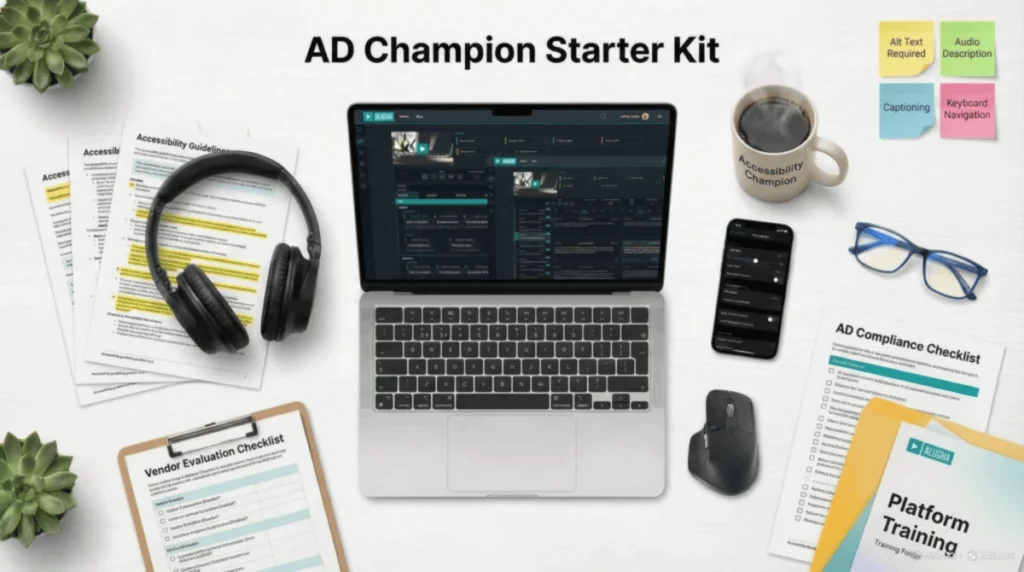
Around that champion, you want a basic level of awareness in key teams. Content producers, editors, and marketers should understand how their creative choices affect audio description: for example, how very fast dialogue, dense on‑screen text, or heavy visual montages can limit room for description. A short training session of around two hours that walks through examples, pitfalls, and simple dos and don’ts is often sufficient to raise this awareness.
On the more operational side, it usually helps to define a few concrete capabilities:
- Procurement and vendor management
Someone who knows how to evaluate audio description providers. They should be comfortable with a simple checklist of questions about user involvement, samples, revision policies, and style guidelines. This prevents decision‑making based purely on price. - Platform administration
At least one person in your technical or platform team who understands how to upload, label, and manage multi‑track audio in your video system. A focused one‑day training on your platform’s audio features is often enough to give them confidence. - Basic accessibility literacy across teams
Key stakeholders in legal, HR or L&D, and communications should understand what audio description is, who it serves, and how it fits into your broader accessibility commitments. This makes it easier to coordinate budgets and timelines.
One point is worth stating very clearly: avoid do‑it‑yourself scripting without proper training. Unless someone on your team has real experience in audio description, do not ask them to write full AD scripts as a side task. Quality drops sharply, and fixing weak or inappropriate scripts later usually costs more than commissioning professionals from the start.
7.2 Working with Providers: What to Look For
Even with internal capacity, most organizations will outsource the creative part of audio description to specialized studios or freelancers. Choosing the right partners is crucial if you want consistent quality.
When you speak to potential providers, go beyond basic questions like price and turnaround time. Ask things such as:
- How do you involve blind and low‑vision users in your process?
- Can you provide samples in our main genres, for example training, corporate communication, education, or marketing?
- What is your revision policy if we or our users identify issues after delivery?
- Do you follow established style guidelines, and if so, which ones?
- How do you train your describers in ethical and inclusive representation?
Good providers will welcome these questions and have concrete, specific answers. They may, for example, explain how they run user testing, refer to particular guidelines they follow, or show you several relevant samples. Vague or defensive responses are a warning sign that they may not yet operate at the level of professionalism you need.
7.3 Internal Guidelines: Your One‑Page AD Policy
To keep audio description from becoming a series of last‑minute, ad‑hoc decisions, it helps to create a short internal policy that everyone involved can refer to. One or two pages is often enough.
This policy should answer a few straightforward but important questions:
Scope
- Which categories of video require audio description?
- Does this include all public‑facing videos, only those above a certain length, or specific content types such as training, onboarding, or flagship campaigns?
Responsibility
- Who is responsible for commissioning AD: a central team, individual departments, or a mix of both?
- Who signs off on quality before publication and who gathers user feedback?
Budget and process
- How is audio description budgeted and approved?
- At what point in the production timeline should AD be ordered so that it is ready well before launch?
Quality review and follow‑up
- How are delivered AD tracks reviewed internally, and when are users involved in testing?
- What is the process for requesting corrections or improvements from providers?
You can also include a short checklist, for example:
- Has this video been checked against the scope rules for AD?
- Has the provider been briefed using our standard template?
- Have we assigned someone to review the delivered track before go‑live?
With these elements in place, your organization has a shared understanding of when and how to do audio description. You create lightweight internal competence, based on one clear champion plus some targeted training, while relying on proven professionals for the creative work. Clear internal guidelines tie it all together and help you avoid confusion, last‑minute panic, and inconsistent user experiences across your video catalog.
8. Building the Business Case and Overcoming Barriers
To get audio description taken seriously inside an organization, you need more than good intentions. You need a clear business case that speaks to different stakeholders, and you need a practical way to respond when the usual objections appear. Rather than treating concerns about cost, complexity, or legal pressure as show‑stoppers, you can turn them into starting points for a concrete implementation plan. Sections 6 and 5 already covered the cost drivers and technical foundations. In this section, we focus on how to turn those facts into a story that resonates with your stakeholders and helps you overcome internal barriers.
8.1 Framing Audio Description Inside Your Organization
If you present audio description as “extra accessibility spend,” it will always compete with other priorities. If you present it as part of modernizing your video infrastructure and reducing long‑term risk, the conversation changes.
Think and talk in terms of:
- Efficiency: fewer files, simpler updates, and less rework
- Compliance readiness: being able to document what is accessible, where, and since when
- Audience growth: reaching users who previously could not fully use your content
For CFOs and budget owners
You can position audio description and multi‑track video as a structural efficiency gain:
- “Right now, we maintain separate files for each language and each described version. By moving to a multi‑track system, we can consolidate from hundreds of video files down to a much smaller master catalog, cutting storage, encoding, and management overhead.”
- “Every time we update a logo, intro, or disclaimer, we currently have to touch multiple video versions. With one master video and separate audio tracks, we update once and keep all language and AD variants in sync. That means less rework and fewer errors.”
- “At the same time, we are opening our content to more users: employees, customers, and partners who previously could not fully use our videos, without producing extra video assets.”
In other words, this is an infrastructure optimization that also happens to deliver accessibility.
For compliance, legal, and risk teams
Here the focus is on documented control and future‑proofing:
- “European accessibility legislation and WCAG 2.2 are setting the bar for public sector and, increasingly, private sector services. We need to be able to show which of our videos offer audio description and in which languages.”
- “A platform that manages audio description as labeled tracks gives us a clear inventory. We can demonstrate coverage by content type, by market, and over time. That is invaluable when responding to audits, tenders, or complaints.”
- “By moving to a multi‑track, standards‑aligned setup, we are not scrambling to retrofit compliance later. We are building an architecture that can absorb new requirements without a full rebuild.”
So the message is: audio description plus multi‑track video is a risk‑reduction and compliance‑readiness measure, not just an isolated accessibility feature.
For HR and Learning & Development leaders
For HR and L&D, audio description supports inclusion, learning effectiveness, and flexibility:
- “Audio description lets us serve employees with visual impairments with the same training videos everyone else uses, instead of separate, parallel materials.”
- “Because AD turns visuals into spoken explanations, it also helps mobile learners who listen to training while commuting, as well as colleagues who are not fluent in the primary language and need extra verbal context.”
- “All of this runs from the same core video asset. One video, multiple audio tracks for different needs. That means we can keep our content consistent globally while still respecting different accessibility and language requirements.”
Framed this way, audio description and multi‑track infrastructure become part of how you scale high‑quality learning and communication across a diverse, distributed workforce, rather than an edge case for a small group.
8.2 Typical Barriers (And How To Answer Them)
Even with a strong business case, you will hear objections. The good news is that each barrier has a corresponding opportunity.
Barrier 1: “We do not have budget.”
Instead of trying to cover everything at once, start small and strategic:
- Focus on your 10 most‑viewed or most critical videos.
- Commission audio description for those first.
- Remember that each AD track serves multiple inclusion needs at once: accessibility, language learning, and audio‑only use.
When you look at real usage, cost per user served drops dramatically compared to looking only at minutes of content produced.
Barrier 2: “Our IT says it is too complex.”
Much of this concern comes from past experiences with one‑file‑per‑version chaos. Multi‑track platforms are designed to remove that complexity, not add to it:
- They let you attach multiple audio tracks to one master video.
- They standardize how tracks are labeled and selected in the player.
If IT resists, frame the move to multi‑track as a way to reduce future support tickets and maintenance work that stem from inaccessible or confusing content setups.
Barrier 3: “We do not know where to start.”
Here, the answer is process, not theory. Use the 90‑day roadmap you defined:
- Pilot audio description on a small set of videos.
- Learn from user feedback and internal experience.
- Then scale with a clearer picture of what works for your organization.
A modest, time‑boxed pilot is often more convincing than months of abstract discussion.
Barrier 4: “Legal has not required it yet.”
In Europe, the direction of travel is clear. As described in Section 2.2, instruments such as the EU Web Accessibility Directive and the European Accessibility Act are steadily raising expectations for accessible digital content, including video. National regulators and equality bodies are also paying more attention to how services, information, and training are provided.
Getting ahead of this curve:
- Shows due diligence and seriousness about inclusion.
- Spreads cost and effort over time instead of forcing emergency retrofits.
- Positions your organization as a leader rather than a reluctant follower.
Combining a clear business case with practical barrier responses makes audio description manageable: finance optimizes infrastructure, legal prepares for audits, HR serves diverse audiences with core content, and everyone benefits from starting small with multi-track tools and scaling based on evidence. The biggest mistake is waiting for perfect conditions—instead, build your pipeline with a strategic video set and let results drive next steps. The question isn’t whether AD makes sense, but how to implement it, which Section 9’s 90-day plan answers.
9. Conclusion & Getting Started
Audio description is no longer emerging, it is expected. For government agencies, it is increasingly a compliance requirement. For enterprises, it is a competitive advantage in talent development and brand reputation. For both, it is achievable at scale with modern technology.
Your path forward is clear:
- Choose infrastructure first: multi-track platform makes everything else easier
- Start with priority content: high-impact videos prove value quickly
- Partner with professionals: quality AD requires trained describers
- Involve users: blind and low-vision feedback ensures real accessibility
- Scale systematically: build AD into standard workflows
The organizations that thrive will be those treating accessibility not as a burden, but as core infrastructure for modern communication.
9.1 Your 90-Day Implementation Plan
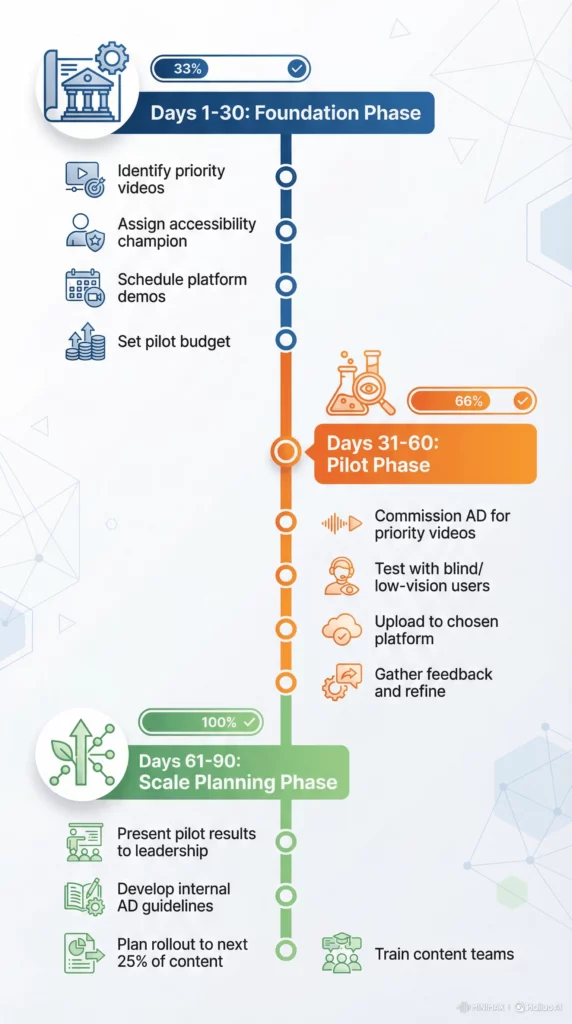
Once you have decided that audio description should be part of your video strategy, the next question is usually “What do we actually do first?” Long discussions about long‑term roadmaps can easily stall progress. A focused, 90‑day plan gives you something concrete to execute, prove value with, and then refine.
The goal of this plan is not to transform your entire catalog in three months. Instead, it is to build a working end‑to‑end pipeline on a small but meaningful slice of your content, so that you have real experience, real user feedback, and real numbers to take back to leadership.
Days 1–30: Foundation
- Identify 3–5 priority videos (highest viewership or compliance risk)
- Assign an accessibility champion (25% of one person’s time)
- Schedule platform demos with multi-track providers
- Set budget for pilot project (about €2,000–5,000)
Days 31–60: Pilot
- Commission AD for priority videos from a professional studio
- Test with 3–5 blind/low-vision users from your network or a local advocacy group
- Upload to the chosen platform and test cross-device playback
- Gather feedback and refine your brief for future projects
Days 61–90: Scale Planning
- Present pilot results to leadership (include user feedback if possible)
- Develop internal AD guidelines (1–2 pages)
- Plan rollout to the next 25% of your video content library
- Train content teams on AD-aware production (for example, leaving space in dialogue)
By the end of Day 90, you do not just have “some AD.” You have a tested workflow, a basic policy, and an informed plan for extending coverage.
9.2 From Pilot to Scalable Strategy
A 90‑day plan like this is valuable because it turns vague intentions into concrete capabilities. You move from “We should probably think about audio description” to “We know exactly how to commission, integrate, and review it on our platform.” You also gain internal allies: the accessibility champion, the content teams who have seen the benefits, the IT staff who now understand the multi‑track model, and the users who can speak to their experience.
From here, scaling becomes a question of priority and pacing, not of whether it is possible. You can extend coverage by content type, by business unit, or by region, always using the same basic pipeline you established in the first three months. Combined with a robust, multi‑track video platform, this kind of incremental, evidence‑based rollout is what turns audio description from a series of isolated projects into a stable, long‑term part of your video strategy.
9.3 Your Next Step: Start the Conversation
Visit alugha’s Audio Description page to:
- See a platform demo
- Schedule a consultation with accessibility specialists